The Base <> Amazon SellerFlex integration is designed to let sellers fulfill Amazon orders directly from their own warehouses while still using Amazon’s logistics network, delivery scheduling, and Prime-eligible customer experience.
SellerFlex is fundamentally different from traditional FBA. Instead of shipping inventory into Amazon fulfillment centers, sellers keep stock in their own facilities. Amazon then coordinates pickups, delivery windows, and last-mile fulfillment for eligible orders. Base acts as the operational control layer, pulling orders from Amazon, managing inventory, generating labels, and synchronizing shipment and status updates back to Amazon.
This guide explains how the Base and Amazon SellerFlex integration works, how to configure it, and how to use it effectively for daily operations. This documentation targets operations teams, supply chain managers, and system administrators who need a clear, end-to-end understanding of how Base handles SellerFlex fulfillment.
At a high level, the integration enables you to:
- Pull pending Amazon SellerFlex orders into Base
- Push inventory updates from Base to Amazon across multiple locations
- Generate shipping labels with SKU-level clarity
- Track shipments, manifests, and tracking numbers in real time
- Sync cancellations and returns with AWB data
- Customize fulfillment workflows based on your business rules
Base connects to Amazon using Amazon’s External Fulfillment / SmartConnect APIs, which support SellerFlex, Easy Ship, and other merchant-fulfilled programs under a single interface. This allows Base to manage multiple fulfillment types consistently without fragmented logic.
What SellerFlex Means in Practice
SellerFlex is a Prime-eligible fulfillment program offered by Amazon. It is especially useful for:
- Heavy or bulky items
- High-value SKUs that sellers prefer to keep in-house
- Sellers with strong warehouse capabilities who want more control
- Orders with strict SLA or scheduled delivery windows
Under SellerFlex:
- Inventory stays in your warehouse
- Amazon schedules pickups and deliveries
- Amazon controls the customer-facing delivery experience
- Sellers remain responsible for accurate inventory, packing, and readiness
Base is the system that ties all of this together operationally.
Step-by-Step Integration: Base <> Amazon SellerFlex
This section explains how the Base and Amazon SellerFlex integration works from initial setup through day-to-day fulfillment operations. It walks through each stage in sequence, showing how orders, inventory, shipping, and returns move between Base and Amazon. The goal is to give sellers a clear, practical understanding of how to run SellerFlex fulfillment smoothly from their own warehouses using Base.
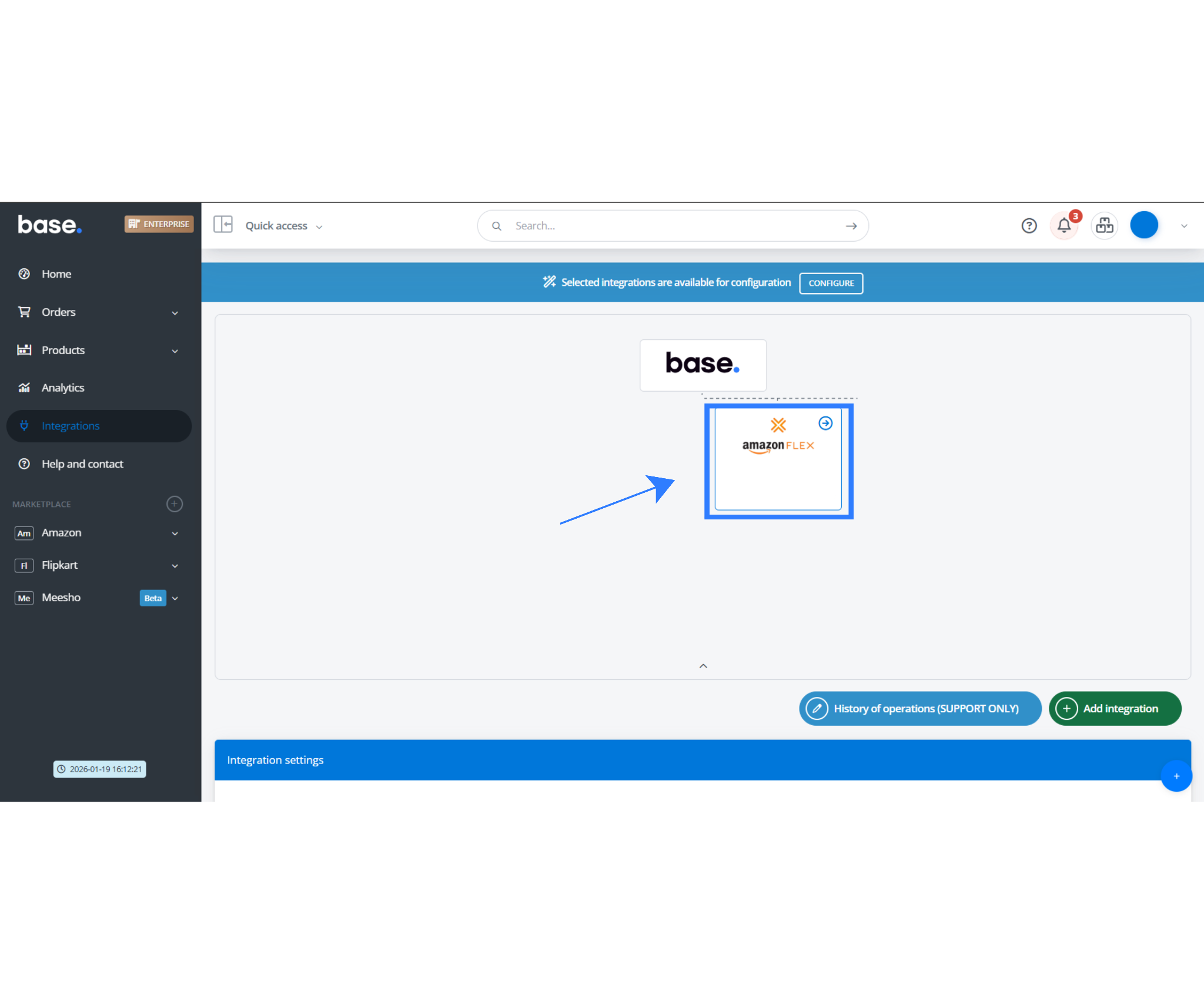
Step 1: Initiate the Base <> Amazon SellerFlex integration
- A user with the required permissions logs into Base.
- Select Amazon as the sales channel using Smart Connect APIs, and configure Amazon SellerFlex separately as the fulfillment/courier integration.
- Base prepares the connection by identifying the required Amazon scopes for:
- Order retrieval
- Inventory updates
- Shipment and tracking data
- Returns and cancellations
- At this stage, no credentials are stored or entered manually.
Outcome: Base is ready to authenticate securely with Amazon using an authorization-based flow.
Step 2: Authenticate using Amazon’s OAuth-style authorization flow
- Base redirects the user to Amazon’s secure authorization page.
- The user signs in using their Amazon Seller Central credentials.
- Amazon displays a consent screen listing the permissions Base is requesting.
- The user reviews and approves access.
- Amazon generates an authorization token and redirects the user back to Base.
- Base securely stores the token and establishes the connection.
Key benefit:
- No manual credential handling
- No password storage inside Base
- Secure, revocable access controlled by Amazon
Outcome: The Base <> Amazon SellerFlex connection is live and authenticated.
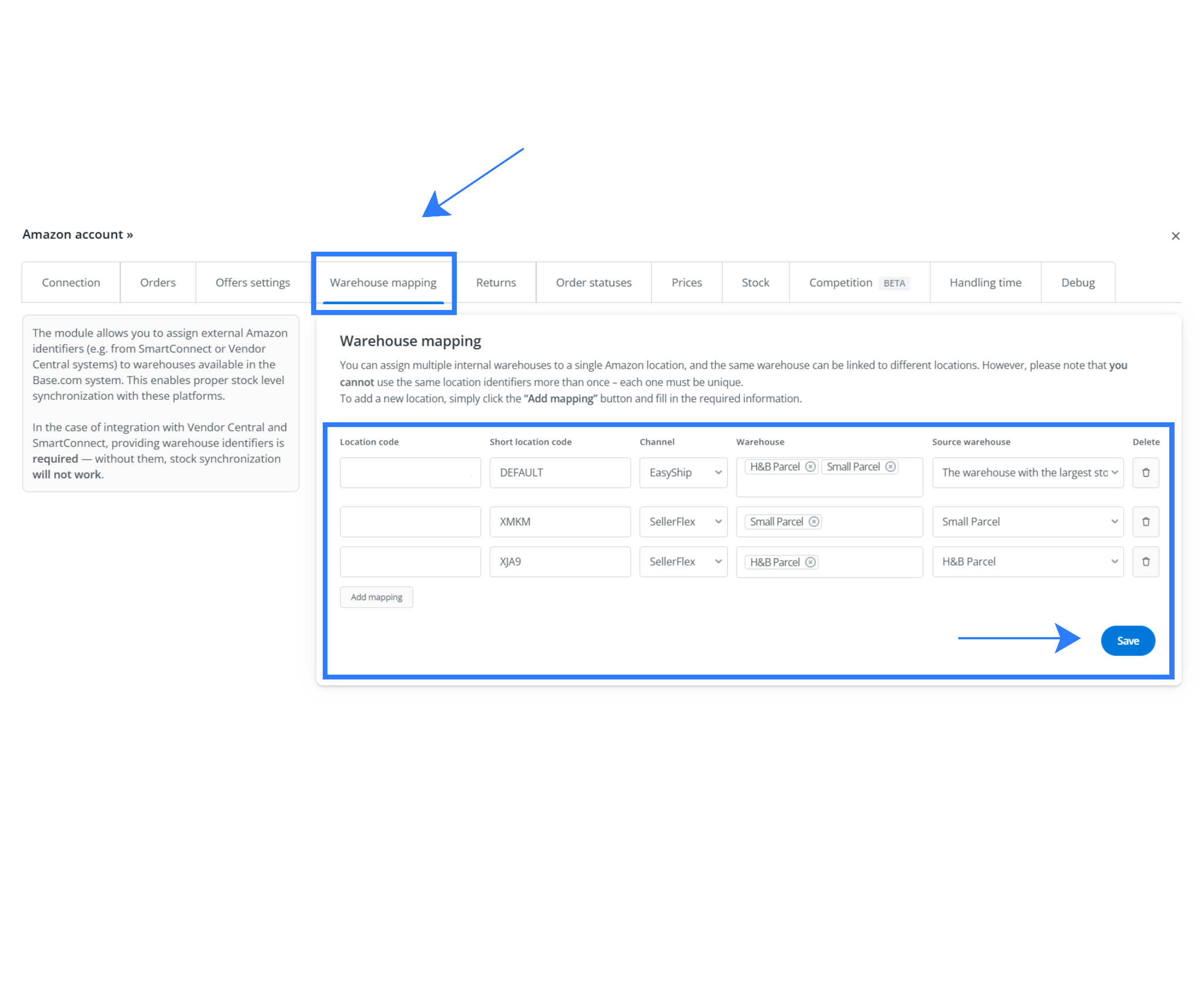
Step 3: Configure warehouse mapping using Amazon Location IDs
- Inside Base, the user configures one or more Amazon Location IDs.
- Each Location ID represents a specific:
- Warehouse
- Fulfillment node
- SellerFlex-enabled site
- Location IDs are mapped to corresponding Base warehouses.
This configuration enables:
- Location-specific inventory updates
- Accurate order routing based on Amazon assignment
- Multi-warehouse fulfillment under a single integration
If the seller operates multiple fulfillment programs, the same integration can also support inventory and order flows for:
- SellerFlex
- Easy Ship
- Other External Fulfillment (SmartConnect) supported programs
Outcome: Base understands where inventory lives and how orders should be routed across warehouses.
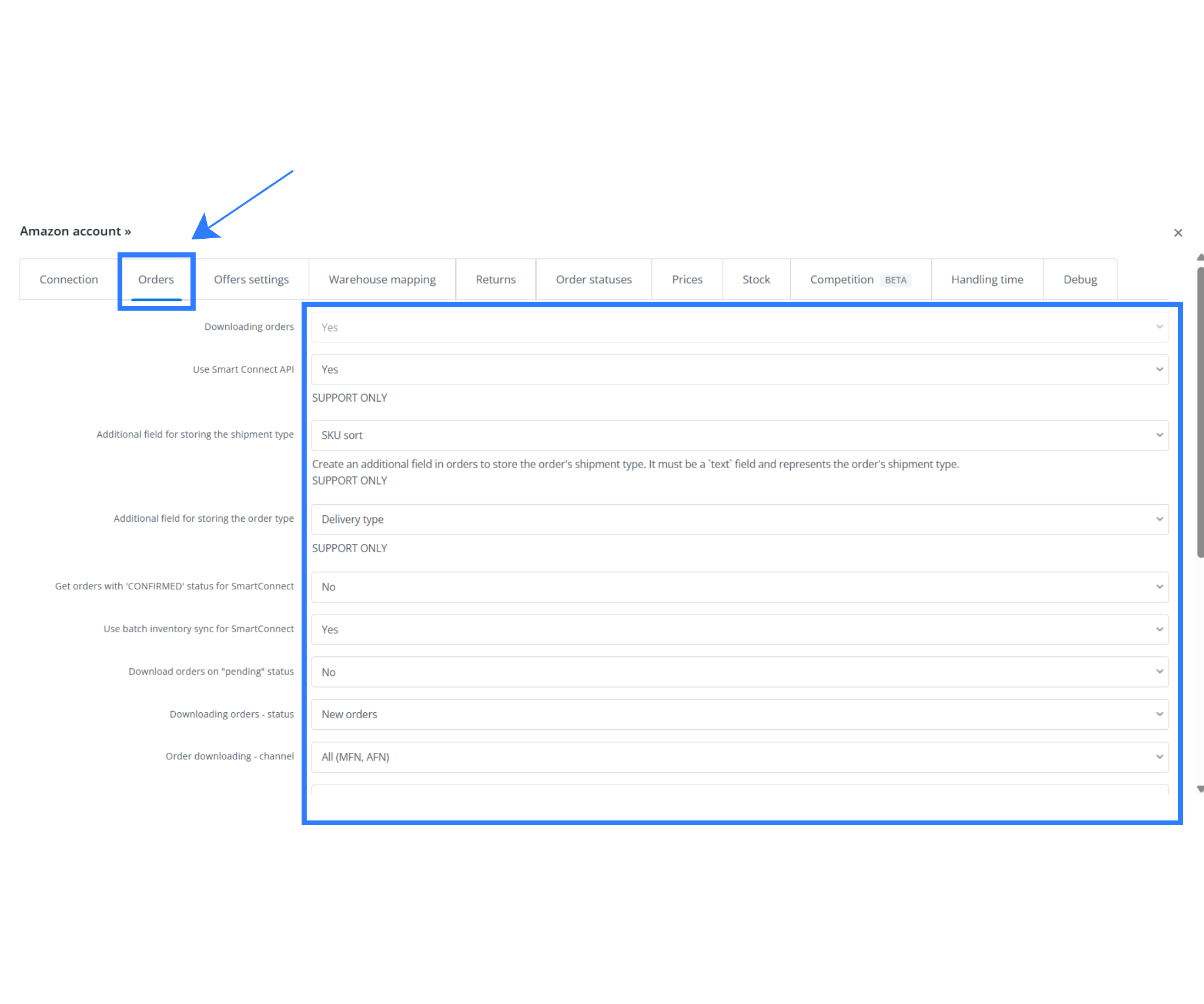
Step 4: Start scheduled order synchronization from Amazon
- Once configuration is complete, Base begins pulling orders from Amazon automatically.
- Order sync runs on a defined schedule, configurable based on operational needs.
- Base imports two categories of orders:
- Unconfirmed orders (new or pending)
- Base can also pull orders ahead of time, including future-dated deliveries.
Why this matters: You see the entire operational workload inside Base, not just newly created orders.
Outcome: Base becomes the system of record for SellerFlex order processing.
Step 5: Handle OMS migration safely (critical during cutover)
This step is especially important when moving from a legacy OMS to Base.
- During migration, sellers often already have:
- Confirmed SellerFlex orders
- Future CPT (Customer Promise Time) commitments
- If inventory is zeroed in the old OMS before these orders are imported, it can cause:
- Stock mismatches
- Overselling
- Missed Amazon fulfillment commitments
- Base avoids this by:
- Importing future confirmed CPT orders early
- Doing so before inventory is fully transitioned
- Inventory and orders stay aligned throughout the migration window.
Outcome:
- No lost orders
- No broken commitments
- Smooth operational transition
Step 6: Apply configurable order handling rules in Base
Once orders are available in Base, sellers define how they should be processed.
Grouping logic
Sellers can configure rules such as:
- Handling multi-item orders differently from single-item orders
- Grouping or batching based on SKU, warehouse, or fulfillment needs
- Applying different workflows depending on order complexity
Confirmation logic
Sellers can choose when an order should be marked as “confirmed” in Base:
- Immediately on import
- After picking is completed
- After packing is completed
These rules allow Base to adapt to real warehouse processes instead of enforcing a fixed model.
Outcome: Base reflects your operational logic, not the other way around.
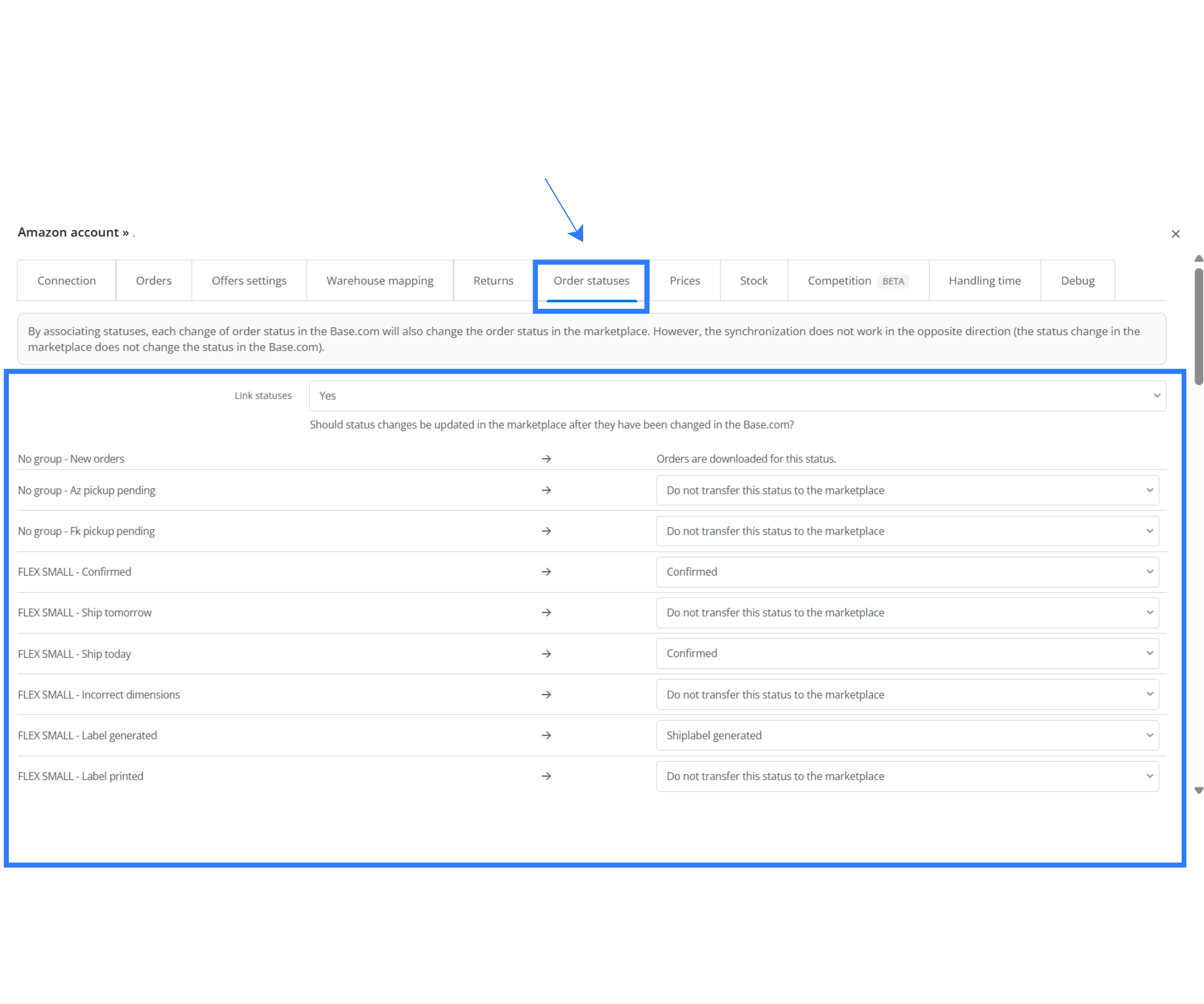
Step 7: Sync order and shipment status updates back to Amazon
As warehouse operations progress, Base keeps Amazon updated in near real time.
Base synchronizes key fulfillment milestones, including:
- Order confirmation status
- Once shipment is created on Amazon, then only order is pushed to Base. Base doesn’t require any separate status sync here.
- Ship-label generation status (always applicable after the label has been fetched in Base)
This ensures:
- Amazon has accurate fulfillment visibility
- Pickup scheduling and delivery planning remain aligned
- There are no status mismatches between systems
Outcome: Amazon and Base stay fully in sync throughout fulfillment.
Step 8: Generate shipping labels with SKU-level clarity
When shipment labels are generated inside Base:
- Base automatically prints SKU information directly on the shipping label.
- Packers can visually validate items without:
- Switching screens
- Referring to separate pick lists
- This is especially useful when:
- Multiple fulfillment modes exist
- The same SKU appears in different workflows
This reduces:
- Wrong item shipments
- Packing delays
- Errors in high-volume or multi-SKU environments
Outcome: Faster packing and higher accuracy on the warehouse floor.
Step 9: Keep inventory synchronized across warehouses and programs
Inventory synchronization is designed for scale and flexibility.
- Base pushes inventory updates to Amazon using:
- External Fulfillment APIs
- SmartConnect batch inventory endpoints
- Inventory updates can be sent:
- In batches
- Per Amazon Location ID
- Across multiple fulfillment programs (SellerFlex, Easy Ship, etc.)
This ensures Amazon always has the latest available stock per warehouse.
Outcome:
- Reduced overselling
- Fewer stock-related SLA failures
- Accurate availability across all sites
Step 10: Track pickup, shipping, and manifest data in real time
Once Amazon logistics takes over delivery execution:
- Base pulls logistics data from Amazon APIs, including:
- Shipping numbers
- Manifest details
- Tracking links
- Shipment visibility is updated in Base automatically.
- Base can push shipment details downstream to:
- Marketplaces
- Storefronts
- Customer notification systems
Outcome: Customers receive timely updates without manual intervention.
Step 11: Process returns with AWB visibility
When Amazon initiates a return:
- Base pulls return updates from Amazon automatically.
- Return AWB (Air Waybill) details are captured inside Base.
- This supports:
- Structured returns processing
- Inventory inspection and restocking workflows
- Accurate returns reporting
Outcome: Returns are fully visible and manageable inside Base.
Step 12: Sync cancellations and keep workflows clean
When an order is cancelled on Amazon:
- Base receives the cancellation update.
- The order status is updated immediately in Base.
- Downstream effects are handled correctly:
- Warehouse teams stop processing cancelled orders
- Inventory is released back into available stock
- Reports remain accurate
Outcome: No wasted effort, no inventory leakage, and clean operational data.
Key Business Capabilities of the Base <> Amazon SellerFlex Integration
The Base <> Amazon SellerFlex integration enables sellers to run advanced, high-volume Amazon fulfillment operations from a single system while retaining control over inventory, warehouses, and workflows. Unlike traditional Fulfilled by Amazon (FBA), SellerFlex allows sellers to keep inventory in their own facilities while still leveraging Amazon’s pickup, transportation, and Prime-eligible delivery network.
At the foundation of this integration is Amazon’s SmartConnect (External Fulfillment / EF-API), which provides a unified interface for handling orders, inventory, shipments, returns, and cancellations across multiple fulfillment programs. This allows Base to apply consistent logic across SellerFlex, Easy Ship, FBM, and related fulfillment modes, reducing complexity while enabling sellers to operate flexible, scalable fulfillment strategies.
1. Multi-Location and Multiple Fulfillment Types
The integration allows sellers to configure multiple Amazon location IDs under a single Base connection. Each location ID typically represents a warehouse or fulfillment site, enabling sellers to operate geographically distributed fulfillment networks without managing separate integrations. Orders and inventory are routed and updated at the location level, which reduces operational fragmentation and improves fulfillment accuracy.
Beyond SellerFlex, Base also supports parallel management of other fulfillment types. Sellers can manage FBM and SellerFlex inventory directly from their warehouses, while also syncing FBA stock counts reported by Amazon into Base. This provides a consolidated inventory view across merchant-owned warehouses and Amazon fulfillment centers. Sellers can also see dispatched and upcoming FBA orders for better planning. Additionally, the same integration handles self-ship orders, allowing sellers to choose their preferred courier partners without maintaining separate systems.
2. Order Synchronization with SLA Prioritization
Base continuously fetches orders from Amazon across all linked fulfillment programs, ensuring no order type is siloed. After ingesting the orders, Base evaluates SLA requirements such as expedited shipping, Prime commitments, and scheduled delivery windows, then prioritizes and routes each order through the fulfillment pipeline accordingly.
SLA-aware routing plays a critical role in SellerFlex operations, where tightly defined pickup schedules and delivery promises must be met. By processing high-priority orders first, sellers can consistently meet customer expectations, avoid missed pickups, and maintain strong performance metrics on Amazon.
3. Migration Support and Confirmed Order Handling
When sellers migrate from an existing OMS to Base, one of the biggest risks is losing visibility into already confirmed Amazon orders. SellerFlex often includes future-dated shipments and CPT (Customer Promise Time) commitments that sellers must honor even after migration.
Base addresses this by pulling both unconfirmed and confirmed orders from Amazon, including future CPT orders. The system imports these orders before it fully zeroes out inventory in legacy systems, ensuring inventory and order continuity throughout the transition. This migration-safe approach prevents stock gaps, overselling, and missed fulfillment commitments during system cutover.
4. Inventory Synchronization and Warehouse-Level Visibility
Inventory synchronization between Base and Amazon is fully bi-directional. Base pushes inventory updates to Amazon for each configured location ID, ensuring Amazon always has accurate, real-time stock availability for SellerFlex and related fulfillment programs.
This enables sellers to reconcile inventory held at Amazon fulfillment centers with stock in their own warehouses. With this granular visibility, sellers can make informed allocation decisions, balance inventory across channels, and significantly reduce the risk of overselling.
5. Labeling and Packing Logic for Operational Efficiency
When Base generates shipment documentation, it prints SKU details directly on the shipping labels. This small but critical feature improves packing speed and accuracy, especially in environments where multiple fulfillment types operate side by side or where the same SKU exists across FBM, FBA, and SellerFlex flows.
Integrated SLA and fulfillment-program logic automatically applies the correct label format and shipping method based on the order’s requirements. This reduces manual checks, minimizes packing errors, and helps warehouse teams process orders faster and more reliably.
6. Returns and Cancellation Management
Base synchronizes return and cancellation information directly from Amazon to ensure fulfillment workflows remain accurate and up to date. Base pulls return data along with AWB details, allowing sellers to process returns natively within the system and align them with inspection, restocking, and reporting workflows.
It automatically reflects cancellations initiated on Amazon, ensuring teams do not pick or pack cancelled orders, inventory is released correctly, and downstream reporting remains clean and consistent.
7. Seller-Defined Workflow Flexibility
A core strength of the Base <> Amazon SellerFlex integration is its flexibility. Sellers can define custom workflow rules that align with their operational model rather than conforming to a rigid system design. The system groups multi-item orders differently from single-item orders, controls when it marks orders as confirmed, and applies different SLA logic based on product type or customer promise.
Sellers can also define different internal statuses for different fulfillment modes, allowing SellerFlex, FBM, and FBA orders to move through distinct operational paths. This flexibility ensures that Base supports a wide range of fulfillment strategies while maintaining consistency and control across Amazon’s ecosystem.
Conclusion
The Base <> Amazon SellerFlex integration gives sellers a powerful way to run Amazon fulfillment directly from their own warehouses without sacrificing speed, visibility, or customer experience. By combining Base’s operational control with Amazon’s logistics network, sellers can handle complex fulfillment scenarios, scale across locations, and maintain Prime-level service while retaining full ownership of inventory and workflows. The integration reduces risk, improves efficiency, and supports long-term growth by ensuring migration safety and real-time sync across orders, inventory, shipping, returns, and cancellations.
Click here to integrate Amazon MCF with Base.com.
Frequently Asked Questions (FAQs)
1. How is SellerFlex different from FBA, and why should I use Base with SellerFlex?
SellerFlex lets you store inventory in your own warehouse while Amazon handles pickup and delivery. Unlike FBA, you retain physical control of stock. Base acts as the central OMS, managing orders, inventory, labels, and status sync, making SellerFlex operationally manageable at scale.
2. Can I use the same Base integration for SellerFlex, FBA, and FBM?
Yes. Base supports multiple fulfillment types under the same Amazon integration. You can manage SellerFlex and FBM inventory from your warehouses while also syncing FBA stock counts and order visibility, giving you a consolidated, channel-agnostic view of inventory and fulfillment operations.
3. How does Base help during an OMS migration?
Base pulls both unconfirmed and confirmed Amazon orders, including future CPT commitments. This allows sellers to import all active and future SellerFlex orders before zeroing inventory in the legacy OMS, preventing stock mismatches, overselling, and missed Amazon fulfillment commitments during migration.
4. How does inventory synchronization work across multiple warehouses?
Base pushes inventory updates to Amazon per Amazon Location ID using External Fulfillment / SmartConnect APIs. The system batches and sends updates across multiple warehouses and fulfillment programs, ensuring Amazon always has accurate, location-specific stock availability and reducing the risk of overselling.
5. How are returns and cancellations handled in Base?
Returns and cancellations from Amazon are automatically synced into Base. Return data includes AWB details for processing and reporting, while cancellations update order statuses immediately. This ensures warehouse teams stop unnecessary work, release inventory correctly, and maintain accurate operational and financial reports.