Integrating DTDC with Base enables D2C brands, online sellers, and marketplace merchants to manage their entire shipping workflow from a single dashboard. Once the integration is complete, sellers can generate DTDC shipping labels instantly, automate order dispatch, schedule courier pickups, sync tracking details with marketplaces, and significantly reduce manual fulfillment effort.
This guide explains the DTDC Courier Integration with Base in detail. It covers the complete setup process, configuration requirements, testing steps, recommended default settings, advanced automation options, and best practices for scaling shipping operations across India.
Why Integrate DTDC with Base?
DTDC is one of India’s most established courier partners, known for its extensive domestic network, regional delivery expertise, and dependable transit timelines. However, managing DTDC shipments separately from order management systems often leads to inefficiencies, delays, and errors.
When sellers integrate DTDC with Base, they gain a unified fulfillment workflow that connects orders, shipping, and tracking in one place.
- Automating shipping workflows from order creation to final delivery
Once an order is created in Base, the shipping process can move forward without repetitive manual steps. Shipments are created directly from orders, labels are generated automatically, and dispatch updates flow seamlessly through the system. - Generating DTDC shipping labels instantly from the Base dashboard
Sellers no longer need to log in to DTDC’s portal to create labels. All required shipment information is pulled directly from the order, reducing data entry errors and saving time during daily dispatch. - Synchronizing tracking updates with marketplaces such as Amazon and Flipkart
Tracking numbers and delivery statuses are automatically pushed to connected marketplaces. This helps sellers remain compliant with marketplace SLAs and avoids penalties for delayed updates. - Managing multiple warehouses and pickup locations from one system
Base allows sellers to configure more than one DTDC sender profile, making it easy to ship orders from different cities or fulfillment centers without maintaining separate courier accounts. - Reducing fulfillment errors and operational delays at scale
By eliminating manual handoffs between systems, the integration minimizes mistakes related to addresses, weights, and courier selection, which becomes increasingly important as order volumes grow.
This integration is especially valuable for Indian sellers processing high daily order volumes across D2C websites and marketplaces.
Prerequisites Before You Start
Before setting up the DTDC Courier Integration with Base, it is important to ensure that all required information and access permissions are in place.
- An active DTDC business account approved for API usage: DTDC provides API credentials only to business accounts that are authorized for system integrations. Sellers should confirm API access with their DTDC account manager before beginning setup.
- DTDC API credentials including API Key, Client Number, and Client Secret or Token: These credentials are required to authenticate your DTDC account inside Base and enable secure communication for shipment creation and tracking updates.
- A registered pickup address that is already approved by DTDC: The pickup address entered in Base must match the address registered with DTDC. Any mismatch may result in pickup failures or shipment delays.
- Admin-level access to the Base dashboard: Only users with appropriate permissions can add or modify courier integrations. This ensures shipping configurations remain controlled and secure.
If API access is not yet enabled, sellers should contact their DTDC account manager to activate it before proceeding.
Step 1: Open the Integrations Panel in Base
Begin by logging in to your Base account using your admin credentials. Once logged in, navigate to the Integrations section from the main dashboard menu. This section serves as the central hub for managing all courier, marketplace, and platform connections.
Click on Add Integration to open the integrations marketplace, where all supported integrations are listed and managed.
Step 2: Search and Select DTDC
Inside the Integrations marketplace, use the search bar to locate DTDC.
- Type DTDC into the search field
- Select the official DTDC Courier integration from the results
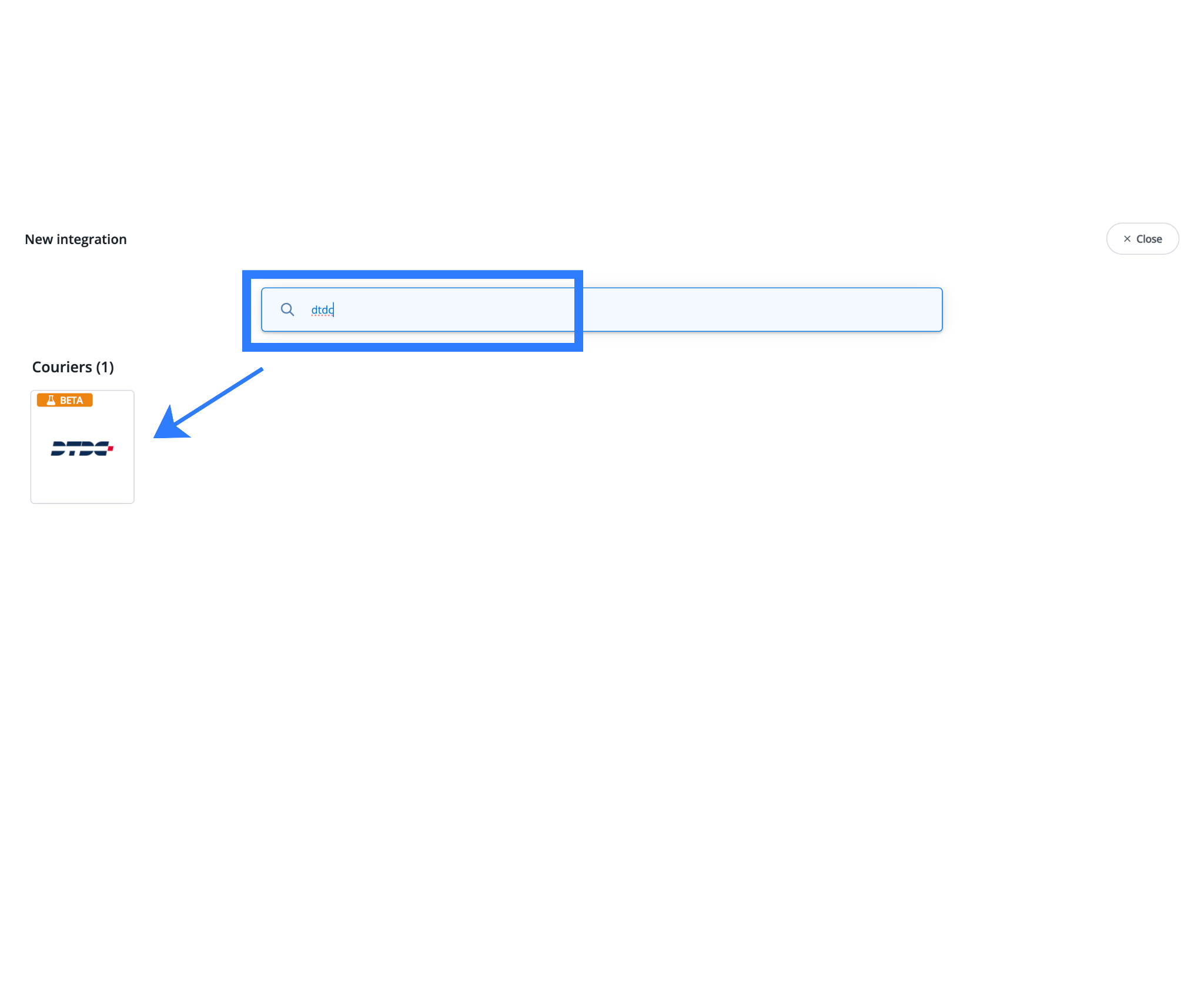
Selecting the official integration ensures that Base connects directly with DTDC’s supported API, allowing full access to shipping, label generation, pickup scheduling, and tracking features.
Step 3: Enter DTDC Account Credentials
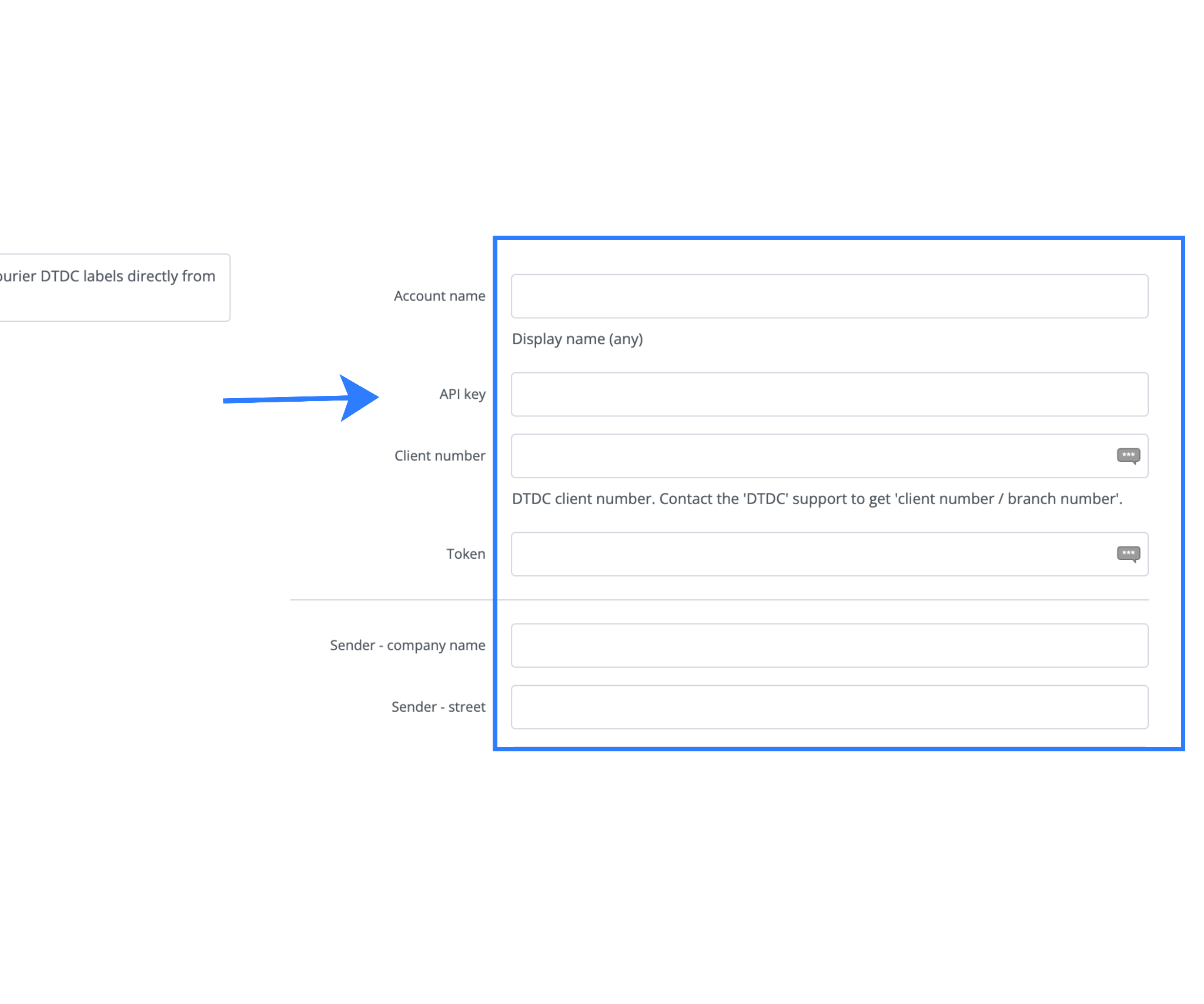
After selecting DTDC, the integration setup form will open. Each field must be filled carefully to ensure successful authentication.
- Account Name (Internal Reference): This name is used only within Base to identify the integration. It is particularly helpful if you operate multiple warehouses or plan to add additional DTDC integrations later, such as naming it after a city or fulfillment center.
- Display Name (Visible in Base): This label appears when selecting a courier during order dispatch. It does not affect shipping operations or billing but helps teams quickly identify the correct courier option.
- API Key: A unique authentication key provided by DTDC that allows Base to securely access DTDC’s systems.
- Client Number: The official DTDC-issued client ID associated with your courier account.
- Client Secret or Token: A secure token used to authenticate and authorize API requests between Base and DTDC.
- Registered Email Address: This must exactly match the email address registered with your DTDC account, as it is used during the verification process.
Step 4: Configure Sender and Shipment Defaults
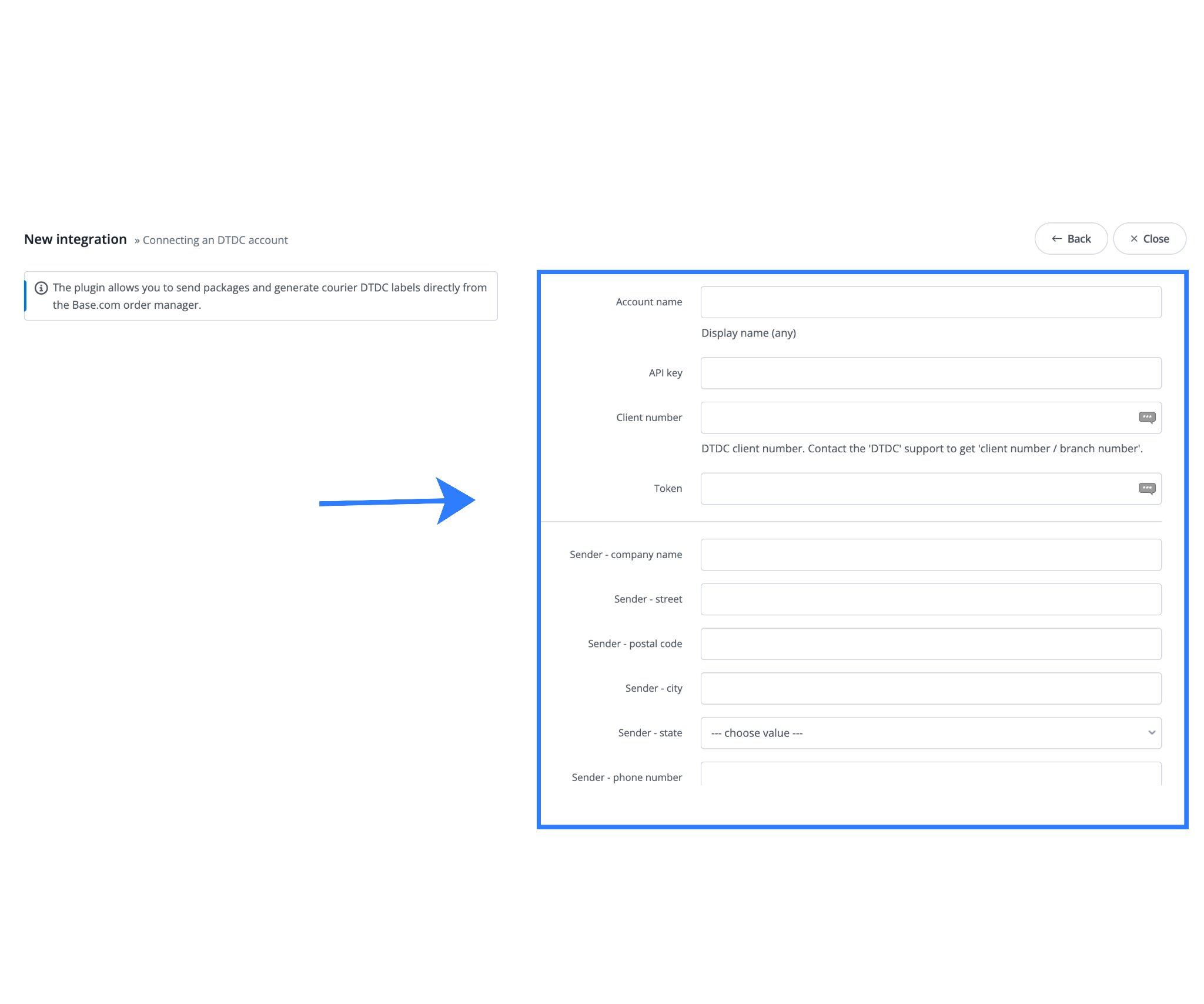
These settings define how shipments are created, labeled, and dispatched.
Sender Details Configuration
- Sender Company Name
Enter the legal or brand name that should appear on DTDC shipping labels. - Sender Address and Location Details
The complete pickup address, including street address, pincode, city, state, and country, must match DTDC records exactly to avoid pickup issues. - Sender Phone Number
This contact number is used by DTDC pickup staff to coordinate collections if required.
GST and Compliance Information
- Seller GST TIN
Required for tax-compliant invoicing and interstate shipping within India. This ensures smoother movement of goods and compliance with regulations.
Package Defaults
- Default Package Weight
An optional fallback value used when individual product weights are missing in the catalog. - Parcel Dimensions
Standard box dimensions that speed up shipment creation and reduce repetitive data entry during bulk dispatch.
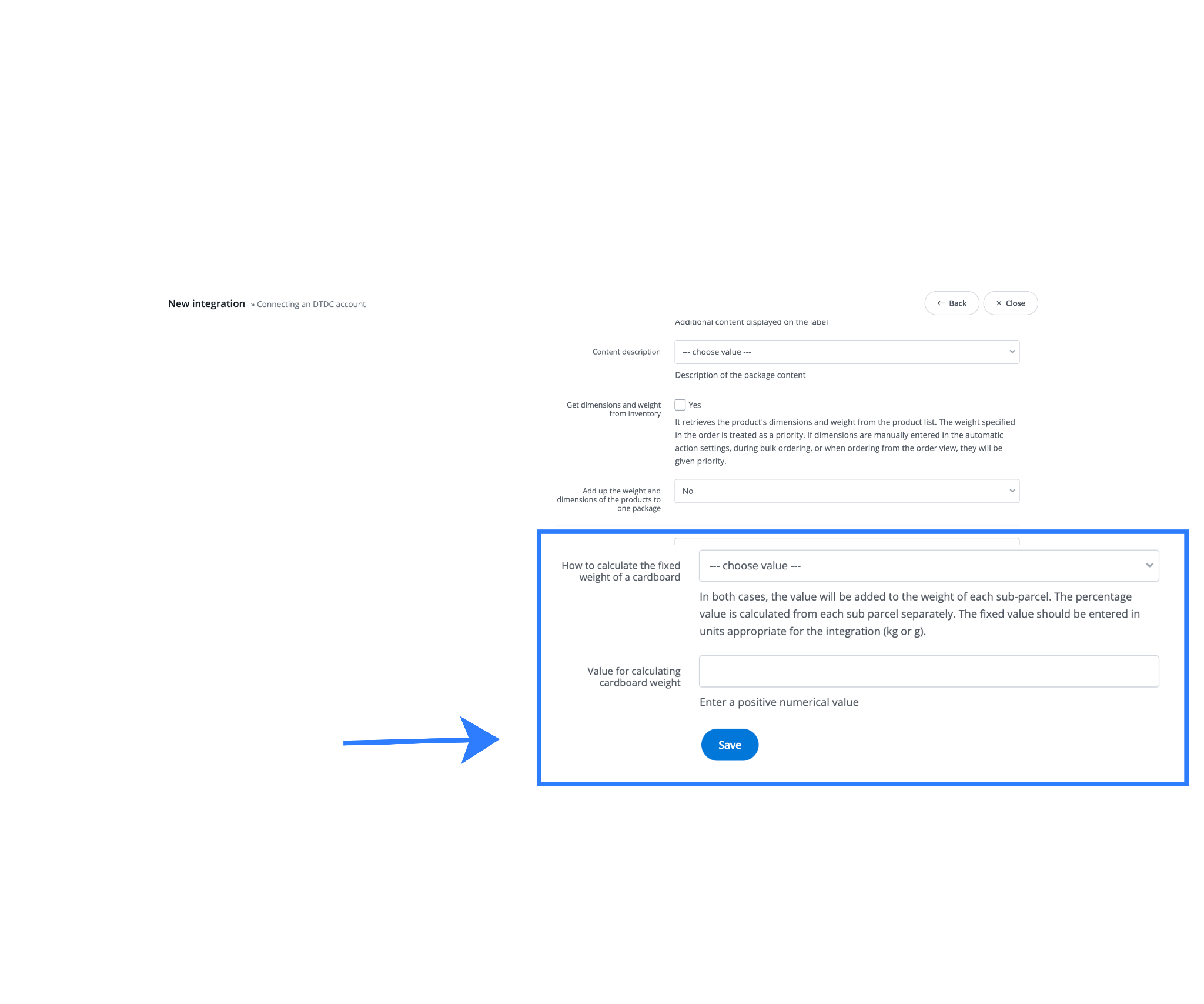
These defaults help maintain consistency and prevent errors during daily operations.
Step 5: Save and Activate the Integration
Once all details are reviewed and confirmed:
- Click Save to submit the integration
- Base validates your DTDC credentials in real time
- Upon successful verification, the integration becomes active
DTDC will now appear as a selectable courier option when processing orders inside Base.
Step 6: Testing Your First DTDC Shipment
Before going live, it is strongly recommended to test the integration with a single shipment.
- Go to the Orders section in Base
- Open a test or low-risk order
- Click the courier or van icon
- Select DTDC as the courier
- Confirm package weight and dimensions
- Click Send Package
Base generates a DTDC shipping label in PDF format. Print and review the label to ensure all details are correct. This confirms that the integration is functioning as expected.
Recommended Default Settings in Base
Configuring defaults properly saves time and reduces fulfillment errors.
- Fixed Package Weight: Use this only if product weights are missing. Otherwise, rely on accurate catalog data for correct rate calculation.
- Saved Size and Weight Templates:Creating templates for commonly used cartons speeds up label generation during high-volume sales periods.
- Automatic Pickup Scheduling: Enable daily DTDC pickup requests at a fixed time to avoid manual booking and ensure consistent parcel collection.
Advanced Features for Growing Brands
As shipping volume increases, Base provides advanced tools to support scaling.
Bulk Shipping with DTDC
Sellers can generate up to 250 DTDC shipping labels in a single batch by filtering orders, selecting multiple shipments, and processing them together. This significantly reduces dispatch time on busy days.
Marketplace Sync for Amazon, Flipkart, and eBay
Tracking numbers and shipment statuses are automatically synced with marketplaces, helping sellers meet SLA requirements and reduce late shipment penalties.
Automated Customer Notifications
Workflow automation can send WhatsApp or email updates when DTDC shipment statuses change, improving customer experience and reducing support queries.
Multi-Warehouse and Multi-Pincode Shipping
Multiple DTDC sender profiles can be created using the same account, allowing sellers to ship from different locations without operational complexity.
Regional Optimization for Indian Deliveries
Base supports region-aware shipping logic that improves delivery performance across metros, Tier-2, and Tier-3 cities while maintaining compliance.
Common Mistakes to Avoid
- Entering incorrect DTDC API credentials during setup
- Using pickup addresses that are not approved by DTDC
- Leaving parcel weight or dimensions blank during bulk shipping
- Skipping test shipments before going live
Avoiding these issues helps prevent failed dispatches and delays.
Bottom Line
Base is a centralized e-commerce operations platform built for Indian and global sellers. By integrating DTDC Courier with Base, merchants can automate shipping, generate labels instantly, sync tracking with marketplaces, and manage fulfillment from a single dashboard. This integration removes manual processes, reduces errors, and supports efficient scaling for growing brands.
Click here to integrate Firstcry with Base.com.
Frequently Asked Questions
1. Can I automate parcel dispatch with DTDC in Base?
Yes. After integrating DTDC, Base enables sellers to automate dispatch workflows by automatically creating shipments, instantly generating labels, and updating order statuses without manual effort. This significantly reduces fulfillment time during high order volumes.
2. Does DTDC integration support marketplaces like Amazon and eBay?
Yes. Base connects DTDC directly with marketplaces such as Amazon, Flipkart, and eBay. Tracking numbers and shipment updates sync automatically, helping sellers remain compliant with marketplace SLA requirements.
3. How is Base’s DTDC integration different from competitors?
Base offers native DTDC integration with deep automation, India-specific logistics optimization, multi-warehouse support, and an easy-to-use interface designed for operational teams.
4. Can I print shipping labels automatically with DTDC integration?
Yes. DTDC shipping labels are generated automatically during dispatch. Sellers can print labels individually or in bulk and automate label creation as soon as orders are ready to ship.
5. What should I do if I face issues during DTDC integration?
Start by verifying your API Key, Client Number, Client Secret, and registered email. Ensure pickup details match DTDC records. If issues continue, contact Base customer support for guided troubleshooting and faster resolution.