Indian e-commerce logistics is no longer just about shipping parcels. It is about execution speed, accuracy at scale, and keeping fulfillment operations stable during demand spikes. As order volumes grow across D2C websites and marketplaces, courier handling becomes one of the biggest operational bottlenecks.
Integrating GoKwik with Base allows sellers to shift from manual courier execution to a system-driven fulfillment model. Instead of juggling courier dashboards, spreadsheets, and tracking links, operations teams manage everything from a single workflow.
This guide explains how the GoKwik–Base integration works from an operational lens. It focuses not only on setup, but also on how teams actually use the integration daily and how it supports scale without increasing headcount.
What the GoKwik–Base Integration Solves?
Before looking at features or setup, it is important to understand the problem this integration addresses.
Most Indian sellers start with courier dashboards when order volumes are low. This works initially, but as volumes increase, teams face recurring issues:
- Duplicate data entry across systems
- Missed pickups due to incorrect address data
- Inconsistent COD tagging
- Tracking delays during peak sales
- Higher customer support load
The GoKwik–Base integration replaces fragmented courier handling with a centralized execution layer. Orders flow into Base, and shipping becomes a controlled extension of order management rather than a separate activity.
The result is fewer manual steps, fewer errors, and predictable dispatch performance even during high-volume days.
Why GoKwik Works Well Inside Base?
GoKwik is optimized for last-mile execution, but its real value is unlocked when paired with a structured operations platform.
Inside Base, GoKwik becomes:
- A selectable courier option
- A label-generation engine
- A pickup execution partner
- A tracking and delivery status source
Instead of thinking in terms of “courier actions,” teams work with orders, and Base manages courier interactions in the background.
This separation is what allows sellers to scale without operational chaos.
Before You Start: Preparation Checklist
A smooth integration depends on having the right details ready in advance.
Ensure the following are available:
- An active GoKwik business account
- API or Client Secret credentials from GoKwik
- Confirmed serviceable pickup PIN codes
- A valid GSTIN for shipping compliance
- Admin access to the Base dashboard
Having these ready prevents setup delays and dispatch issues during initial use.
Step-by-Step: Adding GoKwik to Base
The integration process inside Base is simple and designed for quick onboarding.
Step 1: Access Courier Integrations
- Log in to Base
- Navigate to Integrations
- Select Add Integration
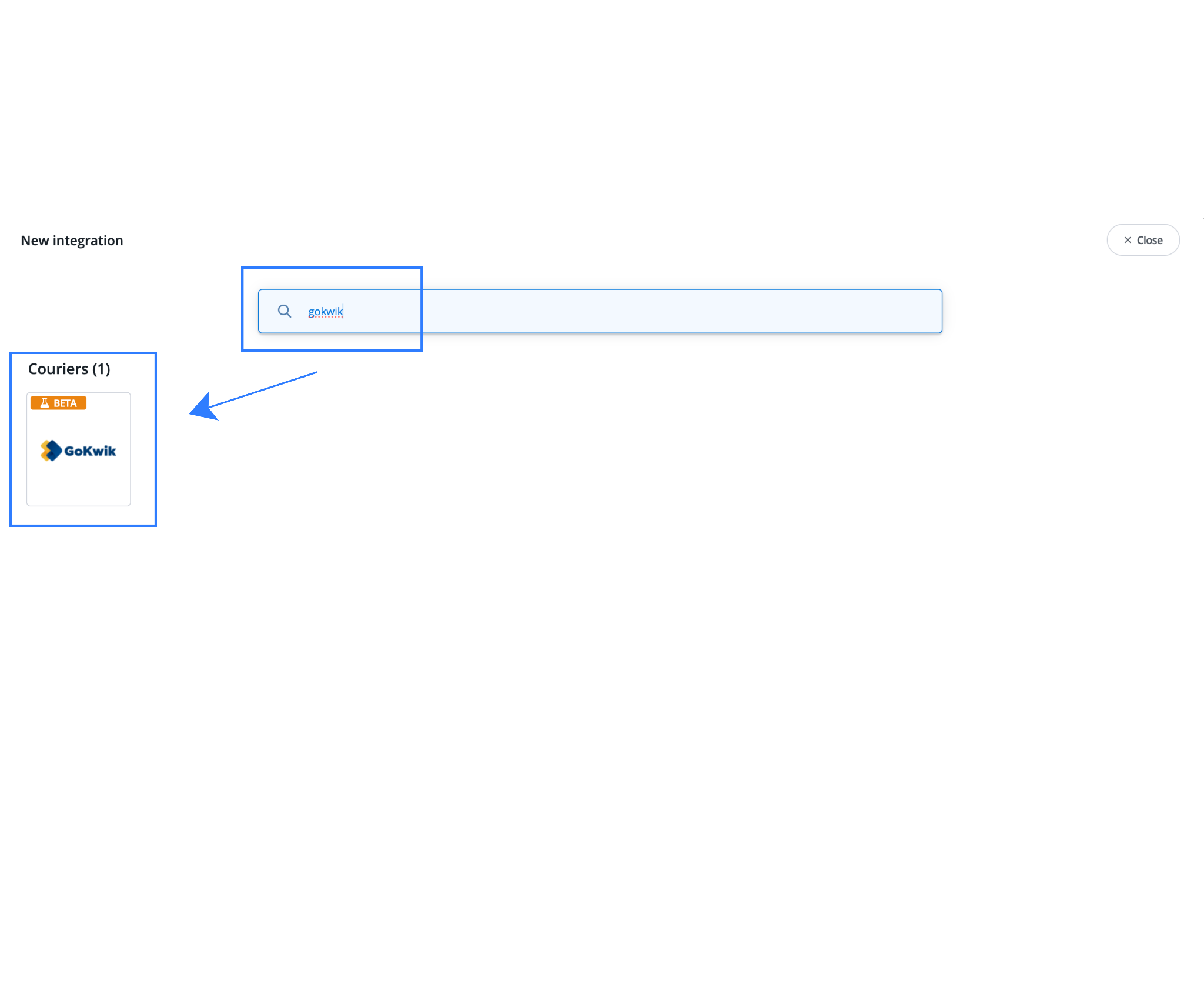
- Choose GoKwik from the courier list
Step 2: Enter Account Credentials
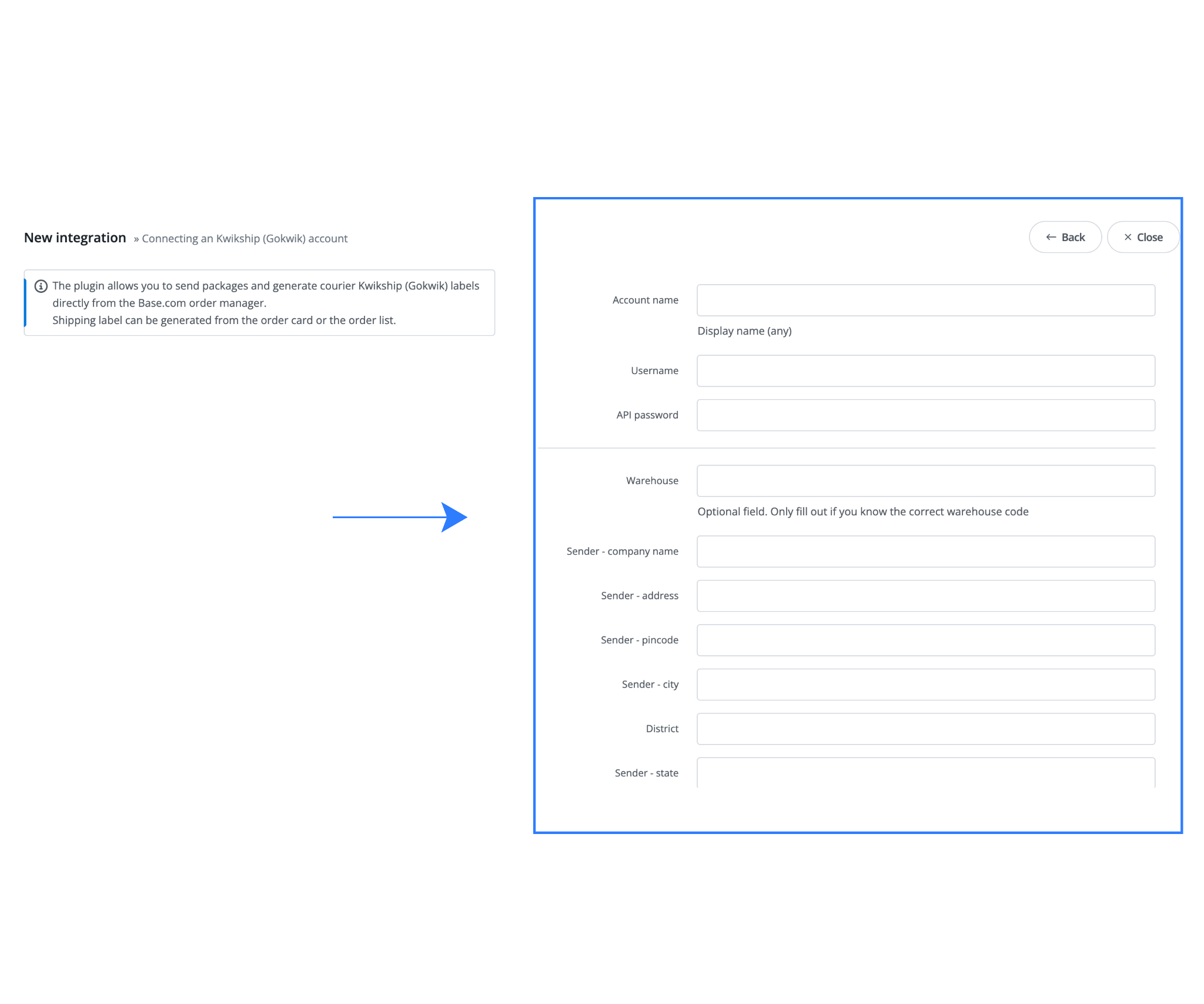
Provide:
- Account Name – An internal label for reference
- Client Secret / API Key – Issued by GoKwik
This establishes secure communication between Base and GoKwik.
Step 3: Configure Pickup (Sender) Details
Accurate pickup information ensures smooth dispatch.
Enter:
- Business or warehouse name
- Contact person
- Complete street address
- City, state, and PIN code
- Phone number and email
Always confirm pickup PIN serviceability before saving.
Step 4: Set Return Address Information
Returns and RTOs are a major cost driver in Indian e-commerce.
Configure:
- Return company name
- Contact person
- Full return address
- Reachable contact details
A clear return setup reduces delays and lost parcels.
Step 5: Weight, Packaging, and Billing Controls
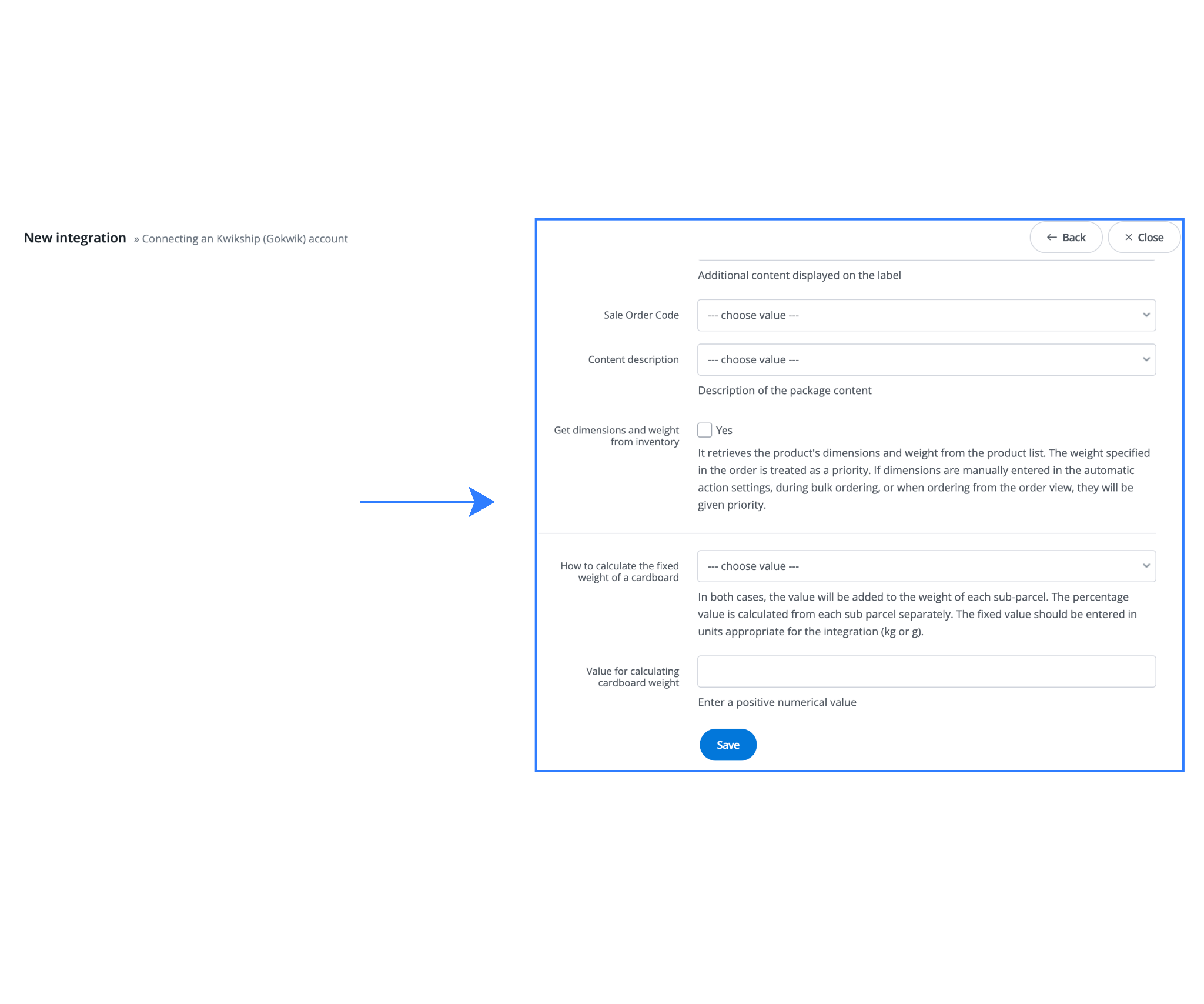
Weight configuration plays a major role in courier billing accuracy. Base provides multiple controls to manage this effectively.
- GSTIN Configuration
Entering a GSTIN ensures compliant shipping documentation and invoicing.
- Maximum Shipment Weight
Set a hard cap to prevent dispatch of shipments exceeding GoKwik limits.
- Default or Fixed Weight
Useful when:
- Product-level weights are unreliable
- Orders frequently include bundles
This prevents billing surprises.
Step 6: Packaging Weight Adjustment
If your packaging adds significant weight:
- Add fixed or percentage-based packaging weight
- Adjust during festive or gifting seasons
This keeps chargeable weight aligned with reality.
Daily Shipping Workflow Using GoKwik in Base
Once setup is complete, Base becomes the command center for all GoKwik shipments.
1. Generating Shipping Labels
- Open the Orders section
- Select an order
- Click Generate Label
- Choose GoKwik
Labels are created instantly and ready to print.
2. Bulk Dispatch for High-Volume Days
Multiple orders can be processed together, allowing teams to clear dispatch queues quickly during sales or promotions.
3. COD and Prepaid Order Management
Base automatically maps payment modes, ensuring GoKwik receives accurate COD values and instructions.
4. Tracking and Status Visibility
Shipment tracking updates flow back into Base and can sync with connected sales channels, improving transparency for customers and support teams.
Who Benefits Most from Using GoKwik with Base?
This integration is designed for Indian sellers who want speed and control without operational complexity.
| Seller Profile | Primary Business Need | How GoKwik Helps | How Base Adds Value | Operational Impact |
| D2C Brands with Time-Sensitive Dispatch | Faster order dispatch and shorter delivery timelines to compete on customer experience | GoKwik enables rapid last-mile movement, especially for same-day or next-day deliveries in high-demand zones | Base automates label creation, pickup assignment, and tracking from the order panel | Orders are dispatched quicker during campaigns without hiring temporary staff or increasing manual workload |
| Marketplace Sellers Using Self-Ship Models | Maintain strict marketplace SLAs while managing shipping independently | GoKwik handles last-mile execution reliably for self-fulfilled marketplace orders | Base centralizes label generation and auto-syncs tracking to marketplaces | Reduced SLA breaches, fewer penalties, and consistent order status updates during peak sales |
| Sellers Shipping Across Metro and Growth Cities | Reliable delivery coverage across metros, Tier-2 cities, and emerging consumption hubs | GoKwik performs well in dense urban routes and expanding regional markets | Base enforces address accuracy and PIN code validation before dispatch | Fewer pickup failures, lower delivery exceptions, and smoother expansion into new cities |
| COD-Focused Indian Businesses | Accurate handling of Cash-on-Delivery orders and payment reconciliation | GoKwik supports both prepaid and COD shipments across its delivery network | Base maps payment modes and order values correctly to courier instructions | Reduced COD mismatches, cleaner reconciliation, and improved customer trust |
| Operations Teams Scaling Rapidly | Ability to process higher daily order volumes without increasing manpower | GoKwik executes pickups and deliveries at scale | Base automates repetitive tasks such as bulk label generation, weight logic, and pickup consistency | Teams manage significantly higher order volumes with the same operational headcount |
Advanced Operational Scenarios
As businesses grow, logistics operations become increasingly complex, with higher order volumes, multiple sales channels, and expanding delivery footprints.
The GoKwik integration with Base is designed to absorb this complexity without forcing teams to add new tools or workflows. By keeping shipping tightly connected to order management, the integration allows brands to scale operations while maintaining control and consistency.
Unified multi-channel fulfillment becomes easier as D2C website orders, marketplace self-ship orders, and even offline or assisted sales can be managed from a single dashboard.
Instead of running separate courier processes for each channel, operations teams follow one standardized dispatch flow while using GoKwik as the last-mile delivery partner. This ensures uniform pickup execution, label generation, and tracking across all sales sources.
As geographic reach expands, brands can set up multiple warehouses and return hubs within Base. Different pickup locations can be assigned based on inventory placement, city-specific demand, or regional fulfillment strategies. Similarly, return addresses can be customized to route RTOs and customer returns to the most efficient hub, reducing transit time and operational costs.
At the customer experience layer, accurate tracking and faster delivery execution play a critical role. With real-time shipment updates flowing through Base, customers receive clearer visibility into order status. This transparency significantly reduces “Where is my order?” inquiries, easing pressure on support teams and improving overall post-purchase satisfaction as order volumes increase.
Common Configuration Errors and Prevention
Most operational issues stem from simple setup mistakes.
| Issue | Root Cause | Impact | Prevention |
| Invalid API credentials | Wrong or expired key | Integration failure | Use active credentials only |
| Unverified PIN codes | No serviceability check | Pickup failures | Validate PINs before dispatch |
| Missing weight logic | Incomplete product data | Billing disputes | Set default or capped weights |
| Incomplete return address | Skipped during setup | RTO delays | Always configure returns |
| No test shipment | Immediate go-live | Peak-time errors | Test with one order |
Best Practices for Scaling Smoothly
As order volumes increase and fulfillment operations expand across cities and channels, small inefficiencies in logistics can quickly turn into major bottlenecks. Scaling smoothly requires more than just adding capacity, it demands disciplined processes, consistent configurations, and proactive monitoring.
Following a set of proven best practices helps ensure that growth does not compromise delivery speed, cost control, or customer experience, even during peak demand periods.
- Revalidate pickup PINs when expanding warehouses
- Review courier billing against configured weights
- Use bulk dispatch during campaigns
- Monitor tracking sync for SLA compliance
- Test configuration changes before peak events
Closing Note
Base.com is designed to bring structure to Indian e-commerce operations. When GoKwik is integrated into Base, last-mile delivery becomes predictable, automated, and scalable.
This integration helps sellers:
- Dispatch faster
- Reduce manual errors
- Improve customer delivery experience
- Scale operations without increasing manpower
For brands navigating India’s complex logistics landscape, the GoKwik–Base integration provides a reliable foundation for long-term growth.
Click here to integrate Blinkit with Base.com.
Frequently Asked Questions (FAQs)
1. Can GoKwik be used for both D2C and marketplace orders at the same time?
Yes. GoKwik can be used across multiple sales channels simultaneously. When integrated with Base, D2C website orders, marketplace self-ship orders, and offline orders can all be processed from a single dashboard while using GoKwik as the last-mile courier.
2. How does the integration help during high-volume sale periods?
The integration reduces manual effort through bulk label generation, automated weight logic, and consistent pickup configurations. This allows operations teams to handle sudden spikes in order volumes without adding temporary staff or changing dispatch workflows.
3. Is it possible to manage multiple warehouses and return locations?
Yes. Base allows sellers to configure multiple pickup warehouses and return hubs. Orders can be routed to the appropriate location based on geography, inventory availability, or operational strategy, improving delivery speed and return handling efficiency.
4. How are Cash on Delivery (COD) orders handled at scale?
COD orders are automatically tagged and mapped with accurate order values during label creation. This ensures GoKwik receives correct COD instructions and helps prevent reconciliation issues or delivery exceptions as COD volumes grow.
5. What should be monitored regularly as operations scale?
As scale increases, teams should regularly review pickup success rates, weight configuration accuracy, tracking sync performance, and delivery timelines. Periodic audits of these areas help identify issues early and maintain stable logistics performance during growth phases.