Base.com allows you to update offers in bulk. All available options can be found in Marketplace → Offer Management → Operations.
The following options are available for all platforms:
- Enable/disable stock synchronization (and in some integrations, price synchronization as well);
- Delete offer from system memory – this option deletes offers from Base.com memory – not from the marketplace system. This option is available for some integrations, e.g., Arena, eMAG;
- Finish the offer and delete from the system memory – this option deletes offers from Base.com memory and from the marketplace system. This option is available for some integrations, e.g., Ceneo, G2A;
- Associate with products from the inventory – this option allows you, for example, to link auctions to products from another warehouse in bulk.
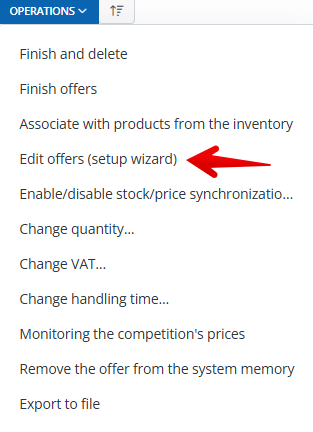
For most marketplace integrations, the Edit offers (setup wizard) operation is also available. You can use it to make bulk changes to your listings.
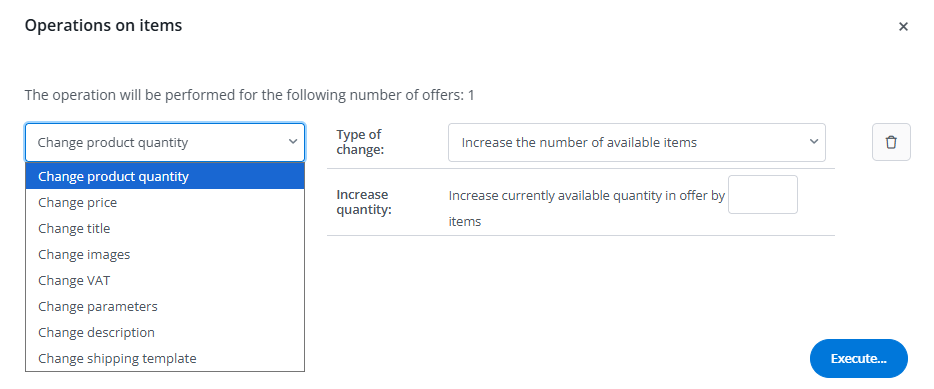
Depending on the selected marketplace, there may be different amounts of data that can be updated via the API. The most common ones are:
- Change parameters — allows you to change the parameter values in a current offer.
- Change price — allows you to change the price of a current offer.
- Change quantity — this operation allows you to change the status of a current offer.
- Change description — this operation allows you to change the description of a current offer
- Change title — this operation allows you to change the title of a current offer
Amazon
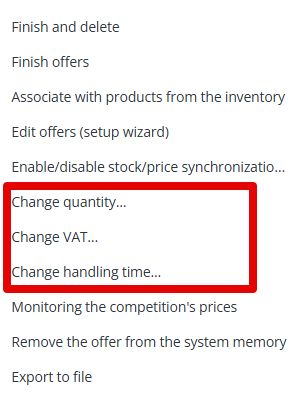
In the case of Amazon, the following additional options are available:
- Change quantity – this option allows you to manually change the number of products in the offer. Please note that if you have the stock synchronization module enabled, it will overwrite any changes made manually
- Change VAT — this option allows you to change the VAT rate for selected offers
- Change shipping time – this feature allows you to specify individual shipping times for selected listings. The entered value will replace the default shipping time set in the system. Please note that the shipping time will be changed in the offer data in the Base panel using this operation. It will be sent to the Amazon marketplace along with the status change on the offer.
Ceneo
In the case of Ceneo, you can update offers using the configurator. However, there is also a second option for updating offer data. All you need to do is re-list the same products (with the same ID number), but with a changed description, for example. The data will then be updated in the XML file.