Integrating RapidShyp with Base enables Indian D2C brands, marketplace sellers, and high-volume e-commerce operators to manage end-to-end shipping from a single operations dashboard. Once the integration is live, sellers can generate shipping labels, automate courier allocation, schedule pickups, and sync tracking updates across marketplaces without manual intervention.
This guide explains the RapidShyp–Base integration in detail, including setup steps, API credential configuration, testing workflows, recommended defaults, automation features, and best practices for scaling shipping operations across India.
Why Integrate RapidShyp with Base?
RapidShyp is a courier aggregation and logistics orchestration platform that provides access to multiple national and regional courier partners through one account. When connected with Base, sellers get a unified fulfillment workflow that connects orders, shipping, tracking, and marketplaces into a single system.
- Centralized shipping operations: All shipments are created, labeled, and tracked directly inside Base without logging into RapidShyp separately.
- Faster dispatch with automated label generation: Orders in Base can be converted into shipments instantly using synced address, weight, and dimension data.
- Automatic tracking sync with marketplaces: Tracking numbers and shipment statuses are automatically pushed to marketplaces like Amazon and Flipkart, helping sellers meet SLA and dispatch timelines.
- Multi-warehouse and multi-pincode fulfillment: RapidShyp supports multiple pickup locations, allowing sellers to fulfill orders from different warehouses or cities under one integration.
- Reduced fulfillment errors at scale: Automation eliminates manual data entry issues such as incorrect weights, mismatched addresses, or delayed status updates.
This integration is ideal for Indian sellers managing high daily order volumes, marketplace-heavy operations, and rapid growth across regions.
Prerequisites Before You Start
Before integrating RapidShyp with Base, ensure the following:
- An active RapidShyp business account
- Completed KYC and approved pickup address in RapidShyp
- Admin access to the RapidShyp dashboard
- Admin access to the Base dashboard
RapidShyp supports self-serve API credential generation, so no courier account manager interaction is required.
How to Generate RapidShyp API Credentials (5-Step Path)
API credentials are generated directly inside the RapidShyp dashboard, exactly as shown in your screenshots.
- Log in to your RapidShyp Dashboard
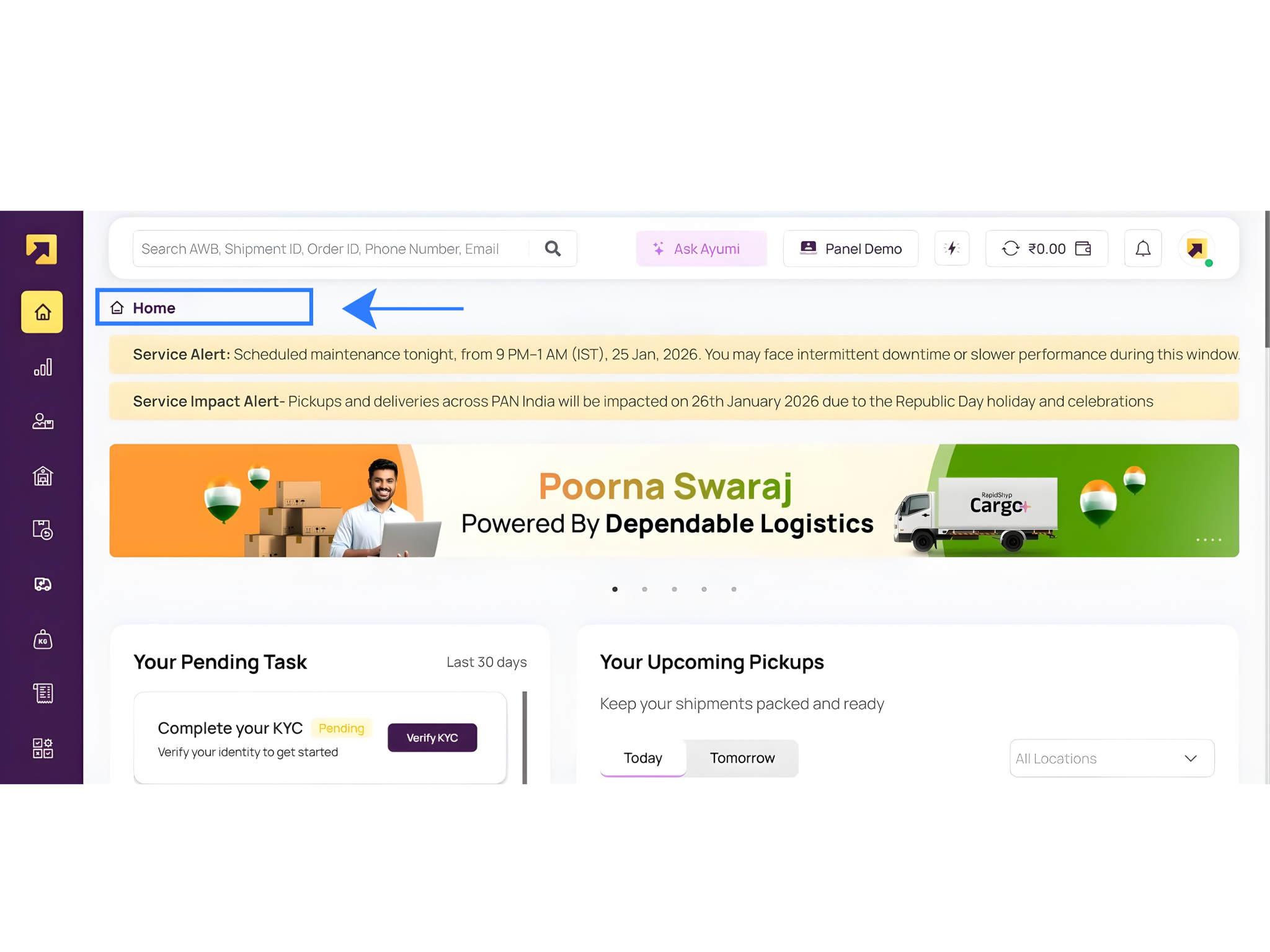
- Go to Settings
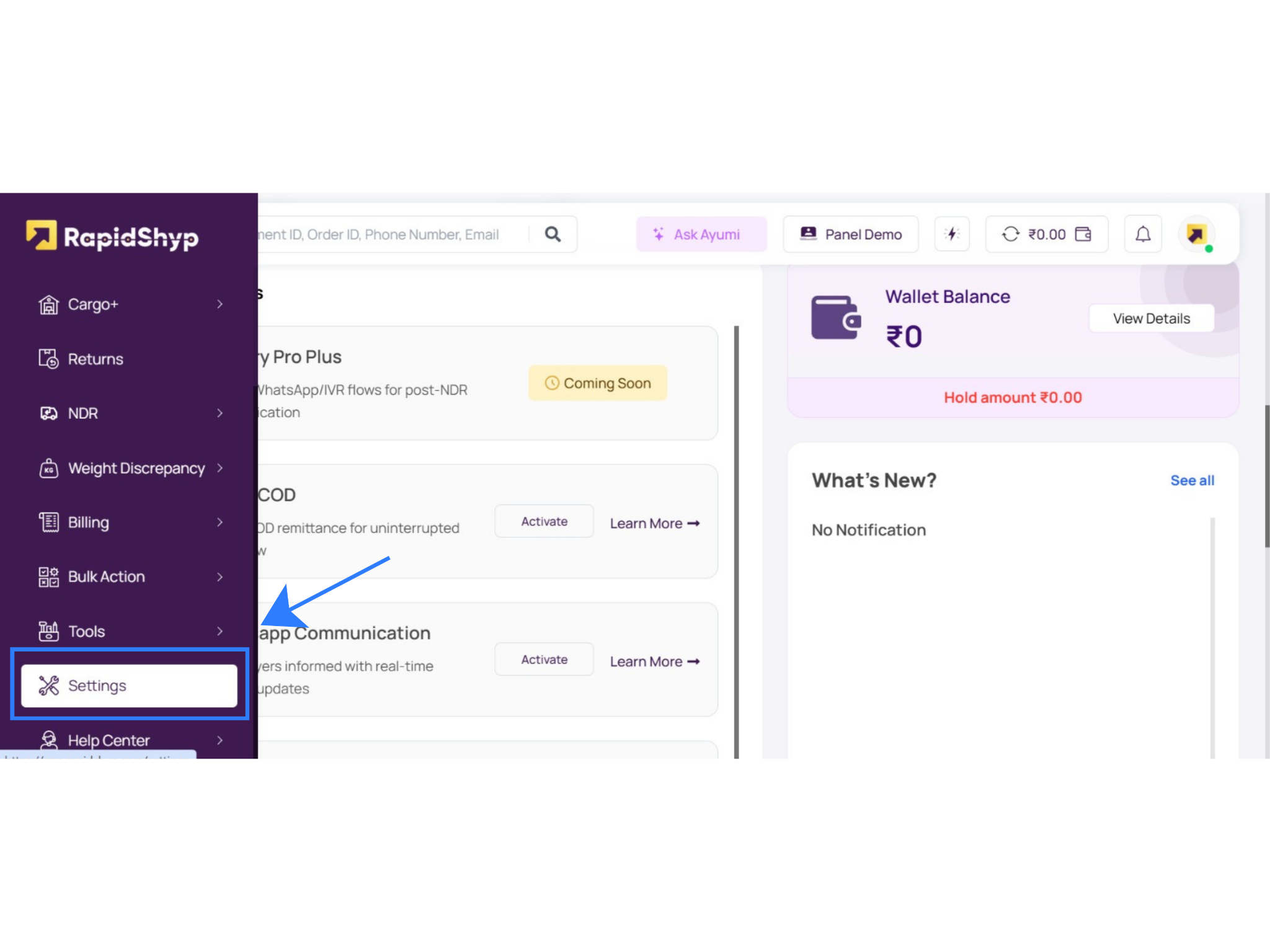
- Scroll to Setup & Manage
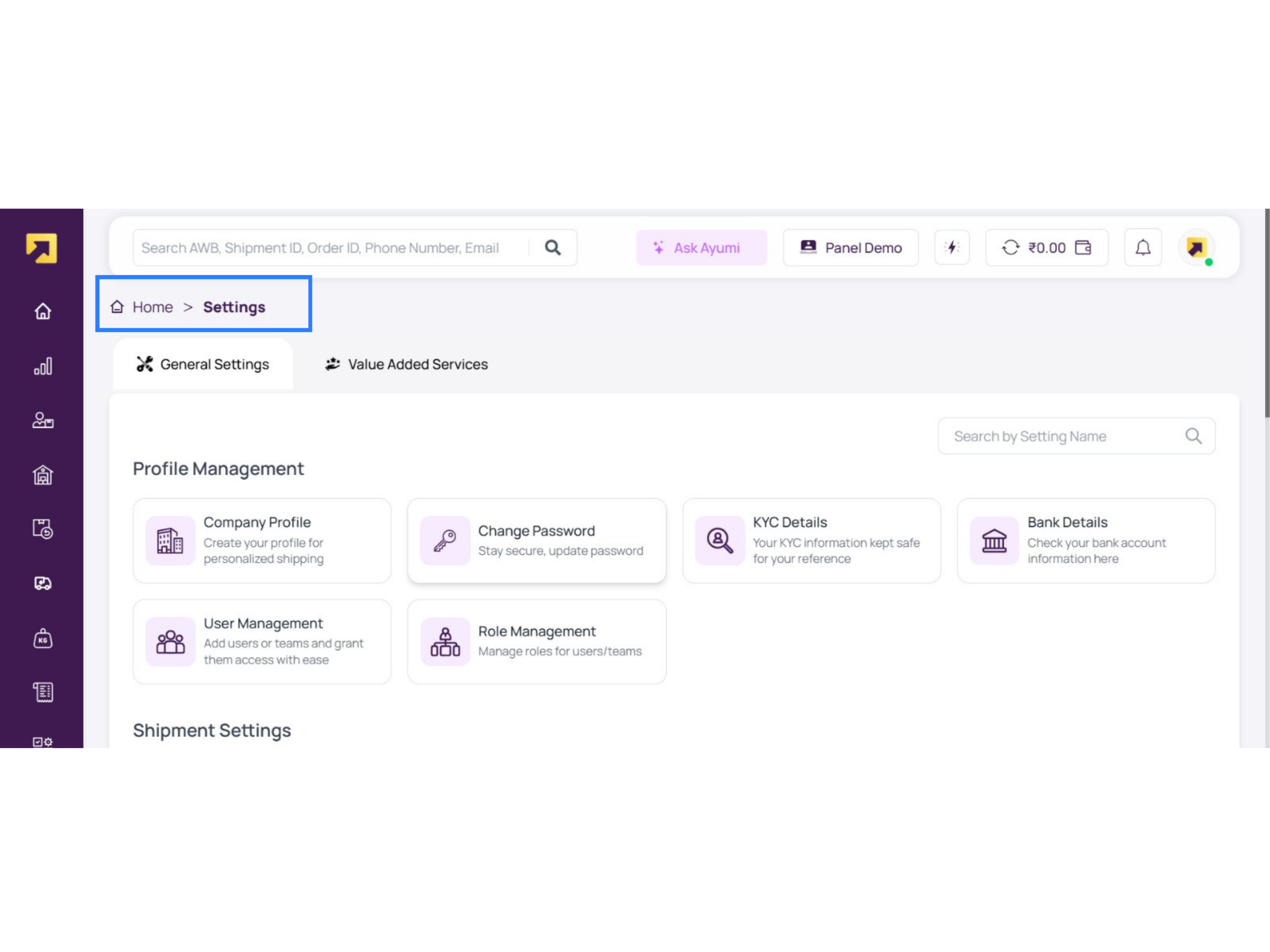
- Click Manage Channels
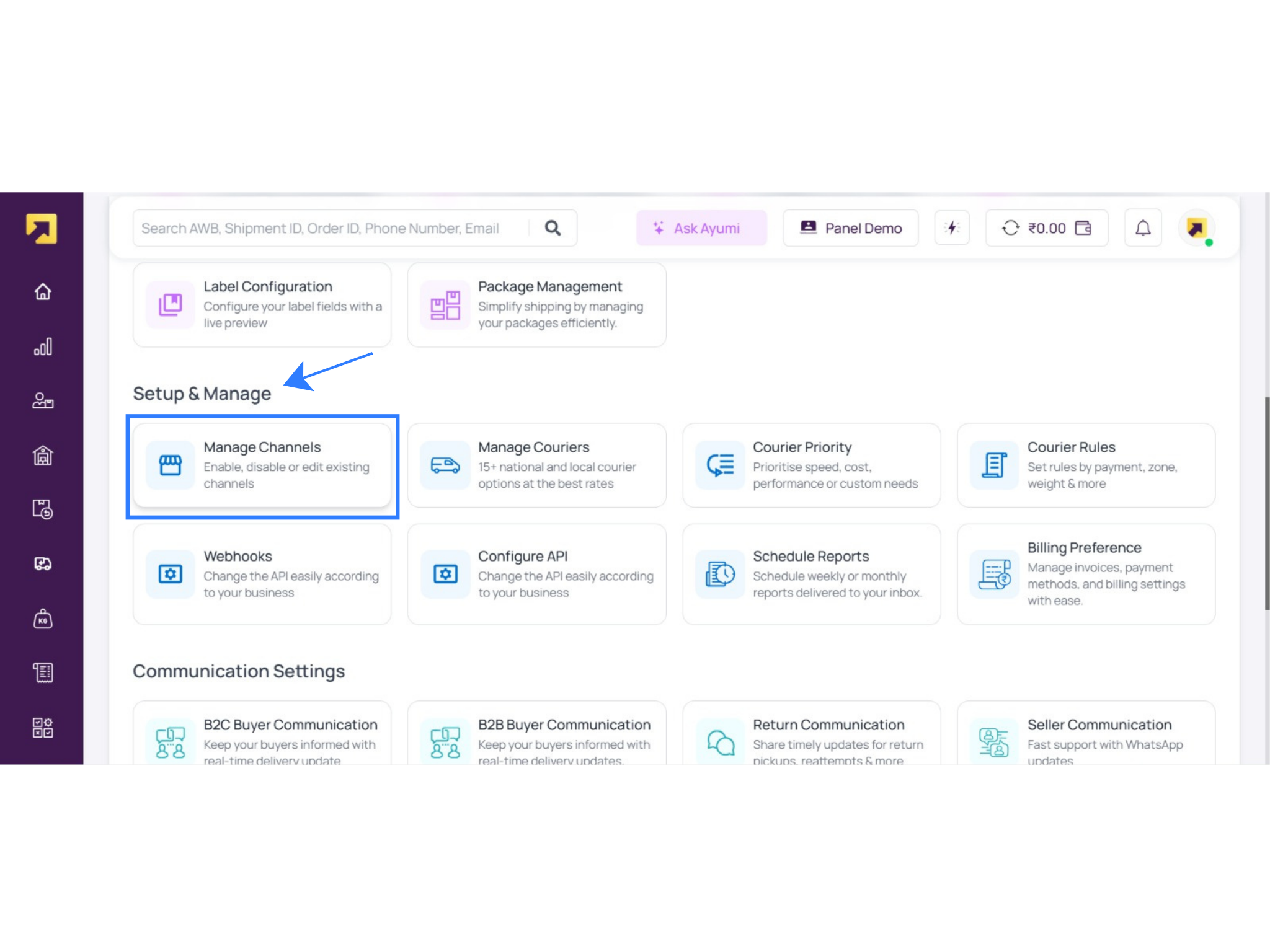
- Click Configure New Channel, select Base, and generate credentials
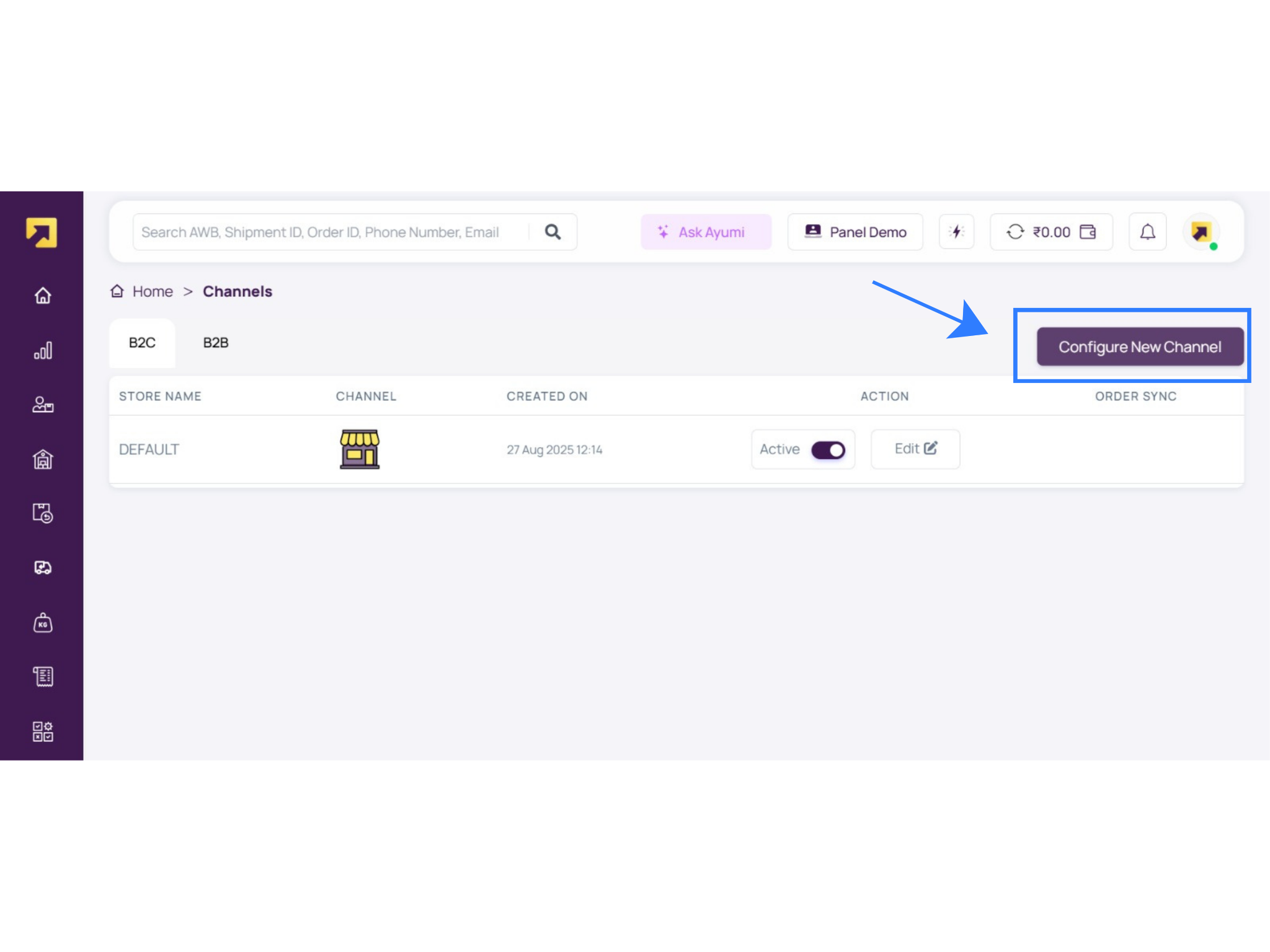
Once generated, RapidShyp provides a Username and Password / API credentials used for authentication inside Base.
Step-by-Step: Integrating RapidShyp with Base
This section walks you through the exact process of connecting RapidShyp with Base, from creating the channel in RapidShyp to activating it for live order dispatch. The steps below follow the actual flow inside the RapidShyp dashboard, as seen in the Channels, OMS Integrations, and Settings sections.
Step 1: Open OMS Integrations in RapidShyp
From the RapidShyp dashboard:
- Navigate to Channels
- Open the OMS Channels section
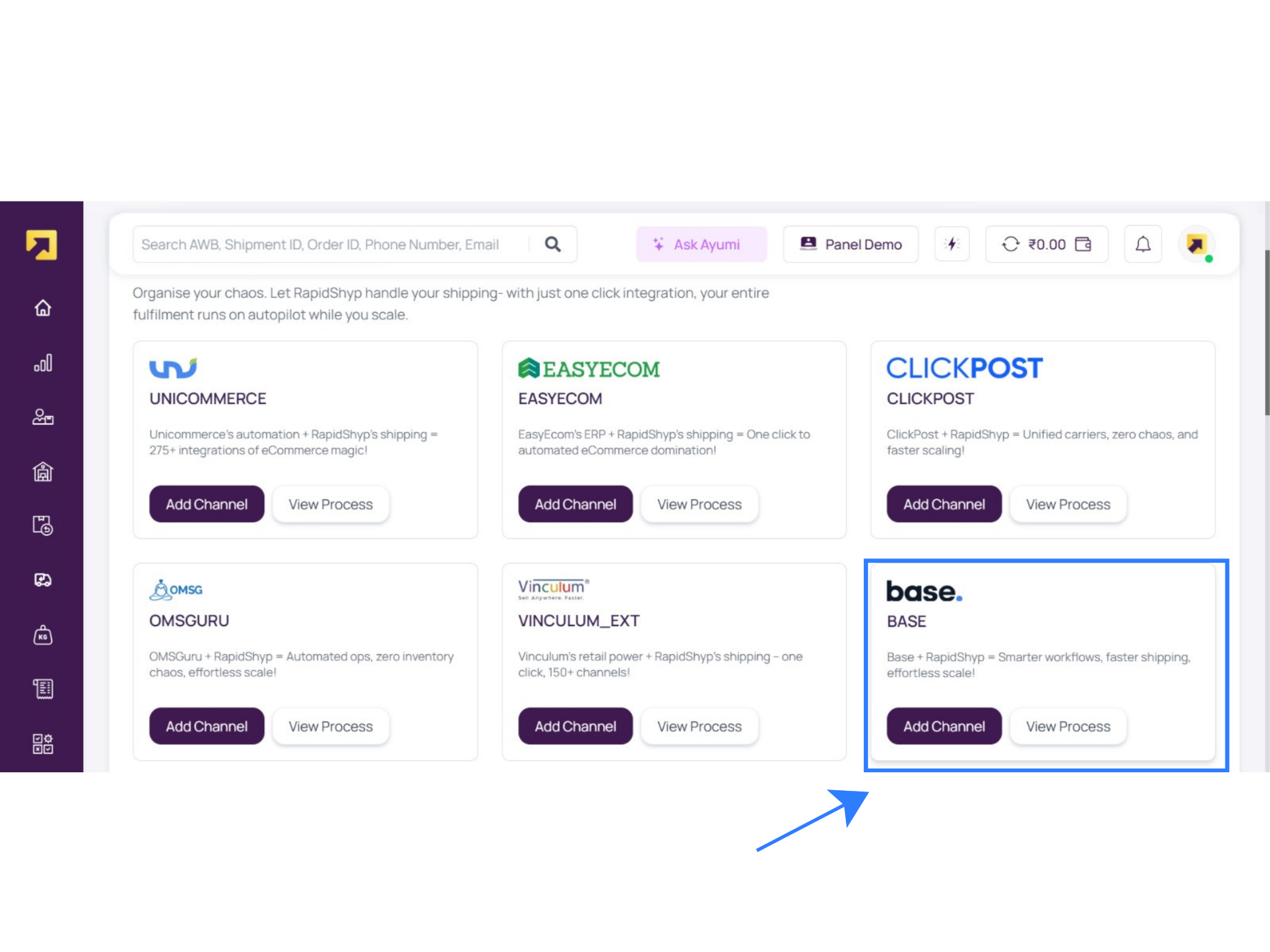
- Locate Base in the available integrations list
- Click Add Channel
This section connects RapidShyp with external order management systems like Base, Unicommerce, EasyEcom, ClickPost, and others.
Step 2: Create a Base Channel in RapidShyp
When adding Base as a channel:
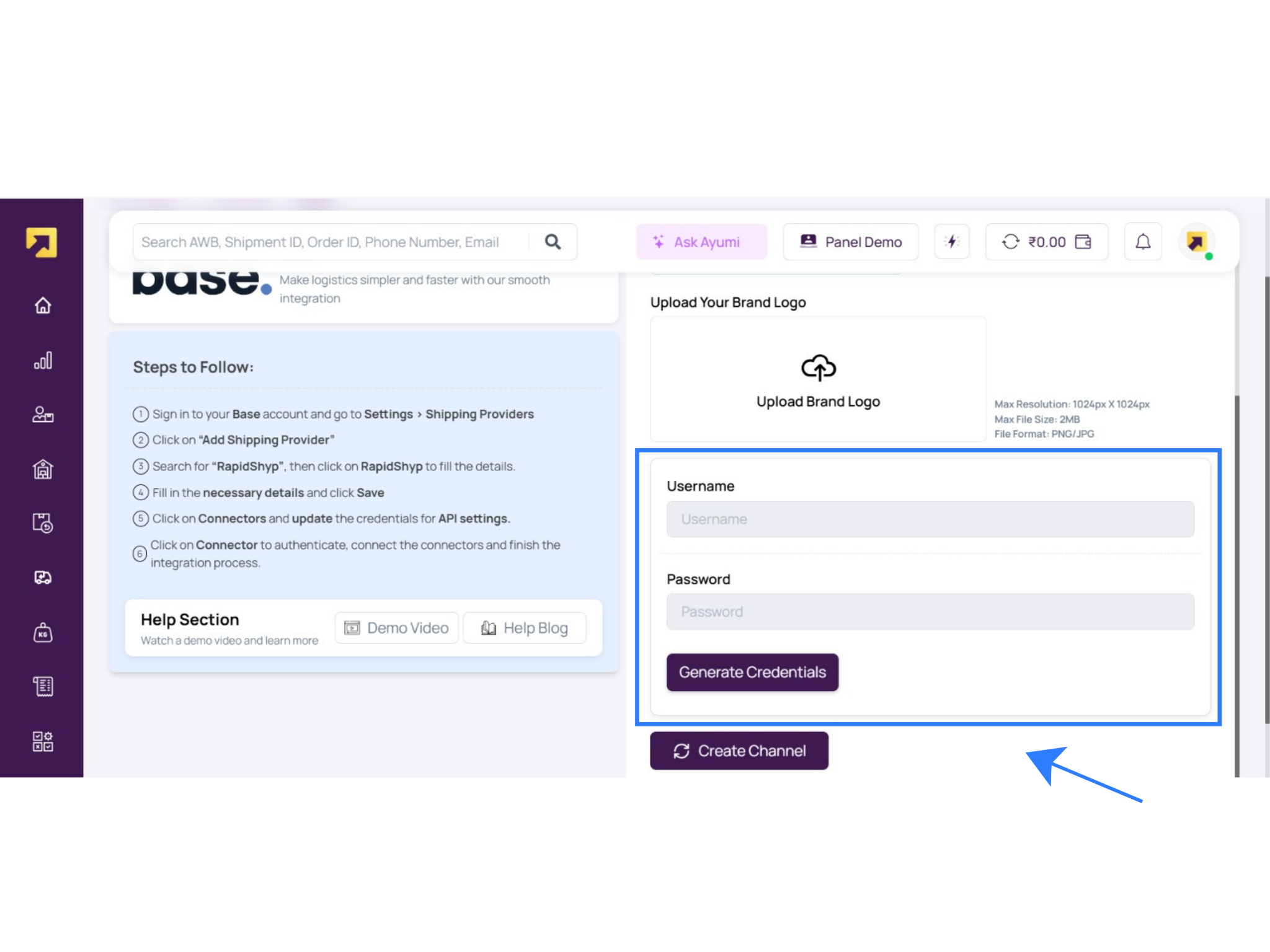
- Upload your brand logo (optional but recommended)
- Enter the generated RapidShyp credentials
- Click Generate Credentials if not already created
- Click Create Channel
Once saved, the Base channel appears under B2C Channels and can be activated.
Step 3: Verify Channel Activation
After setup:
- Go to Channels → B2C
- Confirm the Base channel status is Active
- Ensure order sync is enabled
This confirms RapidShyp is ready to receive shipment creation requests from Base.
Step 4: Configure Shipping & Courier Settings
Inside RapidShyp → Settings → Setup & Manage, configure the following:
- Manage Couriers: Enable preferred national and regional courier partners
- Courier Priority: Define cost-first or speed-first allocation logic
- Courier Rules: Set rules by COD/prepaid, zone, weight slabs, or serviceability
- Pickup Addresses: Ensure pickup address matches approved KYC records
These settings control how shipments are auto-allocated during dispatch from Base.
Step 5: Configure API & Webhooks
From Settings → Configure API:
- Enable API access for shipment creation and tracking
- Configure Webhooks for order status, pickup, and delivery updates
This ensures real-time data sync between Base, RapidShyp, and connected marketplaces.
Testing Your First RapidShyp Shipment from Base
Before going live, testing is strongly recommended.
- Open Orders in Base
- Select a test or low-risk order
- Click Dispatch / Create Shipment
- Select RapidShyp as the courier
- Confirm weight and dimensions
- Click Send Package
Base sends shipment data to RapidShyp, and a shipping label is generated instantly. Verify pickup address, customer details, and courier allocation before proceeding.
Recommended Default Settings in Base
To ensure smooth operations at scale:
- Maintain accurate product weights and dimensions
- Create saved carton size templates
- Enable automatic pickup scheduling
- Use courier priority rules instead of manual courier selection
- Validate GST and invoice details for interstate shipments
These defaults significantly reduce dispatch delays and manual corrections.
Advanced Features for Scaling Brands
As order volumes grow, Base + RapidShyp automation becomes critical.
| Feature | What It Does | Operational Benefit |
| Bulk Shipping | Generate hundreds of shipping labels in one action | Speeds up high-volume dispatch days |
| Marketplace Sync | Auto-sync tracking to marketplaces | Protects SLA and account health |
| Customer Notifications | WhatsApp/email shipment updates | Reduces WISMO tickets |
| Multi-Warehouse Fulfillment | Ship from multiple pickup locations | Enables city-wise scaling |
Common Mistakes to Avoid
Most integration issues arise from configuration gaps rather than system limitations.
- Entering incorrect RapidShyp credentials
- Using pickup addresses not approved in RapidShyp KYC
- Skipping test shipments before going live
- Missing product weights or dimensions during bulk dispatch
- Not enabling courier rules or priorities
Addressing these during setup ensures smoother daily operations and fewer courier escalations.
Bottom Line
Base is a centralized e-commerce operations platform designed specifically for the complexity of Indian e-commerce. It brings together order management, inventory visibility, marketplace synchronization, and fulfillment workflows into a single, unified system. By integrating RapidShyp with Base, sellers can connect their shipping operations directly to their order lifecycle without relying on manual processes or multiple external dashboards.
Once the integration is active, merchants can automatically create shipments, generate shipping labels in real time, schedule courier pickups, and allocate orders to the most suitable courier based on configured rules such as cost, speed, payment mode, or serviceability. Tracking numbers and shipment status updates flow seamlessly from RapidShyp into Base and onward to connected marketplaces like Amazon and Flipkart, ensuring timely dispatch confirmations and SLA compliance.
This integration significantly reduces operational overhead by eliminating repetitive data entry, minimizing dispatch errors, and improving shipment visibility across stakeholders. As order volumes increase, Base and RapidShyp together provide a scalable, automation-driven fulfillment framework that supports multi-warehouse operations, high-volume dispatch days, and consistent delivery performance across India.
Click here to integrate Odoo with Base.com.
Frequently Asked Questions (FAQs)
1. Can I use multiple courier partners through RapidShyp in Base?
Yes. RapidShyp acts as a courier aggregation layer.Once you integrate RapidShyp with Base, you can access all courier partners enabled in your RapidShyp account through a single workflow. Base automatically routes shipments through RapidShyp, allowing courier selection, prioritization, and rule-based allocation without separate integrations.
2. Do I need to contact RapidShyp support to get API credentials?
No. RapidShyp offers a self-serve setup. You can generate API credentials directly from the RapidShyp dashboard by navigating to Settings, scrolling to Setup & Manage, selecting Manage Channels, and configuring Base as a new channel. You don’t need to raise a support ticket or contact an account manager.
3. Does RapidShyp integration with Base support marketplaces like Amazon and Flipkart?
Yes. When you integrate RapidShyp with Base, RapidShyp automatically syncs shipment tracking numbers and status updates to Base, and Base then pushes them to connected marketplaces such as Amazon and Flipkart.. This ensures timely dispatch confirmations and helps sellers remain compliant with marketplace SLA requirements.
4. Can I ship from multiple warehouses using one RapidShyp account?
Yes. RapidShyp allows multiple pickup locations to be configured under a single account. These pickup addresses can be mapped inside Base, enabling sellers to fulfill orders from different warehouses or cities while maintaining centralized shipping operations and courier management through one RapidShyp integration.
5. What should I do if shipments fail after integration?
Start by verifying that the RapidShyp credentials entered in Base are correct and active. Ensure the pickup address exactly matches the approved address in RapidShyp, and confirm that product weight and dimensions are provided. Running a test shipment usually helps identify configuration issues quickly.