Pricing on Temu offers is handled through the price negotiation module. This module allows you to accept/reject or negotiate prices proposed by Temu. It also allows you to propose your own price and perform bulk price changes. Base currently supports two types of price audits. Temu then requires a price change for the offer to be active:
- Price assessment – when it is a newly created offer;
- Price modification – after each price update, if it is too high, Temu may conduct an audit.
Newly created offer
When the offer is first listed, Temu may accept or reject the price at which we want to list the product. If the price we propose is rejected, the marketplace offer will be deactivated and the message “Incomplete – Commercial review failed. Check product details in Temu Seller Center” will appear next to it:
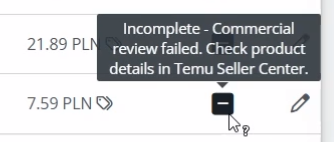
In this situation, all information regarding the proposed changes to the offer will be available directly in the Temu Seller Center panel.
Price change on offer
The price on Temu offers can be changed using the price negotiation module. This module allows you to accept/reject prices proposed by Temu using operations. First, perform the “Change price” operation:
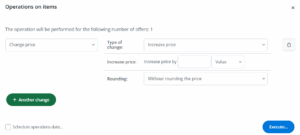
If, after performing the “Change price” operation, the error “SKU has unfinished price order” appears in the operation logs, you should wait until the price audit conducted by Temu is completed.
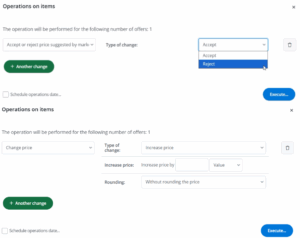
Prices are checked once a day, and Temu then returns a message with the suggested price. Then you has the option to accept/negotiate/reject prices using the “Accept or reject the price suggested by the marketplace” operation. In the case of price negotiations, repeat the “Change price” operation:
Filtering offers
It may happen that Temu will return proposals to change the base price on offers through its API if it sees an opportunity to increase traffic on the offer or develop it. Offers of this type can be filtered in the “Offer Management” tab as follows:
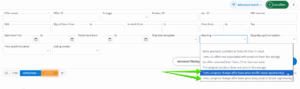
If there is no response to Temu’s proposed price change, the movement in the offer may be reduced.