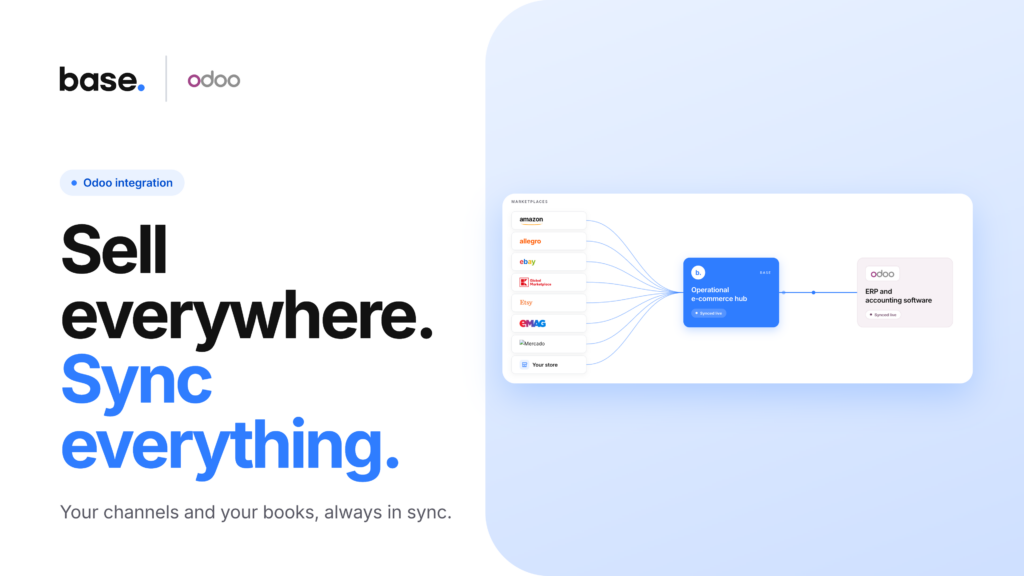
Selling on more than one marketplace is normal. Keeping Odoo in sync with all of them usually isn’t, until someone sets it up properly. If you’re running Odoo for accounting and inventory and selling on Amazon, Mercado Libre, Allegro, or anywhere else, this is how Base connects the two, and what to expect once it’s running.
Base sits between your marketplaces and Odoo. It pulls in orders, listings, and stock from wherever you sell, turns everything into one common format, and passes that to Odoo. Odoo never has to talk to each marketplace individually. It just sees clean, consistent orders arriving from Base, whether they came from a global platform or a niche regional one.
See it in action
How the integration works
Odoo and each of your marketplaces are separate integrations inside Base. You connect your sales channels on one side and Odoo on the other, and Base handles the translation between them, no matter how many channels you add over time.
Once both are connected, here’s what actually happens. Orders placed on any channel land in Base first, then export to Odoo as sales orders, invoices, or both, depending on how you set it up. Product data, quantities, prices, tax rates, and delivery details all travel across in Base’s format rather than each marketplace’s own.
Stock and pricing move the other way: Odoo stays your source of truth for what you have and what you charge, and Base pushes updates out to every channel on a schedule you control. That means you set the price or adjust stock once, in Odoo, and it shows up everywhere you sell.
Because the connection works this way, adding a new marketplace later doesn’t mean reconfiguring Odoo. Connect it once, and every channel plugs into the same pipeline: Amazon, eBay, Allegro, Kaufland, TikTok Shop, Temu, whatever you sell on next.
What syncs, and what stays on the marketplace side
Most of what you need makes the trip cleanly: products, SKUs, order details, customer and delivery information, tax rates, and invoices. A few things are worth knowing before you rely on the export for anything beyond day-to-day operations.
Marketplace-specific details, like a listing ID or a channel-specific SKU, get handled inside Base before an order reaches Odoo. If you need one of those fields inside Odoo itself, check your export mapping rather than assuming it shows up automatically.
Marketplace fees, commissions, settlements, and marketplace-issued invoices stay in your seller account rather than appearing in Odoo as their own accounting entries. And tax treatment depends on your Odoo configuration, fixed, customer-based, or automatic by country, rather than on the marketplace’s own tax logic. It’s worth checking a handful of real orders against your fiscal position rules the first time you set this up.
Two examples make this concrete. Amazon runs through Base as two integrations, standard Amazon for Seller Central and a separate one for Amazon Vendor and Direct Fulfillment, and orders fulfilled by Amazon come through with standard delivery and tracking fields rather than a dedicated FBA process. Mercado Libre is actually five integrations behind one name, split by country (Argentina, Brazil, Mexico, Colombia, Chile), each with its own currency, which together move well over a million orders a month through Base. Set up the currencies you need in Odoo before connecting, and each will export the same clean way.
Marketplaces sellers connect with Odoo through Base
Base works with hundreds of marketplaces and sales channels as part of a broader catalog of 2,000+ integrations spanning marketplaces, e-commerce platforms, and shipping carriers. Looking at global usage, the marketplaces sellers most often pair with Odoo are Mercado Libre, Amazon, Allegro, Shopee, eBay, TikTok Shop, eMAG, Kaufland, Temu, and Trendyol.
If your marketplace isn’t on that list, it works the same way. Odoo doesn’t have separate logic per channel, so a smaller or more regional integration connects exactly like these do.
Setting it up
Setup is the same regardless of which marketplace you’re connecting. Add your Odoo database name, login, and API key under the Odoo integration in Base, map your product fields, and choose how orders should export. The full field-by-field walkthrough is in How to connect Odoo to Base: full integration setup guide.
On the marketplace side, connect Amazon, Mercado Libre, Allegro, or whichever channel you sell on the same way you’d connect any other integration in Base. Once both sides are active, orders start routing through automatically.
Ready to connect Odoo to your own marketplaces? Start from the Odoo integration page in your Base panel.
A few things this integration doesn’t do
It’s worth being upfront about the edges of what syncs automatically, so nothing catches you off guard later.
Odoo doesn’t connect directly to Amazon, Mercado Libre, Allegro, or any other marketplace on its own; Base is what makes that connection possible. Marketplace fees, settlements, and marketplace-issued invoices don’t turn into Odoo accounting records on their own. Odoo won’t automatically apply the right tax treatment or fiscal position for every order either. That still depends on how you’ve configured Odoo. And a marketplace identifier like an Amazon ASIN or a Mercado Libre site code isn’t guaranteed to show up as a native Odoo field unless your export mapping includes it.
None of this makes the integration less useful. It just means the accurate description is simpler than the marketing version: Base normalizes orders from any marketplace into one format, and Odoo processes what it receives according to your own product, tax, and fiscal setup.
FAQ
Which marketplaces can I connect to Odoo through Base?
Any of them. Base has integrations for hundreds of marketplaces and sales channels, all exporting to Odoo the same way. Globally, the most common pairings are Mercado Libre, Amazon, Allegro, Shopee, eBay, TikTok Shop, eMAG, Kaufland, Temu, and Trendyol, but a smaller or regional channel connects just as easily.
Do marketplace fees and settlements show up in Odoo?
No. Those stay in your marketplace seller account. Odoo receives the normalized order and invoice data that Base generates, not the marketplace’s own fee breakdown.
Does Odoo handle marketplace tax and VAT automatically?
No. Odoo applies whatever fiscal-position rules you’ve set up, using the tax and country data Base passes along. It’s worth checking that setup against a few real orders from each marketplace you connect.
Does Mercado Libre work the same way in every country?
Not quite. Mercado Libre is split into separate integrations by country (Argentina, Brazil, Mexico, Colombia, Chile), each with its own currency. Make sure the currencies you need are active in Odoo before connecting.