From 1 November 2026, as part of the EU customs reform, product identifiers (PID) are required for every item in the customs declaration of shipments sent from outside the European Union to recipients in the EU. Base.com passes them to carriers automatically, based on product data. This article explains what the identifiers are, how to prepare product data and how each courier integration handles them.
What are product identifiers (PID)?
Customs authorities require three identifiers for each product in a shipment:
- M-PID (Merchant Product Identifier) – an identifier assigned by the seller, i.e. the product SKU;
- NS-PID (Non-Standardised Manufacturer Product Identifier) – the manufacturer’s or supplier’s part number, or the model number. It has no defined format;
- S-PID (Standardised Product Identifier) – a global product code, e.g. EAN, GTIN, UPC, ISBN or ISSN. It is provided if the product has such a code.
The requirement mainly applies to shipments to private customers (B2C) with a value of up to EUR 150. Some carriers require identifiers more broadly – details are described in the sections for each integration. Missing identifiers may result in the shipment being held at the border or returned to the sender, and in some integrations the label will not be created.
How to prepare product data?
SKU and EAN are taken from the order items. The other identifiers are taken from product additional fields in the catalog. To prepare them:
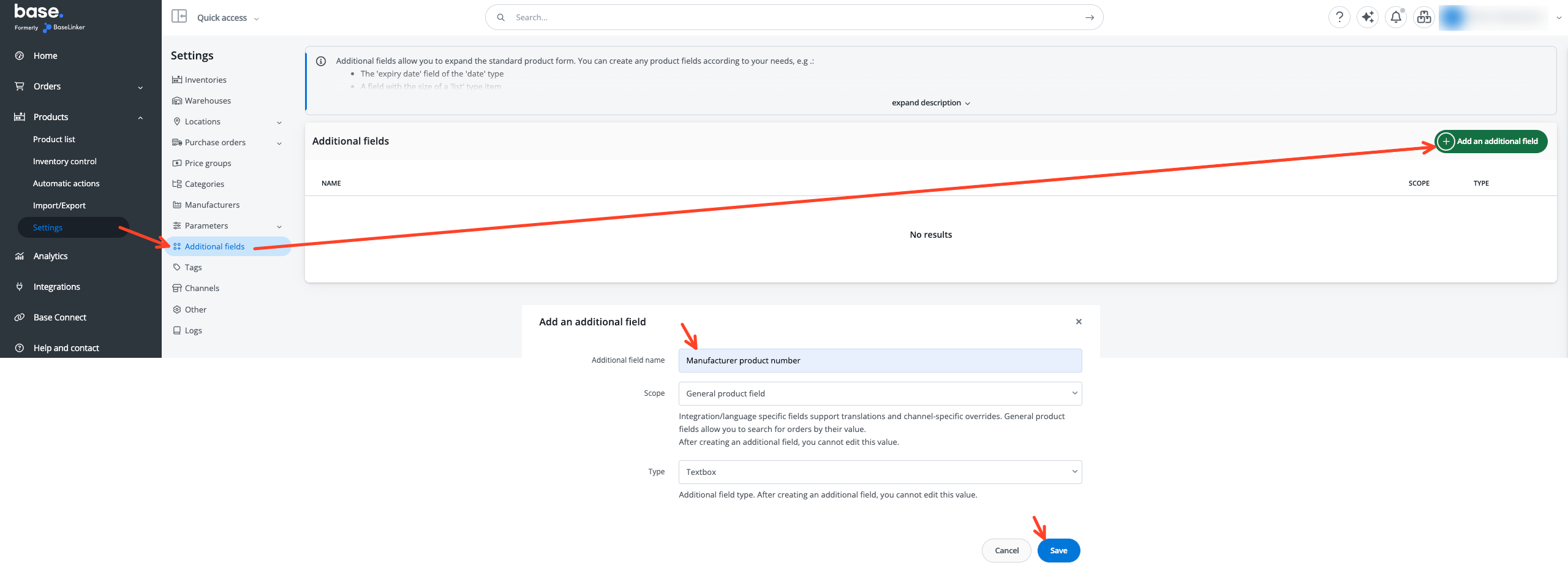
- In Products → Settings → Additional fields, click Add an additional field and add fields named exactly as in the table below, with the scope General product field and the type Textbox. It is enough to add only the fields used by the integration in question.
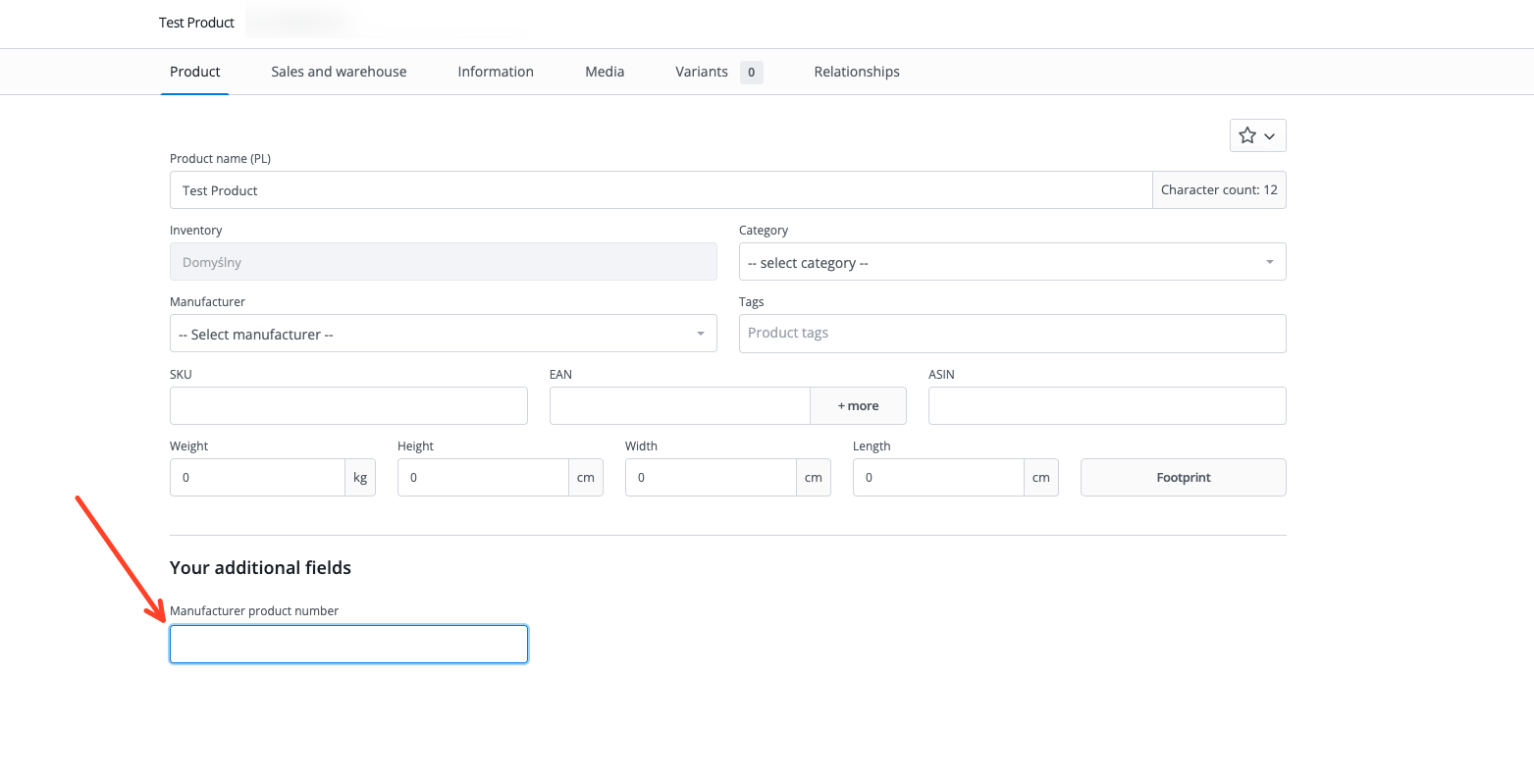
- Field values are entered on the product card in the Product tab, in the Your additional fields section.
- Order items must be linked to products in the catalog – only then are the additional field values passed to the carrier.
- Make sure that products in orders have the SKU and – if the product has one – the EAN filled in.
| Additional field name | What to enter | Integrations |
|---|---|---|
| Manufacturer product number | Manufacturer or supplier part number, or model number. If the product has none of these, its EAN, GTIN, UPC, ISBN or ISSN can be entered as the field value. | Amazon Buy Shipping, DPD UK, FedEx.com (new), GLS DE v2, Royal Mail API, Spring |
| GTIN | Global Trade Item Number of the product, if it is different from the EAN. | Amazon Buy Shipping, DPD UK, Royal Mail API |
| UPC | US product barcode. | Amazon Buy Shipping |
| ISBN | ISBN number of a book. | Amazon Buy Shipping |
| ISSN | ISSN number of a magazine or other serial publication. | Amazon Buy Shipping |
EAN does not require a separate additional field – it is entered in the standard EAN field of the product.
Identifiers on the shipping form
In some integrations, the identifiers are shown in the Customs clearance section of the shipping form on the order card, next to each product. The fields are filled in automatically with order and product data and can be corrected before the shipment is created. A change made on the form applies only to that shipment and does not change the product data.
When creating shipments in bulk and in automatic actions, identifiers are taken only from order and product data.
Support in courier integrations
Below are the integrations in which Base.com passes product identifiers. In all of them, identifiers are sent only in shipments that require them – creating other shipments does not change.
Amazon Buy Shipping
- When: shipments from a sender address outside the EU to an EU country, regardless of value and recipient type. Does not apply to domestic shipments, shipments outside the EU or FBA.
- Data passed: Manufacturer product number and – if filled in – EAN, GTIN, UPC, ISBN and ISSN. Amazon adds the ASIN as the merchant identifier itself.
- Missing data: the Manufacturer product number field is required. If it is empty, the first filled-in code is passed instead: GTIN, UPC, ISBN, ISSN or EAN. If the product has none of them, the label will not be created and a message indicating the product to complete will appear in the panel.
DPD UK
- When: shipments from a sender address outside the EU to an EU country, when Business To Customer is selected as the Business Transaction Type in the Customs clearance section. Applies to both systems: DPD.co.uk API and DPD Local API.
- Data passed: SKU, Manufacturer product number and EAN (or GTIN if there is no EAN). The EAN code and SKU code can be corrected on the shipping form in the Customs clearance section.
- Missing data: SKU is required. If the Manufacturer product number field is empty, the SKU is passed instead.
FedEx.com (new)
- When: shipments from a sender address outside the EU to an EU country, to a private customer (order without a tax number in the invoice data), with a goods value below EUR 150.
- Data passed: SKU, Manufacturer product number and EAN. For such a shipment, the EAN code, SKU code and Manufacturer Part Number fields are shown in the Customs clearance section of the shipping form.
- Missing data: the shipment will be created, but incomplete data may cause it to be held during customs clearance.
GLS DE v2
- When: every shipment that requires a customs declaration.
- Data passed: SKU, Manufacturer product number and EAN. The EAN code and SKU code can be corrected on the shipping form in the Customs clearance section.
- Missing data: empty identifiers are not passed and the shipment will be created. Incomplete data may cause it to be held during customs clearance.
Royal Mail API
- When: every shipment that requires a customs declaration.
- Data passed: SKU, Manufacturer product number and GTIN (or EAN if there is no GTIN). The manufacturer number and GTIN can be corrected on the shipping form in the Customs clearance section.
- Missing data: if the Manufacturer product number field is empty, GTIN, EAN or, as a last resort, SKU is passed instead. The shipment will be created.
Spring
- When: shipments from a sender address outside the EU to an EU country.
- Data passed: SKU, Manufacturer product number and EAN.
- Missing data: empty identifiers are not passed and the shipment will be created. Incomplete data may cause it to be held during customs clearance.