Amazon settlement report reconciliation is the check between what Amazon says it paid, the orders and adjustments behind that amount, and the credit in your bank. The deposit is not your sales figure. It is what remains after the transactions and deductions in that settlement.
For an Indian seller, the job is to explain those movements, post them to the books and leave a trail another person can follow.
How Amazon settlement reconciliation works
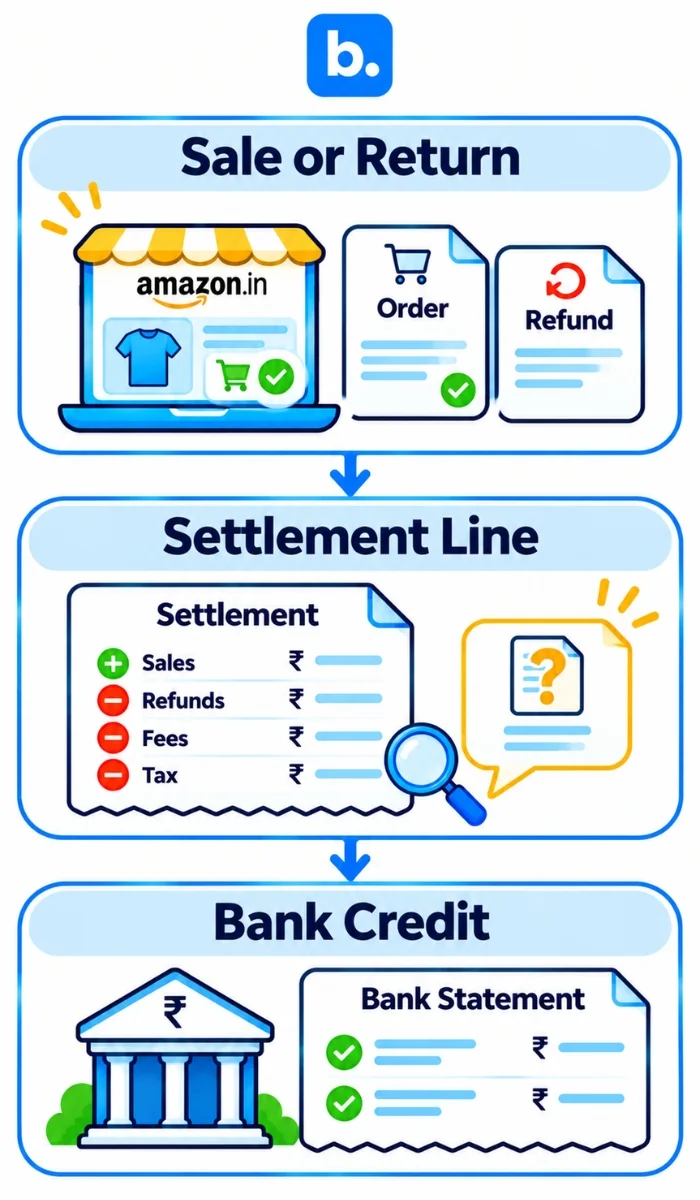
Match three records: the sale or return, the settlement line and the bank credit. Orders show the purchase; the report shows what Amazon included or withheld; the bank shows what arrived.
These records may have different dates. An order can be placed in one period, posted in another and paid later. A refund may relate to an earlier order. Some adjustments do not have an order ID.
Fees, refunds, reserve movements and tax lines all affect the deposit. So instead of asking only “Why is the payout lower?”, ask which report line explains the difference and what evidence supports it.
How Amazon settlement reports work
The settlement report groups money movements for a period. It is not an order export, tax invoice or bank statement. Note its settlement ID, dates, deposit date, currency and total. Check the version and layout currently offered in Seller Central.
Keep order date, Amazon’s posted date and bank credit date separate. A refund or fee may land in a later settlement than the sale, so same-month sales and deposits will not always line up.
GST TCS and income-tax TDS are different tax balances, not “Amazon fees.” Match each to its own record and ledger; ask a CA to confirm current treatment. The settlement report does not show inventory cost or net profit.
How to read an Amazon settlement report
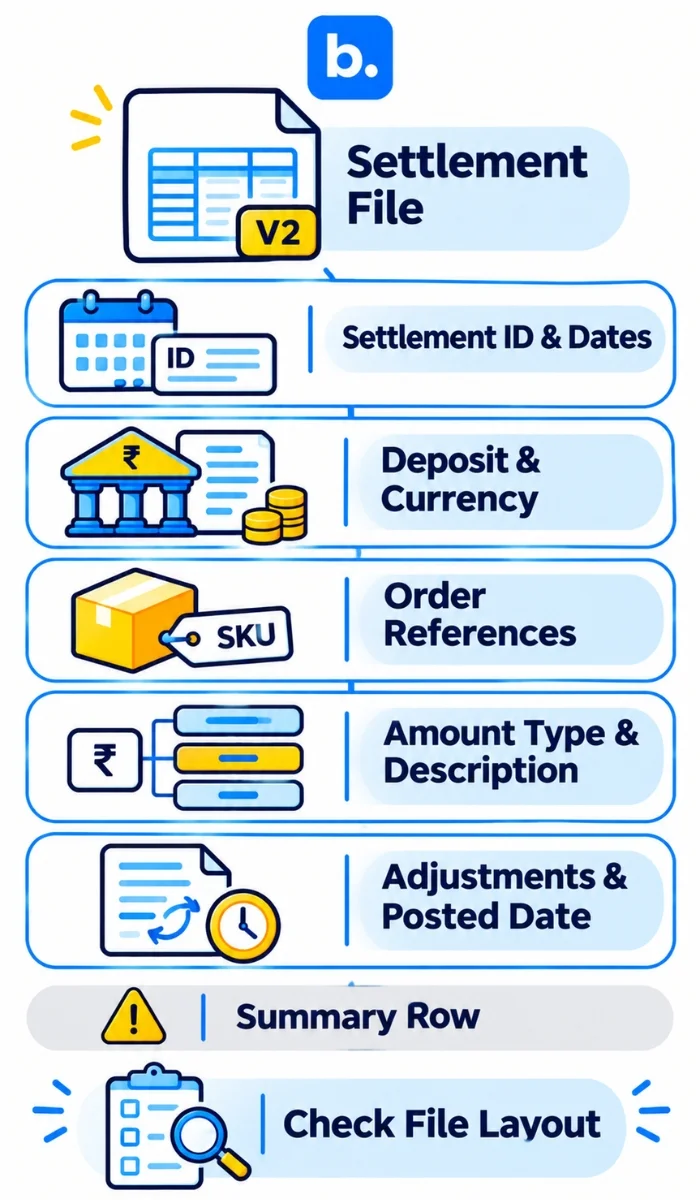
Amazon’s Selling Partner API (SP-API) documentation describes the Flat File V2 settlement report as a tab-delimited file that replaces the older flat-file and XML settlement report formats. The documentation provides the field reference, not a copy of your own Seller Central download. Check the headers and row layout in your downloaded report before importing.
| Field or group | What it tells you | Keep in mind |
|---|---|---|
| settlement-id, settlement-start-date, settlement-end-date | Settlement and period | Carry the ID into your working paper. |
| deposit-date, total-amount, currency | Payout control | Match it to the bank; keep currencies separate. |
| transaction-type | Type of activity | Read the values in your file; do not assume a fixed list. |
| order-id, merchant-order-id, order-item-code, merchant-order-item-id, sku, quantity-purchased | Order or item reference | Non-order lines may have no order ID. |
| adjustment-id, shipment-id, merchant-adjustment-item-id | Adjustment or shipment references | Check these when an order link is absent. |
| amount-type, amount-description, amount | Category, detail and value | Keep the three together; an amount alone says little. |
| posted-date, posted-date-time, marketplace-name, fulfillment-id, promotion-id | Timing and context | Useful for investigation, not a substitute for supporting records. |
The amount-type and amount-description fields are generic and can be used for new fees or transaction types. Ensure you use the labels in your downloaded report to classify each and leave any unknown values. Amazon states that amounts use local currency formatting. Check the decimal and thousand separators in your downloaded file before calculating or importing values.
An empty order-id doesn’t necessarily mean there is no transaction. This could be an orderless charge, chargeback, reserve change or adjustment. Check to see if there is a settlement, adjustment, shipment and item reference.
Import the file as tab-delimited text. If your download includes a separate summary row, leave it out of the detail calculation. Check the layout, currency and sign conventions before comparing detail with total-amount. If a difference remains, investigate it; do not plug it with “miscellaneous.”
Keep order and return records, fee/tax documents and the bank statement beside the report. See Amazon’s Flat File V2 reference for the documented field names. Confirm tax treatment with a CA.
Amazon settlement report reconciliation: eight steps from report to ledger
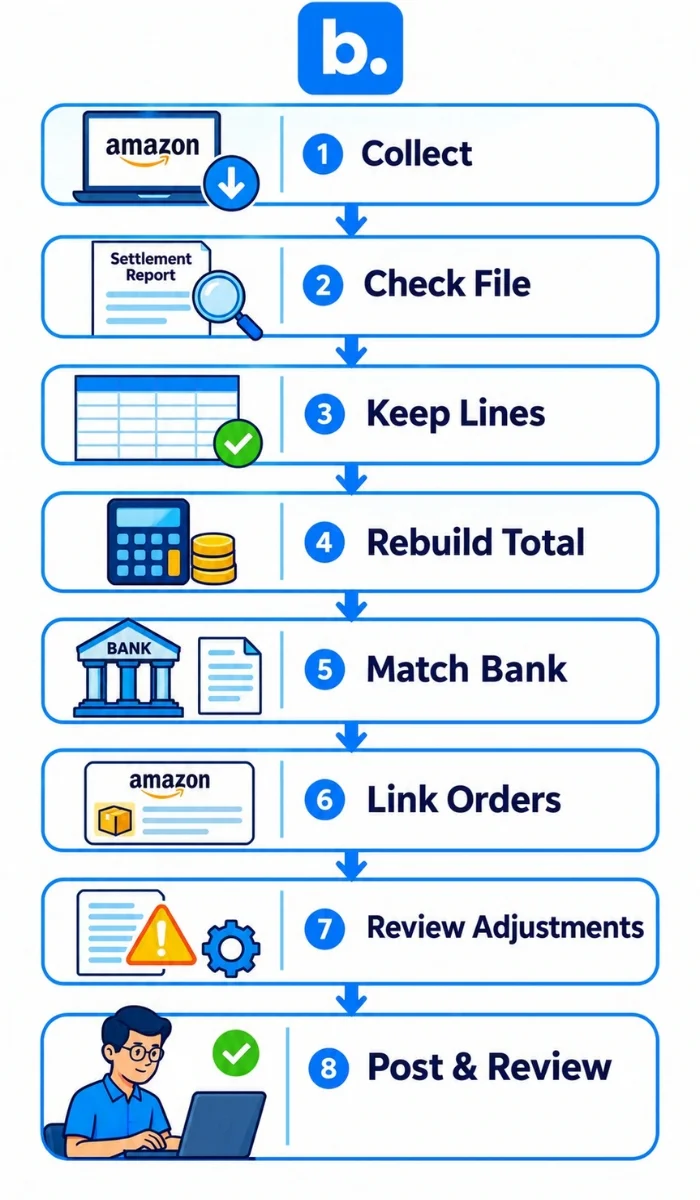
Collect records
Save the original settlement file. Gather the bank statement, order and return data, and relevant fee or tax documents.
Check the file
Confirm ID, dates, currency, headers and row layout. Note source and imported row counts; exclude any summary row from detail calculations.
Keep every line
Preserve raw fields. Add mapping, reference, status and reviewer columns, then classify from the report’s own values.
Rebuild the total
Compare the sum of the detail lines with the settlement’s total amount. Check positive and negative movements separately, and investigate any remaining difference instead of plugging it.
Match the bank
Compare the settlement total with the statement credit. Deposit date is a clue, not proof. Assign timing differences between an owner and follow-up date.
Link orders
Match sales and refunds using available IDs, SKU, quantity and dates. One order can have several settlement lines.
Review other lines
Use adjustment, shipment and item references. Keep unresolved amounts visible with evidence, owner and next date.
Post and review
Record approved activity through a clearing account, compare the ledger with the bank and arrange a second review.
A clearing account temporarily holds amounts processed by Amazon but not yet deposited. Record sales and deductions there, then clear the payout when the bank credit arrives.
Amazon payment reconciliation: worked example and journal entries
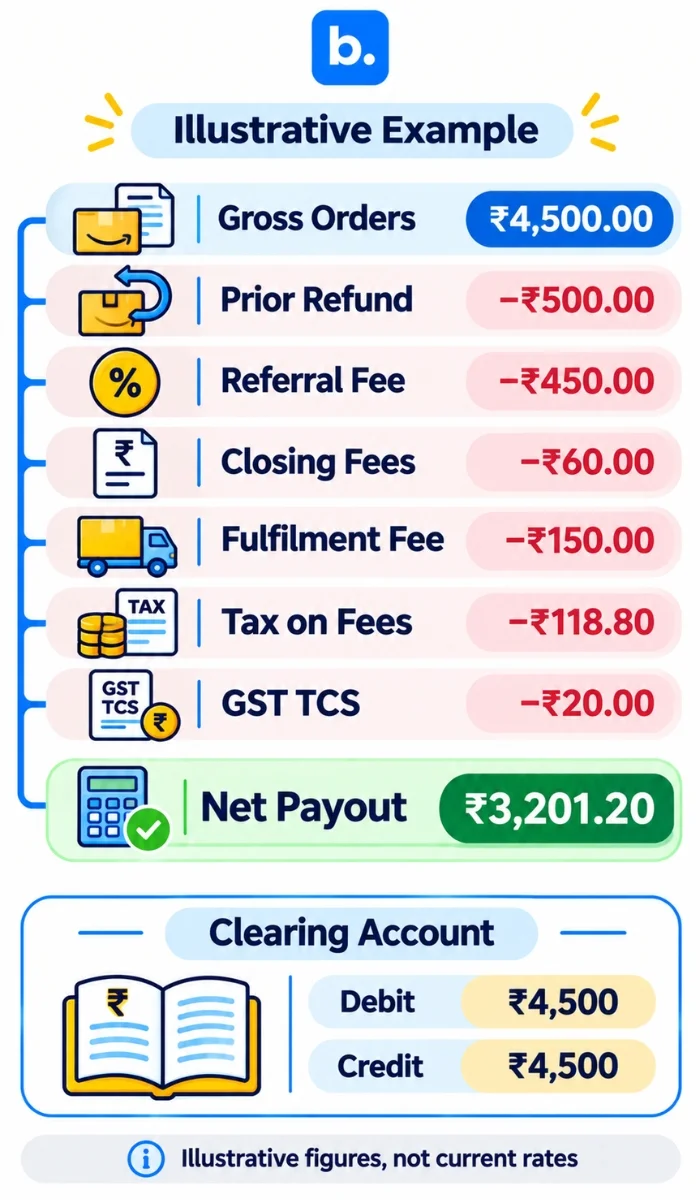
These figures are illustrative, not current fee or tax rates: ₹4,500 gross orders, a ₹500 prior-period refund, ₹450 referral fee, ₹60 closing fees, ₹150 fulfilment fee, ₹118.80 tax on fees and ₹20 GST TCS.
| Settlement movement | Amount (₹) |
|---|---|
| Gross orders | 4,500.00 |
| Prior-period refund | (500.00) |
| Referral fee | (450.00) |
| Closing fees | (60.00) |
| Fulfilment fee | (150.00) |
| Tax on fees | (118.80) |
| GST TCS withheld | (20.00) |
| Net payout | 3,201.20 |
₹4,500 − ₹500 − ₹450 − ₹60 − ₹150 − ₹118.80 − ₹20 = ₹3,201.20. The GST TCS illustration uses 0.5% of ₹4,000 after the ₹500 refund. Link the refund to its original order. GST on the sale is omitted; use the actual tax split shown on the sales invoice.
| Entry | Debit | Credit |
|---|---|---|
| Sale | Amazon clearing ₹4,500 | Sales and applicable output-tax ledgers ₹4,500* |
| Refund | Sales returns / relevant tax adjustment ₹500 | Amazon clearing ₹500 |
| Fees and fee tax | Fee expenses ₹660; eligible input-tax ledger ₹118.80* | Amazon clearing ₹778.80 |
| GST TCS | GST TCS receivable ₹20 | Amazon clearing ₹20 |
| Bank payout | Bank ₹3,201.20 | Amazon clearing ₹3,201.20 |
Split the sale and fee entries between the relevant accounts and tax ledgers using the actual invoices and the CA-approved accounting method. GST TCS is not a selling cost. Income-tax TDS should be recorded in a separate ledger if applicable.
The clearing account now balances:
- Debit: ₹4,500
- Credit: ₹500 + ₹778.80 + ₹20 + ₹3,201.20 = ₹4,500
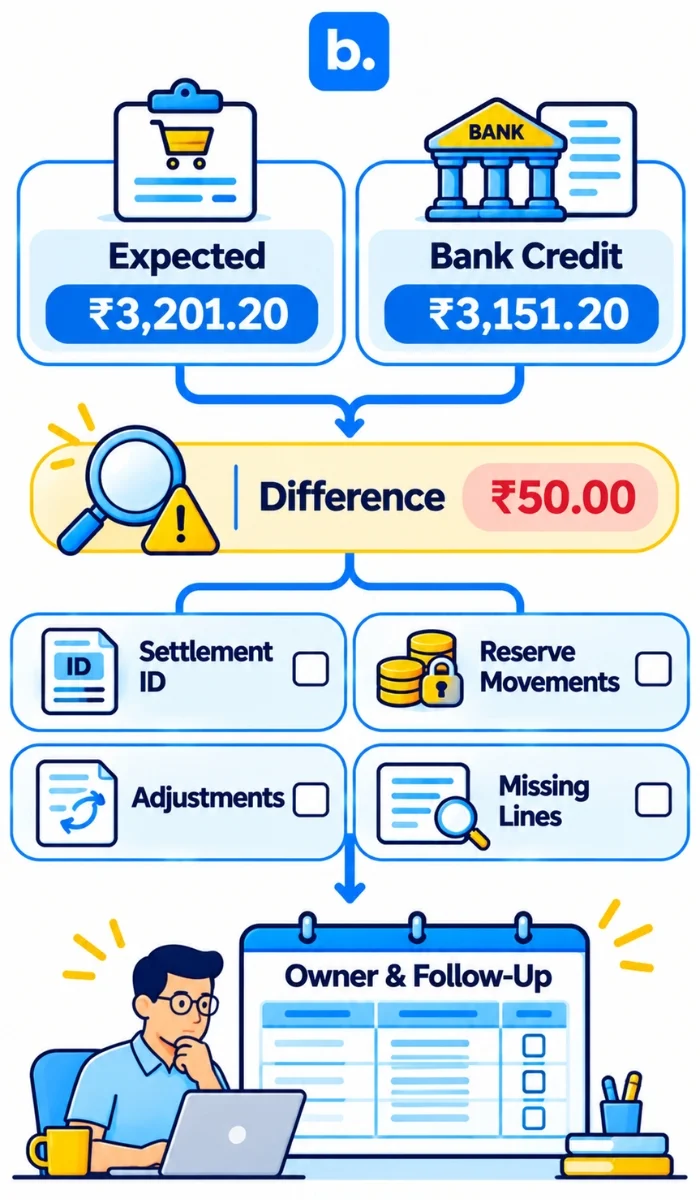
If the expected settlement payout is ₹3,201.20 but the bank statement shows a credit of ₹3,151.20, the difference is ₹50. Investigate this before making any adjustment. Check the bank narrative, date, settlement number and currency. Review the settlement report for reserve movements, adjustments, partial credits or missing or duplicate lines. Record the difference with supporting evidence, an assigned owner and a follow-up date. Do not assume that it is an Amazon fee or write it off without investigation.
Reconcile Amazon returns, adjustments and reserves
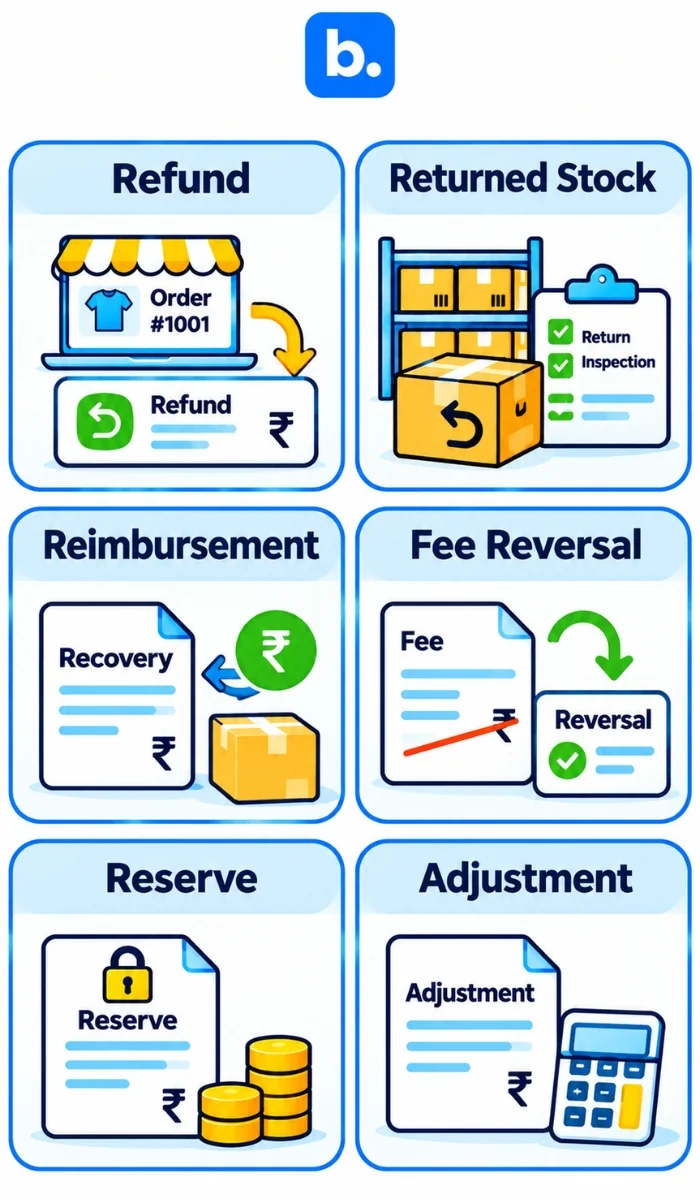
| Item | What to trace | Accounting check |
|---|---|---|
| Refund | Original order and settlement where it appears | Link the cash movement to the sale and apply the right return/tax treatment. |
| Returned stock | Return record and physical disposition | A refund does not prove the item came back in sellable condition. |
| Reimbursement | Adjustment/shipment reference and support record | Review the recovery account; do not book as a new sale. |
| Fee reversal | Original fee and reversing line | Check period and sign; avoid counting it twice. |
| Reserve | Amount and any later release shown | Keep open until released or explained. |
| Other adjustment | IDs, description and evidence | Assign an owner; do not write off an unsupported line. |
Keep an open-item register by settlement ID: amount, reference, owner, next action and closure evidence. That makes refunds and reserves carried across periods easier to follow.
Post Amazon settlement entries to TallyPrime or Zoho Books
Account names depend on your chart of accounts. Map sales to the invoice and tax setup, refunds to returns or credit notes, and fees to reviewed expense accounts. Keep tax on fees, GST TCS and income-tax TDS separate, then clear the payout to bank.
A summary journal can hide missing lines. Keep the transaction-level file and bridge to orders, fee/tax documents and open items. Order-by-order posting still needs a separate check of non-order fees and adjustments.
Amazon and Flipkart with TallyPrime: base.com supports order processing and invoice workflows for connected marketplaces, with invoice forwarding to TallyPrime through the relevant integrations. These workflows can help keep sales documents connected to accounting records. Settlement reconciliation still requires a separate review of marketplace deductions, tax balances, adjustments and bank credits.
Zoho Books integration: base.com supports forwarding invoices created in the system to Zoho Books, downloading invoices from Zoho Books and synchronising selected product, stock and price information. These are accounting and operational data workflows, not proof of automatic Amazon settlement reconciliation.
Amazon seller payment reconciliation across several channels
With Amazon, Flipkart and Shopify, reconcile each payout stream to its own records before combining results in the ledger. The control is similar; the reports and deductions differ.
| Channel | Records to compare | Common difference |
|---|---|---|
| Amazon | Settlement report and bank credit | Refunds across periods, fees, reserves, adjustments and tax lines. |
| Flipkart | Seller payment records and bank credit | Deductions, returns and timing; check current report fields. |
| Shopify with a gateway | Store orders, gateway statement and bank credit | Gateway fees, refunds, chargebacks and payout timing. |
| COD courier | Delivered orders, remittance statement and bank credit | RTOs, courier charges and split remittances. |
This is marketplace payment reconciliation at channel level: match each payout to its own records, then post to the common books. See payment reconciliation for online sellers and managing ecommerce channels in one dashboard.
Where an OMS fits into Amazon reconciliation
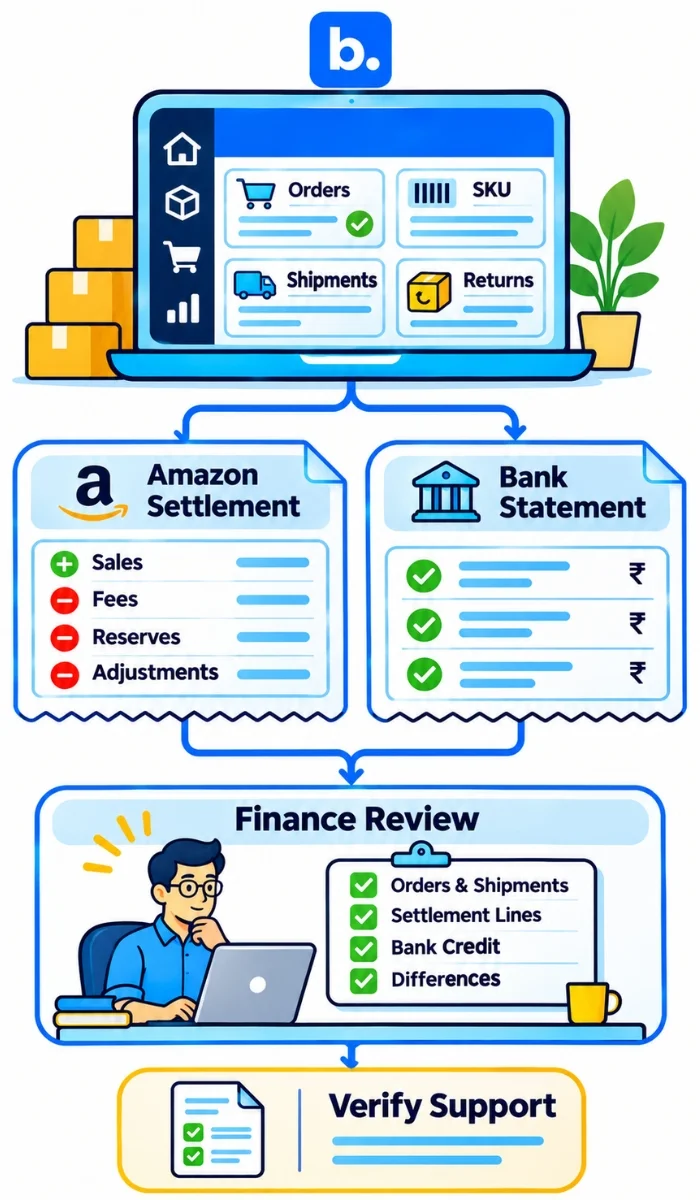
An order management system (OMS) brings connected-channel orders and fulfilment into one workflow. It can give finance order, item, shipment and return context, depending on the connector and setup.
What changes when you start with the order
Starting from an order can help identify its ID, SKU, quantity and shipment context before posting. It does not replace the settlement report: account-level fees, reserves and adjustments still need review, and only the bank statement proves the deposit.
base.com Order Manager supports connected-channel order processing, shipment creation and tracking, and invoice generation and forwarding to supported accounting services. These workflows provide order and invoice context for finance teams, while Amazon settlement fees, reserves, adjustments and bank credits must still be reconciled against the settlement report and bank statement.
Amazon payment reconciliation software: what to check
Look for a payment reconciliation system that shows the source line, mapping, match status, open items and reviewer. Ask vendors to test your report, including awkward cases, not just a clean sale.
| Option | May suit | Keep this control |
|---|---|---|
| Spreadsheet | Low volume and one reviewer | Raw file, formulas, versioned mapping and review. |
| Accounting import | Ledger entry is the bottleneck | Check detail survives and clearing entries are supported. |
| Reconciliation software | Many settlements or repeat exceptions | Test unknown values, duplicates, refunds, non-order lines and audit trail. |
| OMS with accounting | Order, shipment and finance records need to connect | Confirm exactly which settlement and bank data flow. |
Before buying, ask whether it reads tab-delimited V2 and retains the source file; keeps the three amount fields together; flags unfamiliar values; handles summary rows, multi-line orders and older refunds; leaves non-order lines visible; maps GST TCS and income-tax TDS separately; and posts through clearing with approvals in TallyPrime or Zoho Books. Ask for a mapping-change log too.
If a vendor cannot explain an unmatched line without hiding it in “other,” ask for a live test before you commit.
Common Amazon reconciliation mistakes
| Mistake | Better approach |
|---|---|
| Posting the deposit as sales | Record gross activity and deductions, then clear the payout. |
| Matching by amount alone | Use settlement ID, currency, dates and available identifiers. |
| Treating every line as order-related | Keep non-order lines and investigate their references. |
| Adding a summary row to detail rows | Check the layout before calculating. |
| Hard-coding fee descriptions | Flag unfamiliar values for review. |
| Combining GST TCS and income-tax TDS | Keep separate ledgers and records. |
| Writing off a small difference | Record the exception, owner and next date. |
| Treating a refund as returned stock | Reconcile cash and inventory separately. |
Five-day Amazon settlement reconciliation month-end close
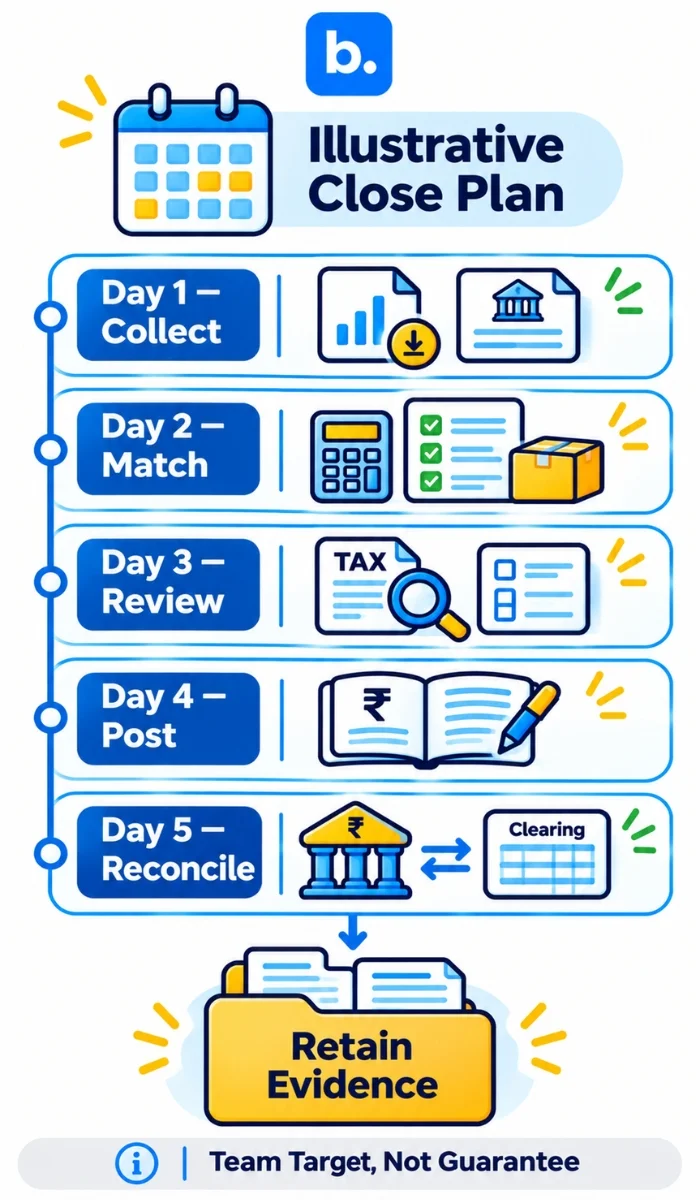
This is an illustrative finance routine, not an Amazon settlement cycle or a product promise.
| Day | Finance work | Output to retain |
|---|---|---|
| 1 | Collect settlement reports, bank statements, order data and supporting documents. | Original settlement files and source records |
| 2 | Rebuild settlement totals and match orders, fees and refunds. | Settlement calculation and order-matching file |
| 3 | Review GST TCS, income-tax TDS, returns, reserves and adjustments. | Tax working papers and exception register |
| 4 | Post approved entries to the accounting ledger and review clearing movements. | Journal references and ledger extract |
| 5 | Reconcile the clearing account with bank credits and review unresolved items. | Settlement-to-bank bridge and signed-off open-item list |
At close, retain a settlement-to-bank bridge, ledger references and an exception list with supporting evidence, owners and follow-up dates. Archive the original report so another reviewer can reproduce the calculations. A five-day close is a team target, not a guarantee.
Conclusion
Keep settlement lines, order records and bank credit connected. Leave non-order fees visible, investigate differences rather than plugging them, and post through clearing. GST TCS and income-tax TDS belong in separate balances; check treatment with a CA. The deposit completes the bridge; it does not replace it.