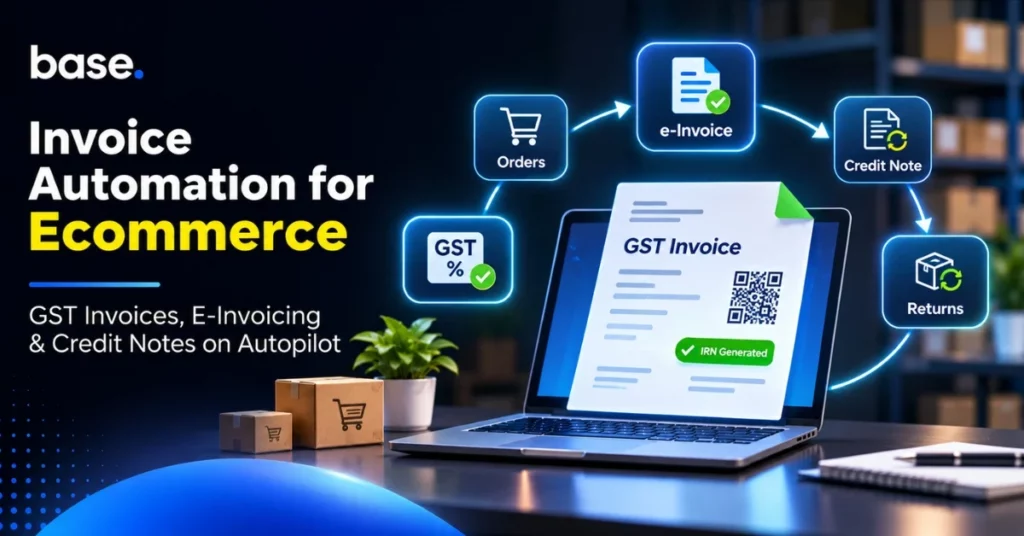
GST e-invoicing for ecommerce sellers is not just about creating a PDF after an order is placed. Sellers must have accurate order and tax data, a properly issued GST invoice, and, if the e-invoicing mandate applies, the details of the invoice must be reported to an authorised Invoice Registration Portal (IRP) to receive an Invoice Reference Number (IRN) and a signed QR code. For high-volume sellers, it may also be necessary to connect invoices to marketplace orders, returns, cancellations and credit notes, and maintain accounting consistency.
This guide will help you understand the difference between a normal GST tax invoice and an e-invoice, which is generally covered by the current mandate, and how an ecommerce invoicing workflow can be organised. It also separates the operational work an order platform can perform from statutory reporting and tax functions which need to be performed by an appropriate accounting, ERP or e-invoicing solution.
So, what is invoice automation for ecommerce businesses?
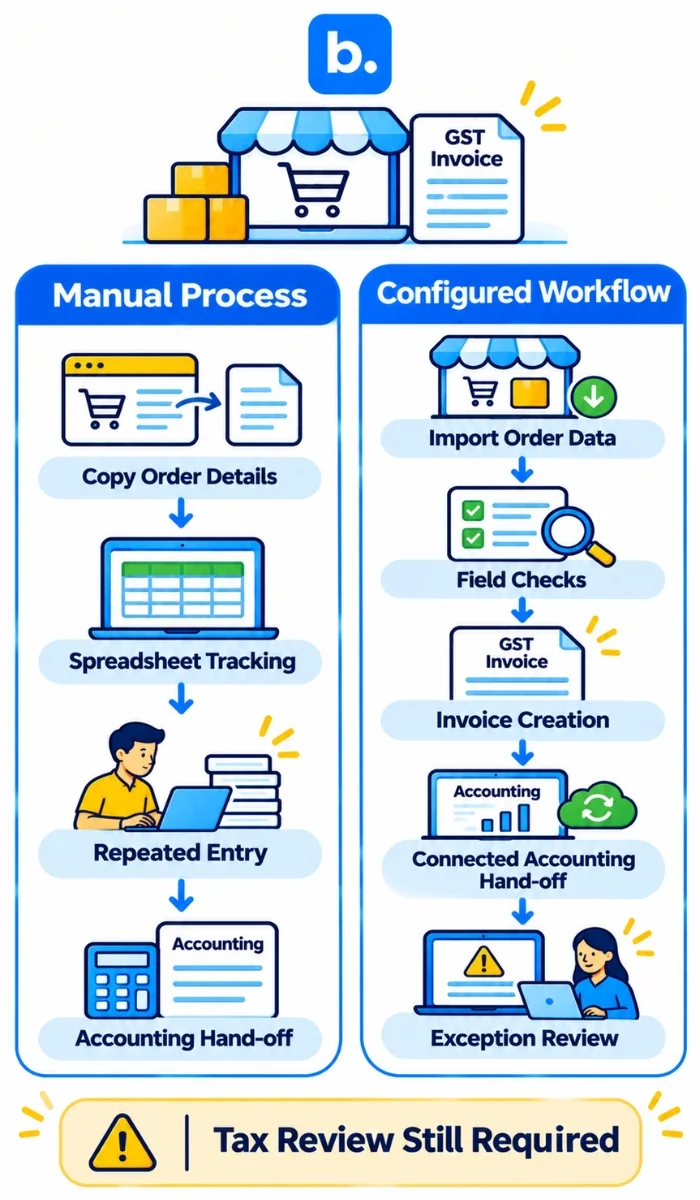
Invoice automation is a process that involves software and a set of steps to create, send, save, and reconcile sales documents with minimal manual effort. The source information can come from a marketplace, a D2C store, a point-of-sale system, or a manually entered order for an ecommerce seller. The invoicing process then leverages the configured customer, product, price and tax information to generate the correct document and to send the relevant information to accounting.
Automation can minimize rekeying and simplify order-to-invoice records. It does not determine a seller’s tax treatment or render incorrect source data compliant. The seller is responsible for setting up and checking its invoicing and reporting procedure with its tax or accounting professional.
A PDF invoice, an accounting entry and a GST e-invoice are not interchangeable terms. A document can be created from an order without reporting to the IRP, and accounting software can contain invoice information without performing all the necessary statutory actions.
| Automated process | Manual process |
|---|---|
| Selected order fields can be transferred to invoice creation through configured workflows, which can minimize repeated entry. | Staff re-enter order information into invoice templates, which adds repetitive tasks and the potential for mismatched records. |
| Status and document references can be stored in connected systems, subject to the integration and review process. | The status of an invoice can be monitored via email, spreadsheets and channel portals. |
Integrations supported can transfer invoice information between systems, but IRP reporting and statutory checks need to be verified.
What should be included in a GST tax invoice?
The CGST Rules, including Rule 46, specify the details of a tax invoice. The specific requirements will vary depending on the type of supply and recipient, so sellers should check with a qualified GST professional to ensure their document setup is correct. Typical invoice details include:
- Supplier name, address and GSTIN, and recipient details including GSTIN (if applicable).
- A consecutive invoice number and date.
- Description of goods/services, HSN or SAC details (if applicable), quantity and unit.
- Total and taxable value, applicable tax rate, tax amount, and place of supply information for inter-State supplies.
- Details of delivery, reverse charge indication and other specific information if applicable to the transaction.
Product tax codes, customer GSTINs, state details and invoice numbering should be kept in source systems and audited periodically. If you are looking for a more in-depth look at invoicing in India, check out the article on Why GST-Compliant Invoicing Is Important for Ecommerce Retailers in India. To get more context on the seller side GST responsibilities, refer to GST Compliance for Sellers from India.
GST e-invoicing – What is it and who is required to do it?
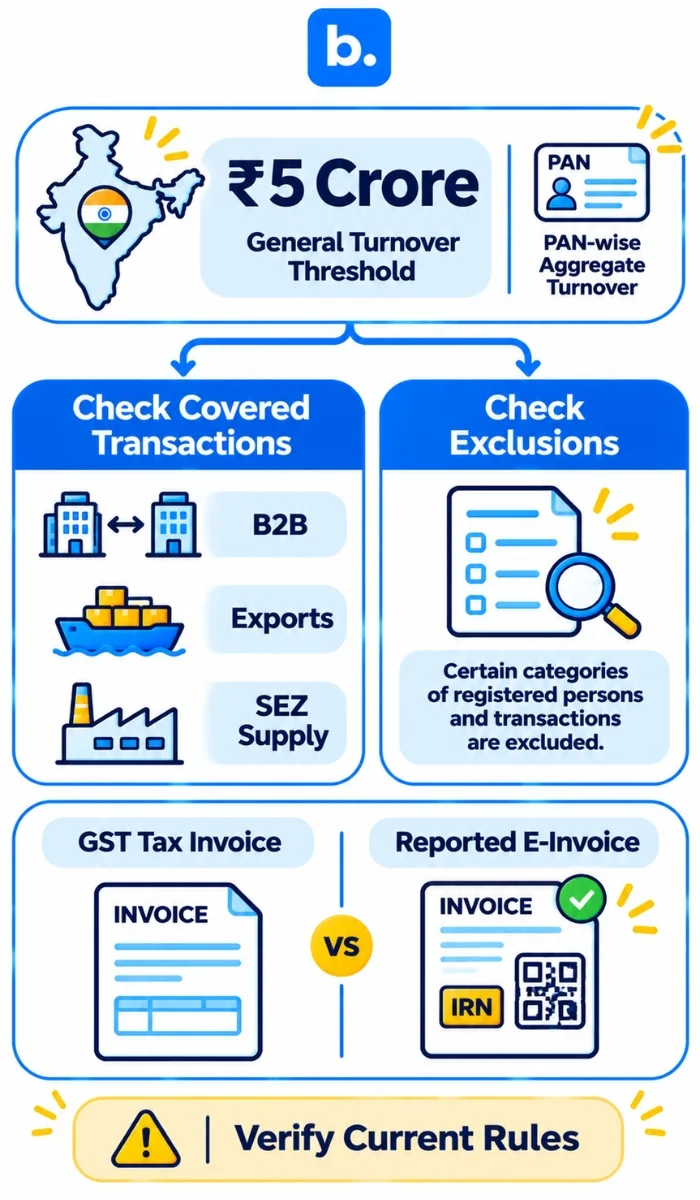
GST e-invoicing is a mechanism for reporting certain information on an invoice to an authorised IRP. The IRP validates the submitted data and, if accepted, returns an IRN and a digitally signed QR code for the reported document. It does not imply that all the invoices have to be generated from a government website, nor does the mere creation of a PDF constitute e-invoicing.
The current general threshold is that e-invoicing is applicable to a registered person whose aggregate turnover was ₹5 crore or more in any preceding financial year from 2017–18 onwards, subject to notified exclusions and transaction rules. The aggregate turnover is computed on an all-India basis PAN-wise. The threshold is not just a registration threshold for one store or GST registration. Taxpayers should verify their status and any exemption with their tax adviser and current CBIC/GSTN notifications before relying on this general summary.
The mandate generally covers specified documents for supplies such as B2B transactions, exports and supplies to SEZs, as prescribed. It does not normally apply to regular B2C invoices via the same IRN process; there are other provisions, such as QR code requirements in some cases. The notifications exclude certain classes of registered persons, such as specified financial institutions, insurers, goods transport agencies, passenger transport or multiplex services, and SEZ units. The exclusions are technical and may change. Refer to the current notification for the specific category and conditions.
| GST e-invoice | Regular GST tax invoice |
|---|---|
| An invoice with prescribed data that is reported to an authorised IRP, where the e-invoicing mandate applies. | A tax document issued in accordance with the GST rules for a taxable supply. |
| After successful IRP reporting, the document has an IRN and a signed QR code in the prescribed format. | Must include specific information as per the GST rules for the transaction. |
| The invoice can be represented as a PDF or printed document containing the required IRN and QR code. | The invoice format may be a PDF or a printed invoice, depending on the rules. |
The mere existence of a PDF is not proof of IRP reporting and IRN generation.
The turnover threshold and coverage outlined here are general guidance, not a determination for a specific seller.
What is the process of generating IRN and QR code?
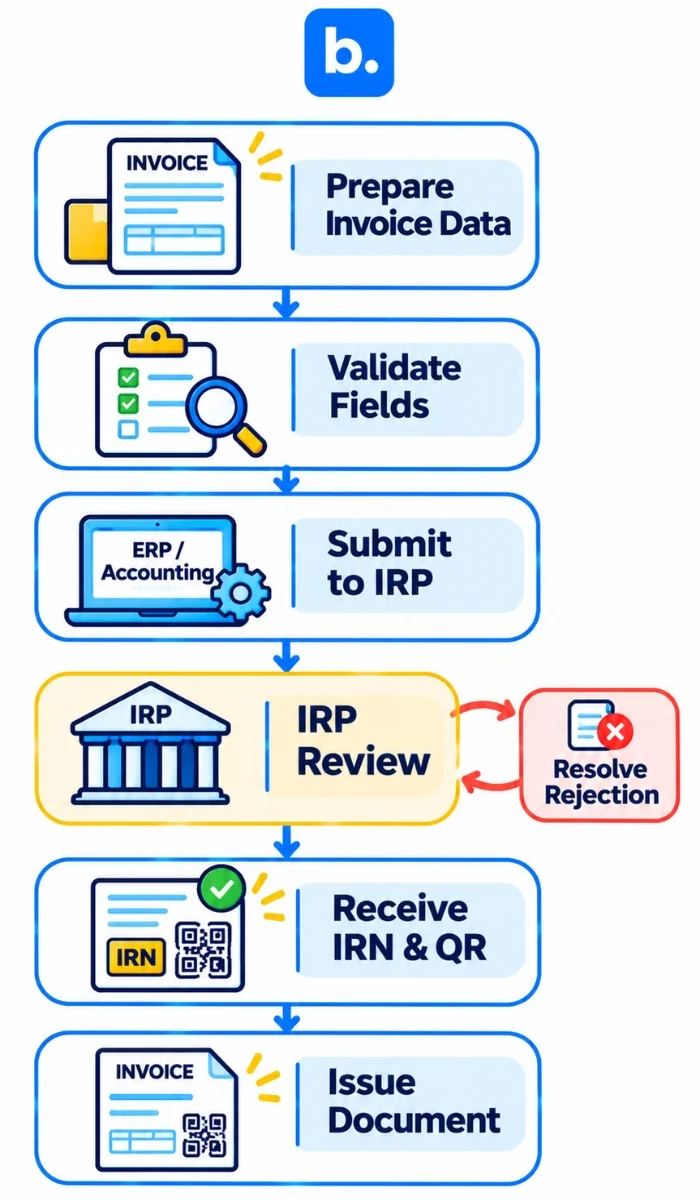
For a covered transaction, the seller’s billing, accounting or ERP system prepares the invoice data in the required schema and submits it to an authorised IRP, directly or through a compatible integration. If accepted, the IRP returns an IRN and signed QR code. The supplier then adds the required information to the invoice sent to the recipient.
- Ensure that the supplier, transaction type and document type are covered by the existing e-invoicing obligations.
- Create the invoice in the accounting, ERP or billing system with the necessary information and check important fields before sending.
- Report to an authorised IRP via the configured software or integration.
- Accept and keep the IRN and signed QR code sent back from the IRP and add them to the document issued as required.
- Compare the invoice with the order, accounting entry and any subsequent amendment, cancellation or credit note.
The GSTN advisory states that taxpayers having an annual aggregate turnover of ₹10 crore or more will have to report covered e-invoices within 30 days of the invoice date from 1 April 2025, and this will also apply to credit and debit notes for which an IRN is required. The IRP will not accept reports outside the reporting window. Sellers should check if this restriction applies to their turnover and ensure that their system configuration is up to date.
What is the process of invoice automation in ecommerce channels?
The order-to-invoice workflow may vary by channel. Some marketplaces produce or supply documents themselves, while some seller workflows produce documents from imported orders. The seller should determine who is responsible for producing each document and how a copy of it, its reference number and tax information are sent to accounting.
- Marketplace: import order details and identify if the marketplace or the seller is responsible for issuing the relevant invoice. Avoid creating a duplicate document.
- D2C store: push order and customer data to the seller’s set up invoicing workflow and sync the generated invoice to accounting.
- Wholesale or B2B: verify the buyer details, GSTIN and agreed commercial terms before issuing the invoice and apply the relevant e-invoice workflow if applicable.
For a high-volume marketplace seller, it is possible to automate the generation of the invoice for eligible orders and then send the covered invoice to the seller’s e-invoicing application. A D2C brand can link its store, order tool and accounting package. In both cases, the exact steps will vary based on the sales channel, supported integration and configuration.
What should be done with credit notes, cancellations and returns?
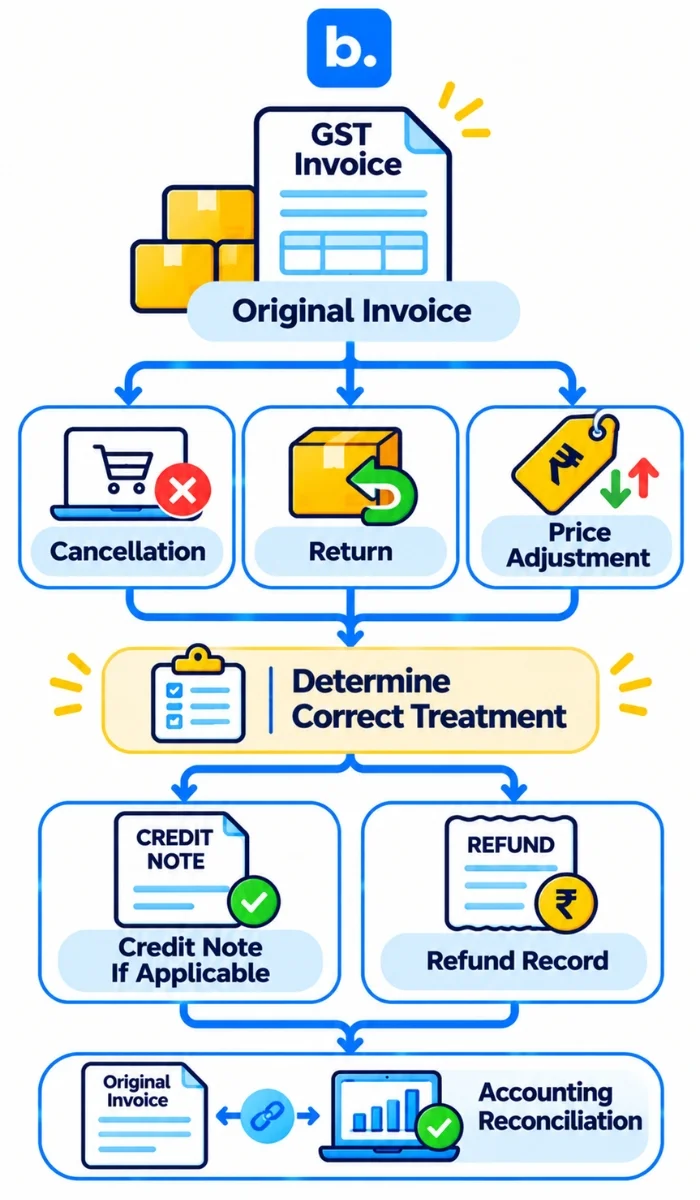
A cancellation, return, price adjustment or refund may impact the original order and the related tax and accounting records. Don’t assume that all returns result in the same document or tax result. A supplier may issue a credit note under section 34 of the CGST Act in specified situations, subject to conditions and time limits. The tax adviser of the business should decide on the appropriate document and reporting treatment for the transaction.
- Keep the original order and invoice for reference of the adjustment.
- Document the reason, date, value and relevant tax information for the return, cancellation or adjustment.
- If applicable, issue and report a credit note in the accounting/e-invoicing process. A credit note issued under the e-invoicing rules can be subject to IRP reporting and IRN.
- Maintain refund/payment records in a separate document from the tax document and reconcile to the original transaction and accounting entry.
For instance, if a customer returns a product, they may receive a refund and, depending on the circumstances and the relevant GST provisions, a credit note. The seller should keep the original invoice reference and not delete or overwrite the original invoice, but use the accounting or GST process that applies.
What is the function of accounting software and order management system?
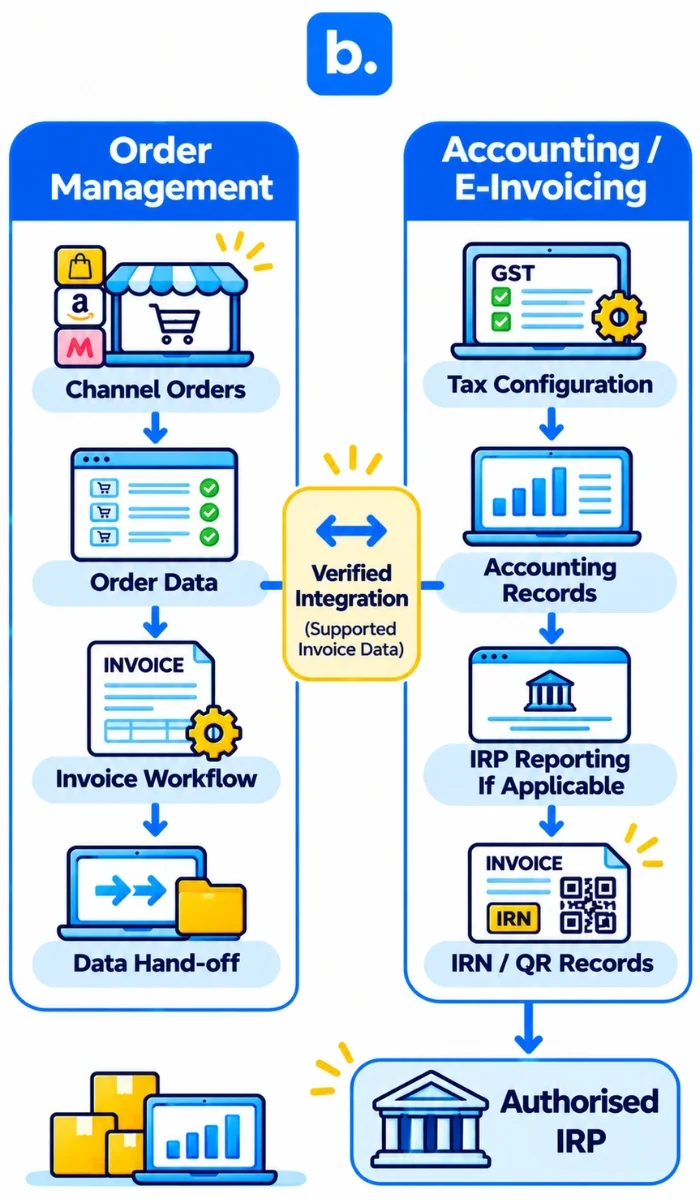
The financial and tax configuration is usually stored in an accounting, ERP or GST application, which also keeps accounting records and, if the functionality and integration of the application allows, it sends the invoice data to an IRP and stores the returned IRN/QR details. Sellers should verify the specific duties of each connected application, such as data mapping, submission status, error handling, and record retention.
An order management system is a system that manages order data across multiple channels. It can be used to help create the order and product information that is required by the invoicing process, but it is not necessarily a GST compliance or accounting system. When evaluating order management for ecommerce, look at how order management software for ecommerce integrates with the seller’s accounting automation software and other financial applications. This includes verifying the data fields and document types that the integration supports. When comparing OMS software or an OMS platform for ecommerce workflows, look at the product and its integrations rather than assuming statutory reporting is included. Payables automation is not about sales invoice automation, but about supplier-side invoices and payments.
What are the pitfalls of invoice automation for sellers?
- Considering a PDF invoice as a proof of e-invoice reporting to IRP.
- Applying an outdated turnover threshold or assuming that the turnover is tested for only one GSTIN and not PAN-wise aggregate turnover.
- Creating duplicate invoices when there is a possibility of a marketplace and seller workflow creating an invoice.
- Allowing product, customer, GSTIN, HSN/SAC or place-of-supply data to remain incomplete or out of date.
- Not keeping track of IRP rejections, reporting deadlines, credit notes and cancellations.
- Assuming an order management tool decides tax treatment, files GST returns or generates IRNs without verified ability.
Utilize pre-issue checks, exception queue and periodic sample reviews. Designate an owner for IRP errors and make sure that corrections are made in accordance with the legal and accounting procedures, not by simply overwriting records.
What are the best ways for ecommerce businesses to establish a dependable invoicing process?
- Identify each sales channel and who is responsible for issuing the invoice, reporting it to the IRP if necessary, and where the final document is stored.
- Keep accurate product tax information, seller and recipient information, GSTINs, numbering rules and channel mapping. Get a qualified person to review the tax configuration.
- Only link order management to accounting or e-invoicing software once you have verified supported fields, document types, submission obligations and error handling.
- Scale automation after testing normal orders, B2B and export cases (if applicable), duplicate events, cancellations, returns and credit notes.
- Track invoice creation, IRP acknowledgement/rejection, IRN/QR attachment and accounting synchronisation. Reconcile exceptions and retain evidence.
- Check system settings and compliance requirements when business turnover, transaction types, integrations or GST rules change.
A reliable workflow automates repeatable data movement and maintains clear human review for tax decisions, exceptions and statutory responsibilities.
Where does base.com fit in ecommerce invoice operations?
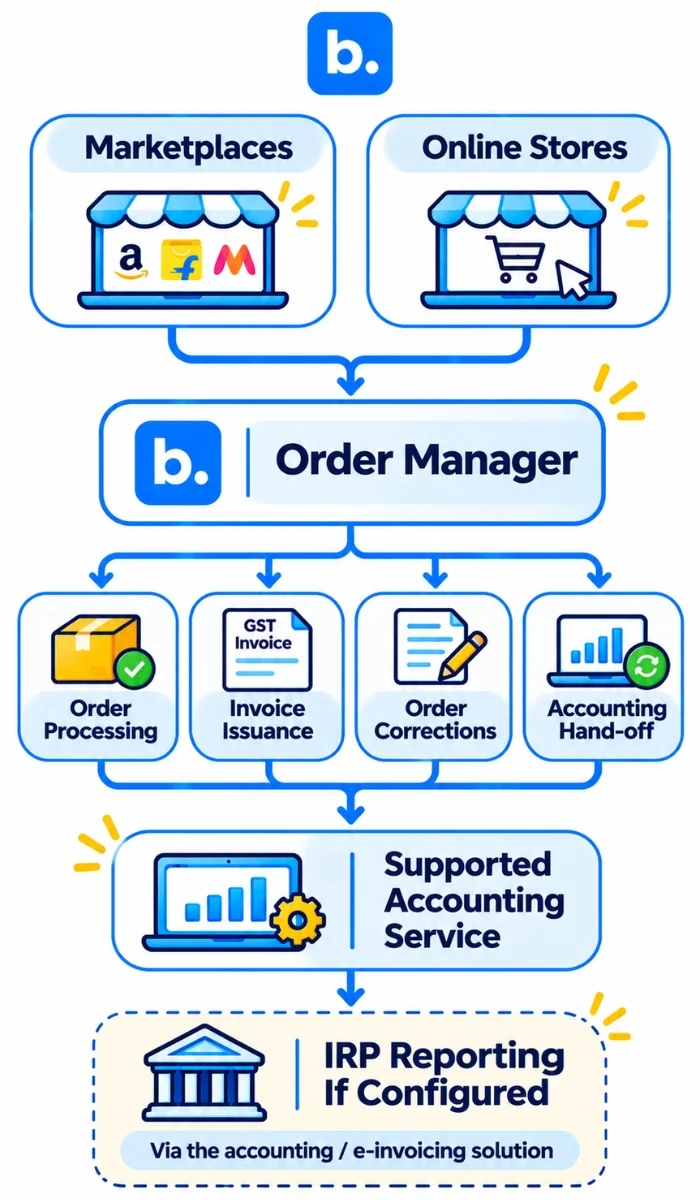
At base.com, we help ecommerce businesses organise orders from connected marketplaces and online stores. Our India Order Manager documentation describes issuing GST invoices, pro-forma invoices, receipts and order corrections individually or in bulk, including automatic actions based on configured rules. It also refers to the forwarding of invoices to supported online accounting services. These features can be used to assist in order processing and invoice data hand-offs.
Our Order Manager is an operational order and invoice workflow, not GST advice or a dedicated accounting/e-invoicing solution. The documented India product information does not establish that base.com independently submits all invoices to an IRP, generates IRNs or signed QR codes, files GST returns, validates GST compliance, or automatically generates every type of credit note. Sellers should check the capabilities of the specific connected accounting/e-invoicing integration, including which system generates and reports each document.
See our Order Manager for details of invoice issuance, corrections and accounting hand-offs. Refer to current official GST guidance alongside GST Compliance for Sellers from India; blog content does not replace official guidance or professional tax advice.
Conclusion
While invoice automation can help to streamline ecommerce order and invoice records, a GST invoice is not a GST e-invoice. Sellers should ensure that the current e-invoicing mandate is in place, ensure that the invoice data is accurate, report covered documents to an authorised IRP within the applicable deadlines, and link returns or credit notes to the original invoice. At base.com, our Order Manager can support operational order processing, invoice creation and supported accounting hand-offs. IRP reporting, statutory treatment and GST compliance remain the responsibility of the seller’s accounting or e-invoicing solution and tax adviser.