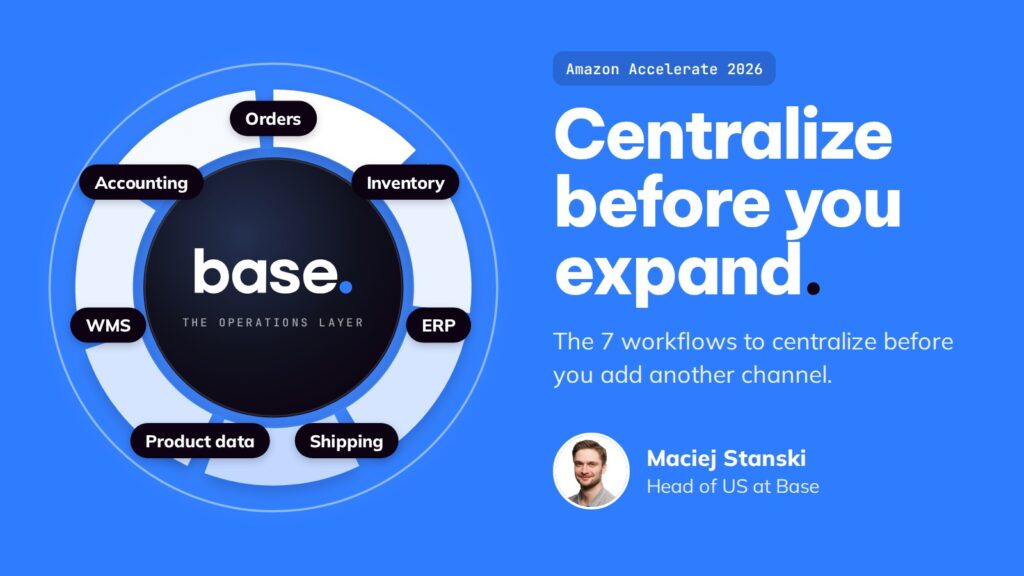

Maciej Stanski, Head of US at Base, on how Amazon sellers can expand to new channels safely.
If you sell on Amazon, you’ve probably been told to diversify by adding Walmart, TikTok Shop, or your own store. More channels should mean more revenue and less risk.
Multichannel ecommerce means selling the same products across several sales channels at once, such as Amazon, Walmart, TikTok Shop, and your own storefront. It’s good advice, but a lot of brands struggle with how they go about it.
Maciej Stanski, our Head of US, spoke about this at Amazon Accelerate 2026. In multichannel ecommerce, he explained, each new channel adds revenue but also multiplies the work. If you don’t change how your operation runs before you expand, every channel you add makes the business harder to manage, including Amazon.
Below is the framework he shared, along with two clips from the session.
Why multichannel ecommerce gets harder with every channel
On Amazon, you already handle five jobs every day: listings, pricing, stock, orders, and tracking.
When you add a second marketplace, you have to do all five again for that channel. Your Amazon listings need to be rebuilt for Walmart’s categories. Pricing has to account for two channels instead of one. Stock has to stay as close to live as possible on both, or you oversell. With a third channel, you’re doing everything three times.



This is usually where multichannel selling starts to fall apart. Maciej has worked with many Amazon brands that expanded to new channels, and it tends to go one of three ways:
The new channel gets its own team and a ring-fenced corner of the warehouse. It works at 50 orders and breaks down at 500.
Early demand is strong, but nothing adjusts inventory across channels automatically. Stock runs out in one fulfillment method and the channel stalls.
The brand hires more people and runs on spreadsheets and separate tools. Margins shrink, and the Amazon business gets less attention and starts to slip.
In each case, the new channel was added on the side instead of being built into how the business already runs. Maciej’s recommendation is to centralize first, then expand. When your core operations run in one system that works with any channel, adding a new one is mostly a matter of setup.
“You can experiment with ten new channels. Keep five of them. The other ones you drop because they didn’t work.”
Maciej Stanski, Head of US, BaseThe 7 workflows to centralize
Maciej covered seven workflows to bring together in one place. Four are daily operations, and three are back-office systems.
Orders from every channel land in one queue, whether you sell on 3 marketplaces or 20, so your team isn’t logging in to each seller portal separately. More on centralizing multichannel order management.
One stock number, shared across every channel and synced as close to live as each marketplace’s API allows. This is what keeps you from overselling.
Master each product once, then publish it to every channel in the format that channel needs, so you’re not rebuilding listings by hand.
Set carrier rules in one place and have tracking sent back to every channel automatically.
Connect the ERP you already run so inventory and order data stay current on both sides.
Pick, pack, and label from a built-in warehouse management system, or route orders to your 3PL.
Reconcile sales across channels automatically instead of stitching exports together at month end.
You don’t have to replace the systems you already use. Base connects to your existing ERP, WMS, and accounting tools so they all share the same data. If you don’t have one of them yet, it’s included in the platform.
Once these seven workflows are in one system, every new channel connects to the same setup. Adding a marketplace changes where you sell, while your back office stays the same.
Protect Amazon first
For most sellers at Accelerate, Amazon is their biggest channel. It’s where their Buy Box, reviews, and Prime customers are. New channels should add to that business without putting it at risk.
When channels are managed by hand, these three issues tend to hurt Amazon account health first:
For Amazon specifically, Maciej walked through five features you set up once and leave running: repricing driven by live competitor price monitoring, with your own rules and floors; handling time synced so promised ship dates match what your warehouse can actually do; one listing form for multiple Amazon markets; Amazon Buy Shipping as a carrier option alongside UPS, FedEx, and USPS; and Amazon MCF to fulfill your non-Amazon orders through Amazon’s network.
These run on automation rules. For example:
Active
A multichannel ecommerce strategy you can start right away
Maciej ended the talk with a three-step audit you can use to check whether you’re ready for your next channel.
If any of these are still manual, fix that before you launch the next channel.
One source of truth for inventory across channels
Order sync and routing rules per fulfillment location
Product data complete and ready for any channel
Price and promo guardrails per channel
Near real-time fulfillment status updates for every channel
ERP and accounting reconciliation automated
Amazon KPIs monitored as new channels launch
Getting these in place is the core of good multichannel ecommerce management. It also sets you up for an omnichannel strategy, because customers only get a consistent experience across channels when your operations are consistent behind the scenes.
The clips in this post are just a few minutes of the fifteen-minute session. The full talk includes the Amazon automation walkthrough, the listing management demo, and the complete expansion checklist.
Frequently asked questions
What is multichannel ecommerce?
Multichannel ecommerce means selling the same products across several sales channels at once, such as Amazon, Walmart, TikTok Shop, and your own storefront. Each channel brings new customers, but each also adds its own listings, pricing, stock, and order work.
What should you centralize before adding a new sales channel?
Start with inventory, product data, and orders, since they cause the most damage when they drift. Then connect shipping, your ERP, warehouse management, and accounting so every channel runs on the same data.
How do you protect Amazon performance when selling on other channels?
Keep one shared stock count synced to every channel, set price and promo rules per channel, and write tracking back to Amazon automatically. Then watch your Amazon KPIs as each new channel launches.
What is the difference between multichannel and omnichannel ecommerce?
Multichannel means selling on several channels. Omnichannel means giving customers one connected experience across them. A centralized multichannel operation is what makes an omnichannel strategy possible.