Running a WooCommerce store in India comes with its own operational challenges like orders, couriers, multi-warehouse stock, marketplace syncing, packaging, invoicing, COD orders, and customer communication. Base.com centralizes all these tasks under one platform, allowing you to automate your backend completely.
This guide explains step-by-step how to connect WooCommerce with Base.com, manage orders, automate courier assignment, sync products and stock, handle multi-warehouse fulfillment, manage customer support, create branded invoices, and scale your operations.
Why Base.com Is the Best Choice for Indian WooCommerce Sellers?
Before we get into the setup, it’s important to understand why thousands of Indian D2C and omni-channel sellers prefer Base.com over basic WooCommerce plugins.
Base.com goes far beyond ordinary inventory plugins. It acts as a complete OMS + WMS + Courier + Invoice + Marketplace Hub built for Indian businesses.
Key Advantages for Indian WooCommerce Stores
- Unified order management across WooCommerce, Amazon, Myntra, Flipkart, Ajio, and more.
- Real-time stock sync across multiple warehouses and channels to prevent overselling.
- Smart courier automation with rules for weight, pincode, SKU, warehouse, and COD.
- Automatic packaging workflows with pick-pack dashboards and bulk shipping label generation.
- Professional invoice generation, GST compliance, and integrations with TallyPrime and Odoo.
- Customer support tools, ticketing, email/SMS notifications, and automatic tracking updates.
- Reliable plugin and API stability unlike many WooCommerce marketplace plugins which break after updates.
This is especially useful if you sell PAN-India across cities like Bengaluru, Mumbai, Delhi, Chennai, Hyderabad, Pune, and Kolkata.
Step-by-Step Integration Guide for Indian WooCommerce Stores
The integration has two parts:
(1) Connecting WooCommerce to Base.com
(2) Installing the Base.com WooCommerce plugin
Below is a detailed walkthrough that a seller can follow without technical expertise.
Connecting your WooCommerce store with Base.com gives you a unified place to manage orders, stock, prices, shipping, and marketplace operations across India. Use this guide to set up the integration the right way from the start.
1. Start the Integration from Your Base.com Panel
- Log in to your Base.com seller panel.
- Go to Integrations on the left menu.
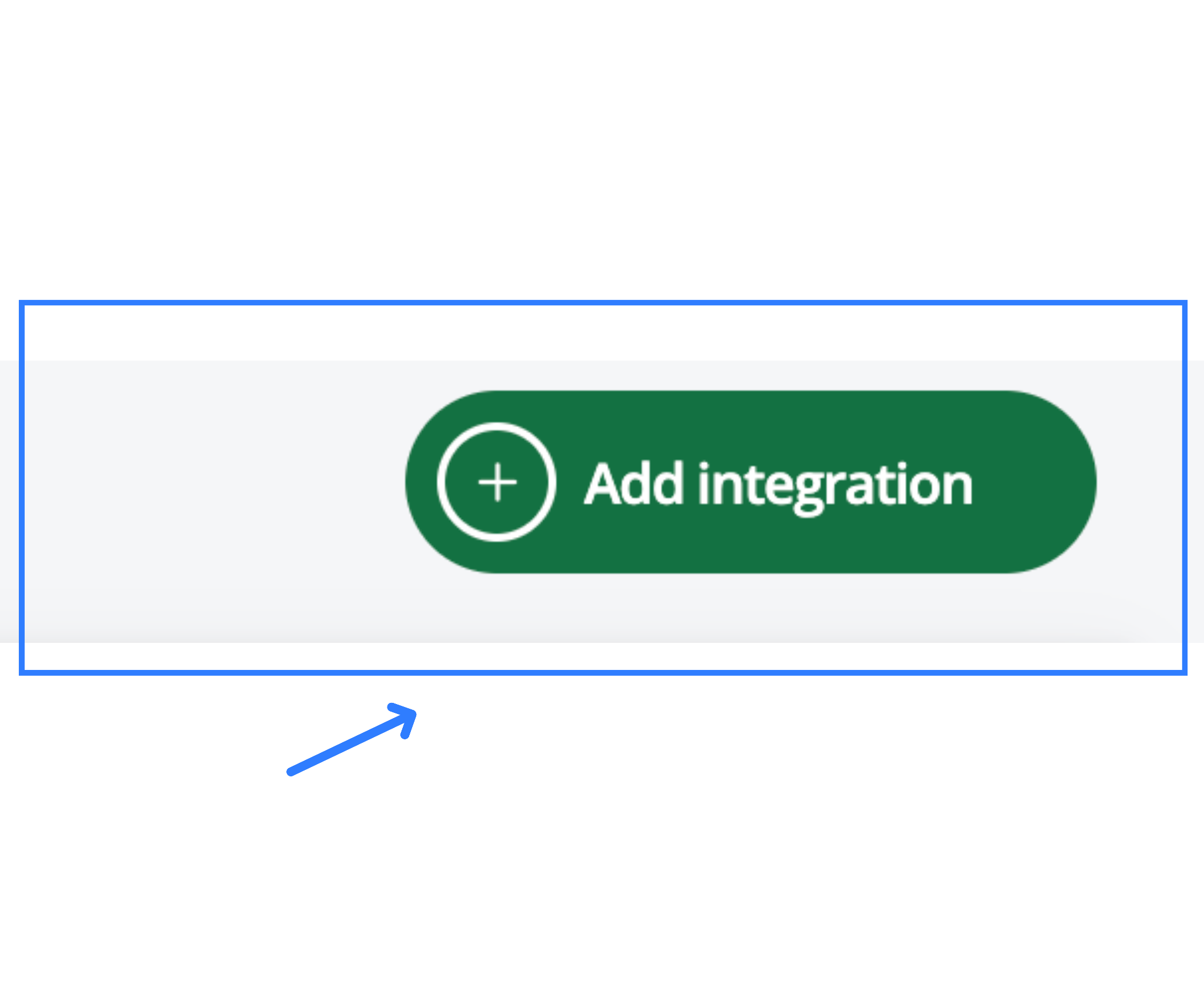
- Click + Add Integration.
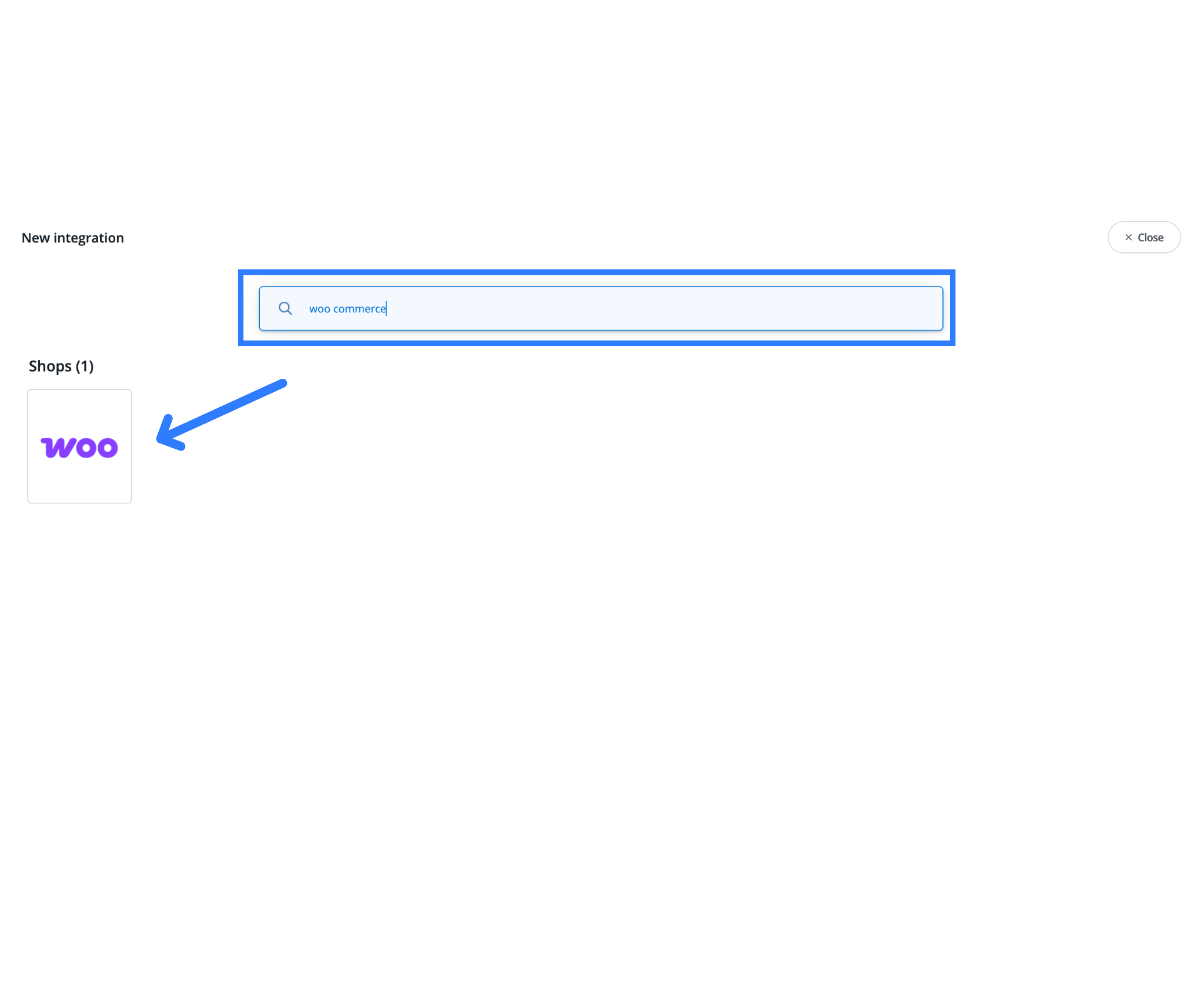
- Search for WooCommerce and select it.
2. Enter Your Store Details
You will now see a setup form.
Fill in:
Display Name (max 15 characters)
This is only for your reference inside Base.com. Examples:
- myshop.in
- trendhub
- fashionstore
Shop Address
Enter your root domain without http:// or https://.
Correct: myshop.in
Incorrect: https://myshop.in, http://myshop.in/shop
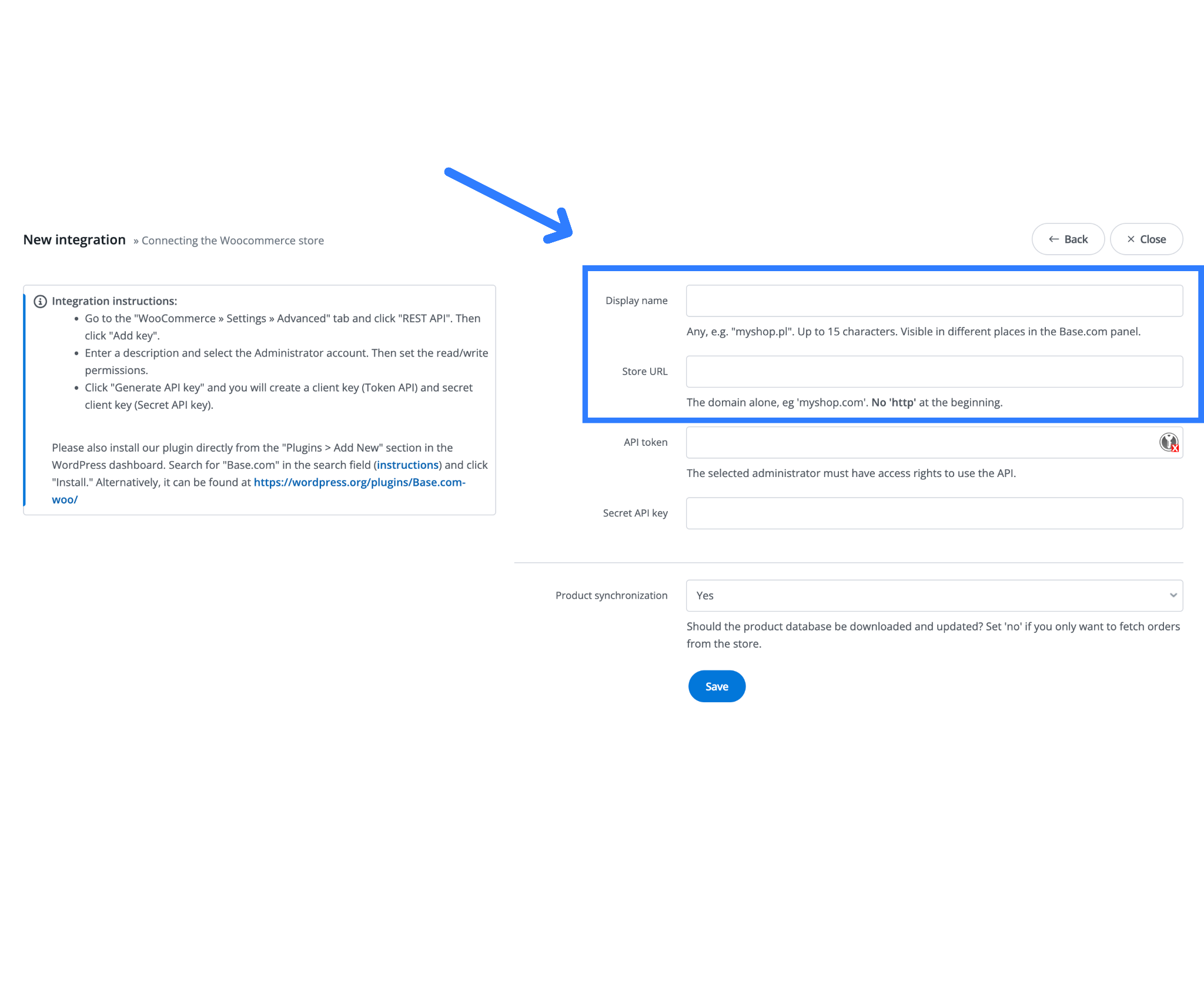 This helps Base.com connect to your site through the WooCommerce REST API.
3. Generate REST API Keys from WooCommerce
Now switch to your WordPress admin panel.
- Go to WooCommerce → Settings → Advanced → REST API.
- Click Add Key.
- Add a description like Base.com Integration.
- Select an Administrator user.
- Set Permissions → Read/Write.
- Click Generate API Key.
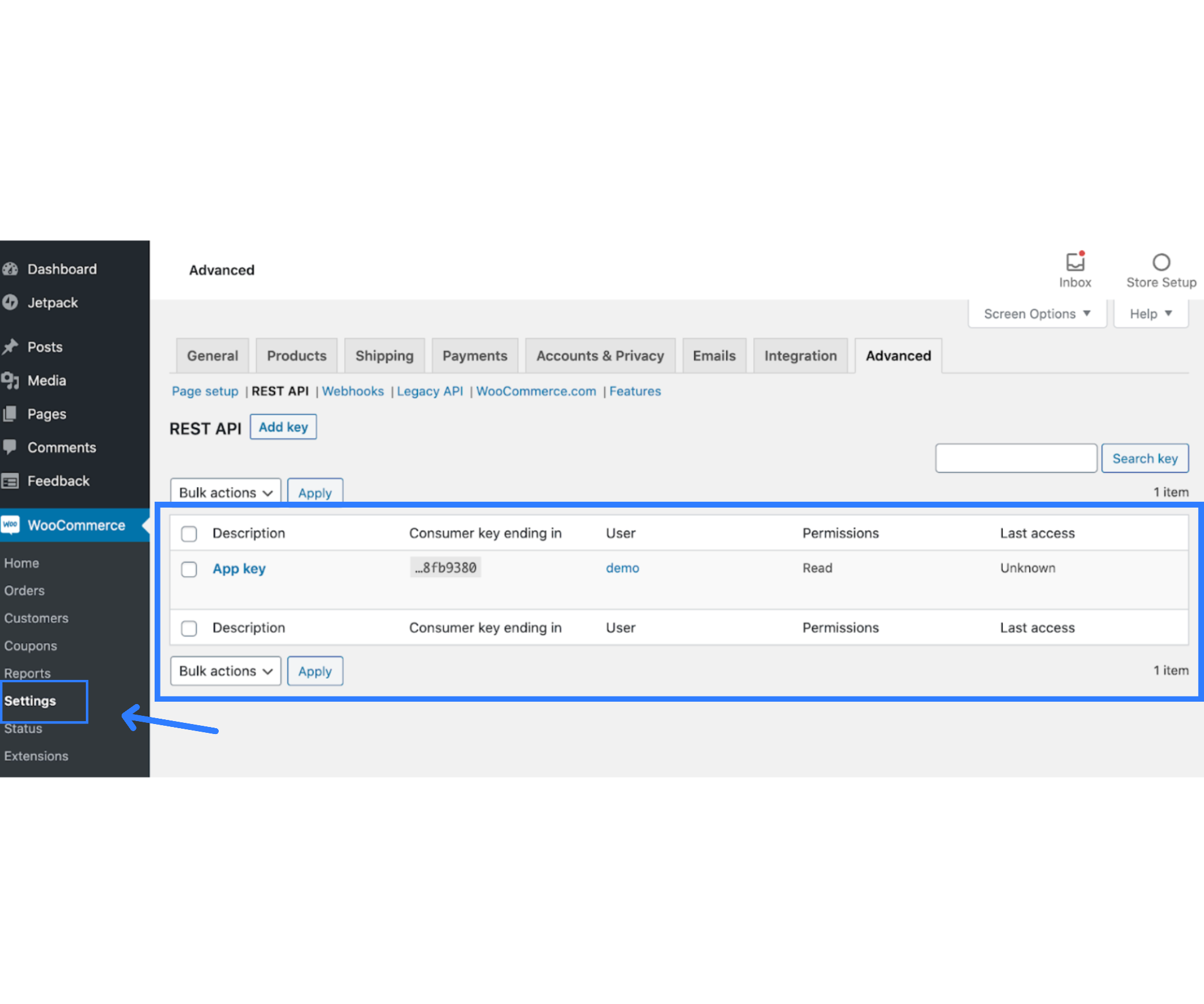
WooCommerce will show two important keys:
- Consumer Key (API Token)
- Consumer Secret (Secret API Key)
Copy both.
4. Paste the API Keys into Base.com
Return to the Base.com integration screen and paste:
- Consumer Key → API Token field
- Consumer Secret → Secret API Key field
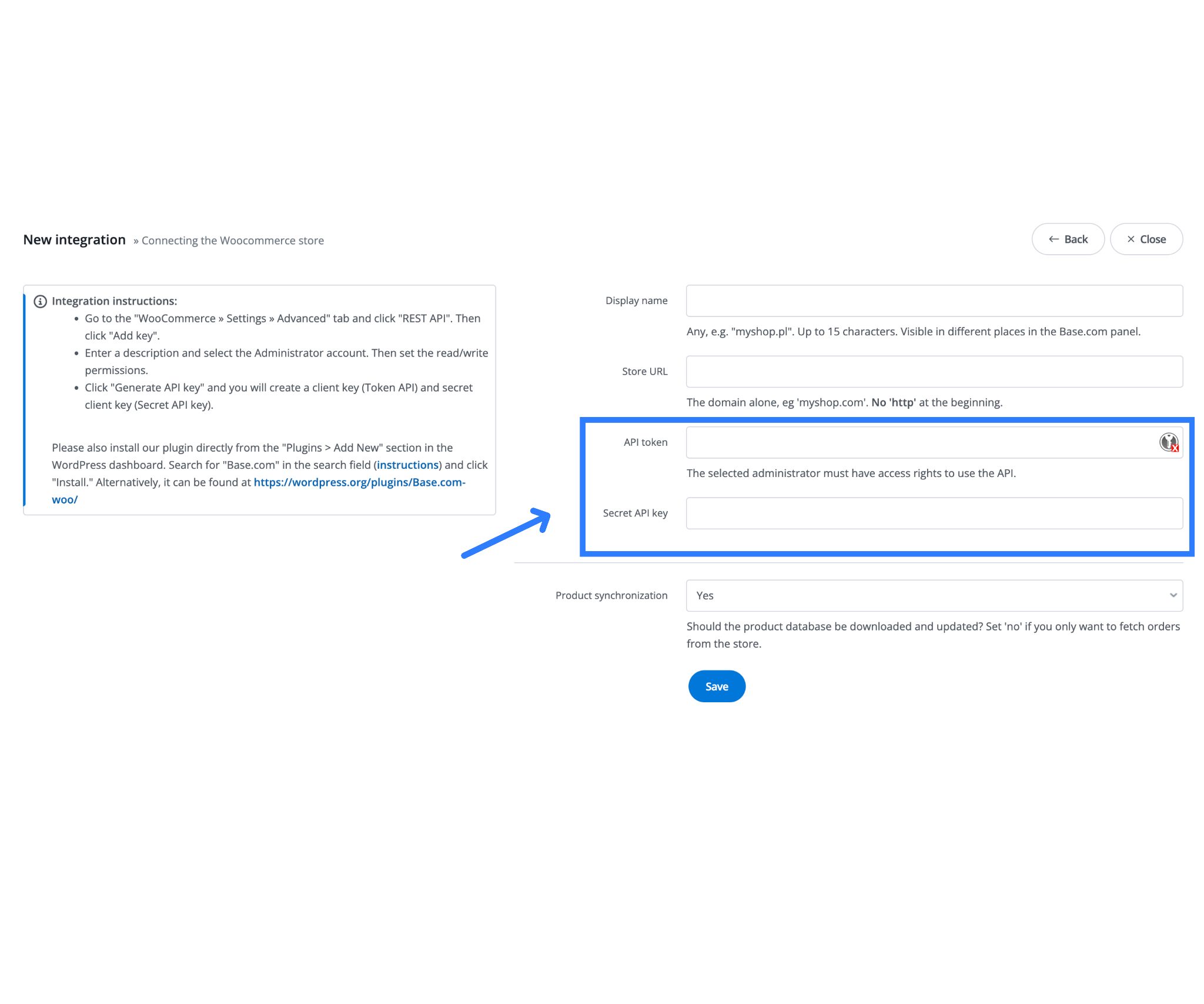
Once done, click Save.
Base.com will attempt to connect to your domain using these keys.
5. Install the Official Base.com Plugin in WordPress

- Go to Plugins → Add New.
- Search for Base.com.
- Install and Activate the official Base.com WooCommerce plugin.
If you prefer, you can also download it from the WordPress.org plugin directory and upload it manually.
This plugin ensures stable syncing for orders, stock, courier status, and invoices.
6. Confirm Required WooCommerce Settings
Make sure the following are enabled:
REST API: Should already be active by default, but verify under WooCommerce → Settings → Advanced.
Pretty Permalinks
Go to Settings → Permalinks and choose:
- “Post name”
or - “Day and name”
Avoid the “Plain” structure because it breaks API endpoints.
7. Optional but Highly Recommended Settings in Base.com
These extras make your workflow smoother.
A. Synchronizing Orders and Products
Once your WooCommerce and Base integration is active, the process of syncing orders and products begins automatically. Updates can also be sent back to WooCommerce for seamless operation.
What to Expect:
- Product Sync: Products from WooCommerce, including details like inventory levels, prices, and variants, will be displayed in Base.
- Order Sync: Orders placed through WooCommerce will be transferred to Base as soon as the connection is live.
- Real-time Updates: You can configure Base to send updates such as order status, payment confirmations, and shipment tracking details back to WooCommerce.
- Multiple Store Setup: If you manage multiple WooCommerce stores, you can repeat this process to integrate each store.
Why It Matters:
By syncing Base and WooCommerce, you streamline your operations and reduce manual tasks. Inventory management, customer communication, and order fulfillment are centralized in Base while keeping WooCommerce up-to-date automatically.
B. Order Flow & Package Creation
Efficiently managing your order stages, packaging, and shipping is key. With Base, you can automate many of these processes for smoother order management.
Key Features:
- Order Stages: Orders placed via WooCommerce will appear in Base and move through stages like “New”, “Processing”, “Packed”, and “Shipped”. Unlike marketplaces, you control the ship date and package creation.
- Automated Courier Selection: Base offers rules-based automation for courier selection based on characteristics like:
- SKU (e.g., heavy items)
- Order quantity (bulk shipments)
- Package weight (heavy items requiring specialized couriers)
- Delivery location (e.g., remote areas)
- Multi-Warehouse Pickup Handling: If you have multiple warehouses, Base assigns the correct pickup location based on product availability and delivery destination. WooCommerce’s fulfillment API allows seamless integration for accurate warehouse assignments.
Why This Is Important:
Automating courier selection based on order criteria saves time and reduces manual work. It also optimizes warehouse fulfillment, ensuring faster delivery and accurate stock levels across multiple locations.
C. Inventory & Price Sync
Accurate inventory and pricing are crucial for seamless operations. Base and WooCommerce sync product quantities and prices in real time.
Features:
- Inventory Updates: Whenever an item is sold in WooCommerce, Base reflects the inventory change, and vice versa.
- Price Sync: Price changes made in WooCommerce or Base are automatically updated across both systems.
- Shipping Costs: Shipping charges or add-ons can be handled directly during the order processing phase.
- Support for COD and Prepaid Orders: Both prepaid and cash-on-delivery (COD) orders are fully supported in the workflow.
Why It’s Important:
This automatic sync prevents overselling by ensuring stock levels are accurate across platforms. It also ensures customers always see the correct pricing, while reducing manual errors and improving cash flow management.
D. Product Listing & Association
To maintain consistency between your product listings in WooCommerce and Base, you need to link them properly.
What You Need to Do:
- Navigate to the Operations section in Base and click on “Associate Products with Shop” to link your WooCommerce products to Base.
- This ensures your inventory, pricing, and fulfillment data sync properly across both platforms.
Why It Matters:
Properly associating products prevents SKU mismatches or duplicate listings, ensuring that inventory updates, price changes, and fulfillment rules are applied accurately.
E. Customer Support Management
Base integrates with WooCommerce to help manage customer support requests associated with orders. This ensures efficient handling of inquiries and problems related to your orders.
How It Works:
- Unified View: Orders from WooCommerce are imported into Base, allowing you to send emails or SMS, or create support tickets directly linked to each order.
- Integrated Communication Channels: Base integrates with multiple customer support channels, including email, SMS, and voice/calling tools, to streamline communication.
- Support Tracking: Base tracks the status, responses, and resolutions of customer support tickets, providing a comprehensive view of customer interactions.
Why It’s Essential:
Having everything tied together in one place ensures better tracking of customer queries and issues, helping you offer a more seamless and efficient support experience.
F. Template Creation: Invoices, POs, Email Templates
Base allows you to create custom templates for important documents like invoices, purchase orders, and emails, ensuring consistency and professionalism in your communications.
Features:
- Custom Invoice Templates: Design invoices with your branding, order details, and tax information.
- Purchase Orders: Create purchase orders tied to products and warehouse assignments, streamlining supplier management.
- Email Templates: Design templates for various triggers such as order placed, payment confirmation, shipped, delivered, and returns. Use dynamic fields to personalize communications.
Why It Matters:
Having pre-designed templates for invoices, POs, and email notifications ensures clear communication, improves customer satisfaction, and saves time as your business scales.
G. Sending Shipment Tracking Links
Once your package is shipped, you can automatically send customers a tracking link to monitor the delivery status, reducing customer queries and enhancing transparency.
Steps to Set Up:
- In Base, navigate to your WooCommerce store’s integration settings and enable “Send shipment tracking link” in the Advanced Settings section.
- When you enter the tracking number in Base, it will automatically send the tracking link to WooCommerce and your customer.
- Ensure the tracking link matches the courier’s URL format for smooth resolution.
Why This Is Important:
Automatically providing customers with tracking links improves their experience and reduces the need for follow-up inquiries, saving time for both you and your customers.
Tips for Scaling and Best Practices
As your business grows, it’s essential to keep your system scalable and efficient.
Key Best Practices:
- Local Courier Integrations: If you operate in regions like India, integrate with local courier services (e.g., Delhivery, Shiprocket) for more streamlined shipping.
- System Scalability: While starting with one store and one warehouse is fine, ensure your system can scale to handle multiple stores, warehouses, and couriers as you grow.
Best Practice Summary:
- Maintain consistent naming conventions for stores, warehouses, couriers, and SKUs.
- Thoroughly test the system before going live, especially warehouse allocation, courier rules, and tracking link generation.
- Monitor system performance post-launch for any issues like stock mismatches, courier errors, or delivery delays.
- Regularly update your system and back up integration settings and credentials to ensure a smooth operation when scaling.
Conclusion
Integrating WooCommerce with Base.com gives Indian sellers a powerful, unified backend that replaces scattered plugins, manual updates, and unreliable workflows. Once connected, your entire store begins to operate on automation and orders sync instantly, stock and prices update in real time, couriers are assigned through intelligent rules, and shipments automatically push tracking details back to customers. Whether you run a single store or manage multiple warehouses and sales channels like Amazon, Flipkart, Myntra, or Ajio, Base.com brings all your operations into one dashboard with unmatched accuracy and reliability.
This integration not only reduces manual work but also prevents overselling, improves delivery speed, and strengthens customer experience. As your business grows, Base.com scales effortlessly by supporting more couriers, more warehouses, more marketplaces, and even accounting tools like TallyPrime and Odoo. For Indian WooCommerce sellers serious about efficiency, automation, and growth, Base.com offers a complete end-to-end solution that is stable, future-ready, and built to handle high-volume e-commerce operations with ease.
Connect WooCommerce with Base.com today, set it up once, automate everything, and let your business run smarter, faster, and more professionally.
Frequently Asked Questions
Q: How do I connect my WooCommerce site to Base.com?
A: Add an integration in Base.com, enter your domain, generate REST API keys in WooCommerce, paste them into Base.com, install the Base.com plugin, and save.
Q: Do I need to install any plugin on my WooCommerce store?
A: Yes. The official Base.com plugin is required for syncing orders, products, stock, and shipments.
Q: Can Base.com combine orders from Myntra and Amazon too?
A: Yes. Base.com functions as a multichannel manager, so WooCommerce orders appear alongside marketplace orders.
Q: Will stock and prices sync automatically?
A: Yes. Base.com updates stock and prices in real time across WooCommerce and all connected marketplaces.
Q: Does Base.com support couriers like DTDC?
A: Yes. Base.com integrates directly with DTDC and other Indian couriers for labels, manifests, and tracking.
Q: Is it compatible with Tally or Odoo?
A: Absolutely. Base.com can generate invoices and sync documents with TallyPrime and Odoo for accounting.