Myntra settlement reconciliation means matching your settlement report with the orders behind it, including returns, fees, taxes and other adjustments, and then checking that the final amount reached your bank account. Ajio follows the same basic idea, but its report structure and terminology can differ. The goal is simple: every rupee in the settlement should be explainable.
This guide walks through the process for both marketplaces, shows a worked payment reconciliation example, explains return adjustments and covers where automation can help.
In this guide
- What payment reconciliation means for Myntra and Ajio
- Why settlement reports do not always match sales
- How to read a settlement report
- Myntra settlement reconciliation step by step
- Ajio payment reconciliation
- A worked payment reconciliation example
- Return adjustments and settlement mismatches
- Manual vs automated reconciliation
- Where an order management system fits
- Choosing ecommerce reconciliation software
- Common mistakes to avoid
What is Myntra payment reconciliation?
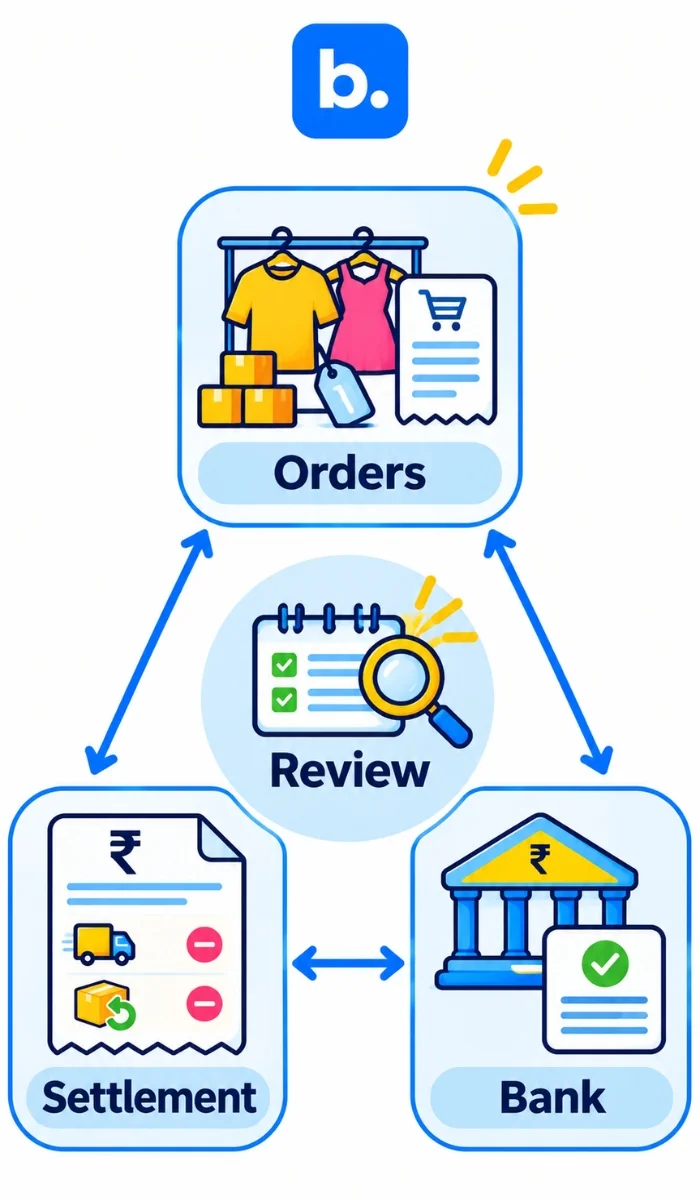
Reconciliation of payments means checking that the money you should have received agrees with the money you actually received. For a marketplace seller, that means matching your own order records with the marketplace settlement report and the credit shown in your bank account. Any difference needs an explanation before you close the books.
Think of the process as a triangle:
Orders to Settlement report to Bank
Your order data tells you what you sold. The settlement report tells you what the marketplace calculated after returns, fees, taxes and adjustments. The bank statement tells you what actually arrived.
You need all three. This matters even more for fashion sellers because returns can appear after the original sale. Industry data shows how significant the problem can be. A 2025 KPMG India report put average ecommerce returns at 18% to 20%, while fast fashion can reach 25% to 30%.
A separate 2024 Unicommerce analysis found customer-initiated returns at 7.8%, down from 10% in 2023, while RTO increased from 6.2% to 7.3%. COD orders also had much higher return rates than prepaid orders.
That is why a seller cannot simply compare total sales with one bank credit and call the books reconciled.
Why Myntra and Ajio settlements rarely match your sales
Your marketplace sales total is not the same thing as your settlement amount. Several things can happen between the customer placing an order and money reaching your bank account.
| Cause | How it can show in settlement data | How to check |
|---|---|---|
| Customer return | Sale is reversed or adjusted in a later settlement | Trace the return to the original order |
| Exchange | Original transaction and replacement item can affect different records | Match the exchange to the original order/item |
| Marketplace fees | Fees reduce the amount payable | Compare fee lines with your agreed commercial terms |
| Reverse logistics | A return-related charge may reduce the settlement | Check the applicable charge and order |
| Taxes | TDS, TCS or other tax-related deductions affect the net amount | Match deductions with your tax records |
| Other adjustments | A claim, penalty or correction may appear separately | Find the settlement reference and supporting record |
| Timing differences | An order may be settled in a different cycle | Compare settlement dates with order and return dates |
The exact charges, fields, rates and payment timing depend on your marketplace agreement and seller model. Do not use an old fee sheet to calculate a current settlement.
This is also why fashion sellers need to look beyond the bank statement. A 2025 EasyEcom report found overall returns falling from 24.8% to 16.2% across its data, while fashion and apparel remained an outlier at 26% in Q4 2025.
The practical lesson is straightforward. Settlement reconciliation is not just an accounting exercise. It is part of keeping your marketplace operations under control.
What is inside a Myntra settlement report?
Do not assume every Myntra seller sees exactly the same report structure. Your commercial model and current seller-panel version matter.
For example, current reconciliation guidance for Myntra PPMP describes each payment-report row as representing the amount settled against an order, while JIT reporting has a different payment-advice workflow.
For reconciliation, group the information into these categories:
| Field or section | What it means | How to treat it |
|---|---|---|
| Settlement reference and date | Identifies the settlement cycle or payment | Use it to match the bank credit |
| Order or item ID | Connects the settlement to the sale | Use it as the main order-level reference |
| Sale amount | Amount associated with the sale | Compare with your order records |
| Return or exchange adjustment | Reverses or changes the original transaction | Trace it back to the original order |
| Commission and fees | Marketplace deductions | Compare with your applicable commercial terms |
| Reverse logistics charge | Cost associated with a return movement where applicable | Check the relevant return |
| Other adjustments | Claims, penalties, corrections or other entries | Investigate individually |
| Tax deductions | Tax-related amounts deducted from the settlement | Match them to your tax records |
| Net settlement | Amount payable after applicable adjustments | Match it with the bank |
Use the current report downloaded from your Myntra seller panel as the final authority for field names. Your other useful records include:
- Orders report
- Returns report
- Settlement or payment report
- Bank statement
- Invoices and credit notes
- Your accounting records
The important part is not the spreadsheet itself. It is the link between these records.
Myntra settlement reconciliation, step by step
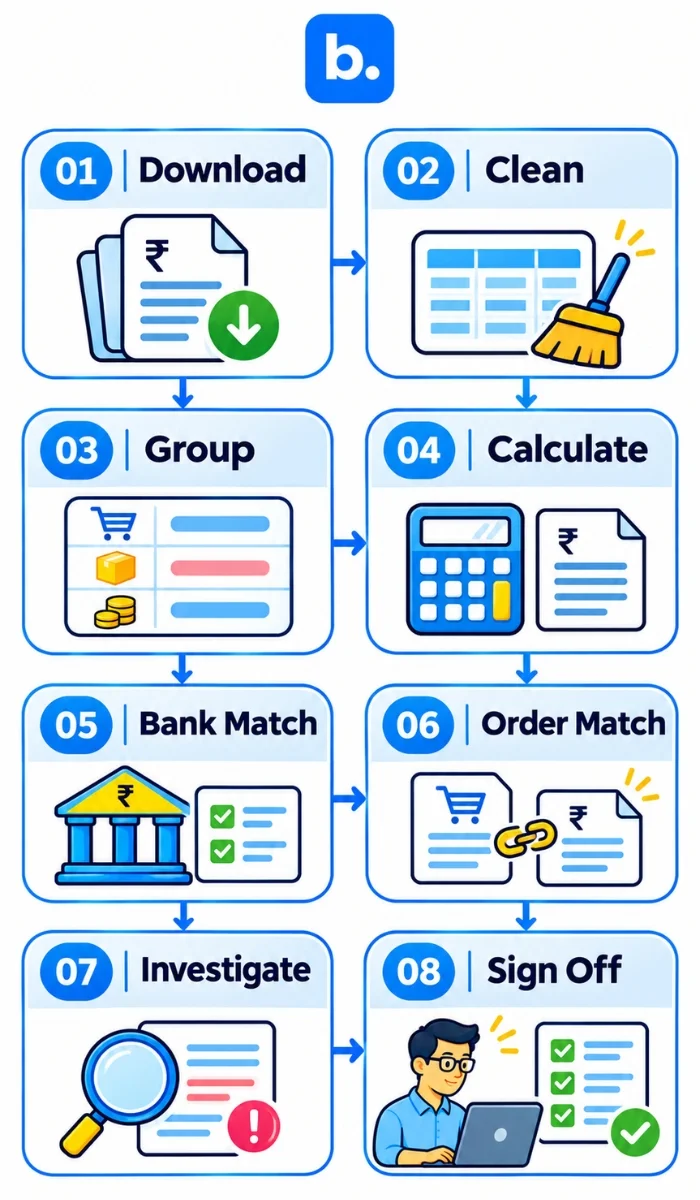
You can do Myntra settlement reconciliation in a spreadsheet, provided you keep the process consistent.
1. Download the reports
Start with the settlement report for the period you are checking. Also download your orders and returns data for the same period. Keep the bank statement ready. Do not start by looking only at the bank credit.
2. Clean your data
Make sure dates use the same format. Check order IDs, item IDs, SKUs and amounts. Remove obvious duplicates and make sure negative amounts remain negative. A small formatting mistake can create dozens of false mismatches.
3. Group the settlement lines
Group each line into a clear category:
- Sales
- Returns
- Exchanges
- Fees
- Charges
- Taxes
- Claims
- Other adjustments
This makes the final settlement easier to understand.
4. Calculate the expected settlement
Add the sales. Subtract returns and applicable deductions. Then account for fees, charges, taxes and other adjustments shown in the report. The result is your expected net settlement.
5. Match it with the bank
Now compare your calculated net amount with the actual bank credit. The two should agree after considering the correct settlement reference and timing. If they do not, do not force the numbers to match. Create an exception.
6. Match orders to your own records
Check whether the orders in the settlement report also exist in your internal order data.
Look for:
- Missing orders
- Duplicate orders
- Incorrect amounts
- Unexpected returns
- Unexplained deductions
7. Investigate unmatched lines
Every unmatched amount should have an owner and a reason.
For example:
₹50 difference —> adjustment from previous cycle —> settlement reference identified —> resolved
That is much better than leaving ₹50 sitting in an unexplained variance column.
8. Post and sign off
Once the settlement is explained, record the relevant accounting entries.
If you use a clearing account, the marketplace settlement can sit there until you match it to the bank receipt. Once both sides agree, clear the balance.
Ajio payment reconciliation: what is different?
The basic method for Ajio payment reconciliation is the same:
Orders —> settlement data —> bank
The difference is the report structure and the terminology used by Ajio.
Current reconciliation documentation for Ajio shows that the report needs to be mapped into categories such as customer payment, fees, claims and taxes. It also separates fees such as commission, payment gateway, fixed, collection, logistics and reverse logistics charges in its standard reconciliation template.
That does not mean you should copy those categories into every Ajio file without checking your own report. Instead, map Ajio’s current fields into your common reconciliation template.
| Point | Myntra | Ajio |
|---|---|---|
| Report source | Seller/partner portal | Seller/partner portal |
| Order matching | Use the order/item reference in the report | Use the order/item reference in the report |
| Returns | Trace the adjustment back to the original order | Trace the adjustment back to the original order |
| Fees | Use current commercial terms and report fields | Use current commercial terms and report fields |
| Tax lines | Check the current report | Check the current report |
| Other adjustments | Investigate separately | Investigate separately |
| Bank matching | Match net settlement to bank credit | Match net settlement to bank credit |
The best approach is to keep one reconciliation template with separate tabs for Myntra and Ajio. That way, your accounting team does not have to learn a completely different process for each marketplace.
Payment reconciliation example: a Myntra settlement, line by line
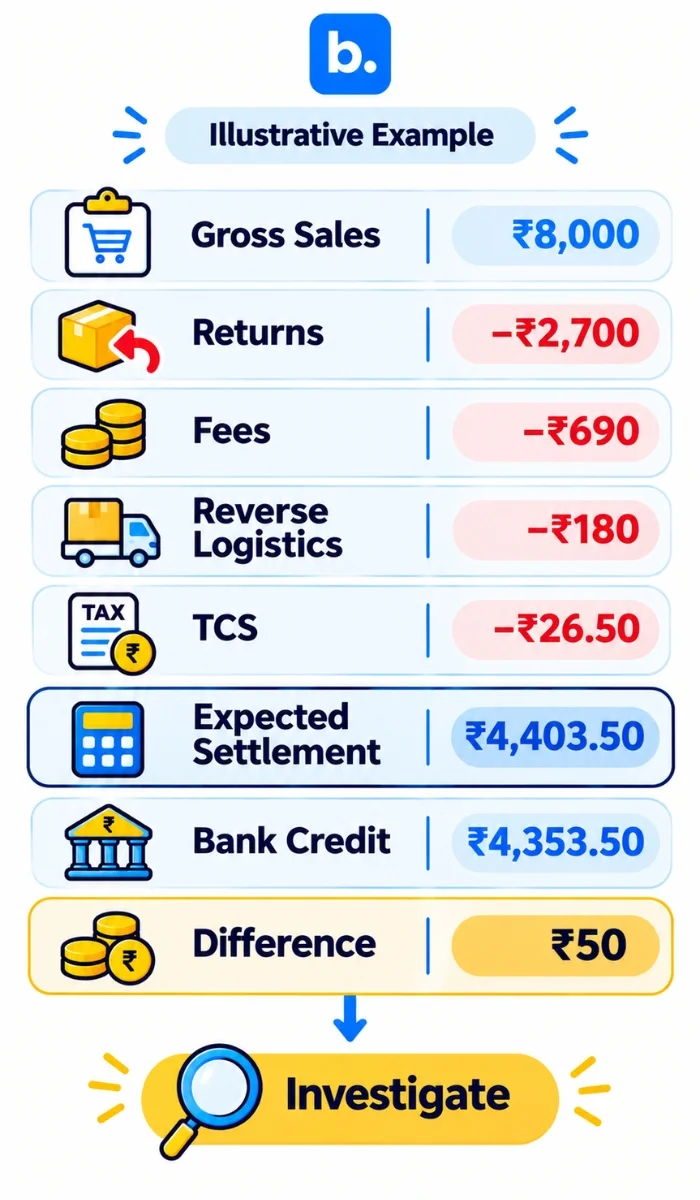
Here is a simplified payment reconciliation example. The numbers below are illustrative only. They are not Myntra rates. Suppose you have five orders:
| Order | Sale amount |
|---|---|
| Order 1 | ₹1,800 |
| Order 2 | ₹1,200 |
| Order 3 | ₹2,000 |
| Order 4 | ₹1,500 |
| Order 5 | ₹1,500 |
| Total sales | ₹8,000 |
Two orders are returned:
- ₹1,200
- ₹1,500
Total returns:
₹1,200 + ₹1,500 = ₹2,700
So your net sales become:
₹8,000 − ₹2,700 = ₹5,300
Now assume the illustrative settlement also contains:
| Line | Amount | Note |
|---|---|---|
| Gross sales | ₹8,000 | Five orders |
| Return adjustments | -₹2,700 | Two returned orders |
| Commission and fees | -₹690 | Illustrative |
| Reverse logistics | -₹180 | 2 × ₹90, illustrative |
| Tax collected at source | -₹26.50 | Illustrative |
| Expected settlement | ₹4,403.50 | Final expected amount |
The calculation is:
₹8,000 − ₹2,700 − ₹690 − ₹180 − ₹26.50 = ₹4,403.50
Now look at the bank.
Your bank statement shows:
₹4,353.50
So you have a:
₹4,403.50 − ₹4,353.50 = ₹50 difference
Do not change your spreadsheet to ₹4,353.50 just because that is what the bank shows.
Investigate the ₹50.
It could be another adjustment, a charge belonging to an earlier cycle, or another item that was not included in your first calculation. The settlement report and bank reference should tell you where to look.
The accounting side
At a simplified level, you would record:
Sales
Debit marketplace receivable/clearing account
Credit sales
Returns
Debit sales returns/credit note account
Credit marketplace receivable/clearing account
Fees and charges
Debit applicable expense account
Credit marketplace receivable/clearing account
Tax deduction
Record the applicable tax deduction against the relevant tax account.
Bank receipt
Debit bank
Credit marketplace receivable/clearing account
The exact journal entries depend on your accounting setup and tax treatment.
The point of the clearing account is simple. It gives you one place to hold the expected marketplace money until you can prove that the settlement and bank receipt agree.
Return adjustments and charges explained
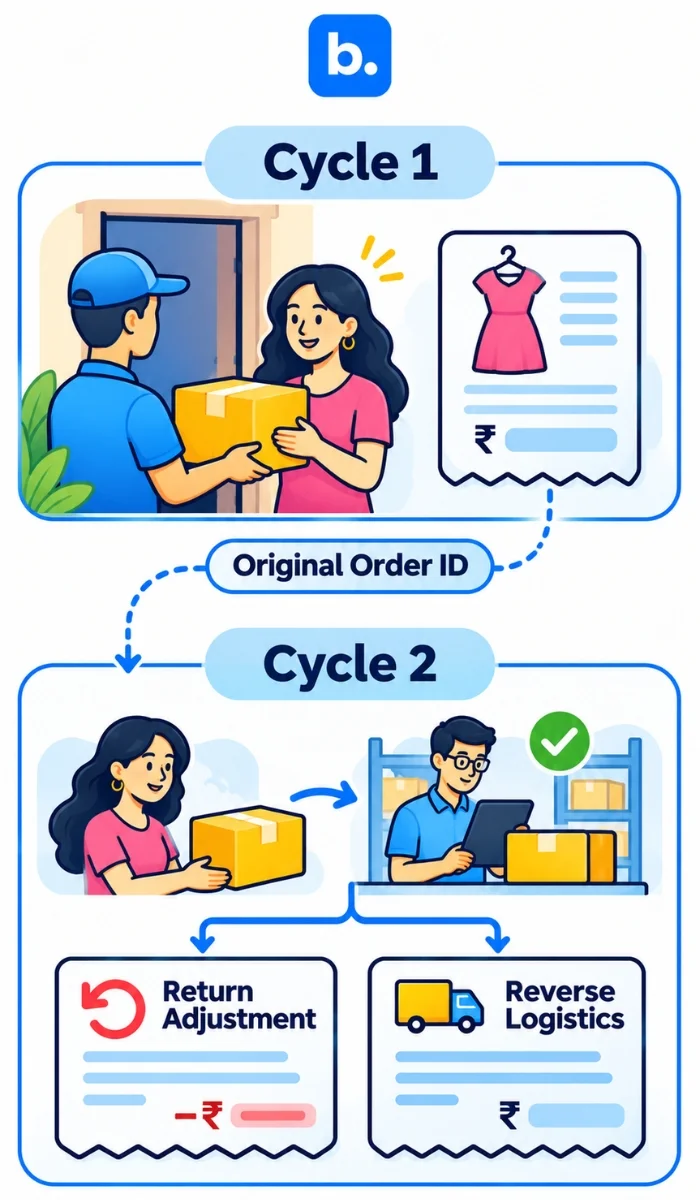
Returns are where marketplace reconciliation gets messy. A customer may place an order in one settlement cycle and return it in another. If you only reconcile each cycle against the orders created during that same period, you can miss the adjustment completely.
| Adjustment | Why it appears | What to check |
|---|---|---|
| Customer return reversal | Original sale is reversed after return | Original order and return status |
| Exchange | Original transaction changes because of replacement | Original and replacement item |
| Reverse logistics charge | Return movement creates a charge | Return reference and applicable terms |
| Damaged or missing return claim | Marketplace or seller may record a claim | Return evidence and claim details |
| Penalty | A marketplace adjustment affects the payout | Reason and supporting reference |
| Other adjustment | Correction or non-order transaction | Settlement reference |
| Tax deduction | Tax amount reduces the payout | Tax records and applicable statement |
Current marketplace reconciliation guidance also shows why non-order settlements deserve attention. These can include charges that do not directly belong to a customer order, such as advertising, cancellation, storage or other miscellaneous fees.
Keep a separate list of open adjustments. Do not let an unexplained return or charge disappear when you close the month.
How to investigate a settlement mismatch and raise a dispute
Start with the symptom.
| Symptom | Likely cause | What to do |
|---|---|---|
| Settlement is lower than expected | Fee, return or adjustment | Rebuild the settlement by category |
| Settlement is higher than expected | Reversal or additional credit | Find the matching adjustment |
| Order is missing | Timing or report issue | Search another settlement cycle |
| Return deducted twice | Duplicate adjustment | Match both deductions to the return |
| Return not deducted | Timing difference | Check later settlements |
| Unknown charge | Non-order adjustment | Trace the settlement reference |
| Settlement is delayed | Payment-cycle or processing issue | Check the seller panel and payment records |
When you raise a dispute, include enough information for someone else to reproduce your calculation.
Include:
- Order or item ID
- Settlement reference
- Settlement date
- Amount shown in the report
- Amount you expected
- Difference
- Delivery or return evidence
- Relevant screenshots
- Your calculation
Check the current seller-panel process and applicable dispute window before submitting anything. Do not rely on an old help article for a current deadline. And if the same mismatch appears every month, fix the process instead of treating each case as a one-off.
Marketplace payment reconciliation across Myntra, Ajio and your other channels
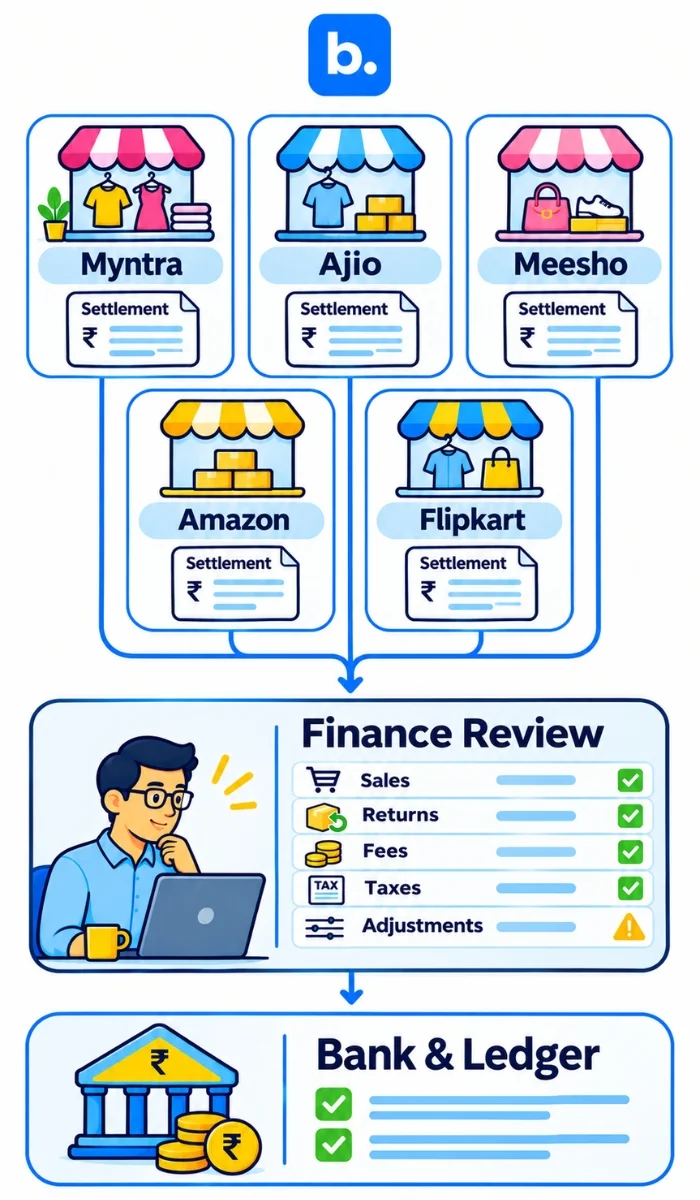
Once you sell on several marketplaces, the problem becomes less about one platform and more about keeping one financial process across all channels. The same three records still matter:
Orders —> Settlement report —> Bank
The report format changes. Your reconciliation logic should not.
| Channel | Payout source | Main difference to watch |
|---|---|---|
| Myntra | Myntra settlement/payment report | Marketplace-specific returns, fees and adjustments |
| Ajio | Ajio payment/settlement report | Different report mapping and fee structure |
| Meesho | Marketplace settlement | Match order and return data to payout |
| Amazon | Seller payment reports | Match marketplace deductions and settlements |
| Flipkart | Seller settlement reports | Check fees, returns and adjustments |
| Own store | Payment gateway/bank | Gateway fees, refunds and chargebacks |
| COD | Courier remittance | Batch payment versus individual orders |
The practical problem is the number of files involved. Base’s current payment reconciliation guide describes a manual process that includes downloading reports from several marketplaces, exporting internal order data, building a master Excel sheet and matching expected payments against actual settlements.
Manual versus automated settlement matching
A spreadsheet works when your volume is manageable and one person can still trace an order without spending half a day searching through files. The problem starts when the number of orders, marketplaces and returns grows.
A payment reconciliation system can read settlement data, group transactions by order, separate fees and taxes, compare expected payouts with actual receipts and send exceptions to a person for review.
What automated payment reconciliation does
A well-designed workflow should:
- Import settlement data.
- Match marketplace orders.
- Connect returns to the original sale.
- Separate fees, charges and tax deductions.
- Compare expected and actual payouts.
- Match the payout to the bank.
- Flag unmatched transactions.
- Keep an audit trail.
Humans still need to review exceptions.
Automation does not mean blindly accepting whatever the marketplace reports. It means spending your time on the transactions that actually need attention.
| Question | Spreadsheet | Software |
|---|---|---|
| Setup | Manual | Configured once, then maintained |
| Speed at volume | Slows as files grow | Handles larger datasets more consistently |
| Error risk | Depends heavily on manual work | Matching rules reduce repetitive errors |
| Multi-channel coverage | Separate sheets or tabs | Can centralize channels |
| Audit trail | Depends on spreadsheet discipline | Usually built into workflow |
| Cost | Low direct cost | Subscription or implementation cost |
The right choice depends on your volume, team size and number of sales channels.
Where an order management system fits in marketplace reconciliation
An order management system is software that collects orders from your sales channels, keeps a central order record and passes order, return and fulfilment data to the systems that need it. OMS software does not replace the marketplace settlement report.
It gives you a cleaner order record to reconcile against that report. The workflow looks like this:
Marketplace order to Shipment to Settlement line to Bank match
That makes order-level reconciliation much easier.
For example, if a return appears in the settlement report, your internal system should already know which order and SKU it belongs to. You should not have to search through multiple spreadsheets to work that out.
A good OMS can also keep marketplace orders, returns and inventory information in one operational view. Base currently supports Myntra order synchronization and order management through its Myntra integration.
The important distinction is this:
The marketplace report tells you what the marketplace settled. The OMS helps you understand the order behind that transaction.
How to choose ecommerce reconciliation software
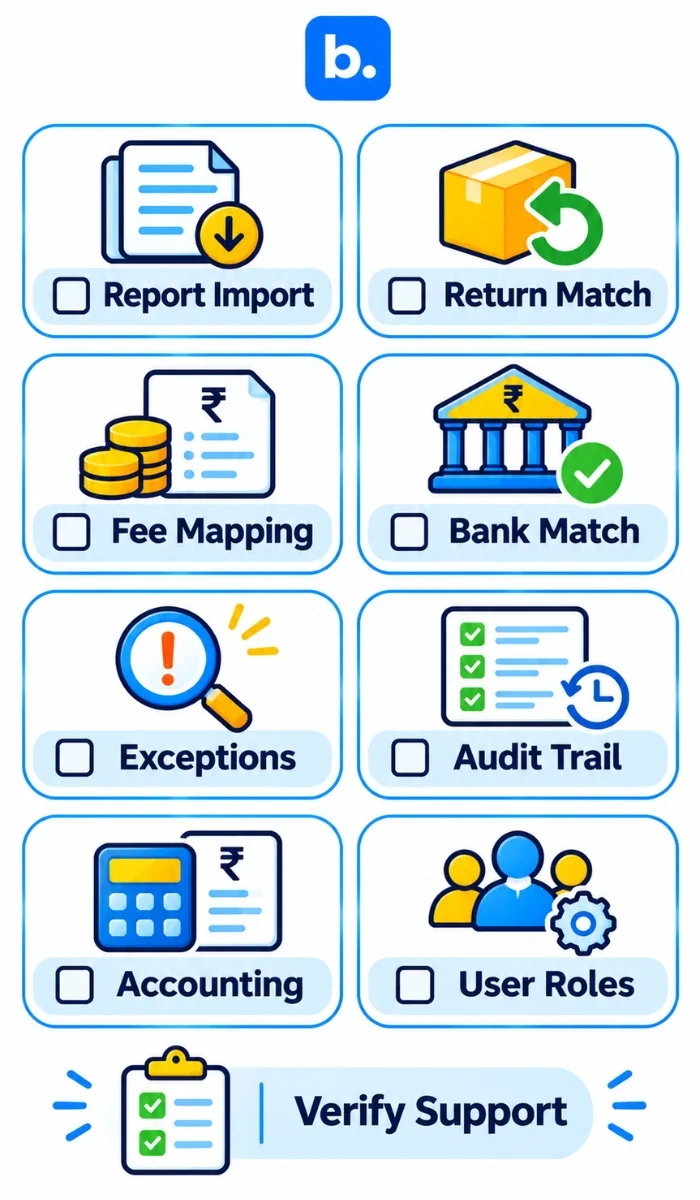
Before choosing ecommerce reconciliation software, ask the vendor to show you your actual workflow. Do not settle for a generic demo.
Check whether the system can:
- Import current Myntra and Ajio report formats.
- Handle marketplace fees, charges and tax deductions.
- Link returns to original orders across settlement cycles.
- Match many orders to one bank settlement.
- Match one order to multiple settlement lines.
- Maintain an exception queue.
- Support a clearing account.
- Export or post the required data to Tally or Zoho Books.
- Maintain an audit trail.
- Control access by user or role.
Also ask:
- What happens when a report format changes?
- Can I see the original settlement line?
- Can I trace a bank credit back to individual orders?
- How are returns from an older cycle handled?
- Can I separate order-related and non-order adjustments?
- How are disputes tracked?
- Can I export the reconciliation for my accountant?
Do not choose a payment reconciliation system only because it says “automated.” Ask to see an unmatched settlement. That is where the real difference becomes obvious.
Common Myntra and Ajio reconciliation mistakes and how to avoid them
| Mistake | Why it hurts | Fix |
|---|---|---|
| Matching only to the bank | You know what arrived but not whether it was correct | Reconcile at order and settlement level |
| Ignoring fee lines | Gross sales look higher than actual receipts | Reconcile every deduction |
| Missing older returns | Returns can appear in later cycles | Keep a rolling return tracker |
| Wrong period cut-off | Sales and settlements get mixed between months | Use settlement dates consistently |
| Treating adjustments as sales | Revenue gets overstated | Classify adjustments separately |
| Mixing marketplaces | Different reports become impossible to audit | Keep marketplace-level tabs |
| Raising disputes late | Evidence can become harder to find | Review exceptions regularly |
| No owner for mismatches | Open items remain unresolved | Assign an owner and due date |
One of the easiest mistakes to make is assuming that a lower payout automatically means the marketplace made an error.
Sometimes the difference is correct.
Your job is to prove which one it is.
How Base OMS helps with Myntra and Ajio reconciliation
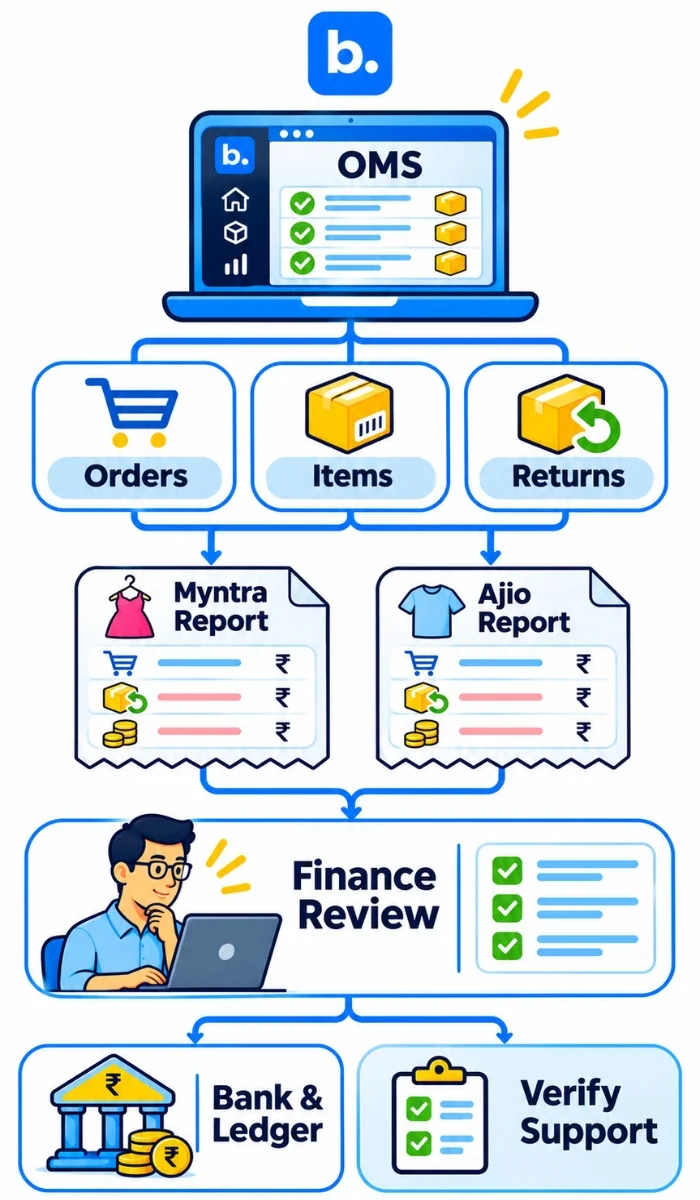
Orders
Base OMS brings marketplace order data into a centralized order workflow. For Myntra, its current integration supports order synchronization and order management through Base.
Settlements
The order record gives your finance team the context needed to connect a marketplace transaction with the sale behind it. The settlement report remains the source for the actual marketplace payout.
Exceptions
Your reconciliation process should surface transactions that do not match instead of burying them inside a spreadsheet. That gives the finance team a shorter list to review.
Base’s broader finance workflow connects order information with accounting and payment reconciliation, while its OMS handles marketplace order data. If your team already manages multiple marketplaces, an OMS platform can also reduce the operational gap between order data and finance data.
Conclusion
Myntra settlement reconciliation becomes much easier when you stop treating the settlement as one bank payment and start breaking it down to the order level. Start with three records: your orders, the marketplace settlement report and the bank statement. Group sales, returns, fees, taxes and adjustments. Match the expected amount to the bank, investigate every difference and keep unresolved items open until someone explains them.
The same process works for Ajio. The reports differ, but the principle does not. If you are handling several marketplaces, moving from spreadsheets to a structured payment reconciliation system can make the process faster and easier to audit.
Frequently Asked Questions
What is Myntra settlement reconciliation?
The three records are your orders, settlement report and bank statement.
How do I do Myntra payment reconciliation?
How is Ajio payment reconciliation different from Myntra?
What does a Myntra settlement report include?
Myntra’s current reconciliation guidance distinguishes PPMP and JIT payment reporting.
What are return adjustments and reverse logistics charges?
Do not assume a fixed rate. Marketplace agreements and charges can change.
What should I do if my settlement is lower than expected?
If the difference remains unexplained, collect the order ID, settlement reference, calculation and supporting evidence before raising a dispute through the current seller-panel process.
How do I do marketplace payment reconciliation across several channels?
Keep a common reconciliation framework while maintaining separate marketplace mappings.
Do I need ecommerce reconciliation software or an order management system?
The two systems solve related but different problems.