If you want to sell Shopify products on Amazon India, you’ll need to list your products in Amazon Seller Central and map each Shopify SKU to the correct Amazon listing. A Shopify Amazon integration can sync supported listings, inventory and orders. You can manage this manually, use an app or connector, or use order management software to reduce manual updates.
If you’re already running your shop on Shopify, adding Amazon India gives you another sales channel. However, you’ll also have to manage two catalogues, order books and inventory feeds. A sale in one channel must reduce stock in the other, and each order needs the correct fulfilment and tracking updates. This guide explains how to connect the two channels and manage the work that follows.
In this guide
- How to sell Shopify products on Amazon India
- Prepare your catalogue and connect both channels
- Sync inventory and avoid overselling
- Manage orders, fulfilment, pricing and returns
- Choose between a connector and an OMS
- Fix common integration issues
How to sell Shopify products on Amazon India
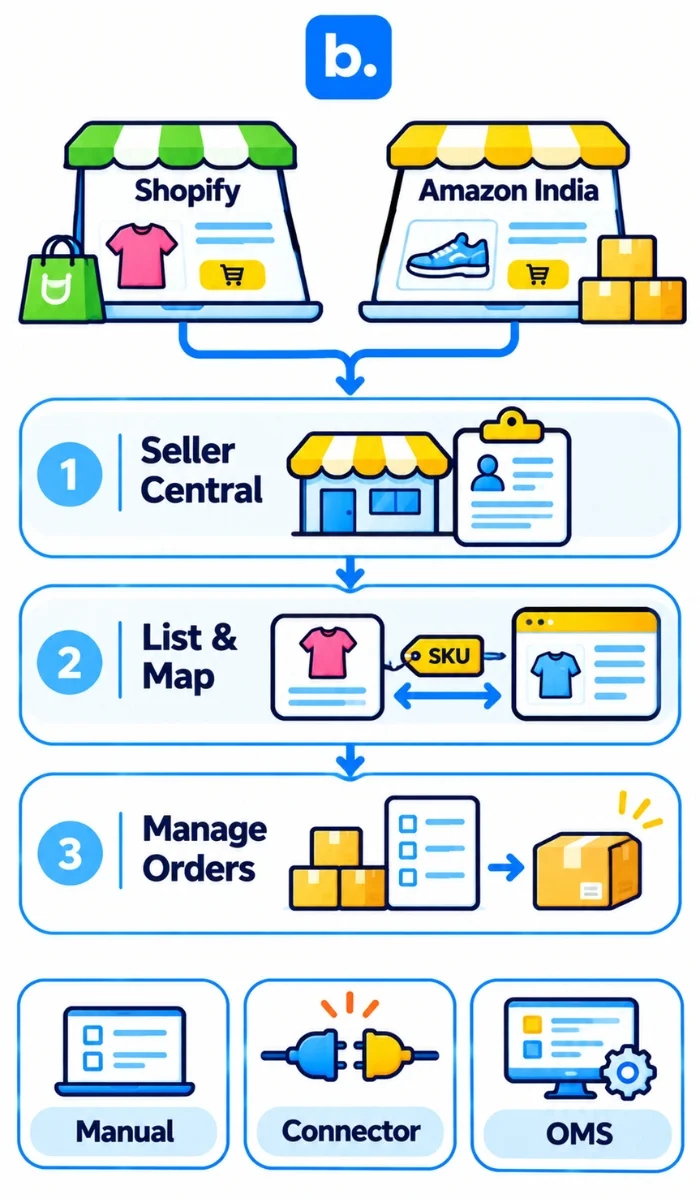
Create or use your Amazon Seller Central account. List your products on Amazon.in and ensure each product listing maps to the correct Shopify SKU. Either manually update both channels, connect via an app or utilise an OMS to manage your inventory and orders.
Depending on the size of your catalogue and order volume you’ll want to choose the best option.
- Manual: Create listings in Seller Central and manually update your inventory and orders. Best for smaller catalogues and fewer orders.
- App/Connector: Connect your Shopify store to Amazon. Supported listings, inventory and orders can be synced. Ensure the app/connector supports the correct fields and regions.
- OMS: Use an order management system to collect your orders and update your inventory with a single workflow. Best for those with multiple channels, warehouses and/or complex fulfilment policies.
Adding Amazon as a sales channel gives your products access to a large online shopper base. In 2024, India had over 270 million online shoppers and its e-retail market was worth around $60 billion. Bain & Company and Flipkart projected that the market could reach $170 billion to $190 billion by 2030 in their ‘How India Shops Online 2025’ report.
However, if you’re running two sales channels, managing them both manually will create extra work. Products could be oversold as both sales channels will have the same units available. Orders may be manually added in another system, and you’ll find yourself having to update prices twice and check multiple dashboards for returns.
| Problem | Costs | Solution |
|---|---|---|
| Overselling | Orders being accepted that can’t be fulfilled | Have shared inventory with a buffer. |
| Wrong Listing | Customers receiving incorrect product details | Ensure listings are clear and have clear rules for SKUs. |
| Manual Order Entry | Extra work and increased risk of errors. | Automatically imported. |
| Different Fulfilment Policies | Orders sent to the wrong team. | Have separate rules for different fulfilment policies. |
| Delayed Cancellation/Return Updates | Incorrect inventory levels. | Update inventory when events have been confirmed. |
| Different Invoicing and Settlement | Longer reconciliation. | Ensure taxes are mapped correctly and have separate records for each channel. |
Preparing your Catalogue
Before you connect the channels, check your product data and SKUs. A connector won’t fix incorrect SKUs or missing product information.
Preparation
Before you list your products, you should;
- Have an Amazon Seller Central account. Fill in any business and tax information needed.
- Have your GST details ready.
- Ensure you have permission to list products in your category/brand.
- Have a SKU Master. Each product and variant should have a unique SKU. Ensure the internal SKU is the same in Shopify and your inventory.
- Check Amazon’s product identifiers. If your product is eligible apply for a GTIN exemption.
- Have product images and titles ready. Ensure they meet Amazon’s listing criteria.
- Calculate your selling price for Amazon. Take into consideration any marketplace and fulfilment costs.
- Decide on how many units you’d like to have as a buffer.
- Choose a fulfilment method. Self-ship, Easy Ship or Fulfilment by Amazon.
- Decide on your return process. How will your team inspect returned items and update inventory?
- Ensure you have correct naming for your SKUs and variants in Shopify. For example, you’re selling a black t-shirt with three different sizes. Each size should have a different SKU.
Connecting Shopify and Amazon
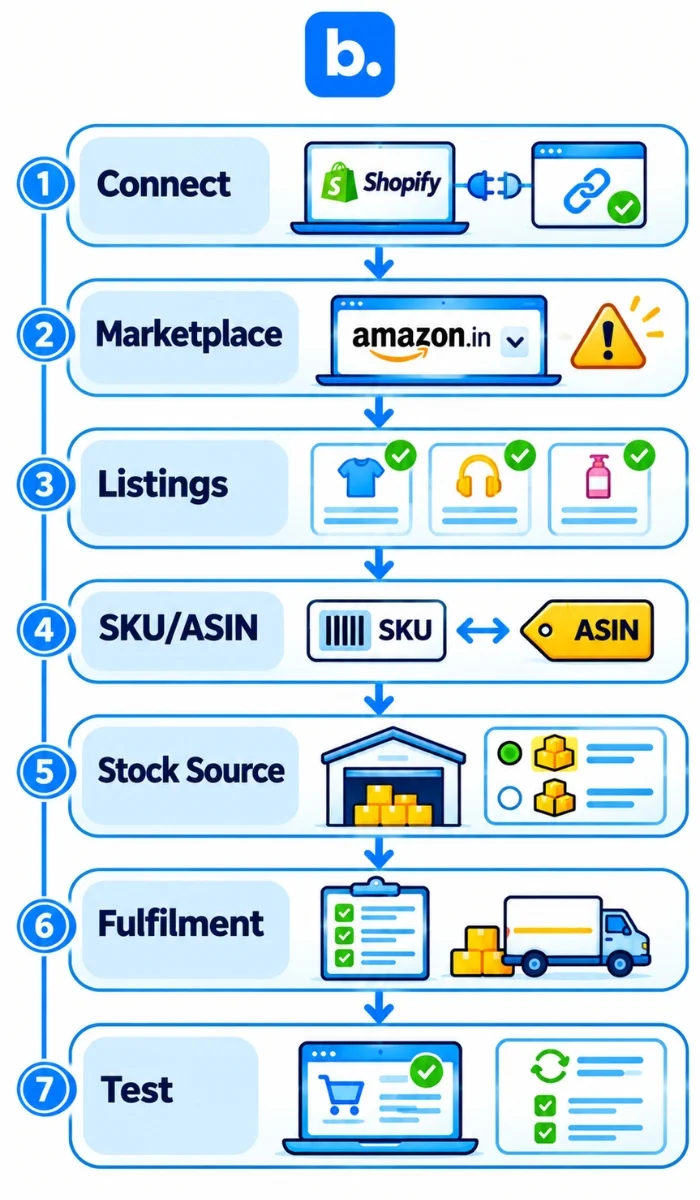
A Shopify Amazon integration will connect your Shopify store to Seller Central. This will allow you to manage your supported listings, orders, and inventory in Shopify. Depending on the tool and marketplace, you’ll be able to do different things. Ensure all SKUs from Shopify are mapped to the correct listings on Amazon before switching on inventory sync.
Shopify Marketplace Connect lets sellers connect to Amazon and manage supported listings, orders and inventory from Shopify admin. Shopify’s documentation lists Amazon as a supported marketplace, but does not clearly identify Amazon.in as a separate marketplace option. Check the marketplace options available in your account before relying on it for India. If Amazon.in is not available, look for a third-party connector or OMS that clearly confirms support for Amazon India.
You can search for available Shopify integrations in the App Store. Don’t just look for Amazon in the description. Ask the provider to confirm that Amazon.in is supported, which fields can sync and which fulfilment methods are covered.
Once you’ve decided on a tool, follow the steps below.
- Connect your Shopify store to your Amazon Seller Central account.
- Choose the correct Amazon marketplace and seller account.
- Import existing Amazon listings or create new listings.
- Map your Shopify product variants to the correct ASIN and SKU.
- Choose your inventory source and how much you want to sell on each channel.
- Choose different selling prices if your costs are different between Amazon and Shopify.
- Choose your fulfilment method.
- Choose how often you want to sync your inventory and orders.
- Place a test order and check your sync log.
A Shopify and Amazon integration can update product details, orders, inventory and tracking, depending on the fields it supports. Some listing attributes, promotions, compliance and settlements may need to be manually updated. Check the tool documentation.
A basic connector may be enough if you have one Shopify store and one Amazon account. If you have bundles, complex variants, FBA inventory, multiple warehouses or custom order rules then you’ll need to be more careful when testing. You may need additional tools.
| Data | Direction | Check |
|---|---|---|
| Product listings | From Shopify to Amazon or vice versa. | Which product fields can be updated? |
| SKU and ASIN | Shopify variant mapped to the correct Amazon listing. | Are all SKUs and variants mapped to the correct ASIN? |
| Inventory | From the main inventory source to both channels. | Where is inventory controlled from? |
| Price | From your chosen pricing source to each channel. | Can you set a different price for Amazon? |
| Orders | From Amazon to Shopify or OMS. | Will the tool prevent duplicate imports? |
| Tracking | From courier/warehouse to the sales channel. | Is valid tracking information being sent? |
| Cancellations/Returns | From marketplace to order and inventory. | When will returned inventory be released? |
| Settlements | From Amazon to accounting. | Can you reconcile fees, refunds and payouts? |
Syncing Inventory Between Shopify and Amazon
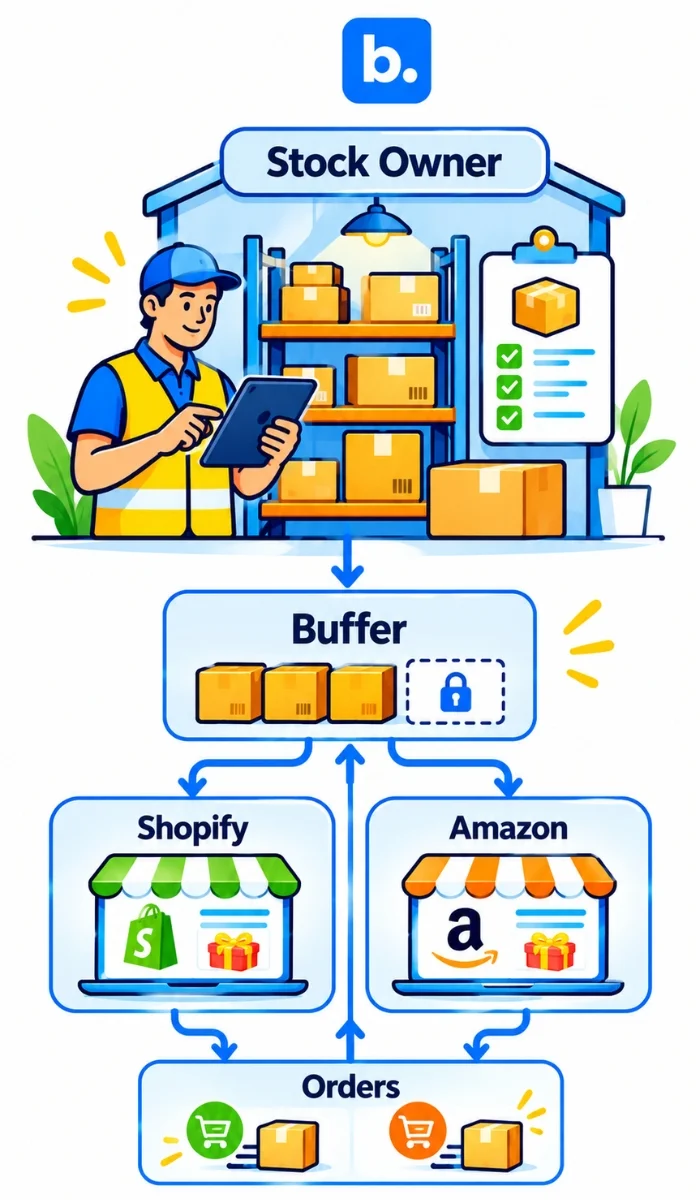
Ensure you have one source of inventory. Have the available inventory sent to both channels. Update your inventory after each sale, cancellation and return. You should also have a small buffer for both channels.
Inventory Source, Frequency & Buffer
First, decide where your team will update inventory. This could be your warehouse management system, inventory tool or OMS. Send the available inventory from this source to both channels.
Don’t allow your team to adjust the same inventory amount in multiple dashboards. If you have 50 units in your warehouse, but 55 in Shopify and 48 in Amazon, then nobody knows what you can actually sell.
Check how frequently your integration updates inventory. Some tools sync after an order is placed, while others follow a schedule. This creates a gap between the sale and the stock update. A faster sync reduces that gap, but you should still keep a buffer.
Ensure your available inventory doesn’t include any damaged, reserved, allocated or pending inventory. This is physical stock but you can’t guarantee it can be sold to a new customer.
Example
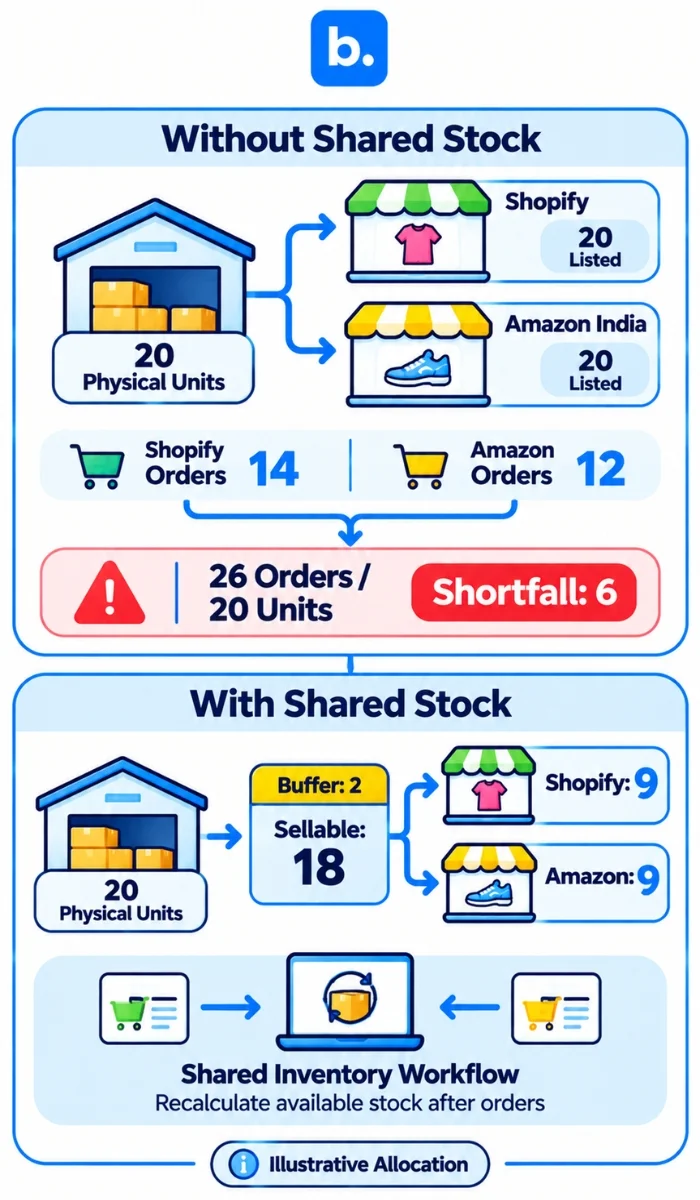
Let’s say you have 20 units of one product in your warehouse.
Without inventory syncing:
You’ll have 20 units listed in Shopify and 20 units listed on Amazon. If 14 orders are placed on Shopify and 12 on Amazon, you’ll receive 26 orders for just 20 physical units. That means 6 orders cannot be fulfilled.
With shared inventory and a 2-unit buffer:
Your integration maintains one shared inventory across both channels. You keep 2 units as a safety buffer, leaving 18 units available to sell.
For this example, assume you split the 18 sellable units equally: 9 units on Shopify and 9 on Amazon.
This is only an illustrative allocation. Your split should reflect demand on each channel and how your integration reserves and distributes stock.
When an order is placed on either channel, the shared inventory decreases, and the integration recalculates the available quantities on both channels.
The safety buffer gives your system some room to process orders and update inventory across channels before all your physical stock is committed. The buffer you need depends on your sales velocity, order volume and inventory sync speed. If you’re selling quickly or receiving orders across multiple channels simultaneously, you’ll need to pay closer attention to your buffer.
FBA Inventory
FBA inventory is in Amazon fulfilment centres. Unless you have a specific fulfilment arrangement, you cannot use stock stored at an Amazon fulfilment centre to fulfil a Shopify order from your own warehouse.
Ensure you have separate tracking for your warehouse and FBA inventory. For example you may have 20 units in your warehouse and 30 units in Amazon. This means you have 50 units of physical stock but the stock in Shopify should only show what your team can fulfil using your Shopify process.
Use the FBA quantity Amazon has reported. Don’t add FBA inventory to your Shopify inventory and then count it again. This will give you an inflated amount.
Managing Orders, Fulfilment & Pricing
Once orders start coming in from both channels, define how your team will handle invoicing, dispatch, tracking, cancellations and returns. The order may arrive in one system, but the fulfilment and tax steps still need to follow the rules of the channel where it was placed.
| Step | Shopify | Amazon India | Action |
|---|---|---|---|
| Order | Admin | Seller Central | If possible, have one queue. |
| Invoice | Shopify & ERP | Amazon Order & Tax | Ensure correct GST, HSN and buyer details. |
| Dispatch | Delivery promise | Ship by date | Ensure the correct deadline is shown to your fulfilment team. |
| Tracking | Add tracking to order. | Confirm shipped with valid tracking. | Ensure correct tracking is sent to each channel. |
| Cancellation | Update order and inventory. | Follow Seller Central cancellation process. | Only release inventory once cancellation has been confirmed. |
| Return | Inspect returned item. | Follow Amazon return process. | Note if item can be sold. |
| Payout | Payment Gateway | Amazon Payout Report | Ensure orders, fees, refunds and payouts match. |
Choosing the Correct Fulfilment Method
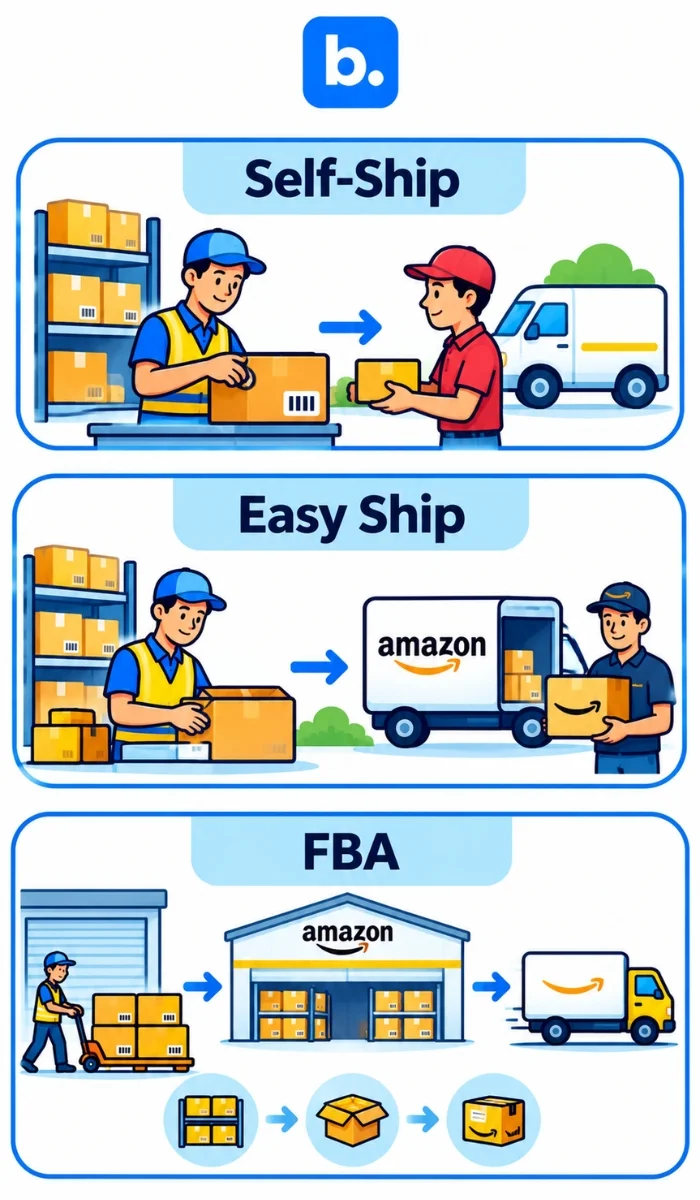
- Self-Ship: You’ll be storing, packing and sending your Amazon orders using your own courier/delivery partner. You’ll need to confirm the order has been shipped with valid tracking.
- Easy Ship: You’ll be storing and packing the product. Amazon will take care of the pickup and delivery. You’ll need to prepare your parcel and handover by the correct date.
- FBA: You’ll be sending your stock to an Amazon fulfilment centre. Amazon will store, pack and ship eligible orders. You’ll still need to track your FBA inventory, returns and inventory changes.
Don’t use the same inventory rules for all three methods. FBA inventory is stored by Amazon, whereas Self-Ship and Easy Ship orders depend on stock available to your team. Your system needs to know which inventory can fulfil each order.
You’ll also need clear rules for returns and cancellations. If an order is cancelled you’ll want to release your inventory, but if it’s being returned, you shouldn’t have it available straight away unless your team has inspected it. Note any damaged, incomplete or unsellable returns.
Pricing & Listing Rules
The fees you pay on Amazon will impact your margin. Referral fees, closing fees and fulfilment costs will vary depending on your product and fulfilment method. Ensure you’re using the latest fee structure or revenue calculator. Don’t use an old fee %.
| Item | Shopify | Amazon India | Rules |
|---|---|---|---|
| Selling Price | Store price | Marketplace price | Have different prices. |
| Product Title | Store format | Amazon Listing Format | Follow each channel’s title rules. |
| Images | Product page requirements | Amazon requirements | Ensure you follow the rules. |
| Promotions | Shopify Discounts | Amazon Deals/Promotions | Avoid unexpected discounts. |
| Tax | Store & Invoice | Seller Central & Invoice | Ensure tax details are the same. |
Order Management System
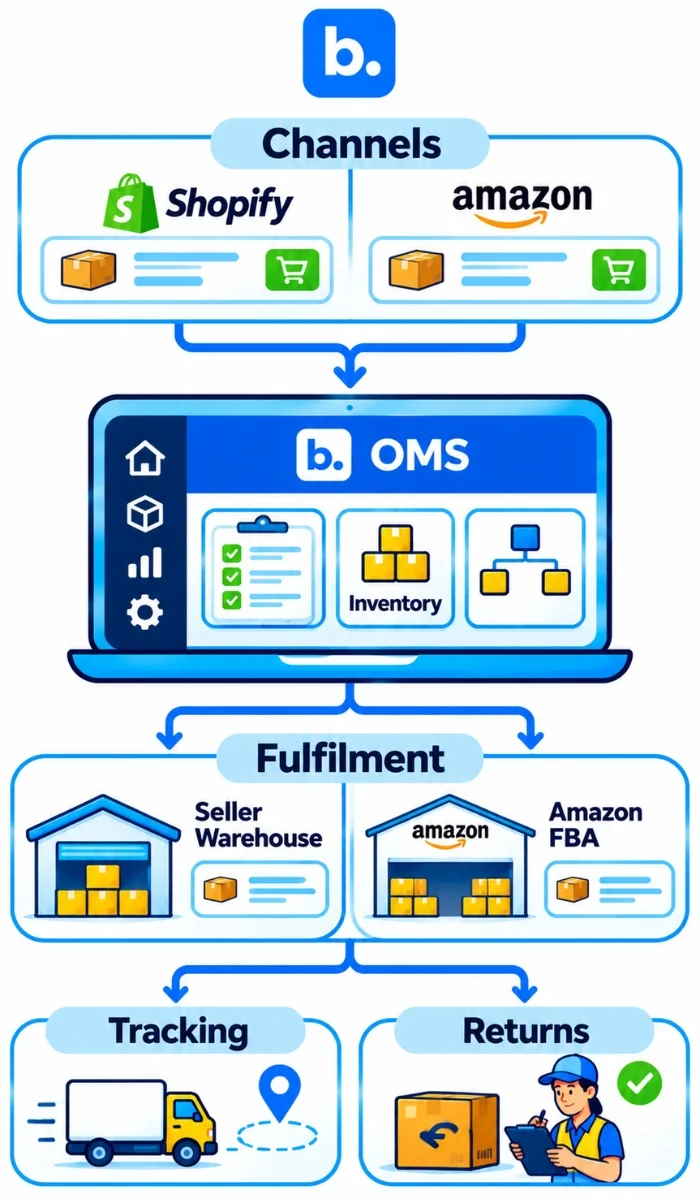
An order management system (OMS) collects orders from your sales channels, gives your team a shared view of inventory, applies order rules and sends orders to fulfilment and accounting. It gives your team one place to manage the order flow.
If you’re selling on Shopify and Amazon with a simple process, a connector may be sufficient. If you have a high order volume, multiple channels or more than one warehouse, an order management system can reduce manual work and help your team manage exceptions. This is order management for ecommerce.
An OMS will help with:
- Single queue: Orders from Shopify and Amazon will be in one place. Your team can check the status of their orders.
- Single inventory view: The system will have a shared inventory and send the correct amount to the connected channels.
- Returns/cancellations: Your team can note any changes and update the correct inventory.
The basics are simple. Orders are sent from Shopify and Amazon to the OMS. The OMS will check the inventory and apply your order rules. The order will then be processed by your warehouse/fulfilment team. Tracking information will be sent to the correct sales channel.
A connector will only connect two platforms. An OMS will help with more of the order process. They don’t replace Shopify or Seller Central; they will still have their own functions.
| Scenario | App/Connector | OMS |
|---|---|---|
| One extra sales channel | Often enough. | May be overkill. |
| Multiple sales channels | Check connection limits. | Central order process. |
| High order volume | Depends on queue and rules. | One place to manage orders. |
| Bundles and variants | Check that SKUs are mapped. | More detailed inventory rules. |
| Multiple warehouses | May have limited routing. | Warehouse allocation rules. |
| Order cost information | May need another system. | Can support larger reporting. |
A Base OMS is one option to consider if you need a shared order workflow across channels. Before choosing any integration or OMS, check that it supports the marketplaces, inventory rules and fulfilment methods you use.
| Route | Best for | Limitations | Effort |
|---|---|---|---|
| Manual | Small catalogue & low order volume. | Time consuming & more errors. | Low initial, high ongoing. |
| Native/Channel App | Supported marketplace & standard requirements. | May not be available in all regions. May not have the correct features. | Low-Medium. |
| Multi Channel Connector | Shopify, Amazon & others. | Depending on SKU, fulfilment & warehouse. | Medium. |
| OMS | Multiple channels, warehouses &/or complex rules. | Requires planning & setup. | Medium-High. |
Before choosing an order management system for ecommerce consider;
- Does it support Amazon.in?
- Does it connect to all your sales channels?
- How quickly does the inventory update?
- Does it support self-ship, easy ship & FBA?
- Does it track returns/cancellations?
- Can you have different pricing and inventory buffers?
- Does it show any failed syncs and how to resolve?
- What support do they offer for setup?
If you also have a WooCommerce store, then ensure the tool supports this. A woocommerce amazon integration may have different extensions and connection rules.
Ask the provider to demonstrate a few real scenarios: two orders placed at nearly the same time on both channels, a return, an unmapped SKU and a failed connection. Check how the system flags each issue and what your team needs to do next. These tests will tell you more than a generic product demo.
Common Shopify and Amazon Integration Issues
Most issues will be due to incorrect product data, incorrect mapping or unclear inventory rules. Check your error log before disconnecting and reconnecting.
| Issue | Reason | Solution |
|---|---|---|
| Rejected/Hidden Listing | No attributes, category permissions or policy issues. | Check the reason from Seller Central and update your listing. |
| SKU Not Mapped to ASIN | No match between Shopify variant and Amazon listing. | Ensure the exact variant is mapped to the correct ASIN. |
| Inventory Not Updating | Delayed, paused or failed. | Check connection, frequency and error log. |
| Overselling | Different or out of date inventory. | Have one source of inventory and buffer. |
| Incorrect Price | Different rules or failed price. | Have clear source of pricing and check failed updates. |
| No Amazon Order in Shopify/OMS | Failed marketplace connection/order import. | Check authorisation and import logs. |
| No Tracking to Amazon | Incorrect carrier/tracking field mapping. | Ensure shipping details are correct and check carrier requirements. |
| Duplicate Listings | Products have been imported/created multiple times. | Check existing ASINs. |
How Base OMS and Base WMS fit into the workflow
One SKU on Shopify and Amazon
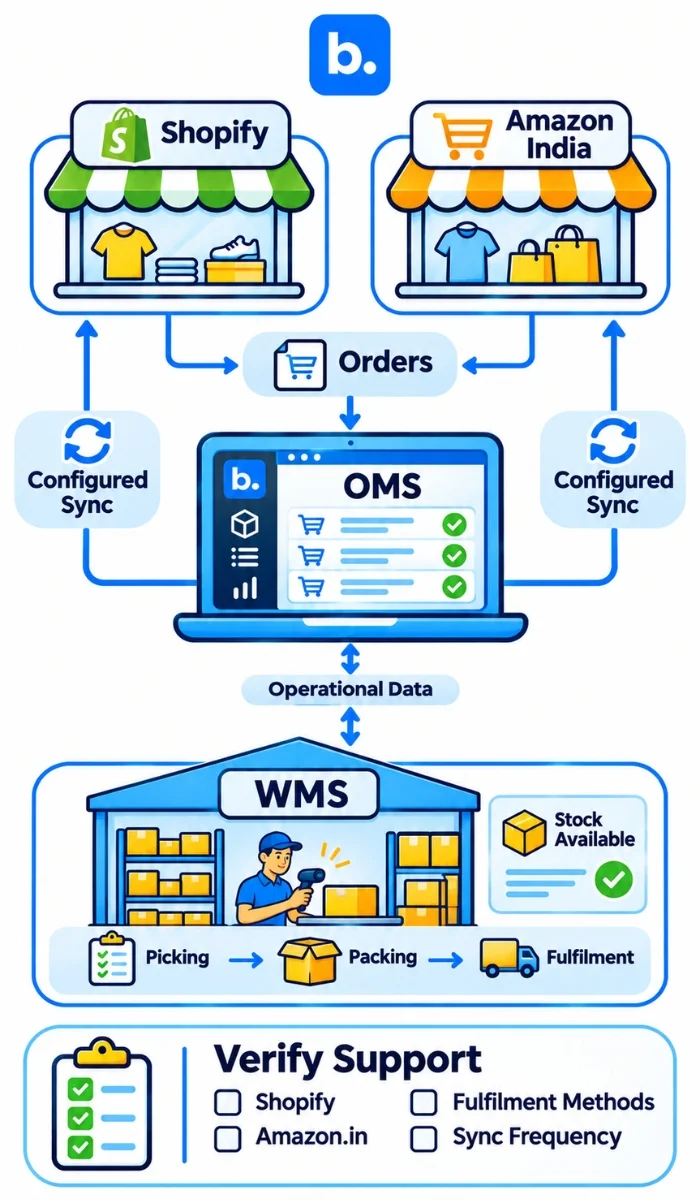
Your brand has the same bestseller on Shopify and Amazon India. You have 20 units in your warehouse. Orders come in on both channels. If you have separate inventory amounts on each channel, you may promise the same unit twice. Your team then has to identify which order it can’t fulfil and update inventory on both channels.
Base OMS can bring connected channel orders into one queue, while Base WMS can help your warehouse team manage stock and fulfilment. When an order is placed on one channel, the shared inventory workflow should update the quantity available to the other channel, based on the sync rules you configure. Your team can check orders and inventory in one workflow.
Before choosing a setup, confirm that the required Shopify and Amazon India connections are supported, check how often stock is updated, and test what happens when an order is cancelled or returned. The exact workflow will depend on your channel connections, warehouse setup and configuration.
Conclusion
Selling on Shopify and Amazon India gives your products another route to customers, but it also creates more work across listings, stock, orders, fulfilment and returns. Start with accurate SKU and ASIN mapping, choose one inventory source and test the sync before making all your stock available on both channels.
A connector may be enough for a simple setup. If you manage multiple channels, warehouses or complex fulfilment rules, an OMS can give your team a more controlled order workflow. Check the marketplace support and test real order scenarios before you commit.