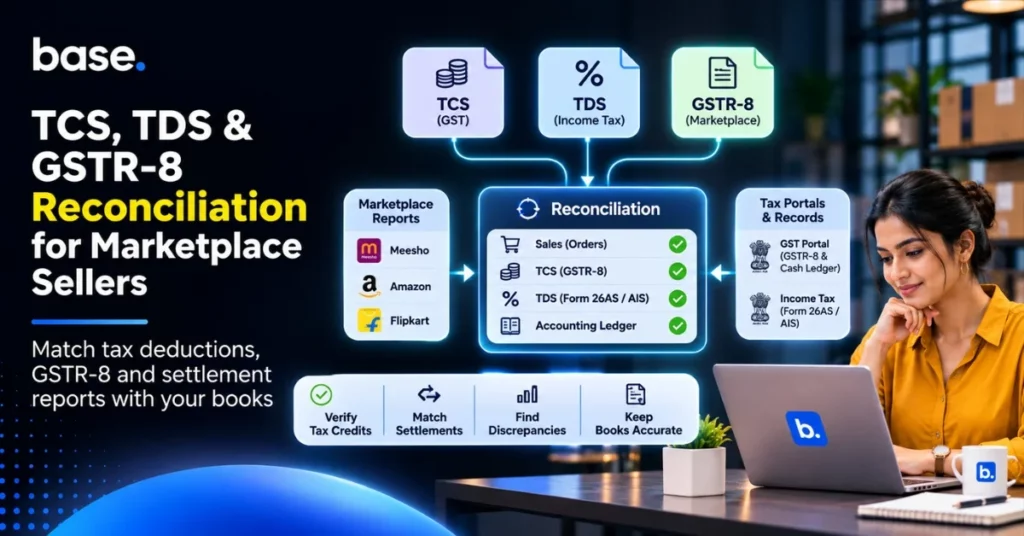
Marketplace sellers will have to check that the GST TCS figures reported by the marketplace in GSTR-8, Income Tax TDS figures reported separately, and their own books of account all tally. The reasons why there may be discrepancies could be due to incorrect GSTIN/PAN information, incorrect returns, cancellations, incorrect reporting periods, and unmatched transactions. Reconciling on a regular basis will make sure that you can see where your tax credits are, deductions are correct, and your books are accurate. This is an important check for ecommerce sellers who face TCS and TDS deductions.
These deductions will impact your cashflow and tax records. Whilst the marketplace might show they have deducted tax, you need to see if this is shown correctly within the correct government portal.
This article explains what TCS, TDS and GSTR-8 are, what reports you need to look at and provides a step-by-step process to make sure they all tally. Examples and common discrepancies are also included.
What is TCS, TDS & Tax Reconciliation?
Reconciliation refers to ensuring that your payment, transaction and accounting records all match. For Marketplace Sellers, this ensures your marketplace reports match your GST, Income Tax and books. A simple way to understand payment reconciliation is to check that amounts recorded by the marketplace, tax portals and your books agree.
Three things to understand are:
- GST TCS (Tax Collected at Source). Under section 52 of the Central Goods and Services Tax (CGST) Act, 2017, the eligible ecommerce operator collects the tax on the net value of taxable supplies made via their marketplace. This is reported within GSTR-8.
- Income Tax TDS (Tax Deducted at Source). The TDS is deducted by the ecommerce operator on eligible payments and seller credits. This applied under section 194-O of the Income-tax Act, 1961 up to 31 March 2026. From 1 April 2026, it applies under section 393(1), Table Sl. No. 8(v) of the Income-tax Act, 2025.
- GSTR-8. This is a monthly return that the ecommerce operator must file. It shows what supplies have been made via their marketplace and how much GST TCS has been collected.
What is the difference between TCS, TDS & GSTR-8?
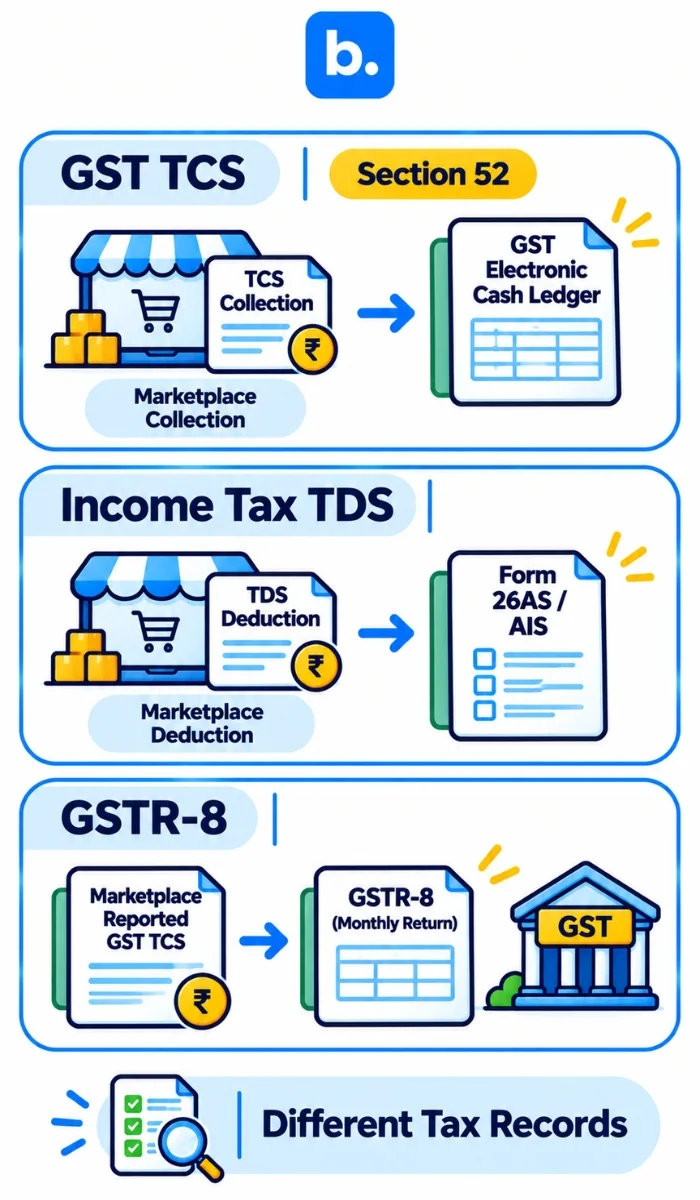
These terms often get confused, as they are often used together in marketplace settlement statements. Each has different purposes, legislation, and reporting.
| Component | Legislation | Collected/Deducted By | Reported Within | How to Reconcile |
|---|---|---|---|---|
| GST TCS | Section 52 of CGST Act, 2017 | Eligible Ecommerce Operator | GSTR-8 | GST Portal & Electronic Cash Ledger |
| Income Tax TDS | Section 194-O of Income-tax Act, 1961 OR Section 393(1), Table Sl. No. 8(v) of 2025 Act. | Ecommerce Operator | Applicable Income Tax TDS Statements & Credits. | Form 26AS, AIS, TDS Certificates. |
| GSTR-8 | Section 52 of CGST Act, 2017 | Ecommerce Operator | GST Portal | The supplies and TCS have been reported correctly. |
| GST TDS | Section 51 of CGST Act, 2017 | Notified Government Departments & other specified deductor. | GSTR-7 | GST Portal & Electronic Cash Ledger. |
What is the difference between GST TCS & Income Tax TDS?
There are different rates for GST TCS and Income Tax TDS.
GST TCS: The current aggregate rate is 0.5% of eligible taxable supplies. This will generally be 0.25% CGST & 0.25% SGST/UTGST for Intra-State supplies. Inter-State supplies will be charged at 0.5% IGST TCS.
Income Tax TDS: The rate is 0.1% on the gross value of eligible ecommerce transactions. This has been applied since 1st October 2024 under section 194-O. This has also been set at 0.1% under section 393(1), Table Sl. No. 8(v) of the Income-tax Act, 2025.
The new Income Tax legislation also has an exemption for payments made to an individual or HUF Ecommerce participant who has an annual gross value of sales/services of ₹5 lakh or less. They will also need to provide PAN or Aadhaar to the operator.
The GST TCS credit will show within the supplier’s electronic cash ledger. This will be based on the GSTR-8 submitted by the operator. The Income Tax TDS will need to be reconciled separately.
Important Note: GSTR-8 is not a TDS return. The GST TDS (Section 51) is different to the Income Tax TDS (Section 194-O & 393).
Why is TCS & TDS reconciliation important for Ecommerce sellers?
Regular TCS TDS reconciliation will ensure your tax records are accurate.
There are 5 reasons why this is important:
1. Accurate Tax Credits.
Whilst the marketplace may have collected GST TCS or deducted Income Tax TDS, you need to see if this is credited correctly to your seller details. This will help you identify any missing entries, incorrect PAN details or GSTIN discrepancies.
2. Understand your cashflow.
By knowing your TCS & TDS, commissions and other charges, you can know how much the marketplace has taken.
3. Accurate GST Returns.
By comparing the supplies reported by the marketplace to your sales, you can identify any discrepancies with taxable values, returns & adjustments. This will allow you to investigate before finalising your returns.
4. Accurate Income Tax.
You need to see you have the correct TDS deducted. If there are no entries or incorrect entries, this could impact your tax credit.
5. Prepare for Audits.
Having clear records will help you explain any discrepancies during an audit.
| Issue | Impact | Why it matters. |
|---|---|---|
| Missing GST TCS Credit. | No amount in Electronic Cash Ledger. | GST Credit not confirmed. |
| Incorrect Income Tax TDS. | No amount in Form 26AS or other applicable records. | Tax Credit may not be available. |
| Mismatch in Settlement. | No match in Net Payout vs Ledger. | Bank & Ledger do not match. |
| Different Reporting Period. | No match in the monthly figures between the marketplace and the seller. | May require further investigation into returns. |
| Incorrect Seller Details. | TCS/ TDS not showing against the correct GSTIN/PAN. | Difficult to confirm credit. |
Just because there is a deduction shown in the marketplace settlement report does not mean the tax credit will appear in the correct government portal.
What reports & records do you need?
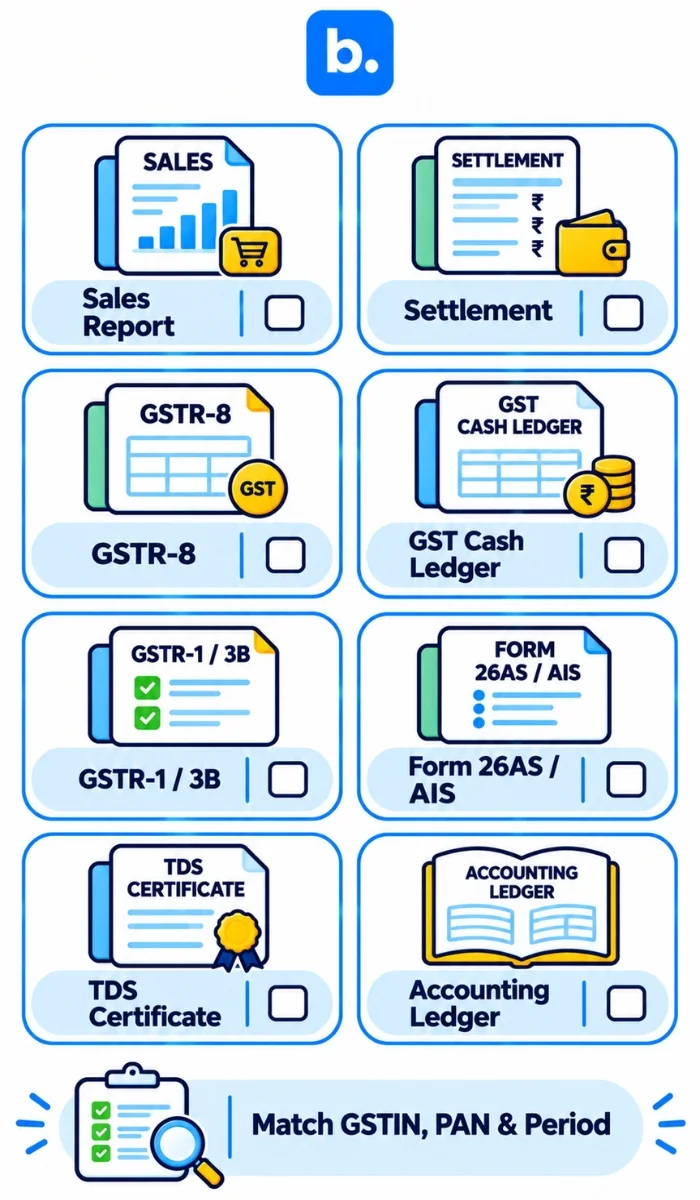
Before you start reconciling, you need to gather the following reports:
| Report/Record | Details | To Check |
|---|---|---|
| Sales Report. | Order IDs, Invoice Value, Taxable Value, Returns & Cancellations. | Total Sales & Value of Transactions. |
| Settlement Report. | Gross Sales, Commissions, Refunds, Deductions & Net Payout. | All Deductions & Net Payout. |
| GSTR-8. | Supplies, Returns & TCS reported by the operator. | Taxable Values & TCS. |
| GST Electronic Cash Ledger. | TCS Credits made against the correct tax heads. | Amount, GSTIN & Tax Period. |
| Seller GSTR-1. | Outward Supply Information including applicable Ecommerce operator details (Table 14(a)). | Sales made via Ecommerce operators. |
| Seller GSTR-3B. | Outward Tax Liability & Values. | Correct Taxable Values & Liability. |
| Income Tax TDS. | Deductor details, PAN, Amount Paid/Credited & TDS. | Amount deducted & Deductor. |
| Form 26AS & AIS. | Applicable Income Tax Transaction & Credit. | Confirm deduction has been reported. |
| TDS Certificates. | Tax details deducted & reported by the Deductor. | PAN, Amount & Applicable Period. |
| Accounting Ledger. | Sales, Tax deductions, Receivables & Settlements. | See if marketplace details match. |
You should make sure you are comparing the correct details. This means ensuring you have matching GSTIN, PAN, marketplace & period.
If you are selling on multiple marketplaces such as Amazon and Flipkart, ensure you have separate records for each marketplace. For Amazon sellers, understanding Amazon payment reconciliation can help you review settlement reports, deductions and payment discrepancies.
You should also understand the difference between GST TCS and GST TDS. The GSTR-8 will show the TCS from the Ecommerce operator. However, GSTR-7 will show the GST TDS. The Income Tax TDS will need to be reconciled separately.
How to Reconcile TCS, TDS & GSTR-8
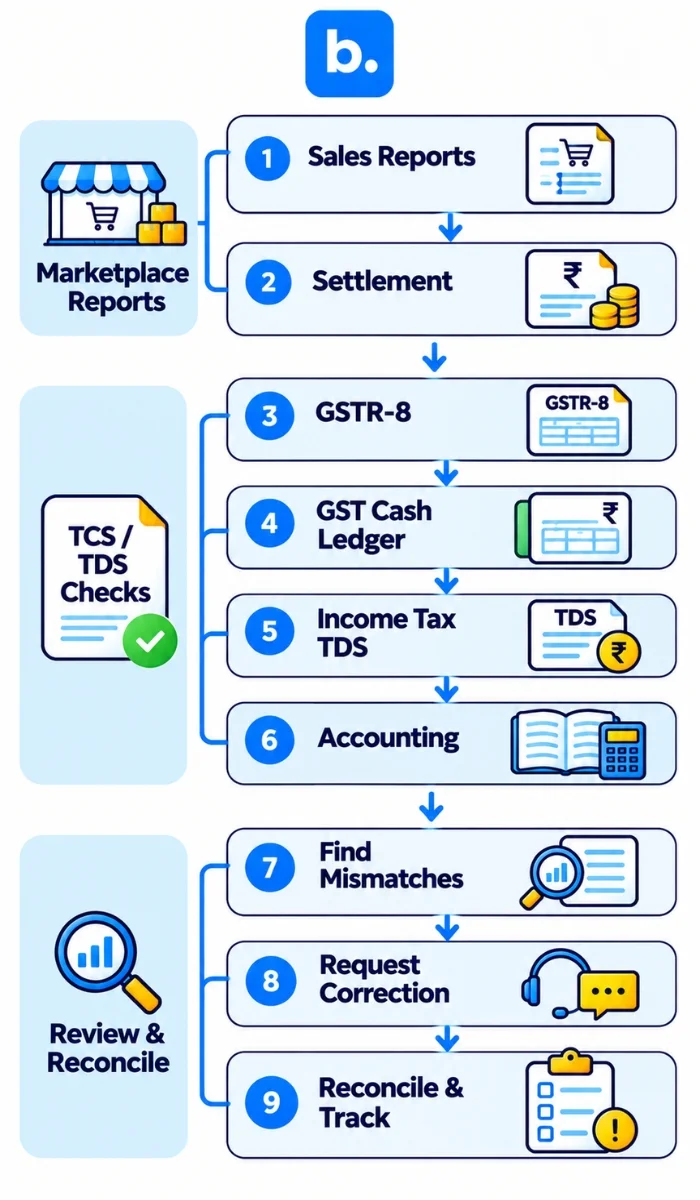
Following a structured process will help you compare the marketplace reports with the government portals. This is the core of marketplace payment reconciliation: checking each source against the others instead of relying on the settlement total alone.
Follow these 9 steps:
1. Download Sales & Settlement Reports.
Download the sales & settlement statements from the marketplace. This should include order level details, order IDs, invoice value, taxable value, returns, cancellations, refunds & marketplace deductions.
2. Download GSTR-8.
Go to the GST Portal and download the GSTR-8 details. Ensure the supplies, adjustments & TCS match with your marketplace.
3. Check GST Electronic Cash Ledger.
Check whether the GST TCS reported by the marketplace is available for acceptance under your correct GSTIN. You can follow the official GST portal guide on accepting TDS and TCS credits to review and accept the relevant entries before verifying the credited amount in your electronic cash ledger.
4. Compare GSTR-8 & Sales.
Make sure that taxable supplies reported by the operator match with your sales invoices & orders. This should include any returns, cancellations & adjustments.
5. Reconcile Income Tax TDS.
Make sure that the TDS details from the marketplace match with the applicable Form 26AS, AIS & TDS Certificates. This should include your PAN, Deductor details, Gross Transaction Value & TDS.
6. Compare Figures with Accounting Ledger.
Ensure your Gross Sales, GST TCS, Income Tax TDS, Commissions, Refunds, Other Charges & Net Payout match with your accounting ledger.
7. Identify Discrepancies.
Ensure you have separated the discrepancies into timing discrepancies, missing credits, incorrect GSTIN/PAN details, return adjustments & calculation discrepancies. This will help you identify the correct source.
8. Raise Disputes & Update.
If you have identified an incorrect deduction you will need to contact the marketplace or applicable Deductor. Provide them with the transaction details & ask for the correction. Update your reconciliation tracker.
9. Complete Reconciliation.
Ensure you have a record of all reconciled transactions, outstanding credits & discrepancies. Note the reason for the discrepancy & carry this forward until the correction/credit has been made.
Process at a glance
- Sales & Settlement Reports
- GSTR-8
- GST Electronic Cash Ledger
- Income Tax TDS
- Accounting Ledger
- Investigate Discrepancies
You should keep a separate reconciliation schedule for GST TCS & Income Tax TDS, even though they will be reviewed by your finance team during the monthly close.
Common Discrepancies with Marketplace Payments
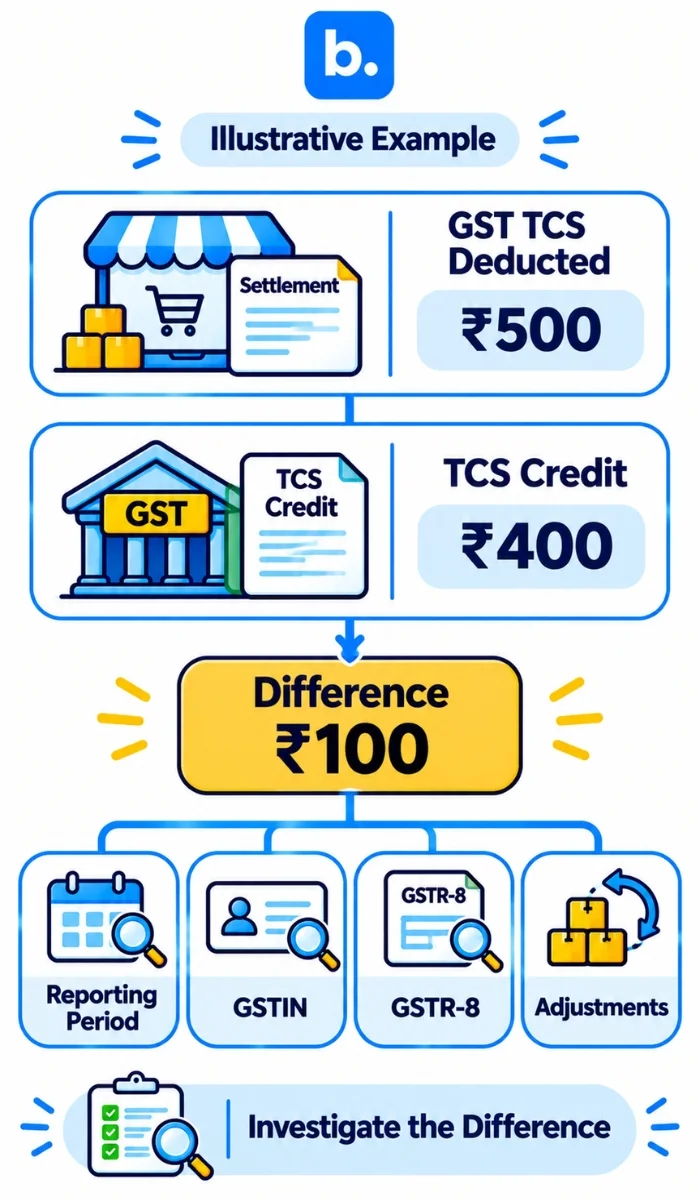
Not all discrepancies will be down to incorrect deductions being made. They can also be due to different reporting periods, returns & transaction adjustments.
Below are 6 common issues to check:
| Discrepancy | Reason | Check | Action |
|---|---|---|---|
| GSTR-8 doesn’t match Sales. | Different period or adjustments. | GSTR-8 & Sales Report. | Ensure the transactions match. Consider timing discrepancies. |
| GST TCS not credited. | Incorrect GSTIN or delayed reporting. | GSTR-8 & Electronic Cash Ledger. | Check GSTIN & Contact Marketplace. |
| Income Tax TDS not credited. | Incorrect PAN or delayed reporting. | Form 26AS, AIS & TDS Certificate. | Confirm PAN & Request Correction. |
| Returns & Cancellations don’t match. | Refunds & Credit Notes in different periods. | Sales Report, Return Report & GSTR-8. | Ensure the returns match & are adjusted. |
| Settlement deductions don’t match. | Incorrect commission, fees & other deductions. | Settlement Report & Accounting Ledger. | Check each deduction. |
| Incorrect TCS/ TDS. | Incorrect calculation, rate or transaction type. | Tax Report from Marketplace & Applicable Provisions. | Recalculate & Raise Dispute if necessary. |
Sellers dealing with Flipkart settlements can also refer to this Flipkart payment reconciliation guide to understand marketplace-specific payment differences.
Example:
Your settlement report from your marketplace shows you have been charged ₹500 for GST TCS in this period. However, you only have a credit of ₹400 in your electronic cash ledger.
In this case, you will need to investigate why there is a discrepancy of ₹100. Check that the marketplace has reported the full amount in their GSTR-8. Also check that the periods match & that the TCS has been credited against the correct GSTIN.
Don’t assume it’s an error. First, check whether it’s a timing, reporting or calculation issue.
If your marketplace shows you have been charged ₹300 for Income Tax TDS but this does not show in your applicable Income Tax records, check the PAN, Deductor details & reporting.
How to Reconcile Ecommerce Payments
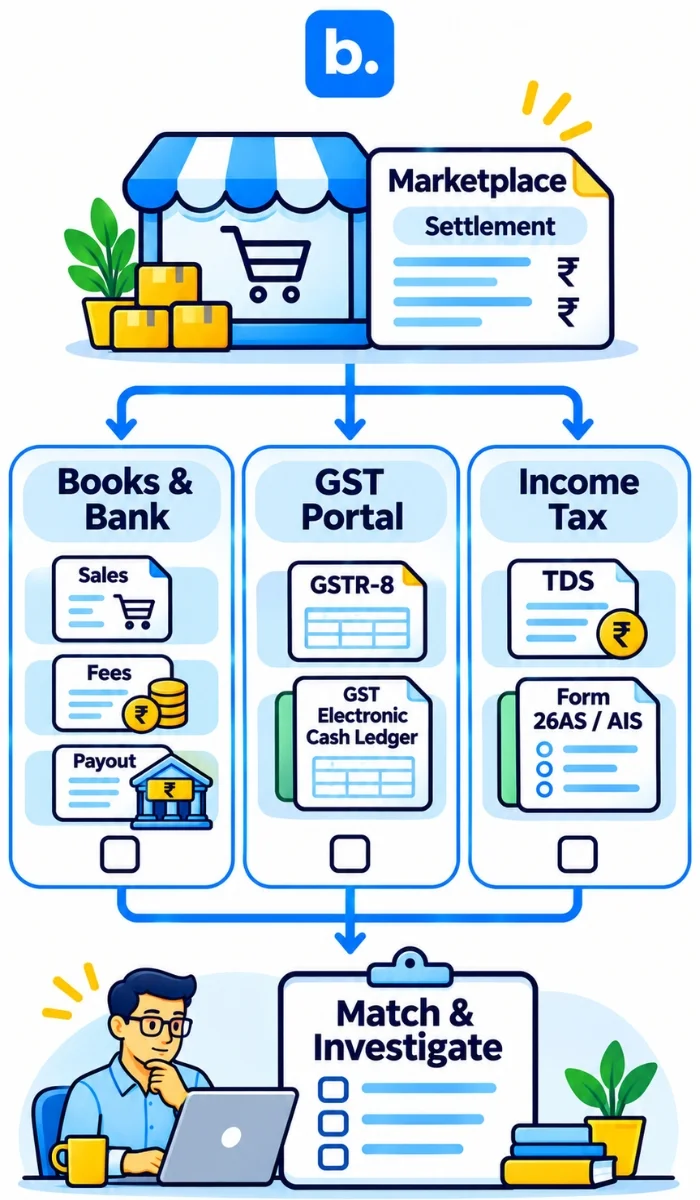
Reconciling Ecommerce payments isn’t just about ensuring the amount paid by the marketplace matches the amount you have received into your bank. You also need to ensure the sales, deductions & credits from the marketplace match your books. This is also the basis of ecommerce payment reconciliation, where each order, deduction and payout is checked against the relevant record.
There are 3 comparisons to make:
1. Marketplace & Books.
Ensure the order value, sales returns, marketplace commissions, refunds, tax deductions & net payout match your accounting ledger.
2. Marketplace & GST Portal.
Ensure the eligible supplies & TCS match your sales & electronic cash ledger. Also ensure the GSTIN & applicable period.
3. Marketplace & Income Tax Portal.
Ensure the TDS matches with your applicable tax credits. Also ensure the PAN, Deductor details, Gross Value & Tax has been deducted.
| Comparison | Reports | What should match. |
|---|---|---|
| Marketplace & Books. | Sales, Settlement & Ledger. | Sales & Deductions match. |
| Marketplace & GST Portal. | GSTR-8, GSTR-1 & Electronic Cash Ledger. | Eligible supplies & TCS. |
| Marketplace & Income Tax Portal. | Marketplace TDS, Form 26AS & AIS. | TDS matches. |
Where possible, ensure you have order-level reports. This will make it easier to see where the discrepancy is. Having order IDs, invoice numbers, GSTIN & PAN will help.
Also ensure you have a record of any discrepancies with the period. If the transaction shows in a different period, note why & carry this forward.
Should I use a Spreadsheet or Ecommerce Reconciliation Software?
Depending on how many orders you have & how many marketplaces you have, you may want to use a spreadsheet. However, as the number of transactions increases, this can become time-consuming.
| Criteria | Spreadsheet. | Ecommerce Reconciliation Software |
|---|---|---|
| Data. | Manual entry. | Consolidates data from supported sources. |
| Order Level. | Manual formulas. | Can support. |
| GST TCS. | Manual calculations. | Can be organised. |
| Income Tax TDS. | Manual. | Can be organised. |
| Returns. | Manual adjustments. | Can be tracked. |
| Discrepancies. | Manual & depends on formulas. | Can identify unmatched or inconsistent entries. |
| Audit Trail. | Manual. | May have audit trail. |
| Multiple Marketplaces. | Manual consolidation across multiple sheets. | Can consolidate. |
Using reconciliation software can help your finance team keep their transaction records organised. They can also compare what reports they have available & identify discrepancies. The right ecommerce reconciliation software should fit the reports and systems your team already uses.
Using a payment reconciliation system can help you save time on matching large amounts of transactions. However, the features available will vary. Ensure the software works with your marketplaces, accounting & tax reports. A payment reconciliation workflow can also be supported by an order management system or oms software when it provides the order and transaction records your finance team needs. Not all tools will integrate directly with the GST & Income Tax portals. Ensure they have the correct reports.
Benefits of Automated Payment Reconciliation
Automated payment reconciliation will save you time on repetitive tasks. Your finance team can see a consolidated view of what needs to be done.
Benefits:
Centralised Data
Have a centralised view of sales, orders & settlements from your marketplace. This will help your finance team have organised records.
Faster Matching
Match orders using order IDs, invoice numbers, GSTIN, PAN & other details. Automate using rules to save manual comparisons.
Identify Exceptions
Identify missing entries, duplicate entries, incorrect amounts & unmatched deductions. This can be reviewed by your finance team.
Track
Keep track of any outstanding tax credits, discrepancies & corrections. This makes it easier to follow up with marketplaces & deductors. For example, if your finance team has thousands of orders per month, they may have to spend a lot of time comparing sales reports, settlement statements & accounting entries. Using an automated process will help consolidate the data & give a list of unmatched transactions.
Whilst automation can help with the reconciliation process, it won’t replace the need for tax professionals. The seller is still responsible for ensuring they have confirmed their statutory records.
Where an Order Management System Fits in Marketplace Tax Reconciliation
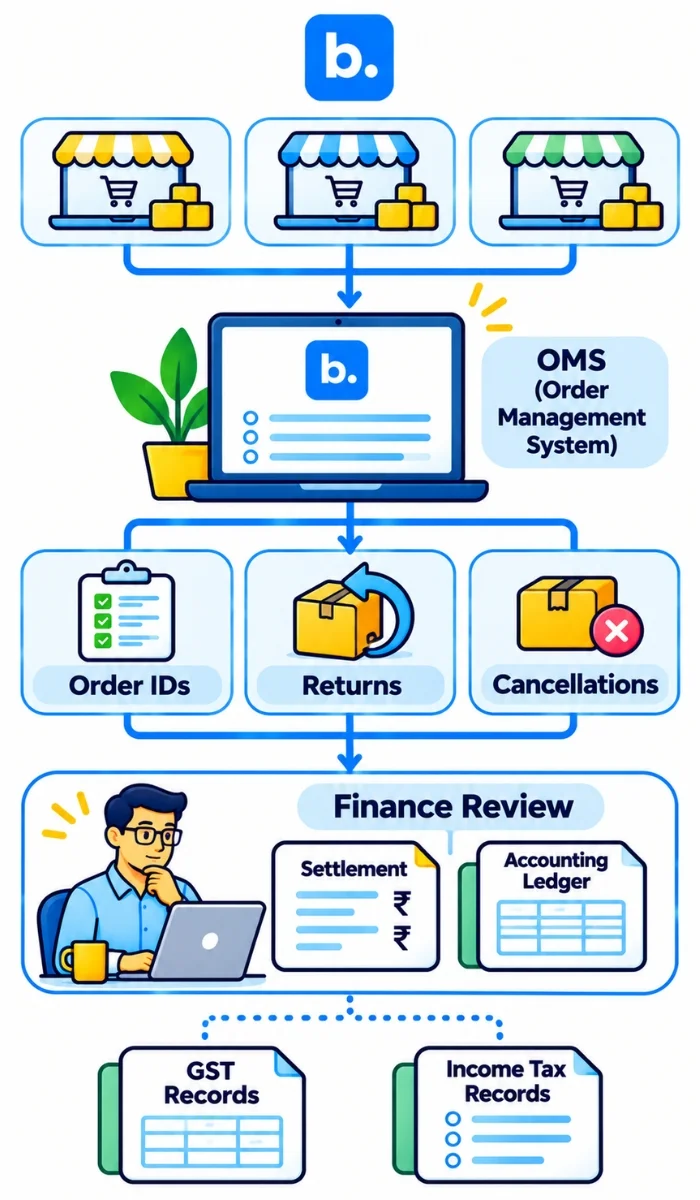
An order management system (OMS) is software that centralises order information, sales activity and fulfilment data across sales channels. OMS software can give sellers a consistent view of order details that may be needed during reconciliation.
There are three ways an OMS can support this process:
- Order-level visibility: Keep order IDs, invoice details, sales values and order statuses organised. These details can be compared with marketplace sales and settlement reports.
- Return and cancellation tracking: Maintain visibility into returned, cancelled and refunded orders. These transactions can affect reported sales values and settlement figures.
- Centralised operational records: Bring order information from supported sales channels into one place. This gives finance and operations teams a consistent reference when comparing marketplace and accounting records.
An OMS is not automatically a tax filing or tax credit verification system. Sellers still need marketplace statements and official GST and Income Tax portal records to confirm TCS and TDS credits.
How Base OMS Helps with Marketplace Reconciliation
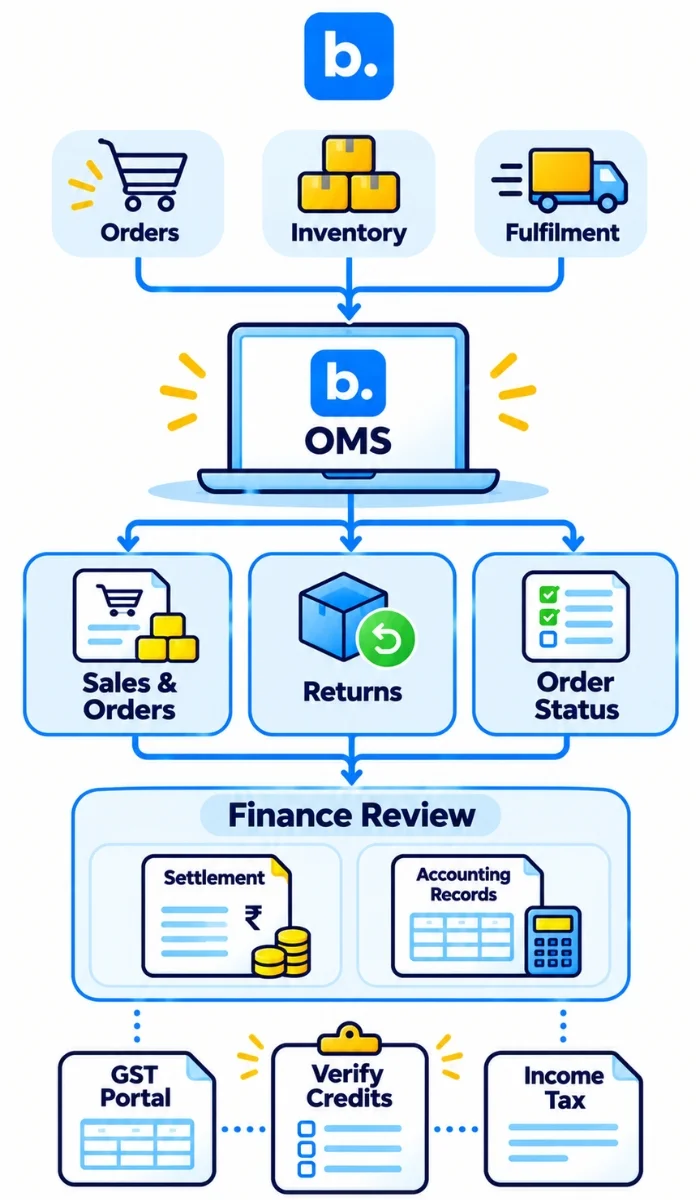
Base OMS can support marketplace reconciliation by giving teams an organised view of order information across supported sales channels. This can help operations and finance teams refer to order details when reviewing marketplace records.
Order information, including order IDs, sales details and order statuses, can help teams compare marketplace activity with their internal records. Where returns and cancellations information is available, teams can also review adjustments that may affect sales and settlement figures.
This operational visibility can make it easier to investigate differences between order records, marketplace settlements and accounting entries. The exact reports and workflows available depend on the channels and features supported by Base OMS.
Base OMS supports order management and operational visibility. Sellers should continue to use marketplace statements and official GST and Income Tax records to verify statutory TCS and TDS credits. Book a Base OMS demo to understand how its order management capabilities can support your marketplace operations.
Conclusion
For ecommerce sellers dealing with TCS and TDS, regular reconciliation means checking marketplace sales, GST TCS, income-tax TDS, GSTR-8 and accounting records separately. This helps identify missing credits, reporting differences and incorrect deductions before they affect financial records. Keep the relevant reports together, investigate unmatched entries and follow up on corrections. Book a Base OMS demo to understand how centralised order data can support marketplace reconciliation.