
Automatic actions in Base.com are built on a simple idea: when something happens in the system, the next step should happen automatically. Base already knows the event. The value comes from deciding what should happen next, and under which conditions.
Every automatic action has three parts:
- An event that starts the rule
- Conditions that decide when it applies
- Actions that run once those conditions are met
This structure lets teams automate order processing without hardcoding workflows or relying on manual checks.
In our experience working with growing eCommerce and d2c operations, this simple structure works across different order volumes and warehouse setups. The concept stays the same. What changes is how teams apply it.
A small operation may focus on removing routine tasks. A larger one may use automatic actions to enforce consistency, improve visibility, or close process gaps at scale. The same building blocks support all of these use cases.
How Automatic Actions Evolve As Operations Scale
Automatic actions in Base.com usually start simple. As operations grow, they become more intentional.
In early stages, teams use them to remove manual follow-ups. For example:
- When an order is paid, a document is created.
- When an order is packed, a label is printed.
The goal is simple: make sure routine steps happen every time. No one has to remember or double-check.
At this stage, automatic actions reduce friction and help small teams stay consistent as order volume increases. This reflects a common automation best practice: automate repeatable tasks first before adding more advanced controls (as recommended by workflow automation standards from sources like McKinsey and Gartner – insert references if needed).
As operations expand, automatic actions take on a new role. They become coordination and control tools. Teams use Base events to signal external teams, centralize exceptions, and introduce decision points without slowing down execution.
At a higher scale, automatic actions also support visibility and governance. They help ensure order statuses stay accurate and working patterns are visible across warehouses and marketplaces.
The principle stays the same:
Base runs the core workflow.
Automatic actions make sure the right response happens automatically as complexity grows.
1. Small to mid-size operations: removing manual follow-ups
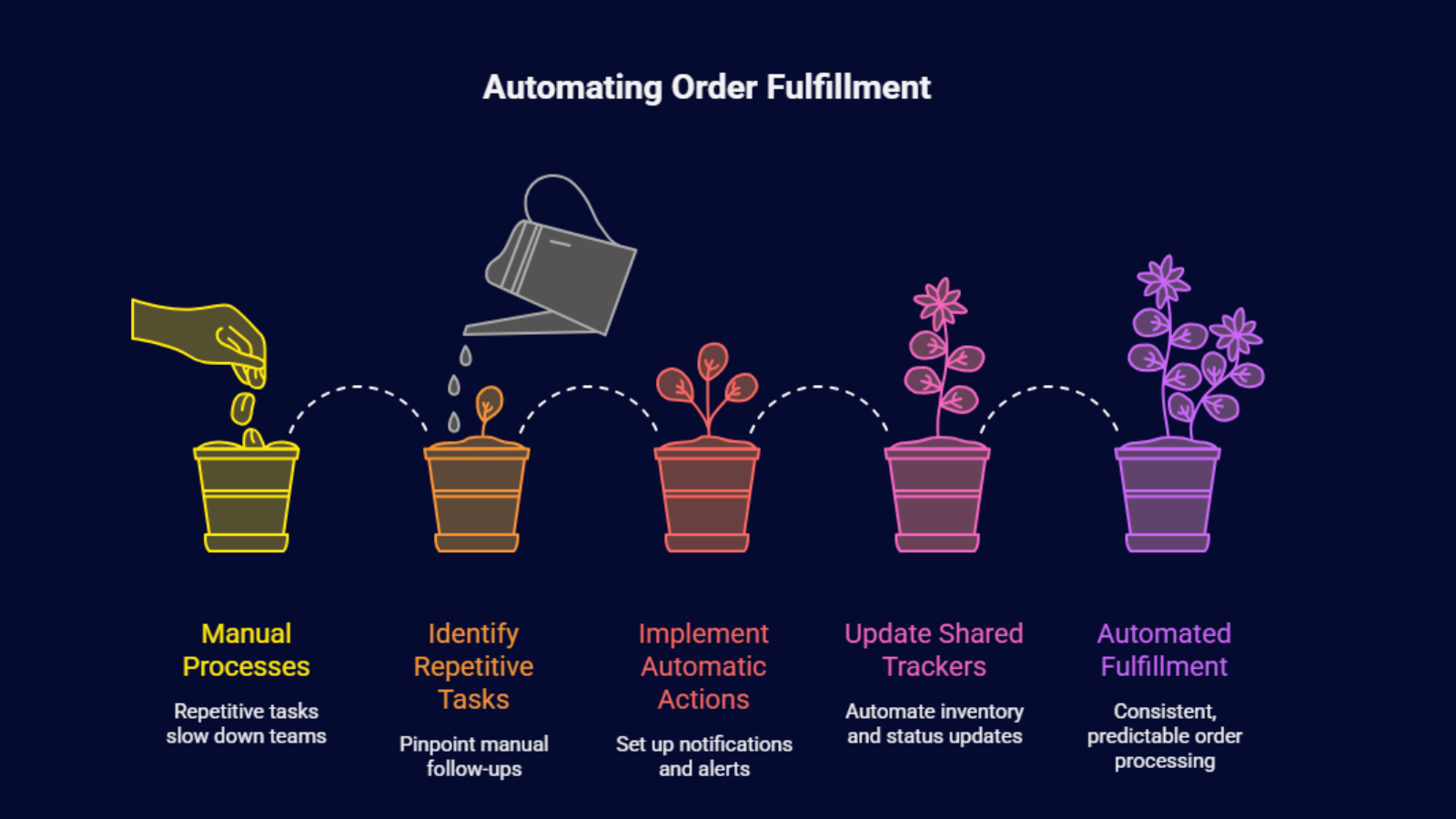
For small to mid-size teams, Base already handles most of the working logic needed for day-to-day fulfillment. Orders flow in. Stock is allocated. Documents are generated. Shipments are processed.
The main challenge at this stage is repetition.
Teams use automatic actions to remove manual follow-ups that slow them down or create inconsistencies.
Common use cases
1. Notifying courier partners when orders are ready
- Event: Order reaches “ready for dispatch” or “packed”
- Action: Send notification or update status
- Result: No need to manually check queues or send messages
2. Alerting internal teams about exceptions
- Event: Order exception is created
- Action: Notify customer support or operations
- Result: Issues are handled early instead of being found later
3. Updating shared trackers automatically
- Event: Inventory level changes or order status updates
- Action: Update an internal sheet or tool
- Result: Teams stop maintaining spreadsheets manually
At this stage, automation is not about building complex workflows. It is about making sure routine tasks happen every time, without relying on memory, inboxes, or side conversations.
The benefits are practical and measurable:
- Fewer manual steps in order processing
- Less reliance on specific team members noticing changes
- More predictable day-to-day execution
Importantly, Base remains the place where work happens. Automatic actions do not add extra decision layers. They simply ensure that once Base records an event, the obvious next step happens automatically.
For small teams, the goal is consistency, not sophistication.
2. Growing operations: coordinating people outside Base
As order volumes increase, operations rarely stay inside one system. More external teams get involved. Coordination becomes just as important as execution.
Typical examples include:
- 3PL partners managing part of fulfillment
- Packaging or kitting vendors
- Inspection or compliance teams
- Regional partners working in separate tools
These teams often do not need full access to Base. They need clear and timely signals.
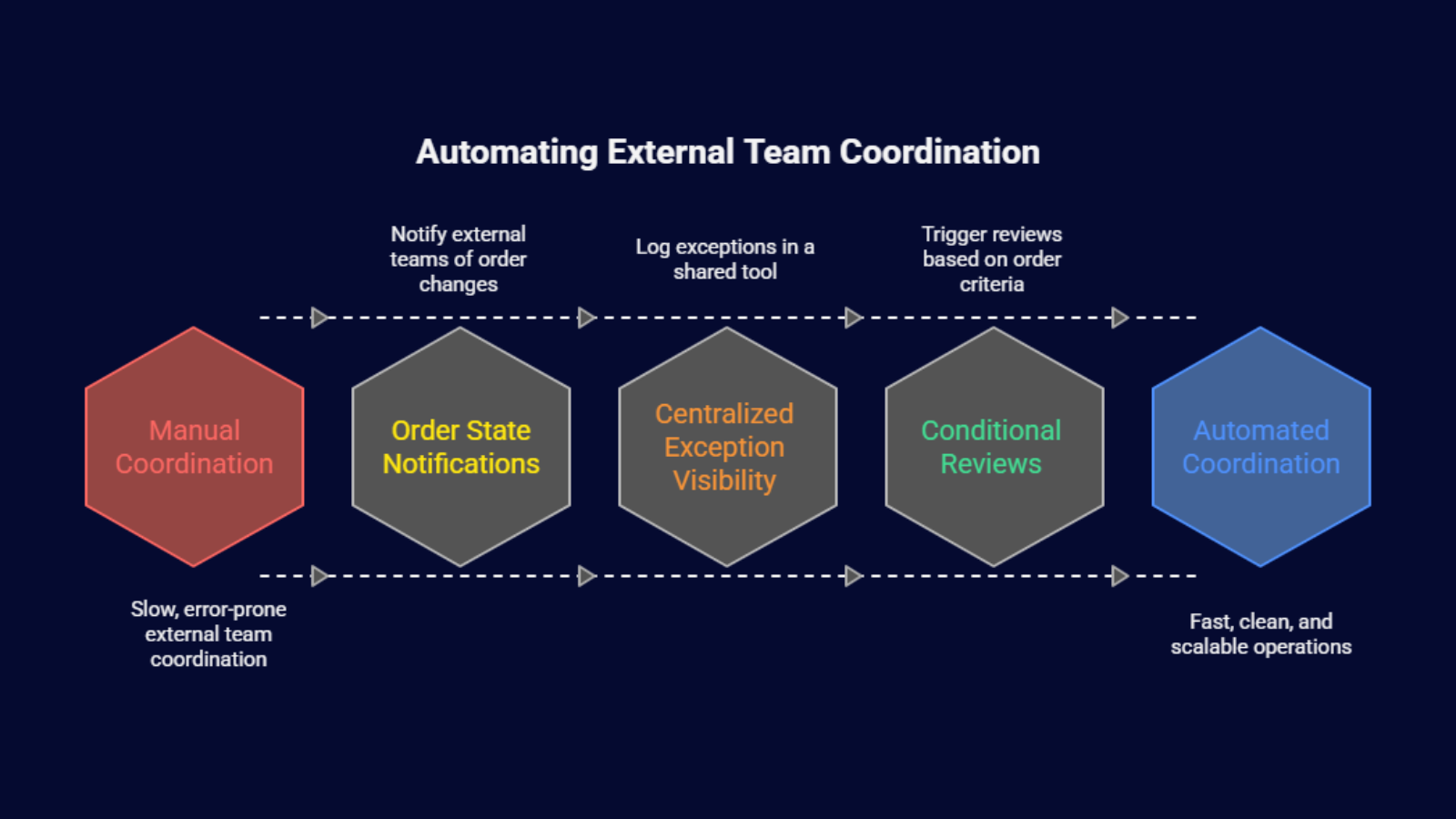
Automatic actions act as coordination layers between Base and the systems around it.
Common patterns
1. Order state–driven notifications
- Event: Order changes state
- Action: Notify an external team or system
- Result: Partners act at the right time without logging into Base
2. Centralized exception visibility
- Event: Exception raised
- Action: Log it in a shared tracking tool
- Result: Operations teams see all issues in one place
3. Conditional reviews and approvals
- Event: Order meets set criteria (value, destination, override)
- Action: Trigger review or approval
- Result: Controls apply only where needed
Instead of adding manual steps or giving wider system access, Base events become clear signals others can act on.
This keeps warehouse execution clean:
- Core fulfillment workflows stay fast
- External coordination happens automatically
- Teams interact with Base only when needed
At this stage, automatic actions help teams scale without redesigning processes.
3. Large-scale operations: visibility and controlled decision points
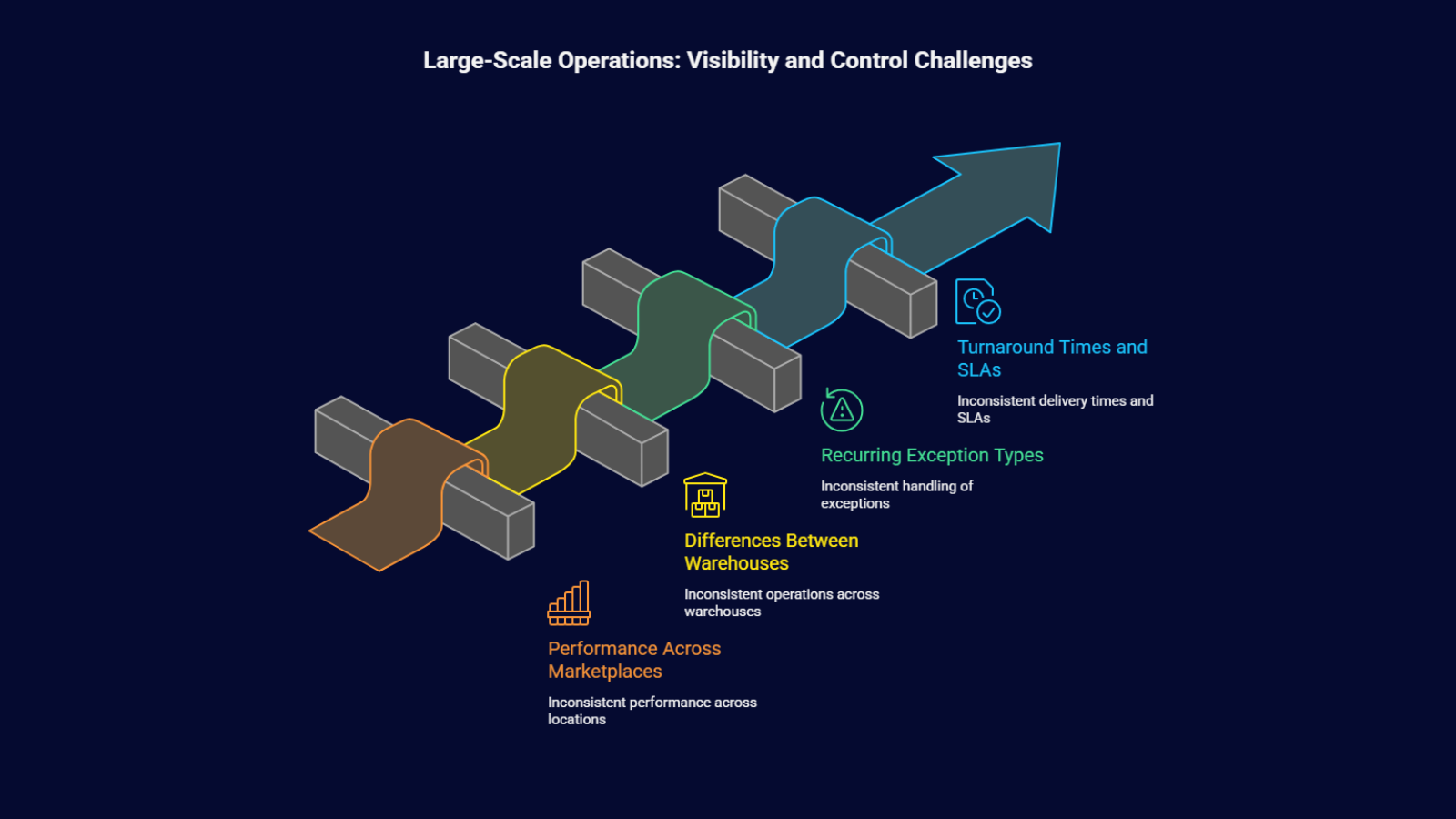
At a large scale, execution is usually stable. The bigger challenge is visibility, governance, and consistency across locations.
Leadership teams need insight into:
- Performance across marketplaces
- Differences between warehouses
- Recurring exception types
- Turnaround times and SLAs
Manually exporting data or reviewing reports does not work at this scale.
Automatic actions help by collecting working signals as they happen.
Typical use cases
1. Lifecycle completion and status accuracy
- Event: Courier marks parcel as delivered
- Action: Automatically complete the order in Base
- Result: System status reflects reality without manual updates
2. Operational data aggregation
- Event: Exception, delay, or status change
- Action: Log data into reporting tools
- Result: Leadership sees patterns, not isolated incidents
3. Selective control points
- Event: Order meets defined risk or value thresholds
- Action: Trigger approval or review
- Result: Oversight without slowing standard orders
The key principle here is restraint. Base does not apply automatic actions everywhere. It activates them only when specific conditions are met.
This ensures:
- Base workflows remain fast and predictable
- High-risk scenarios receive attention
- Reporting reflects real-time operations
At scale, automatic actions help organizations grow without losing clarity or control.
Why This Approach Works Well With Base.Com
Base.com is designed to execute warehouse logic reliably. Order routing, stock allocation, document generation, courier rules, and fulfillment states all live in one place.
Automatic actions work well because they do not compete with that logic. They respond to what Base already knows has happened.
This is important.
When automation recreates warehouse logic outside the WMS, teams often face conflicts, delays, or unclear ownership. Keeping core decisions inside the WMS follows established warehouse system best practices (see general WMS governance principles – insert industry reference).
Base avoids these issues by keeping execution centralized.
Automatic actions extend that execution outward. They listen for events like:
- Order paid
- Order packed
- Order dispatched
- Order delivered
Then they trigger the next step automatically.
The logic stays anchored in Base. The response happens where it needs to happen next.
Because automatic actions are event-driven, they fit naturally into Base’s operating model. Every important change is already tracked. Automatic actions make sure those changes do not stop at the warehouse boundary.
Notifications are sent. Documents are created. Statuses are updated. Data is shared. No manual checks are required.
Another reason this approach works is flexibility.
Automatic actions are not rigid workflows. They are modular rules built from events, conditions, and actions. This lets teams apply automation selectively.
- High-volume, low-risk orders move straight through.
- High-value or unusual orders trigger extra steps.
The same event can lead to different outcomes based on defined conditions.
As operations grow, this flexibility becomes more important. Teams can add or refine rules without rewriting processes. You can add new marketplaces, warehouses, or partners by defining new rules instead of restructuring workflows.
Base stays stable. Automation evolves around it.
Extending Automation With viasocket

Many teams extend this model by connecting Base automatic actions to external tools using lightweight automation layers such as viaSocket (insert link).
viaSocket listens to Base events and triggers actions in other systems. And it can also send responses back into Base when needed.
It does not replace Base’s automatic actions. It works alongside them.
Common use cases include:
- Sending Base events to tools that are not natively connected
- Coordinating people who do not need Base access
- Automating approvals or reporting outside the WMS
- Connecting Base to internal tools without custom development
This setup follows a clear separation of responsibilities:
- Base focuses on warehouse execution
- External tools handle communication and reporting
- viaSocket connects the two
There are also clear boundaries:
- viaSocket is not a replacement for Base logic
- Core fulfillment decisions should stay in Base
- It is best for coordination, not high-frequency warehouse execution
- Like any external system, it requires ownership and monitoring
Used carefully and on purpose, this model scales well. Whether a team processes hundreds of orders per week or hundreds of thousands per day, automatic actions help ensure consistent responses.
Orders complete when deliveries are confirmed.
Exceptions are logged when they occur.
Approvals trigger only when thresholds are met.
Reporting stays current without manual exports.
Final Thoughts
Automatic actions give Base.com users a practical way to scale operations without losing clarity or control.
They respond to events Base already tracks. They ensure routine steps, coordination, and selective decision points happen automatically, without slowing warehouse execution.
Teams can start small by removing manual follow-ups. Over time, they can introduce more structured automation as order volumes, partners, and complexity grow — while keeping core fulfillment logic centralized in Base.
When automation needs to extend beyond the warehouse, tools like viaSocket support this model by carrying Base events to external teams and systems.
With clear boundaries:
- Base executes
- Automatic actions respond
- External layers coordinate
The result is predictable workflows that grow with the business — without adding unnecessary working overhead.
Frequently Asked Questions
1. Do automatic actions replace manual workflows in Base.com?
No. They support and simplify workflows. They automate repeatable steps but do not remove human control. Teams decide where automation applies.
2. Can multiple automatic actions trigger from the same event?
Yes. The same event can trigger different actions based on conditions. For example, a paid order may generate documents for standard orders but trigger approval for high-value ones.
3. Do automatic actions slow down the system?
No. They are event-driven and lightweight. They react to events Base already processes, so they do not slow warehouse execution when configured properly.
4. When should teams use viaSocket with Base.com?
When actions need to happen outside Base — such as notifying partners, syncing data, or triggering approvals in other systems.
5. How do teams avoid over-automation?
By adding rules only to solve clear problems. Keep core logic in Base. Define boundaries for external tools. Review automation regularly to keep it useful and simple.