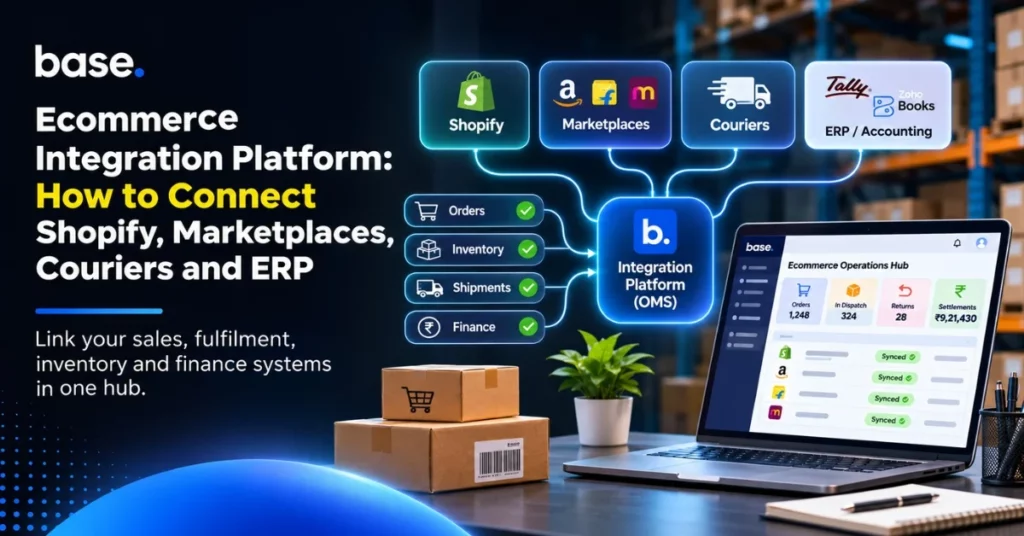
To manage all ecommerce channels in one dashboard, connect the store, marketplaces, couriers, warehouse and accounting or enterprise resource planning (ERP) system to a shared layer. It passes orders, stock, shipment and finance data between them. That layer can be an integration platform or an order management system (OMS) acting as the hub.
This guide is for ecommerce and operations teams that are tired of switching dashboards and repairing sync errors by hand. It explains what to connect first, where each system should own its data, and how to choose and roll out the hub.
How to manage all ecommerce channels in one dashboard
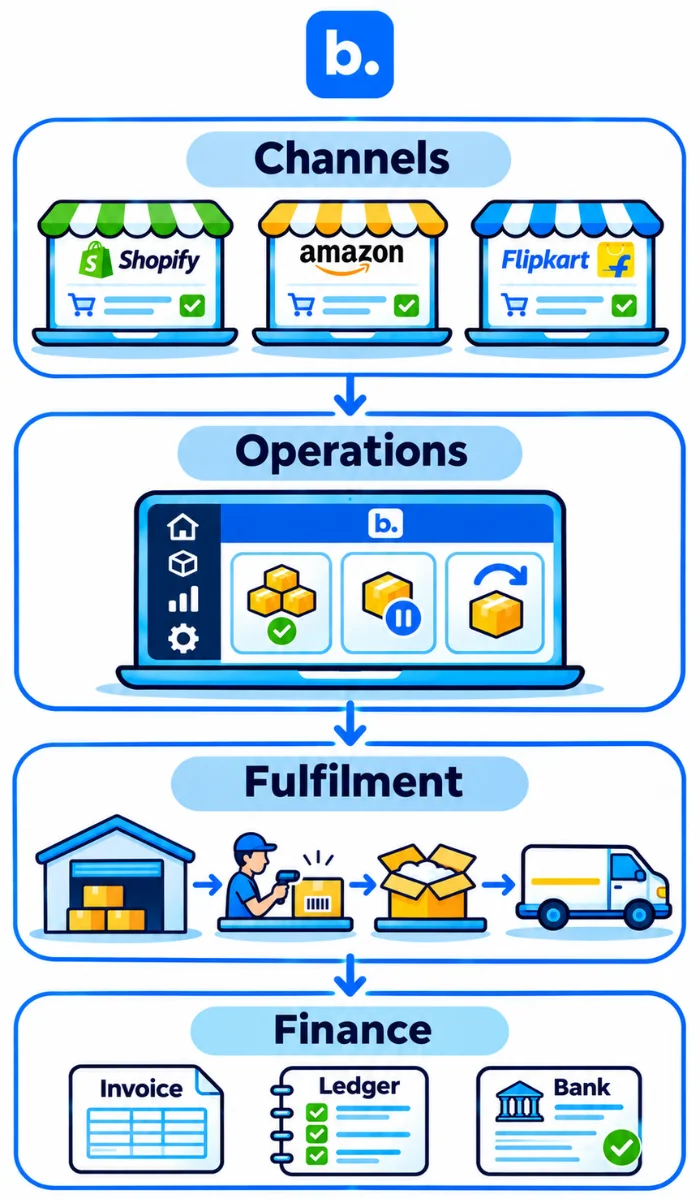
By connecting your selling channels with operations, fulfilment and finance systems, your staff can view ecommerce activity in one place. Define which system owns each record and how updates should be handled. This gives your team a consistent view of orders, stock and fulfilment while keeping exceptions visible for review.
| Layer | What it covers | Example systems and records |
|---|---|---|
| Channels | Where orders begin | Shopify, marketplaces, other storefronts; products, orders, cancellations |
| Operations | Rules applied to orders and stock | Order management system; allocation, holds, returns, available stock |
| Fulfilment | Where goods are picked and shipped | Warehouse, courier or aggregator; pick, pack, label, tracking, delivery |
| Finance | Where money and accounting records are reviewed | Payments, cash on delivery (COD) remittances, accounting or ERP; invoices, fees, settlements |
Businesses generally use three connection approaches: point-to-point integrations between individual applications, an integration platform that connects multiple systems, or an OMS-led hub that also manages order and inventory workflows. The right approach depends on the number of channels, the complexity of operations and how much control the business needs over orders and stock.
Why point-to-point integrations break as you add channels
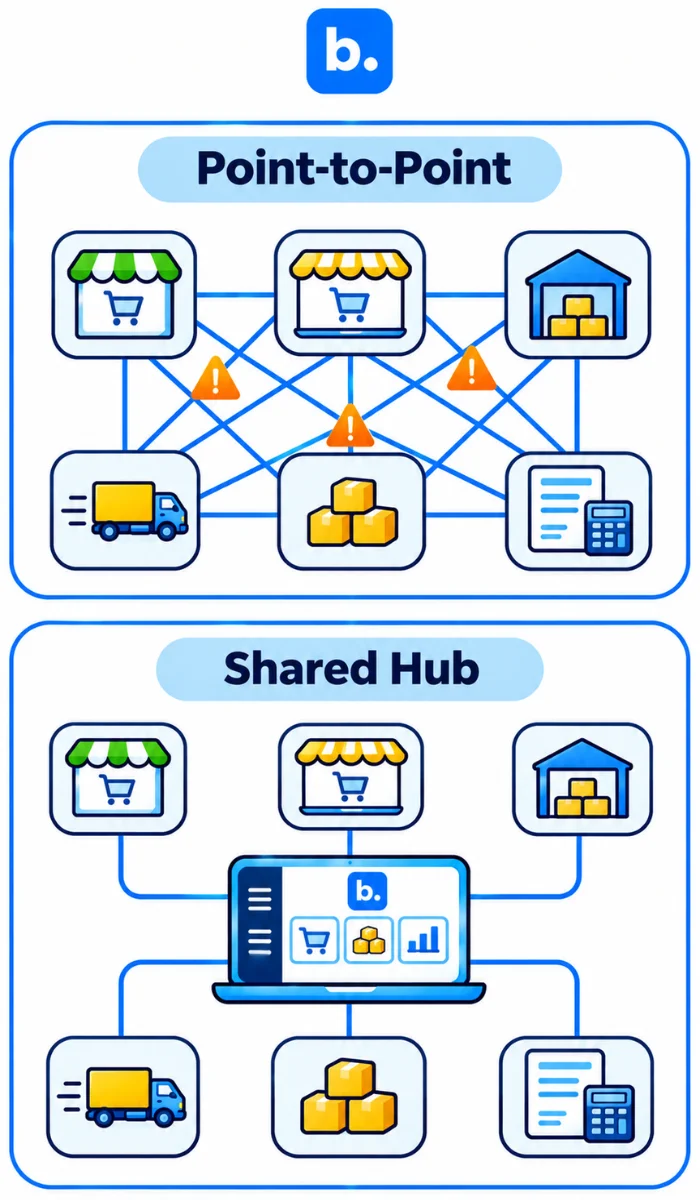
Every new tool can require links to existing tools. This adds mappings, credentials and failure points. Ecommerce integration also requires clear ownership of the data fields being exchanged.
Order IDs can vary between Shopify, marketplaces, couriers and accounting systems. Having a single reference will help to track shipments and refunds back to the sale.
Stock drifts when two systems both edit quantity. Choose one stock owner and define how reservations, cancellations and returns change availability.
If there is an issue with the API call, it could fail, take longer than expected or be throttled. If there is no alert in place the issue may not be identified until you have oversold or receive a complaint.
Different dashboards and status names mean staff repeatedly check and copy details. A shared view should remove that work, not add another screen.
Often one person will be responsible for maintenance. Ensure you know who owns the connection, what the alert is and what to do to get it back up if there is an app update or field change.
| Problem | Business impact | Fix |
|---|---|---|
| Too many links | Repeated mapping work | Use a defined hub |
| Different order IDs | Hard to trace parcels | Keep a shared reference |
| Competing stock updates | Oversells or phantom stock | Name one stock owner |
| Silent errors | Late discovery | Add alerts, logs and retries |
| Separate dashboards | Repeated checks | Use one operational view |
| One-person maintenance | Handover risk | Document owner and recovery |
What an ecommerce integration platform connects
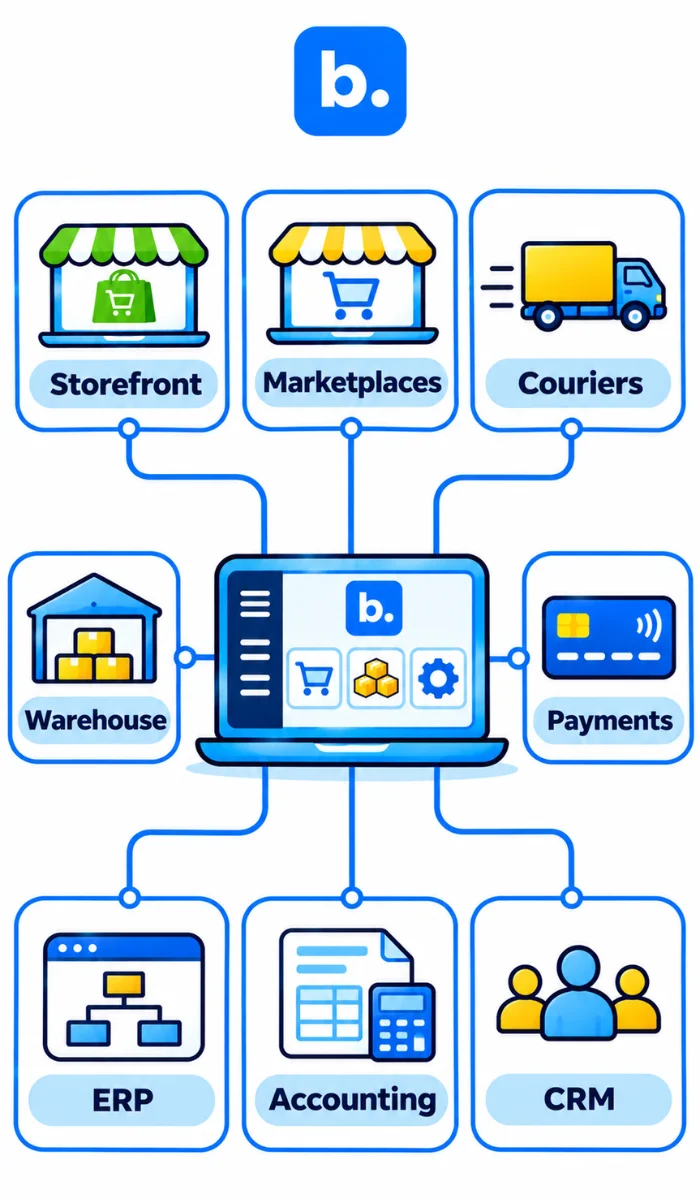
An ecommerce integration platform connects selling, shipping, warehouse and accounting systems. It moves agreed data on defined rules, so teams do not have to re-enter each order by hand. The integration may be one-way or two-way. Confirm direction and ownership for every field.
| Layer | Systems (examples) | Data going in | Data going out |
|---|---|---|---|
| Storefront | Shopify, WooCommerce | Orders, products, customers, payment status | Stock, fulfilment, tracking |
| Marketplaces | Amazon, Flipkart | Orders, listings, cancellations, returns | Price, stock, dispatch, tracking |
| Couriers and aggregators | Carrier APIs, shipping tools | Booking, tracking, delivery events | Shipment and parcel details |
| Warehouse | Warehouse management system (WMS) | Orders, pick instructions, receipts | Pick/pack, dispatch and stock movements |
| Payments and COD | Gateways, courier remittances | Transactions, refunds, fees, payouts | Order references, collection status |
| ERP | SAP, ERPNext, Microsoft Dynamics, Navision | Sales, returns, inventory and operational records | Product/stock master, purchasing and business records |
| Accounting | Zoho Books, TallyPrime, Frappe, BUSY | Sales, invoices, payments, taxes, refunds and settlements | Account mappings and financial records |
| Marketing and customer tools | CRM, email, support tools | Customer and order events | Segments and service updates |
The integration platform will generally be used for transporting and transforming data. An order management system will be used for applying order and stock rules such as allocation, holds and returns. Some products will offer both features, so think about what system will own the rules.
Plan your integrations before you buy anything (checklist)
- List all sales channels, couriers, warehouse and finance tools being used.
- Define where your source of truth is for products, stock, orders, pricing and customers.
- Ensure clean SKUs (Stock Keeping Unit). Remove any duplicates, check variants and bundles.
- Understand what the average volume is. Identify busy days and seasonal spikes.
- Define who will monitor sync issues and who has the ability to correct the source.
- Define any requirements for your ERP or accounting. For example, if you need to post order by order or in summary format, or how GST will be handled.
- Know what API access you have. What are the permissions and rate limits?
Depending on what fields and identifiers are available within your systems, you will need to integrate with your ecommerce platform software. Shopify has different API limits depending on the API and plan. Connections should be queued up and have responsible retry logic. There may be different names for statuses between systems. It is vital to have clean SKUs to ensure accurate product matching. See Shopify’s API limits guidance. Use the previous table to record each field’s owner, direction and reviewer.
Ecommerce platform integration: connecting Shopify and your storefront
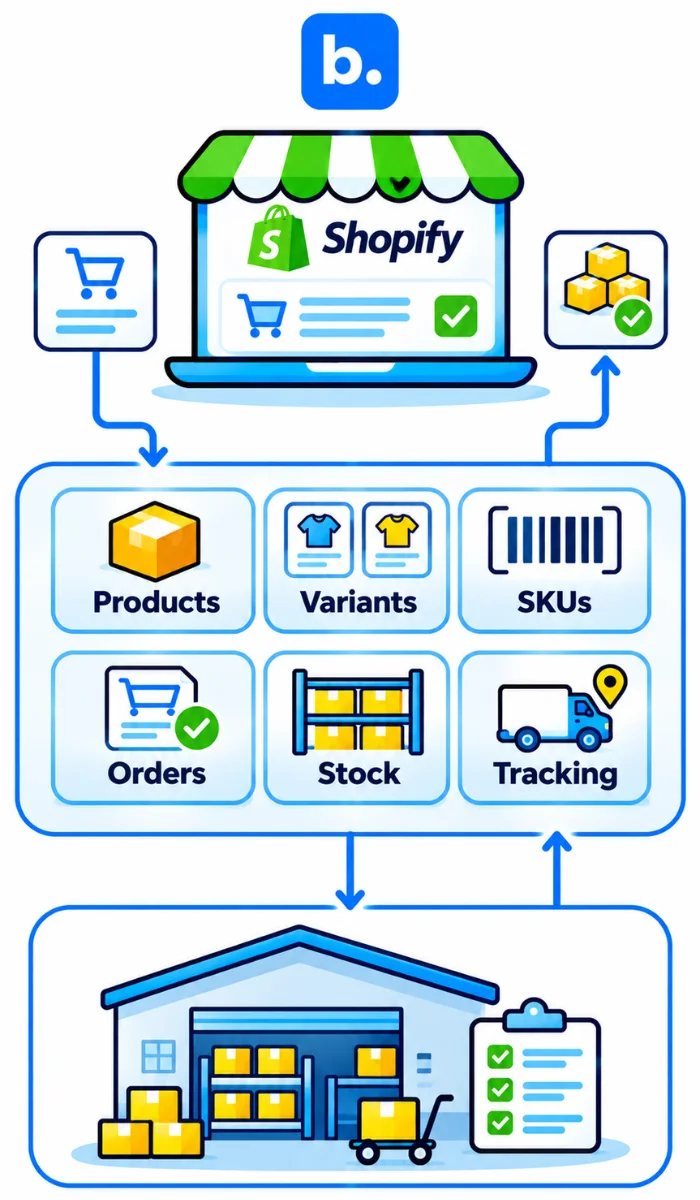
When integrating with an ecommerce platform, start with your storefront as this is where your orders, products and customer information will be. Once connected, map products and variants. Agree how stock levels will be calculated. Orders can then be brought into the process. Test shipment creation, fulfilment status and tracking updates to ensure they are correctly reflected against the original order.
Shopify integrations: App Store apps or API?
App Store apps suit standard needs when they support the required fields and workflow. Check permissions, data direction, errors and support. A custom API suits rules that apps do not cover, but needs technical ownership and ongoing tests. Shopify offers public and custom apps; API limits vary. Custom does not automatically mean faster or more reliable.
What to sync with the storefront
Sync products, variants, SKU, available stock, orders, payment status and COD flag. Add fulfilment, tracking, cancellations, refunds and returns as needed. Define which system can edit each field; do not overwrite a recent warehouse count with stale store data.
Other storefronts
WooCommerce and custom sites can join the hub if they expose required fields. Keep product IDs and SKUs consistent. Custom sites may need developer support for APIs, webhooks or checkout changes.
Where storefront-only integrations run out of road
A storefront connection may be enough for one store and a simple shipping route. More channels, bundles, warehouses or custom rules may need extra tools. Check what the existing app already handles before adding another stock or order editor.
See the Shopify, Amazon and Flipkart order guide and Shopify–Zoho Books connection page.
Multi channel integration platform: connecting marketplaces and couriers
A multi channel integration platform must preserve order references and send the fields each channel needs. An order download alone does not cover listings, stock, cancellations, returns, settlements or tracking.
Marketplaces
Map offers to products and SKUs before stock updates. Test orders, cancellations, partial fulfilment and returns. Settlement reports are separate; order sync does not guarantee fees or payouts. See the Shopify, Amazon and Flipkart order guide, Amazon–TallyPrime and Flipkart–TallyPrime pages.
Couriers and aggregators
A courier connection may support allocation by pincode, weight and payment mode, plus airway bill (AWB), labels, tracking, non-delivery reports (NDRs) and COD remittance. Verify features by account and service. See the Shopify–Shiprocket integration overview.
| Direction | Data | Frequency to aim for |
|---|---|---|
| Stock to channels | Available stock by SKU/location | Set a peak-sales target |
| Orders from channels | New, changed, cancelled orders | Meet dispatch cut-offs |
| Tracking to channels | AWB and shipment status | After booking and on events |
| Returns from couriers | Status, quantity, condition | On each return event |
| Settlements to finance | Fees, refunds, remittance, payouts | Each statement cycle |
These are operating targets, not guaranteed sync intervals. Test the actual connection under normal and peak load.
Connect your ERP and accounting system
Send mapped sales, tax, payment, refund, fee, settlement and stock records to accounting or ERP. The ERP may also manage purchasing and other business records.
Order-wise posting is easier to trace but creates more entries. Summary posting reduces volume; keep an invoice-level register for audit and tax detail.
- ERP systems: Examples include SAP, ERPNext, Microsoft Dynamics and Navision. Confirm the required business records, inventory information and accounting data flows for each integration.
- Accounting software: Examples include Zoho Books, TallyPrime, Frappe and BUSY. Check invoice, payment, tax, refund and settlement mappings before enabling automated posting.
Reconcile invoices and returns to orders, then settlements to the bank. Finance must review the result.
Where an order management system fits in an ecommerce integration platform
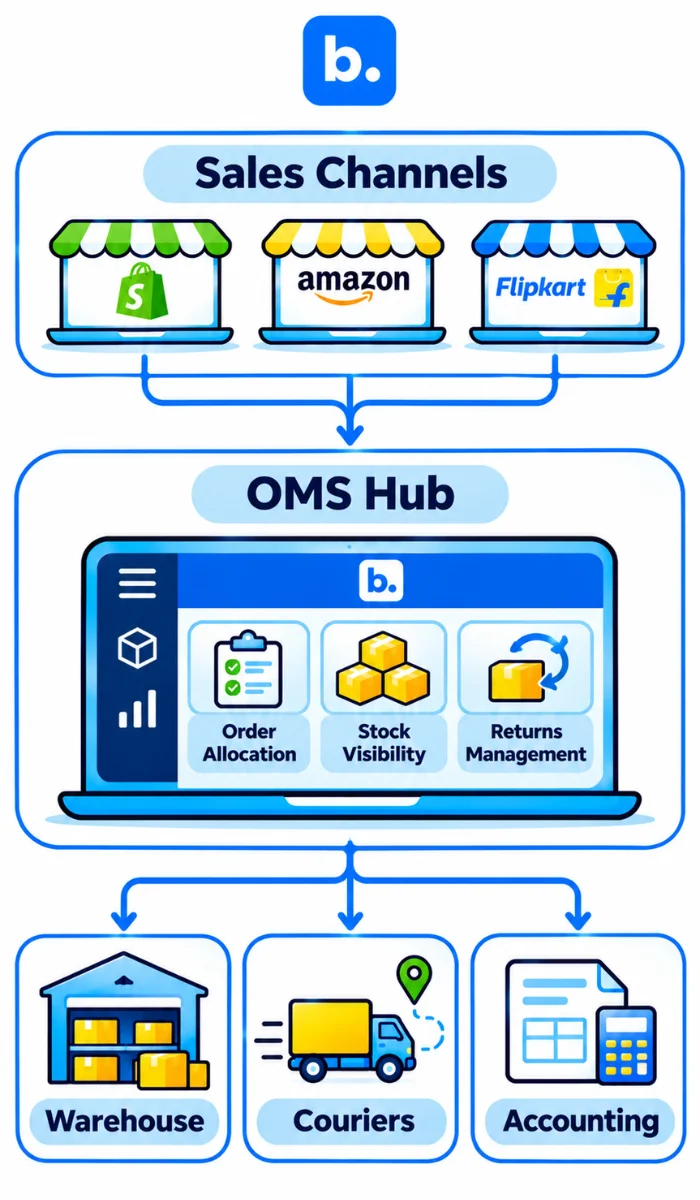
An order management system (OMS) collects channel orders, maintains an operational inventory view, applies order rules and passes work to fulfilment and accounting. Choose explicitly whether it owns stock; it need not replace accounting.
It can keep one order record, apply COD, allocation and hold rules once, and link returns to the sale. Order management for ecommerce means controlling what happens after import. OMS software should show order progress, sync failures and the next action.
Connector vs integration platform vs OMS hub
| Question | Connector | Integration platform | OMS hub |
|---|---|---|---|
| Who owns order rules? | Usually the connected app or store | Merchant-configured workflow or source system | OMS applies operational rules |
| Who owns stock? | Often one connected inventory source | Defined by mapping and rules | OMS may hold the operational view; confirm master |
| What happens on failure? | Depends on app logs and support | Central logs, retries if provided | Order queue and exceptions if provided |
| Effort to add a channel | Low for standard use; limited scope | Add and map a connector | Configure channel plus order and stock rules |
| Fit for high COD share | Depends on COD records supported | Can route COD data if mapped | May link COD status to order workflow; verify remittance handling |
How to choose an ecommerce integration platform
Compare what the platform does, not just its connector count.
- Channels, couriers and ERPs supported for your country and account.
- Depth of each connection: orders, stock, statuses, returns, settlements or only some of these.
- Order and stock rules, including bundles, holds and location allocation.
- Error log, alert, retry and duplicate prevention.
- Volume handling and expected update behaviour during peaks.
- Reporting in one dashboard, with a way to open the source record.
- Setup time, migration help, technical support and ownership of connector changes.
- Pricing model: connector, order volume, user, channel or add-on fees.
For a multi channel integration platform, ask the vendor to show a real test flow using your own sample fields. Ask: How are failed syncs shown? Who fixes a broken API connection? How long does adding a channel take? Request a list of supported records and a clear statement of what is not included.
| Route | Best for | Limits | Typical effort |
|---|---|---|---|
| Point-to-point | Few systems with simple flows | Links multiply as systems grow | Build and maintain each connection |
| Integration platform | Moving data across several tools | Rules and ownership may live elsewhere | Map fields, routes and exceptions |
| OMS software | Orders, stock and fulfilment rules need one operational hub | Accounting and settlement coverage must be checked | Configure channels, inventory and workflows |
How to roll out in phases
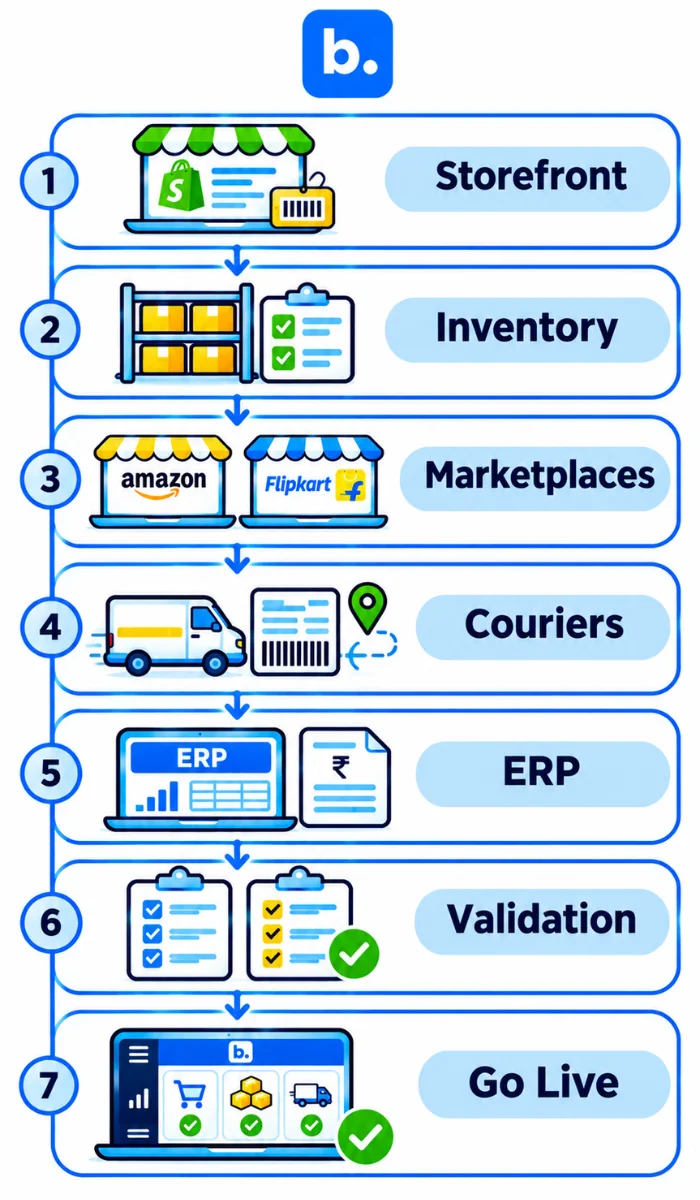
Connect one flow at a time. Validate it before adding the next system.
- Connect the storefront; clean SKUs.
- Connect stock; name its source of truth.
- Add marketplaces; test orders and cancellations.
- Add couriers; test shipment and COD rules.
- Connect accounting or ERP; approve mappings.
- Run both processes briefly and compare records.
- Remove duplicate manual steps after checks pass.
| Phase | What to connect | What to check before moving on |
|---|---|---|
| Storefront and catalogue | Shopify or other store; product and variant data | SKU match, order IDs, product counts |
| Inventory | Stock owner and channel updates | Available quantity, reservations, cancellation release |
| Marketplaces | Marketplace accounts and offers | Listing match, order, cancellation and return flow |
| Couriers and COD | Aggregator or carriers, payment mode rules | Label, AWB, tracking, COD and return events |
| Accounting or ERP | Vouchers, invoices, stock or settlement data | Tax fields, ledger mapping, source reference |
| Parallel validation | Existing and new workflows | Sample orders tie across all records; exceptions assigned |
| Cutover | Remove duplicate exports and manual edits | Named owner, rollback path and monitoring in place |
Common integration problems and how to fix them
| Problem | Why it happens | Fix |
|---|---|---|
| Duplicate orders | Retry creates a second record or two tools import the same channel | Set a unique external order key; check before retrying |
| Stock drift between channels | Multiple systems overwrite available stock | Set one stock owner; define reservations and safety stock |
| SKU mismatch | Variants, bundles or marketplace offers use different codes | Clean the SKU master and keep a mapping table |
| API rate limits or timeouts | Too many requests, long jobs or temporary service errors | Queue requests, retry with backoff and monitor errors |
| Silent sync failure | No alert, log review or named owner | Alert on failed records; assign and track a recovery task |
| Tax data mismatch | Field mapping or source tax setup differs | Pause posting; compare source invoice and approved tax mapping |
| Courier status delay | Carrier scan or webhook arrives late | Show last event time; use courier portal to confirm before rebooking |
| ERP entries rejected | Missing ledger, tax field or required master | Log the rejected record, correct mapping and retry once validated |
How Base.com Supports Multichannel Ecommerce Operations
Base.com is a multichannel ecommerce operations platform that brings together order management (OMS), warehouse management (WMS), B2B CRM, basic ERP capabilities and customisable workflow automation. It connects supported sales channels, couriers, warehouse processes and business systems, helping teams manage different parts of their operations through one platform. The exact workflows depend on the integrations and configuration used.
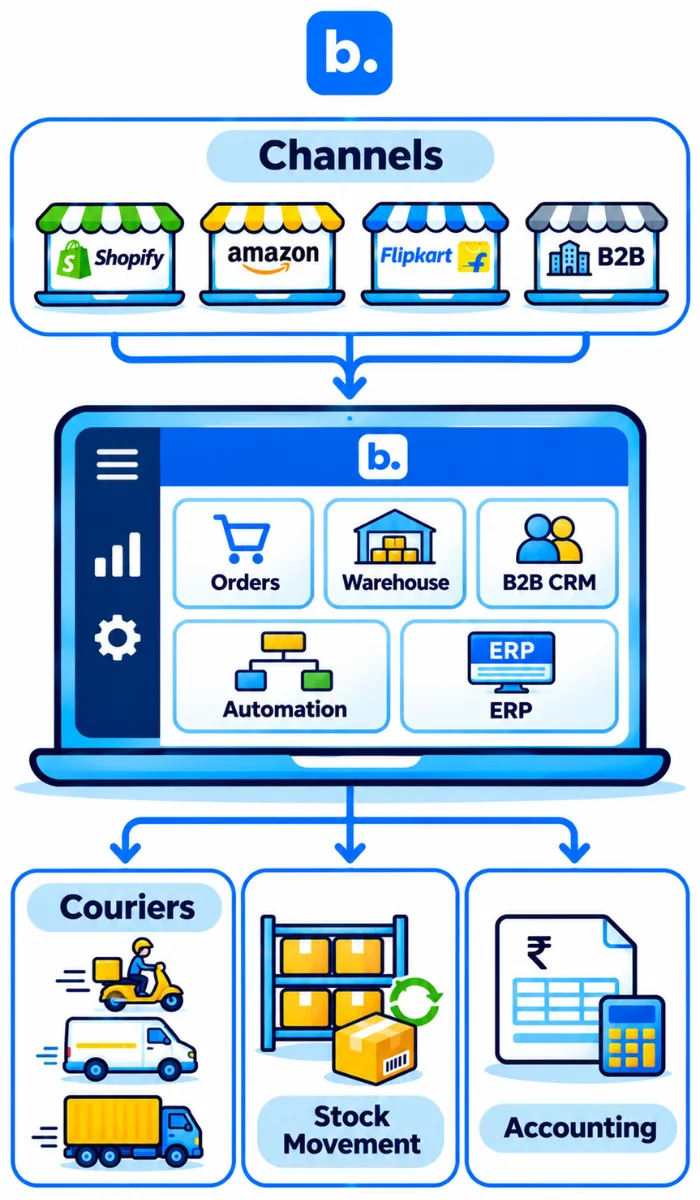
| Connected system | Operational information handled through the connection |
|---|---|
| Storefronts and marketplaces | Orders, product information, stock updates, cancellations and fulfilment details, where supported |
| Couriers | Shipment bookings, labels, tracking details and delivery updates, where supported |
| Warehouse processes | Stock movements, picking, packing and dispatch information, depending on the configured WMS workflow |
| ERP and accounting systems | Selected sales, invoice, payment, refund, stock and settlement records, depending on the integration |
Base.com can serve as the central operational platform for businesses selling across multiple channels. Its capabilities cover order processing, warehouse management, B2B business relationships, selected ERP functions and configurable workflow automation. Businesses can connect their storefronts, marketplaces, couriers and other business applications according to their operational requirements. Confirm the exact integrations and supported data flows before implementation.
To understand how Base.com can fit into your ecommerce operations, book a demo and review your current sales channels, warehouse processes and business systems.
Conclusion
A practical hub connects four layers: channels, operations, fulfilment and finance. The team chooses which system owns each record, maps the fields, then tests orders, stock, shipments, returns and accounting in phases. That is how you manage all ecommerce channels in one dashboard without assuming that every connector does everything. Start with the storefront and clean SKUs; add marketplaces, couriers and ERP only after checks pass. Use the integration planning checklist above to prepare your rollout, then book a Base demo if you want to review the hub model.