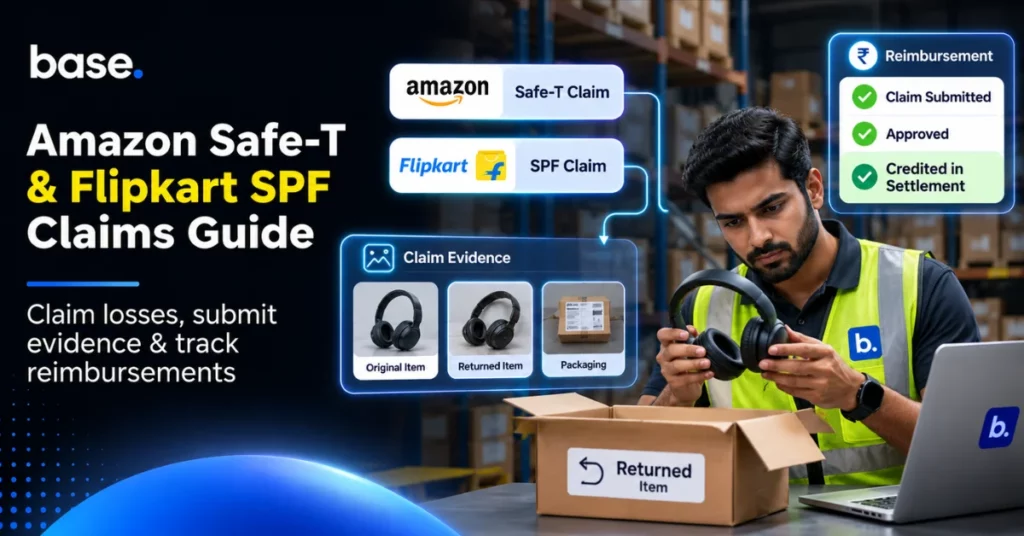
When a product worth ₹2,000 is sold and then returned, you expect to receive the same item back. But what happens when you receive a different item in your warehouse?
You may be able to make a claim in the form of Amazon Safe-T to reclaim your valid loss. Similarly, sellers on Flipkart can make claims to be compensated via the Seller Protection Fund (SPF).
To make a claim, you will need to provide the correct evidence and reason for your claim. You will also need to make sure you make the claim before the deadline. Once your claim has been approved you should make sure the reimbursement is reflected in your settlement.
This guide will cover everything you need to know about Amazon Safe-T, Flipkart SPF, evidence, common reasons for rejections and how to make sure your reimbursement is matched in your settlement. We’ll also show you how to keep your records in order as a seller on Indian marketplaces.
What is Marketplace Claims Management?
This is the process of identifying a loss as a seller, checking if it is eligible for a claim, providing evidence and making the claim. You may need to make a claim if:
- The wrong item was returned.
- The product was damaged.
- The returned package was missing accessories.
These situations often require you to take three steps:
| Action | Description |
|---|---|
| Customer Refund | The marketplace will refund the customer based on the policies. |
| Claim Reimbursement | You will claim reimbursement for your valid loss. |
| Dispute Settlement | You will dispute charges, fees or adjustments in your settlement. |
Just because you have a customer refund doesn’t mean you will be reimbursed. If there is a discrepancy in your settlement, you may need to go through a financial support process.
Keep your original order ID, return details, evidence from your warehouse and financial records.
How a marketplace claim works
- Identify Loss – What has happened to your order?
- Check Eligibility – Is it eligible under the right marketplace programme?
- Provide Evidence – Provide evidence of your product, shipment and return.
- Make the claim – Keep your claim reference and date.
- Monitor Outcome – Note the approved or rejected amount.
- Check Reimbursement – Make sure the credit is matched in your settlement.
Amazon Safe-T Claim
An Amazon Safe-T claim allows eligible sellers to claim reimbursement for certain losses that occurred due to returns, refunds and unacceptable conditions.
SAFE-T stands for Seller Assurance for Ecommerce Transactions.
If you sell black wireless headphones and the customer returns a different model, but the refund has been processed.
You can investigate to see if the order is eligible for reimbursement under Safe-T. Make sure you know what was originally sent and what has arrived in your warehouse.
Other examples include damaged returns, empty packages, missing main items and certain returns that have not arrived.
Not all claims will be automatically approved. You will need to check if the order is eligible based on your fulfilment method, refund and current programme rules.
Safe-T is also different to Amazon’s FBA inventory reimbursement. You will need to make sure you are claiming under the correct claim based on your order type.
You can find out more about Amazon India’s SAFE-T programme here.
When can I make an Amazon Safe-T claim?
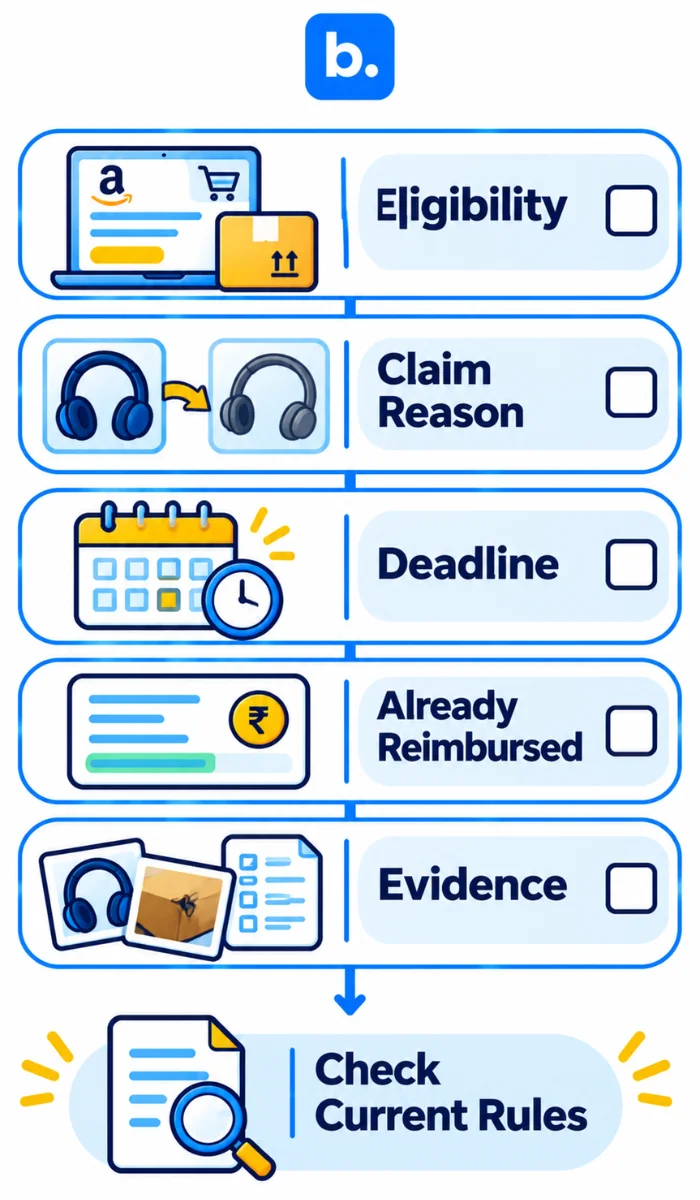
Before you make your claim, you will want to check the following:
Eligibility
Check your original order ID, fulfilment method and refund history. Make sure the loss is eligible under Safe-T or another reimbursement.
Reason
What has gone wrong? Was the item damaged, wrong item or missing contents?
Select the reason that matches your evidence.
Claim Deadline
Amazon India has different claim deadlines depending on your situation.
According to Amazon India’s reimbursement policy, sellers have 15 days after receiving a wrong or damaged return to make a claim. For certain lost returns, the deadline is 50-75 days following the relevant refund or replacement. Make sure you check which deadline applies to your claim and when the filing period begins.
Already Reimbursed
Check if you have already been reimbursed by Amazon. Some eligible losses will be proactively reimbursed so you may not need to make a duplicate claim.
Evidence
Make sure you have the correct evidence including photos and order references.
| Claim Situation | Check | Evidence Required |
|---|---|---|
| Wrong Item Returned | What was originally sent and what was returned. | SKU, Product and Return Photos. |
| Damaged item returned. | What condition was the item in and who is responsible. | Damage and Packaging Photos. |
| Item Missing. | What was the return status and what was in the package. | Receipt and Package Evidence. |
| Missing Accessories. | What was originally in the item. | Product Specs and Inspection Notes. |
| Refund Dispute. | What is the correct reimbursement. | Refund and Order History. |
How to make an Amazon Safe-T claim
Eligible claims can be made via Amazon Seller Central.
- Login to Amazon Seller Central.
- Go to Orders and click Manage SAFE-T Claims.
- Click Make a new claim.
- Enter your relevant order ID.
- Check if it is eligible.
- Select the correct claim reason.
- Describe the issue and loss.
- Upload your evidence.
- Submit your claim. Keep your claim reference.
- Monitor your claim and provide any information requested.
The menu options may change, so use the current Seller Central interface.
What to include in your claim description
Make sure you are being factual and provide details of what you sent and what was returned. Include how your evidence supports your claim.
The customer ordered SKU HP-204 black wireless headphones but we received a different model in our warehouse. See attached photos to show what was returned, model number and packaging. We have also included the original order and receipt.
Don’t accuse the customer of anything. Make sure your evidence proves the loss.
Keep a note of the date you submitted, claim reference and original files.
Flipkart Seller Protection Fund (SPF)
The Flipkart Seller Protection Fund allows sellers to make claims for certain losses that have occurred due to returns and logistics.
If you sell a kitchen appliance worth ₹3,500 on Flipkart and the returned package contains a damaged item or completely different item.
You may be able to claim compensation under the SPF programme.
Common situations include damaged returns, wrong item returned, missing items and certain losses due to shipments. However, not all returns will be reimbursed.
You will need to check if the order is eligible, provide evidence and make the claim before the deadline. Don’t confuse this with a return dispute or incorrect deduction. These may need to be handled differently.
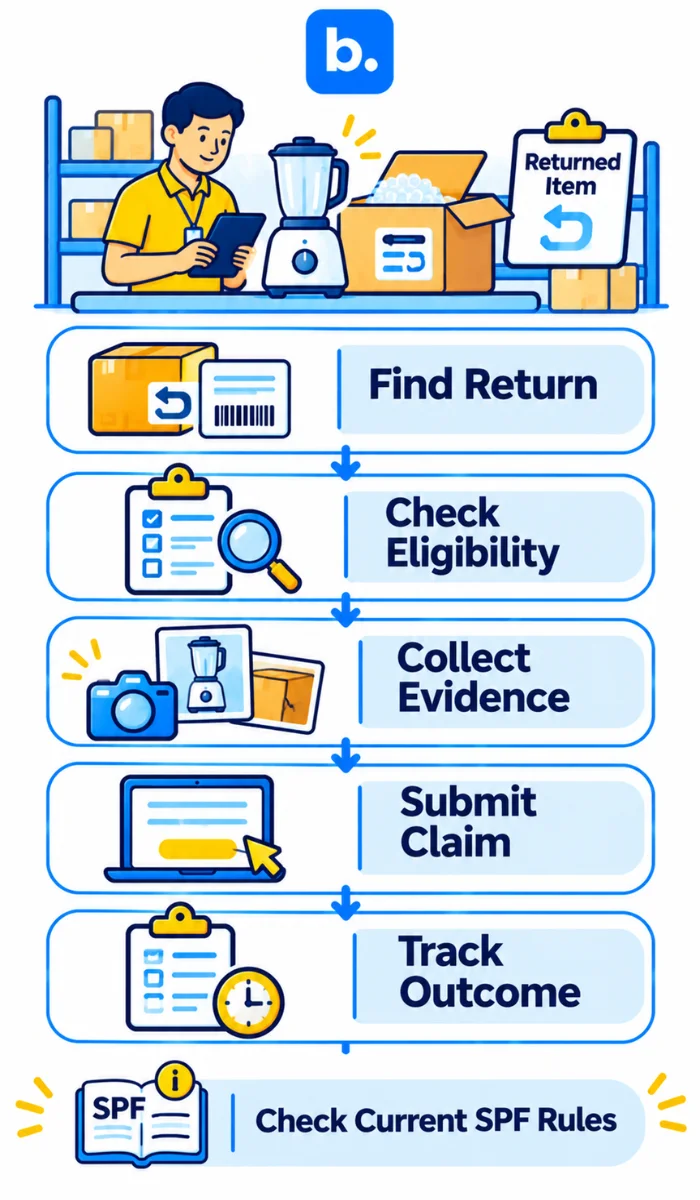
How to make a Flipkart SPF claim
You can make a claim via the available options in the Seller Hub.
- Login to Seller Hub.
- Find the relevant order or completed return.
- Review the return and shipment.
- Check what is eligible and the deadline.
- Click the relevant option to make a claim or get support.
- Select the correct claim reason.
- Upload your photos, videos or other evidence.
- Submit your claim.
- Keep your claim/support ticket number.
- Monitor your claim and reimbursement.
You can find more information on how to make a claim via the completed returns dashboard and support in the published FAQ. There is also a 14 day deadline to make claims after receiving the returned product.
Evidence required
You may need to keep your order ID, return reference, invoice, product photos, packaging photos and warehouse inspection.
If possible, you may want to provide a video of the unboxing. Don’t edit the video, keep it as it was originally recorded.
Try and capture evidence as soon as you receive the return. The longer you wait, the harder it will be to prove what the package originally looked like.
Key Differences Between Amazon Safe-T and Flipkart SPF
Both programmes allow sellers to claim compensation for eligible losses. However, there are different rules.
| Factor | Amazon Safe-T | Flipkart SPF |
|---|---|---|
| Marketplace | Amazon | Flipkart |
| Purpose | Reimbursement for eligible seller losses. | Protection for eligible seller losses. |
| Claim | Seller Central | Seller Hub/Seller Support |
| Eligibility | Safe-T programme rules. | SPF programme rules. |
| Evidence | Order, return and loss. | Order, return and logistics. |
| Deadline | Dependent on claim. | Dependent on current SPF rules. |
| Compensation | Marketplace decision. | Marketplace decision. |
| Follow Up | Amazon Settlement Reports. | Flipkart Settlement Reports. |
Neither programme will automatically be an insurance for all returns.
If you are selling on both platforms, keep your claims in separate records. Using a central tracker will help you stay on top of your deadlines.
Evidence required for marketplace claims
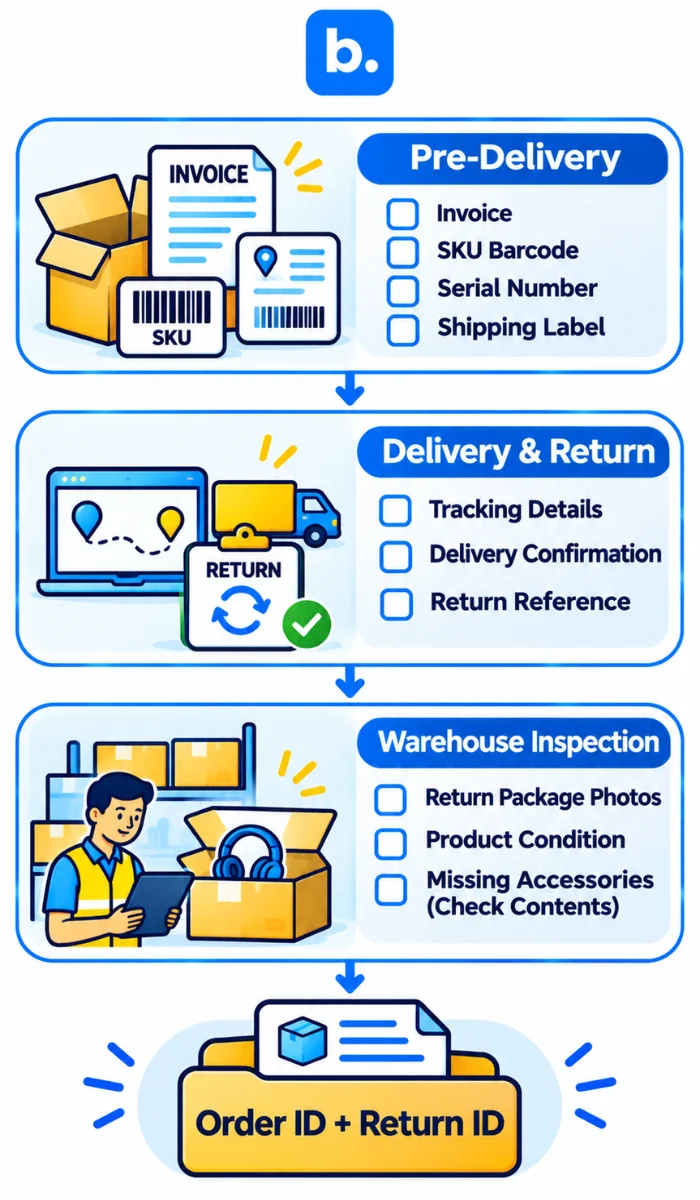
You will need to prove what was sent, what happened during the delivery/return and what was received.
Pre-Delivery
Keep your product SKU, invoice, serial number (if applicable), shipping label and weight.
Photos or videos of your packaging may help to prove what the item originally looked like.
Delivery/Return
Keep your tracking details, delivery confirmation, return IDs and carrier exceptions.
This will help prove when the package moved and if there were any issues with the delivery/return.
Warehouse
Take photos of the packaging, return label and what condition the item was in. Note if there were any missing accessories and check serial numbers.
| Claim Reason | Useful Evidence | Common Issue |
|---|---|---|
| Wrong Item | Compare original SKU and returned item. | No item information. |
| Damaged | Clear photos of the product and packaging. | Not visible. |
| Empty | Check packaging and receipt. | No receipt. |
| Missing Accessories | List of contents and inspection. | No clear contents. |
| Lost Shipment | Tracking and carrier. | Not fully tracked. |
| Incorrect Refund | Order and refund. | No order reference. |
Not all marketplaces will require the same evidence. Amazon India have specific video requirements for certain categories and sellers.
A video won’t guarantee your claim will be approved.
Keep your files organised and labelled with your order ID, return ID and what evidence it is. This will make it easier to find when the marketplace asks for clarification.
Why Amazon Safe-T and Flipkart SPF claims get rejected
Even genuine losses can be rejected.
| Reason | Issue | How to avoid |
|---|---|---|
| Incorrect Category | Wrong reason for claim. | Check programme first. |
| Missed Deadline | Claim was made too late. | Keep track of deadlines. |
| No Evidence | Didn’t provide the required evidence. | Use a checklist. |
| Unclear Photos | Not visible. | Take clear photos. |
| Wrong Order Type | Claim is under another reimbursement. | Check fulfilment. |
| Duplicate Claim | Already compensated. | Check previous credits. |
| Incorrect Information | Incorrect SKUs/return. | Check before submitting. |
If your claim has been rejected, make sure you read the reason.
Check if there is an appeal process. If so, provide any additional evidence and make sure you are within the deadline.
Don’t make duplicate claims to get around the rejection.
How to Track Marketplace Claim Reimbursements
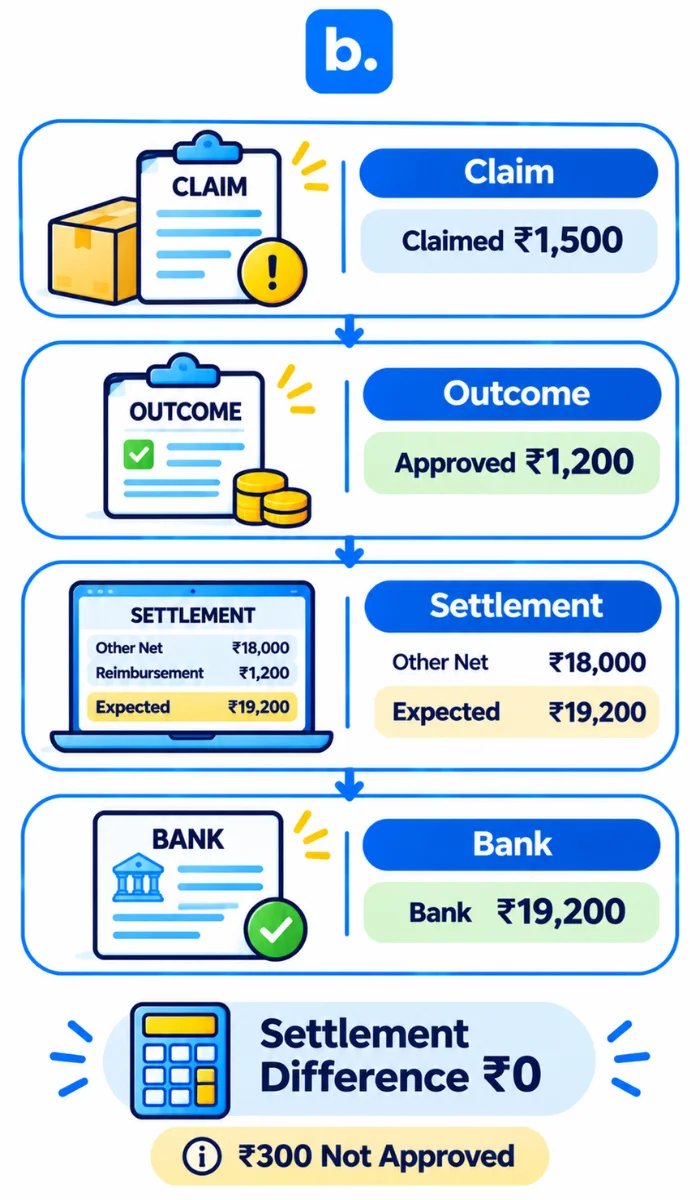
Payment reconciliation is the process of matching your internal financial records with those of the marketplace and your bank.
For marketplace claims, this will be matching what you claimed, what has been approved and what has been credited.
Just because your claim has been approved, it may not have been paid.
Using payment reconciliation for your marketplace claims will help you identify if there are any missing reimbursements, partially approved claims and any credits that have been added in future settlements.
There are four steps to claim reconciliation.
Claim – Note the order ID, claim reference, amount claimed and date made.
Outcome – Note the approved amount, status and date.
Settlement – Find the reimbursement in the marketplace financial report.
Bank – Match the total amount from the marketplace to your credit.
Here is an example of a claim tracker.
| Claim Details | Marketplace | Internal | Status |
|---|---|---|---|
| Order ID | AMZ-1001 | AMZ-1001 | Matched |
| Claim Reference | ST-2001 | ST-2001 | Matched |
| Amount Claimed | ₹1,500 | ₹1,500 | Matched |
| Approved Amount | ₹1,200 | ₹1,200 | Matched |
| Reimbursement Made | ₹1,200 | ₹1,200 | Matched |
| Bank Settlement | Total Payout | Pending |
The claim has been approved for ₹1,200 but you originally claimed ₹1,500. This does not necessarily mean there is an issue with your reconciliation.
The marketplace has approved ₹300 less than you claimed. You will need to check that the ₹1,200 has been credited and what has happened to the rest of your loss.
Keep your claim records even once the case has been closed.
Example of Payment Reconciliation
You make a claim for ₹1,500 via Amazon Safe-T. Amazon approve your claim for ₹1,200.
Your other net marketplace transactions total ₹18,000.
| Transaction | Amount |
|---|---|
| Claim | ₹1,500 |
| Approved Reimbursement | ₹1,200 |
| Other Net Transactions | ₹18,000 |
| Expected Settlement | ₹19,200 |
| Bank Credit | ₹19,200 |
| Difference | ₹0 |
This has been calculated by adding ₹18,000 and ₹1,200 to give a total of ₹19,200. Your settlement matches. As the marketplace have approved ₹300 less than your original claim, this is a claim outcome.
What if only ₹18,000 was credited to your bank?
| Amount | |
|---|---|
| Expected Settlement | ₹19,200 |
| Bank Credit | ₹18,000 |
| Investigate Difference | ₹1,200 |
Don’t assume this is a permanent loss.
Check if the reimbursement has been added in a different settlement, reversed or has not been processed.
Ecommerce Payment Reconciliation Software
If you are processing hundreds of orders across Amazon and Flipkart, manually reconciling can become tricky.
Ecommerce reconciliation software can help you keep your supported settlement records in order and highlight any discrepancies.
Payment reconciliation software may help you match transactions, identify any discrepancies in reimbursement and provide exception reports.
| Issue | Software Process | Benefit |
|---|---|---|
| Multiple Reports | Consolidate records. | Easier to review. |
| No Reimbursements | Identify any missing credits. | Faster to investigate. |
| Partially Approved | Compare approved amounts. | Clearer accounting. |
| Duplicate Adjustments | Match references. | Reduce errors. |
| Delayed Credits | Track any pending entries. | Improved follow up. |
Automated payment reconciliation can help reduce any repetitive work if you have the right data. However, this doesn’t guarantee your claim will be approved or that you will get all the missing payments.
You will still need to review any exceptions and contact the marketplace.
How an Order Management System can help
An order management system can help you manage your orders, stock and fulfilment across your supported sales channels.
If you receive a damaged return, you often want to investigate using your operational records.
You will need to identify the original order, what SKU the product was and what was dispatched.
| Investigation | Useful OMS Information | Why it’s useful |
|---|---|---|
| Original Product | Order ID and SKU. | Proves what item was. |
| Dispatch | Shipment details. | Helps with investigation. |
| Return | Available return records. | Identifies what stock was affected. |
| Missing Quantity | Order and stock records. | Helps identify discrepancies. |
| Stock Impact | Stock adjustments. | Keeps accurate records. |
OMS software can help your teams find the right information. However, this won’t automatically be a claiming system or a financial reconciliation. The evidence available will depend on what software you have and what services it is linked to.
How Base OMS can help with marketplace orders and stock
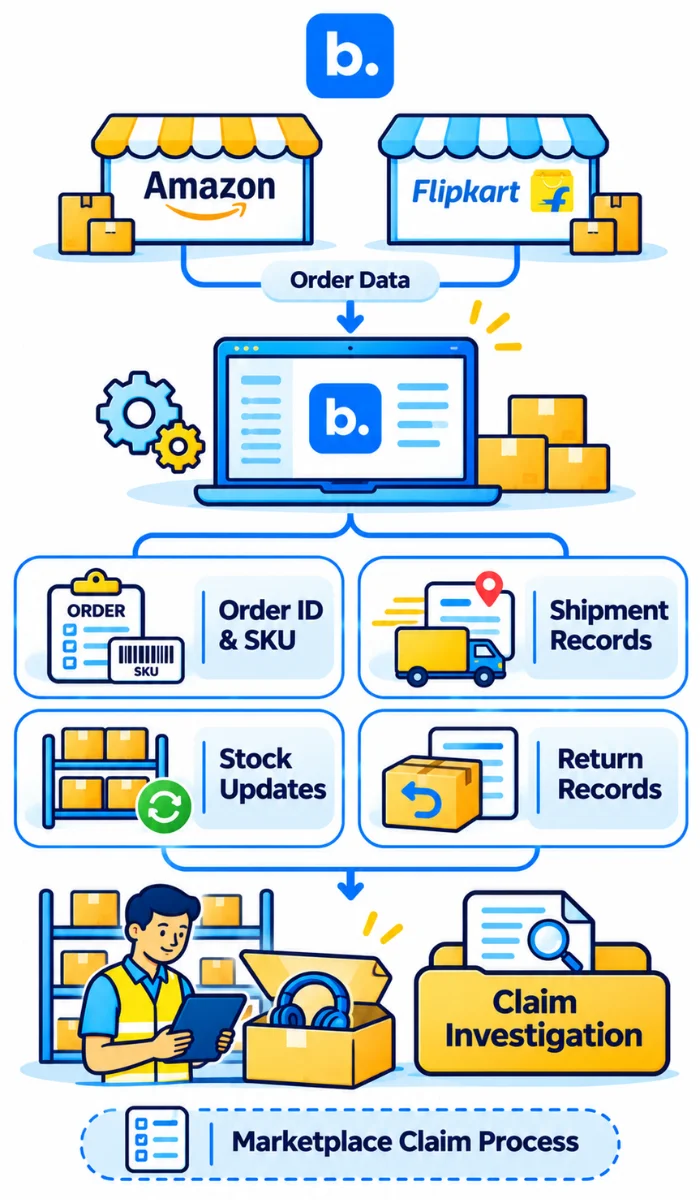
Managing orders across Amazon and Flipkart can be time consuming. Base OMS can help you manage your orders from supported marketplaces.
It can help you keep your linked orders in order, track your stock and manage your fulfilment.
With the Flipkart integration, you can import orders, sync your stock and pricing, update shipping numbers and manage your orders. This will help your operations team find useful order and fulfilment information to investigate marketplace returns.
It will also help you keep track of your stock as products move between your sellable stock, returns and damaged stock. This will depend on your set up workflows.
However, this doesn’t guarantee you will get approved for Safe-T or SPF. Claims will still need to be made under Amazon and Flipkart rules.
Find out more about how Base OMS can help you manage your orders and stock centrally.
Best Practice for Amazon Safe-T and Flipkart SPF Claims
Having good processes in place to manage your claims will help.
- Check eligibility. Identify if it is eligible under Safe-T, SPF or another process.
- Keep track of deadlines. Make sure you know what the deadline is for each claim.
- Provide consistent evidence. Take photos and inspect returns as they come in.
- Be accurate. Be factual and provide evidence.
- Keep your claim references. All claims should be linked to the original order.
- Check rejections. Make sure you know what the appeal process is.
- Check reimbursements. Make sure the approved amount is reflected in your settlement.
Example of a marketplace claim tracker
| Field | Example |
|---|---|
| Marketplace | Amazon |
| Order ID | AMZ-1001 |
| Return ID | RET-1001 |
| Claim Reference | ST-2001 |
| Claim Reason | Wrong Item Returned |
| Amount Claimed | ₹1,500 |
| Date Made | 10 November 2026 |
| Status | Partially Approved |
| Approved Amount | ₹1,200 |
| Reimbursement Made | Yes |
| Settlement Reference | SET-1101 |
| Reconciliation | Matched |
These are just examples.
Make sure roles are clear. Your warehouse team will provide evidence, your marketplace operations will make the claims and your finance will check the reimbursements.
Don’t close off financially until you have accounted for the outcome and settlement entries.
Common Mistakes When Making Claims
| Mistake | Impact | Better Practice |
|---|---|---|
| Wrong Programme | Claim gets rejected or delayed. | Check eligibility. |
| Late Claim | Missed deadline. | Keep on top of deadlines. |
| No Clear Evidence | Can’t prove loss. | Take clear evidence. |
| No Product Details | Difficult to prove discrepancy. | Keep SKU and Serial Number. |
| Incorrect Information | Claim discrepancies. | Check references. |
| Approved Doesn’t Mean Paid | Missing credits not noticed. | Check settlement. |
| Ignore Partially Approved | Loss not recorded. | Track approved amounts. |
One more mistake is relying solely on one unboxing video.
Your claim needs to be useful and provide evidence relevant to the issue. If your product was damaged, missing accessories or lost in shipment, you may need different evidence.
Having accurate documentation will help you explain your loss. However, the final decision will be made by the marketplace based on their policies.
Conclusion
Making a claim via Amazon Safe-T or requesting compensation via Flipkart SPF can help you reclaim eligible losses. However, you will need to check if it is eligible and make sure you make your claims on time. Keep your evidence in order in your warehouse.
Most importantly make sure the reimbursement is reflected in your settlement. Just because your claim has been approved doesn’t mean it will be fully closed financially. Make sure you have accounted for the credit and any difference.
Base OMS can help you manage your linked order and stock information to help with your investigations.