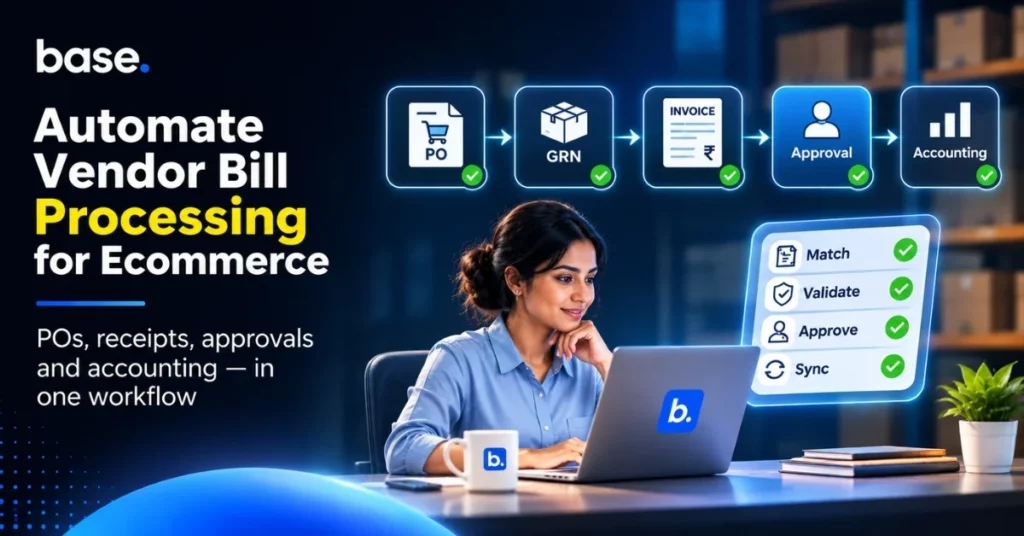
Ecommerce accounts payable automation involves digitizing workflows to capture vendor bills, compare them to purchase orders and goods received, route exceptions for review, and pass approved invoices into the accounting process. The aim is not to pay all the bills automatically, but to minimise manual data entry, identify duplicate or unsupported charges at an earlier stage and provide finance with a clear picture of what is owed and why. This is more difficult with ecommerce as product suppliers, 3PLs, couriers and service vendors invoice on different cycles and may include different orders, receipts or shipment events.
This guide covers a practical PO–GRN–invoice workflow, vendor statement reconciliation, controls and software selection for approval. It also separates financial accounts-payable functions from ecommerce purchasing, warehouse and accounting integrations, so that businesses can automate the proper hand-offs without having to assume that an order platform handles payments or replaces accounting controls.
What is accounts payable automation for ecommerce?
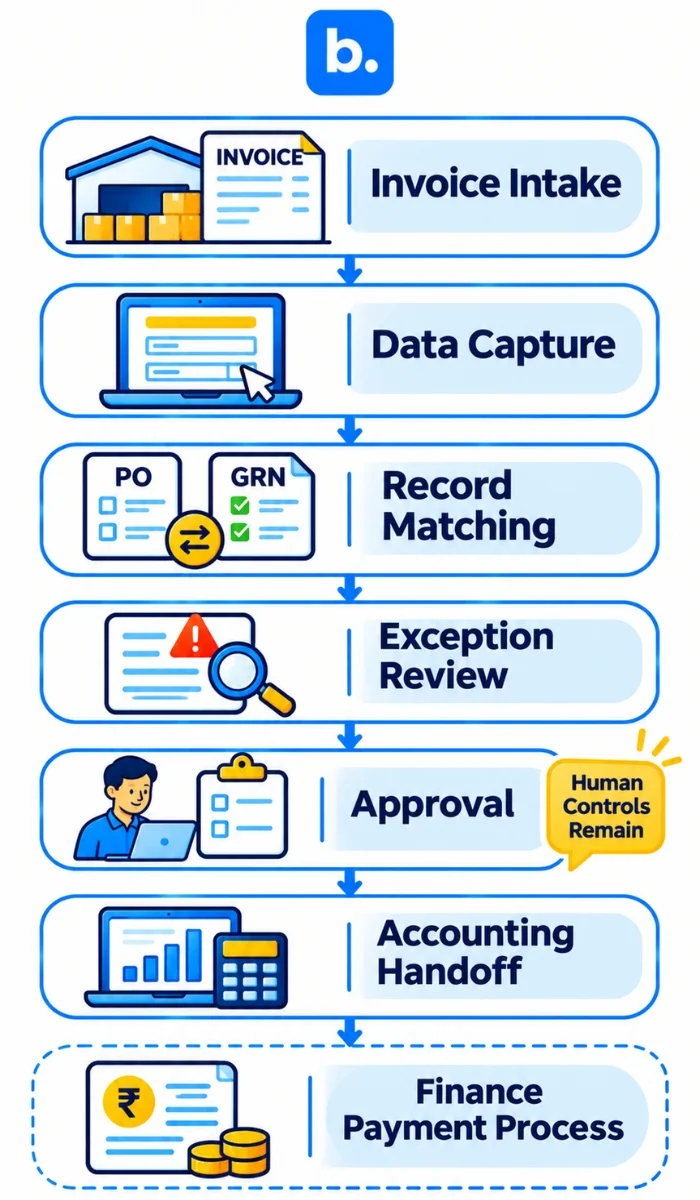
Accounts payable (AP) refers to the amount of money a business owes to its suppliers for goods or services that have been received or ordered. Accounts payable automation involves software and predetermined controls to minimize repetitive tasks associated with receiving invoices, extracting data, comparing records, routing for approval and sending approved bills to an accounting system or payment process.
A useful AP workflow still has people responsible for policy decisions: approving spend, resolving exceptions, confirming supplier changes and releasing payments. The evidence and status should be more visible, not eliminated. Automation should not weaken segregation of duties or authorise unsupported bills.
For an ecommerce business, AP can include product vendors, packaging suppliers, 3PLs, couriers, marketing providers and software vendors. Different types of bills require different supporting evidence. A product invoice could be matched to a PO and receipt, while a courier bill might require shipment, weight or service data.
Why is vendor bill processing a challenge for ecommerce businesses?
As suppliers, SKUs, purchase orders, warehouses, channels and shipping activity increase, so do the number of invoices. A single PO can be received in multiple deliveries, a supplier can invoice by shipment and a return or price change can lead to a credit note at a later date. There are numerous operational line items on a 3PL or courier bill that may not fit into a single order.
Typical risks associated with manual processes are:
- Invoices that have been posted twice or to the wrong supplier, period or account.
- Any quantity or price that is billed or received that is not approved on the PO.
- A partial delivery that does not have an updated open quantity balance.
- A return, short shipment or agreed price change that is not included in the bill or credit note.
- No clear owner or status of approvals delayed in email, chat or spreadsheets.
- Supplier statements that include missing invoices, credits or payments.
These are not data entry issues, but control and record linking issues. AP automation is most effective when the purchase, receive and finance records have the same identifier and exception owner.
How can ecommerce teams automate vendor bill processing?
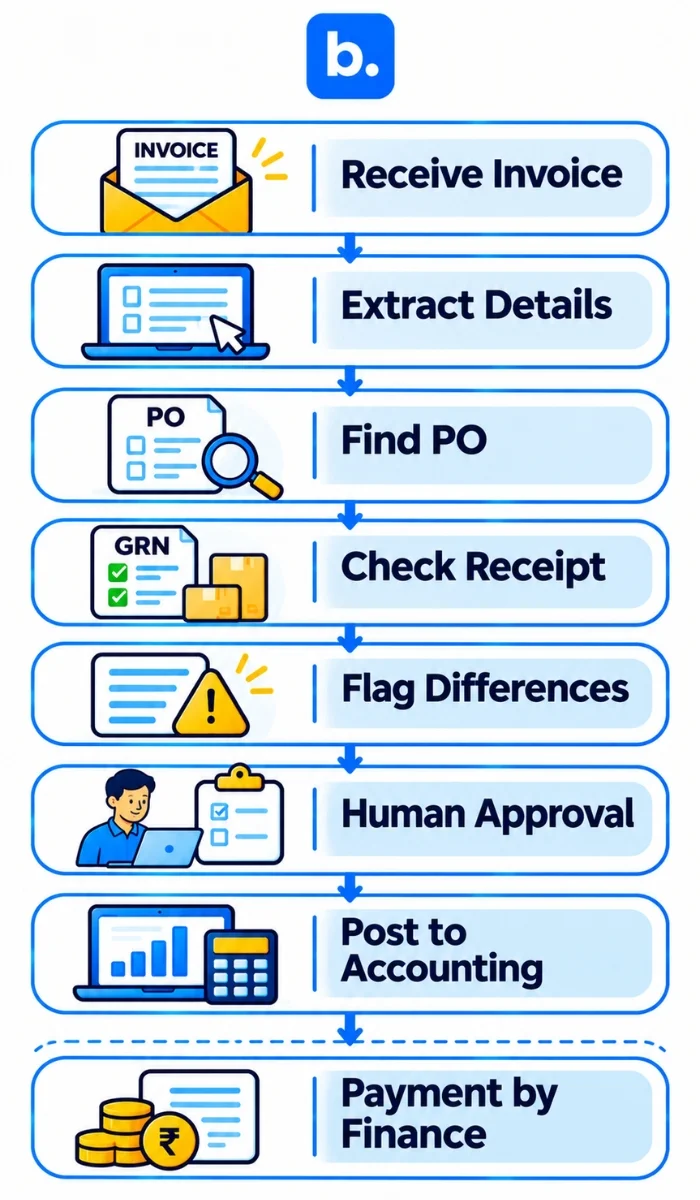
Ecommerce teams can automate vendor bill processing by linking invoice intake to purchasing and receipt records, then routing exceptions and approval decisions for human review. A typical controlled workflow is:
- Get the supplier invoice via an approved channel and register the source file, supplier and invoice reference.
- Record the invoice number, date, supplier ID, currency, line items, quantity, unit price, tax fields, total and payment terms. Check critical information with the original document.
- Locate the matching PO and ensure that it is authorised, is from the supplier and has not been closed or cancelled.
- Match invoice lines to goods received or service evidence. For partial deliveries, check the invoice against cumulative accepted quantities and any previous invoices.
- Record any exceptions, including duplicate invoice references, price or quantity differences, missing receipts, differences in tax fields, unapproved fees or credit notes not applied.
- Send the bill and supporting documentation to the appropriate reviewer per company policy. Maintain approval/rejection and query history.
- Post or export the approved bill to the accounting system with the appropriate supplier, account, tax treatment and accounting period. Do not duplicate postings when a sync is retried.
- Pay according to agreed terms and delegated authority through the organisation’s finance process; retain remittance and reconciliation evidence.
Invoice data extraction, matching, approvals and payments may be separate software capabilities. Confirm which tasks the selected payables software performs, which require manual approval, and which are handled by the accounting or banking system.
What is the procedure for three way matching of PO, GRN and invoice?
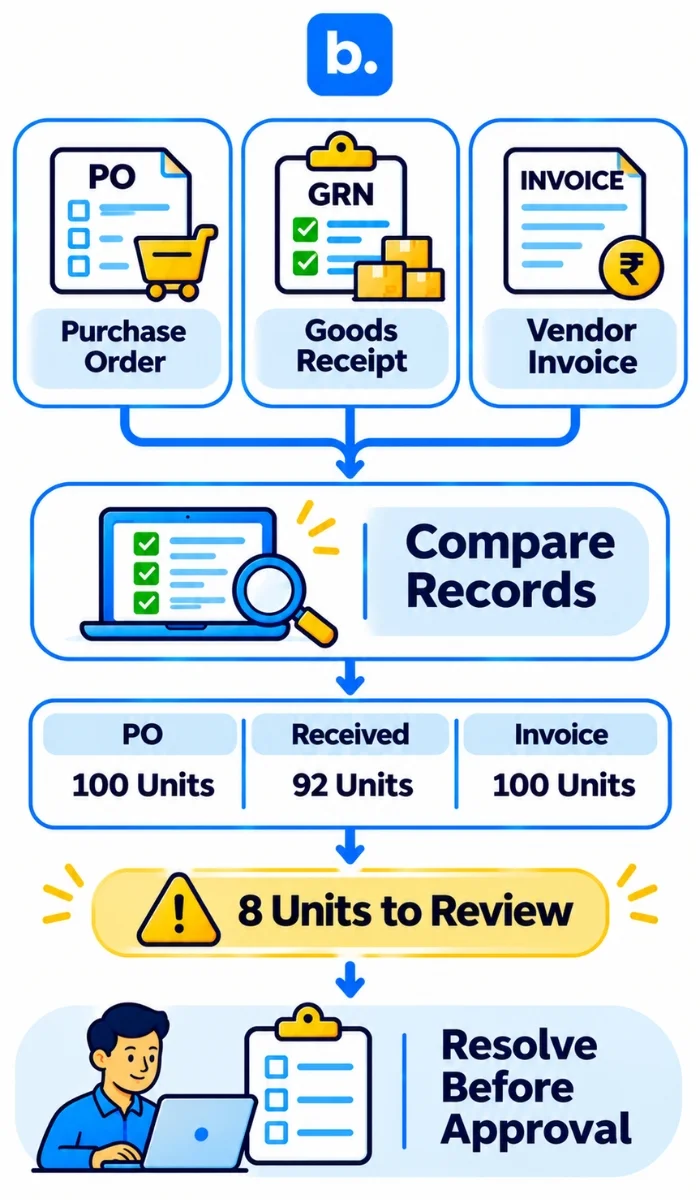
Three-way matching involves the matching of the business’s approval, receipt, and supplier’s bill. For goods, a GRN (Goods Receipt Note) or similar receiving document is used to acknowledge goods, and for services, it can be an approved service confirmation or contract milestone.
| Record | What it confirms | Example check |
|---|---|---|
| Purchase Order (PO) | The amount of money the business is authorized to purchase, including the agreed upon items, quantities and prices. | Has this supplier, SKU, quantity and price been approved? |
| Goods Receipt Note (GRN) | The number of items the warehouse counted, inspected and accepted | How many units were received and accepted and when? |
| Vendor invoice | The price the supplier is asking for and how much is to be paid. | Is the bill the same price, same quantity, and the same tax information? |
For example, a PO places an order for 100 units of a product at ₹500 per unit. 92 units are received and accepted in the warehouse. If the invoice is for 100 units, the system should highlight the difference of 8 units for review instead of silently assuming that the invoice is correct. There might be a good reason for the delay, such as a later delivery date or contract term, but it should be documented before approval.
Matching tolerances, tax checks and evidence for services should follow company policy and applicable rules. A software match is a control aid; it does not establish legal or commercial correctness.
What are the controls to be placed on purchase order approvals and exceptions?
An approval workflow should be based on the company’s authority structure and maintain separation of requesting, receiving, approving and paying wherever feasible. Set up spend limits, department, supplier category, budget or exception category approval rules. Avoid using a random threshold that you’ve seen in another business.
Useful controls include:
- Need an approved PO for non-emergency purchase (exception path documented).
- Avoid open POs for the same request that conflict with one another, if supported by the system.
- Route changes to price, quantity, tax or vendor bank details for review instead of silently updating records.
- Record partial receipts and leave quantities open until receipt, cancel or close.
- Provide information to the requester and supplier of PO status only via approved and traceable channels.
- Escalate urgent or out-of-policy purchases to a named approver and retain the reason.
Purchase-order and reorder workflows can be used to organise procurement, but a PO approval does not mean an invoice from a supplier is approved or a payment is released. For purchasing and replenishment in an Indian warehouse, see How to Automate Purchase Orders and Reorder Points in an Indian Warehouse.
What is the benefit of vendor reconciliation in accounts payable?
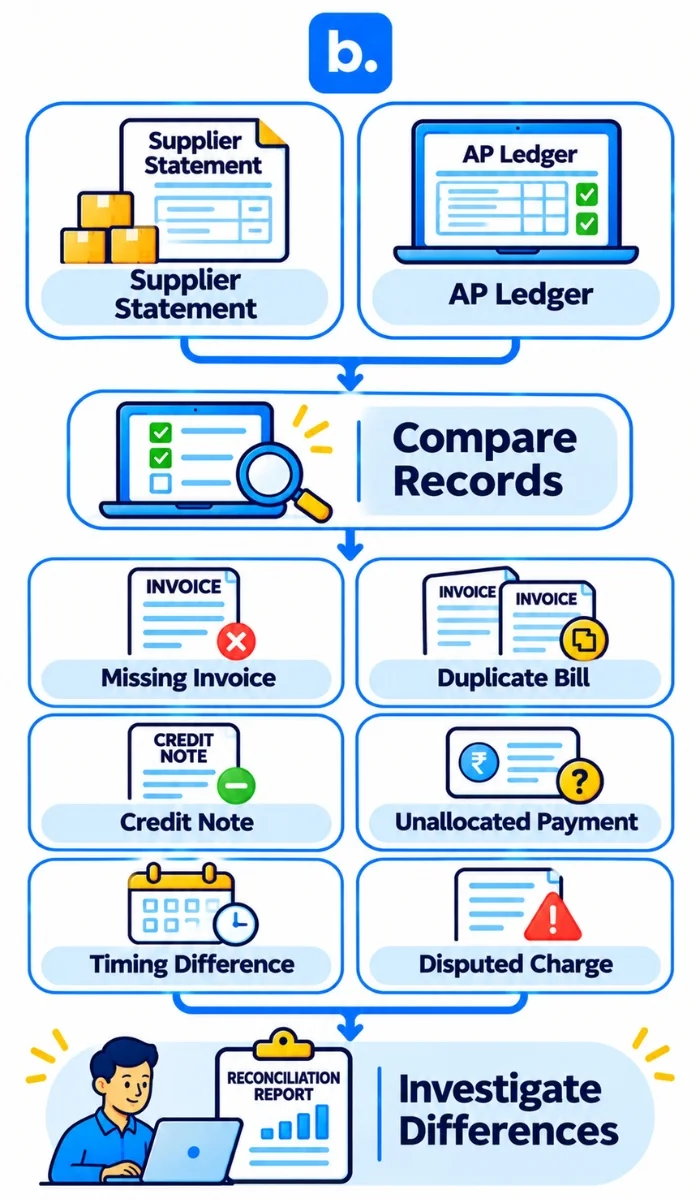
Vendor reconciliation in accounts payable involves reconciling the supplier’s statement to the company’s AP ledger and supporting documents, such as invoices, POs, receipts, credit notes and payment records. It assists in determining what items should be investigated prior to considering the balance complete.
A practical review searches for missing invoices, unrecorded credit notes, duplicate bills, payments not allocated by the supplier, timing differences and disputed charges. Match by supplier account, document number, currency, date and amount. Do not post an adjustment without an explanation, and record each difference with its cause, evidence, owner and next action.
For 3PL and courier statements, compare invoices with operational evidence such as shipments, weights, storage periods, service events, returns and agreed rate cards. The article Accounts Payable Reconciliation for Ecommerce Brands: Vendors, 3PLs and Couriers covers this statement-matching context in more detail.
In case of any fields in the invoice that are related to GST or e-invoice, check the rules applicable to the taxpayer and transaction. The guidance on the GST invoice field on the official portal provides a summary of the invoice details but does not imply automatic validation of GST treatment or ITC eligibility by an AP tool. Get guidance from the organisation’s tax expert as necessary.
What are the key features businesses should consider in accounts payable automation software?
Select accounts payable automation software based on the control gaps and accounting systems that the business actually has. Look at vendors for their capabilities, implementation effort, auditability and data ownership, not just “touchless” processing.
| Selection area | Questions to ask | Evidence to request |
|---|---|---|
| Invoice capture | What types of files and channels are accepted? Is it possible for users to compare extracted values with the source? | Use representative supplier invoices to demonstrate. |
| Matching | Can it match PO lines and accepted receipts, process partial deliveries and flag variances? | Short, split and changed deliveries test cases |
| Approvals | Are routes able to include roles, limits, substitutions and exceptions outside of the policy? | Request a workflow configuration and audit-log demonstration. |
| Accounting hand-off | What accounting systems and fields are available? What happens if a sync is retried or creates a duplicate? | Request a sandbox integration or sample export. |
| Reconciliation | Can open items be matched against statements, credits and payments? | Sample reconciliation report and exception queue. |
| Controls and security | Is there a clear understanding of access rights, change history, document retention and payment permissions? | Security documentation and a controls walkthrough. |
The best accounts payable software is the one that works for the organisation’s transaction types, approval policy, accounting environment and control requirements. Request a demonstration of the entire process, not just a clean single invoice, with a PO, partial receipt, invoice variance, credit note and payment record.
How can you tell if payables automation is successful?
Monitor a limited number of indicators before and after the implementation. Set period, start and end events, exclusions and data source to ensure changes are comparable.
| Metric | Practical definition | What it can indicate |
|---|---|---|
| Invoice processing time | The median time between receipt of the invoice and posting or resolution. | Delays in capture, matching or approval |
| Exception rate | Corrected or manually investigated invoices / Invoices reviewed. | Data quality, PO discipline or supplier issues |
| Duplicate detection | Identified duplicates prior to posting or payment | The effectiveness of duplicate controls. |
| Approval turnaround | The time from the submission of a complete approval request to a decision. | Ownership and policy constraints in queues |
| On-time payment rate | The number of bills paid by the verified due date / the number of bills due during the period. | The planning of payments and the reliability of cash processing. |
| Cost per processed invoice | Defined AP processing costs / number of invoices processed | The impact of automation on operating effort |
Apply the measures to identify bottlenecks, rather than as universal benchmarks. A lower exception rate is only beneficial if the process continues to identify true exceptions, but not if it is processing unsupported invoices faster.
How does base.com play a role in ecommerce purchase and accounting processes?
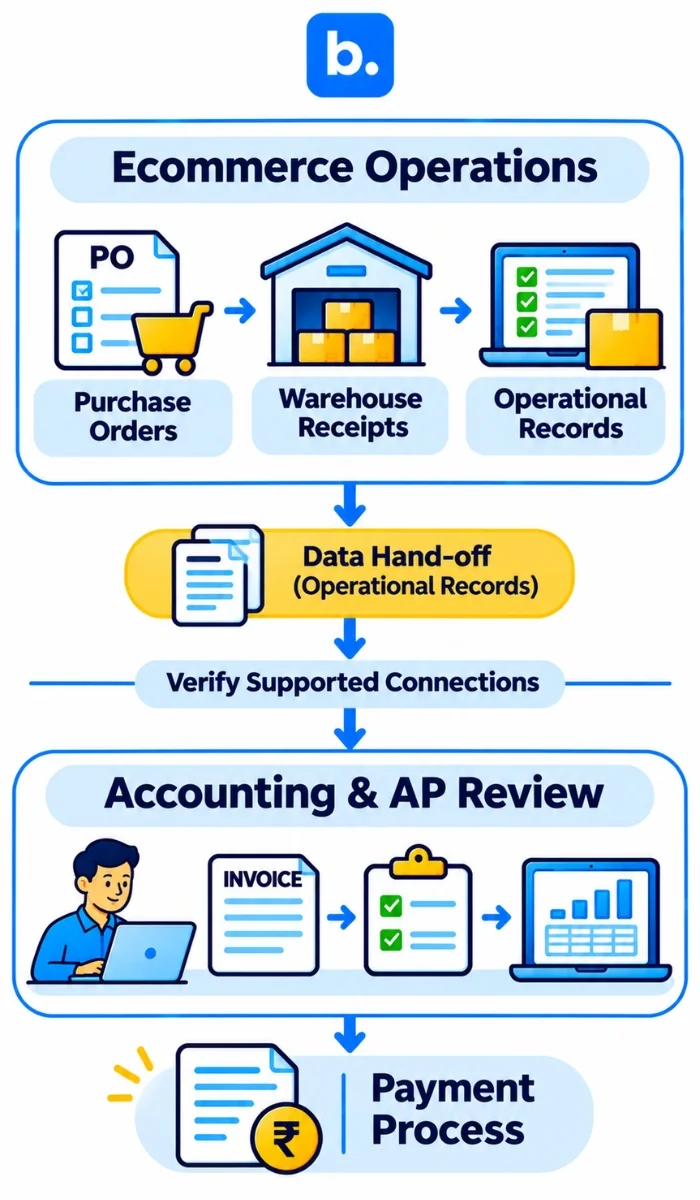
At base.com, we support ecommerce operational workflows such as purchase-order and warehouse processes, order and inventory records, invoice generation and supported accounting connections. Purchase orders and inventory and invoicing management are listed in our India pricing information and our WMS documentation describes a Purchase Order Module for supplier orders and recording incoming products. These capabilities can be used to link purchasing and warehouse activity to the accounting hand-off.
Our platform pages do not establish AI-based vendor invoice extraction, automated three-way invoice matching, AP approval hierarchies, direct vendor payment execution, automated GST/TDS validation or a complete AP ledger. Unless a specific supported feature is independently verified, those controls should be performed through the business’s accounting or specialist AP system. An order management system (OMS software or an OMS platform) is not automatically accounts payable automation software. Assess operational order software separately from payables software and accounting automation.
For broader accounting-integration context, see Leveraging Automated Ecommerce Accounting and Payment Systems. Verify the existing accounting connection and workflow before using it for invoice transfer or financial posting.
Conclusion
The benefits of accounts payable automation are bill entry reduction and visibility, but reliable results begin with connected evidence: an authorised PO, receipt or service confirmation, supplier invoice, controlled approval and an auditable accounting hand-off. For ecommerce businesses, vendor statements should be reconciled and exceptions, tax decisions and payment release should be done by humans. Our purchasing, warehouse and accounting integrations are not the same as unverified AP invoice extraction, three-way matching or payment execution, and can help with operational records and document flows at base.com.