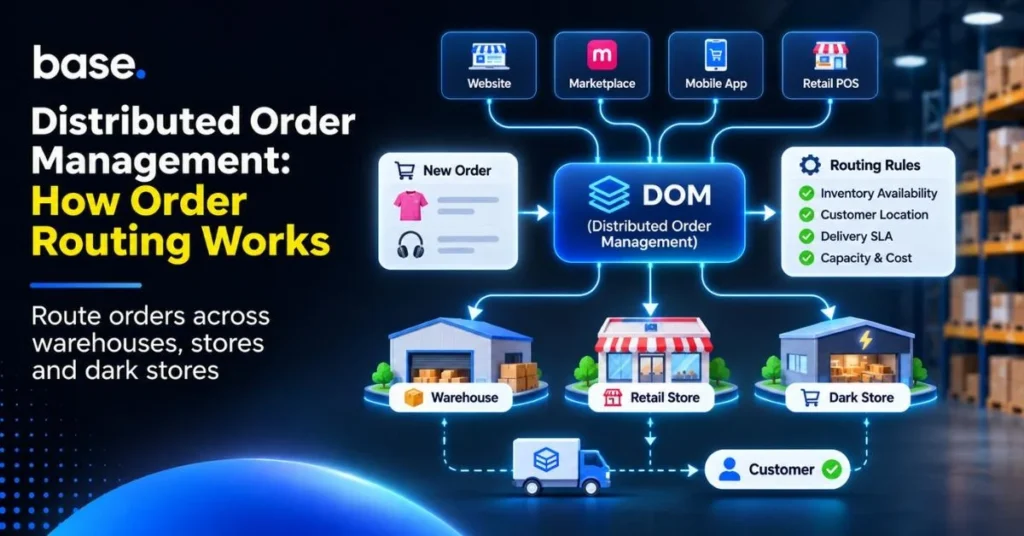
Distributed order management is the process of coordinating orders across multiple fulfilment locations and deciding which warehouse, retail store, dark store or partner should handle each order. The decision is more involved than choosing the nearest site: the location needs the right available stock, the ability to process the order and a workable route to the customer. Indian ecommerce businesses may receive orders from a website, marketplace, app or shop while holding inventory in several cities. Distributed order management connects those orders to the fulfilment network and applies configured rules to select a suitable source. It can also help teams respond when a location cannot fulfil an order as planned. The aim is not to route every order automatically at any cost, but to make allocation decisions against priorities such as delivery commitment, stock use, capacity, shipment count and cost. Those priorities differ between a regional warehouse, a store and a local dark store.
What is distributed order management?
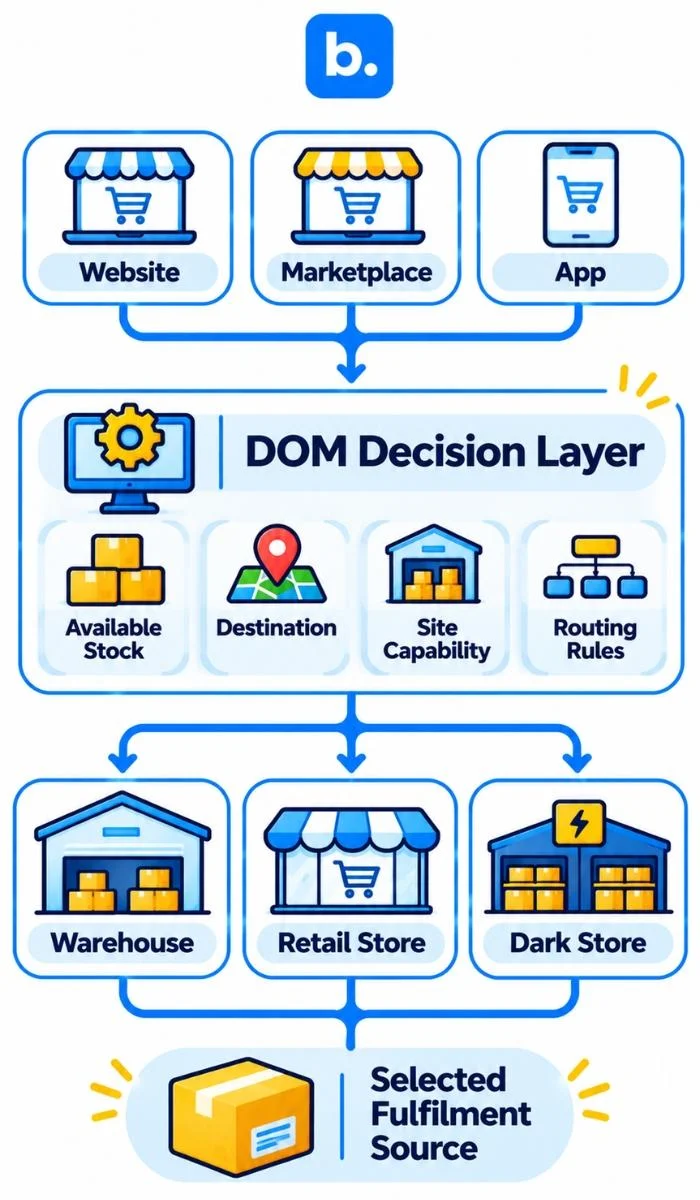
Distributed order management (DOM) coordinates customer orders and inventory across a network of fulfilment locations. It uses information such as available stock, destination, site capability and business rules to determine where an order, or its individual lines, can be fulfilled. A network might include central and regional warehouses, retail stores, dark stores, third-party logistics (3PL) warehouses or suppliers that fulfil orders directly, if the software supports those sources.
The defining feature is the decision layer: DOM evaluates the network and coordinates allocation rather than treating each location as an isolated stock point. IBM describes its distributed order management capability as aggregating orders across channels and using rule-based allocation across internal and external fulfilment locations in its DOM overview. It is an enterprise example; an order management system for ecommerce may offer less advanced routing.
Why ecommerce businesses use DOM
A distributed network can extend geographic coverage, make stock at several sites available to more orders and provide alternatives when one location is unable to fulfil. It can also coordinate orders from different channels against connected inventory. These are potential operational benefits, not guaranteed savings or faster deliveries. Results depend on inventory accuracy, the design of the network, carrier coverage and the rules applied.
Distributed order management is more than multi-warehouse inventory
Inventory management across sites tracks stock held in each place. For order management for ecommerce, DOM adds the decision about which site should fulfil an order and coordinates allocation. A seller might track five warehouses yet have staff assign every order manually. Multi-location stock alone is not DOM.
How does distributed order management work?
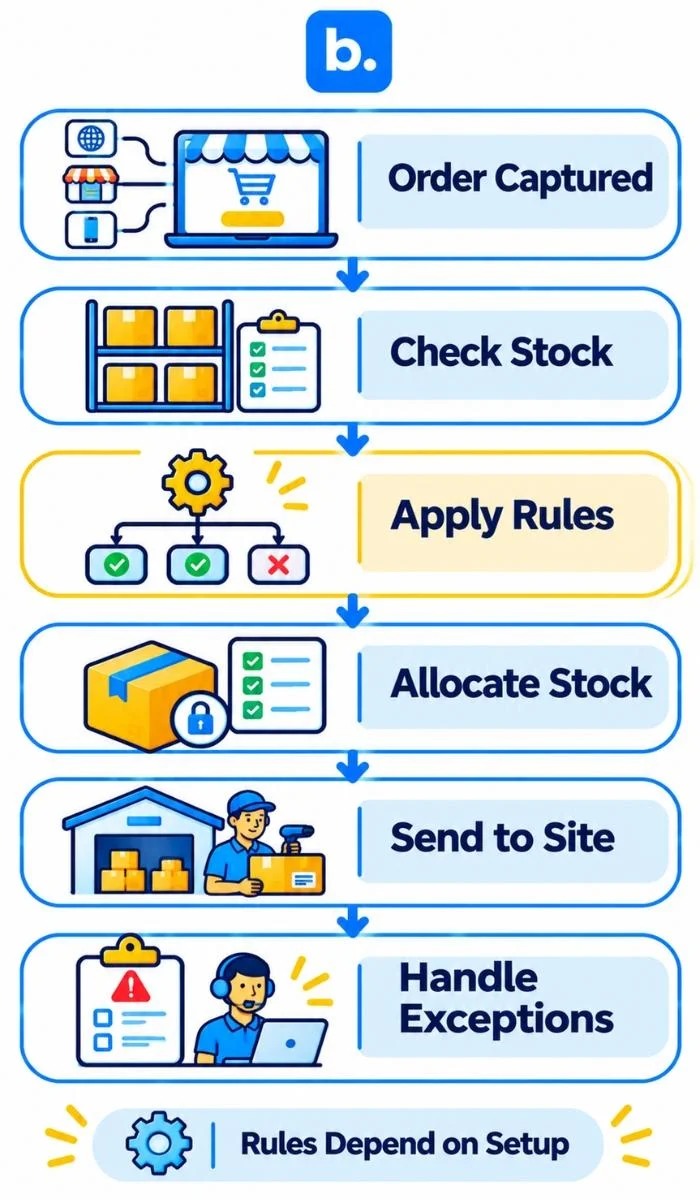
A DOM workflow combines order details, location-level inventory and fulfilment rules to select a source. Reservation timing, routing depth and exception actions vary by platform.
1. Orders enter from connected sales channels
Orders can come from a website, marketplace, mobile app, point-of-sale system or other connected channel. An OMS centralises order lines, address, channel and fulfilment method. Marketplace order management can use the same network as website orders if integrations and inventory links support it.
2. The system checks stock at eligible locations
Routing needs location-level stock, not just a network total. Physical stock on hand is not necessarily available to promise: units may be reserved, damaged or blocked. Available-to-promise (ATP) is the quantity the business can commit under its rules. Oracle’s order promising documentation explains how ATP and sourcing rules analyse supply against the requested date.
A stock keeping unit (SKU) identifies a product or variant. Accurate SKU mapping matters: a wrong match can send work to a site that cannot pick the item.
3. Routing rules find eligible locations
Configured rules exclude unsuitable sites and rank eligible ones. A location may need sufficient stock, the ability to fulfil all lines, destination coverage and capacity. Product, channel or regional preferences can also apply. Stock alone does not make a site suitable.
4. Inventory is allocated or reserved
Once a source is selected, stock may be allocated or reserved to prevent the same units being committed twice. Reservation rules should also account for cancellations and reassignment so that released stock becomes available again.
5. The selected location receives fulfilment work
The chosen site receives the fulfilment instruction. Local staff pick and verify products, pack the order, prepare shipment and hand it to a carrier. DOM coordinates where work happens; it does not replace physical fulfilment.
6. Exceptions are resolved
A stock discrepancy, damaged item, overloaded site or unavailable carrier can break the plan. Depending on the configured workflow, the order may be held, reassigned, split or sent for manual review. Clear exception-handling rules help teams respond when the original fulfilment location cannot complete the order.
How are orders routed across warehouses, stores and dark stores?
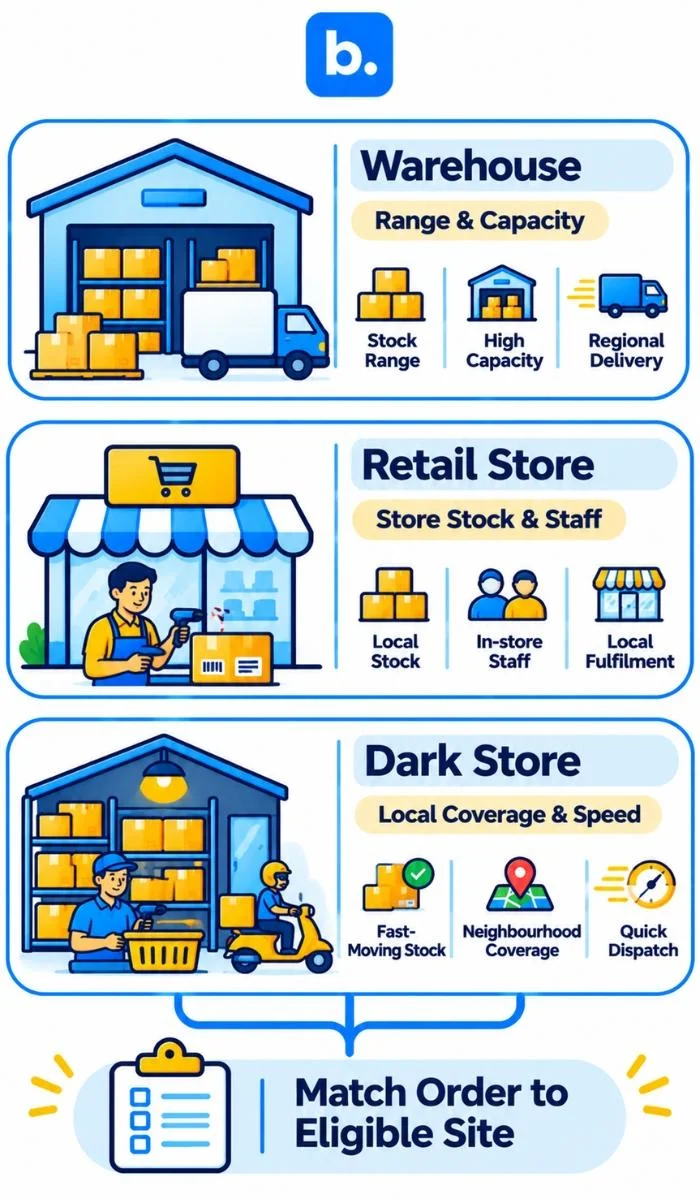
The same basic decision principles can apply across a network, but each location type has different constraints. A routing setup should recognise what each site can fulfil rather than treating every node as interchangeable.
Routing across multiple warehouses
Central and regional warehouses typically hold broader ranges or larger quantities than local nodes. Routing can consider stock by region, destination coverage, carrier availability, processing workload, channel reservations and whether an order can ship complete from one site.
Illustrative example: A Pune customer orders two products. Mumbai has both items available; Delhi has one. If the delivery commitment and other configured rules allow, the system may choose Mumbai to send one parcel rather than split the order between Delhi and Mumbai. If Mumbai lacks capacity or a suitable carrier option, another eligible location may rank higher. The best route depends on the actual rules, not the city names alone.
For practical context on planning stock across sites, see our article on multi-warehouse fulfilment in India. It is useful to distinguish network-level allocation from the separate work of maintaining accurate inventory across multiple warehouses.
Routing online orders from retail stores
A retail store can be enabled as a fulfilment location, for example for ship-from-store orders, if inventory records, staffing and processes support it. The business needs to decide which shops can fulfil online demand, what cut-off times apply and how much stock to protect for walk-in customers. Opening hours and store workload may also affect suitability. A location should not become an online fulfilment node just because it holds sellable stock.
Other store-linked options include buy online, pick up in store (BOPIS) and buy online, return in store (BORIS). These are related fulfilment models, but their availability depends on the retailer’s systems and operating policy. They should not be confused with automatic routing from a store.
Routing orders across dark stores
A dark store is a dedicated fulfilment site for online orders, generally not open for ordinary customer shopping. It is relevant to quick-commerce and hyperlocal models because it can serve a defined local area. A suitable dark store must hold the requested products, cover the delivery address, have unreserved inventory and be able to process the order within the promised window.
CBRE’s October 2026 report describes India’s dark stores as compact urban fulfilment sites supported by larger replenishment hubs. It estimates a network of approximately 7,800 dark stores across more than 100 cities in its quick-commerce and urban logistics report. The figure describes the sector, not a requirement for every retailer to operate one. A grocery order placed through a quick-commerce app might be routed to a nearby dark store if it has the items and capacity; a large regional warehouse may be unsuitable for that local delivery promise.
What factors influence distributed order routing?
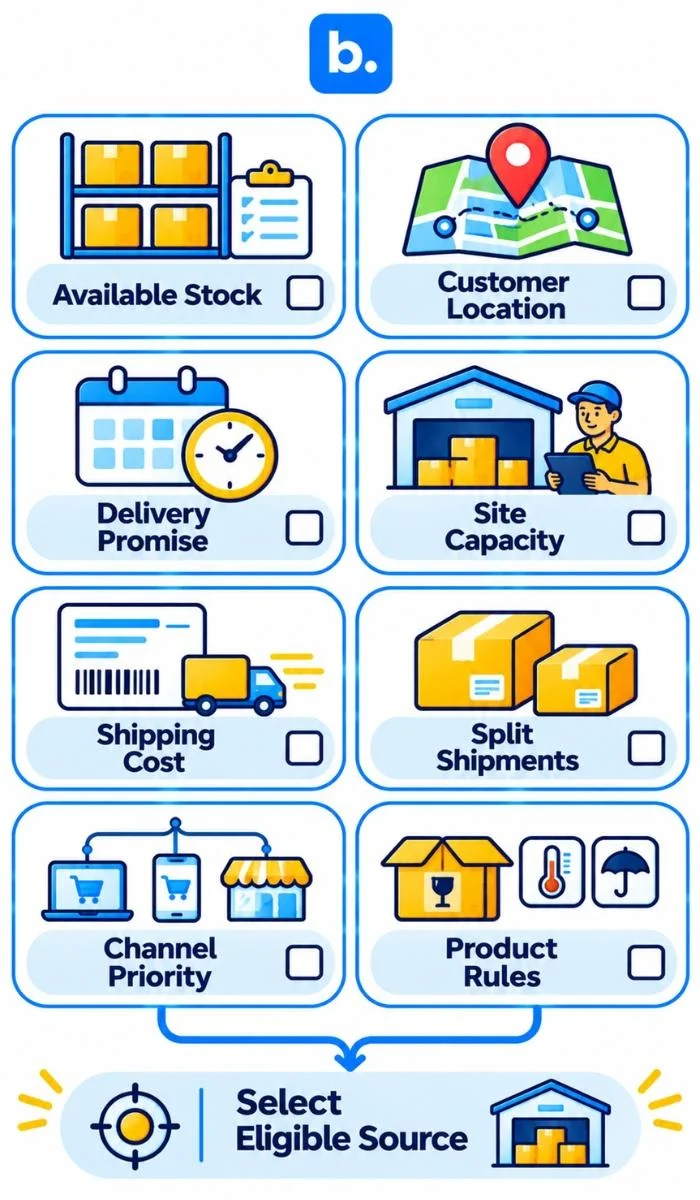
A routing decision depends on whether a site can fulfil the order and how well it meets the business’s service and operating priorities. The table summarises factors a system or team may need to consider; which can be automated depends on available data and configuration.
| Routing factor | What to consider | Why it matters |
|---|---|---|
| Inventory availability | Sellable quantity after reservations and restrictions | Avoids allocating unavailable stock |
| Customer location | Destination, coverage and distance | Determines whether a location can serve the order |
| Delivery commitment | Required dispatch or delivery window | Helps assess whether the promise is achievable |
| Fulfilment capacity | Workload, staffing and site constraints | Avoids assigning work to an overloaded node |
| Shipping cost | Carrier options and distance-related charges | Adds cost to the routing trade-off |
| Split shipment rules | Whether one site can fulfil all order lines | Balances parcel count against speed and availability |
| Channel priorities | Stock or rules reserved for certain channels | Respects channel-specific commitments |
| Product restrictions | Storage, handling or shipping limits by site | Keeps allocation within operating requirements |
The closest location is not always the best
A warehouse 10 kilometres away may lack one item, while a site 35 kilometres away can fulfil the complete order and has a suitable carrier service. The second may be the better source under the business’s rules. Likewise, a nearby store might be busy serving walk-in customers, while a warehouse has the capacity to meet the dispatch commitment. Proximity is one factor, not a universal routing rule.
For example, a routing policy may prioritise keeping an order together, staying within a defined delivery region or selecting a location closer to the customer. The order of these priorities determines which eligible location is selected. Businesses should configure routing rules around their delivery commitments, stock availability and fulfilment costs.
When should an order be split?
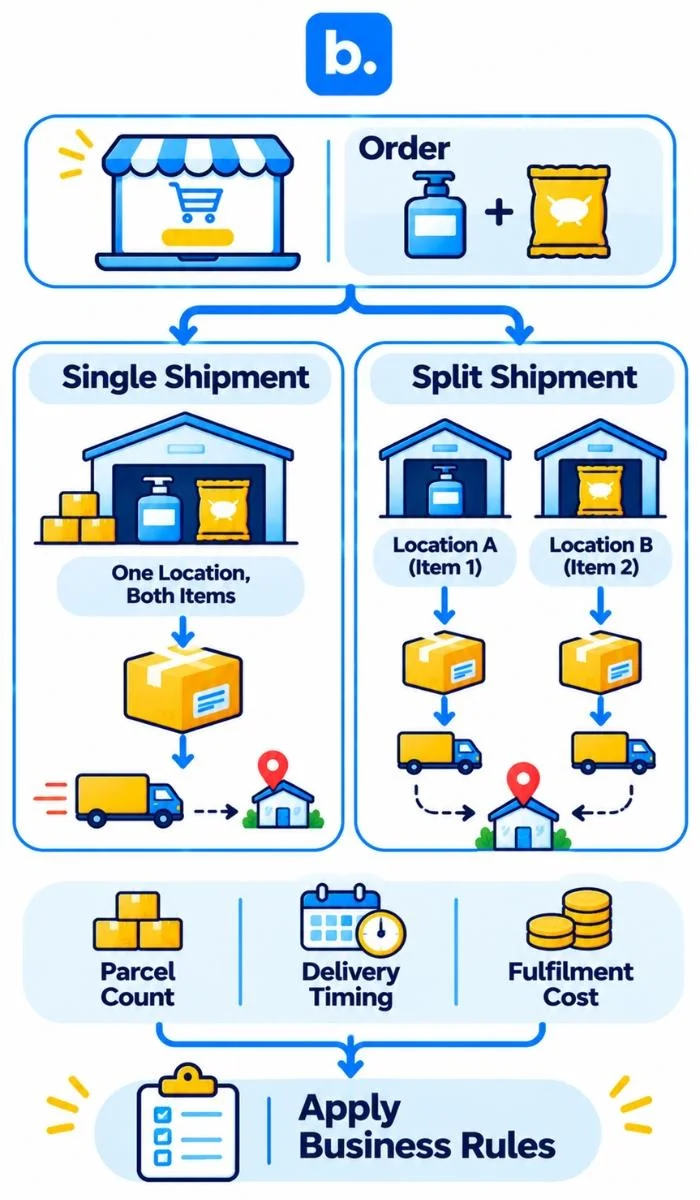
A split shipment sends items from one order in more than one parcel. It can be useful when no single location has all items or splitting avoids a lengthy delay, but it can add handling and shipping cost and deliver the order in pieces. Keeping an order together is not always better if it misses a customer commitment. Set priorities for acceptable cost, parcel count and delivery timing, then test edge cases.
Distributed order management vs OMS, WMS and basic order routing
OMS, DOM, WMS and basic order routing are related, but they describe different responsibilities. This comparison separates order coordination from allocation and warehouse execution.
| System or concept | Main responsibility | Example |
|---|---|---|
| Order management system (OMS) | Manages orders across channels and coordinates the lifecycle | Bringing website and marketplace orders into one view |
| Distributed order management (DOM) | Coordinates sourcing and allocation across fulfilment locations | Selecting a warehouse or store for an order |
| Warehouse management system (WMS) | Manages warehouse inventory and operational tasks | Picking, packing, location tracking and stocktaking |
| Basic order routing | Assigns an order using a limited or fixed rule | Sending an order to a default or nearest eligible site |
| Inventory management system | Tracks stock quantities and movements | Recording available, reserved and adjusted stock |
An OMS can manage orders without advanced network-wide sourcing. Basic order processing software may capture orders or update statuses without choosing between locations. DOM adds location selection and, depending on the OMS platform, may support reservations, split fulfilment and exceptions. A WMS manages work inside the chosen warehouse; DOM may send it instructions, but the systems are not interchangeable. For two sites and simple rules, basic routing may suffice. Larger networks may need more capable OMS software, if it supports the required data and workflows.
Challenges of managing a distributed fulfilment network
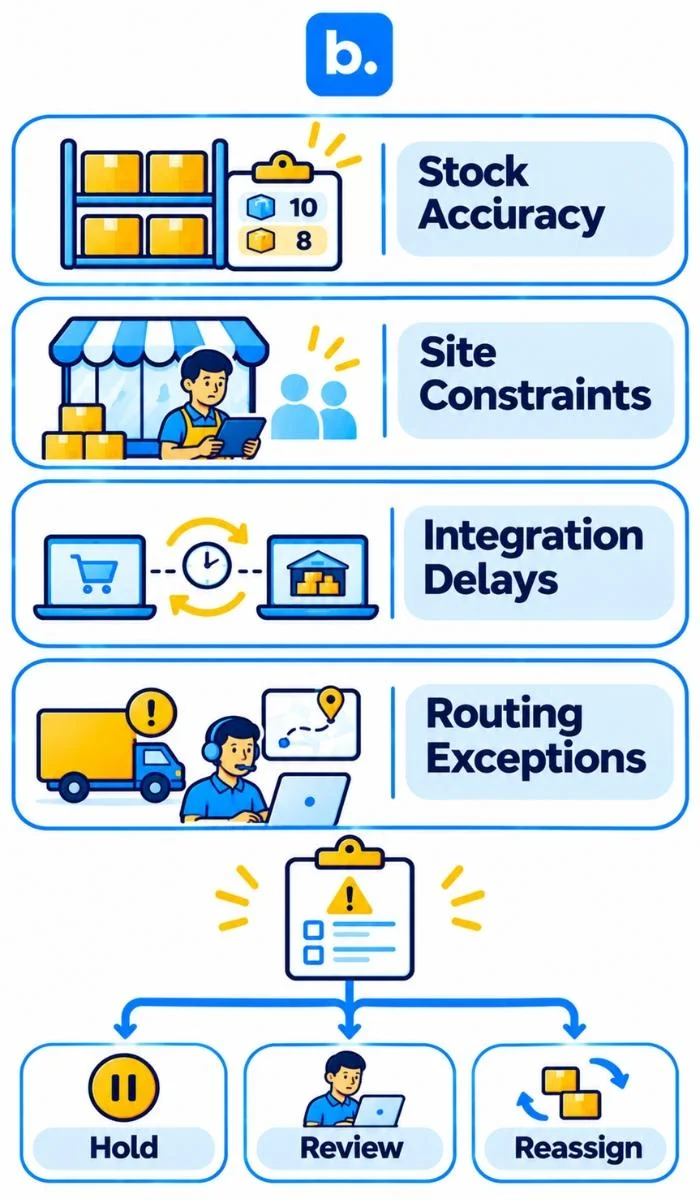
More locations create fulfilment options but also add complexity. First, location-level inventory must be accurate: a combined stock total can hide that a particular site has no available units. Second, sites differ. A store, dark store and warehouse may have different cut-offs, staffing and product capabilities. Third, integrations can lag or fail, leaving routing decisions based on stale order or inventory data. Finally, exceptions need ownership. If a site cannot fulfil, teams need a defined way to hold, reassign or review the order. Effective DOM depends on reliable location data, suitable rules and coordination between systems and local teams, with human review available when automation cannot safely decide.
Features to look for in distributed order management software
Evaluate order management software for ecommerce by testing location-level stock, allocation, routing rules and exceptions, not feature count alone.
- Location-level inventory: See stock by warehouse, store or fulfilment node, including reserved and unavailable quantities.
- Configurable routing rules: Reflect stock, destination, location priority and site capability where the system supports those inputs.
- Reservation controls: Understand when stock is committed and how cancellation or reassignment changes availability.
- Split-order handling: Check whether order lines can be sourced from different sites and how the resulting parcels are tracked.
- Location and channel controls: Define which sites can fulfil which products or channels.
- Integration coverage: Look for connections to the stores, marketplaces, WMS, ERP and carriers used across the fulfilment network.
- Exception visibility: Find orders that cannot proceed as planned and see what action is required.
- Reporting: Review allocation, status and site-level activity to identify recurring issues.
Evaluate the software using realistic cases: a preferred site has insufficient stock, a carrier cannot serve the address, a store is at capacity or an order needs two parcels. These scenarios help establish how routing rules, integrations and employee decisions work together.
How Base.com supports multi-warehouse ecommerce operations
At Base.com, our WMS supports multiple warehouse records within one catalogue, with separate stock and location records. This gives businesses visibility of inventory held across their warehouse network and helps teams manage stock movements and warehouse operations.
Our Order Manager brings orders from connected online stores and marketplaces into one interface. Teams can manage order statuses, customer messages, invoices, shipments and printing from a central workspace. Our order-forwarding workflow also supports stock reduction and synchronisation with connected stores.
For warehouse fulfilment, our WMS supports inventory management, goods receiving, stock movements, pick lists and guided picking workflows. Our Order Manager coordinates orders across connected sales channels, while our Shipping Management supports shipment creation, carrier services, labels and tracking.
Together, these functions help ecommerce businesses organise multi-warehouse inventory, centralise order handling and coordinate shipping operations.
Conclusion
Distributed order management is about deciding where an order should be fulfilled, not simply counting stock in several places. The right source depends on available inventory, destination, delivery commitment, capacity and the trade-offs around split shipments. Warehouses, stores and dark stores each have distinct operating limits, and exceptions need a clear path to review or reassignment. When evaluating OMS software, assess how its routing rules handle real network decisions, including stock shortages, capacity constraints, split shipments and delivery commitments.
