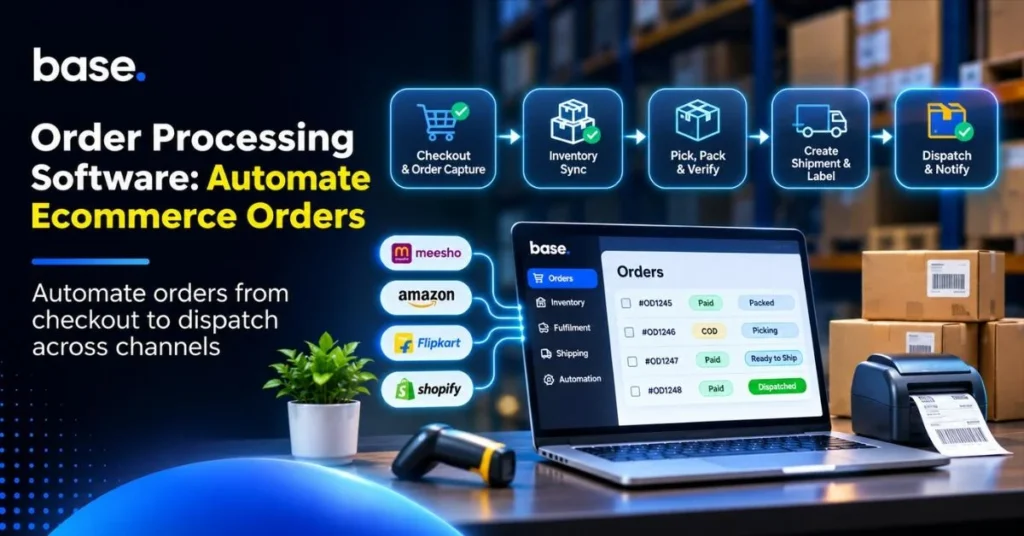
Ecommerce order processing software moves orders from checkout towards dispatch by capturing and coordinating order data. Depending on integrations and setup, it can import orders, update stock and statuses, generate invoices or shipments, print labels and notify customers. For Indian sellers using websites, marketplaces, inventory tools and courier portals, connected workflows reduce repeated entry and make progress visible. To automate order processing ecommerce workflows, identify routine system tasks and where people must verify details or handle physical work. An order management system (OMS) coordinates information across channels and teams; it does not pick and pack goods or hand parcels to a carrier. The goal is a connected route from checkout to dispatch, with clear responsibility at each hand-off.
What is ecommerce order processing software?
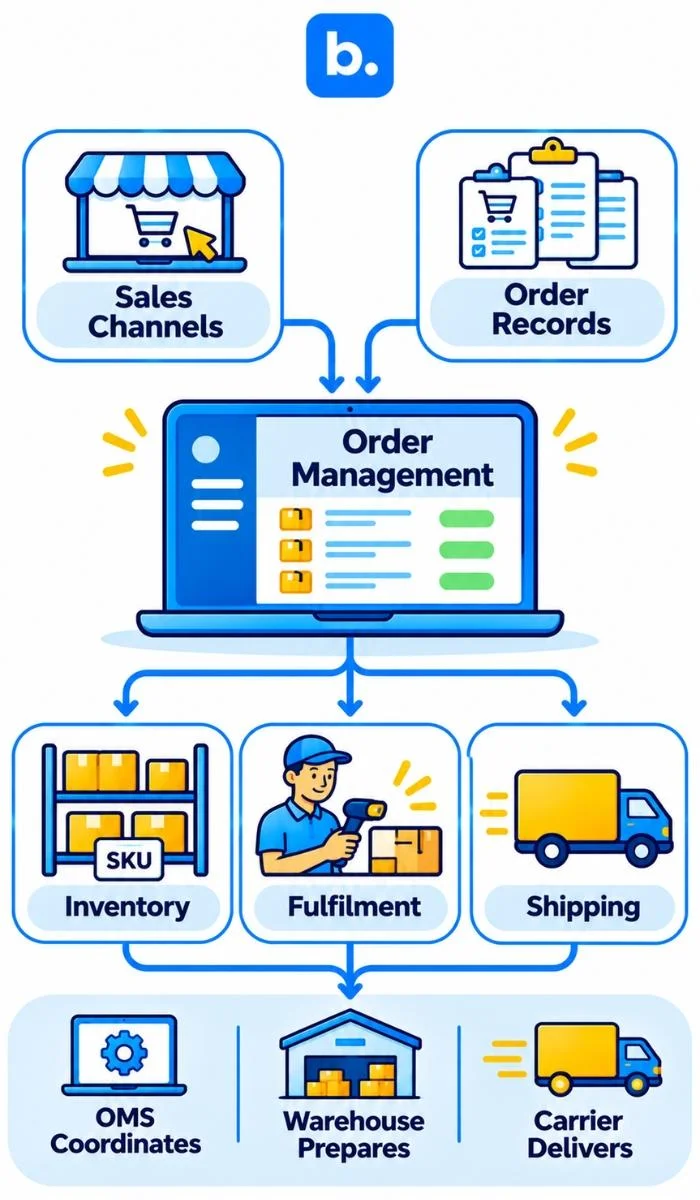
Ecommerce order processing software manages tasks after a customer places an order. It collects order information, records progress, connects orders to inventory and coordinates fulfilment and shipping. An order management system (OMS) provides a broader layer for handling orders across sales channels and their lifecycle. Order processing is a central OMS workflow, though features vary by provider.
An OMS can bring connected store and marketplace orders into one view, pass details to inventory or fulfilment systems and track progress. Order management for ecommerce coordinates work between sales channels, stock records, warehouse teams and shipping services. It is not automatically a payment gateway, complete warehouse system or carrier. For a closer look at how order management works, read our article on what order management means and why it matters for sellers.
Order processing software vs an OMS
The terms overlap in software descriptions. A narrower order processing tool might import orders or create invoices. OMS software generally aims to coordinate more of the lifecycle, including order capture, inventory visibility, workflow rules, fulfilment hand-offs and shipping information. These are not fixed industry definitions, so compare the actual capabilities rather than relying on the product label.
How an OMS fits into ecommerce operations
A customer buys through a connected online store. The OMS receives the order details and makes the order available to the relevant team. Stock information may be updated or sent to connected channels according to the configured workflow. Warehouse staff then pick and pack the items. A shipping connection may create a shipment, label and tracking record. The OMS connects these activities, while the warehouse and carrier perform their respective physical work.
How automated order processing works: from checkout to dispatch
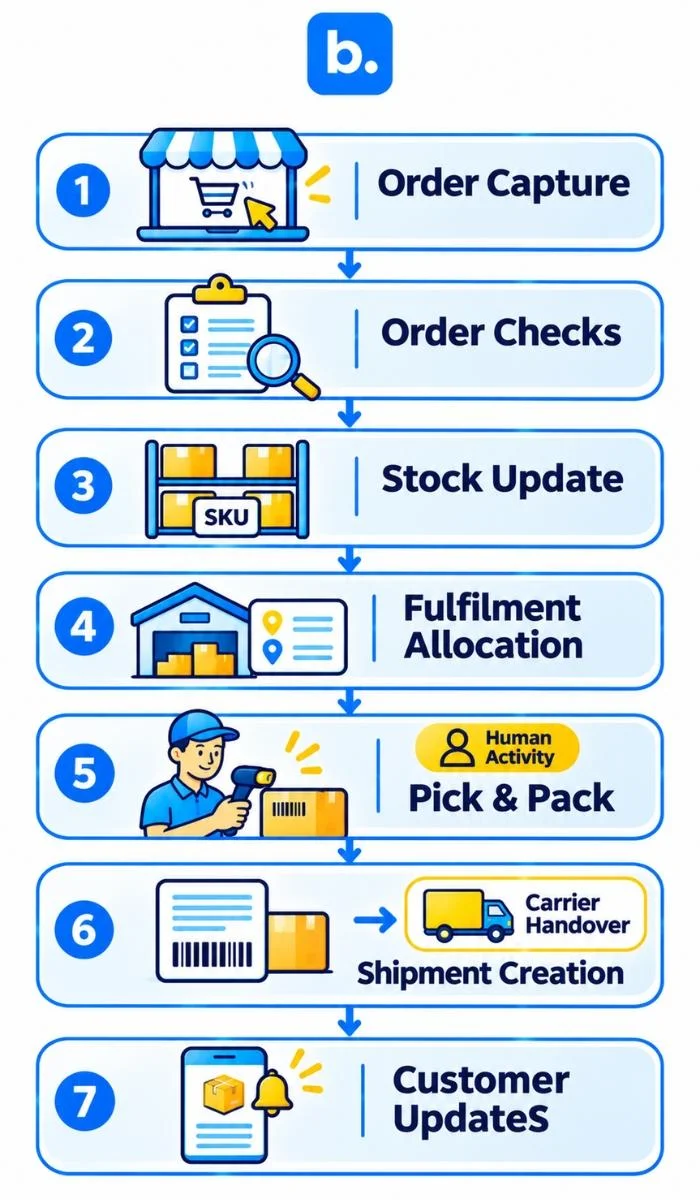
Automated order processing connects stages so information can move between systems without repeated data entry. The following stages outline a typical ecommerce order lifecycle, from order capture and inventory updates to fulfilment, shipping and customer notifications.
1. Capture orders from connected sales channels
Orders may come from a brand website, marketplaces such as Amazon or Flipkart, other connected stores, or manually created phone and in-person orders where supported. A connected OMS can import eligible orders into one list, the core of marketplace order management. A seller using its website, Amazon and Flipkart, for example, can review incoming orders in one interface rather than checking three dashboards.
2. Validate order details and payment status
Before fulfilment, the workflow should reflect order status and required checks: complete address and product details, cancellation requests or a flag for manual review. Cash on Delivery (COD) and prepaid orders may follow different configured processes.
Payment authorisation approves an attempted charge; capture instructs collection. Settlement transfers funds to the merchant, while reconciliation compares transaction or settlement records with sales and bank records. An OMS may display payment status from a connected service, but it is not thereby a payment gateway or settlement-reconciliation system. For example, a prepaid order may enter fulfilment after payment confirmation, while a COD order follows the seller’s configured checks.
3. Synchronise inventory and update stock
Order processing software can connect orders with inventory. Depending on configuration, stock may be reserved or reduced when an order is imported, confirmed or forwarded, then updated availability sent to connected channels.
This can help prevent a seller offering units already committed elsewhere, but does not eliminate overselling. Incorrect product mapping, inaccurate counts, delayed updates or failed integrations can still create discrepancies. A stock keeping unit (SKU) identifies an item or variant in inventory records, so its mapping between systems must be accurate. Teams should also have a clear process for identifying failed synchronisations and correcting stock discrepancies.
4. Allocate the order and prepare fulfilment
The order must reach the right fulfilment team or location. Depending on the software, it may check stock, assign a warehouse or pass details to an ERP, WMS or fulfilment partner. Businesses operating across multiple warehouses should account for stock availability and fulfilment responsibilities at each location.
An OMS coordinates the order and its requirements. A warehouse management system (WMS) manages warehouse work such as location-based stock handling, picking and packing. They may exchange data, but the team should know which system owns each order status, quantity and task.
5. Pick, pack and verify the order
Picking and packing are physical tasks: an employee locates the products, picks and checks the quantity, packs the parcel and confirms it is ready. A barcode scan can help verify the product against the order when data and scanning are set up correctly. Software can prompt or record the check; it does not physically pick or pack without separate automation equipment.
6. Create the shipment, label and dispatch record
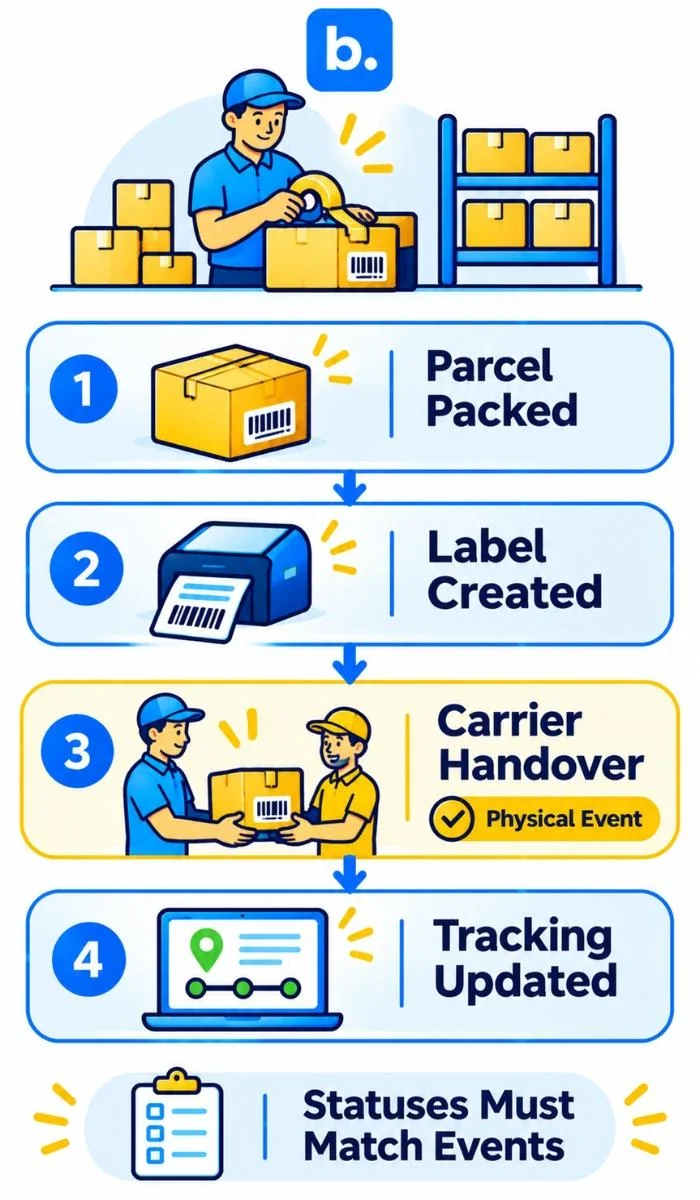
A connected shipping workflow may create a shipment with a supported carrier, generate a label or document, request pickup and record tracking details. It may also update the order and share tracking information where supported.
A shipment or label is not dispatch: the parcel still needs to be handed to the carrier, whose collection or scan is a separate event. Set statuses to reflect what has actually happened, not to treat a label as proof of handover.
7. Notify the customer and maintain visibility
Customer messages can follow order confirmation, a processing update, shipment creation or tracking availability. Match the message to the actual event: a dispatch notice sent when only a label has been printed may mislead the customer. A shared order record helps service teams check progress. Returns are a later, separate workflow.
Which ecommerce order processing tasks can be automated?
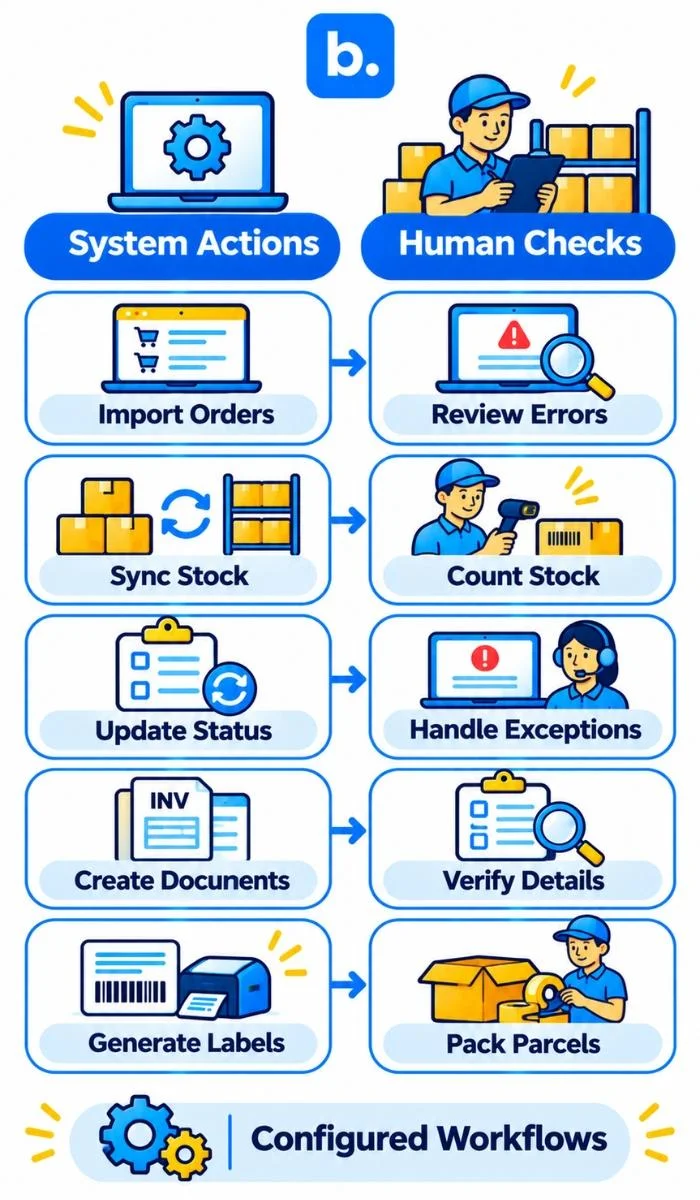
Ecommerce businesses can automate many repeatable, system-based tasks, but the exact scope depends on the OMS, connected services and configured rules. The examples below distinguish software actions from the work that may still need a person.
| Order processing task | What automation can do | Where human involvement may remain |
|---|---|---|
| Order import | Bring orders from connected sales channels into a central system | Investigate failed imports or missing order data |
| Stock updates | Synchronise quantities with connected inventory or sales channels | Correct physical-count, mapping or sync discrepancies |
| Order status updates | Change statuses when configured events and conditions are met | Review unusual, disputed or incomplete orders |
| Invoice generation | Generate invoices or receipts using configured rules | Correct errors or handle exceptions |
| Shipment creation | Create shipments through supported carrier connections | Resolve serviceability or carrier issues |
| Label printing | Generate and print shipping labels or documents | Check misprints, damaged labels or parcel details |
| Customer notifications | Send messages when selected events occur | Answer questions and resolve service problems |
| Pick and pack verification | Use a barcode scan to check product codes against an order | Physically pick, pack and resolve mismatches |
The useful starting point is not to automate everything. Prioritise repetitive tasks that occur often, follow clear rules and currently require employees to switch systems or re-enter data. Keep human attention for judgement, exceptions and physical handling.
Illustrative example: A retailer processing 300 orders a day might configure imports, routine status changes, invoice creation and label printing for supported orders. Staff could then focus on address gaps, stock discrepancies, cancelled orders and item mismatches. This is an example of a possible workflow, not a customer result or a measured performance claim.
Why manual order processing becomes difficult as a business grows
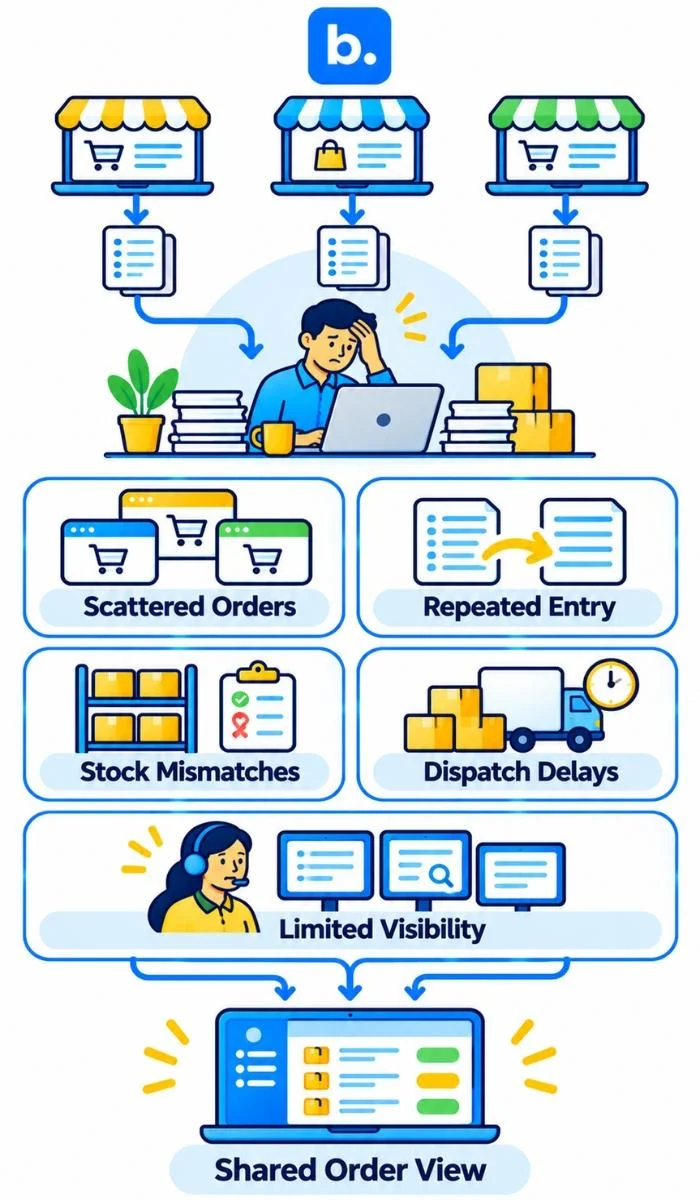
Manual order processing can work for a small seller with one channel and few daily orders. As channels, products, warehouses and volumes grow, disconnected hand-offs become harder to monitor.
Orders get scattered across platforms
Teams checking separate seller portals may overlook an order or pick it up late.
Repeated data entry increases errors
Copying addresses, quantities or product identifiers between tools can introduce mistakes.
Inventory information becomes inconsistent
A delayed stock update may leave units listed as available after they have been committed elsewhere.
Dispatch work becomes harder to coordinate
Creating shipments, downloading labels, printing invoices and updating statuses in separate interfaces adds hand-offs.
Customer service lacks a clear order view
When statuses and tracking details are scattered, staff must search several systems to answer a query.
Adding people may increase capacity, but it will not resolve mismatched data or repeated entry by itself. A connected order management system ecommerce workflow can reduce avoidable administration while keeping exceptions visible.
Essential features to look for in order management software
The right order management software connects the sales channels, inventory records, fulfilment process and shipping services a business actually uses. When comparing an OMS platform, assess the workflow end to end, not just the length of a feature list.
Centralised order dashboard
Check whether orders from connected channels appear in a shared view with order details, channel source, customer information and processing status. Search, filters and an order history can help teams find work and investigate exceptions.
Marketplace and ecommerce integrations
List the marketplaces, ecommerce platforms and other channels the business uses. Indian sellers may need examples such as Amazon, Flipkart, Myntra, Meesho, Shopify or WooCommerce, but no list should be treated as a guarantee of coverage. The relevant integration should support the order information and actions needed to keep the seller’s workflow connected.
Inventory synchronisation
Inventory synchronisation connects order activity with stock records and channel availability. Accurate SKU and variant mapping helps maintain consistent quantities across systems. Teams should also have a process for identifying and resolving discrepancies when updates fail.
Workflow automation and configurable rules
Event-based rules can trigger actions such as changing an order status, sending a customer message, creating a shipment, generating an invoice or printing a document. Businesses can organise these workflows around different sales channels, COD and prepaid orders, and common exceptions. An action history also helps teams understand which tasks have been completed and which need attention.
Shipping, picking and packing support
Shipping workflows can include shipment creation, label printing, pickup requests and tracking information. For in-house fulfilment, a connected WMS can support picking lists, barcode checks and packing verification. Order coordination and physical warehouse execution remain separate responsibilities.
Reporting, permissions and integration options
Teams may need visibility into order volumes, statuses, action history and exceptions. Check employee roles and access levels, API or integration options, and whether the setup can support the business’s expected channel and order growth. Include a plan for what staff do when an integration is unavailable.
How to implement ecommerce order processing automation
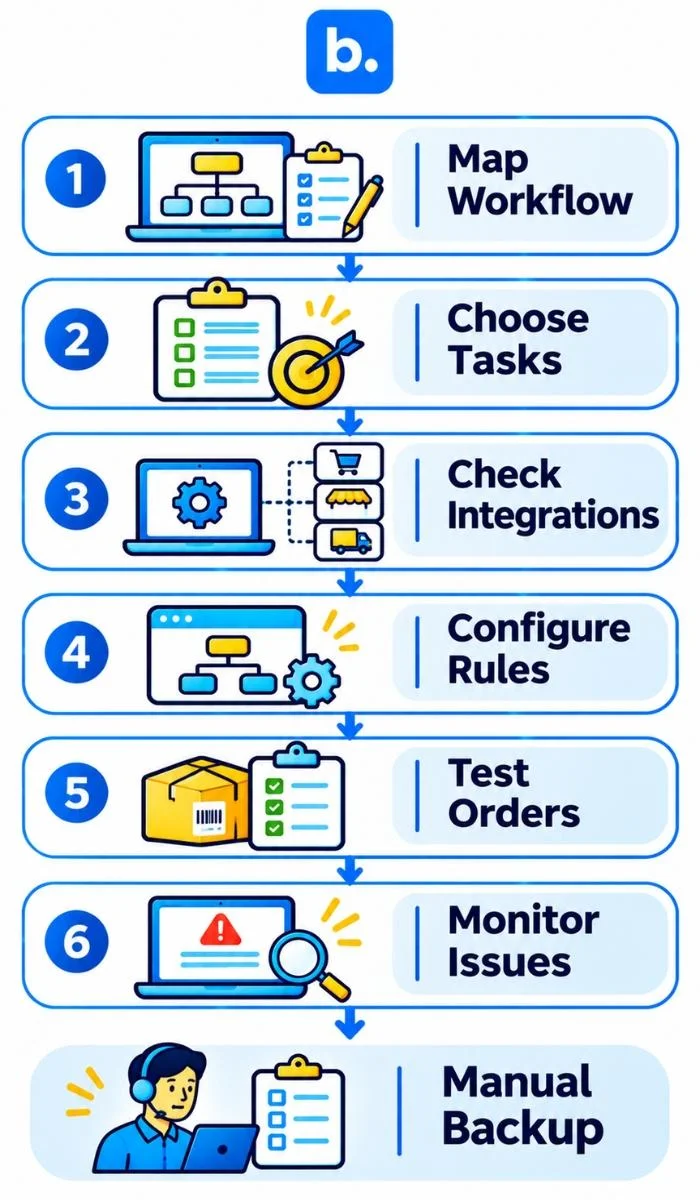
A staged implementation helps teams verify data and rules before relying on them for everyday order handling.
- Map the current workflow. Document how an order moves from checkout to carrier handover. Note every system, manual data entry, status change and hand-off.
- Choose the first tasks to automate. Start with frequent, predictable work such as order imports, stock updates, invoice generation or shipment creation. Understand why an existing manual check is needed before removing it.
- Check integrations and data. Confirm the required store, marketplace, inventory, ERP and carrier connections. Review SKUs, variants, warehouse records and order fields for accuracy.
- Configure rules by order type. Set conditions for statuses, messages, documents or shipment creation. Test COD and prepaid orders, incomplete addresses, cancellations and other common exceptions.
- Run a controlled test. Process sample orders from each channel. Verify the order data, stock changes, status, invoice, label and tracking record, then check that physical hand-offs are represented accurately.
- Monitor exceptions and refine. Track failed imports, stock mismatches, orders awaiting fulfilment and carrier issues. Assign an owner to review errors and update rules when the process changes.
Reliable automation depends on accurate data, working integrations and clear responsibility for exceptions. Keep a manual fallback for critical tasks if a connection fails. For practical examples of event-based workflows, read our article on automatic actions in Base.com.
How Base.com supports ecommerce order processing
At Base.com, our Order Manager brings orders from connected online stores and marketplaces into one central interface. Sellers can manage orders from different channels, forward orders to connected stores or ERP systems, and keep order information organised throughout the processing lifecycle. Our Order Manager also supports manually added phone and in-person orders, invoice generation, order status updates and customer messages.
Our Workflow Automation helps reduce repetitive order administration. Sellers can configure automatic actions to change order statuses, send customer messages, issue invoices or receipts, create shipments and print documents when defined events and conditions are met.
For warehouse preparation, our Pick&Pack Assistant uses barcode scanning to help employees identify and verify products during picking and packing. It can also capture a photo of the packed parcel. Our WMS supports warehouse activities such as receiving, inventory management, guided picking and packing.
Our Shipping Management brings supported carrier services into one interface. Teams can create shipments individually or in bulk, print shipping labels, request pickups and forward tracking numbers to connected marketplaces and stores. Automatic customer notifications can also keep buyers informed as shipment statuses change.
Together, our Order Manager, WMS and Shipping Management help connect order capture, inventory, warehouse preparation and shipping in one ecommerce workflow.
Conclusion
Order processing software connects the stages from checkout to dispatch and automates predictable system work. Map the workflow, check integrations and data, and keep people responsible for verification, exceptions and physical fulfilment. An OMS coordinates order information, warehouse teams prepare parcels and carriers collect and deliver them. Clear boundaries help automate the right tasks without confusing a label or status update with actual dispatch.
