If you are deciding how to choose a WMS for ecommerce, first map the work your warehouse actually does, then test whether each shortlisted system supports those processes, connects with your sales and fulfilment tools, and fits your team’s capacity. The best WMS software is not simply the product with the longest feature list. A small single-site operation has different needs from a brand handling thousands of SKUs, several sales channels, multiple warehouses or sharp Diwali and marketplace sale peaks.
A warehouse management system (WMS) manages physical work such as receiving, storage, picking, packing and stock movements. Not every ecommerce business needs a dedicated WMS; the decision depends on complexity, order volume and required controls. Use these 12 checks to compare today’s needs with realistic growth plans.
Start by understanding what your warehouse actually needs
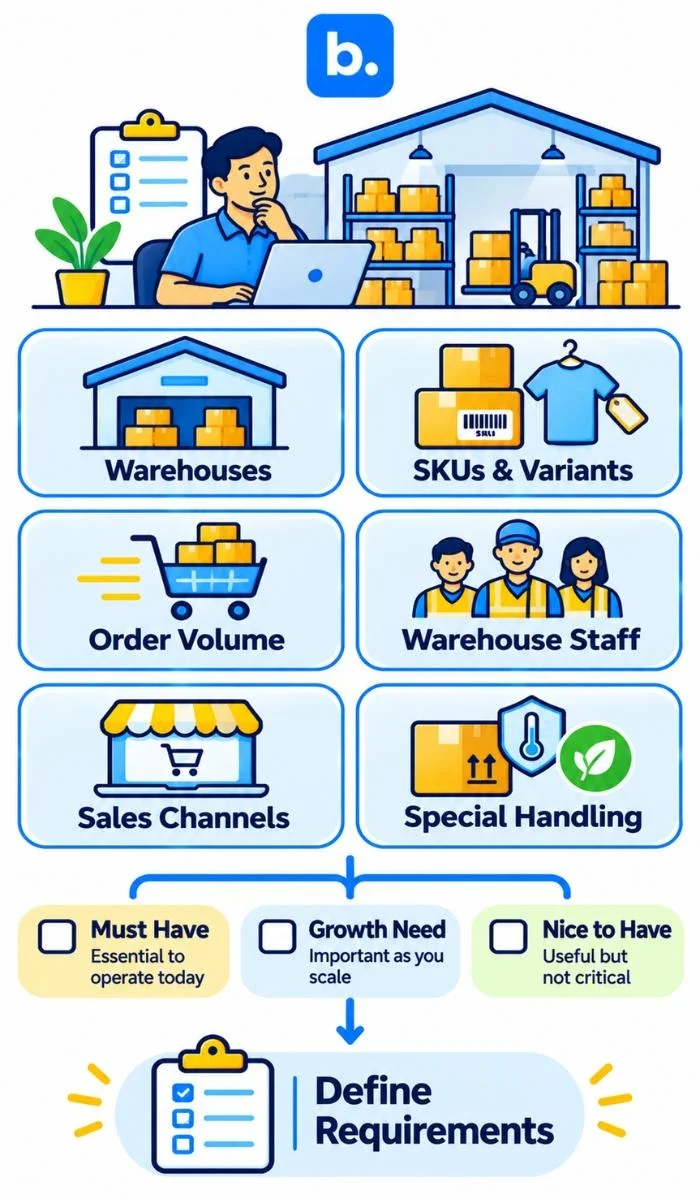
Document how work moves through the warehouse before asking vendors for demonstrations. Record the number of warehouses and storage locations; active SKUs and variants; average daily orders and peak-season volume; lines and units per order; staff and shifts; sales channels; and any batch, expiry, serial-number or special-handling needs. Map current receiving, putaway, replenishment, picking, packing, dispatch, stocktaking and returns processes. Note where information is re-entered or exceptions are managed outside the system.
Separate requirements into three groups: must-have, required to operate correctly today; growth requirement, likely to matter as volume or complexity rises; and nice-to-have, useful but not essential. A brand with one warehouse may need multi-location capability later, but should not pay for complex enterprise features without a credible plan to use them.
These distinctions clarify system boundaries: a WMS controls physical warehouse activity; an order management system (OMS) coordinates orders across channels; inventory software records quantities; shipping software supports shipment and carrier workflows; and an enterprise resource planning system (ERP) covers broader business processes. Products may combine roles, so evaluate workflows, not labels.
The 12-point checklist for choosing a WMS
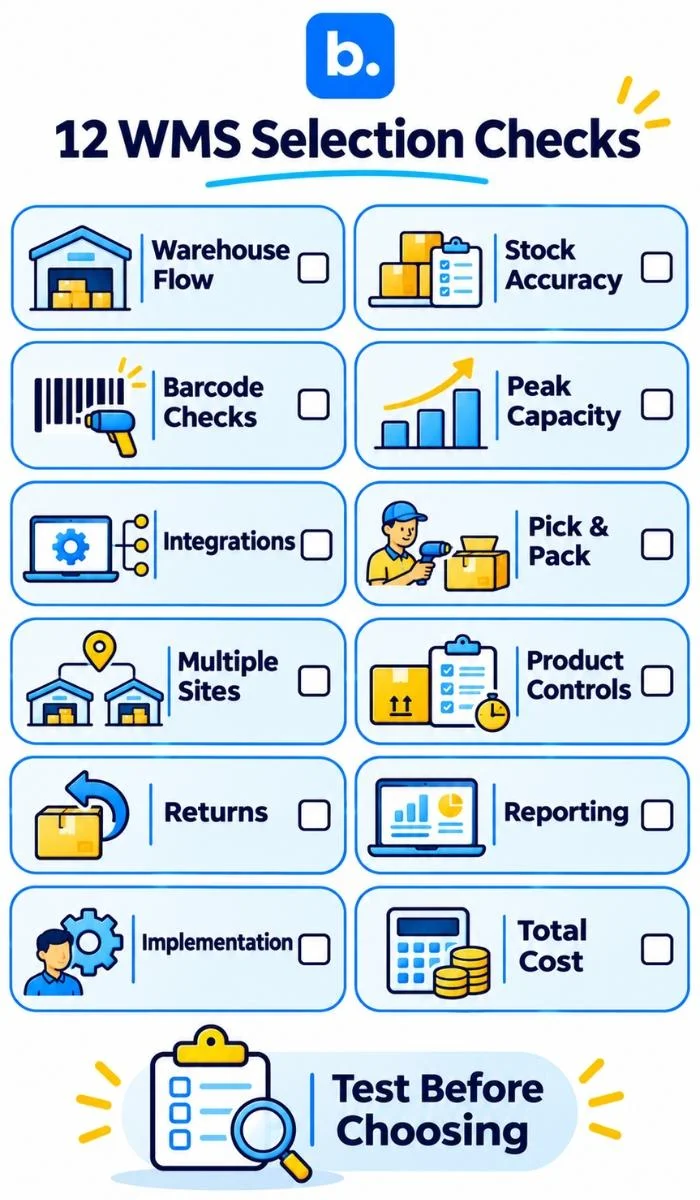
1. Does the WMS cover your complete warehouse workflow?
Check the relevant flow from receiving and putaway through storage, replenishment, picking, packing, dispatch, stocktakes and returns. A small team may need basic receiving and picking; a larger site may need directed putaway, batch control and task management. A stock dashboard alone is not a complete workflow. Our guide to warehouse management systems explains the broader role of a WMS.
Ask: Which processes are standard, and which need another module or customisation? Can you show receiving through dispatch?
Test: Run one ordinary order and one exception, such as a short delivery or damaged item, through the full process. If you are comparing warehouse and order tools, see WMS vs OMS for ecommerce sellers.
2. How accurately does it track inventory and locations?
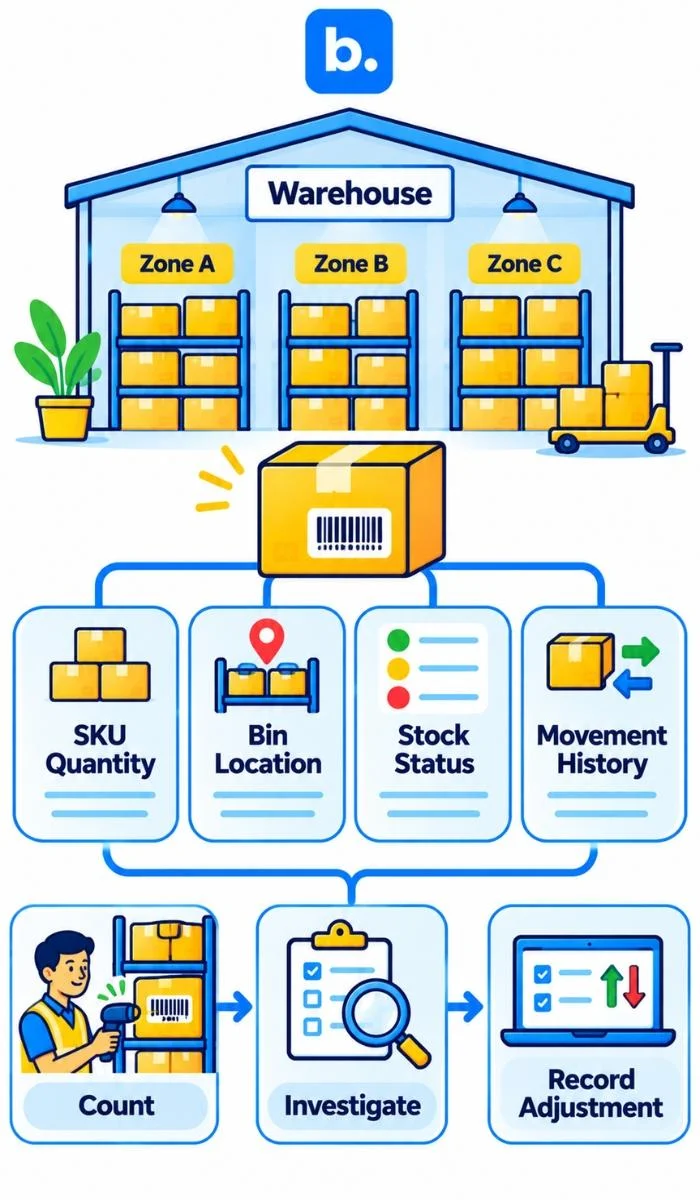
Staff need both quantity and location visibility. Assess bin, rack or shelf tracking where needed, movement records, adjustments and audit history, cycle counts, and reserved, available or damaged states. SKU totals alone may not locate items across storage areas. Discrepancies can contribute to channel overselling and cancellations.
Ask: Can stock be tracked by location? Are adjustments recorded with a reason and history? How often does connected inventory update?
Test: Count a selected location, enter a discrepancy and trace the adjustment. Check that the result is visible where your workflow expects it.
3. Does it support barcode scanning and verification?
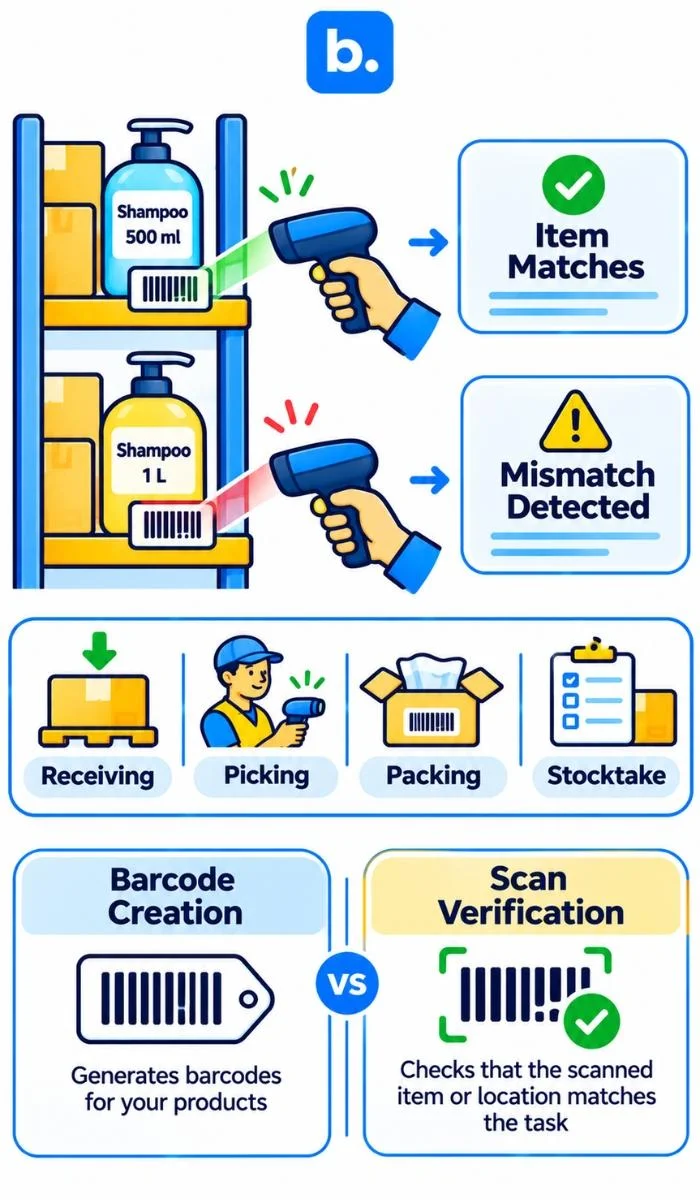
Evaluate scanning at receiving, product and location identification, picking, packing, stock movements and stocktakes. Barcode generation is not verification: the latter checks that a scanned item or location matches the task. That distinction matters for lookalike products and variants. Do not assume every WMS supports every scan workflow.
Ask: Which tasks support scanning? Can the system flag an unexpected item? Which mobile devices or scanners work, and are there hardware or licence costs?
Test: Scan the wrong variant at picking or packing and observe whether the system detects the mismatch, records it and tells the user what to do next.
4. Can it handle your order volume, including peaks?
Average orders hide Diwali, marketplace sale and launch peaks. Assess peak orders, lines and units, simultaneous users, locations, bulk processing and responsiveness. Check limits and charges behind claims such as “unlimited orders”.
Ask: What order and transaction volumes have been tested? Are there user, location or processing limits? How does pricing change when volume spikes?
Test: Ask the provider to run a representative high-volume scenario or show relevant load-test evidence. A standard demo shows workflow, not proof of peak-load performance.
5. Does it integrate with your ecommerce channels and other systems?
A WMS may exchange orders, product data, stock, status and shipping information with marketplaces, D2C platforms, OMS, ERP or accounting software, shipping tools, point-of-sale systems or a third-party logistics provider. A listing does not prove every workflow is supported. Check data exchanged, sync frequency, error handling and who owns failures. See our Order Manager and browse the Base integrations directory as starting points, then verify the specific connection you need.
Ask: Is each required channel supported? What syncs, how often, and who resolves failures? Is an API or custom integration needed?
Test: Create or update a test order and stock quantity, then trace the data in both systems. Simulate a failed sync and inspect the alert, retry and recovery process.
6. Does it support efficient picking and packing?
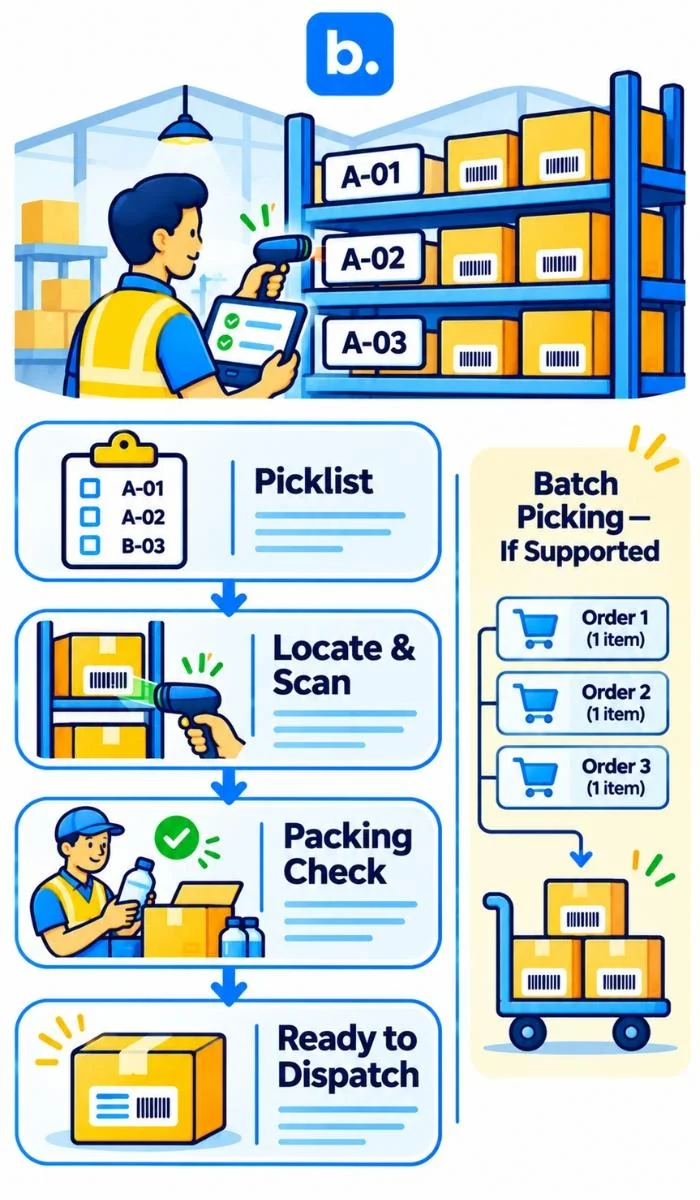
Picking and packing affect accuracy and dispatch, but the right method depends on order profile and layout. Assess location-based picklists, barcode checks, batch picking where needed, packing verification, documents, labels and packing stations. Test batch picking for many single-item orders; complex multi-item orders may need another flow. No method is universally faster.
Ask: Can picklists use warehouse locations? Can staff verify SKU and quantity? Which picking methods and packing checks are supported?
Test: Process one multi-item order and several single-item orders, including similar variants. Check how the system groups work and how packing staff confirm completeness before dispatch.
7. Can it manage multiple warehouses and stock allocation?
Multi-warehouse features matter when stock sits at multiple facilities, stores or fulfilment locations. Check separate visibility, site records, transfers and central oversight. A brand with stock in Mumbai and Bengaluru may need to distinguish each site’s inventory. Visibility is not automated order routing; verify allocation rules separately.
Ask: How many sites can be configured? Are transfers recorded? Can allocation be set by warehouse, stock or another rule?
Test: Place an order when one item is unavailable at the usual site. Observe whether the system simply shows balances or proposes or applies an allocation rule, and verify what happens to stock records.
8. Does it support your products’ specific inventory requirements?
Products may require batch or lot tracking, expiry dates, first-in-first-out (FIFO) or first-expiry-first-out (FEFO) rotation, serial numbers, variant or bundle handling, dimensions or separate damaged and quarantined stock. Food, beauty and some personal care may need batch or expiry visibility; electronics may use serial numbers; fashion relies on size and colour variants. Choose relevant controls only. A software feature does not establish regulatory or quality compliance.
Ask: Which attributes are recorded? Can rotation be configured? How are damaged or quarantined units kept out of saleable stock?
Test: Receive two batches with different expiry dates, or a variant-heavy product, then pick an order and inspect which unit the workflow directs staff to select.
9. How does it handle returns and returned inventory?
Plan returns as warehouse work. Check whether staff can record them, link to original orders where supported, inspect condition, separate saleable and damaged stock, assign locations and track movements. Release inventory only at the appropriate process stage. Customer returns and return-to-origin (RTO) shipments differ in available information and handling. Do not assume the WMS manages refunds, courier claims or marketplace approvals.
Ask: Can a returned item be inspected before restocking? How are damaged units held and final disposition recorded?
Test: Process one resalable return and one damaged item, then confirm that only the eligible unit appears in available stock.
10. Are reports and dashboards useful for warehouse decisions?
Reports should help investigate exceptions, not just show total inventory. Useful views include stock discrepancies, picking or packing errors, orders awaiting work, receiving activity, ageing stock, returns awaiting inspection and pending workload. Smaller brands may need clear stock and order reports; larger sites may need filters by location, product, date or task.
Ask: Which reports are standard? Can they be filtered and exported? How long is history retained, and are custom reports extra?
Test: Ask the provider to find a stock discrepancy or delayed return, drill down to the underlying record and export the result. The DPIIT’s e-Handbook on Warehousing Standards identifies requirements, configuration, integration, testing, training and reporting as implementation considerations, not a mandatory checklist for every seller.
11. Is it practical to implement and use?
A WMS can disappoint if staff find it cumbersome or implementation is under-planned. Assess layout configuration, product and opening-stock migration, device setup, training, testing, documentation and support. Pilot a limited range, zone or workflow before go-live; test receiving, picking, packing, stock updates and exceptions. Timing depends on data quality, site complexity, integrations and process changes.
Ask: Who leads implementation? What data and preparation are required? What training, test environment and go-live support are included?
Test: Ask for a written implementation plan with responsibilities, dependencies and acceptance checks. Have a warehouse employee, not only a manager, complete routine tasks in the demonstration or pilot.
12. Does the total cost make sense over time?
Subscription or licence is only part of total cost of ownership (TCO): the cost of selecting, implementing, operating and maintaining the system over time. Include setup, recurring and per-order fees, additional sites or users, integrations, hardware, training, support, customisation and staff time. Compare providers over the same period, such as three years, and using the same volume and site assumptions. Review our pricing page against your required scope.
Ask: What is included? Which capabilities cost extra? How do fees change with volume or site growth, and what happens if you change plans?
Test: Request a written cost scenario for your current operation and a realistic growth case. The cheapest WMS is not automatically the best value, and a higher price does not prove better fit.
How to compare shortlisted WMS providers
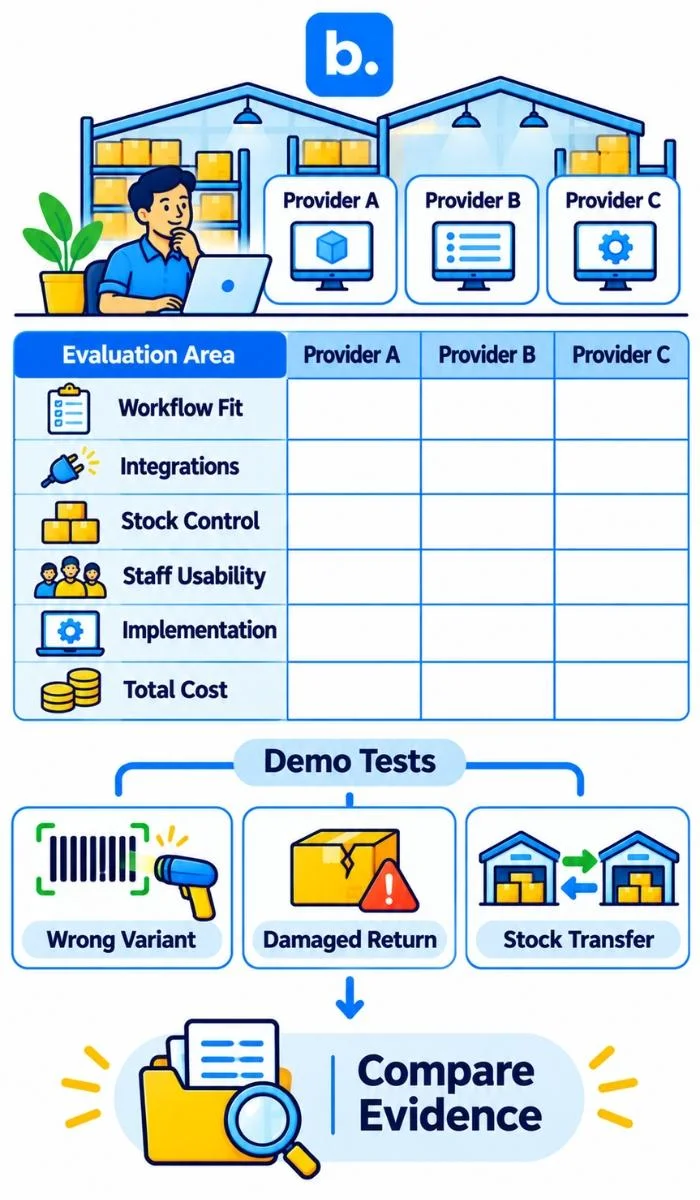
Shortlist three or four providers and use the same scenarios. Record evidence, including whether each process is standard, configurable, integration-dependent or extra-cost.
| Evaluation area | What to record |
|---|---|
| Functional fit | Which required workflows are supported, and how? |
| Integration fit | Which channels and systems connect, and what data moves? |
| Inventory control | How are locations, movements and discrepancies managed? |
| Usability | Can warehouse staff complete routine tasks clearly? |
| Implementation | What preparation, training and support are included? |
| Scalability | Can it support realistic growth in orders, SKUs and sites? |
| Total cost | What is the full cost over the same evaluation period? |
Ask every provider to demonstrate a short delivery, similar-variant pick, multi-item pack, damaged return and inter-site stock transfer. Compare behaviour and documentation. Searches for the best warehouse management system, best WMS systems or best software for warehouse management can surface options, not prove fit. Choose warehouse management system solutions using evidence from your operation.
Common mistakes to avoid when choosing a WMS
Avoid choosing on subscription price alone; integrations, hardware, training or support may cost extra. Inventory records are not a system for directing receiving, storage, picking and returns. Include warehouse staff in usability tests and verify each integration’s scope. Avoid buying for an unrealistic future, but plan for credible growth. Practical testing can reveal how the system handles discrepancies, exceptions and seasonal pressure.
Quick-reference: WMS vendor demo checklist
| # | Selection check | Ask the provider | Quick demo test |
|---|---|---|---|
| 1 | End-to-end workflow | Which stages are standard? | Run receiving to dispatch with a discrepancy. |
| 2 | Stock and locations | Can stock be traced by bin? | Count a bin and review an adjustment. |
| 3 | Barcode verification | Which tasks verify scans? | Scan the wrong variant; check the warning. |
| 4 | Peak capacity | What limits apply during peaks? | Request realistic load-test evidence. |
| 5 | Integrations | What syncs, and who owns failures? | Simulate a failed synchronisation. |
| 6 | Picking and packing | Which pick methods and checks? | Process single- and multi-item orders. |
| 7 | Multiple sites | Does it route or only show stock? | Test an item unavailable at the usual site. |
| 8 | Product controls | Can it track batches, expiry and variants? | Test FEFO or variant selection. |
| 9 | Returns | When does returned stock become saleable? | Inspect one resalable and one damaged return. |
| 10 | Reporting | Can reports filter and export? | Trace a discrepancy to its source. |
| 11 | Implementation | Who trains staff and supports go-live? | Pilot a workflow with warehouse staff. |
| 12 | Total cost | Which costs change as we grow? | Compare written three-year scenarios. |
How Base WMS supports ecommerce warehouse operations
Base WMS covers many of the workflows in this checklist, including purchase-order-based receiving, incoming quantity and quality checks, location assignment, barcode scanning and batch or expiry tracking. Teams can configure warehouse locations, view stock, carry out stocktakes and make documented adjustments. The system supports location-guided picklists and scanning during picking; the Packing Assistant checks shipment completeness and supports shipping labels and related documents. Return statuses and reasons can be configured, while the mobile WMS app supports receiving, picking, packing and returns on compatible devices with barcode scanning.
Suitability still depends on your setup and required workflow, so confirm feature availability and configuration for your use case. Explore our WMS and test it against the 12 checks rather than assuming any platform covers every warehouse need.
Conclusion
The right WMS fits your warehouse processes, connects reliably with your systems and supports a credible next stage of growth. Use this guide on how to choose a WMS for ecommerce to set priorities, then test shortlisted products with your own scenarios before choosing a provider.
