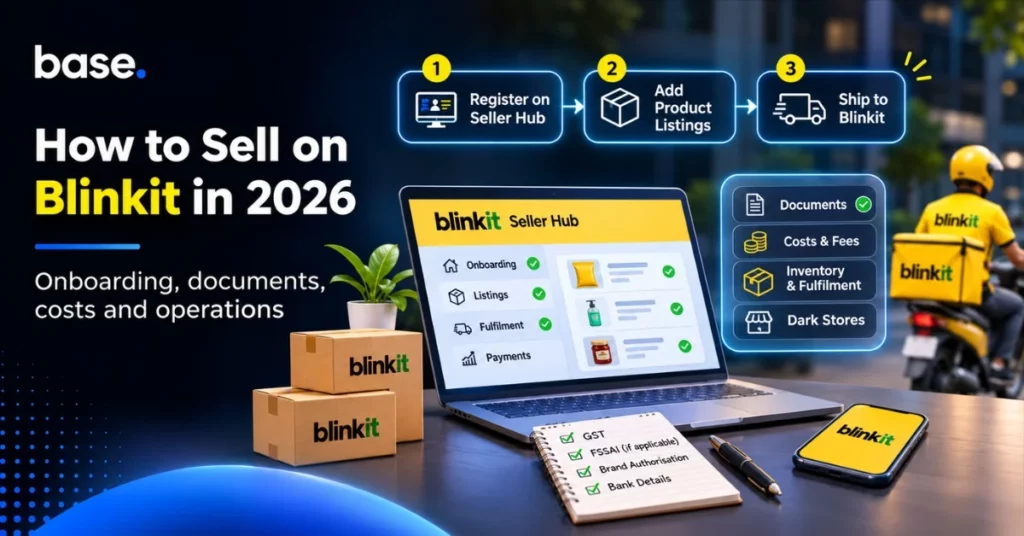
To sell on Blinkit, sign up via Blinkit Seller Hub, provide the details of your business and products, set up your listings, and adhere to the shipping and fulfilment guidelines for your account. Blinkit’s process is broken down into three steps: register on Seller Hub, add product listings, and ship to Blinkit. Sellers can begin in as little as seven days, depending on verification and preparation, it says.
The application is just the beginning of the selling process. You also require precise product information, a viable supply plan and a clear understanding of your commercial terms. If your account is set up to use a purchase-order (PO) fulfilment workflow, you’ll also want to understand how POs, appointments, dispatch notifications and receiving are managed. This guide will help you understand how to prepare, what to check before you commit stock and how to set up day-to-day operations after you’ve onboarded.
What is selling on Blinkit?
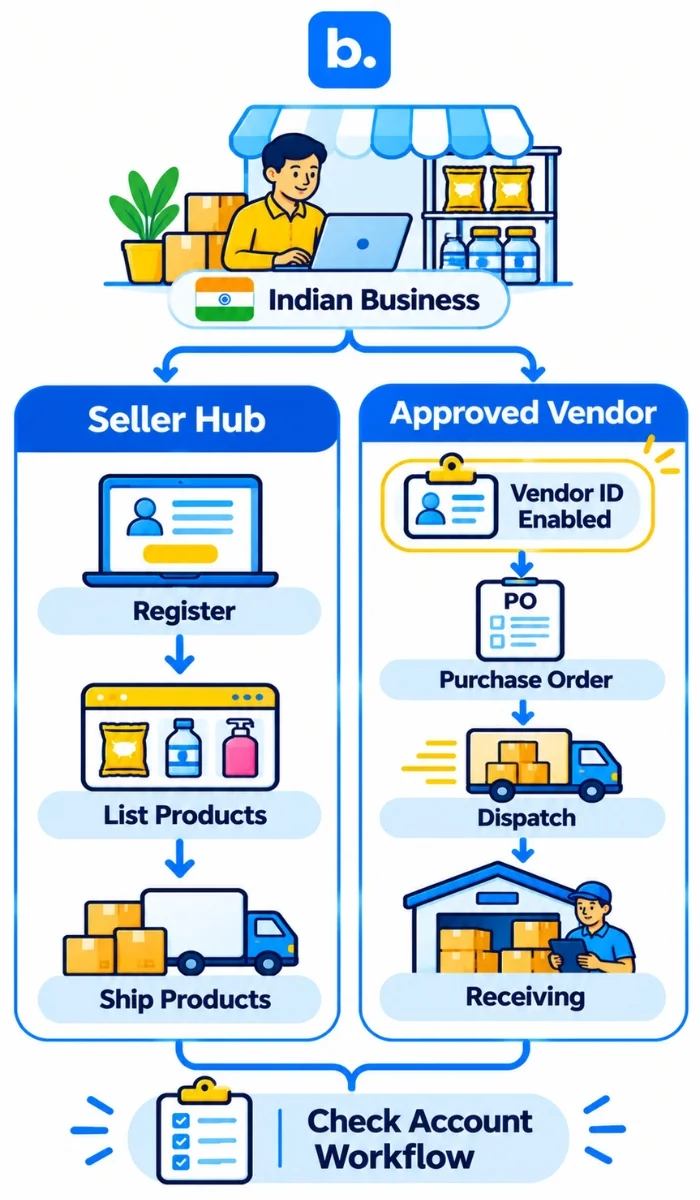
When you sell on Blinkit, you will be subject to the seller or vendor process for your products to be approved, listed and supplied. The operating model will vary based on your account. Blinkit Seller Hub is a self-serve path to sign up, list products and ship. Separately, our Blinkit PO integration is for approved vendors whose vendor IDs Blinkit has enabled.
These workflows should not be assumed to be the same. At onboarding, verify if your business will be handling product listings and shipments via Seller Hub, fulfil purchase orders under a vendor arrangement, or have another process defined for your account. Define who is responsible for listing updates, stock replenishment, delivery, receiving and any discrepancies.
Blinkit is among the various fast commerce platforms. Its onboarding and fulfilment steps are unique to Blinkit, so follow the instructions in Seller Hub and your own account terms, not other platform’s.
For a comparison of Blinkit, Zepto or Instamart, read our guide to Blinkit, Zepto or Instamart: Where Should Your D2C Brand Sell on Quick Commerce Platforms?
How to sell on Blinkit using Seller Hub
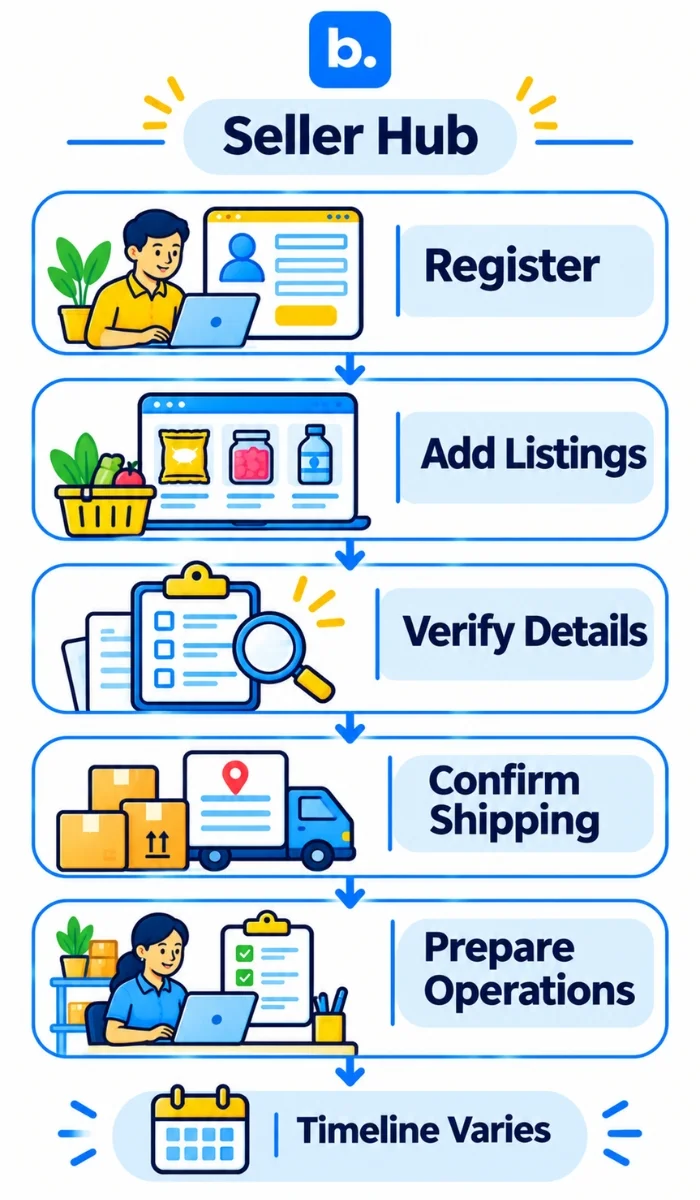
Blinkit’s Seller Hub onboarding process is broken down into three steps: register, create product listings, and ship to Blinkit. Please refer to the existing portal instructions for your application.
- Sign up on Blinkit Seller Hub. Fill in the business and account details requested. According to Blinkit, sellers can begin with just one GST and bank account, subject to its onboarding requirements.
- Fill out product descriptions. Create precise product names, descriptions, identifiers, pack sizes, images, prices and any category-specific information required in the portal.
- Provide information for verification. Check all fields and documents prior to submission. Incomplete or incorrect information may delay the process.
- Verify the fulfilment arrangement. Check where products must be delivered, which shipping instructions apply and how quantities are checked at receipt.
- Prepare to manage the account. Assign owners for listing updates, stock planning, dispatch coordination and follow-up on receiving discrepancies.
Blinkit says sellers may be able to start in as little as seven days. Use this as the platform’s stated potential timeline, not a guaranteed launch date. When you can start selling may be influenced by verification, requested corrections, listing approval and your own operational readiness.
What documents and product information should you prepare?
Get ready the information asked for in Seller Hub and review the checklist for your category and account. Blinkit’s public seller information includes business and brand information, manufacturer information, trademark or trademark-application information, brand logo and authorisation documents. It also includes details of GST and bank, shipping details and if applicable, FSSAI licence. IRN credentials and a digital signature are also listed as details that sellers may need to provide.
| The name of the document or information | The information to be checked |
|---|---|
| Business and brand information | Ensure that the legal business and brand information is consistent with the information submitted. |
| GST and bank details | Ensure that the details are correct and that they are the details of the seller account being registered. |
| Trademark or authorisation information | If asked, provide proof of brand ownership or authorisation to sell the products. |
| Product information | View product identifiers, descriptions, variants, pack sizes, images and category information. |
| Shipping details | Verify the dispatch or shipping location and the fulfilment information provided in Seller Hub. |
| FSSAI licence (if applicable) | Ensure that the licence is valid and applicable to the products being listed. |
| IRN credentials and digital signature (if requested) | Determine if these apply to your account and fulfilment arrangement. |
Requirements may differ depending on the product category and seller arrangement. The list above is a preparation guide and not a replacement for the current checklist in Seller Hub.
How much does it cost to sell on Blinkit?
Use the commercial terms that Blinkit provides your business to build your cost calculation. Never use a commission figure or fee estimate as a basis for pricing unless it is confirmed for your account.
Think about the expenses associated with your agreement:
- Platform charges/commission as per agreement.
- Discounts, promotions or advertising you choose or agree to fund.
- Product preparation, packaging, labelling and regulatory compliance.
- Transport to the fulfilment location.
- Stock holding, replenishment, expiry, damage and potential unsold stock.
- Integration or operational software of your choice.
- Taxes and other charges that are part of your terms.
Compare the amount you expect to receive after applicable deductions with your product, operating and fulfilment costs. According to Blinkit’s Seller Hub, the earnings are credited automatically every 15 days for orders that are delivered. Confirm the settlement basis, deductions, returns treatment and payment terms in your account and agreement before making financial projections.
Blinkit also claims that sellers can set and manage product listing prices via Seller Hub. While pricing control is helpful, it is not a substitute for a margin calculation that incorporates discounts, fulfilment and other relevant costs.
What is the best way to plan inventory and fulfilment?
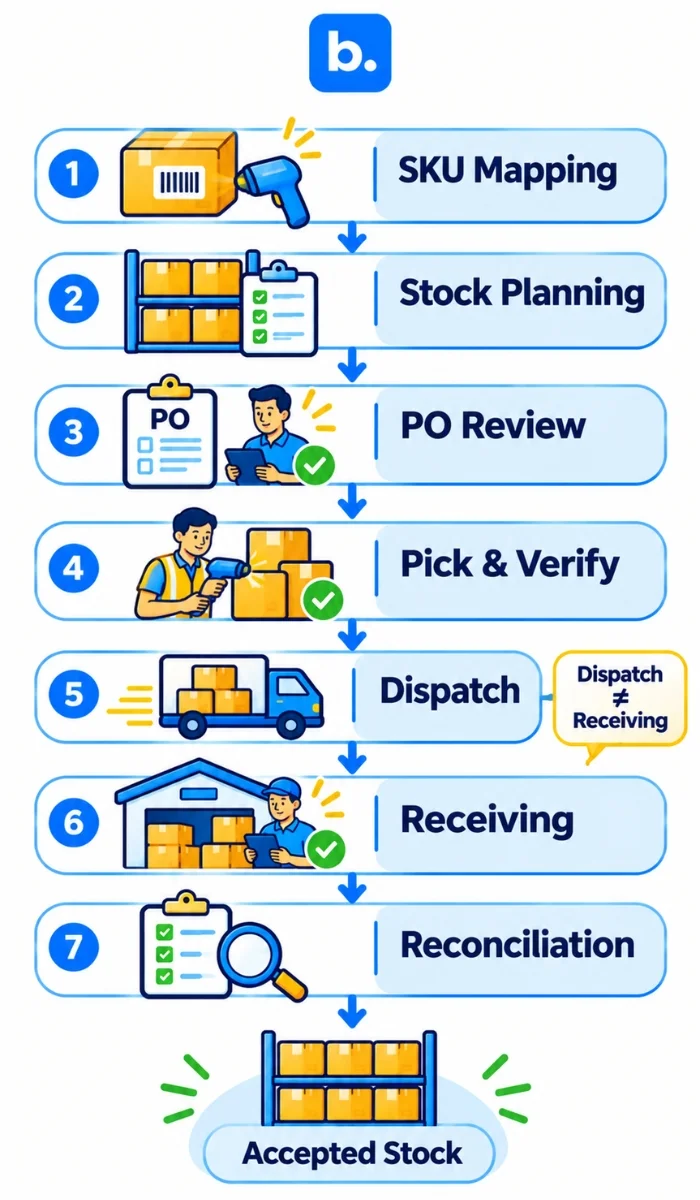
Schedule inventory by product, location and status. Stock in your warehouse, stock in transit and stock recorded as received at a Blinkit fulfilment location are not the same. Your records should allow you to determine what was requested, what you sent and what was received.
Before launch:
- Match each listing to the appropriate internal SKU, barcode, variant and pack size.
- Schedule replenishment based on sales, supplier lead times and your account’s delivery needs.
- Determine who is responsible for checking POs, verifying quantities and making dispatch.
- Record dispatch separately from delivery and receiving.
- Investigate shortages, excess quantities, damage and rejected deliveries.
- Conduct regular stock checks to reconcile system records with actual stock.
To learn more about stock accuracy across channels, refer to Inventory Sync Across Marketplaces in India and Manage Inventory Across Multiple Ecommerce Marketplaces. Blinkit supply and receiving should still be done according to the instructions for your own account.
What does a dark store mean for Blinkit suppliers?
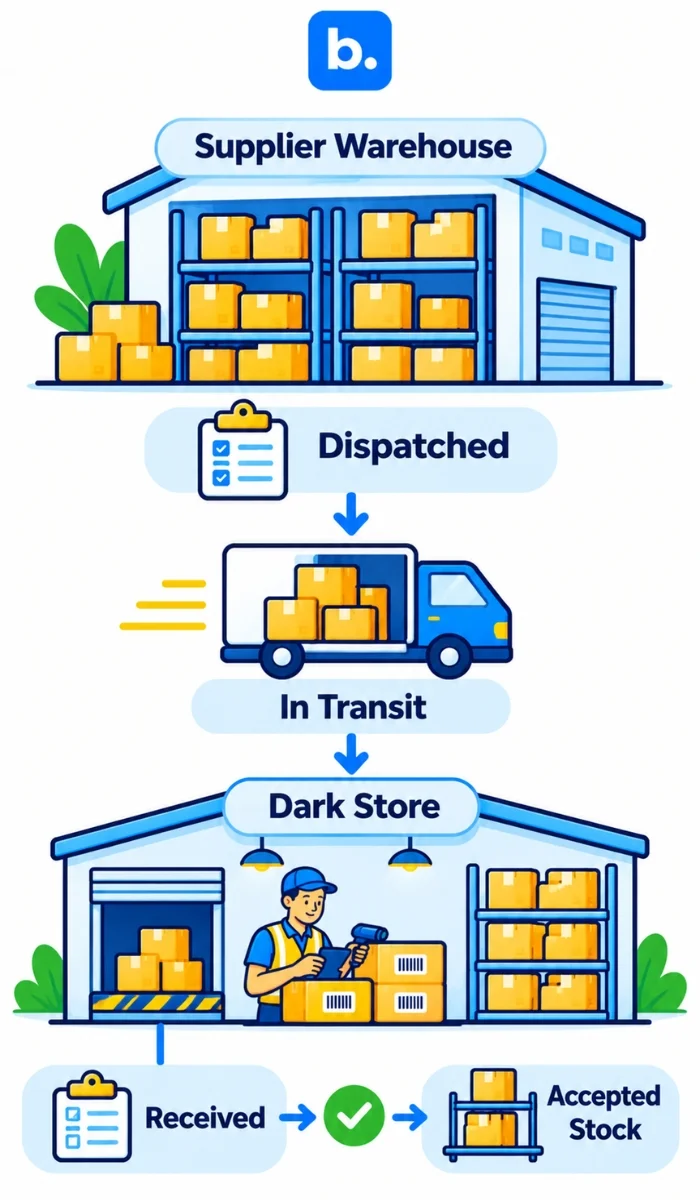
A dark store is a fulfillment center that stores and retrieves products for online orders, but does not operate as a traditional retail store. The important thing for suppliers is that a product should not be considered available in a location until it has been received in that location via the appropriate receiving process.
Dispatch is not a confirmation of receipt or acceptance of goods. Maintain separate records for dispatched, received and available quantities. This simplifies the process of following up on a delivery discrepancy and minimizes the risk of using central warehouse stock as local stock.
What software can be used to help Blinkit?
Software can minimize duplicate data entry and assist teams in tracking supported fulfilment steps. The question isn’t just whether a tool “integrates” with Blinkit. Review the information it receives, what it supports and what your staff still need to do in Seller Hub or another system.
Once Blinkit enables their vendor IDs, our Blinkit Integration Setup guide outlines the PO workflow that is available to approved vendors. It includes automatic PO receipt, appointment scheduling, advance shipping notice (ASN) handling, item-level fulfilment visibility and PO lifecycle tracking. These capabilities are part of the documented Blinkit integration. Confirm the setup and actions available for your vendor IDs.
Order Manager manages order workflows for connected store and marketplace orders. It is different from the Blinkit PO integration. For stock accuracy management across channels, refer to Inventory Management System in India.
At base.com, we assist approved Blinkit vendors with the documented PO workflow, once the necessary vendor ID enablement is in place. Before taking a specific action, review the guide and your account setup.
What are some things to consider before going live on Blinkit?
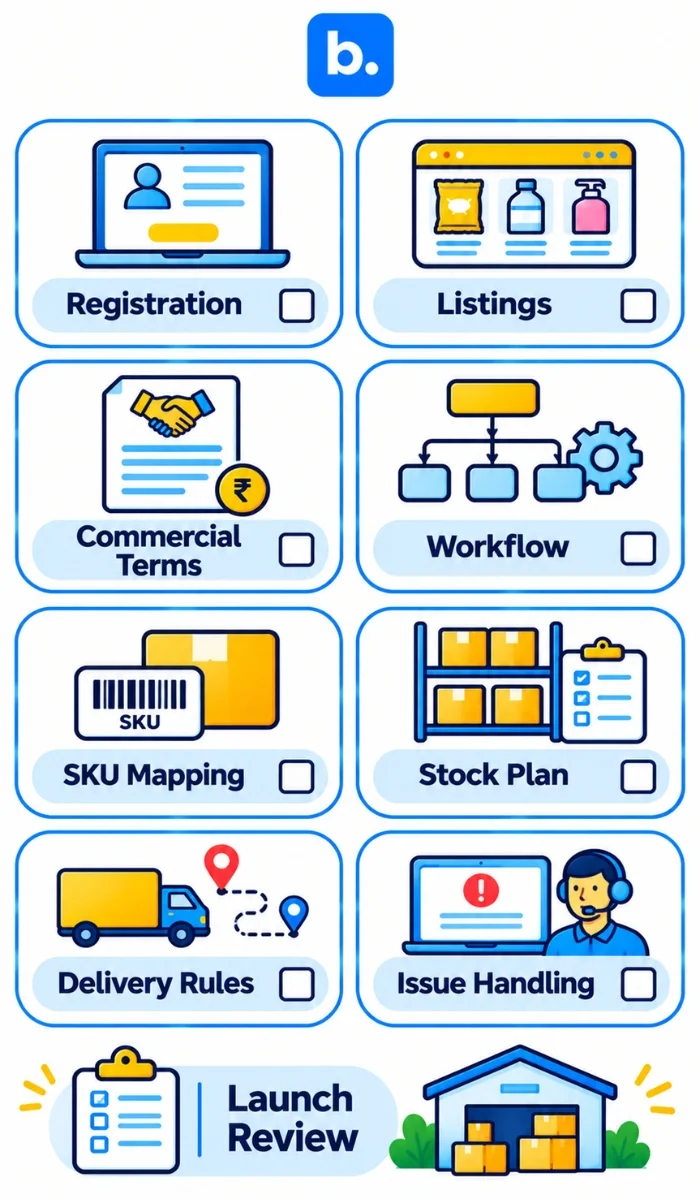
Before placing stock or planning a launch, use this checklist:
- Have you completed your Seller Hub registration and have you addressed any verification requests?
- Are your product listings accurate and approved?
- Are your commercial terms, payment basis and deductions confirmed?
- Are you aware of which seller or vendor fulfilment process your account is using?
- Are SKUs, barcodes, pack sizes and product variants mapped correctly?
- Do you have enough stock and a replenishment plan to provide the quantities needed?
- Are the roles of each team in PO review, picking, dispatch, delivery and receiving known?
- Are delivery instructions and discrepancy procedures clear?
- If you are using software, have you verified that it is compatible with your vendor ID and the specific workflow you are looking for?
- Are there pending listings, stock issues or receiving discrepancies, and is someone responsible for them?
Begin with a supply plan that your team can handle. Before expanding the range or operations, review product sales, replenishment, fulfilment issues and net returns.
Conclusion
To sell on Blinkit, you need to complete Seller Hub onboarding, provide business and product information, and ensure that the commercial and fulfilment terms for your account are accurate, and that you have accurate stock and delivery records. According to Blinkit, sellers may be able to start in seven days, depending on verification and readiness. Our Blinkit integration allows for documented fulfilment actions for approved vendors using the PO workflow once Blinkit has enabled the vendor ID. Check the account setup and terms before you place inventory or develop your operating process around a particular feature.