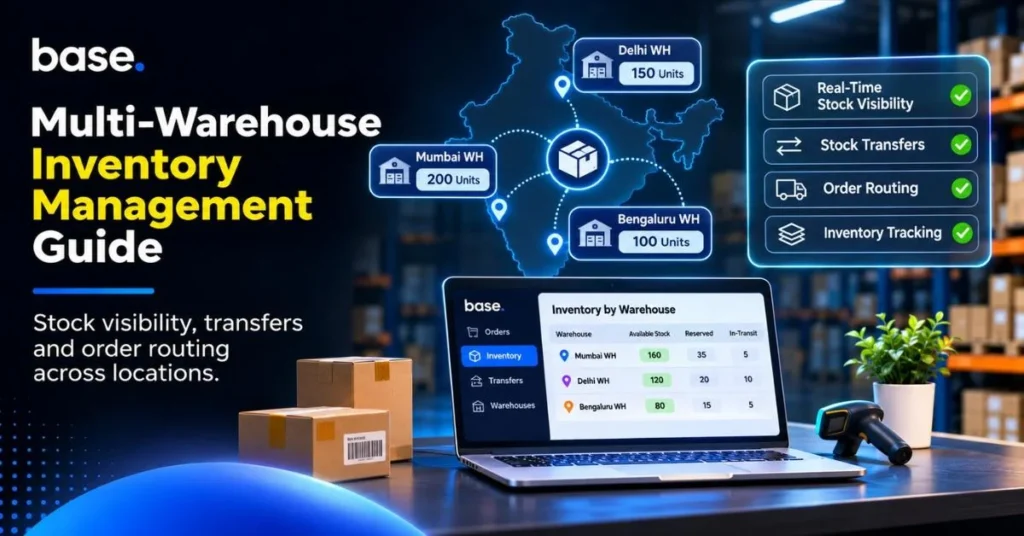
You have 200 units of stock in your Mumbai warehouse, 150 in your Delhi warehouse and 100 in your Bengaluru warehouse. That adds up to 450 units, but your system shows only 420 units in total. Where are the missing 30 units?
Now, when a customer places an order, where should you fulfil it from?
Multi-warehouse inventory management can be a complex process. You need to know where your stock is, how much is available and which warehouse can fulfill the order.
Managing stock across multiple warehouses can cause issues, including over-selling, extra transfers, and higher shipping costs. The Ecommerce market in India was worth around ₹10.83 lakh crore in 2024 (IBEF). As businesses are fulfilling orders from multiple locations, accurate stock tracking is essential.
This guide will explain how to manage inventory, transfers, and orders from multiple warehouses.
What is multi warehouse inventory management?
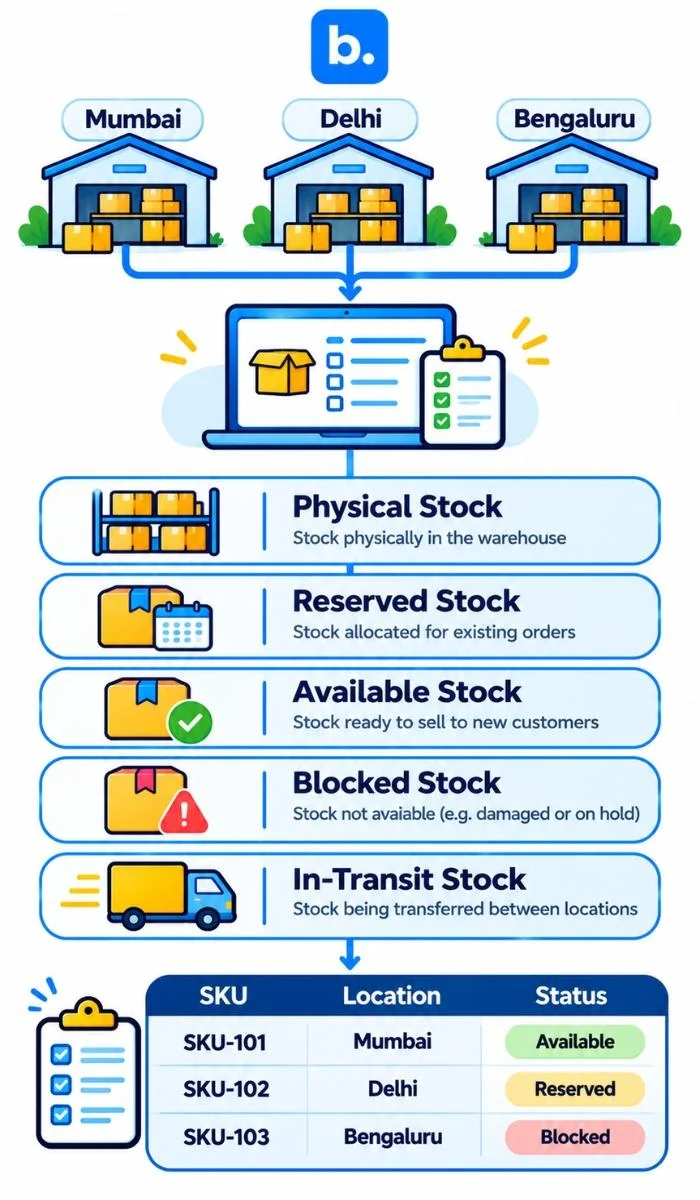
Multi warehouse inventory management is where you track, manage and allocate inventory across multiple warehouses.
When you have one warehouse, you will mainly be keeping track of incoming stock, where it is stored, orders and outgoing stock. When you have multiple warehouses you will also need to manage transferring stock, reservations, restocking and allocating orders.
For example, if you have the same SKU in your Mumbai, Delhi and Bengaluru warehouses, you will need to keep track of how much stock is in each.
You will also need to know what stock is available to sell. This includes:
- Physical stock – Stock that is physically in your warehouse.
- Reserved stock – Stock that is reserved for existing orders.
- Available stock – Stock that is available to sell to new customers.
- Blocked stock – Stock that is damaged, quarantined or otherwise not available.
- In-transit stock – Stock that is being transferred.
Without knowing how much stock you have in each warehouse, you can’t tell which one can fulfill the order.
Why can managing stock across multiple warehouses be challenging?
If different teams are using different spreadsheets, software and fulfillment providers to manage stock, it can cause issues.
This can lead to:
| Challenge | Impact | Example |
|---|---|---|
| Delayed stock updates | Over-selling | Item sold on Shopify but still showing as available on Amazon. |
| Incorrect order fulfillment | Increased shipping costs | Order from Delhi fulfilled from Mumbai. |
| No tracking of transfers | Incorrect stock levels | 30 items dispatched but no record of them being received. |
| Poor reservation management | Double booking | 2 orders reserving the same stock. |
| Multiple systems | Manual reconciliation | Each warehouse has their own spreadsheet. |
Even if you have enough stock in total, you might not have any of the required item in the allocated warehouse. The aim is to have accurate stock levels and status for each warehouse.
How to keep track of your stock levels
Start by knowing how much stock you have in each warehouse. This can be done with a simple calculation:
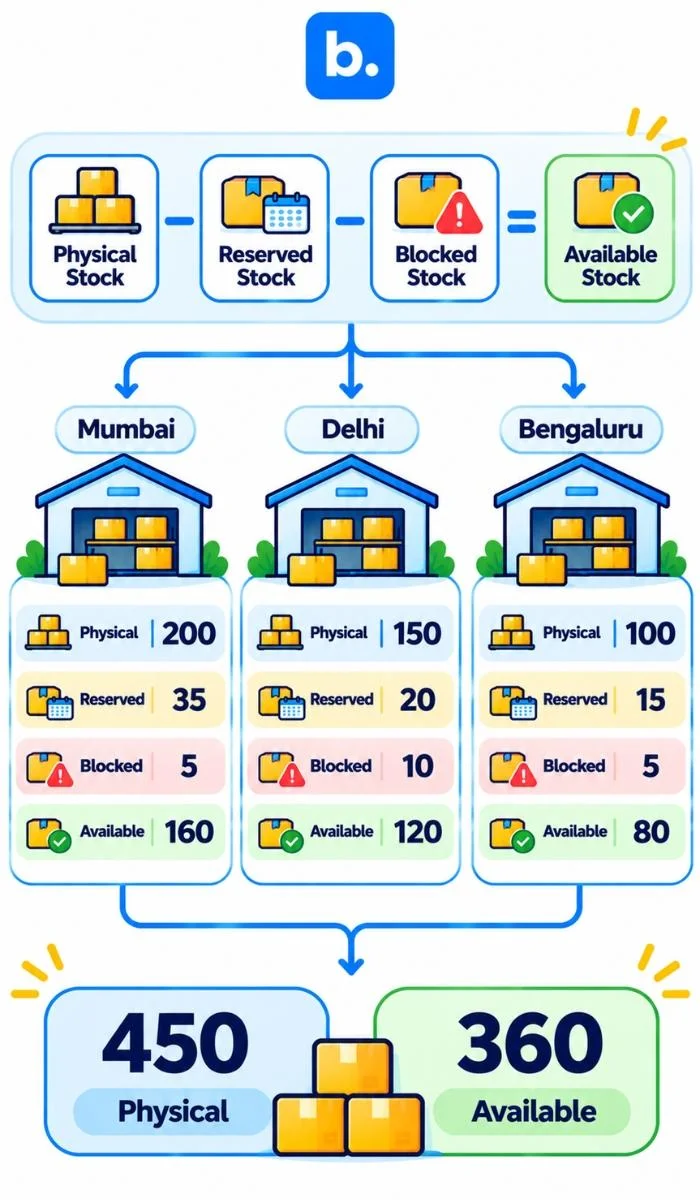
Available to sell = Physical stock – Reserved stock – Blocked stock
Blocked stock and reserved stock will be separate from each other. In real-life scenarios you might also have safety stock and other allocation rules.
For example, once your stock records are corrected, here is how you can calculate the available stock across your warehouses.
| Warehouse | Physical Stock | Reserved | Blocked | Available to Sell |
|---|---|---|---|---|
| Mumbai | 200 | 35 | 5 | 160 |
| Delhi | 150 | 20 | 10 | 120 |
| Bengaluru | 100 | 15 | 5 | 80 |
| Total | 450 | 70 | 20 | 360 |
You have 450 units in total but only 360 available to sell.
If you publish all 450 units as available, you run the risk of over-selling.
Your inventory should have the following details:
- SKU
- Warehouse
- Physical stock
- Reserved stock
- Blocked stock
- Available stock
- In-transit stock
- Last updated.
Also make sure to keep your stock transfers separate.
How to prevent over-selling
Over-selling is when you have more orders than you can fulfill. For example, you have 5 items available in your Mumbai warehouse. You are selling the same item on Amazon and Shopify.
3 items are sold on Amazon and 2 items on Shopify. Before your stock levels update on both sites another customer places an order. You have now sold 6 items, but only have 5.
There are 5 ways to reduce the risk of over-selling:
- Central inventory records – Keep your stock records in one place.
- Reservations – Set a time to reserve stock and when to unreserve.
- Stock synchronisation – Update your supported marketplaces and stores.
- Safety stock – Keep a suitable amount of safety stock.
- Monitor exceptions – Look into any negative stock, double booking, failed updates.
| Cause | Prevention | System |
|---|---|---|
| Double booking | Reservations | OMS or Inventory |
| Delayed marketplace updates | Stock synchronisation | Integrated |
| Damaged stock | Stock status | WMS or Inventory |
| Incorrect stock levels | Cycle counting | Warehouse |
Your systems should have a clear source of truth for stock availability. Even with integrated systems there can be delays. It is still important to monitor.
How to transfer stock between warehouses
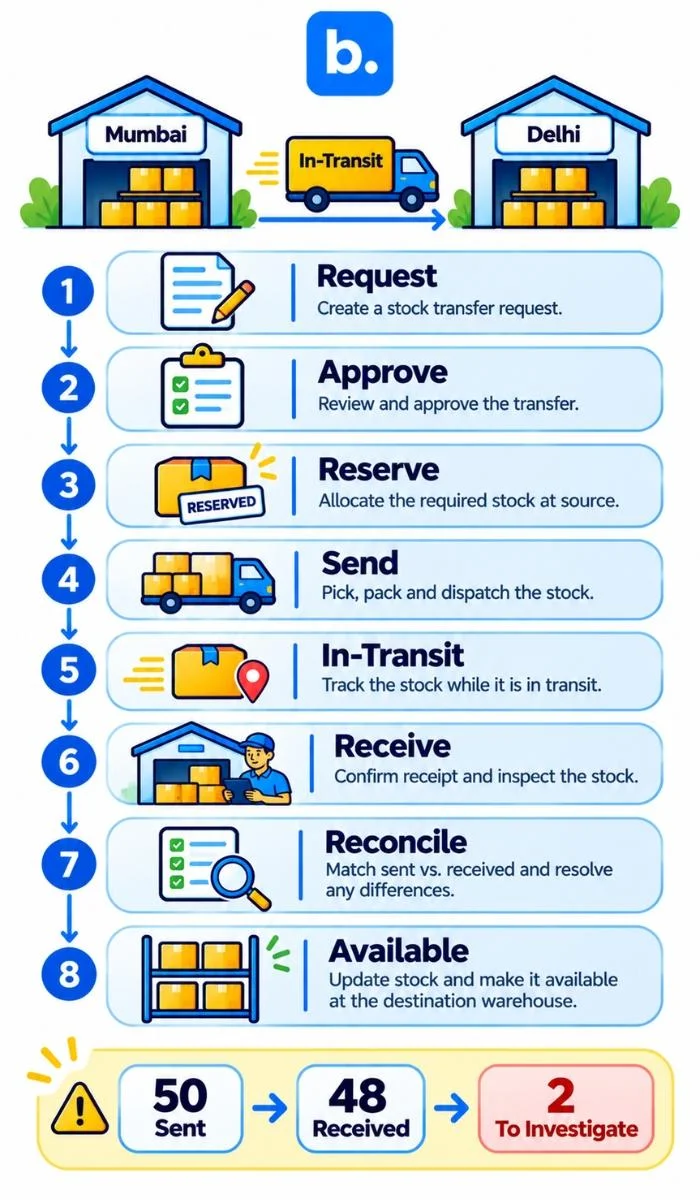
Transferring stock between warehouses is when you move inventory between 2 storage/fulfillment locations.
You might need to transfer stock if one region is experiencing increased demand, or a warehouse is running low on stock. Another reason could be that another location has excess stock.
A controlled transfer would involve:
- Checking what stock is required at your destination warehouse.
- Checking what stock is available at your source.
- Making a stock transfer request.
- Approving the transfer.
- Reserving the required amount.
- Picking and packing.
- Sending the stock.
- Updating the stock to in-transit.
- Receiving the stock and inspecting.
- Checking that the right amount was received.
- Updating the available stock.
- Closing the transfer once discrepancies have been resolved.
Every transfer should have a reference number to link the source and destination.
Request > Approve > Reserve > Send > In-Transit > Receive > Reconcile > Available.
However, just because you have sent 50 items from Mumbai does not mean you will have 50 items available in Delhi.
Example of transferring stock
You have 200 available units of SKU-101 in your Mumbai warehouse and 20 units available in your Delhi warehouse. Demand has increased in Delhi so you decide to transfer 50 units from Mumbai.
| Transfer Stage | Mumbai Available | In-Transit | Delhi Available |
|---|---|---|---|
| Before transfer | 200 | 0 | 20 |
| Reserve 50 | 150 | 0 | 20 |
| Sent | 150 | 50 | 20 |
| Received | 150 | 0 | 70 |
This will keep your total company stock at 220 units (assuming no sales, losses or adjustments).
During the reservation stage the 50 units will still be physically in Mumbai but will not be available to sell. Once sent they will be in-transit.
What if only 48 units are received?
You have sent 50 units from Mumbai. However, only 48 units have been received.
You should:
- Update with the 48 units received.
- Leave the discrepancy.
- Check the packing and sending documentation.
- Investigate with the carrier and receiving.
- Only update the transfer once reconciled.
Do not automatically update Delhi with the 50 units. By reconciling the transfer you will be able to see if there is a shortage.
How to decide when to transfer stock
You should not transfer stock just because you have more in one warehouse.
Look into regional demand, current reservations, incoming purchase orders, restocking time, storage space, transfer costs and safety stock.
A simple reorder point calculation can help.
Reorder point = (Avg daily demand x Restocking time) + Safety stock.
If you sell 10 units a day in Delhi, take 4 days to restock and have 20 units of safety stock.
Reorder point = (10 x 4) + 20 = 60 units.
You should look into restocking when your relevant stock reaches 60.
This example assumes demand and restocking time are relatively consistent.
| Factor | Check | Why |
|---|---|---|
| Regional demand | Sales in the last period. | Avoid unnecessary transfers. |
| Available stock | Units available to sell. | Avoid shortages. |
| Restocking time | How long to restock. | Plan ahead. |
| Transfer costs | Transport and handling. | Keep margins. |
| Safety stock source | How much stock to have in the source. | Avoid creating another shortage. |
Also consider if the source warehouse needs the stock for their orders.
What is multi-warehouse order fulfillment?
Multi-warehouse order fulfillment is when you assign an order to the most suitable warehouse. It is not always the closest warehouse. The closest warehouse may have low stock, a backlog or limited carrier coverage.
When assigning orders, you should consider:
- Available stock.
- Delivery location.
- Shipping costs.
- Estimated delivery time.
- Warehouse capacity.
- Carrier coverage.
Orders can be assigned manually, using rules or automatically (depending on your software).
For example, your rules might mean the closest applicable warehouse, cheapest shipping or a warehouse with all the items. This will depend on your OMS, WMS and shipping integrations.
How to assign the Right Warehouse for your E-commerce orders
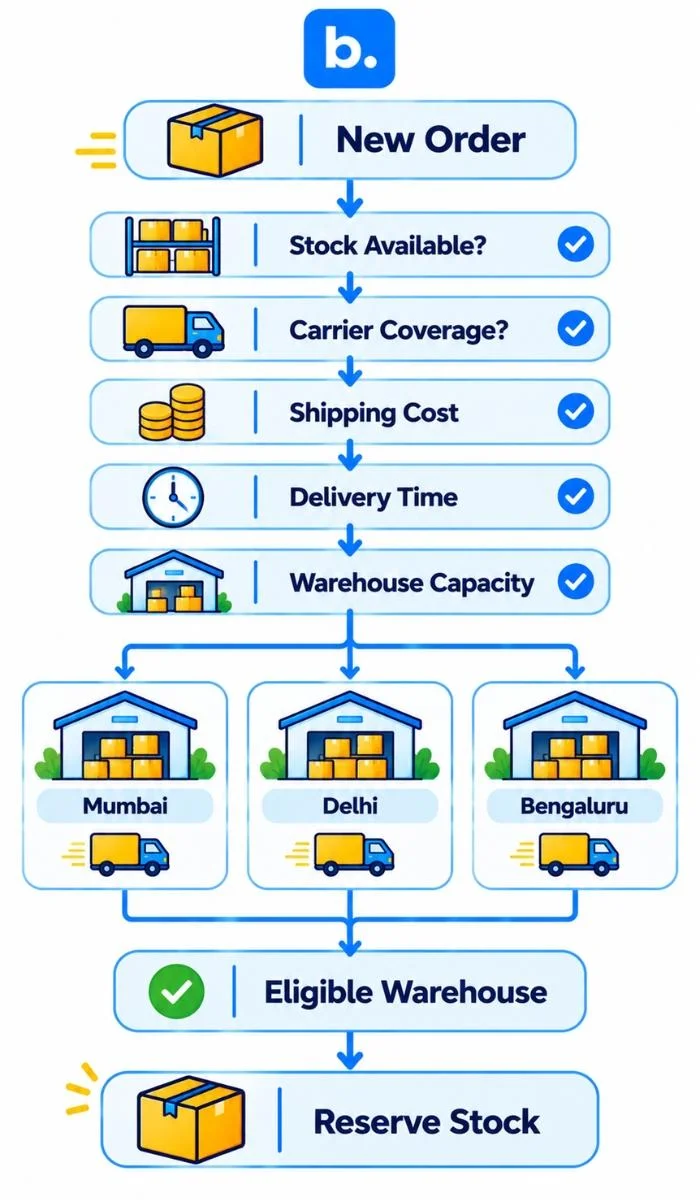
First find out where your customer is delivering to and what warehouses have the required items.
Then:
- Check available stock.
- Remove any warehouses that don’t have enough stock.
- Check carrier coverage.
- Compare the shipping costs and estimated delivery times.
- Check warehouse capacity.
- Apply your order fulfillment rules.
- Reserve the stock.
- Send the order to the warehouse.
Example
| Warehouse | Available Stock | Shipping Cost | Estimated Delivery Time |
|---|---|---|---|
| Mumbai | 25 | ₹70 | 1-2 days |
| Delhi | 80 | ₹140 | 3-4 days |
| Bengaluru | 40 | ₹110 | 2-3 days |
Shipping costs and delivery times are for example only. Mumbai seems like the best option as there is enough stock, cheaper shipping and faster delivery.
However, there may be a backlog in Mumbai or carrier limitations. Find the best applicable warehouse.
Single fulfillment vs Split fulfillment
The customer has ordered 2 items. Product A is in your Mumbai warehouse and Product B is in your Delhi warehouse.
Should you fulfill from multiple warehouses or transfer?
Single fulfillment means the order will be fulfilled from one warehouse. Split fulfillment means the order will be fulfilled from 2 or more warehouses.
| Factor | Single Fulfillment | Split Fulfillment |
|---|---|---|
| Packages | Usually 1 | 2 or more |
| Shipping Costs | Often cheaper | Can be more expensive |
| Tracking | Easier | Multiple tracking numbers |
| Stock | All items in one place | Items in multiple places |
| Complexity | Less complex | More complex |
| Flexibility | Limited by local stock | Utilises multiple locations. |
Split fulfillment can help avoid delays if you don’t have all items in one warehouse. However, the customer may receive multiple packages and shipping costs could be higher.
Check the rules of your marketplaces, delivery promises and costs. Not all sales channels will allow split fulfillment.
How to manage returns and damaged stock
Returns can be sent back to the original fulfillment warehouse, another fulfillment location or a third party logistics provider.
You will need to know where the items are being returned to and if they are suitable to sell.
- Identify the order and SKU.
- Update with return shipment.
- Confirm the warehouse.
- Inspect the item.
- Categorise the item.
- Update stock status.
- Restock, repair, quarantine or dispose.
- Reconcile.
| Return Status | Stock Status | Action |
|---|---|---|
| Unopened & Suitable to Sell | Suitable to Sell after inspection. | Restock. |
| Damaged Packaging | Hold. | Inspect. |
| Damaged Item | Not suitable to sell. | Repair, claim or dispose. |
| Wrong item returned. | Exception. | Investigate. |
| Missing accessories. | Hold. | Verify. |
Effective warehouse and inventory management will ensure returned stock is kept separate until the warehouse have confirmed the stock status.
How a warehouse management system can help you
A warehouse management system can help businesses manage their physical warehouse. This includes receiving, storing, moving, picking and shipping.
Depending on the software you use, it can help you manage inventory per location, scanning barcodes, transferring stock, cycle counting and returns.
However, warehouse inventory management systems can vary.
| Software | Purpose |
|---|---|
| Basic Inventory Software | Track stock levels. |
| Warehouse Management System | Manage your physical warehouse. |
| Order Management System | Manage orders. |
| ERP | Connect procurement, finance and inventory. |
A warehouse inventory management system may only track stock levels and not have advanced picking or binning features. When looking at inventory software for your warehouse, ensure it has the features you need.
Different wms systems will have different levels of automation. Not all will automatically choose warehouses and manage transfers.
How to connect your multiple warehouses with your E-commerce channels
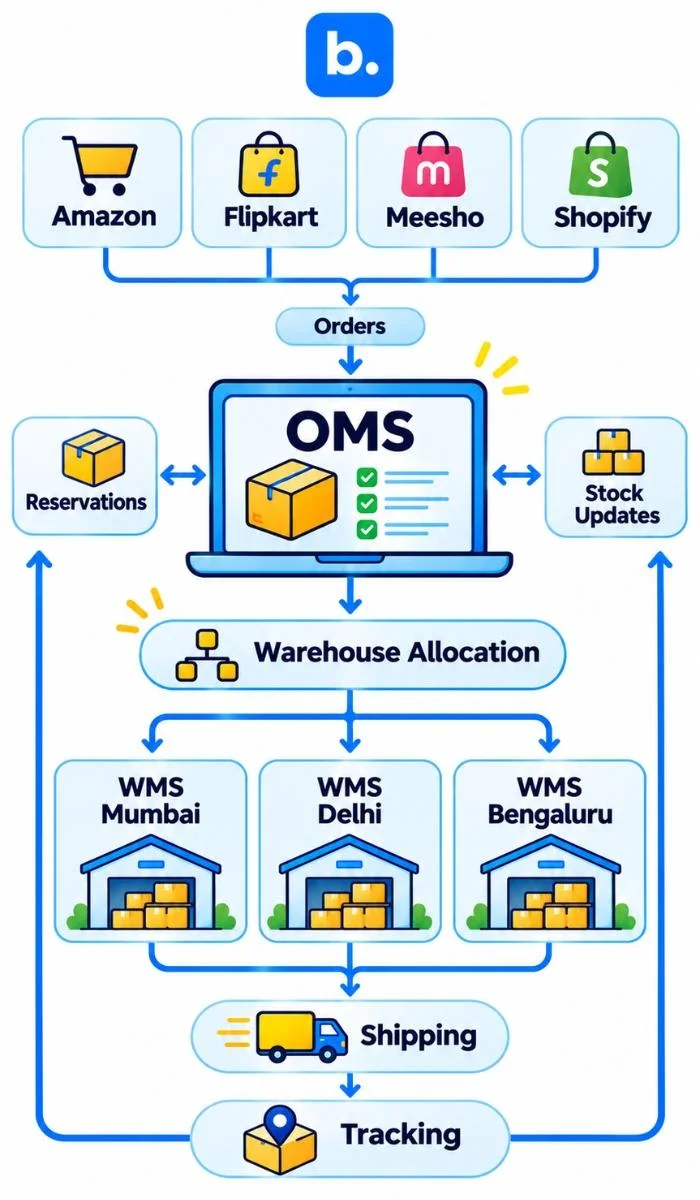
When selling on Amazon, Flipkart, Meesho and Shopify you will need to move orders and stock updates between your integrated systems.
A typical process would be:
Sales Channels > OMS > Warehouse Allocation > WMS > Shipping Updates.
Your warehouse systems should have accurate information on orders, reservations, shipping and returns.
| Event | From | To | Expected Update |
|---|---|---|---|
| New Order | Marketplace | OMS | Order imported. |
| Order Allocation | OMS | WMS | Fulfillment request. |
| Stock Reserved | OMS/WMS | Integrated | Stock levels reduced. |
| Transfer Received | WMS | Inventory Platform | Stock updated in destination. |
| Order Sent | Shipping System | OMS/Channel | Tracking Updated. |
| Returned & Restocked | WMS | Inventory System | Stock updated to sellable. |
Decide what systems are responsible for what stock levels and reservations. Otherwise you may get double updates, incorrect SKU mapping and delayed integrations.
Test real orders, cancellations, transfers and returns.
How to reconcile your stock
Stock reconciliation is when you compare your stock levels to verified stock.
Even if you have the correct total for your company, you might not have the correct stock levels in your warehouses.
Even when your system shows the correct total stock, there may still be discrepancies between individual warehouses. For example:
| Warehouse | Stock (System) | Stock (Physical) | Difference |
|---|---|---|---|
| Mumbai | 200 | 195 | -5 |
| Delhi | 150 | 155 | +5 |
| Bengaluru | 100 | 100 | 0 |
| Total | 450 | 450 | 0 |
You have the correct total but are missing 5 units in Mumbai and have 5 extra in Delhi. This could be due to a transfer not being recorded, error in receiving, incorrect warehouse or an adjustment.
Before updating any records investigate the movements. Just because there is a difference does not mean the stock has moved between the warehouses.
Perform regular cycle counts to identify issues quicker. Focus on fast moving and high value SKUs.
Best Practice for Managing Multi-warehouse Inventory
Have consistent processes.
- Use consistent SKU codes.
- Track stock per warehouse.
- Track stock statuses.
- Keep track of all transfers using references.
- Have order fulfillment rules.
- Have suitable safety stock.
- Perform regular reconciliations using cycle counts.
- Monitor integration issues.
| Best Practice | Benefits | KPI to Monitor |
|---|---|---|
| Track per warehouse | More visibility | Accurate stock levels. |
| Reservations | Reduce over-selling. | Over-sold orders. |
| Track transfers | Reduce unknown movements. | Transfer discrepancies. |
| Order fulfillment rules | More consistent fulfillment. | On-time dispatch. |
| Cycle Counting | Identify issues quicker. | Frequency of adjustments. |
| Monitor integrations. | More reliable updates. | Failed stock syncs. |
Set realistic targets based on your current processes.
Common Mistakes with Multi-warehouse Inventory Management
| Mistake | Risk | Best Practice |
|---|---|---|
| Only track total stock | Incorrect fulfillment decisions. | Track per warehouse. |
| Track in-transit as available | Over-selling. | Wait for confirmation. |
| Ignore reservations. | Double booking. | Correctly reserve. |
| No confirmation of transfers. | Incorrect stock levels. | Reconcile transfers. |
| Always fulfill from closest warehouse. | Orders delayed or failed. | Check stock and capacity. |
| Multiple systems managing stock. | Conflicting stock levels. | Set a source of truth. |
| Only reconcile total stock. | Hide discrepancies in warehouses. | Count per location. |
Having accurate stock records, controlled transfers and clear fulfillment rules will help you manage your multi-warehouse operations.
How We at Base.com Support Multi-Warehouse Order and Inventory Management
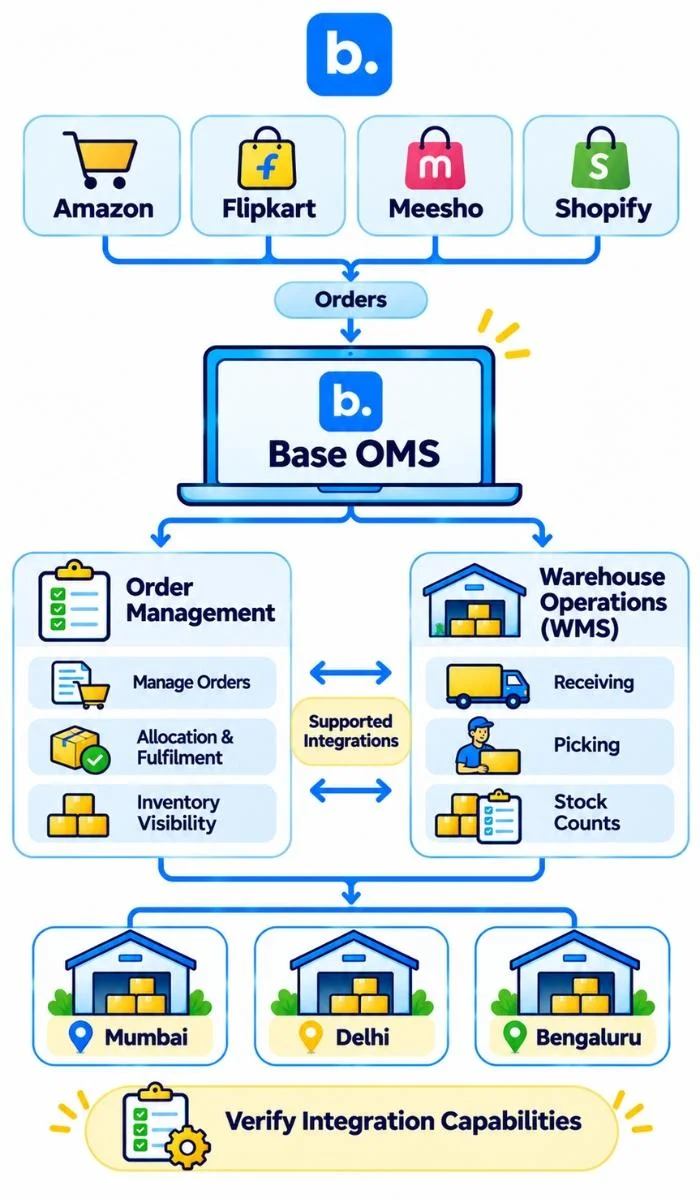
Managing orders across multiple warehouses becomes easier when ecommerce order processing and physical warehouse operations work together.
We at Base.com provide Order Manager to help businesses manage orders from connected marketplaces and online stores through one centralised system. Your team can manage incoming orders, track their processing status and coordinate fulfilment across sales channels.
For physical warehouse operations, our Base WMS supports inventory management across warehouse locations, including goods receiving, storage, suggested product placement, pick lists and guided picking routes. Warehouse teams can organise stock, locate products and follow structured picking workflows when preparing orders for dispatch.
With Base WMS, you can:
- Manage inventory and stock movements across warehouse locations.
- Record incoming stock and organise product placement.
- Generate pick lists for warehouse orders.
- Use guided picking routes to help staff locate and collect products efficiently.
- Manage stocktakes and barcode-assisted inventory checks.
- Coordinate packing and warehouse fulfilment activities.
Our Order Manager and Base WMS address different parts of the fulfilment process. Order Manager supports ecommerce order processing, while Base WMS helps warehouse teams manage the physical work involved in receiving, storing, picking and packing products.
We also provide Shipping Management to support shipment creation, carrier integrations, shipping labels and tracking workflows.
Explore Our WMS, our Order Manager and our Shipping Management features to see how we help ecommerce businesses coordinate orders, warehouse operations and shipping as they grow.
Conclusion
Managing your stock across multiple warehouses requires accurate stock records, controlled transfers and clear fulfillment rules. Keep track of reservations, in-transit stock, discrepancies and fulfillment requirements. Using integrated OMS and WMS processes will help you manage your orders.
Explore how Base.com’s Order Manager can help with your order and inventory management as your business grows.
