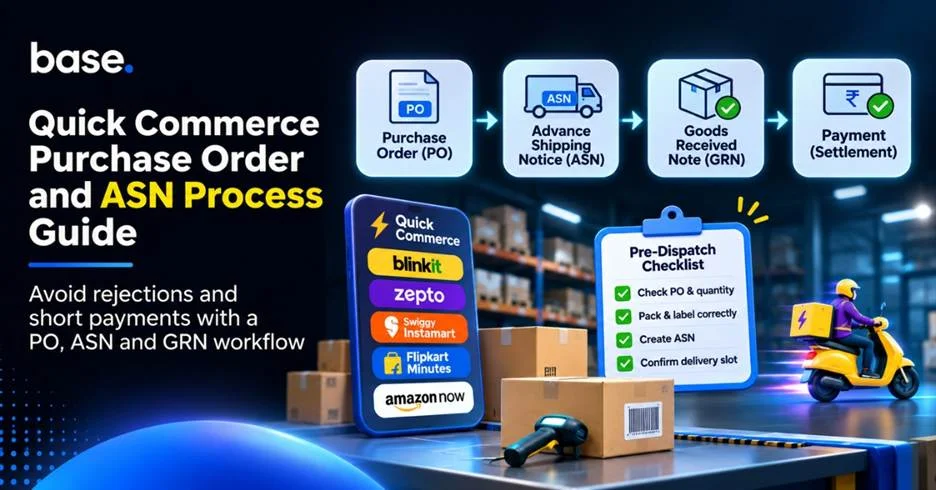
The quick commerce purchase order and ASN process connects what a platform orders, what a brand dispatches and what the receiving team accepts. The purchase order (PO) records the order, the advance shipping notice (ASN) sets out the planned shipment, and the goods received note (GRN) records the goods accepted. Matching these records helps brands identify quantity differences before they affect invoicing and payment.
This guide is for brand operations, supply chain and finance teams that supply quick commerce platforms against purchase orders. It explains the general process and the checks that can help prevent shipment rejections and payment discrepancies. Each buyer may use different document names, systems and receiving rules, so follow the current supplier instructions and agreement.
What is quick commerce and why PO, ASN and GRN are important?
Quick commerce is a retail format in which customers receive everyday and impulse-purchase goods within a short delivery window. Dark stores and local fulfilment centres make accurate inbound and receiving records particularly important.
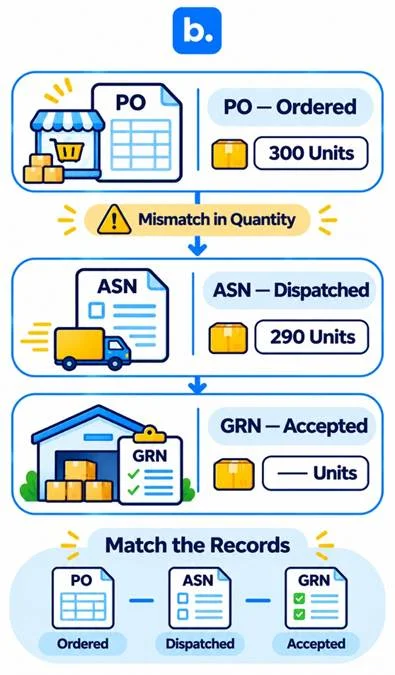
The PO records what the platform ordered, the ASN tells the receiving team what the supplier intends to send, and the GRN records what the receiving location accepts. Differences between these records can lead to rejected quantities, invoice disputes or short payments.
For example, a PO may list 300 units while the brand dispatches 290. If the ASN still shows 300, the shipment records do not match. If some of the 290 units are damaged and rejected, the accepted quantity recorded in the GRN will be lower still. Matching the documents at each hand-off helps operations and finance teams identify and resolve these differences.
Quick commerce platforms and which ones work on POs
Quick commerce platforms have different sourcing, fulfilment and receiving arrangements. A platform may also use different processes across categories, so the table below is a starting point rather than a universal set of supplier rules.
| Platform | Supplier / PO information to check | Official source |
|---|---|---|
| Blinkit | Review category specific PO and receiving terms. | Blinkit brand information |
| Zepto | Check the purchase order, delivery instructions and receiving process specified for your brand. | Zepto Brand Partner Portal |
| Swiggy Instamart | Do as the supplier has arranged in your brand agreement. | Swiggy Instamart partner information |
| Flipkart Minutes | Check the sourcing and fulfilment model for your arrangement. | Flipkart Minutes announcement |
| Amazon Now | Review your category supplier and fulfilment. | Amazon Now announcement |
The workflow below is a general example. Document names and receiving steps can differ by platform and supplier arrangement.
The step-by-step quick commerce purchase order and ASN process
Follow the buyer’s instructions for each order. Delivery appointments, document names and submission systems may vary.
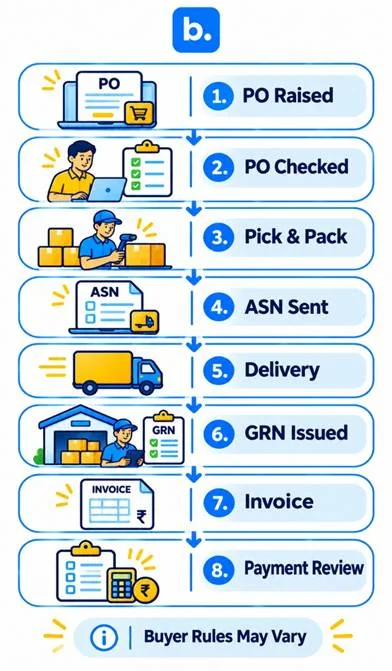
- The platform raises a purchase order. The PO includes product details, quantities, prices and delivery information. Check the PO number, SKUs, quantities, rates and delivery date.
- The brand reviews the PO and confirms whether it can fulfil the requested quantities and terms. Check available inventory, agreed rates and delivery schedules before accepting the order.
- The brand picks and packs the stock according to the buyer’s receiving instructions. Check SKUs, quantities, packaging, labels and shelf life.
- The brand sends an ASN before dispatch, where the buyer’s process requires one. Make sure the ASN matches the final packed products and quantities.
- The shipment is delivered to the specified receiving location. Check the delivery slot, transport documents and shipment identification before dispatch.
- The receiving team checks the goods and records the accepted quantities in the GRN, including any shortages, damage or rejected goods.
- The brand raises an invoice in line with the agreed terms. Check the PO reference, accepted quantity, rates, taxes and any agreed charges.
- The buyer processes payment according to the agreed terms and any applicable adjustments. Compare the invoice status, GRN quantities, deductions and payment records.
This is a general workflow. Document names, submission procedures, delivery appointments and receiving processes can vary. Follow the buyer’s current operating instructions.
PO, ASN, GRN and related terms
| Term | What it is | Who issues it | Why it matters |
|---|---|---|---|
| Purchase Order (PO) | Order placed by the buyer for the products and quantities. | Buyer or platform. | Provides the order reference for products, quantities and agreed terms. |
| Advance Shipping Notice (ASN) | Pre-arrival shipment information. | Supplier or brand. | Prepares the receiving team for the expected shipment. |
| Delivery appointment | Scheduled receiving slot. | Depending on process, buyer or facility. | Coordinates inbound delivery. |
| Goods Received Note (GRN) | Record of goods received and accepted. | Organisation or system that receives. | Records accepted quantities and any discrepancies. |
| Invoice | Request for payment for supplied goods. | Supplier. | States payable according to the terms agreed. |
| Debit or credit note | Document of a correction to an amount due. | Buyer or supplier as per adjustment. | Records corrections or claims of financial nature. |
| Short payment | Less than expected payment. | Not a document, a payment result. | Checks quantities, deductions or records. |
Fill rate is the percentage of the ordered quantity that is successfully delivered. A debit note records a buyer’s claim or adjustment that may reduce the amount payable. Use the buyer’s terminology where it differs.
Reasons why shipments are rejected
| Cause | What happens | How to avoid it |
|---|---|---|
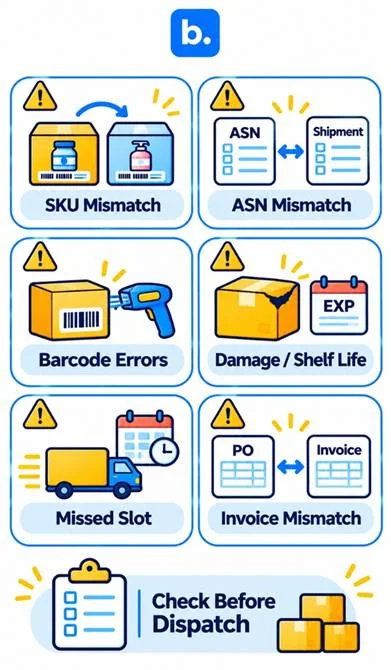
| PO quantity or SKU not on the PO | Receiving team may refuse products that are not in accordance with the approved order. | Check PO prior to picking and packing. |
| ASN is not in alignment with shipment | Advance shipment information is not the same as the goods shipped. | Compare the ASN with the final packed shipment. |
| Wrong labels or barcodes | Products may be hard to identify or process at receiving. | Check product labels and carton barcodes before dispatch. |
| Damaged goods or short shelf life | Products may not meet the quality or shelf-life requirements. | Check products and adhere to the requirements of the buyer. |
| Missed delivery slot | The receiving site might not be prepared to receive the shipment. | Check the appointment and delivery instructions. |
| PO not matched with the invoice | Invoice processing can be slowed down by commercial or quantity differences. | Check PO references, quantities, rates and tax information. |
Acceptance and rejection rules depend on the platform’s policy and the supplier agreement. Check the applicable requirements before dispatch rather than assuming that the same standards or penalties apply to every buyer.
The reasons for short payments
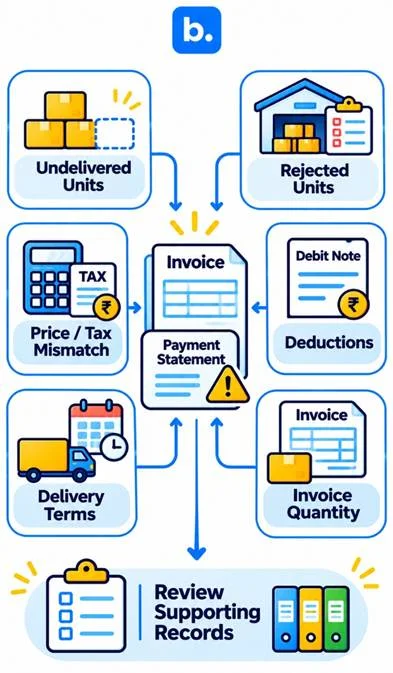
A short payment is an amount received that is lower than the supplier expected under the invoice and agreed terms. It may result from missing or rejected units, agreed deductions or a documentation mismatch. Compare the records to identify the reason before raising a dispute.
| Cause | How it shows up | What to check |
|---|---|---|
| Units not delivered against the PO | Less than ordered quantity is shipped. | Check PO, ASN and dispatch records. |
| Units rejected at the receiving site | GRN has a lower number of accepted units than delivered. | Check the GRN and discrepancy information. |
| Price or rate mismatch | The invoice is not the same as the agreed commercial value. | Check PO, commercial terms and tax information. |
| Debit or credit note | Amount payable is reduced by an adjustment. | Review the description of deduction and record. |
| Late delivery penalties | There can be a contractual deduction on agreed terms. | Check delivery records and the agreement. |
| Wrong quantity invoice raised | The quantity recognised under the process is not reflected in the invoice. | Check invoice, quantity accepted and commercial terms. |
Check every deduction against the contract and supporting records. Do not assume a penalty or rate applies unless it is included in the relevant agreement.
A worked example: PO, ASN and GRN side by side
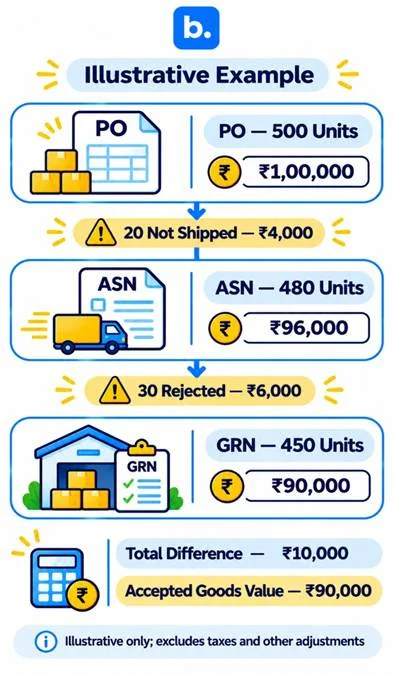
The figures below are illustrative and hypothetical. They do not represent any platform’s commercial or payment policy. Suppose a brand receives a PO for 500 units at ₹200 per unit, dispatches 480 units and has 450 accepted. The remaining 30 dispatched units are treated as rejected, for example because they were damaged.
| Document | Units | Value | Note |
|---|---|---|---|
| PO | 500 | ₹1,00,000 | Original order quantity and value. |
| ASN | 480 | ₹96,000 | 20 less than the PO. |
| GRN | 450 | ₹90,000 | 30 units shipped were rejected. |
| Illustrative accepted-goods value | 450 | ₹90,000 | Illustrative value at the unit price indicated. |
The 20 units not dispatched are worth 20 × ₹200 = ₹4,000. The 30 rejected units are worth 30 × ₹200 = ₹6,000. The total difference is ₹10,000, leaving an illustrative accepted-goods value of ₹90,000.
The brand should check why 20 units were not dispatched, why 30 units were rejected, whether the GRN accurately records the accepted quantity, and whether the invoice and payment records reflect the agreed terms. This example excludes tax, freight, deductions and other adjustments. Actual payment treatment depends on the agreement.
Checklist: avoid rejections before dispatch
Use this pre-dispatch checklist alongside the buyer’s instructions for each delivery.
- PO received and checked.
- Quantities and product rates agreed.
- Correct SKUs selected.
- Physical stock counted prior to packing.
- Product labels and barcodes checked.
- Expiry and shelf-life checked.
- Carton and packaging requirements adhered to.
- ASN is consistent with the actual shipment.
- Delivery appointment confirmed (if applicable).
- Transport and delivery documents ready.
- PO terms and invoice information verified.
Follow the buyer’s receiving instructions for every shipment. For help planning product range and inventory, read our quick commerce guide.
Disputing a rejection or short payment
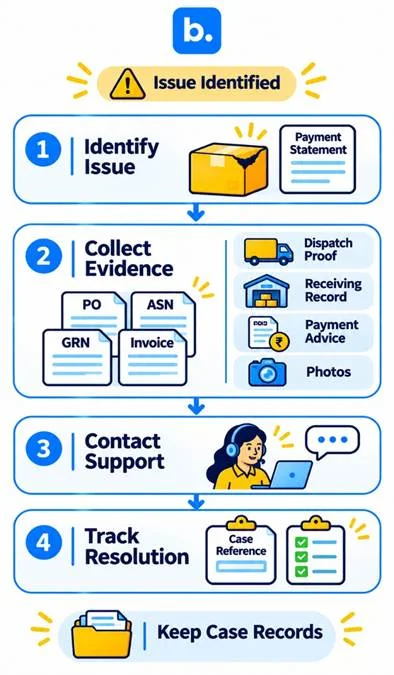
| Issue | Evidence to gather | Where to raise it |
|---|---|---|
| Units rejected | GRN, discrepancy details and product images. | Appropriate supplier/vendor support line. |
| Units not credited | PO, ASN, dispatch proof and GRN. | Receiving or supplier reconciliation team. |
| Price mismatch | PO, agreed commercial terms and invoice. | Commercial or accounts team. |
| Deduction | Debit note, payment advice and supporting records. | Account or vendor support team. |
Use the platform’s official supplier support or dispute channel. Include the PO, ASN and GRN references, invoice number, dispatch and delivery proof, relevant photos, expected and received amounts, and a brief explanation. Check the current supplier documentation for the correct submission method and any time limit.
How Base assists with quick commerce POs and deliveries
Orders: Our Order Manager gives you visibility of orders from the sales channels that are connected to Base. Teams can view order details and complete orders with available workflows. The information and actions available are dependent on the channel connection.
Shipments: Our platform facilitates order-processing and shipment operations of supported integrations. The functions available depend on the connection. If the channel you are using does not support the creation or transmission of an ASN, do not assume that it is created or transmitted.
Matching: Teams can review order and inventory data in their linked channels to identify discrepancies. Base does not replace the buyer’s PO, receiving records or GRN, and this does not mean that PO-to-GRN matching or reconciliation is automated. Capabilities depend on the channel integration. Book a demo to discuss how Order Manager may fit your operation.
Conclusion
A reliable quick commerce purchase order and ASN process keeps the PO, packed shipment, ASN and GRN aligned. Check SKUs and quantities before dispatch, then compare accepted goods with the invoice before reviewing payment. These controls help teams identify discrepancies early and resolve them using supporting evidence. Confirm each buyer’s process and commercial terms, and speak with our team about order visibility across your connected channels.