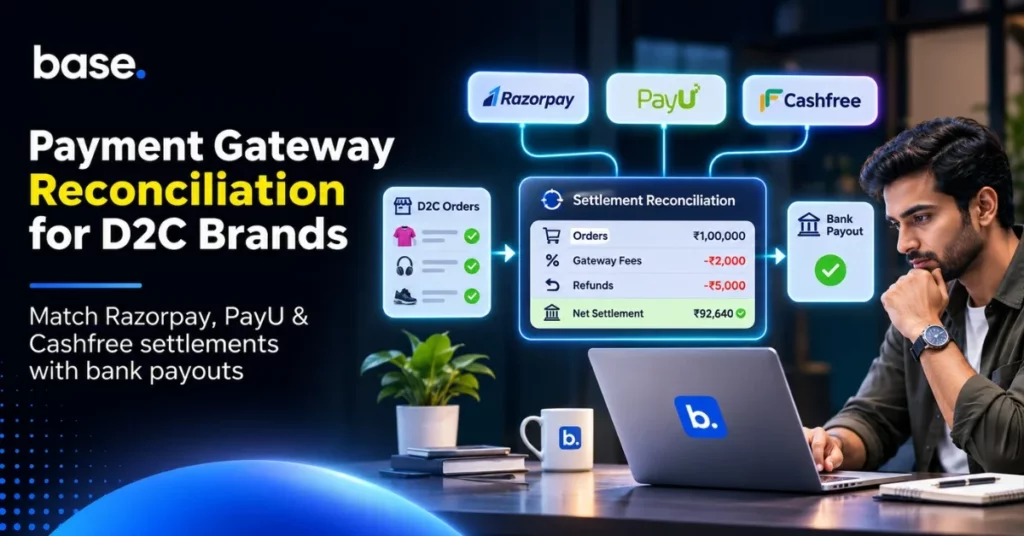
When a customer places an order through your D2C website and pays, it will show up as successful on your Payment Gateway. However, the amount eventually credited to your bank account may be different due to refunds, gateway fees and other adjustments.
This is why payment gateway reconciliation is important. D2C brands must reconcile the Payment Gateway transactions, settlement reports, bank statements, order history and accounting information. By regularly reconciling payments, you can ensure that any missing settlements, incorrect deductions and unmatched transactions are identified.
What is Payment Gateway Reconciliation?
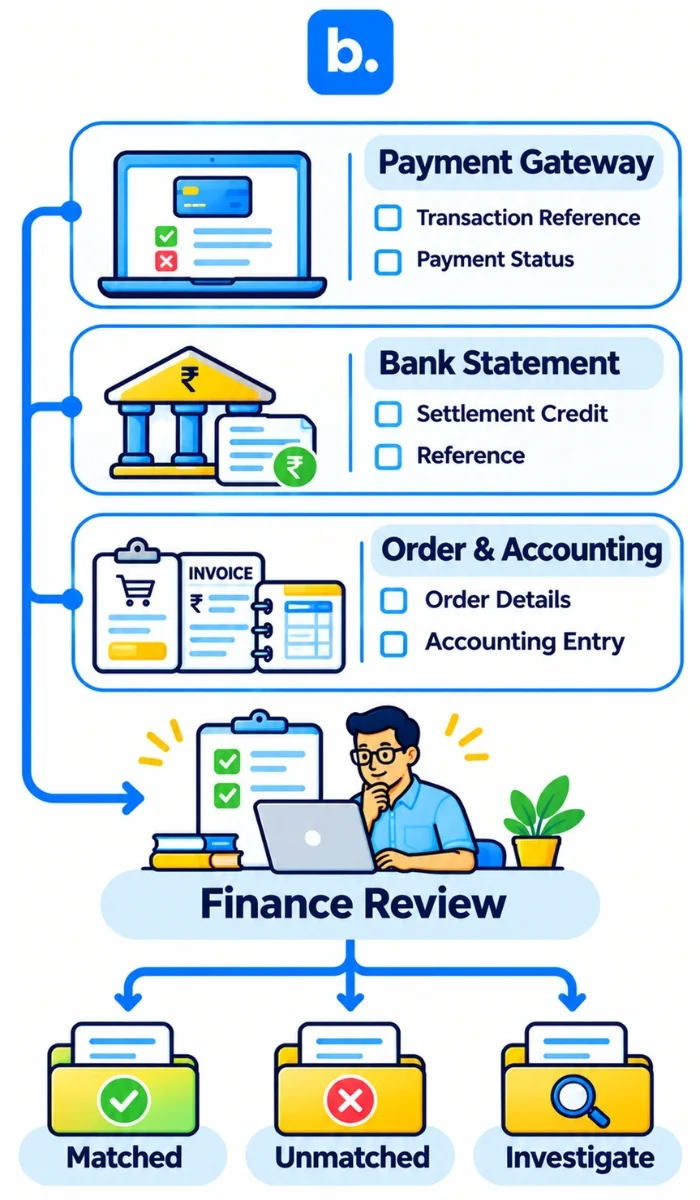
Payment gateway reconciliation is the process of matching payment information from your Payment Gateway with your D2C orders, settlement reports and bank statements. It is also known as merchant account reconciliation. The process of payment reconciliation involves comparing payment records across different sources to ensure that transactions and amounts match.
All three must be matched:
- Payment Gateway: Shows successful and failed transactions, refunds, fees and settlement details.
- Bank Statement: Confirms the amount actually credited to your business account.
- Order & Accounting Records: Show the original order value, payment status, refunds, fees and corresponding accounting entries.
| Report | Information | What to Check |
|---|---|---|
| Gateway Transaction Report | Payment ID, Order ID, Amount, Status | Successful Payment, Failed Payment, Refunded Payment |
| Settlement Report | Gross Amount, Fees, Adjustments, Net Payout | Shows the settlement |
| Bank Statement | Settlement & Reference | Amount Paid, Settlement Date |
| Order Information | Order Value, Invoice Value, Payment Status | If the payment is linked to the correct order |
| Accounting Ledger | Sales, Fees, Refunds & Bank Entries | Ensure all entries are correct |
How Payment Gateways Work
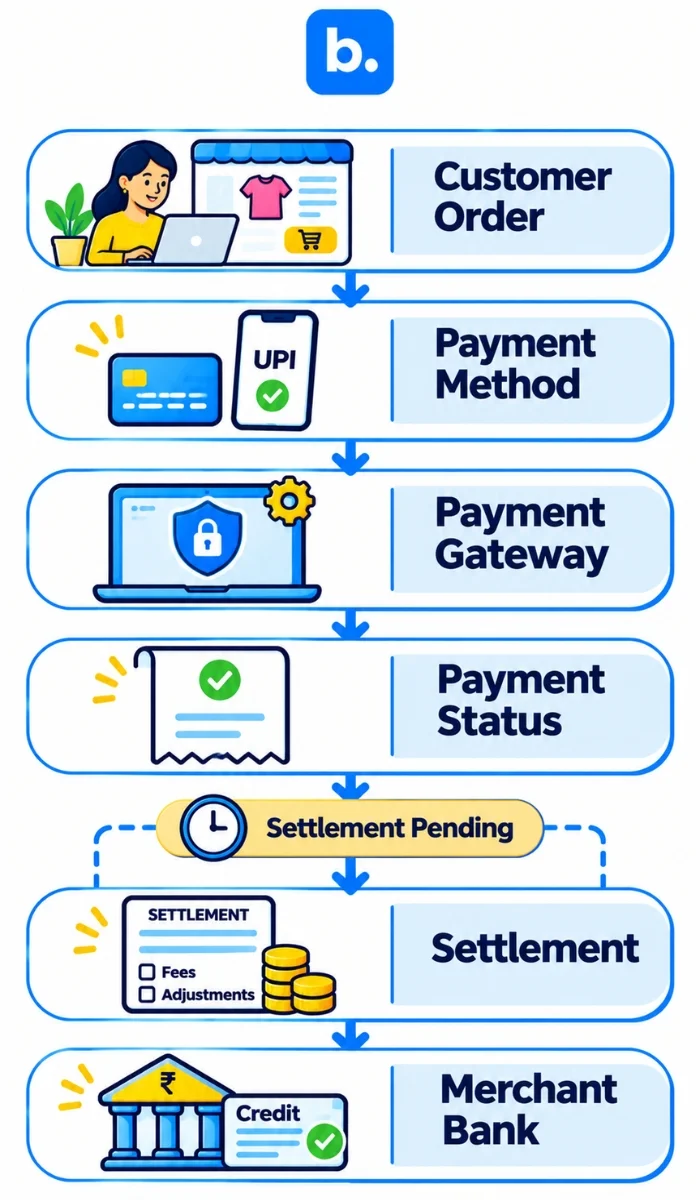
A Payment Gateway is used to facilitate online payments between your customer, your bank and your business. This allows payments to be made using UPI, credit card, debit card and net banking.
For example, if a customer makes an order on your website, they may pay using Razorpay/PayU/Cashfree. They will pay ₹2000 and the gateway will process and update the payment status. The payment will go through settlement and get paid into your registered bank account.
- Customer places order on D2C website.
- Customer selects payment method.
- Payment is processed through Payment Gateway.
- Payment status updated.
- Applicable fees, taxes and adjustments are applied.
- Remaining amount is paid into merchant bank account.
Customer > D2C Website > Payment Gateway > Settlement > Merchant Bank Account.
It is important to note that just because a payment shows as successful, it doesn’t mean it has been settled into your bank. The payment can show as successful in the Payment Gateway dashboard, but it may not have settled yet.
Settlement dates can vary depending on the provider, merchant set-up, bank holidays and other factors. Always check the settlement status and bank reference.
Why Reconcile Payment Gateways?
D2C brands may receive hundreds or thousands of payments per day. This can make it difficult to find out why there is a discrepancy if there are small differences. Understanding payment reconciliation for D2C brands in India can help you manage payment records, settlements and discrepancies more effectively.
By regularly reconciling your payments, your finance team can see what payments have been collected. There are 5 reasons why you need to reconcile:
1. Accurate Revenue
You want to ensure you are recording successful payments against the correct order. This will help to avoid any missing or duplicated revenue.
2. Identify Any Missing Settlements
Even though the payment shows as successful in your gateway, there may not be an entry in your bank. Reconciling will help you to identify the transaction.
3. Identify Gateway Fees
Your Payment Gateway will charge you fees for processing payments based on your merchant agreement. You will also need to identify any applicable GST. By identifying the breakdown of your settlement, you will know how much is being deducted.
4. Identify Refunds
Refunds will affect the amount you receive. By checking your Payment Gateway reports, you can ensure they have been recorded correctly in your accounting.
5. Accurate Cashflow
By knowing your expected settlements, you will know how much money you have available.
| Issue | Impact | Why |
|---|---|---|
| Missing Settlement | Less money than expected has been paid into your bank | Cashflow discrepancy |
| Incorrect Gateway Fees | Incorrect expenses have been recorded | Incorrect profit calculations |
| Duplicate Payment | Duplicate revenue | Incorrect financial records |
| Unrecorded Refund | No refund has been recorded | Incorrect Sales & Liability |
What Information Will I Need?
Before you begin, you need to gather the information from your Payment Gateway, bank, order management system and accounting. Depending on your provider, you may have different report names. However, they will have similar information.
| Report | Information | What to Check |
|---|---|---|
| Transaction Report | Payment ID, Order ID, Amount & Status | Successful & Failed Payments |
| Settlement Report | Gross, Fees, Deductions & Net Payout | Settlement |
| Refund Report | Refund ID, Payment ID, Amount & Status | Refunds |
| Chargeback Report | Disputes & Adjustments | Dispute Amount & Status |
| Bank Statement | Settlement & Reference | Amount Paid |
| Order Report | Order ID, Invoice Value & Status | Payment matched |
| Accounting Ledger | Sales, Refunds, Fees & Bank Entries | Correct entries |
| Fee Statement | Processing Fees & Applicable GST | Fees & Tax |
When reconciling your reports, check whether you have the following reference numbers:
Order ID:
To identify the order placed by the customer.
Payment ID/Transaction ID:
To identify the payment.
Settlement ID:
To identify the settlement batch.
UTR/Bank Reference:
To help identify the actual payment.
This will help you match your order to the payment, settlement and bank. If you are missing these references, the team will have to look through the reports to find the correct one.
How to Reconcile Payment Gateways
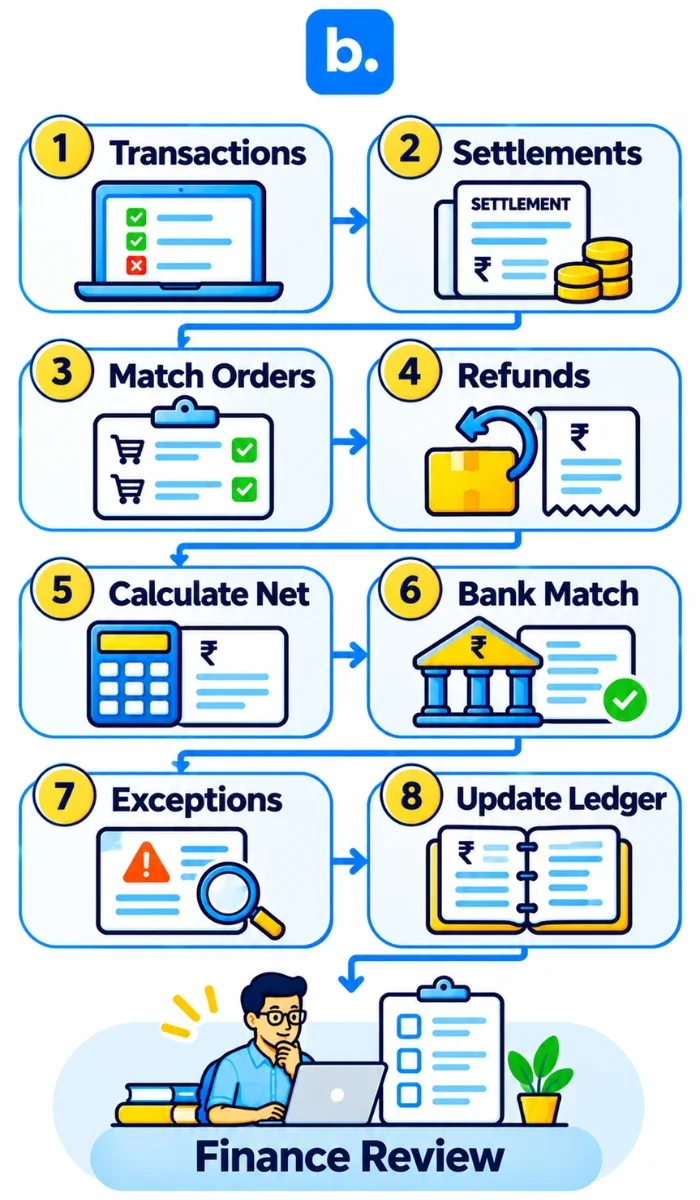
Having a clear process will help to make sure you can match up the Payment Gateway reports with your bank and accounting. This will help to match up all relevant payments and understand why there is a discrepancy.
Complete the following 8 steps:
1. Download Gateway Transaction Reports
Download transaction reports from your Payment Gateway (Razorpay/PayU/Cashfree). Ensure you have the payment ID, order ID, amount, date and payment status. Split into successful, failed & pending.
2. Download Settlement Reports
Ensure you can see the gross, refunds, gateway fees, GST on fees, adjustments & net payout. This will help you to understand how the gateway calculated your payout.
3. Match Payment ID and Order ID
Match the Payment Gateway payment ID & order ID to your D2C order information. Successful payments should be matched to the correct order and the amounts.
4. Identify Refunds & Chargebacks
Identify any refunded, disputed or reversed payments. Ensure the refund has been recorded with the correct reference. A refund initiated by your business and a chargeback by the customer will be two different transactions, so they should be recorded separately.
5. Calculate Expected Settlement
Calculate the expected settlement amount by identifying the gross, refunds, gateway fees, applicable taxes and adjustments.
6. Match Settlement Information
Match the settlement ID, amount and date to your Bank Statement. Where possible use the UTR.
7. Identify Any Unmatched Transactions
Split into any missing settlements, late payments, duplicates, incorrect deductions and timing issues. Ensure you have notes on why there is a discrepancy.
8. Update Accounting Information
Update your accounting to include gateway fees, refunds, adjustments and settlement. Keep a tracker of any discrepancies that haven’t been resolved.
Example of Calculating a Settlement
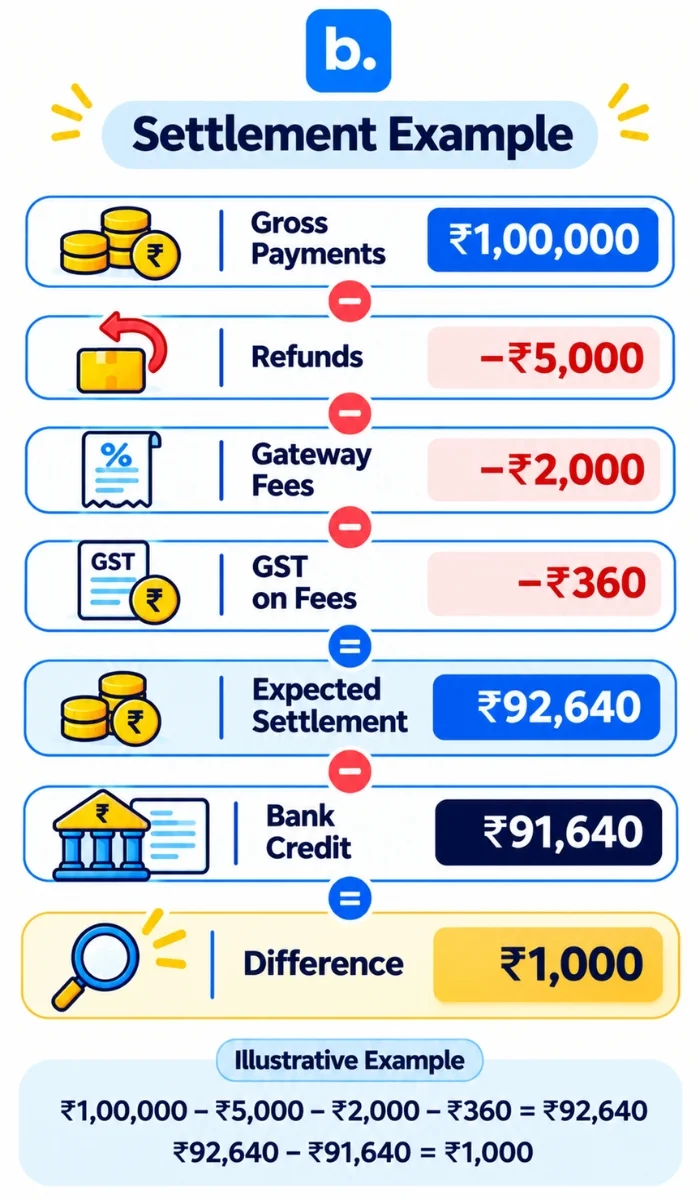
A D2C brand has received 100 successful payments of ₹1000.
This will give a total of ₹1,00,000. However, this will be reduced by refunds and gateway fees.
| Particulars | Amount |
|---|---|
| Gross | ₹1,00,000 |
| Refunds | ₹5,000 |
| Gateway Fees | ₹2,000 |
| GST on Fees (Example) | ₹360 |
| Expected Net Settlement | ₹92,640 |
₹1,00,000 – ₹5,000 – ₹2,000 – ₹360 = ₹92,640
The finance team should identify what the expected settlement is. In this example, it is ₹92,640. If the actual amount paid into the bank is ₹91,640, there is a discrepancy of ₹1000.
Check the Settlement Report to see if there have been any additional deductions, adjustments or if it has been added into a different settlement batch. Only raise a support request if the issue can’t be resolved.
Note: This is just an example. The fees, GST and adjustments will depend on the merchant agreement, tax invoice and transaction.
Common Issues with Payment Gateways
Not all discrepancies will be down to the Payment Gateway. It can be due to settlement timing, refunds, chargebacks, fees and incorrect entries.
Here are 6 common issues:
| Issue | Potential Cause | What to Check |
|---|---|---|
| No payment in bank | Pending/Late Settlement | Transaction & Settlement Reports |
| Less than Expected settlement | Fees, Refunds & Adjustments | Breakdown of settlement |
| Duplicate Payment | Duplicate entries in accounting/payment | Payment ID & Order ID |
| No refund recorded | No refund recorded/late refund | Refund Report |
| Payment shows as failed but customer has been debited | Pending Payment/Bank has reversed | Payment Gateway Status & Bank Reference |
| Chargeback Adjustment | Customer Dispute/Payment reversed | Chargeback Report |
Example of a Settlement Discrepancy
The Payment Gateway report shows an expected settlement of ₹50,000. However, the bank shows that only ₹48,500 has been paid.
There is a discrepancy of ₹1500. Before raising a support ticket, check the Settlement Report to see if there are any additional fees, refunds, chargebacks or if it has been added into a different settlement batch.
If the settlement still shows ₹50,000 after everything has been deducted, check the status and UTR. If there is still a discrepancy, share the settlement ID and supporting transaction details with the support team.
How to Reconcile Razorpay, PayU & Cashfree
Overall the reconciliation process will be the same. However, the reports, dashboards and references will vary. Razorpay provides settlement reconciliation reports which will help you to match your transactions to settlement IDs. You can refer to the official Razorpay reports documentation to understand the reports available through its dashboard. The dashboard also allows the merchant to see payment details & settlement details using the Payment ID.
PayU provides transaction, settlement, refund & TDR reports. You can refer to the official PayU reports documentation to understand the available reports. The settlement details may include Merchant Transaction ID, Settlement ID, UTR, Settlement Date & Net Settlement.
Cashfree provides settlement & transaction reports. You can check the official Cashfree reports documentation to understand the reports available for reconciliation. This will help the merchant to identify any discrepancies between the settled transactions and amount paid into their bank. The settlement reports will also include transaction references & Net Settlement.
| Payment Gateway | Reports | Key Information |
|---|---|---|
| Razorpay | Payments, Settlement Reconciliation, Refunds | Payment ID, Order ID, Settlement ID & UTR |
| PayU | Transactions, Settlements, Refunds & TDR | Merchant Transaction ID, PayU ID, Settlement ID & UTR |
| Cashfree | Transactions, Settlements, Refunds & Ledger | Order ID, Transaction Reference, Settlement ID & UTR |
Things to Remember:
Use transaction reports. Settlement reports may show you the final amount. Using transaction reports will help you to identify what payments have been included in each batch.
Check settlement and bank dates separately. The date the payment shows as successful may not be the same as the date it has been settled into your bank.
Keep separate reports for each Payment Gateway. If you have multiple gateways, ensure you have separate transaction & settlement reports.
Use consistent references. Using Payment ID, Order ID, Settlement ID & UTR will help you to track your transactions.
Not all 3 payment gateways will have the same reports or settlement timing. Check your dashboard and merchant agreement to see what reports and settlement timing you can expect.
Manual vs Automated Reconciliation
If you are not receiving many transactions, you may only need to use a spreadsheet. You can download reports from your Payment Gateway, match up the payment ID to the order and match the settlement amount to the bank.
However, if you are receiving more transactions, this can take more time. If you have multiple gateways, refunds, partial settlements and chargebacks it can be difficult to track manually. Understanding the differences between automated vs manual payment reconciliation can help you decide which approach works best for your business.
| Criteria | Manual | Automated |
|---|---|---|
| Data | Manual downloads | Supports consolidating data |
| Matching | Manual formula | Rules |
| Refunds | Manual updates | Supports tracking refunds |
| Fees | Manual calculations | Supports comparing fee data |
| Missing Settlements | Manual identification | Supports identifying unmatched |
| Multiple Gateways | Multiple sheets | Supports consolidation |
| Audit Trail | Depends on manual information | Depends on features |
A merchant reconciliation system can help to keep your transactions in a clear format. A payment reconciliation system can help you match your payments, settlements & bank based on available references.
Automated payment reconciliation can help to reduce repetitive tasks. It can also help to identify any unmatched transactions. However, this will depend on the tool, supported gateways and available bank data.
Before choosing a tool, ensure it will support your payment gateways, accounting, bank statements, refund reports & settlement reports. Automation will not help to resolve any disputes with the Payment Gateway. You will still need your finance team to review any exceptions.
How Can an OMS Help with Reconciliation?
An order management system will help to keep all your order information in one place across your supported sales channels. This can help your finance team to identify any discrepancies between customer orders and payments.
OMS software can help D2C brands maintain organised order records and give finance teams a consistent reference when checking payment-related discrepancies. An OMS platform can also bring order information together across supported sales channels.
An OMS can help you in 3 ways:
Centralised Order Information:
Keep Order ID, Invoice, Order Value & Order Status in one place.
Payment & Order Information:
Identify any discrepancies based on available payment references & order status.
Returns & Cancellations:
Review any returned, cancelled or refunded orders.
Although an OMS won’t replace your Payment Gateway dashboard, Bank Statement & accounting, it can help you to identify discrepancies. Marketplace payment reconciliation will be different to D2C reconciliation. D2C brands typically reconcile their payments collected from their website and settlement from the gateway. However, marketplace sellers will also need to account for marketplace fees, deductions & marketplace settlement statements.
How Can Base OMS Help with D2C Payment Reconciliation?
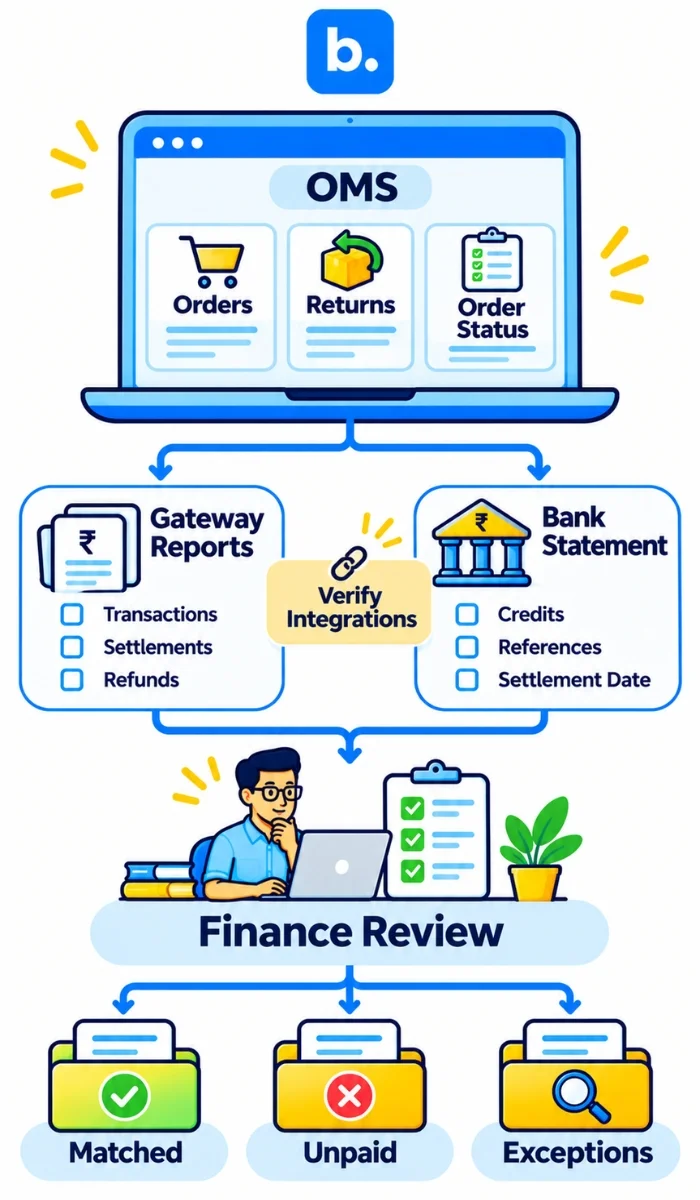
Base OMS can help with the operational side of reconciliation. Your team will have a clear view of your order information across your supported sales channels. This can help your finance & operations teams to refer back to order details.
Having order ID, sales & order status can help you to identify discrepancies between your website orders and gateway transaction reports. Having returns & cancellations information can help you to review any order adjustments.
Having a centralised OMS will help you to easily identify discrepancies. The reports available will depend on the channels & features available.
Base OMS will help with order management & operational visibility. D2C brands should still refer back to their Payment Gateway reports, bank statements & accounting to confirm settlements & deductions. Book a demo of Base OMS to see how the order management can help your operations.
Conclusion
Regular payment gateway reconciliation helps D2C brands match customer payments with gateway settlements, bank credits and accounting records. Check transaction IDs, refunds, processing fees and settlement references to identify differences before they affect your books. As payment volumes grow, an organised reconciliation process can save time and improve financial visibility. Base OMS can support the order management side of this process.