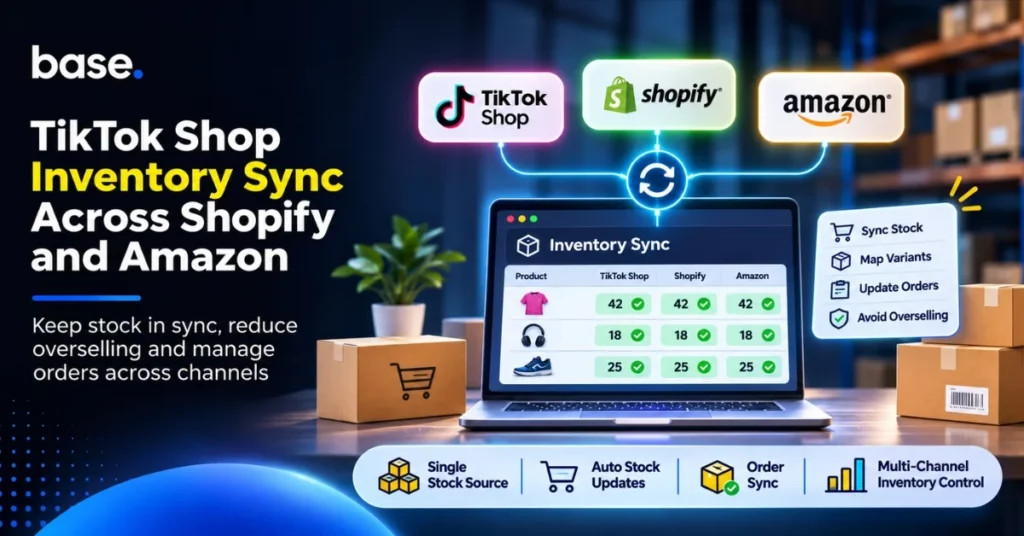
A low-stock product is listed on TikTok Shop, Shopify and Amazon. An order arrives while the other listings still show the previous quantity. TikTok Shop inventory sync coordinates those updates, but accurate availability depends on more than matching numbers: offers, variants, warehouses and orders must point to the right records.
This guide follows the order-to-stock workflow, from choosing the inventory source to testing the connection. Examples assume merchant-fulfilled inventory; FBA is treated separately below.
What does TikTok Shop inventory sync actually mean?
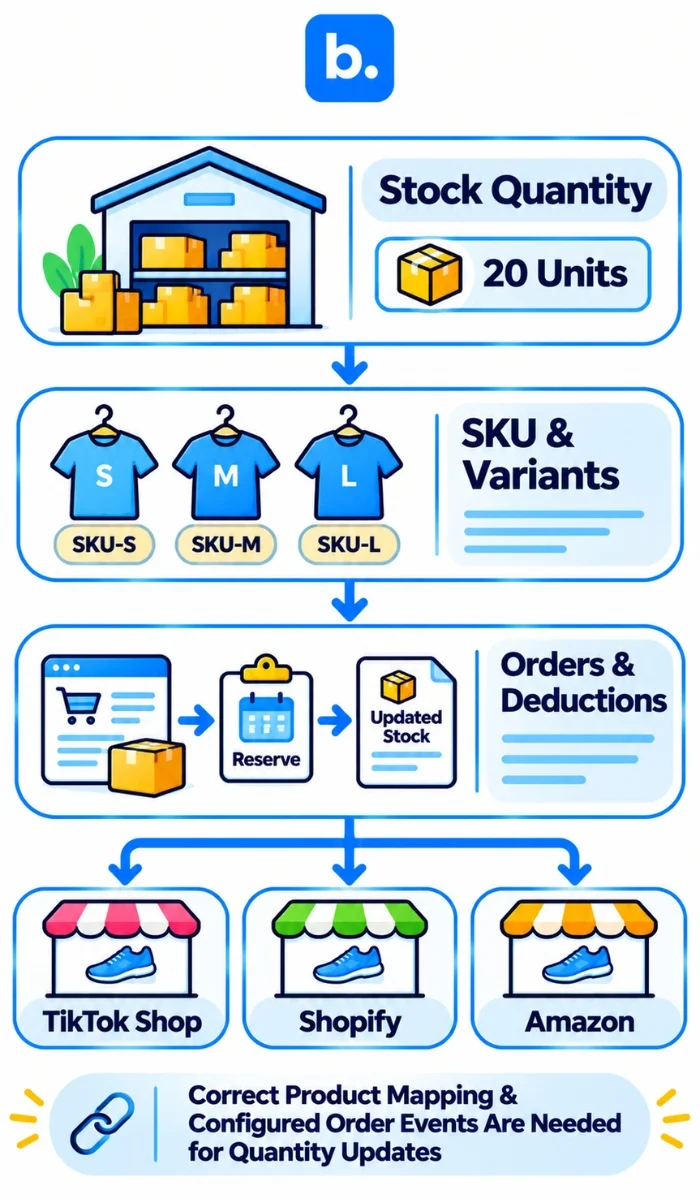
TikTok Shop inventory sync coordinates stock, product links and order information so the correct available quantity appears across connected channels.
Stock quantity synchronisation
Updates follow the selected inventory source; order retrieval, source processing and marketplace acceptance all affect publication.
Product, SKU and variant synchronisation
A stock-keeping unit (SKU) is an identifier assigned to a product or sellable variant, including its size, colour and unit of sale. Products that share a name but differ by variant still need separate records; otherwise the wrong quantity may update.
Order synchronisation and stock deductions
Once an order reaches the configured processing stage, it can trigger the relevant stock reservation or deduction. The exact behaviour depends on the order settings and inventory source. Product catalogue edits are separate from quantity updates; a completed import does not prove the order-to-stock flow works.
Why inventory gets out of sync across TikTok Shop, Shopify and Amazon
Trace the mismatch from sale to stock effect to the next accepted channel update.
Separate inventory pools across sales channels
Each channel can maintain its own quantity even when the listings refer to one physical stock pool. Three listings showing 20 units do not create 60 units to sell.
Incorrect SKU and variant mapping
A blue medium shirt must link to its own variant, not the parent product’s total or a large size. Duplicate identifiers and incorrect pack quantities can affect the wrong record.
Warehouse and fulfilment location mismatches
Stock available at one location is not automatically usable by another channel’s fulfilment arrangement. Keep location mappings explicit. Our broader How to Manage Inventory Across Multiple Warehouses Efficiently guide covers warehouse planning.
Delayed updates, simultaneous orders and returns
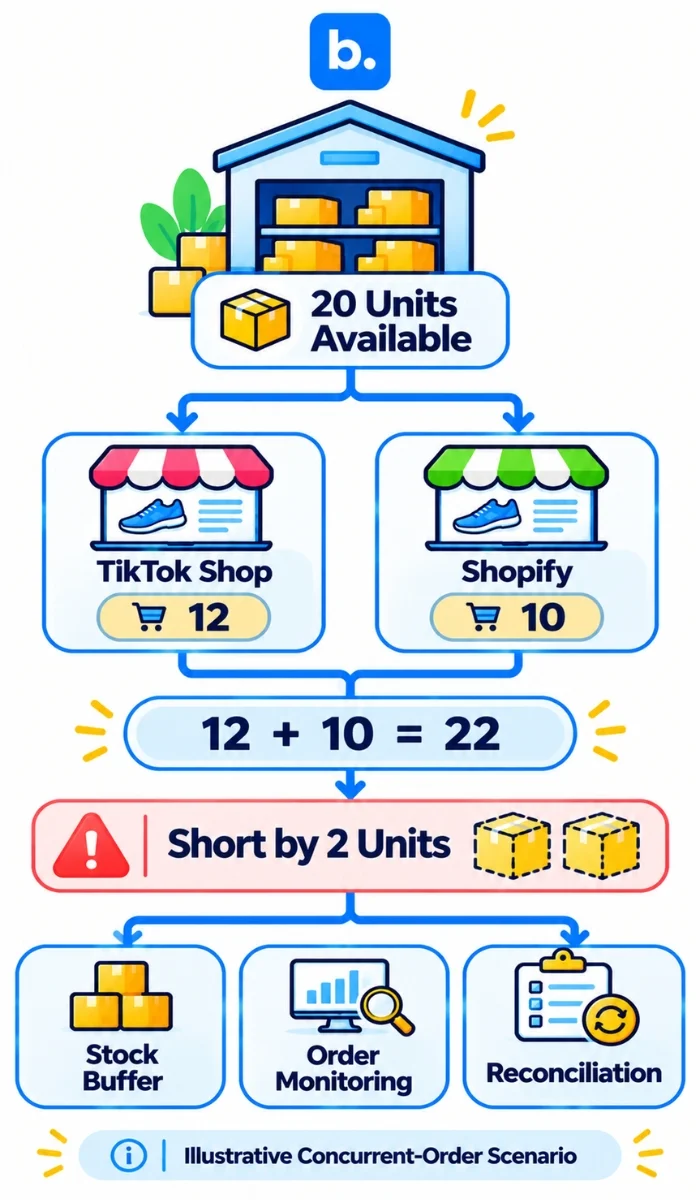
Suppose 20 units are available. TikTok Shop accepts 12 while Shopify accepts 10 before the revised quantity reaches both channels: demand is 22, leaving two units short.
Cancellations, returns and manual adjustments add further differences. Reserved, damaged or uninspected stock should not be confused with saleable availability.
Choose the right inventory source before connecting your channels
Decide which system controls each figure. An ecommerce platform integration should respect that authority. Otherwise, two connected systems may attempt to update the same stock quantity independently.
Using Shopify as the inventory source
This can fit a business whose store controls stock. Map the correct Shopify locations and available-stock field. Our Shopify integrations support store and marketplace flows according to the chosen configuration.
Using an ERP or warehouse system
An enterprise resource planning system (ERP) or warehouse management system (WMS) may already control receipts, adjustments and usable stock. Keep that authority, subject to supported interfaces for products, warehouses and orders.
Using a central multichannel platform
An ecommerce integration platform can coordinate inventory and channel workflows without replacing every specialist system. Assign ownership separately for product information, available stock, orders, and fulfilment/tracking data. Document which system supplies each and which may update it.
For broader system-selection considerations, see Inventory Management System in India.
How to set up TikTok Shop inventory sync with Shopify and Amazon
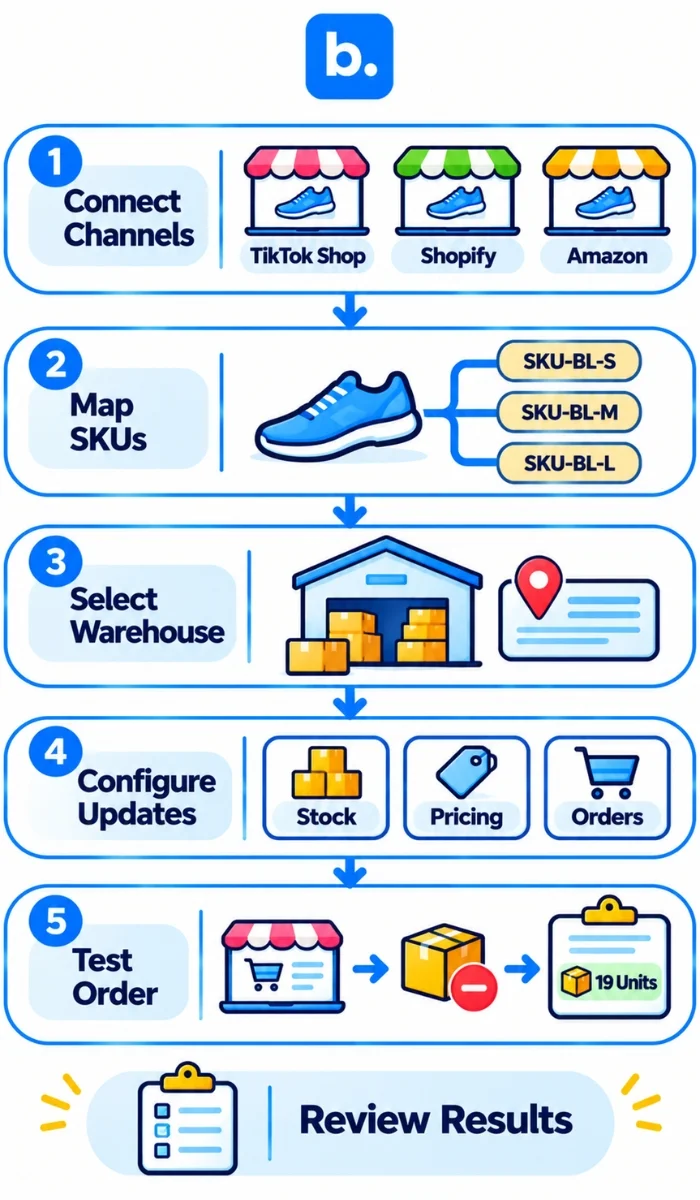
Start by setting up one product and one warehouse.
1. Connect your sales channels
Connect TikTok using the main seller account for the relevant market. Ensure Shopify, and the correct Amazon seller account are connected. Check the regions and fulfillment options supported.
2. Import and link existing product offers
Import any existing TikTok offers. Match them to the correct products/variants in your inventory. Fix any unmatched offers, duplicate SKUs and incorrect units of sale. Once ready, enable syncing.
3. Choose your warehouses and source
Ensure you have selected the correct source and warehouse for each offer. Don’t just match warehouse SKUs from overseas. If you have Amazon FBA stock, make sure it is kept separate from general merchant fulfilled stock unless the confirmed fulfillment method supports it.
4. Set stock, pricing and order settings
Set quantities, how often you want to update them, and out of stock settings. Set pricing separately so you don’t overwrite your market specific pricing. Enable orders to be imported. Agree where they will be processed. If orders are sent from TikTok Shop to Shopify ensure the process doesn’t result in a double deduction.
5. Run through the whole order to stock process
Use permitted test facilities or controlled, authorised orders. Check that:
- The same product and variant are correctly linked.
- The source’s available quantity is correct.
- The order imports successfully.
- The intended reservation or deduction happens once.
- Revised availability reaches the relevant listings.
Verify timestamps, cancellations and inspected-return cases before scaling.
Treat this integration with an ecommerce platform as an ongoing order-to-stock handover, not a one-time login.
How to reduce overselling when orders arrive at the same time
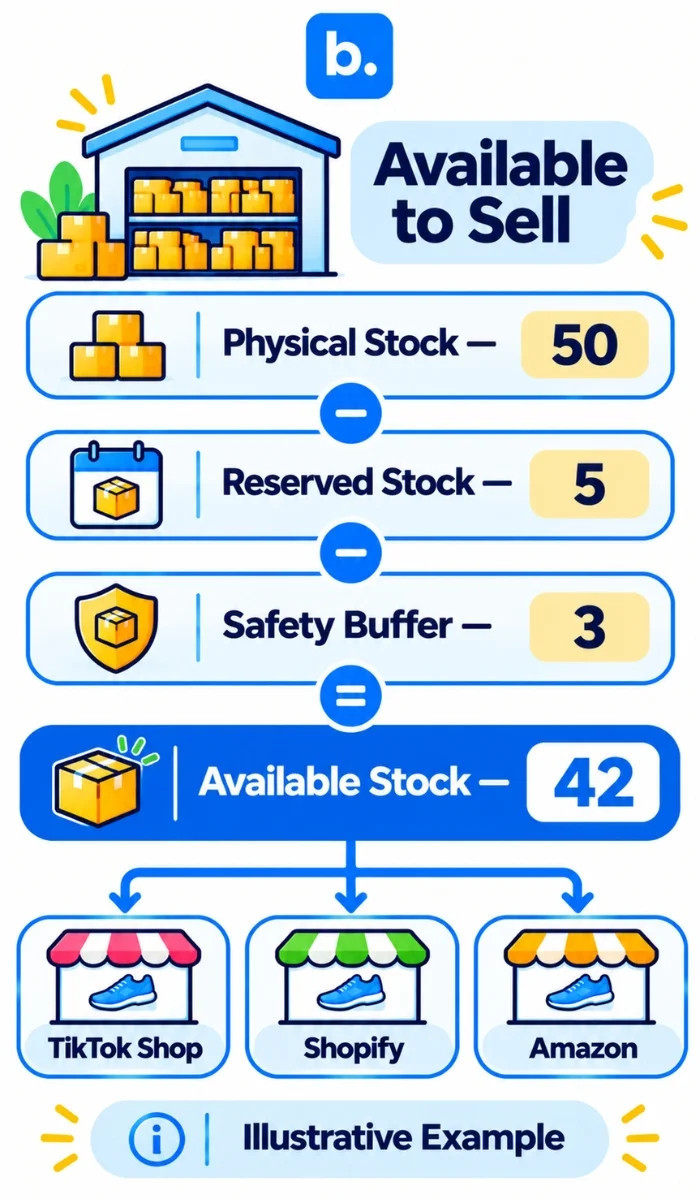
Calculate available-to-sell inventory correctly
A simple model is:
Available stock = physical stock − reserved stock − safety buffer.
With 50 physical units, five reserved and three withheld as safety stock, available quantity is 42, assuming no other holds. If the source already reports 42 as available, don’t subtract the same holds again.
Shopify’s inventory-state definitions distinguish on-hand, committed, unavailable and available quantities. Confirm the field your source actually supplies.
Maintain a stock buffer for high-demand products
Size the buffer against observed update delays and demand bursts around promotions and livestreams. A displayed-quantity cap is not an exclusive physical reservation. Some US TikTok campaigns reserve inventory; account for those commitments too.
Monitor failed synchronisations and delayed updates
Check disconnected accounts, failed requests, unmatched offers and late order imports. Campaign-reserved stock can also cause quantity reductions to be rejected. Use the permitted campaign controls rather than repeatedly forcing an incompatible update.
Reconcile inventory regularly
Compare physical counts, the authoritative available figure and marketplace quantities after returns, cancellations and manual edits. Restore availability according to the actual reservation or deduction state. A refund alone is not evidence that returned goods are saleable.
Reservations help once orders enter the stock workflow. Independent channels can still accept concurrent orders before updates arrive, so synchronisation reduces risk without guaranteeing zero overselling.
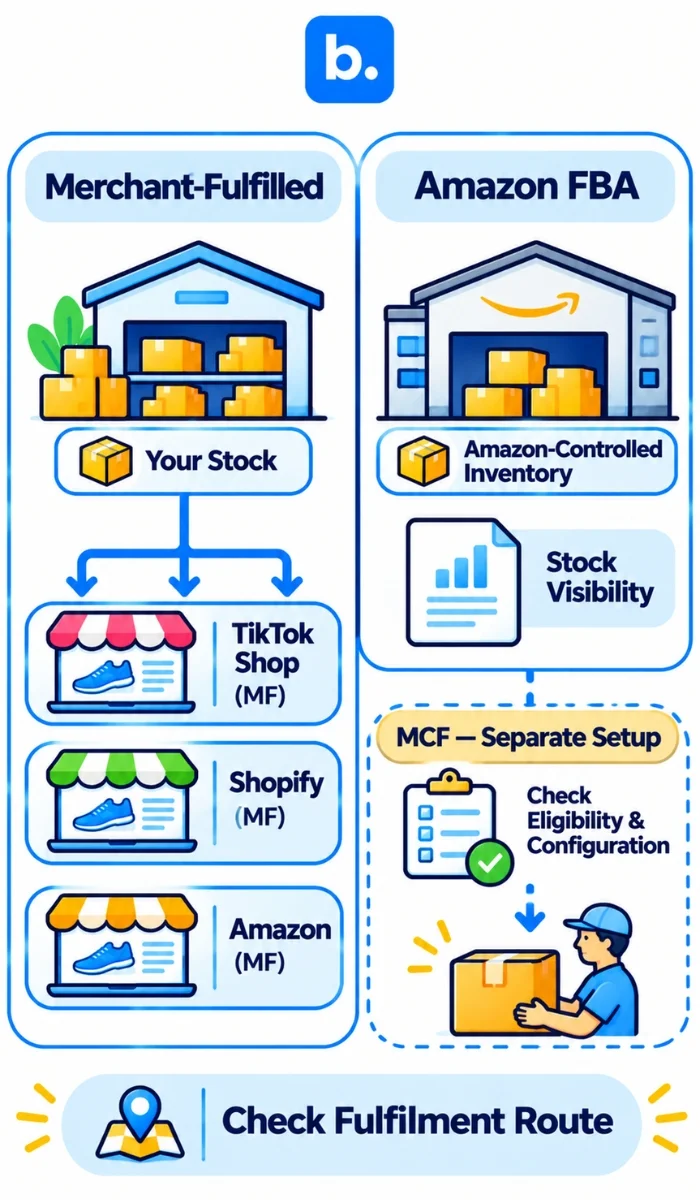
Amazon FBA vs merchant-fulfilled inventory: what should you sync?
Merchant-fulfilled inventory
Stock in your warehouse or fulfilment facility can supply connected merchant-fulfilled offers where the configured route supports it. Match the actual Amazon offer, SKU, warehouse and fulfilment method before sending quantities.
Amazon FBA inventory
Fulfilment by Amazon (FBA) has Amazon-controlled inventory records with separate available and reserved reporting. Our Amazon FBA integration imports this information for visibility; Amazon remains the authority for that stock.
Where Multi-Channel Fulfilment fits in
Amazon Multi-Channel Fulfilment (MCF) is a separate service that allows eligible external-channel orders to be fulfilled using Amazon-held inventory. Our Amazon MCF integration is configured separately from standard FBA stock visibility. Confirm the supported stock and fulfilment workflows for your account before treating Amazon-held inventory as a shared stock pool.
What to check when TikTok Shop stock is not updating
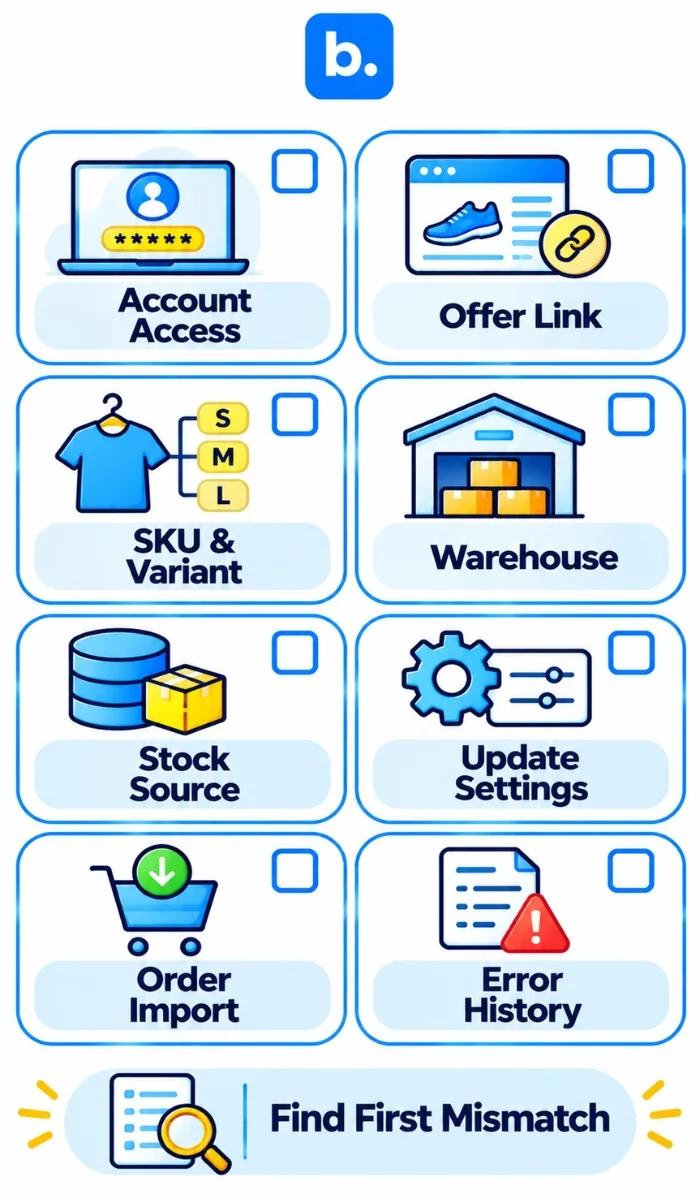
Find the first point where the expected quantity diverges:
- Is the TikTok account still authorised?
- Was the existing offer imported and linked?
- Are the SKU, variant and pack identifiers correct?
- Is the intended warehouse selected?
- Is the right inventory source active?
- Are stock updates enabled, with price settings independently intentional?
- Has the order imported and reached the expected stock event?
- Do update histories show errors or campaign restrictions?
- Has a manual edit or another connector overwritten stock?
Record the offer, warehouse, quantity, timestamps and returned error. Diagnose that evidence before reconnecting everything. If stock is unreliable, use the channel’s permitted controls to restrict the affected offer while investigating.
How we help manage TikTok Shop inventory and orders
At base.com, we help coordinate stock, product and order information through a multi-channel integration platform configured around the seller’s operations.
Connect TikTok Shop with your commerce operations
Our two-way TikTok Shop integration supports order import, existing-offer import and links to selected inventory products and variants. We establish those relationships before enabling quantity updates.
Coordinate stock and price updates
We provide configurable sources, quantity rules, price settings and warehouse mapping. For catalogues managed here, inventory settings support reservations when orders are fetched and controls against negative-stock fulfilment. Test these with the actual source and order route.
Manage orders and fulfilment from one workflow
We bring orders into Order Manager or forward them to a connected store or ERP. Configured Automatic Actions, Pick&Pack and supported carrier workflows help coordinate processing and tracking back to TikTok Shop. Our TikTok Shop integration setup guide explains the settings.
Choose a plan that matches your order volume
Our India plans list Freemium for up to 100 orders/month and 1,000 products, with hourly order, stock and price synchronisation. Business includes real-time synchronisation. Review the current Freemium and Business plans against your volume and update needs; processing time still depends on the marketplace.
Conclusion
Reliable TikTok Shop inventory sync needs linked offers, correct variants and warehouses, an agreed stock authority and tested order processing.
At base.com, we help sellers coordinate product, stock, price and order workflows across supported channels. Explore our TikTok Shop integration to see how it fits your existing commerce setup. Re-test after any channel, warehouse or inventory-source change.