

Meesho suppliers manage large catalogs by getting three things right before adding volume: correct catalog grouping, accurate weight and dimension data, and disciplined pruning of non-performers. Product listing on Meesho differs from other marketplaces because commission is zero, so shipping weight and return rates decide your margin rather than a commission percentage.
Why Meesho Catalog Management Needs a Completely Different Approach Than Amazon or Flipkart
Complete brand approval, confirm your selling model, and verify that your physical stock matches your catalog data before you upload anything to AJIO. Catalog management in the AJIO Seller Panel fails most often at the inbound quality check, not at listing, because AJIO physically inspects goods under its warehouse-fulfilled models. Data errors become rejected stock, not just rejected listings.
Why AJIO Punishes Catalog Errors Harder Than Other Fashion Marketplaces
Sellers arriving from Amazon or Flipkart expect the worst outcome of a bad listing to be a rejected upload. On AJIO, under warehouse-fulfilled models, the worst outcome is a truck of inventory turned away.
That single difference reshapes the entire preparation sequence. Four structural factors drive it.
Registration is gated and approval-based. AJIO does not offer open self-registration. Sellers apply through Reliance Retail’s supplier registration portal, which serves AJIO alongside other Reliance businesses, and receive Seller Central credentials only after approval. Brand approval, trademark verification, and signing the Terms of Trade all precede catalog work.
Fulfilment model determines your data requirements. AJIO operates multiple selling models, including just-in-time warehouse fulfilment where AJIO handles logistics and returns, and dropship models where the seller retains those responsibilities. Commission, return liability, and required catalog fields differ by model.
Physical quality check is real. Under warehouse-fulfilled models, stock is inspected on inbound. A barcode that does not scan, a garment that does not match its declared composition, or a pack whose contents differ from the catalog becomes a rejection at the dock.
The audience is premium, and the AOV is higher. AJIO positions as a curated, trend-led destination, which means presentation standards and data completeness expectations sit above open-marketplace norms.
Catalog management in the AJIO Seller Panel therefore has to be treated as a pre-listing discipline rather than a post-listing optimisation. Everything below is sequenced accordingly.
The Pre-Launch Timeline That Avoids Costly Catalog Rework
A well-planned pre-launch timeline helps sellers complete catalog preparation before product launch deadlines create pressure. From finalizing product information and images to validating attributes, pricing, inventory, and listings, each step needs enough time for review and corrections.
The following timeline outlines the key catalog activities sellers should complete before launch to minimize rework and ensure products are ready to go live.
| Stage | Weeks before go-live | What must be finished |
| Approval and contracting | 6-8 weeks | Brand approval, trademark, Terms of Trade signed |
| Model decision | 5-6 weeks | Selling model confirmed, margin modelled |
| Data preparation | 4-5 weeks | Templates, attributes, size charts, codes |
| Physical verification | 3-4 weeks | Weights, measurements, barcodes, samples |
| Catalog upload | 2-3 weeks | Submission and approval cycles |
| Inbound or activation | 1-2 weeks | Stock dispatched, or listings switched live |
Onboarding timelines vary. Some sellers report roughly a week to ten days for verification, others closer to three weeks depending on documentation and category. Build the longer estimate into your plan, because catalog management in the AJIO Seller Panel cannot begin in earnest until credentials exist.
Check 1: Verify Brand Approval, Trademark and Contracting Alignment First

Do this before you write a single line of product data.
AJIO verifies trademark ownership and brand legitimacy. Resellers without documented authorisation are generally not accepted, and mismatches between GST registration details, bank account details and trademark records are a frequent cause of delay.
Verify before applying:
- Trademark registration or applied-for status in the correct class
- Legal entity name identical across GST certificate, PAN and bank records
- Registered address matching GST registration
- Brand authorisation letters where you are not the trademark owner
- Category eligibility for your product range
A rejection here costs weeks. There is no catalog work worth doing until this clears, because approval scope determines which categories you can even build for. Catalog management in the AJIO Seller Panel begins after contracting, not before it.
Check 2: Confirm Your AJIO Selling Model Before Building Catalog Data
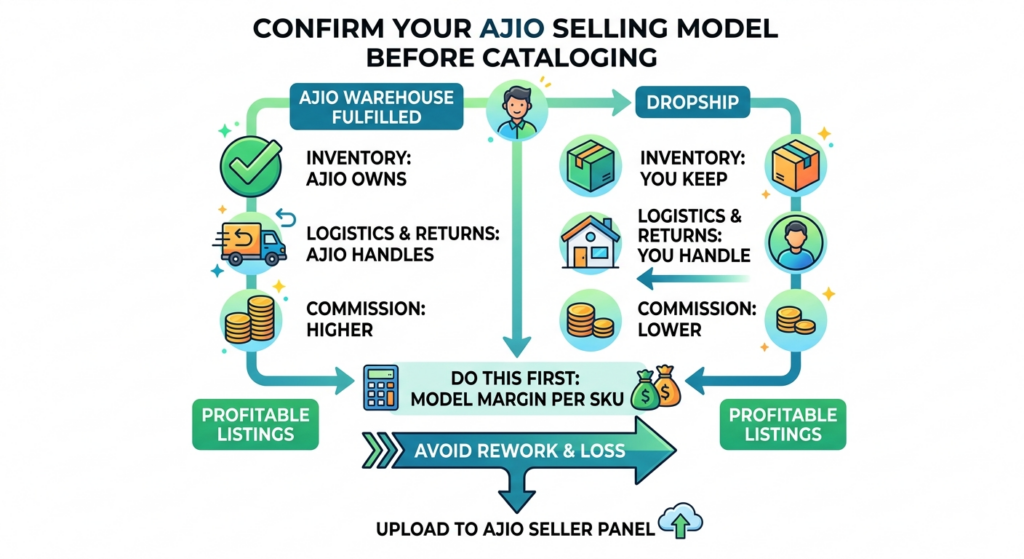
This is the check most sellers skip, and it invalidates work done out of order.
AJIO’s models differ in who owns inventory, who handles returns, and what the commission structure looks like. Warehouse-fulfilled just-in-time arrangements shift logistics and returns to AJIO. Dropship arrangements keep them with you, typically at lower commission.
The catalog consequences are real, not administrative.
| Model characteristic | Catalog implication |
| AJIO warehouse fulfilment | Barcodes and packaging must survive physical inbound QC |
| Seller-fulfilled dispatch | Your own dimension and weight data drives shipping cost |
| AJIO owns returns | Return reasons still route back to your catalog data |
| Seller owns returns | Return cost is directly yours, so accuracy pays faster |
| Differing commissions | Margin floors per SKU differ by model |
Model your margin per SKU under the applicable model before uploading. Catalog management in the AJIO Seller Panel includes commercial data, and a catalog built against the wrong model produces listings you cannot profitably fulfil.
Check 3: Confirm Category Template and Taxonomy Accuracy Before Upload
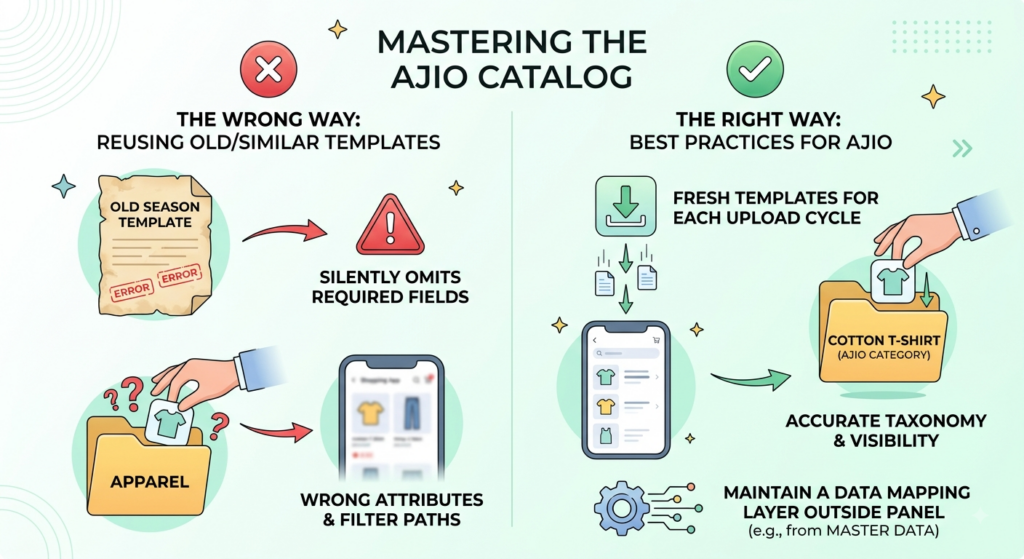
AJIO provides category-specific upload templates. They are not interchangeable, and a template borrowed from a similar category will silently omit fields that category actually requires.
Two failures recur.
Wrong category selection. A product placed in an adjacent category inherits the wrong attribute set and appears in the wrong filter paths. Because AJIO is fashion-led and its taxonomy is granular, adjacent categories are easy to confuse.
Stale templates. Templates change. A file that worked last season may fail validation now.
Download fresh templates for every category before each upload cycle, and maintain a mapping from your master data fields to each template rather than retyping. Efficient catalog management in the AJIO Seller Panel depends on that mapping layer existing outside the panel.
Check 4: Get Size Chart Accuracy and Format Right for Every Fit Type
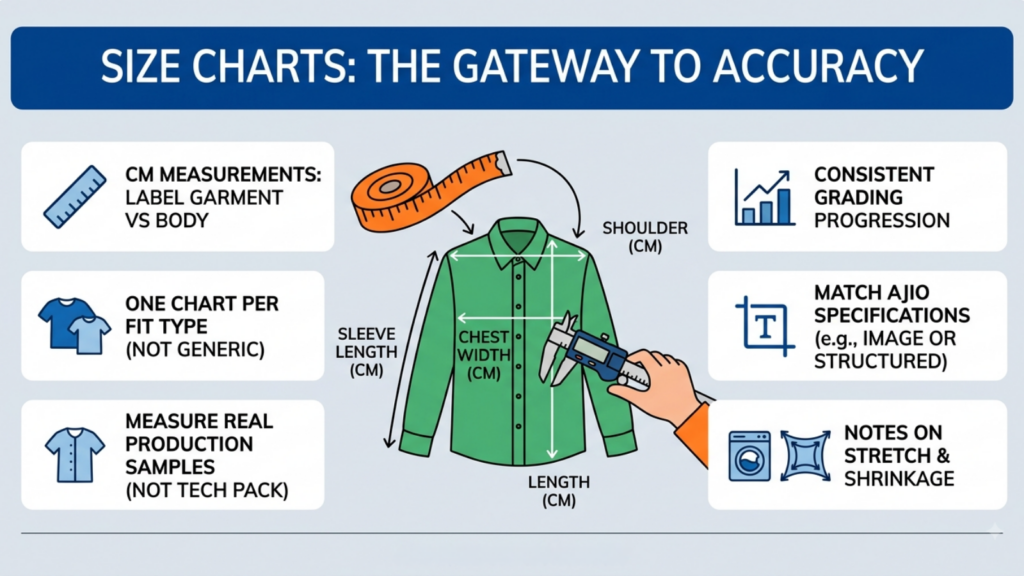
Size charts are an explicit gate in AJIO onboarding, and they are also the highest-leverage accuracy check in the entire list.
Fashion carries the highest return rates in Indian e-commerce, and COD returns run at roughly 25-30% across categories. Fit is the leading avoidable cause, and fit is a data problem.
What to verify:
- Measurements in centimetres, with garment versus body measurements explicitly labelled
- One chart per fit type, not one generic chart applied across the range
- Actual measurements taken from production samples, not from the tech pack
- Consistency across sizes, so the grading progression is arithmetically sound
- Format matching AJIO’s specification, including any image or structured requirements
- Notes on stretch, shrinkage or wash behaviour where material makes it relevant
Measure real garments. The most common source of fit returns is a chart derived from intended specifications rather than delivered product.
Version Your Size Charts Centrally Across Every Sales Channel
A pattern change should update every style using that chart. If your charts live as loose image files, the same style will carry different measurements across AJIO, Myntra, and your own site within two seasons.
Sound catalog management in the AJIO Seller Panel treats a size chart as structured, versioned data rather than an artwork file.
Check 5: Complete the Full Fashion Attribute Set, Not Just Mandatory Fields
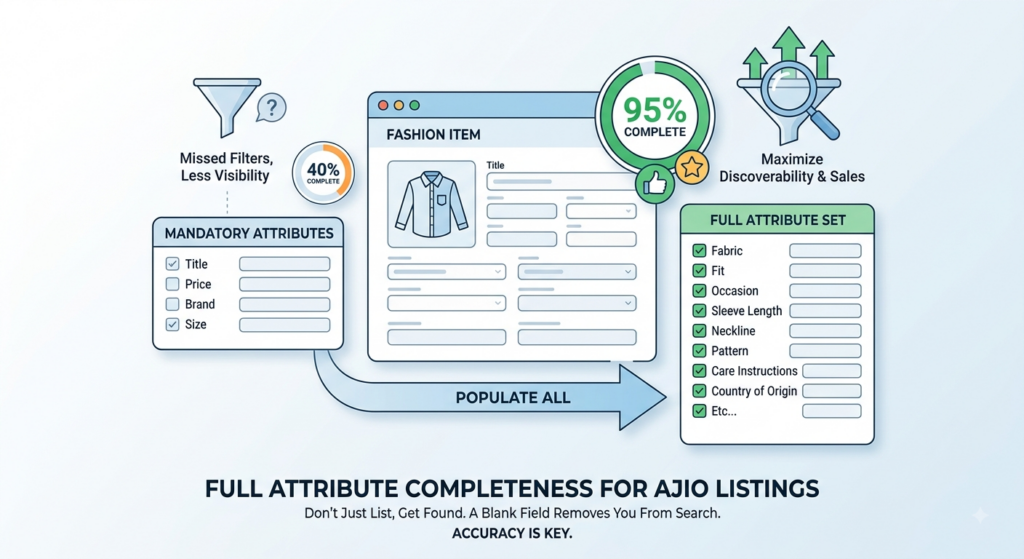
Populating mandatory fields gets you listed. Populating the full set gets you found.
AJIO’s discovery experience runs on filters. A buyer narrowing to a specific fabric, fit, occasion, and sleeve length is filtering on four attributes simultaneously. A blank on any one removes you from that result set entirely.
| Attribute group | Commonly left blank | Why it matters |
| Construction | Fabric composition, weave, lining, closure type | Core filters in ethnic and formal wear |
| Fit | Fit type, length, rise, neckline, sleeve length | Highest-usage apparel filters |
| Occasion | Occasion, season, festive suitability | Drives wedding and festive demand |
| Care | Wash care, ironing guidance | Reduces post-purchase complaints |
| Provenance | Craft technique, handloom or artisan detail | Relevant for AJIO’s artisan and craft categories |
| Pattern type, print scale, embellishment | Primary discovery path in ethnic wear |
Set a completeness target above 90% on the full attribute set per category, measured before upload rather than after. Catalog management in the AJIO Seller Panel is judged on completeness, and completeness is measurable in your own file before AJIO ever sees it.
Accuracy matters more than volume here. A wrong fabric composition on a premium listing is worse than a blank one, because it produces a return and a complaint rather than just a missed filter.
Check 6: Meet Image Standards and On-Model Photography Requirements

AJIO’s positioning is visual and curated, which raises the bar above open marketplaces. Imagery is part of catalog management in the AJIO Seller Panel, where premium positioning translates into concrete requirements.
Verify before submission:
- Resolution and dimensions meeting current specifications
- Background treatment consistent with category requirements
- On-model imagery where the category expects it, which is most apparel
- Detail shots showing fabric texture and construction
- Scale or fit reference, since garment proportion drives returns
- No watermarks, promotional text, competing brand marks or visible price stickers
- Colour calibration, so delivered product matches the on-screen thumbnail
Colour accuracy is a margin issue, not a design preference. A colour mismatch on a premium-priced garment generates a return that costs forward and reverse logistics plus the lost sale.
Build the Photography Shot List Directly From the Catalog
At any real volume, the shot list should be generated from your style master rather than maintained separately. Two lists diverge within one season, and reconciling them is where catalog management in the AJIO Seller Panel quietly consumes a team’s capacity.
Check 7: Structure Style, Variant and Colourway Data Correctly From the Start
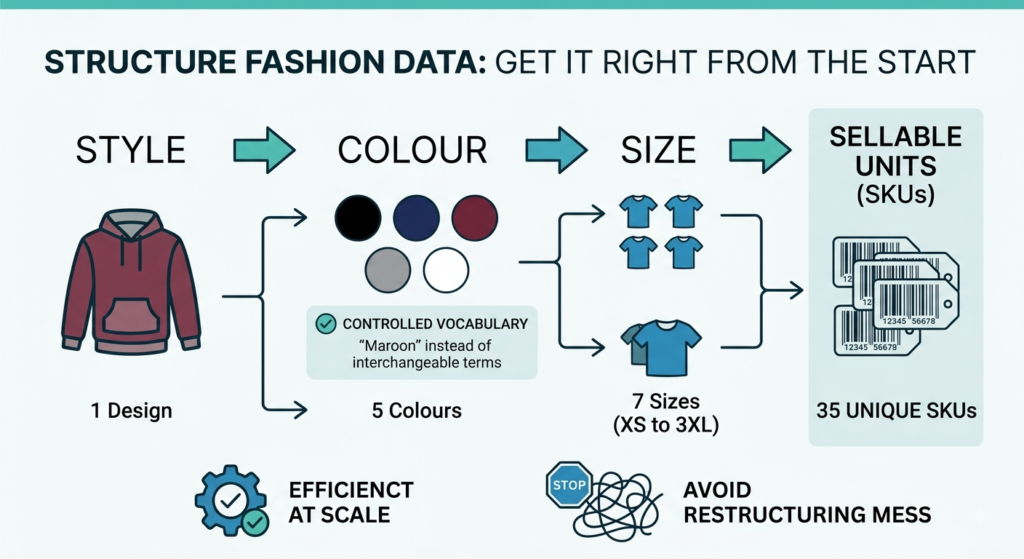
Fashion catalogs multiply. One style in five colours and seven sizes is 35 sellable units under one design.
Get the structure right before uploading, because restructuring after listings are live is substantially harder.
| Structural error | Consequence |
| Sizes created as separate styles | Fragmented performance data, unmanageable panel |
| Colourways merged into one entry | Buyer cannot see what they are ordering, returns rise |
| Colourways with no relationship between records | Ranking and review signals scatter |
| Internal codes reused across colours | Returns cannot be traced to a specific unit |
| Inconsistent colour naming | Your own catalog becomes unsearchable internally |
Maintain a controlled colour vocabulary. “Maroon,” “wine” and “burgundy” used interchangeably across seasons is a small discipline failure that becomes a large data problem at scale, and it is where catalog management in the AJIO Seller Panel usually starts to break down as style counts rise.
Check 8: Verify Barcode, Article Code and Identifier Accuracy Before Labelling

This check is where warehouse-fulfilled models punish sloppiness hardest.
Under inbound quality check, a barcode that does not scan or does not match the declared article is a physical rejection. The stock has already shipped. You now pay to bring it back.
Verify:
- Every sellable unit has a unique identifier, including each size
- Barcodes physically scan on the actual packaging, tested with a scanner
- Codes on labels match codes in the catalog file exactly, including leading characters
- No identifier reused across colours or sizes
- Labels are durable and legibly placed for warehouse handling
- Your internal codes map cleanly to whatever AJIO records against the listing
Test a physical sample per style before bulk labelling. Catalog management in the AJIO Seller Panel is only as accurate as the label a warehouse operator actually scans.
Check 9: Align MRP, Pricing and Commercial Data Across the Catalog
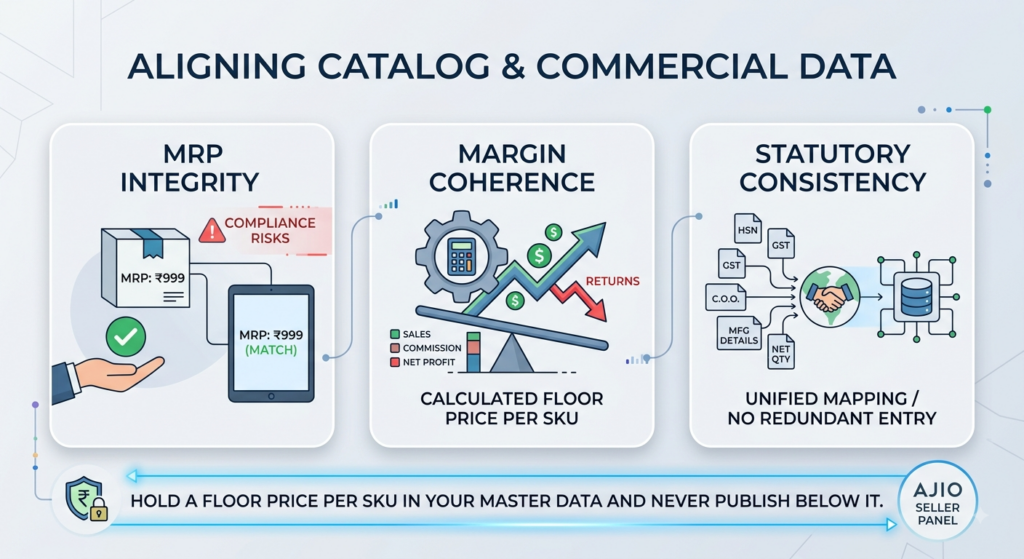
Three separate accuracy risks sit here.
MRP integrity. The MRP in your catalog must match the printed MRP on the product. A mismatch is a compliance exposure and a common inbound rejection reason.
Price and margin coherence. Under the applicable model and commission structure, verify each SKU clears your margin floor after expected returns. On premium-AOV platforms, sellers often assume higher price protects margin, then discover return rates erase it.
Statutory fields. HSN, GST rate, country of origin, manufacturer or importer details, and net quantity must be populated accurately and consistently. Maintain a single central mapping of category to HSN and GST rate rather than retyping per template.
Hold a floor price per SKU in your master data and never publish below it. Disciplined catalog management in the AJIO Seller Panel means the commercial guardrail lives in your own system, not in a spreadsheet someone overrides under pressure.
Check 10: Run Physical-to-Data Verification Before Every Upload

The final check before upload, and the one that prevents the most expensive failures.
Take physical samples and verify them against the catalog record, field by field.
| Field | Verification method |
| Fabric composition | Check against actual garment label and mill certificate |
| Measurements | Measure the production sample, not the sample garment |
| Weight | Weigh packed unit on a calibrated scale |
| Dimensions | Measure packed carton or polybag |
| Pack contents | Open a pack and count |
| Colour | Compare physical sample to edited image under neutral light |
| Barcode | Scan the actual label |
| MRP | Read the printed tag |
Do this on a sample of styles per drop, weighted toward high-volume and high-value lines. Under warehouse-fulfilled models, this check is the difference between a smooth inbound and a rejected consignment.
Mature catalog management in the AJIO Seller Panel treats physical verification as a mandatory gate rather than a spot check, because the cost asymmetry is severe. Verification costs an afternoon. A rejected consignment costs a season’s timing.
The Complete 10-Check Sign-Off Summary for AJIO Sellers
Use this as the sign-off sheet for catalog management in the AJIO Seller Panel. Nothing uploads until every row is closed.
| # | Check | Fails at | Lead time |
| 1 | Brand approval and contracting | Application stage | 6-8 weeks |
| 2 | Selling model confirmation | Margin, post-launch | 5-6 weeks |
| 3 | Category template and taxonomy | Upload validation | 4-5 weeks |
| 4 | Size chart accuracy | Onboarding gate, then returns | 4-5 weeks |
| 5 | Attribute completeness | Discovery and filters | 4-5 weeks |
| 6 | Image standards | Approval, then conversion | 3-4 weeks |
| 7 | Variant and colourway structure | Panel manageability | 4-5 weeks |
| 8 | Barcode and identifier accuracy | Inbound QC | 3-4 weeks |
| 9 | MRP and commercial data | Compliance and margin | 3-4 weeks |
| 10 | Physical-to-data verification | Inbound QC | 3-4 weeks |
Assign Ownership by Check, Not by SKU Range
Audits stall on ownership. Ten checks handed to one operations executive become a queue.
| Checks | Owner | Skill required |
| 1, 2, 9 | Commercial or account lead | Contracting, margin modelling |
| 3, 5, 7 | Catalog executive | Category knowledge, template mapping |
| 4 | Product or tech design | Garment measurement, grading |
| 6 | Creative or studio | Photography, specification compliance |
| 8, 10 | Warehouse or quality | Physical verification, labelling |
Checks 1 and 2 gate everything else. Checks 4, 6 and 8 can run in parallel once the model is confirmed. Sequencing catalog management in the AJIO Seller Panel this way typically compresses an eight-week plan into five.
Measure These Five Numbers Before and After Every Catalog Push
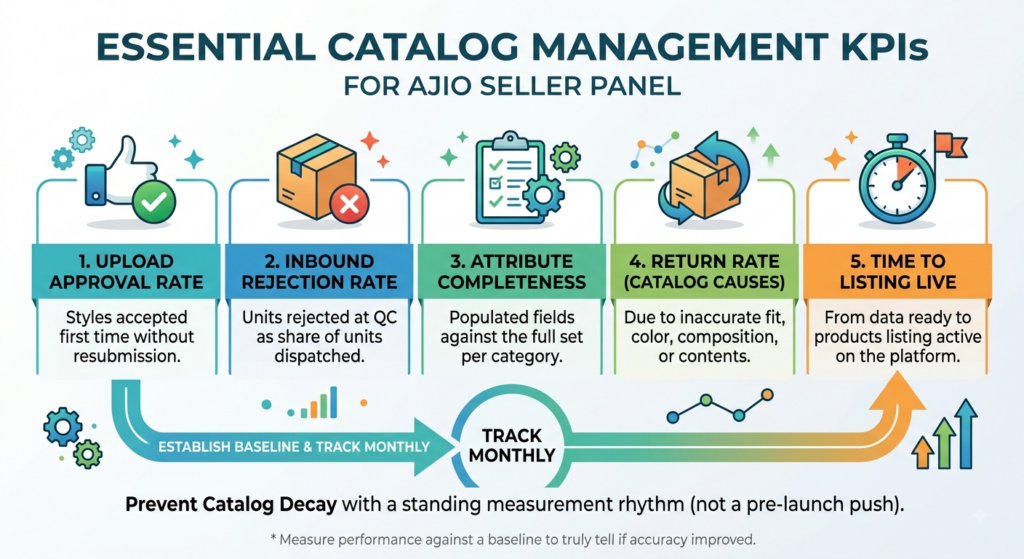
Without a baseline, you cannot tell whether accuracy improved or whether a season simply went well.
First-pass upload approval rate. Styles accepted without resubmission.
Inbound rejection rate. Units rejected at quality check as a share of units dispatched.
Attribute completeness. Populated fields against the full set, per category.
Return rate attributable to catalog causes. Fit, colour, composition and contents reasons specifically.
Time from data ready to listing live. The practical measure of whether your process works.
Track monthly. Catalogs decay continuously as styles are added under time pressure by different people, so catalog management in the AJIO Seller Panel needs a standing measurement rhythm rather than a pre-launch push.
Why the Master Product Record Has to Sit Outside the AJIO Panel
Everything above is achievable manually for one brand launching 150 styles. It is not achievable for a brand running 2,000 styles across AJIO, Myntra, Amazon Fashion and its own site.
The failure pattern is universal. The team corrects a composition on AJIO, misses it elsewhere, corrects each channel separately, and within two quarters no one knows which value is authoritative. Meanwhile, returns are being driven by whichever version was wrong.
Durable catalog management in the AJIO Seller Panel requires corrections to live in a master product record that every channel reads from. Edits made only inside the panel are overwritten at the next bulk push, which is why the same defect reappears every season.
Base.com is built on that principle. Catalog, order management, and warehouse operations share one product record, with rule-based validation before publication and version history on every attribute change. Parent-child style and size relationships are modelled natively, so the family structure exists before anything is pushed to any marketplace.
For AJIO specifically, the fields that cause inbound rejections- barcodes, weights, dimensions, composition, and pack contents- are held once and used by the catalog, the warehouse, and the courier alike. A correction made for listing accuracy also corrects the packing rule and the declared weight, rather than requiring three edits in three systems that later have to be reconciled.
The difference is when you find errors. In a spreadsheet workflow, you find them at the dock. In a governed catalog, validation catches them four weeks earlier.
Start With Brand Approval and Selling Model Confirmation First
If you act on two items, take brand approval and selling model.
Approval determines whether you can list at all. Model determines what your catalog data has to support and whether the economics work. Every other check is wasted effort if either is wrong.
Rigorous catalog management in the AJIO Seller Panel is not about uploading faster. It is about arriving at upload with data that has already been verified against physical product.
Frequently Asked Questions
What is catalog management in the AJIO Seller Panel?
How long does AJIO seller onboarding take?
Why does AJIO reject stock at inbound rather than at listing?
Which catalog errors cause the most returns on AJIO?
Should size and colour variants be separate listings on AJIO?