

To set discount prices for marketplace products, start from contribution margin rather than from MRP, calculate the volume uplift each discount depth requires just to break even, assign discount tiers by SKU role rather than uniformly, and set a hard floor the discount cannot cross.
A discount is not a price cut. It is a purchase of volume, and it has a price.
How to Set Discount Prices for Marketplace Products
“What discount should we run?” is the wrong opening question. The right one is: how much more volume does this discount need to generate before it earns its own cost back?
That number is calculable, and it is usually far higher than teams expect.
Required volume multiple = original contribution margin % ÷ (original contribution margin % − discount %)
Take a SKU priced at ₹1,000 with a landed cost of ₹600. Contribution margin is ₹400, or 40%. Apply a 20% discount and the price becomes ₹800, so contribution falls to ₹200 per unit. To generate the same total contribution, you now need to sell twice as many units.
Not 20% more. Twice as many.
| Discount depth | At 30% margin | At 40% margin | At 50% margin | At 60% margin |
|---|---|---|---|---|
| 10% | 1.5x | 1.33x | 1.25x | 1.20x |
| 20% | 3.0x | 2.0x | 1.67x | 1.50x |
| 30% | Not recoverable | 4.0x | 2.5x | 2.0x |
| 40% | Not recoverable | Zero margin | 5.0x | 3.0x |
| 50% | Not recoverable | Negative | Zero margin | 6.0x |
This table is arithmetic, not a benchmark. The figures are exact for any SKU where you know your true contribution margin.
Two conclusions follow immediately, and they shape everything else about how to set discount prices for marketplace products.
Thin-margin SKUs cannot be discounted deeply. A 30% margin SKU at a 30% discount has no contribution left. No volume uplift rescues it.
Deep discounts only make sense on high-margin SKUs or with a strategic purpose beyond margin. A 50% discount on a 60% margin SKU needs 6x volume to break even on contribution. If you are running it to clear ageing stock or acquire customers, say so explicitly and account for it as such, rather than pretending it is a profitable promotion.
Why How to Set Discount Prices for Marketplace Products Differs in India
Indian festive sale periods are steep-discount environments by convention. Sellers who enter without a framework end up matching competitors rather than deciding.
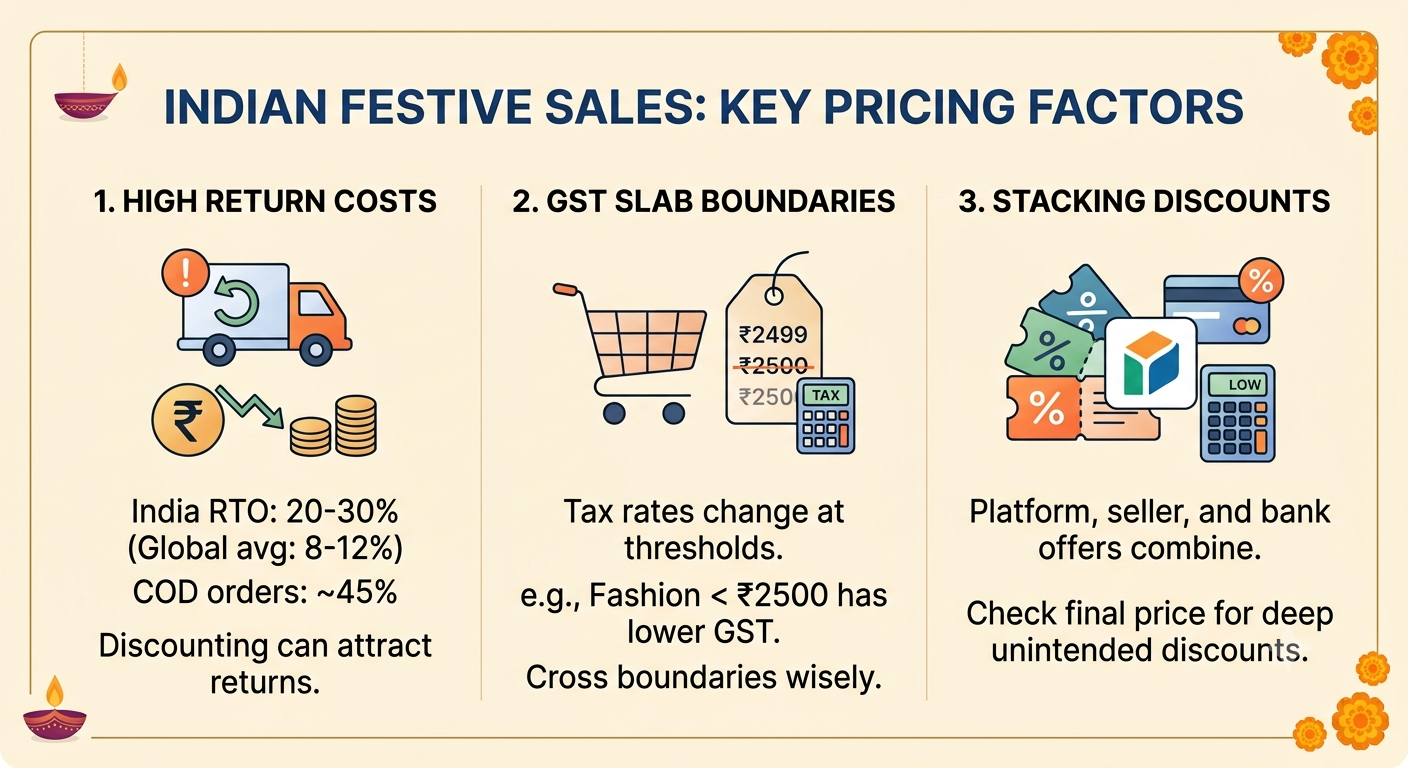
Three India-specific factors change the calculation.
- Return costs sit inside the discount decision. India’s average RTO rate sits between 20% and 30%, against a global benchmark closer to 8-12%, with COD around 45% of D2C orders. A discount that attracts low-intent COD buyers can increase RTO while increasing gross orders. Directional figures; verify against your own data.
- GST slab boundaries create real price points. Redseer specifically flagged that with GST rates dropping for fashion under ₹2,500, premium fashion priced at ₹2,499 would be interesting to watch. That is a genuine pricing threshold, not a psychological one, and discounting a ₹2,700 item to ₹2,499 crosses a tax boundary as well as a price point.
- Discount layers stack in ways approval processes miss. A platform discount, a seller coupon, and a bank cashback offer can combine to produce a realised price well below what was approved, depending on who funds each layer.
Discount Ladders: Why How to Set Discount Prices for Marketplace Products Varies by SKU
Uniform discounting is the most common structural error. Different SKUs are doing different jobs in a sale, and the discount should reflect the job.
| SKU role | Purpose in the sale | Typical discount posture | Success measure |
|---|---|---|---|
| Traffic driver | Win the deal slot, pull visitors | Deepest, accepted as loss-leading | Sessions and attach rate, not SKU margin |
| Margin SKU | Convert the traffic profitably | Moderate | Contribution margin |
| Clearance | Exit ageing or seasonal stock | Deep, capped by recovery target | Units cleared and cash recovered |
| New launch | Buy trial and reviews | Modest, protect reference price | Review volume and repeat rate |
| Long tail | Present, not promoted | Minimal or none | No management overhead |
Discount postures are strategic positions, not fixed percentages. Set the actual numbers from your own contribution margins using the break-even table above.
The traffic driver row is where discipline matters most. A loss-leading SKU is defensible if, and only if, you measure the attach rate. If visitors arrive for the discounted SKU and buy nothing else, you have bought traffic and sold margin, and the strategy failed regardless of how well the SKU itself sold.
Track basket composition on deal days specifically. It is the only evidence that a traffic driver is working, and without it the role-based approach to how to set discount prices for marketplace products is unverifiable.
The Funding Question: Who Actually Pays for the Discount
Marketplace discounts are funded in several ways, and the label often does not match the mechanism.
- Seller-funded discount. You bear it in full. Straightforward and fully visible in your margin calculation.
- Platform-funded discount. The marketplace bears it, sometimes in exchange for participation commitments or promotional fees.
- Co-funded. Split by agreement.
- Bank and payment offers. Typically funded by the bank or payment partner, though eligibility conditions may affect your order mix.
- Deal slot fees. Separate from the discount itself, charged for placement.
The failure mode is assuming a discount described as platform-funded reaches your P&L at zero cost. Some are recovered through commission adjustments or promotional fees at settlement.
Before agreeing to any promotional layer, confirm the funding mechanism in writing and model it into landed cost. Anyone deciding how to set discount prices for marketplace products without knowing who pays for each layer is guessing at their own margin.
How to Set Discount Prices for Marketplace Products Around Indian Price Bands
Discounting to an arbitrary number wastes the last few rupees of margin.
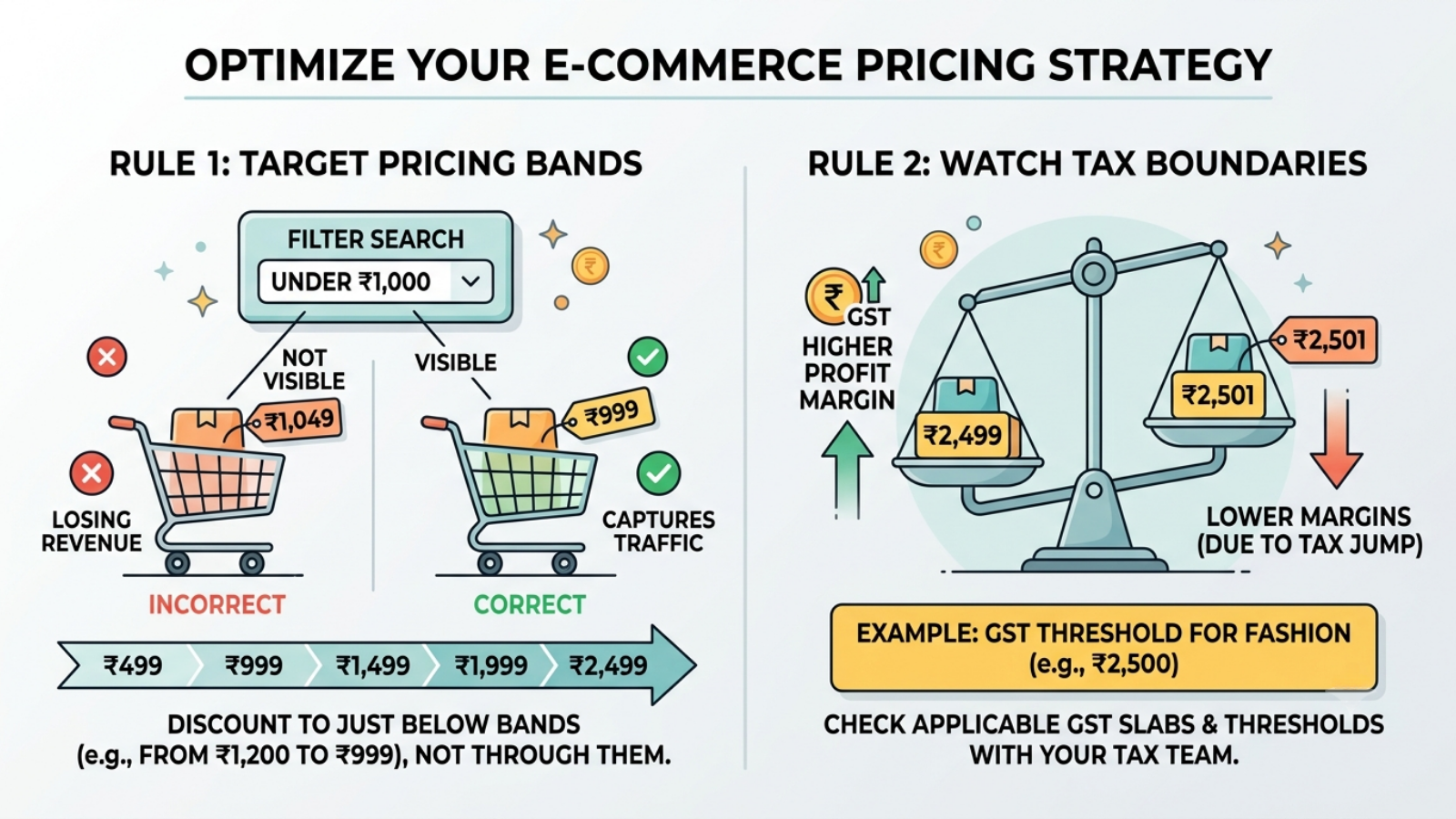
Indian ecommerce clusters around recognisable bands: ₹299, ₹499, ₹999, ₹1,499, ₹1,999, ₹2,499. Filter behaviour reinforces this: a shopper filtering “under ₹1,000” does not see your ₹1,049 item at all, no matter how good the offer is.
Two practical rules:
- Discount to just below a band, not through it. Moving from ₹1,200 to ₹999 captures the filter. Moving to ₹950 gives away ₹49 for nothing.
- Check the tax boundary, not just the psychological one. The GST threshold that Redseer highlighted for fashion under ₹2,500 is a real economic boundary. Confirm current slab boundaries applicable to your category with your finance or tax team, since these change.
This is the part of how to set discount prices for marketplace products that costs nothing and is skipped most often. Work backwards from the band to the discount percentage rather than forwards from a round discount to whatever price results. A “flat 25% off” campaign that lands SKUs at ₹1,049 and ₹1,124 has left money on the table twice.
Step by Step: How to Set Discount Prices for Marketplace Products With the Base.com PIM Module
Base.com bundles order management, product management (PIM), warehouse management, shipping, workflow automation, repricing and analytics into one platform. For discounting, the relevant machinery is the Product Manager’s price groups, bulk editing, price synchronisation and Price Automation.
Step 1: Confirm Purchase Prices Are Current

Base.com’s Product Manager combines ERP, WMS and PIM functions, and supports calculating price groups based on purchase price.
Update purchase prices before anything else. Every calculation below- margin, break-even uplift, floor- depends on this figure, and a discount plan built on last season’s costs is confidently wrong.
If supplier costs or GST slabs have moved since your last update, this step is not optional.
Step 2: Build a Price Group Structure for Discounting
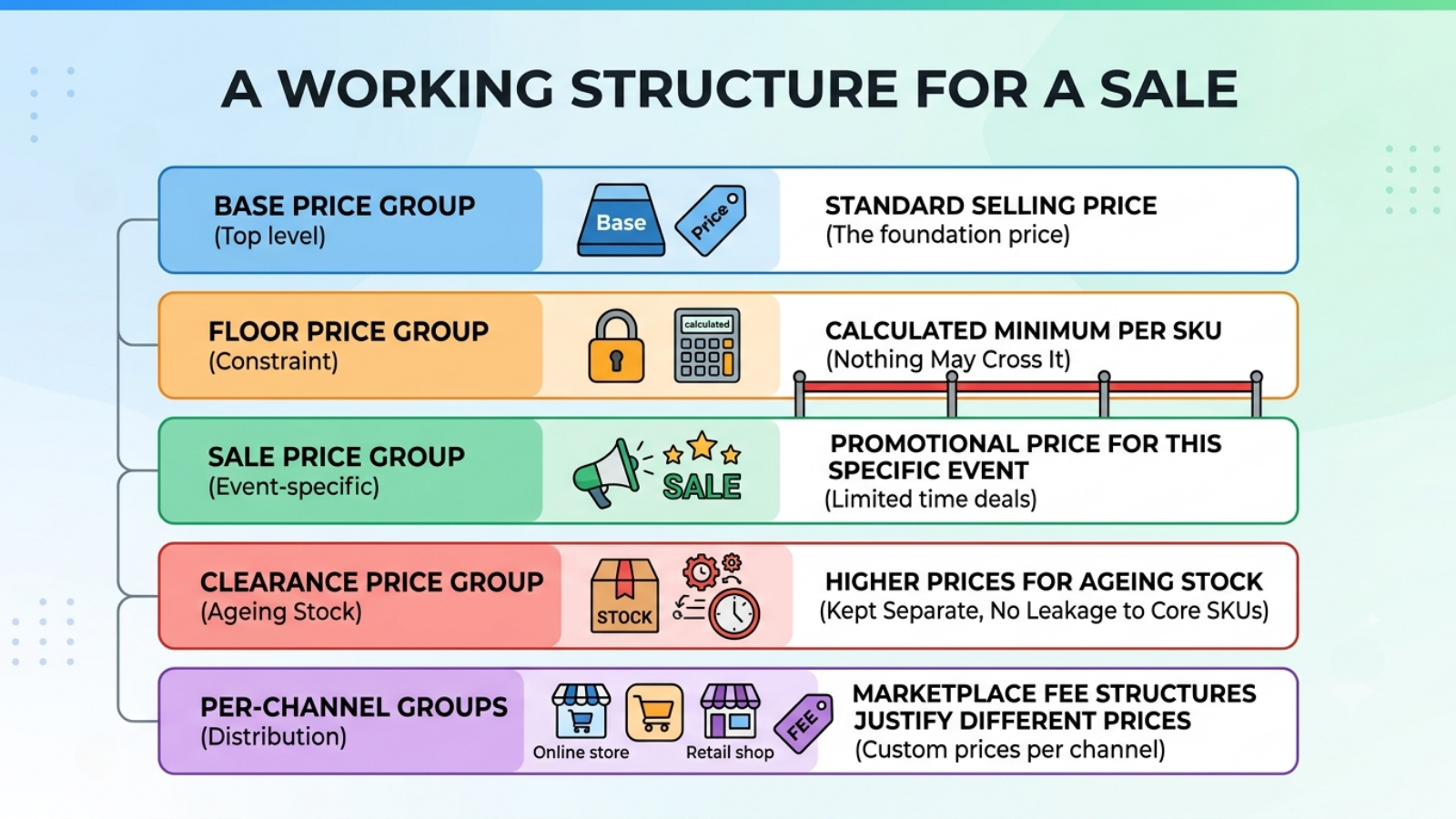
An inventory in Base.com can be assigned one or more languages, warehouses, and price groups, which function as separate price lists.
A working structure for a sale:
- Base price group, standard selling price.
- Floor price group, the calculated minimum per SKU. Nothing may cross it.
- Sale price group, the promotional price for this specific event.
- Clearance price group, higher prices for ageing stock, kept separate so clearance logic never leaks into core SKUs.
- Per-channel groups where marketplace fee structures justify different prices.
Keeping the sale and clearance groups separate is what prevents the single most damaging discount error: a clearance-depth price accidentally applied to a core margin SKU.
Step 3: Calculate Floors Before Calculating Discounts
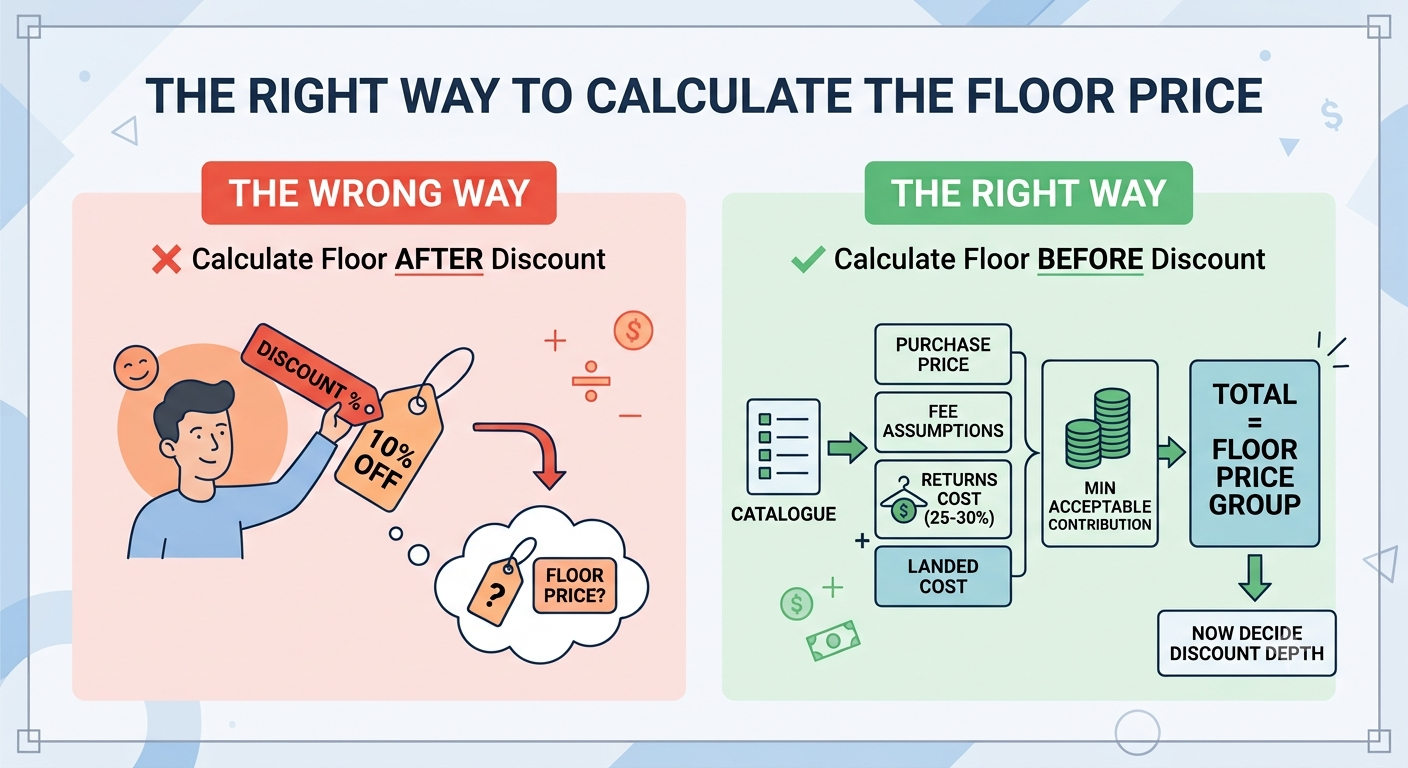
Export the catalogue with purchase price alongside your fee assumptions and returns cost, calculate landed cost, add minimum acceptable contribution, and write the result into the floor price group.
Do this before deciding discount depth, not after. A floor calculated after the discount has been agreed tends to be reverse-engineered to justify it.
For fashion in particular, include the returns line. Fashion return rates commonly reported at 25-30% in India mean a floor calculated without returns cost will look healthy and lose money on every sale.
Step 4: Assign Discount Tiers by SKU Role
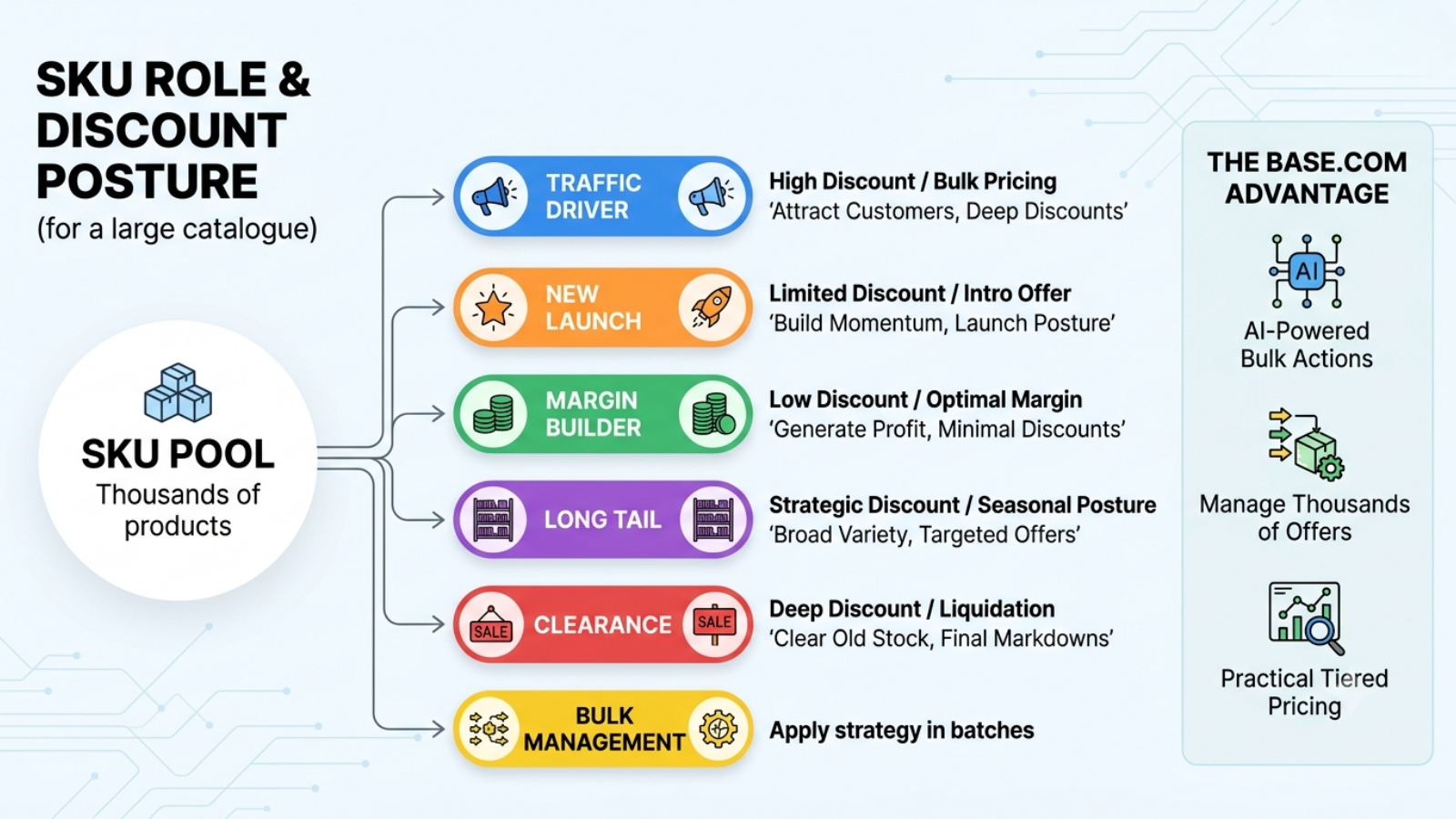
Tag SKUs by the role they play in the sale: traffic driver, margin, clearance, new launch, long tail, and apply the corresponding discount posture.
Base.com supports bulk listing and editing of thousands of marketplace offers, and its AI functions are positioned for modifying many products or offers simultaneously rather than one at a time. This is what makes role-based tiering practical on a large catalogue rather than theoretical.
Work in bulk by tier. Never apply a flat percentage across the whole catalogue.
Step 5: Validate Every Discounted Price Against Its Floor
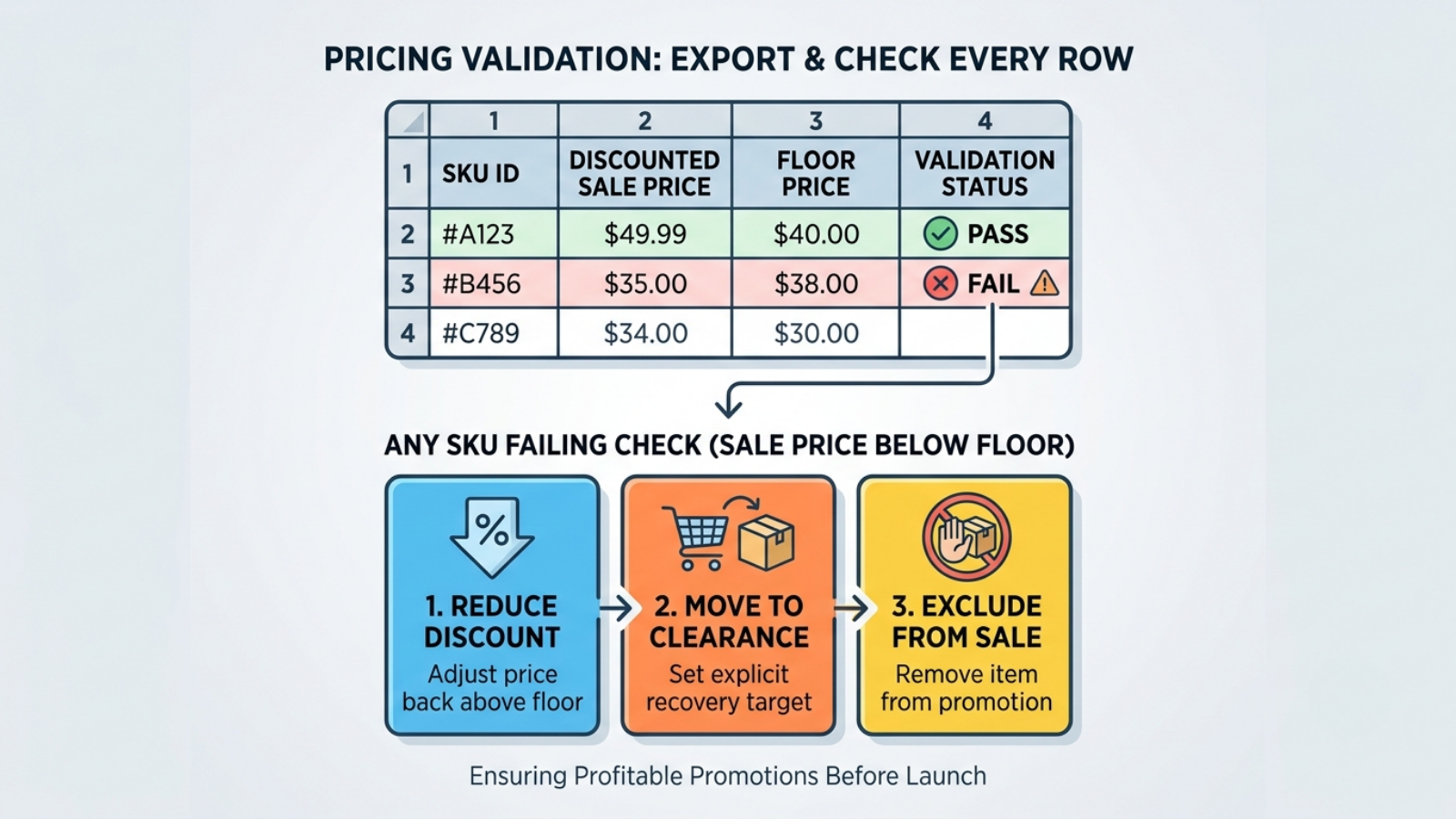
Export sale price and floor price side by side and check every row.
This validation pass is the actual control. Everything before it was configuration, and configuration without validation is where below-cost prices survive to launch.
Any SKU where the discounted price falls below its floor gets one of three treatments: reduce the discount, move it to the clearance tier with an explicit recovery target, or exclude it from the sale.
Step 6: Model the Fully Stacked Price
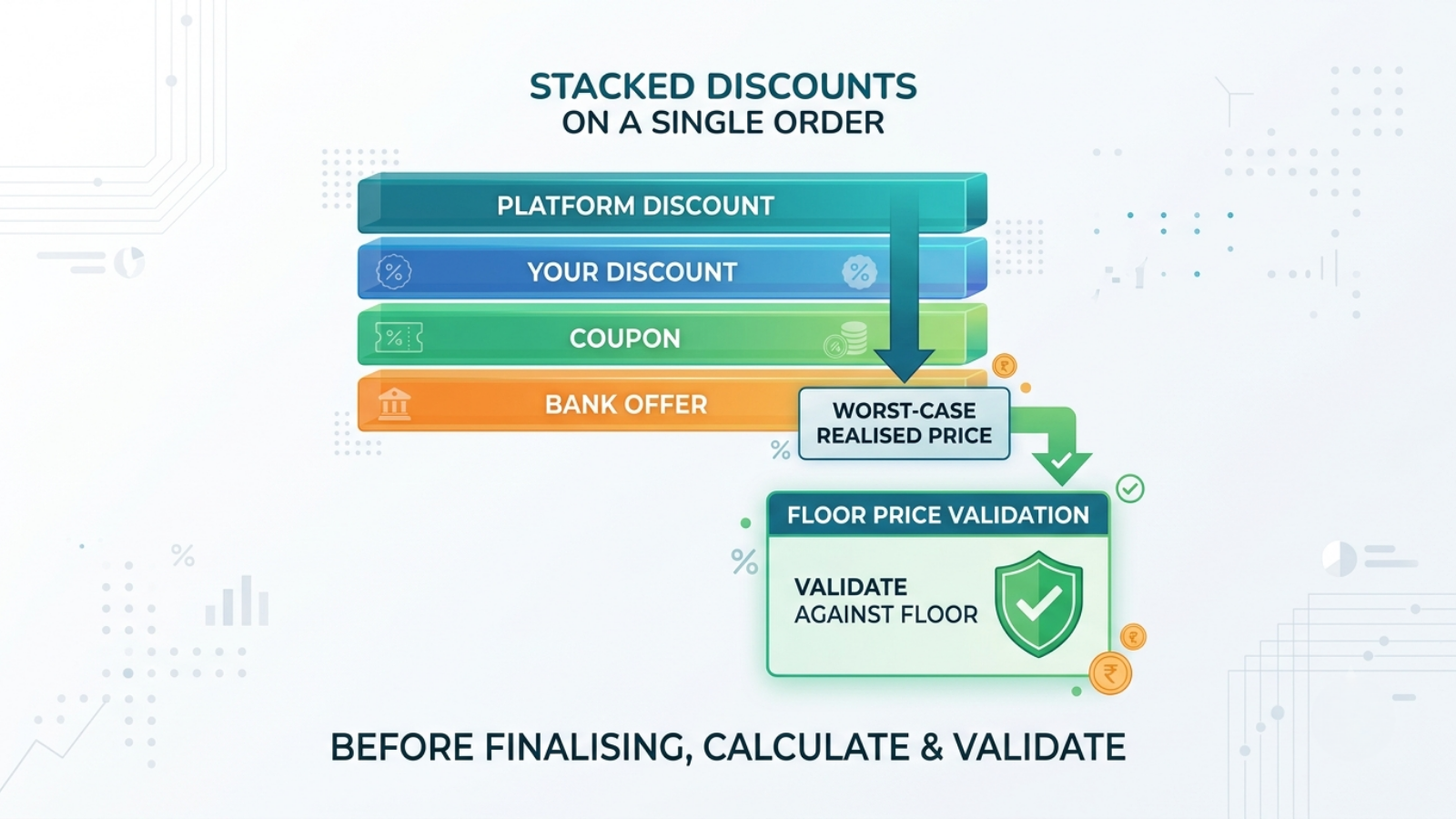
Before finalising, calculate the worst-case realised price if every discount layer fires on the same order: your discount, the platform layer, any coupon, any bank offer.
Validate that stacked price against the floor, not just your own discount. This is the check that most commonly separates an approved discount plan from what actually happens at settlement.
Step 7: Set Price Automation Limits That Respect the Floor
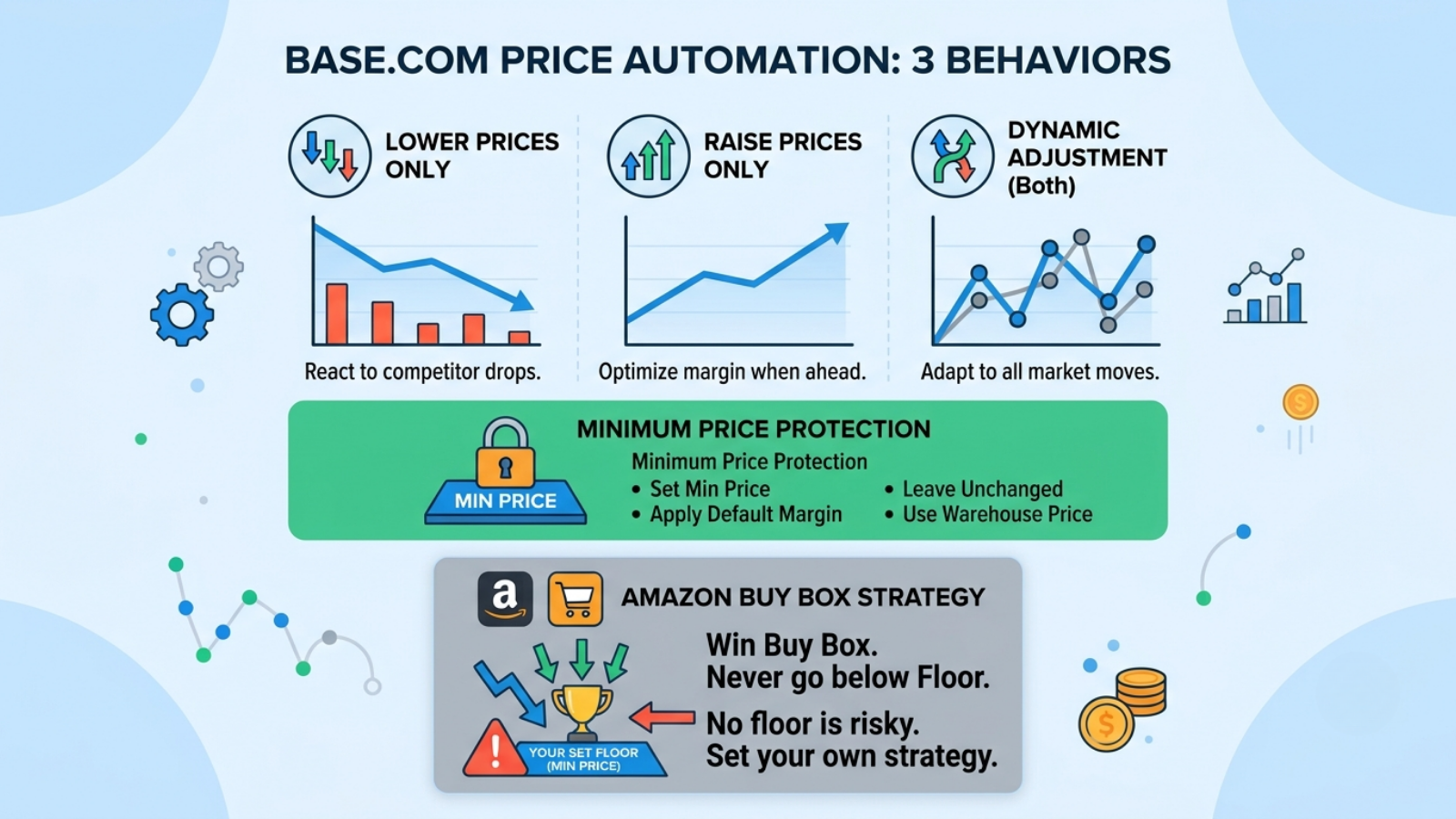
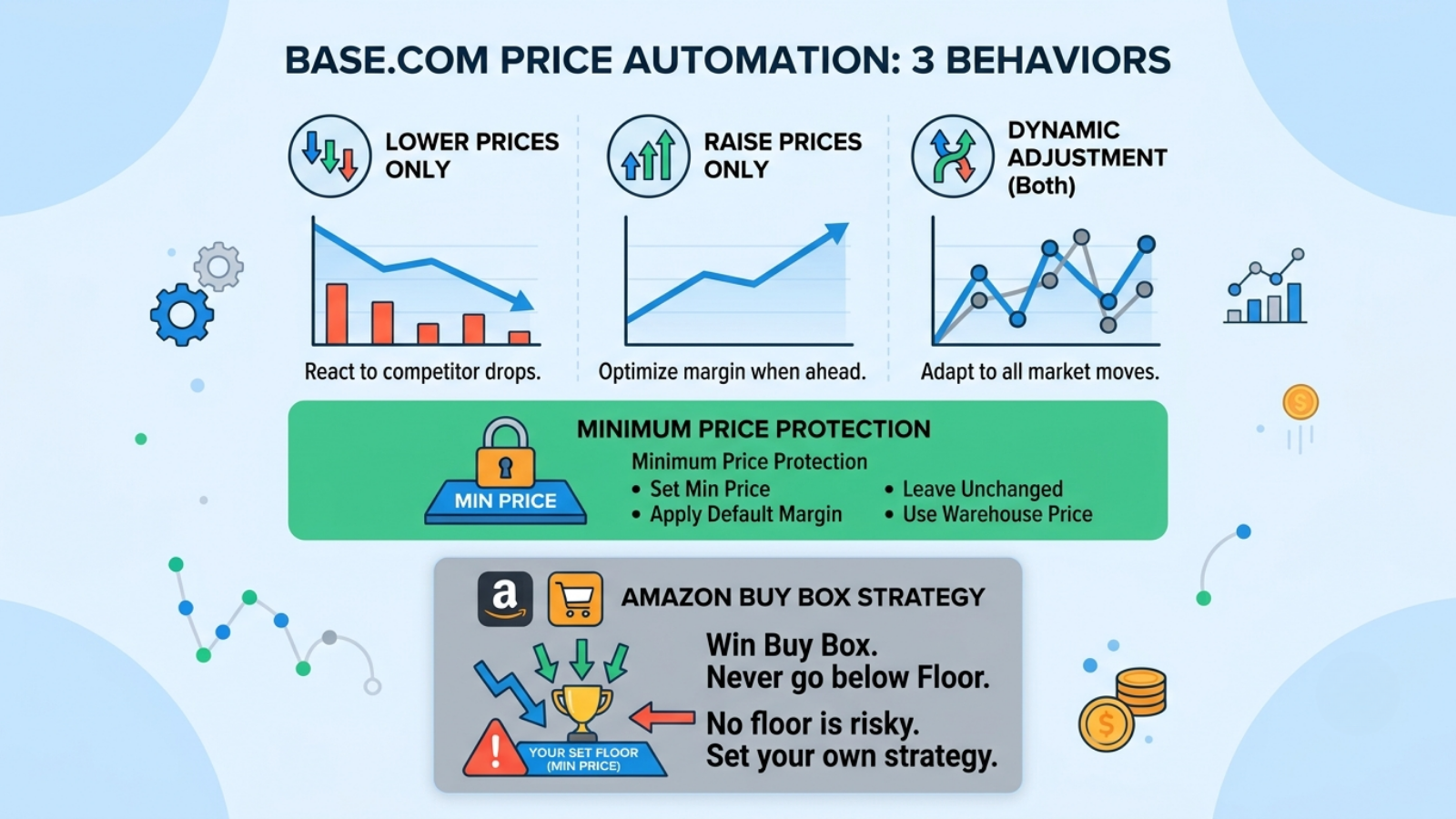
Base.com’s Price Automation adjusts prices in response to competitor movement, with three behaviours: lower prices only, raise prices only, or dynamic adjustment in both directions. When the calculated price would fall below your minimum, the options are to set the minimum price, apply the default margin, leave the price unchanged, or use the warehouse price.
For Amazon specifically, the automation will attempt to lower the offer price until the Buy Box is obtained or the set minimum price is reached.
Set that minimum from your calculated floor. Running a repricer during a sale without a floor-derived minimum means your discount strategy is decided by whichever competitor is most willing to lose money.
Enable the raise-prices behaviour too. Base.com’s own reporting on its repricing beta indicated the majority of users used it to increase prices and improve margins rather than to cut them. That is a vendor claim about its own beta rather than independent research, but the underlying logic holds: competitor stockouts and competitor price rises during a sale are margin opportunities that a lower-only configuration cannot capture.
Step 8: Route Prices Through Target Price Groups Correctly
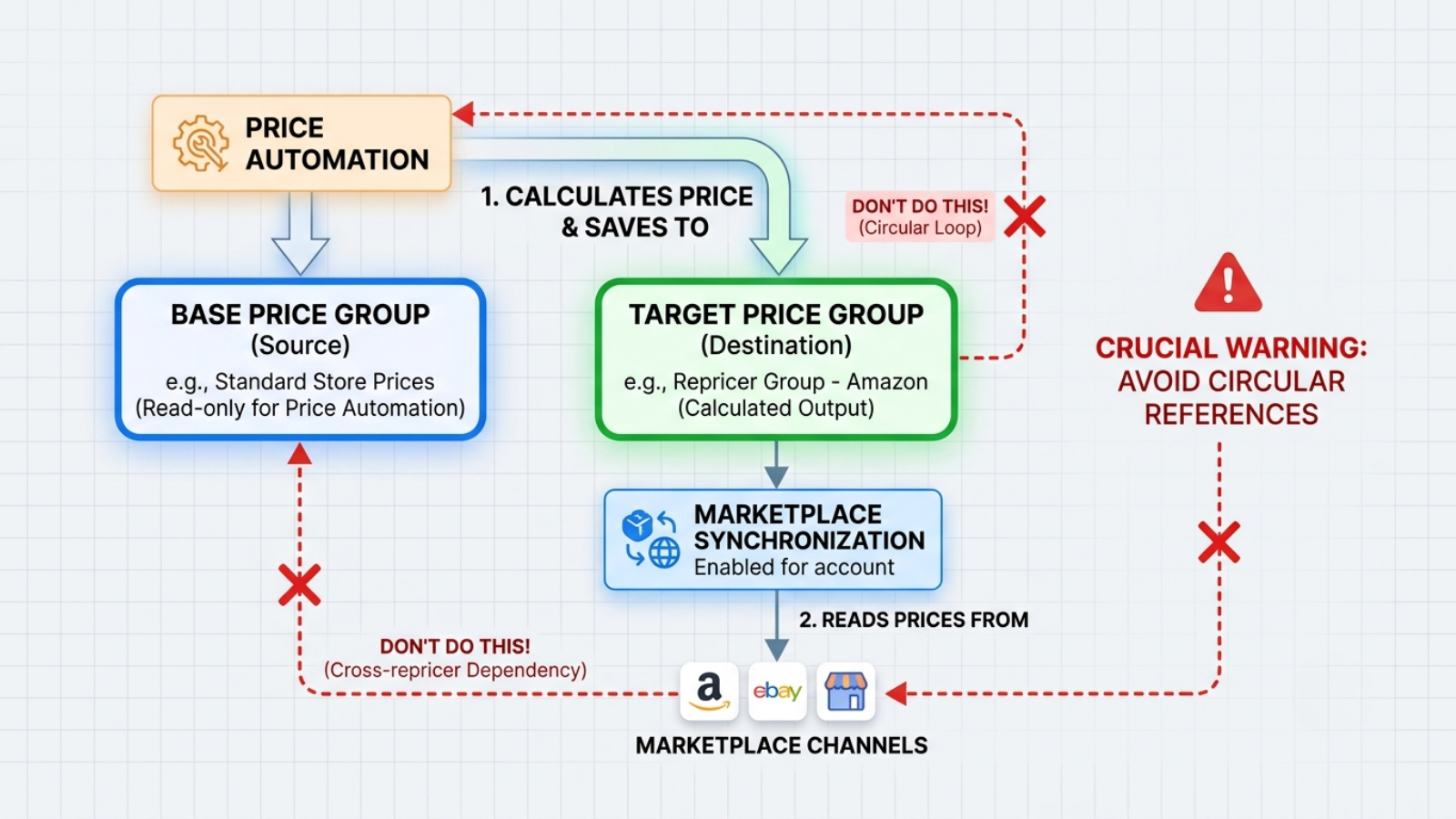
Price Automation saves calculated prices into a designated target price group, and getting them onto the marketplace requires price synchronisation to be enabled for that account.
Base.com’s documentation carries an explicit warning: do not select the same price group as the base price for this or any other repricer, and ensure the target group is not being used as a base price group by a repricer on another marketplace.
Diagram your price group map before configuring. Which group is base, which is target, which channel reads which. Circular references here produce failures that are genuinely difficult to diagnose mid-sale.
Step 9: Raise Price Synchronisation Frequency for the Window
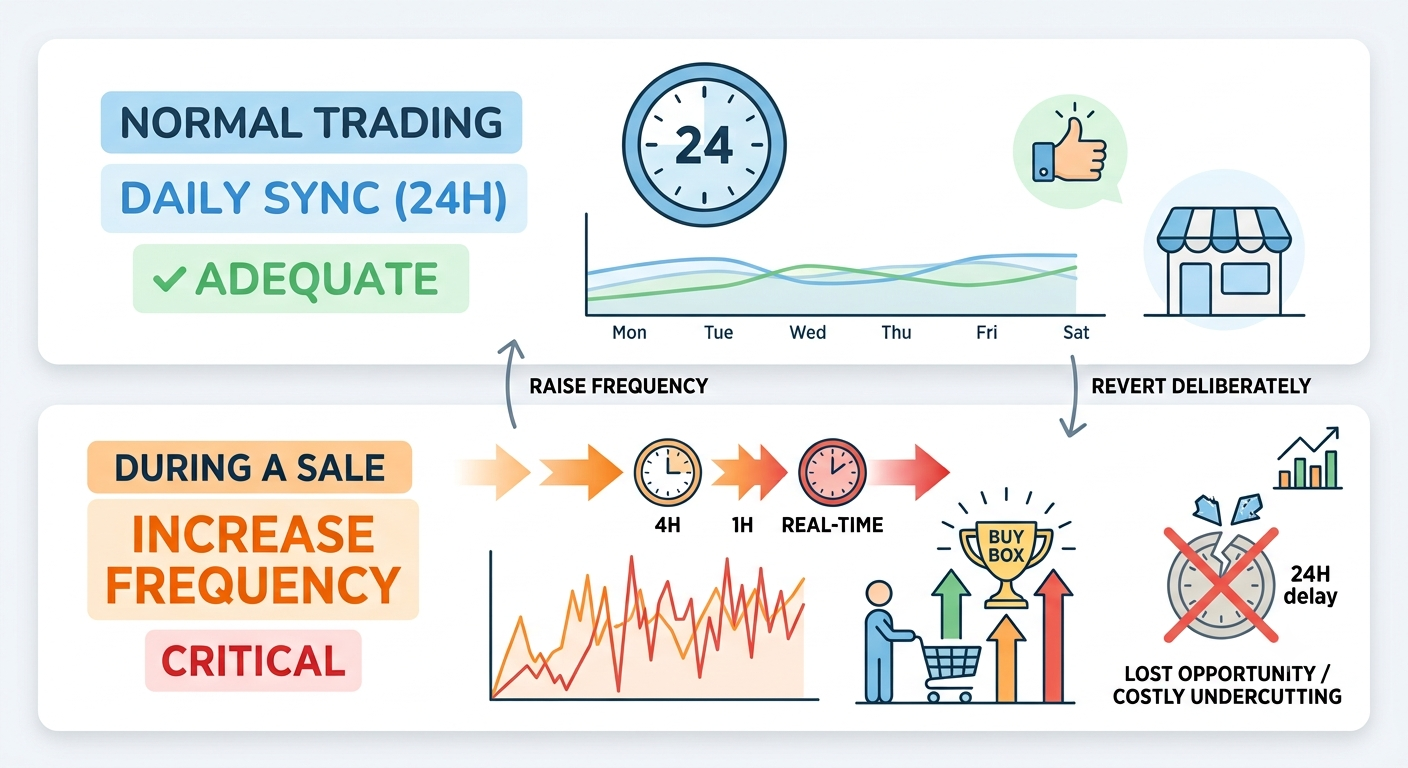
Base.com’s price synchronisation runs at 24-hour, 12-hour, four-hour, hourly or real-time intervals.
Daily sync is adequate for normal trading. During a sale, a competitor price move that takes 24 hours to reach your listing costs you either a day of Buy Box or a day of unnecessary undercutting.
Raise the frequency for the window and revert deliberately afterwards.
Step 10: Plan the Price Restoration Before You Launch
Decide now what happens when the sale ends.
Snapping straight back to full price after a deep discount can suppress conversion, because the recent lower price becomes the buyer’s reference point. A staged restoration, sale price, then an intermediate price, then base, protects velocity and the ranking signal that depends on it.
Build the restoration schedule into your price groups before the sale opens, so it executes as a planned change rather than a scramble.
Step 11: Freeze and Document
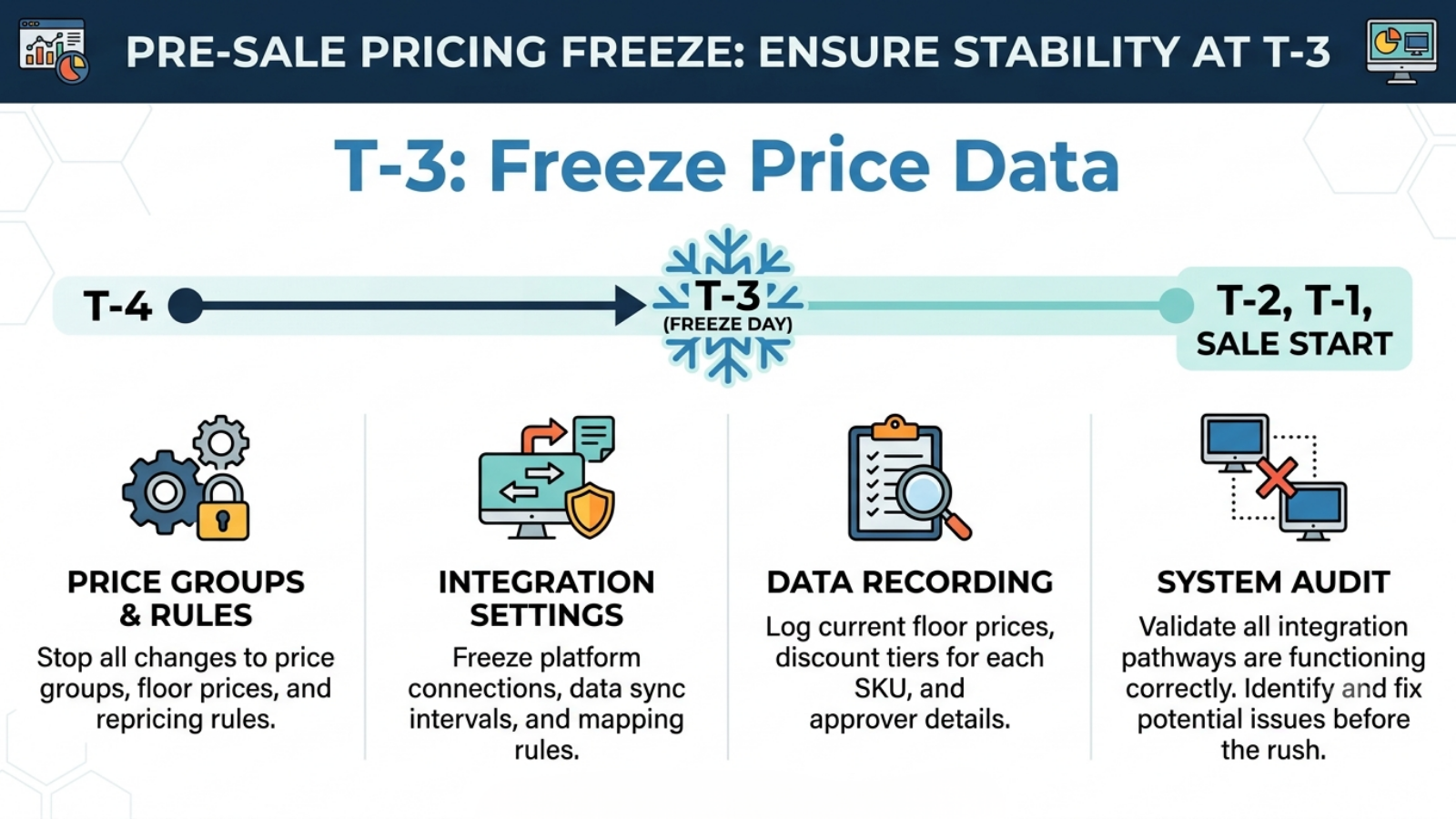
Freeze price groups, repricing rules, and integration settings at T-3.
Record which price group each channel reads, what each floor is, what discount tier each SKU sits in, and who approved it. Price rules fail more quietly than stock rules, and mid-sale changes have no time to be validated.
Base.com’s documented competitor-monitoring and repricing coverage names Amazon, Allegro, eMAG and Ceneo. Coverage for Flipkart, Myntra or Meesho is not enumerated in public documentation.
The PIM, price group, bulk editing and synchronisation machinery described above applies regardless of marketplace. The competitor-monitoring layer may not. Confirm current Indian marketplace support with Base.com directly before building a strategy that depends on it.
Discount Depth Guidance by Category
Category is the second-largest input into how to set discount prices for marketplace products, after the contribution margin itself.
Category economics constrain how deep you can go, largely through return rates and margin structure.
| Category | Typical India return rate | Discount constraint | Note |
|---|---|---|---|
| Fashion and apparel | 25-30% | Returns cost consumes margin before discount does | Calculate floor after returns, always |
| Beauty and personal care | 1-5% | Margin usually supports depth | Expiry-driven clearance is the real discount trigger |
| Consumer electronics | 5-8% | Thin margins cap depth sharply | Small discounts, high absolute value |
| Home and kitchen | 15-20% (global) | Reverse logistics cost is high | Deep discounts on bulky items rarely recover |
| FMCG and food | Low | Shelf life drives clearance timing | FEFO should trigger the discount, not the calendar |
| Jewellery and accessories | Low | High ASP, low obsolescence | Discount is rarely the right lever; carrying cost is low |
Return-rate figures blend Indian and global sources and are directional. Verify against your own data before using them in a floor calculation.
The electronics row deserves emphasis. Thin percentage margins on high-ASP items mean the break-even table punishes depth severely: a 10% discount on a 15% margin SKU requires 3x volume to break even. Understanding how to set discount prices for marketplace products in electronics is mostly an exercise in resisting depth.
Marketplace-Wise Considerations for How to Set Discount Prices for Marketplace Products
| Marketplace | Discount dynamic | What to watch |
|---|---|---|
| Amazon.in | Buy Box responds to price among other factors | Set repricer minimum from floor, not from competitor price |
| Flipkart | Ranking responds to price and velocity together | Confirm funding of each discount layer before agreeing |
| Myntra | Steep discounting is the category norm | Floor must absorb 25-30% return cost first |
| Meesho | Price-led, high RTO exposure | Deep discounts can increase RTO faster than orders |
| Nykaa / Ajio | Curated, brand-positioning sensitive | Check brand agreement constraints on discount depth |
| Quick commerce | Convenience premium often accepted | Discount may be unnecessary; test before assuming |
| Own D2C | Highest margin per unit | Do not undercut your own marketplace listings accidentally |
The quick commerce row is worth testing rather than assuming. Convenience-led channels frequently sustain higher prices than marketplaces, and applying marketplace discount depth there can give away margin no customer required.
Measuring Whether the Discount Worked
Measure within 14 days of the sale closing.
| Metric | Formula | What it tells you |
|---|---|---|
| Realised volume uplift | Sale units ÷ baseline units | Compare against required break-even multiple |
| Contribution vs baseline | Total contribution during sale ÷ equivalent baseline period | The actual answer |
| Below-floor sale rate | Units sold below floor ÷ total units | Should be exactly zero |
| Attach rate on deal days | Basket items per order, deal days vs normal | Whether traffic drivers worked |
| RTO delta | Sale-period RTO % − baseline RTO % | Whether discount depth attracted low-intent buyers |
| Post-sale velocity recovery | Weeks to return to baseline velocity at base price | Reference price damage |
Targets are not offered here deliberately, because the only meaningful benchmark is your own break-even multiple, which the table at the top of this article gives you exactly.
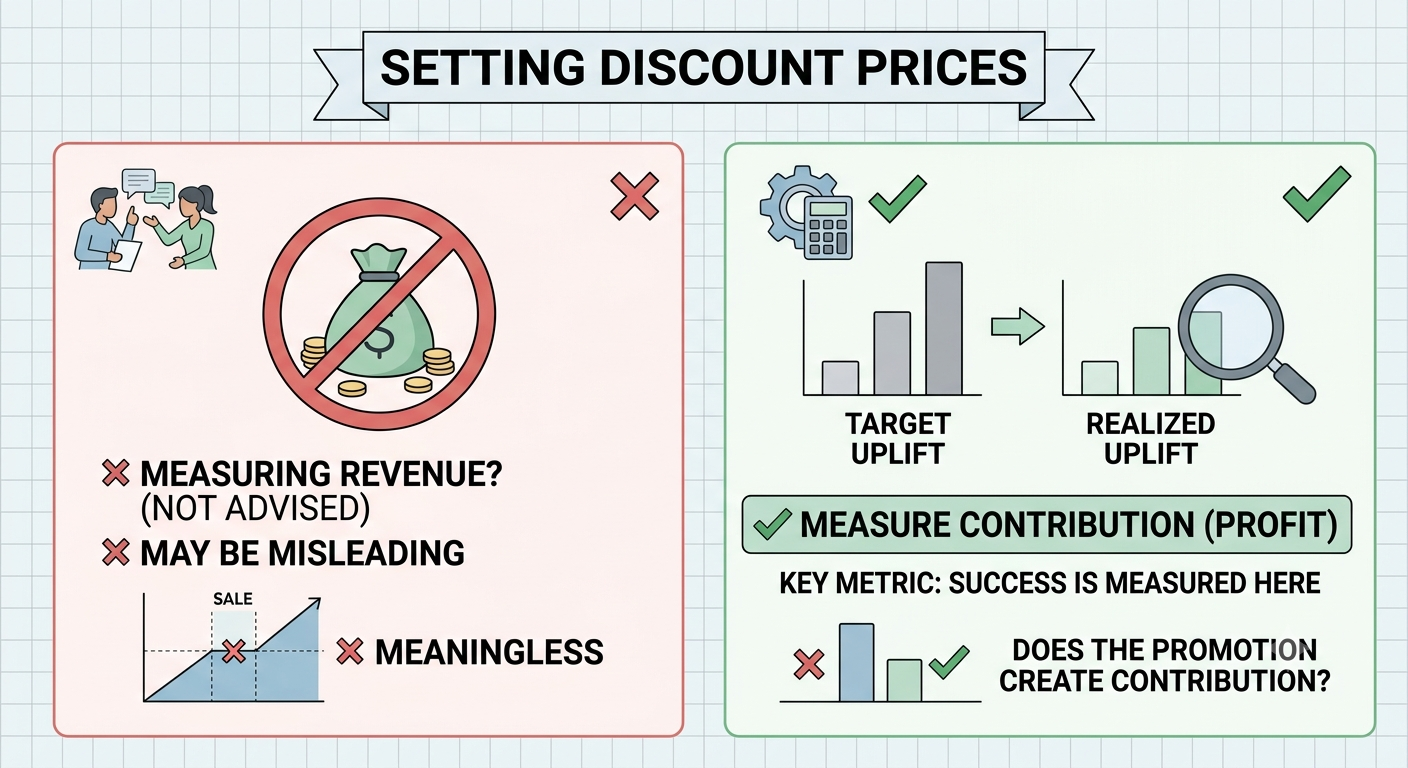
The comparison that matters is realised volume uplift against required uplift. If a 30% discount on a 40% margin SKU needed 4x and delivered 2.2x, the promotion destroyed the contribution regardless of how strong the revenue line looked.
Revenue growth during a discounted sale is close to meaningless as a success measure. Contribution is the number, and measuring it is what turns how to set discount prices for marketplace products from an annual argument into a repeatable calculation.
Mistakes to Avoid While Setting Discount Prices for Marketplace Products
- Discounting from MRP rather than from contribution margin. MRP has no relationship to what you can afford to give away.
- Applying a flat percentage across the catalogue. Different SKUs do different jobs and warrant different depths.
- Never calculating the break-even uplift. Most teams discover the required multiple only after the sale, if ever.
- Assuming platform-funded means free. Some layers return through commission adjustments or promotional fees.
- Omitting returns cost from the floor. In fashion, this single omission makes profitable-looking prices loss-making.
- Discounting past a price band. Moving to ₹950 instead of ₹999 gives away margin the filter did not require.
- Running a repricer without a floor-derived minimum. Your discount strategy ends up set by your least disciplined competitor.
Deciding How to Set Discount Prices for Marketplace Products Is a Contribution Decision
Every discount is a trade: margin per unit exchanged for volume. The trade is either favourable or it is not, and the arithmetic that settles it takes thirty seconds per SKU.
Start from the contribution margin. Calculate the break-even multiple. Assign depth by SKU role rather than uniformly. Confirm who funds each layer. Set a floor and route every automated price through it. Discount to a price band, not past one. Plan the restoration before you launch.
With Indian festive GMV projected to cross ₹1.15 lakh crore in a 30-35 day window and discount depth treated as a competitive default rather than a decision, the sellers who protect contribution are the ones who worked out what each percentage point actually costs before the sale opened. Base.com’s price groups, bulk editing, and Price Automation give you the structure to hold a floor across thousands of SKUs and multiple channels without editing prices by hand.
Calculate the multiple. Set the floor. Discount by role. Measure contribution, not revenue.
Frequently Asked Questions
How do I know if a discount is too deep?
Should every product get the same discount during a marketplace sale?
How does RTO affect how to set discount prices for marketplace products in India?
What price should I discount to?
Can I raise prices during a sale period?