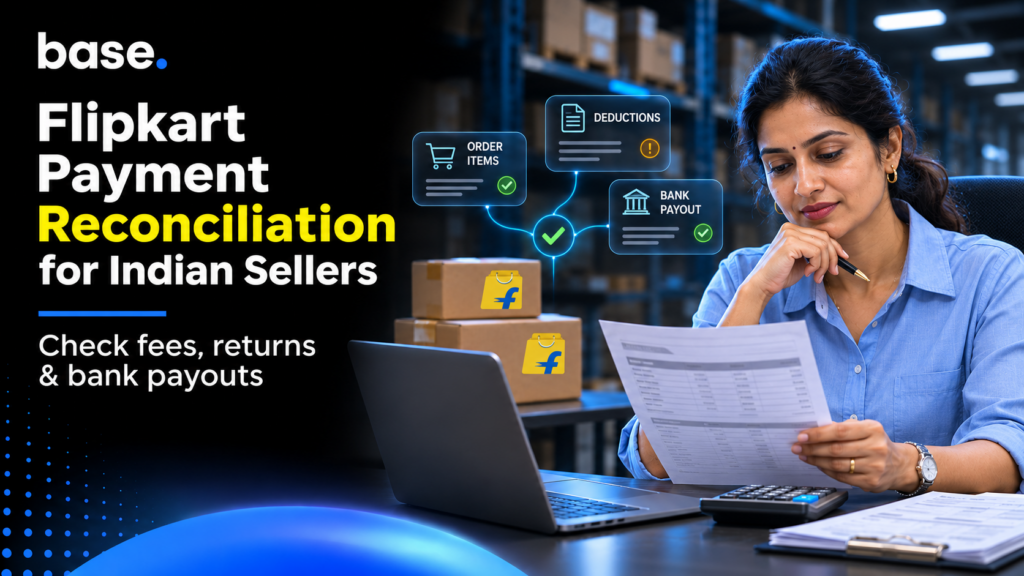
The Flipkart payment reconciliation process is reconciling your settlement report to your order items, commission, fees, returns, tax and the amount that has been paid into your bank account. This can be done by downloading the reports and reconciling your order items. Sum up the deductions and reconcile to your bank. Investigate any discrepancies and post to your ledger.
This guide will help sellers and finance teams to understand how the payout differs from sales. This provides an easy to repeat process that will tell you what to deduct and provides an example for your books.
What is payment reconciliation for a Flipkart seller?
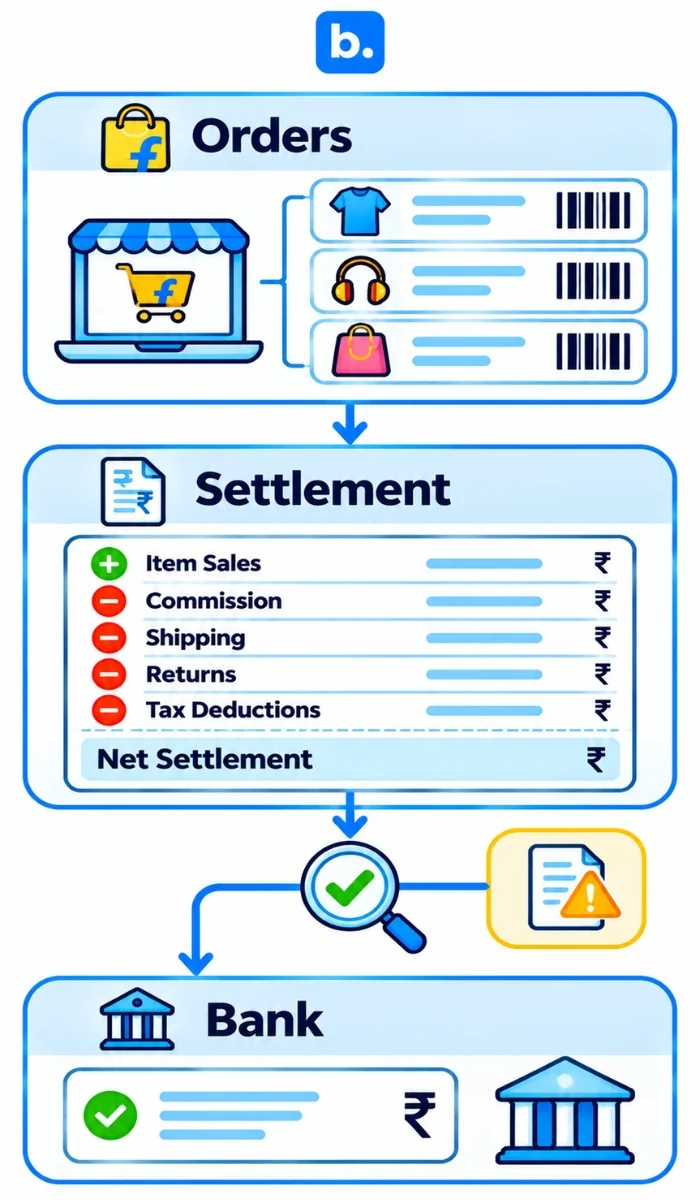
Payment reconciliation is ensuring your revenue matches up to the cash you have received and understanding why there are discrepancies. As a Flipkart seller this means reconciling your orders to your settlement transactions and your net settlement to your bank and ledger.
Keep three records together: Orders show sales, Settlement shows payment after deductions, and Bank shows cash received. Explain every difference in the working paper.
A clean match ensures that your revenue, expense and tax balances are correctly categorised and there is evidence to provide to Flipkart if queried.
How Flipkart settlements work and why they are hard to match
Flipkart defines settlement as a periodic seller payment, with transaction detail at order-item level. One payment may cover many items. For payment reconciliation on Flipkart, start with the settlement period and item lines, not only the bank credit.
Flipkart’s public Fees and Commission page says payment timing depends on seller tier and that funds may arrive as fast as seven days. Treat that as general guidance, not a promise for every order. Check the schedule shown in your account before investigating a payment as late.
Order level transactions may not reflect item level. Also consider seller specific commission, flat fee, shipping and pickup charges, returns after sales period and deductions like GST TCS, Income tax TDS, SPF, storage, recall, advertising etc. which are not order sales. Refer to the seller rate card and maintain separate tax accounts.
What is inside a Flipkart settlement report
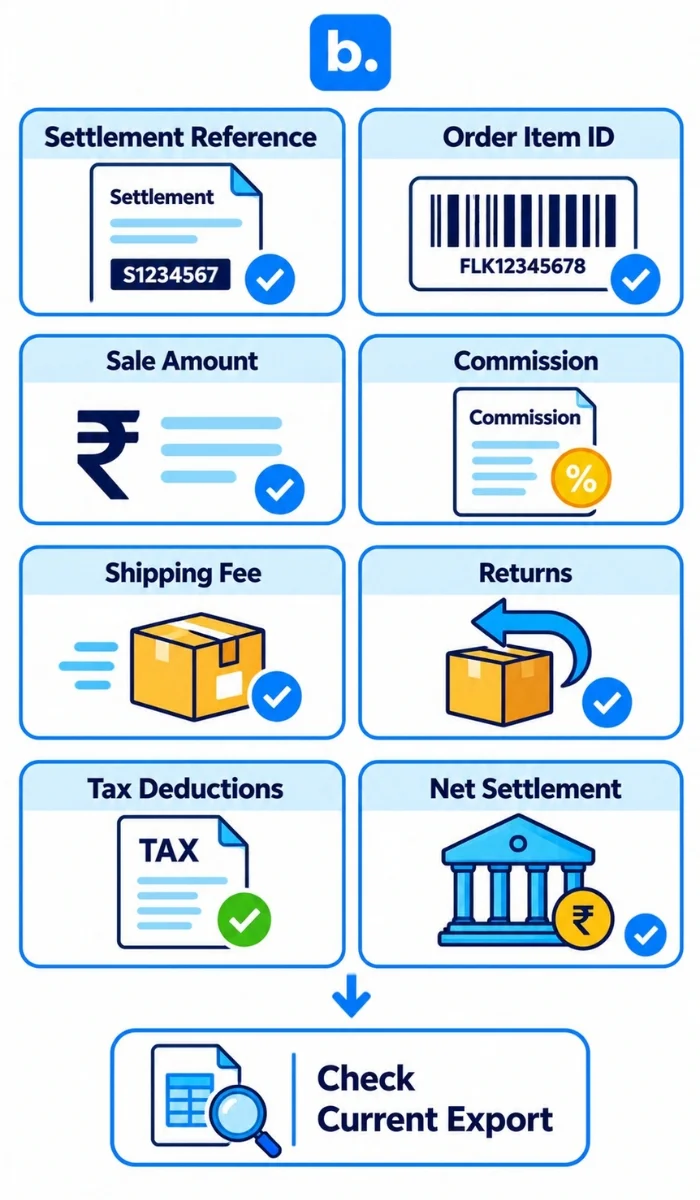
Flipkart’s public seller API documentation distinguishes a Sales Report, a Settled Transaction Report, an Orders Report, a Returns Report and commission invoice reports. The settled transaction report is documented as including Orders, PLA, TDS, SPF, Storage and Recall. The Flipkart Seller Platform overview also defines a transaction as settlement and payment details at order-item level, and a return as linked to an order item.
Seller Hub workbook labels can vary by report export. The table below groups the labels and sections to look for, rather than claiming every account receives an identical workbook.
| Field or section | What it means | How to treat it |
|---|---|---|
| Settlement or payment reference and date | Identifies the payout batch and period | Keep this reference on every working-paper row. |
| Order ID and order item ID | Connects a transaction to an item sold | Match at item level where possible, not order ID alone. |
| Sale Amount, offer or seller share | Sale value and any discount allocation | Use invoice and promotion records to confirm the seller-funded amount. |
| Commission Fee | Category-based selling fee | Compare with the rate card applicable to that order. |
| Fixed Fee, sometimes called closing fee | Per-order platform charge | Check seller tier, price band and fulfillment type. |
| Shipping Fee | Forward shipping charge | Check local, zonal or national zone and chargeable weight. |
| Collection Fee | Payment collection charge | Check payment mode and the applicable rate card. |
| Reverse Shipping Fee or return logistics | Return-related charge, where shown | Link it to the return and original order item. |
| GST on marketplace fees | Tax charged on Flipkart services | Reconcile to the fee invoice and eligible tax ledger. |
| TCS and TDS | Separate tax deductions | Match each to its own tax statement and ledger. Do not book as commission. |
| Return, cancellation or refund | Sale reversal or return status | Link to the original order item and track stock separately. |
| SPF, PLA, Storage, Recall or other adjustment | Non-order or service activity | Keep as separate lines with the relevant reference and evidence. |
| Net settlement or Bank Settlement Value | Net amount due for transfer | Tie to the bank credit. Do not treat it as gross sales. |
A seller-help example describes separate Orders, Non-Order SPF, Storage & Recall, Ads, TDS and Tax Detail sections. This is not a universal workbook schema: Flipkart’s API report types and Seller Hub tabs are not interchangeable.
Flipkart settlement report reconciliation, step by step
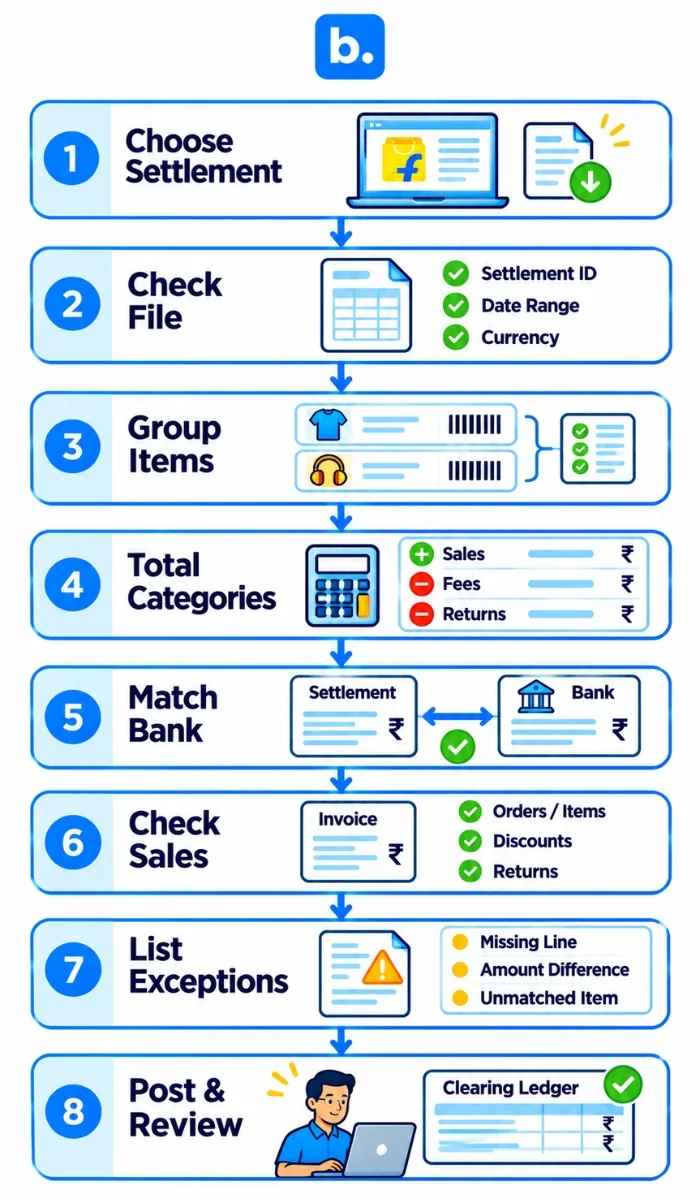
- Choose one settlement. Download the settlement or payment report, the relevant orders and returns reports, and the bank statement. Save the original files.
- Check the file. Confirm the settlement reference, date range, currency, row count and headers. Keep the file’s number and date formats intact during import.
- Group by order item. Match the available order ID and order item ID. Separate sales, returns, commission, other fees, tax lines and adjustments.
- Total each category. Re-add sales, refunds, fees, taxes and non-order movements. Check the result against the settlement’s net amount.
- Match the bank. Compare the net settlement with the bank credit and its reference. If multiple credits or dates are involved, record that rather than forcing a one-to-one match.
- Check your own sales records. Compare order-item lines with invoices, discounts and return documents. A settlement match does not prove the sale was booked correctly.
- List every exception. Give each unmatched fee, return, claim or bank variance an amount, reason, owner, evidence and next action.
- Post and sign off. Post the approved entries, clear the bank amount and have another person review the bridge and open items.
Flipkart payment reconciliation: a worked example
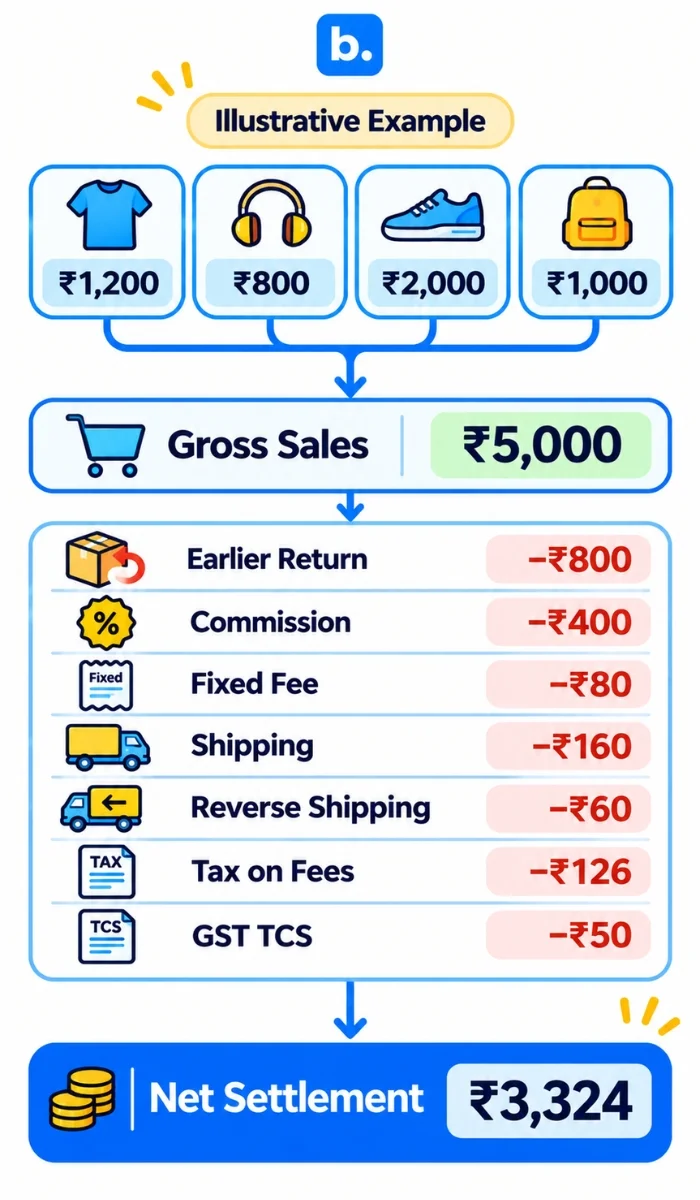
This is a simplified example, not a Flipkart rate card. Four order items settle in the period: ₹1,200, ₹800, ₹2,000 and ₹1,000, or ₹5,000 total. A return reverses an ₹800 sale from an earlier period. Assume commission of 8%, fixed fees of ₹80, shipping fees of ₹160, reverse shipping of ₹60, tax on fees of ₹126 and TCS of ₹50.
| Settlement line | Amount (₹) | Note |
|---|---|---|
| Four order items | 5,000 | 1,200 + 800 + 2,000 + 1,000 |
| Earlier-period return | (800) | Link to original order item |
| Commission Fee | (400) | Example assumption: 8% of ₹5,000 |
| Fixed Fee | (80) | Illustrative |
| Shipping Fee | (160) | Illustrative |
| Reverse Shipping Fee | (60) | Return-related, illustrative |
| Tax on fees | (126) | 18% of ₹700 in assumed fees |
| Tax collected at source | (50) | Illustrative tax balance |
| Expected net settlement | 3,324 | Before any other adjustment |
The arithmetic is ₹5,000 − ₹800 − ₹400 − ₹80 − ₹160 − ₹60 − ₹126 − ₹50 = ₹3,324. The assumed fees total ₹700, and 18% of ₹700 is ₹126. Sales tax on the goods is left out to keep the example short. Use your actual invoices and tax setup in the books.
A simplified journal bridge would be:
| Entry | Debit | Credit |
|---|---|---|
| Record sale | Flipkart clearing ₹5,000 | Sales and applicable output-tax ledgers ₹5,000* |
| Record return | Sales returns / relevant tax adjustment ₹800 | Flipkart clearing ₹800 |
| Record fees and fee tax | Fee expenses ₹700; eligible input-tax ledger ₹126* | Flipkart clearing ₹826 |
| Record GST TCS | GST TCS receivable ₹50 | Flipkart clearing ₹50 |
| Record payout | Bank ₹3,324 | Flipkart clearing ₹3,324 |
*The sale and fee tax entries are abbreviated. Split the amounts using the actual invoice and CA-approved accounting treatment. Do not combine GST TCS with income-tax TDS or fees.
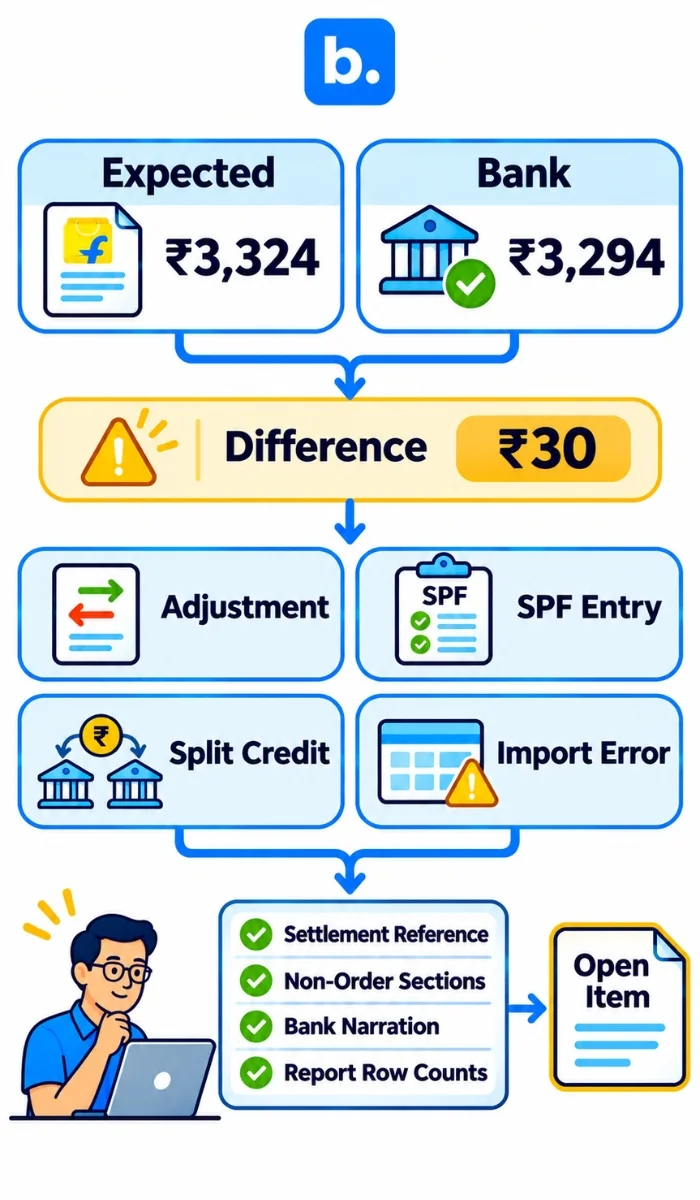
Now suppose the bank shows ₹3,294. The ₹30 difference could be an adjustment, a protection-fund entry posted elsewhere, a split credit or an import error. Check the settlement reference, non-order sections, bank narration and row counts. If the report still does not explain it, keep ₹30 on the exception list with an owner. Do not write it off as a fee without evidence.
Commission, fee and return deductions explained
| Deduction | Why it appears | What to check |
|---|---|---|
| Commission Fee | Marketplace selling charge | Product category, selling price and the rate card for that order. |
| Fixed Fee | Per-order platform charge, also described publicly as a closing fee | Seller tier, price band and fulfilment type. |
| Shipping Fee | Forward delivery charge | Actual or volumetric weight, chargeable slab and local/zonal/national zone. |
| Collection Fee | Payment collection charge | Prepaid or COD mode and order value. |
| Reverse Shipping Fee | Return logistics charge, if shown | Customer return versus courier return, original item and applicable rate card. |
| GST on fees | Tax on marketplace services | Fee invoice and input-tax eligibility, checked with a CA. |
| GST TCS | Tax collected by the e-commerce operator | Match the tax statement and keep it as a separate tax balance. |
| Income-tax TDS | Income-tax withheld from the payout | Match the applicable tax statement; keep separate from GST TCS. |
| Customer return | Buyer returns a delivered item | Refund, return status, original item and inventory disposition. |
| Courier return or RTO | Shipment returns before successful delivery | Check return status and any charge shown; do not treat it as the same event as a customer return. |
| Penalty, claim or SPF entry | A recovery, claim or protection-fund transaction | Check its reference, direction and supporting case. A credit and a recovery do not have the same accounting effect. |
A customer return and an RTO are different events. Flipkart’s platform documentation says a return can lead to a refund, replacement or cancellation, and identifies each return against an order item. Reverse logistics and fee treatment depend on the event and account terms, so check the transaction rather than assuming a fee is always refunded. Carry unresolved returns forward in an open-item list.
Post Flipkart settlements to your ledger (Tally and Zoho Books)
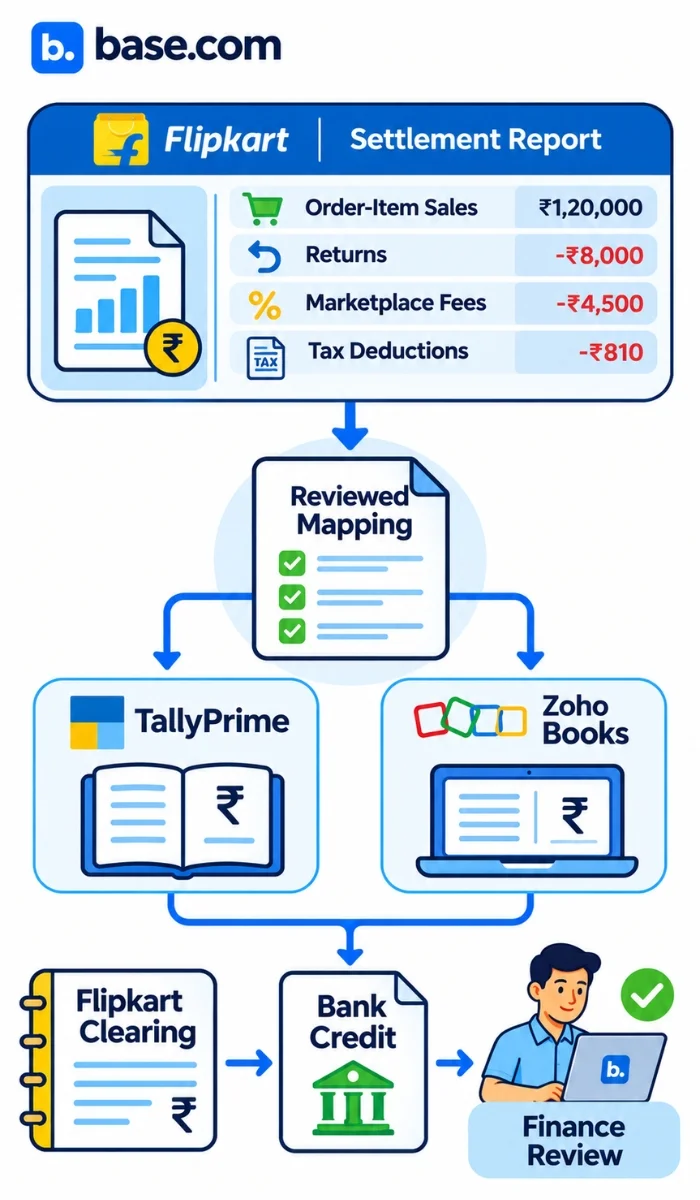
Post sales by the correct tax treatment, returns as credit notes or sales returns, commission and other marketplace fees as expenses, tax on fees to the relevant input-tax ledger, GST TCS and income-tax TDS to separate balances, and the net receipt against Flipkart clearing.
Order-wise posting gives more detail for tracing a return or fee. A summary voucher is faster, but only works as a control if the order-item file and deduction totals are kept with it. Do not post only the bank amount as sales.
Amazon and Flipkart with TallyPrime: Our Amazon–TallyPrime and Flipkart–TallyPrime integrations cover order and invoice workflows. They do not replace the separate job of matching settlement files and posting settlement journals.
Shopify and Zoho Books: Our Shopify–Zoho Books integration supports the documented invoice flow. You still need to match gateway payouts to the bank.
Marketplace payment reconciliation across Flipkart, Amazon and other channels
Use order activity, payout detail and bank credit for each channel, keeping separate settlement bridges before consolidating the books.
For Flipkart, match item-level fees, returns and non-order sections. Amazon settlements may include fees, adjustments, returns and reserves; Shopify gateway payouts add gateway charges and refunds; courier COD remittances require checks for RTOs and split credits. Keep a separate settlement bridge for each channel.
Where an order management system fits in Flipkart payment reconciliation
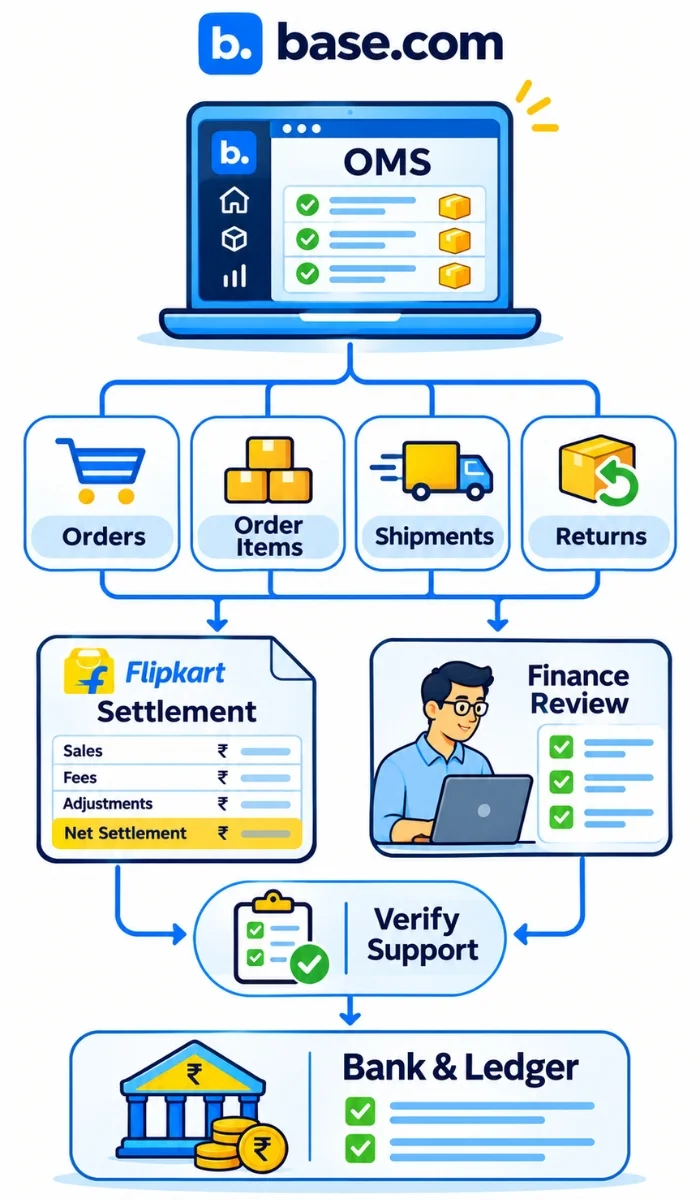
An order management system collects channel orders and keeps records for fulfilment, returns and accounting workflows. It can provide order ID, order item or SKU, shipment and return context, helping trace settlement lines back to an item. The connector determines which details are available.
Our Flipkart–TallyPrime integration brings Flipkart orders into the workflow and forwards invoices to TallyPrime. Settlement-file import and payout reconciliation are separate capabilities; check with our team for current product support.
How to choose Flipkart payment reconciliation software
Choose based on transaction volume and required order-level evidence.
| Factor | Spreadsheet | Reconciliation software |
|---|---|---|
| Setup | Fast, manual mapping | Configuration and testing |
| Volume | More formulas and review | Faster repeat checks if imports work |
| Errors | Depends on controls | Depends on mapping and exceptions |
| Channels | Separate formats | Verify report support |
| Audit | Team-created | Check history and approvals |
| Cost | Staff time | Subscription and training |
A dedicated ecommerce reconciliation software should pass these checks:
- It imports the current Seller Hub settlement file without dropping tabs or rows.
- It keeps commission, fixed fee, shipping, collection and return charges distinct.
- It maps GST TCS and income-tax TDS separately.
- It links a return to the original order item, even when the return settles later.
- It matches one payment to many order items and retains the references.
- It shows unmatched and non-order items in an exception queue with notes.
- It supports clearing-account posting to TallyPrime or Zoho Books.
- It keeps a reviewable audit trail with user roles and mapping changes.
Common Flipkart reconciliation mistakes and how to avoid them
Avoid matching only the bank total, ignoring fee or tax lines, missing earlier-period returns, or booking unexplained adjustments as sales. Keep separate order, transaction and bank dates; retain a settlement reference on every line; and assign each unmatched item an owner, evidence and next action.
Seven checks to run on any Flipkart reconciliation tool, including Base OMS
- Read the settlement file in the current format.
- Splits commission, fees and tax deductions.
- Links return to the original order item.
- Matches one payment to multiple order items.
- Shows unmatched items with notes.
- Posts approved entries to the ledger.
- Keeps a reviewable audit trail.
At Base, we help bring Flipkart orders into TallyPrime and forward invoices. That gives your finance team order context, while the settlement checks above still need to be tested against your own workflow. If you want to automate file matching, fee and tax checks, return matching, exception review or journal posting, talk with our team about what is currently available and validate it using a Seller Hub export.
Bring this checklist to a Base demo and we will walk through the workflow with you.
Conclusion
Good Flipkart settlement report reconciliation connects order items, settlement deductions and bank credit. Check fees against the seller’s rate card, link returns to the original item, and separate tax balances from expenses. Preserve non-order lines, post through clearing and explain every difference. To see how order and invoice workflows fit alongside this process, ask for a Base demo.