Payment reconciliation refers to the process of bringing together the funds that have come into your bank or payment provider and ensuring they are in line with sales, refunds and fees that you should have received. The payment reconciliation process for online sellers is to collect sales and payout data, match payouts to orders, account for fees, tax and returns, investigate differences, then post the result to your books.
This guide will help finance & operations teams within your ecommerce business to get their gateway, marketplace & courier payment reconciliations in order. We have laid out a clear process to follow, an example to compare your reports to and guidance on when you should no longer use a spreadsheet.
What is payment reconciliation?
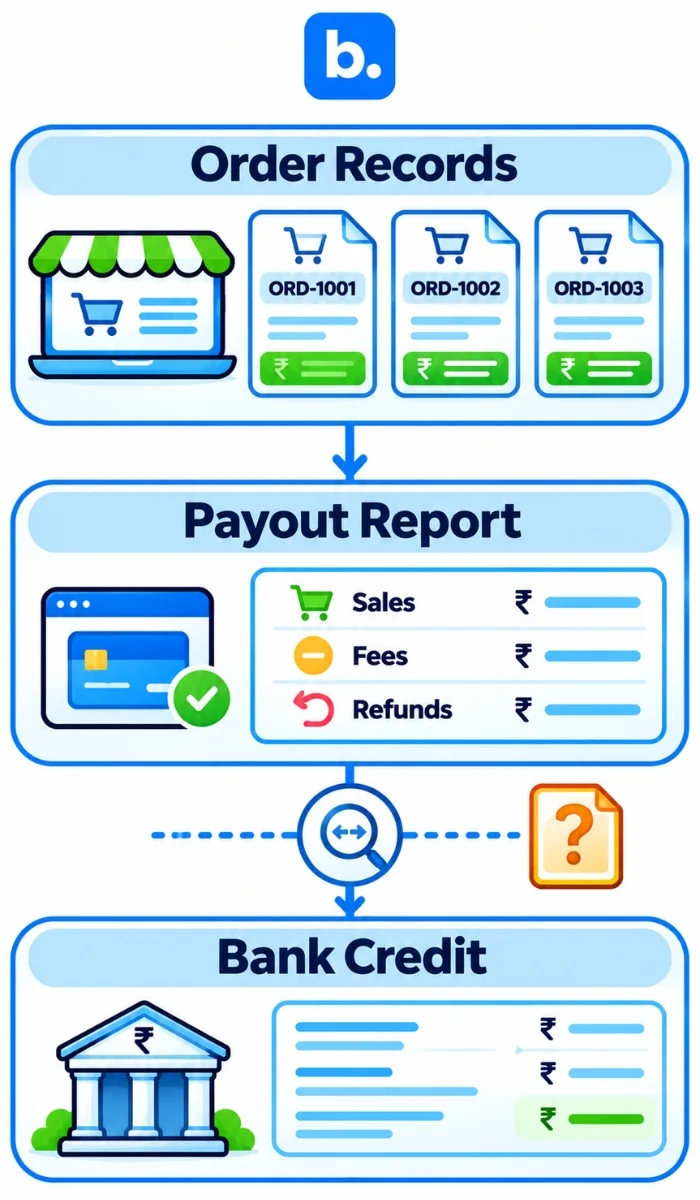
Payment reconciliation involves checking your sales records against the payment provider’s reports and your bank statement to make sure the amounts match. If they don’t, you need to identify the reason. This includes accounting for orders, refunds, transaction fees and other adjustments. Any amount that remains unexplained should be flagged for further investigation.
The process relies on three records. Order records show how much you sold, payout reports show how much the payment provider transferred, and your bank statement confirms how much you actually received. Comparing all three helps you keep revenue, pending payments and cash flow records accurate. It also gives your finance team a clear trail to refer to during an audit.
It is important that you can track revenues, receivables and cash. A good reconciliation provides finance with a clear audit trail.
Why ecommerce payment reconciliation is harder than a normal bank reconciliation
One payout can cover many orders, so a bank total alone does not show which sales it contains.
Fees and tax are netted before payment. The bank shows net cash; invoices show gross sales.
Refunds may hit a later payout than the original sale, separating them across periods.
Couriers send COD in batches. One remittance may cover many airway bills and deductions.
Providers use different report layouts, IDs and sign conventions, so each needs a mapping.
A late-month sale may settle next month. Sale, settlement and bank dates can differ.
| Source | How the money arrives | What makes it hard to match |
|---|---|---|
| Payment gateway | Net payout to bank | One payout can bundle sales, refunds and fees |
| Marketplace | Settlement transfer | Commission, delivery charges, tax and returns are deducted |
| Courier (COD) | Remittance against delivered shipments | AWB-level collections and deductions may arrive in batches |
| Direct bank or UPI transfer | Individual or grouped bank credit | Payer reference may not include an order ID |
Small glossary
| Term | Meaning in this guide |
|---|---|
| Payout | Money a provider transfers to the seller’s bank. |
| Settlement | A cycle report of transactions, deductions and amount payable. |
| Remittance | Money a courier transfers from COD collections. |
| Chargeback | A payment reversal following a cardholder dispute. |
| TCS | GST tax collected at source shown on some marketplace statements; verify the credit with your CA. |
| TDS | Tax deducted at source shown on a statement; verify current tax records with your CA. |
The payment reconciliation process for online sellers, step by step
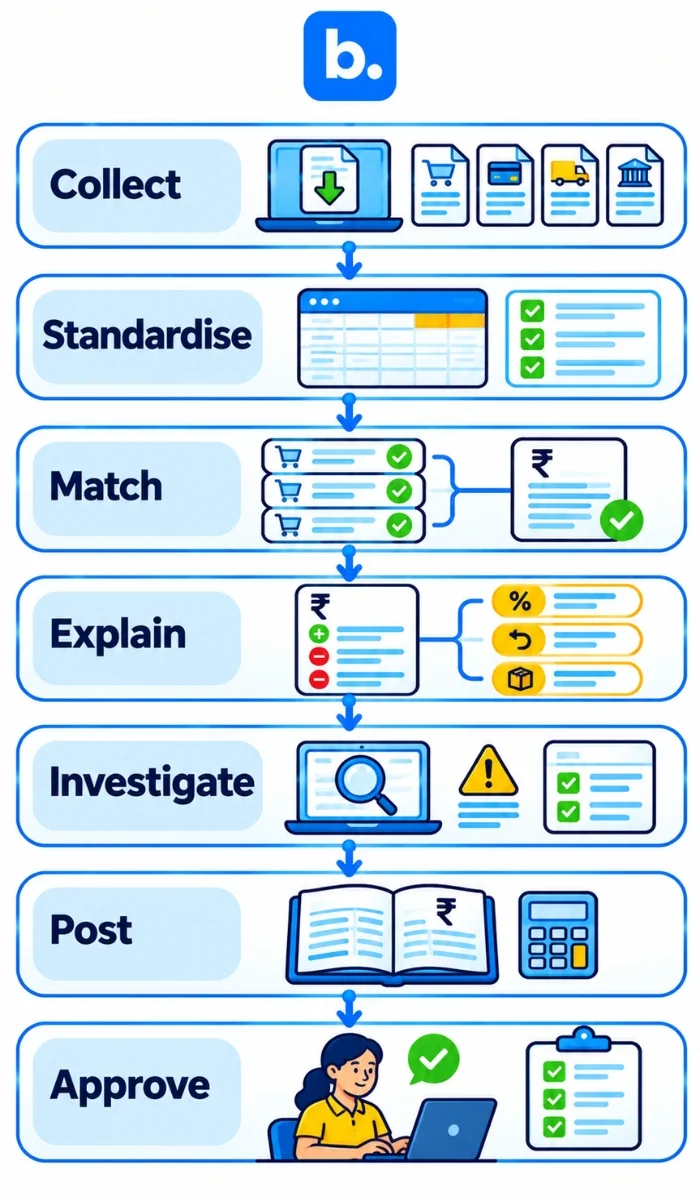
Ensure you follow the same steps each period and leave the original reports untouched so that you can trace the changes back to the correct file.
- Gather the data. Download your order, gateway/marketplace payout/settlement, courier remittance and bank statements for the period. Ensure there is sufficient overlap between the dates so that you pick up late settlements.
- Standardise the data. Ensure order IDs, invoice numbers, transaction references, settlement IDs, AWBs, dates, currencies and signs are in the same columns. Check if refunds/fees are positive or negative.
- Link orders to payouts. Using the payout/remittance reference, link the lines of the payout to the orders. There may be multiple orders linked to one payout.
- Ensure all differences are explained. Break down the differences into fees, tax deductions, refunds, holds, chargebacks and timing differences. Use the evidence from the provider’s report/invoice to show why the changes have been made.
- Investigate unmatched data. Look for missing IDs, duplicates, money paid into the next period or payments with no order reference. Assign ownership and ensure you have evidence.
- Post to your books. Post sales, returns, fees, fee taxes and bank activity to your approved ledgers. Do not post the net payout as new revenue.
- Review and sign off. Ensure the clearing balance has been explained, there is ownership for all outstanding items and the totals for the period match the original reports and bank credits.
A clearing account is a temporary ledger for money due from a provider: record sales against it, then clear it to the bank when the payout is matched. Its balance shows what is still pending or unexplained.
Payment reconciliation example (worked, step by step)
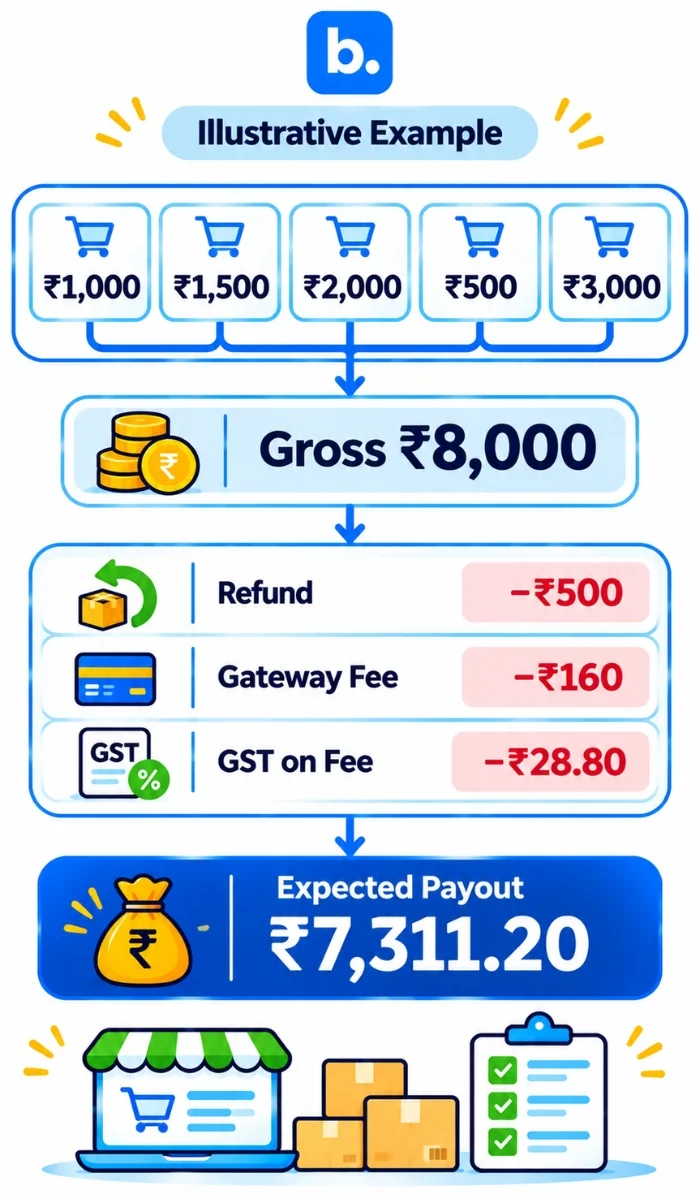
Assume one gateway payout covers five orders: ₹1,000, ₹1,500, ₹2,000, ₹500 and ₹3,000. Gross orders total ₹8,000. The ₹500 order is fully refunded. For illustration, assume a gateway fee of 2% on the original gross, not returned on the refund, plus 18% GST on the fee. These are example inputs, not current rates for any named gateway. Confirm actual tax and fee treatment with your CA.
| Line | Amount | Note |
|---|---|---|
| Five orders | ₹8,000.00 | Gross amount from invoices/orders |
| Full refund | −₹500.00 | Refund on the ₹500 order |
| Gateway fee | −₹160.00 | 2% of ₹8,000 |
| GST on gateway fee | −₹28.80 | 18% of ₹160 |
| Expected payout | ₹7,311.20 | ₹8,000 − ₹500 − ₹160 − ₹28.80 |
The books should preserve the gross sale, refund and fee separately. Split the original invoice total between sales and output tax using the actual invoices; do not credit the whole ₹8,000 to revenue if it includes tax.
| Entry | Debit | Credit |
|---|---|---|
| Original sales: gateway clearing | ₹8,000.00 | |
| Sales and output tax, split per invoices | ₹8,000.00 | |
| Refund: sales return and tax adjustment | ₹500.00 | |
| Gateway clearing | ₹500.00 | |
| Gateway fee expense | ₹160.00 | |
| Eligible input tax on gateway fee, if supported | ₹28.80 | |
| Gateway clearing | ₹188.80 | |
| Bank payout | ₹7,311.20 | |
| Gateway clearing | ₹7,311.20 |
Only claim input tax credit if the tax invoice and your eligibility support it. A second person should re-check the arithmetic and the entry mapping.
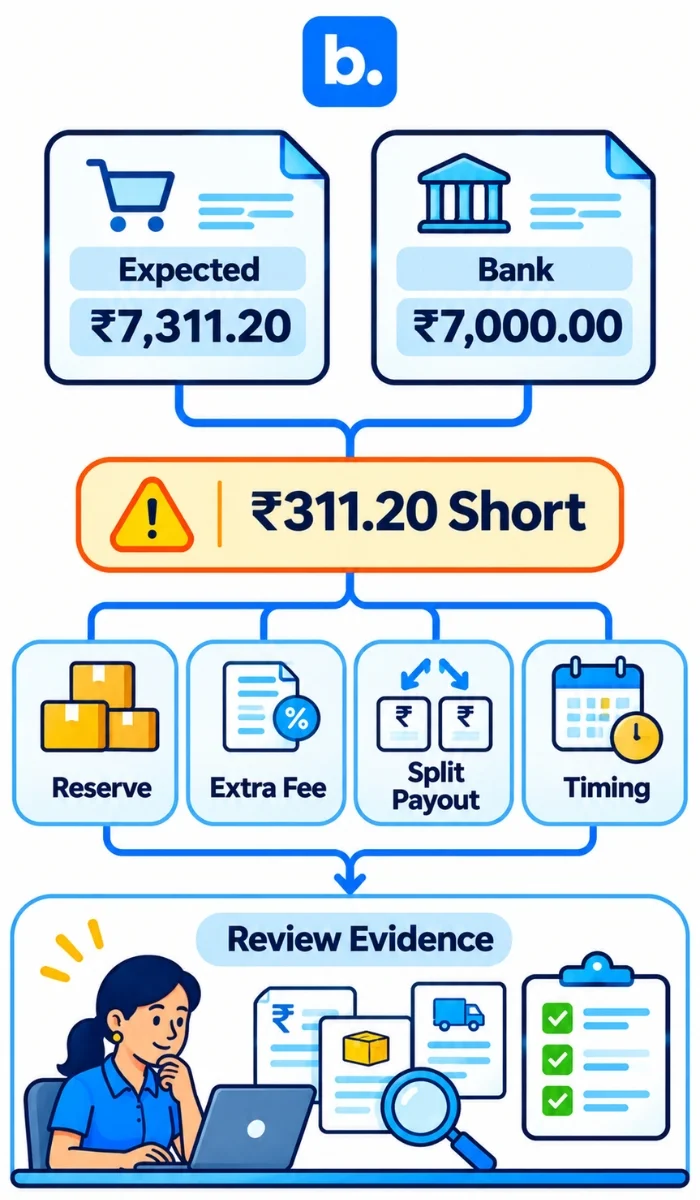
Now assume the bank shows ₹7,000 instead of ₹7,311.20. The unexplained difference is ₹311.20.
| Expected | Bank credit | Difference | What to do |
|---|---|---|---|
| ₹7,311.20 | ₹7,000.00 | ₹311.20 short | Check the settlement for a rolling reserve, second fee, split payout or timing item. Post a reserve or fee only when the provider’s record supports it. |
If the statement confirms a reserve, leave it as a separate receivable or reserve balance for later matching. If it shows another fee, record that fee from the provider’s document. Do not write off the difference just to close the period.
Marketplace payment reconciliation: Amazon, Flipkart and others
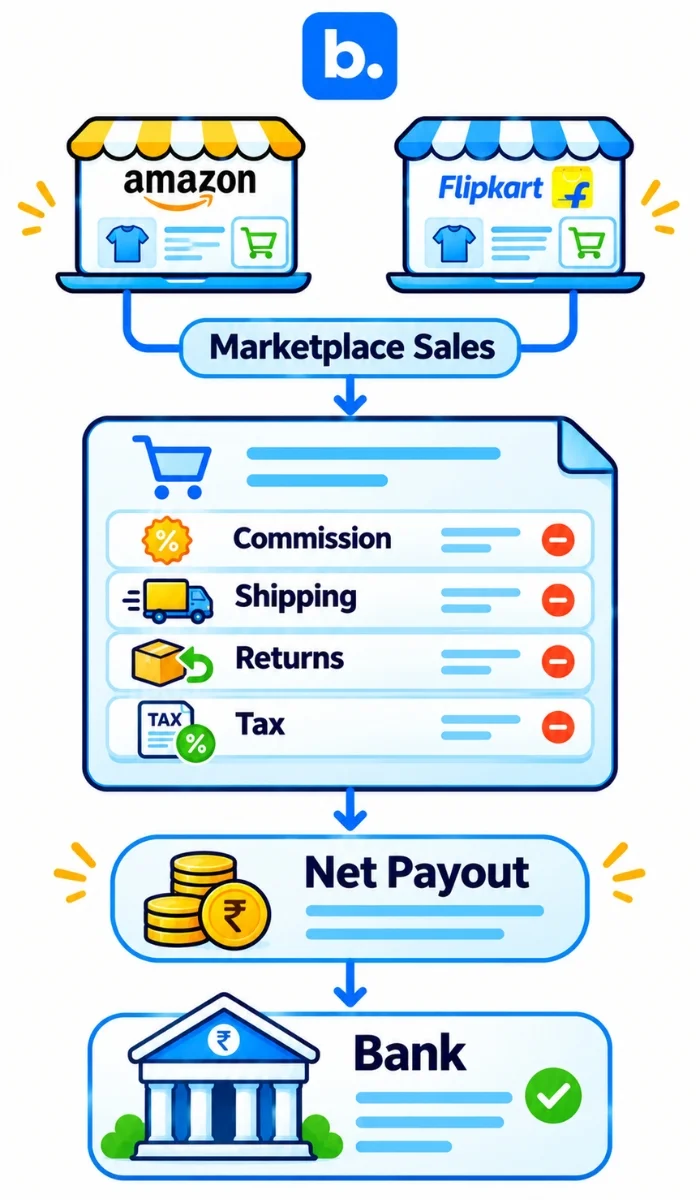
Marketplace payment reconciliation means matching each settlement report to the orders it covers, after commission, fees, shipping charges, tax collected at source and returns. Start with the seller portal’s settlement file, then trace the transfer to the bank statement.
| Item | Where to find it | What to check |
|---|---|---|
| Sales | Order and tax reports | Order/item ID, invoice value, date and returns |
| Commission and fees | Settlement or fee statement | Rate, fee base, reversals and tax on fees |
| Shipping charges | Settlement detail | Charge, weight/zone basis and any adjustment |
| Tax collected at source | Tax or settlement report | Amount, seller registration and tax-credit record |
| Returns and reversals | Return report and settlement lines | Original order, refund and fee reversal |
| Reserve or hold | Settlement statement | Reason, amount and expected release evidence |
| Payout date | Transfer or bank reference | Settlement ID, amount and bank-credit date |
A settlement cycle can cross month-end. Keep the sale or invoice date and settlement date distinct, and reconcile late transfers in the next period without moving the original sale just to make a cash match. Report names can change by marketplace and seller account, so confirm the current portal fields before setting up a mapping.
For accounting-entry context, see the Amazon–TallyPrime and Flipkart–TallyPrime integration pages.
COD and courier remittance reconciliation
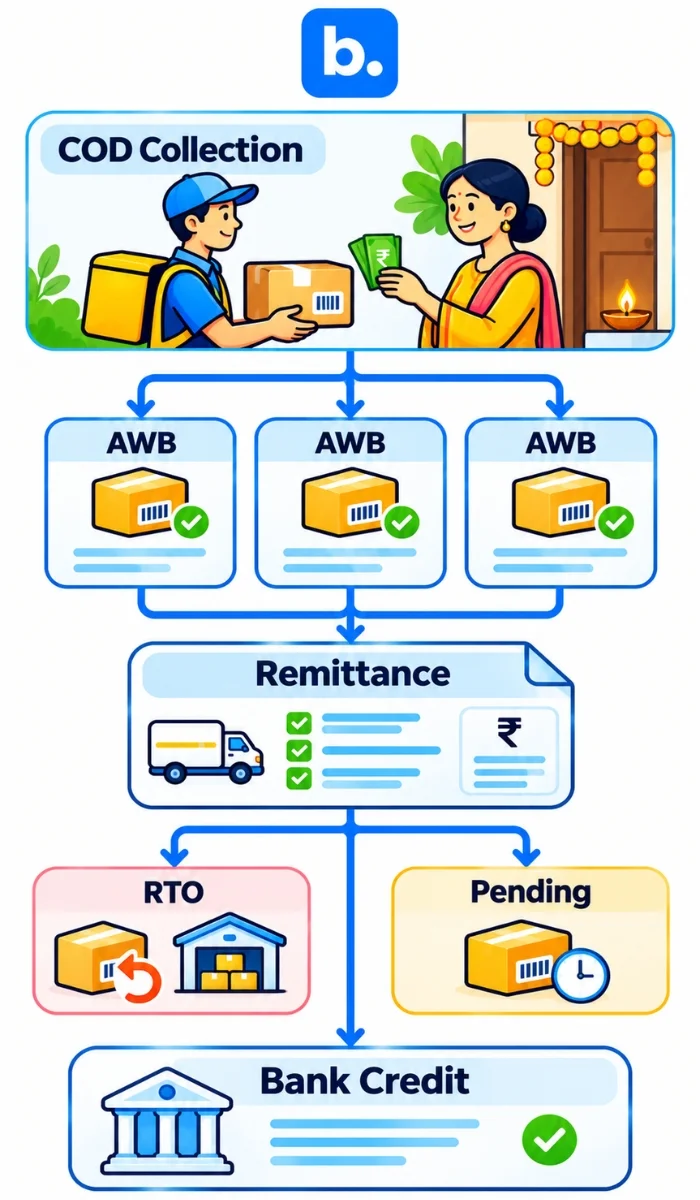
For COD, match each remittance line to the shipment’s AWB (air waybill) and the original order. Compare the delivered amount, COD fee, deductions and bank credit. A short remittance may be a timing gap, a return-to-origin (RTO), a deduction or an actual short payment. Keep each case open until the courier statement or a later credit explains it.
| Stage | Risk | Check |
|---|---|---|
| Delivered and remitted | Amount differs from order COD value | Match AWB, order amount, fees and bank credit |
| Delivered, not yet remitted | Funds are still in the courier cycle | Check the remittance report and next transfer |
| Refused or RTO | Forward/return costs and stock reversal | Match return status, deductions and inventory receipt |
| Short paid | Deduction or missing shipment in batch | Compare AWB-level lines and raise a documented query |
COD timing varies by courier, service and account. Use the live remittance report and current courier documentation rather than assuming a fixed number of days. See the Shopify–Shiprocket integration overview for a related shipping workflow.
Matching rules and how to handle exceptions
An exact match links one transaction to one order using a unique reference and amount. A many-to-one match links several orders to one payout batch. A rule-based match uses approved references, an amount tolerance or a date window when the source files do not share one ID. Keep the rule and reason visible so reviewers can see why two lines were matched.
| Exception | Likely cause | Action |
|---|---|---|
| Payout short by a small amount | Fee, rounding or separate adjustment | Compare line items and provider invoice; do not assume rounding |
| Payout with no matching order | Reserve release, refund-only batch or missing import | Search by settlement/transaction reference and prior periods |
| Order with no payout | Pending settlement, cancellation or failed capture | Check payment status and next provider cycle |
| Duplicate payment | Retry, customer paid twice or duplicate import | Compare transaction IDs; reverse only with evidence |
| Refund not reflected | Refund is pending or posted in a later cycle | Check refund ID, date and subsequent settlement |
| Chargeback | Customer dispute and processor reversal | Link dispute to original order, fee and case record |
Set a review threshold based on your materiality policy and investigate larger differences first. Still log small differences. Never write off an unexplained item without a note, evidence and approver.
Manual vs automated payment reconciliation
Spreadsheets work when there are few payouts, one channel and a reviewer who can check each line. Automated payment reconciliation becomes worth assessing when reports, channels and returns multiply or month-end close slips. Software can organize and match records, but it cannot decide an unsupported tax treatment for you.
| Question | Spreadsheet | Ecommerce reconciliation software |
|---|---|---|
| Setup | Quick to start; mappings are manual | Requires setup, access and field mapping |
| Speed at higher volume | More copy, filters and review | Can process recurring files or feeds, if supported |
| Error risk | Formula and paste errors need controls | Mapping or source errors still need review |
| Multi-channel coverage | Separate tabs and layouts | Depends on supported providers and connectors |
| Audit trail | Manual notes and version control | Logs may be available; confirm export and retention |
| Cost | Staff time and spreadsheet controls | Subscription and implementation cost |
Automate fee and tax splits first, then payout matching, then the exception queue. A payment reconciliation system should show the source line, match reason and unresolved balance rather than just a green “reconciled” status.
Where an order management system fits in payment reconciliation
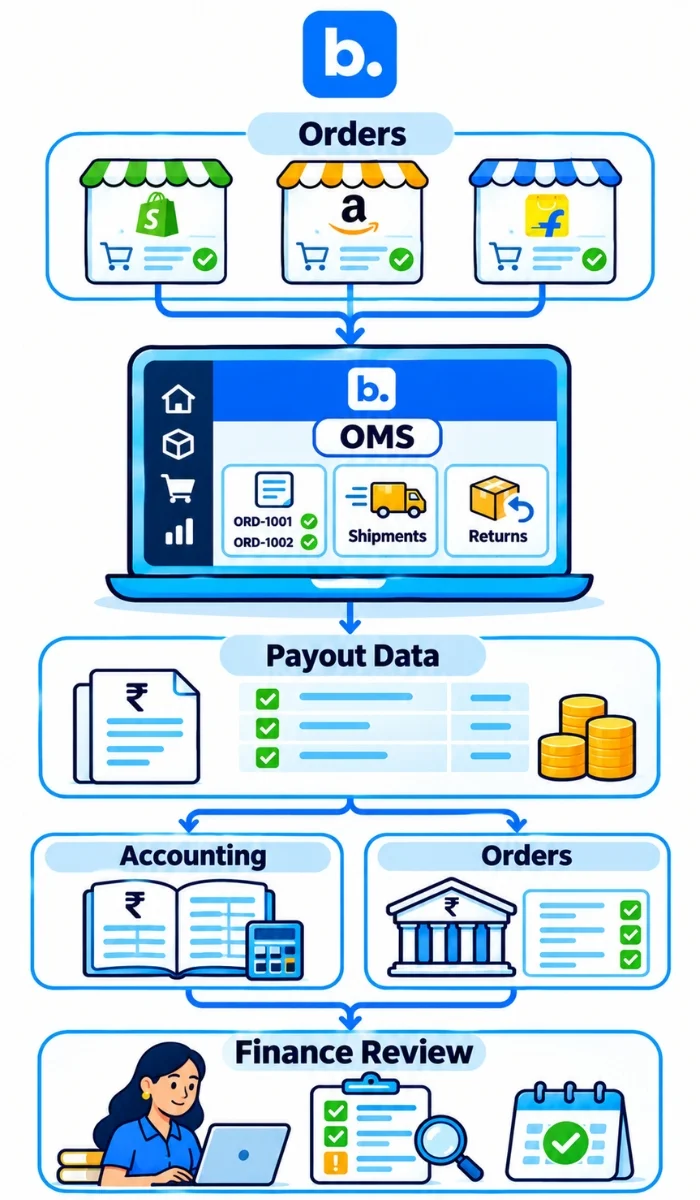
An order management system (OMS) will take orders from all your sales channels and create a central order. It will then pass this order information along with returns and payment information to fulfillment and accounting. An order management system is not a replacement for your accounting system or bank statement.
This can help keep all orders under one ID from sale to shipment. It can also track any cancellations or returns for that order. If you have access to order level costs (such as shipping/fees) you can add these to the order. The OMS software can help with reconciling payouts back to the order and fulfillment.
What changes when reconciliation starts from the order
Your order reference will become your central point of reference. You will still need to reconcile your payments and courier statements to your bank credits.
The flow is a working model, not a claim about every connector. A Base OMS connection should be assessed against the sources, records and exception handling it supports in writing.
How to choose a payment reconciliation system
Use this checklist to compare the workflow, not just the number of integrations.
- Gateways, marketplaces and couriers covered for your accounts.
- Handling of fees, TCS/TDS, refunds and returns.
- Many-to-one payout matching and timing windows.
- Exception queue, notes, owners and status history.
- Clearing-account support and control of open balances.
- Export or posting to your accounting system.
- Audit trail, role permissions and period sign-off.
- Setup time, support and ongoing mapping changes.
When reviewing ecommerce reconciliation software, ask: Which reports and transaction types are included? How are failed imports shown? Can finance see why a match was made? Who supports a broken connection? What does a new gateway or marketplace cost in setup time?
| Route | Best for | Limits | Typical effort |
|---|---|---|---|
| Spreadsheet | Few payouts and one channel | Manual mapping and review | Low setup; ongoing staff time |
| Accounting add-on | Existing books need selected feeds | Coverage may stop at accounting records | Configure ledgers and mappings |
| Reconciliation software | Many payouts and recurring exceptions | Verify channels, reports and posting scope | Implement sources, rules and reviewers |
| OMS software with reconciliation | Order, shipment and payment records need a shared link | Confirm settlement-level capabilities | Configure channels, orders and finance flow |
A payment reconciliation system should fit your existing accounting controls. Ask for a sample file test and a written list of what it matches, exports and leaves for finance.
Common payment reconciliation mistakes and how to avoid them
| Mistake | Why it hurts | Fix |
|---|---|---|
| Matching only to the bank, not orders | Deposit is verified but order coverage is unknown | Trace each batch to order references |
| Ignoring fees and tax deductions | Gross sales and net cash never tie | Record each deduction from provider evidence |
| Double-counting refunds | Sales return and payout refund are posted twice | Link both to the original transaction |
| Using the wrong period cut-off | Late settlements appear missing | Keep sale, settlement and bank dates separate |
| Mixing gateways in one sheet | Different IDs and fee rules get confused | Keep a source and mapping field per provider |
| No clearing account | Unsettled money is hard to track | Keep amounts due open until matched to bank |
| No owner for exceptions | Unmatched items roll forward without action | Assign an owner, due date and note |
What gets automated and what finance still reviews with Base OMS
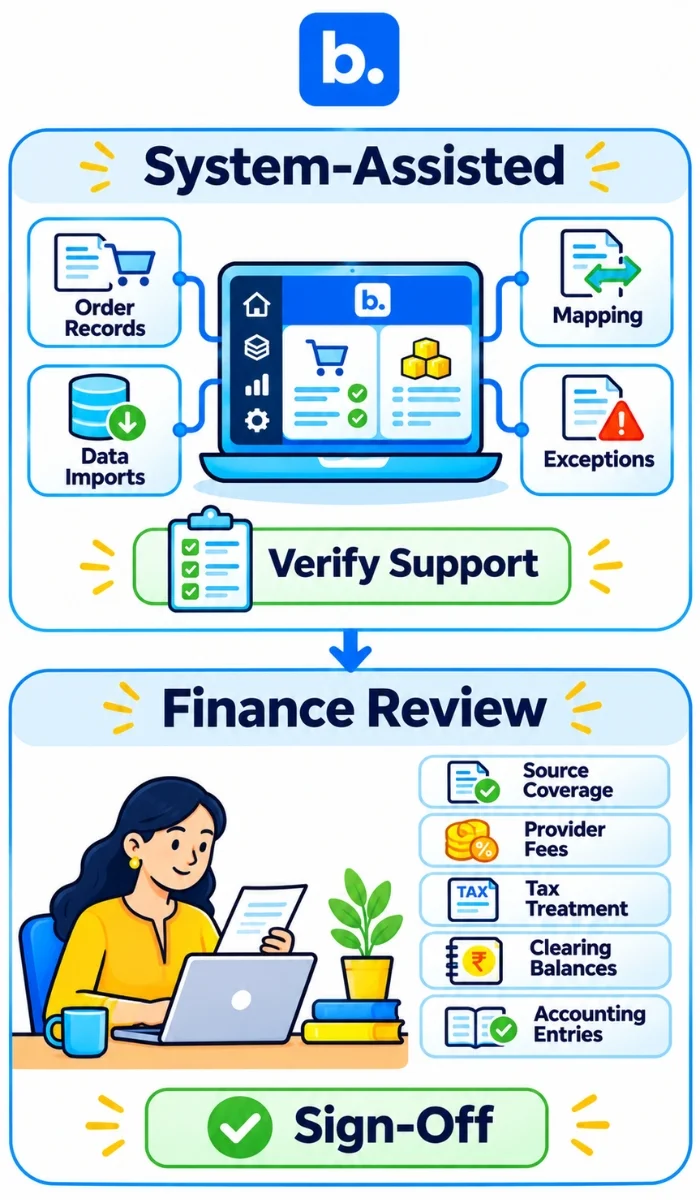
The table is a confirmation checklist, not a statement of live functionality. The product team must verify each row before publication.
| Automated by Base OMS (confirm each item) | Still reviewed by finance |
|---|---|
| Collecting order and payout data: confirm supported sources | Confirm report coverage and period |
| Matching payouts to orders: confirm matching keys and scope | Review batch matches, timing and unmatched lines |
| Splitting fees and tax: confirm fields and rules | Check provider documents and tax treatment |
| Flagging unmatched items: confirm queue, notes and ownership | Investigate, document and approve each exception |
| Posting to the books: confirm destinations and entry types | Approve accounting treatment and sign off |
Treat the table as a test plan. The product team must confirm whether Base OMS matches payouts or only provides order-level cost data, which gateways and marketplaces are covered, and what it posts to accounting. Base OMS supports [confirmed data sources and match rules to be added after sign-off]. Base OMS surfaces [confirmed month-end views to be added after sign-off]. At close, finance still reviews period cut-off, tax, refunds, unresolved balances and entries before approval. This is the boundary to verify for any OMS platform: software can prepare and flag records, while a person remains accountable for judgement and sign-off. No screenshots or customer result are included because verified assets were not provided. Book a Base demo to review the workflow.
Conclusion
Payment reconciliation follows seven steps: collect the order, payout and bank records; standardize them; match batches to orders; explain differences; investigate open items; post the entries; and review the period. The three records are orders, payouts and bank deposits. That is the payment reconciliation process for online sellers in practice. Start with a small sample, keep fees and refunds separate from sales, and document every unresolved item. If you need a worksheet, use the tables above as a starting point; book a Base demo to review an automated workflow.