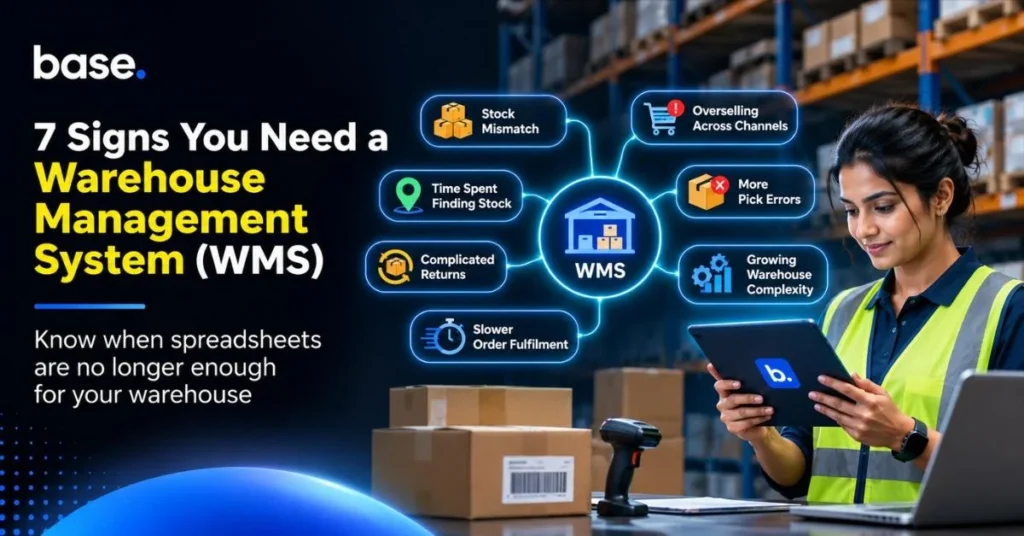
The clearest signs you need a warehouse management system (WMS) are recurring gaps between recorded and physical stock, overselling across channels, time lost locating products, increasing pick errors, and returns or stock movements that are difficult to trace. These problems usually appear when the number of products, transactions, employees or storage locations has grown beyond what manual updates can reliably support. The right warehouse management software can structure these tasks, but the decision should follow the operational problem, not a fixed business-size threshold.
That does not make spreadsheets a bad starting point. A small seller with a limited catalogue, one storage area and a few simple daily transactions may manage perfectly well with a shared sheet. The decision to change should come when manual reconciliation, delays or errors are costing more than the effort of adopting better tools. A suitable WMS can structure receiving, storage, stock movements, picking, packing and returns, but it cannot guarantee accurate results without sound data and consistent processes.
Why spreadsheets work at first, but become difficult as warehouses grow
Excel or Google Sheets can record SKUs, opening quantities, purchases, dispatches, current balances and simple adjustments. When one or two people manage a small product range in one location, a carefully maintained file may be adequate. It is also flexible for analysis and planning.
The workload changes as a business adds variants, daily orders, staff, sales channels, returns or storage locations. Someone must record each receipt, pick, dispatch, return, damage and transfer, then reconcile changes across copies or systems. A spreadsheet stores information, but does not inherently enforce a process, verify that an employee moved the right item or show who changed a quantity and why. As activity grows, version control and timing become operational issues, not merely spreadsheet design problems.
7 signs you need a warehouse management system
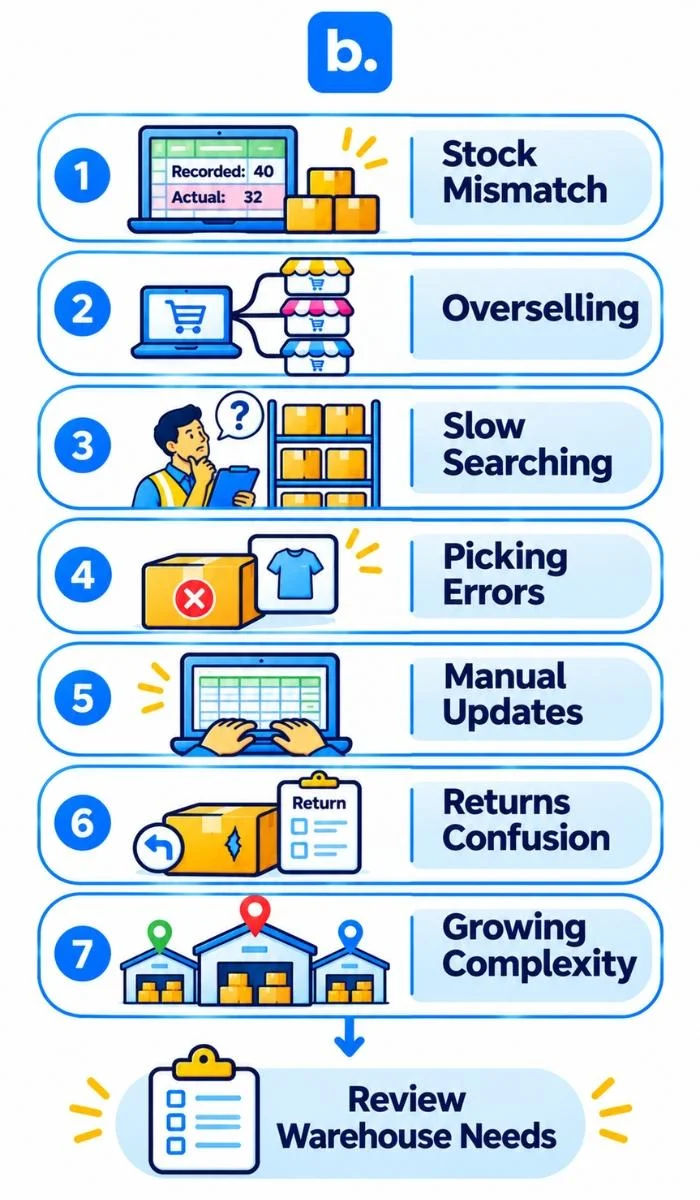
1. Your spreadsheet stock count rarely matches the shelf
If recorded and physical quantities disagree repeatedly, manual inventory control may no longer be keeping pace with warehouse activity. Receipts may be entered late, orders dispatched before the sheet is updated, returned goods left unrecorded, or damaged products counted as saleable. A transfer from one shelf to another can also disappear from the record if nobody logs it.
For example, the file shows 40 units of a popular stock keeping unit (SKU), but staff find only 32 while preparing orders. Someone has to pause fulfilment, count again and investigate old transactions before confirming available stock. Recurring differences can lead to overselling, cancellations, emergency stocktakes and purchasing decisions based on the wrong balance.
A WMS can record stock through configured receiving, movement, dispatch and adjustment workflows, and support full or partial stocktakes. Some systems also offer barcode-assisted counts and documented adjustments, which help teams investigate discrepancies. A WMS does not make inventory automatically accurate: employees still need to record transactions correctly and follow the process. For a broader definition of its role, see our warehouse management system guide.
2. You oversell across marketplaces and your own website
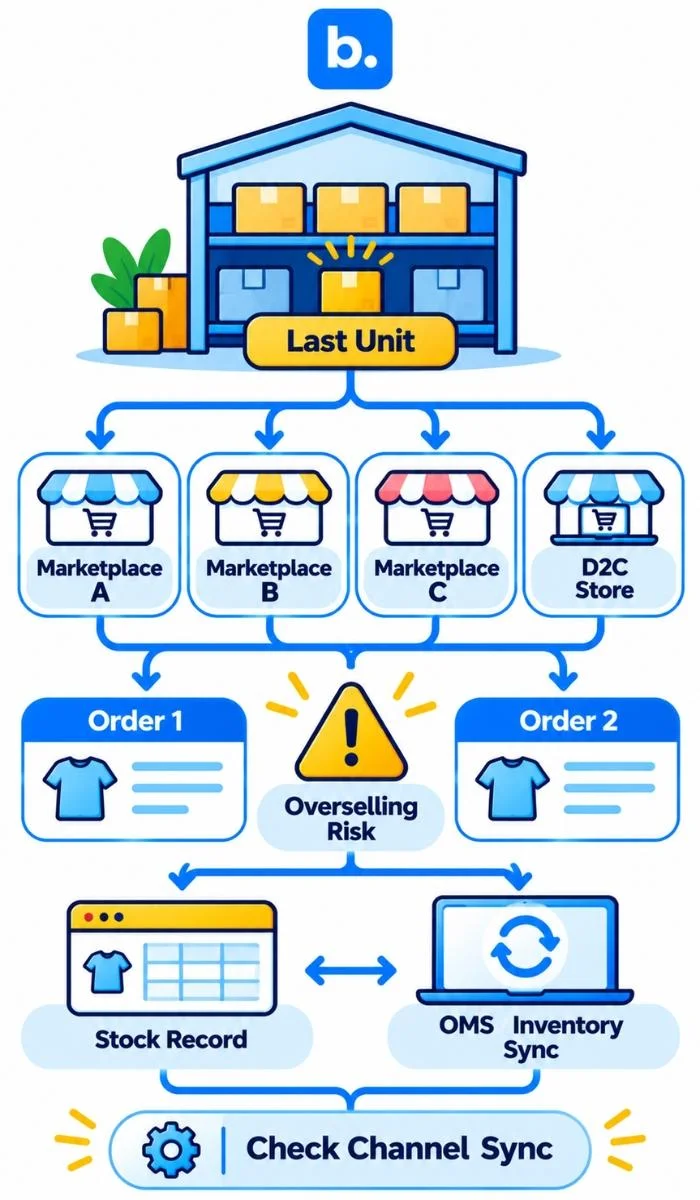
When the same unit is offered on Amazon, Flipkart, Meesho and a direct-to-consumer (D2C) website, a sale on one channel needs to be reflected in available stock elsewhere. If updates are delayed or separate files are maintained, two buyers may order the last unit before anyone reconciles the balance. That can mean cancellations, refunds, complaints and time spent working out which order can be fulfilled.
The key requirement is a reliable central stock record and timely synchronisation across channels. A WMS may support warehouse stock records, but cross-channel order and inventory synchronisation is often handled by an order management system (OMS) or inventory platform, or a connected combination. Check supported connectors and how stock changes, cancellations and returns are processed. Our Order Manager is part of the wider order workflow; confirm the exact channel and sync behaviour for your setup. Installing a standalone WMS alone does not automatically prevent overselling.
3. Staff spend too much time searching for products
A stock sheet may show that a SKU exists without identifying which rack, shelf or bin contains it. This becomes harder when a warehouse has zones, overflow locations, similar products or stock moved without a location update. If experienced employees rely on memory, new starters take longer to learn the layout and picking slows whenever the knowledgeable person is unavailable.
A fashion seller, for example, may list the quantities of a shirt in several sizes and colours but still leave pickers searching shelves for the right variant. Time spent hunting affects order preparation and makes the warehouse more dependent on individual staff knowledge.
A suitable WMS can maintain location records and, depending on its capabilities and configuration, offer bin-level tracking, labelled locations or location-guided picklists. Those features only help when the warehouse layout is mapped and stock movements are recorded consistently.
4. Picking and packing mistakes are increasing
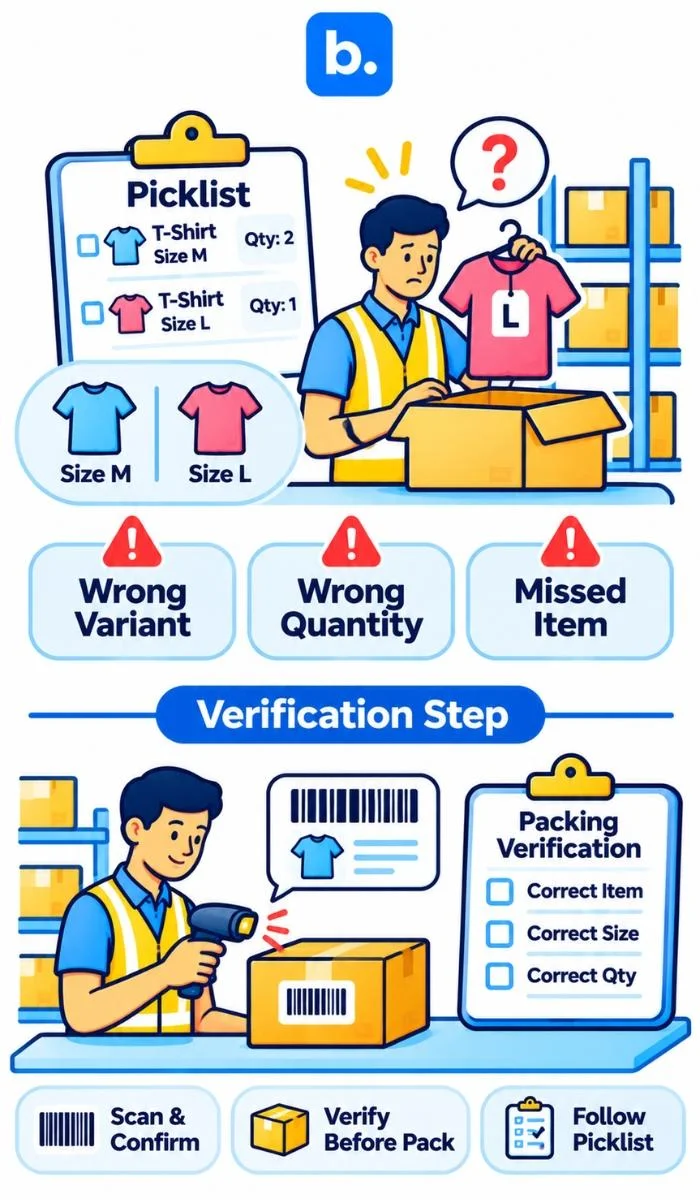
Printed order lists, handwritten notes and memory make it harder to check that the right SKU, variant and quantity are being handled, especially when products look alike. A picker might select a similar size or colour, miss one line in a multi-item order, or pack the wrong quantity. During a festive promotion, several close variants may be moving through the same work area at once.
Errors can lead to wrong-item returns, replacements, customer complaints and extra shipping work. They also consume time investigating whether a mistake happened during picking, packing or stock entry.
A WMS may provide structured picklists, barcode verification or packing checks. Scanning can help confirm that the product matches the task, but it is a control, not a guarantee. Product data, barcode quality, workflow configuration and staff practice still matter.
5. Manual updates are slowing order preparation
If each receipt, dispatch or return requires copying information between several sheets, the team may spend more time maintaining records than moving orders. Re-entering stock into marketplace files, transfer sheets and accounting or shipping tools creates opportunities for typing errors, late updates and conflicting balances. It can also make it difficult to trace why a stock figure changed.
A WMS can structure warehouse transactions and update relevant records when supported tasks are completed. Connected inventory or order systems may exchange order and stock information, reducing duplicate entry. The extent of automation depends on the product, integrations and configuration; a WMS will not eliminate every manual task or resolve bad master data by itself.
Track the time spent on corrections and reconciliation, not just the number of spreadsheets. If the same information is repeatedly entered or checked by different people, the hand-off is a signal to review the process.
6. Returns and damaged stock are hard to account for
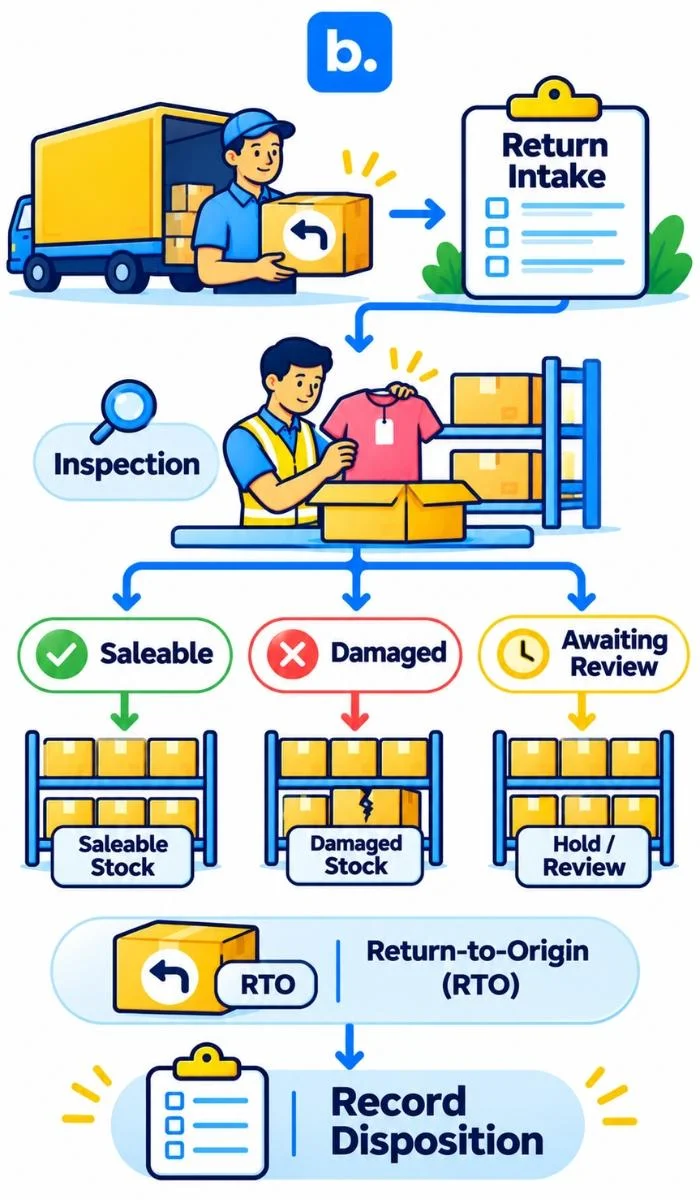
A returned parcel is not automatically saleable stock. Staff may need to link it to an order, check the item and quantity, inspect its condition, decide whether it can be resold, and record where it is stored. If a return is physically back but still absent from the file, the business may understate stock. If a damaged unit is accidentally counted as available, the next customer may be promised an item that cannot be shipped.
Customer-initiated returns and return-to-origin (RTO) parcels have different circumstances and records, though both need clear warehouse intake and stock disposition. In a cash-on-delivery (COD)-heavy mix, an undelivered parcel may return to origin; record it distinctly from a customer-requested return. Separate sheets can hide which items await inspection and which are safe to release.
A suitable WMS may support return intake, statuses, inspection notes and separate stock dispositions. Features vary. Do not assume a WMS approves refunds, resolves courier disputes or authorises a marketplace claim; those are separate processes.
7. Warehouse complexity is growing faster than your process
A second fulfilment location, more employees, additional channels or a wider catalogue can make a single shared spreadsheet difficult to govern. Teams may keep different files, managers may need manual consolidation to see stock across sites, and only one person may understand the formulas. Physical counts may interrupt dispatch, while temporary staff struggle to follow inconsistent routines during peak demand.
Order volume is not the only measure. A seller with fewer orders but many variants, several storage locations or complicated returns may need more control than a higher-volume business with a simple process. The issue is how often manual work causes delay, error or uncertainty.
A WMS can help standardise records and warehouse tasks, and some systems support multiple locations or warehouses. Map the next realistic stage of growth before selecting software. More complexity in a product brochure does not mean you need every feature today, and none of the seven signs is a fixed purchase threshold.
Spreadsheet vs WMS: what changes in daily warehouse operations?
The difference is not simply a file versus a screen. A WMS can turn physical warehouse steps into recorded, repeatable transactions. The actual functions depend on the software selected.
| Warehouse activity | Spreadsheet-based process | WMS-based process |
|---|---|---|
| Stock records | Staff enter quantities manually | Supported transactions update stock records |
| Product location | Location may be stored in separate columns or files | Some systems track warehouse or bin locations |
| Receiving | Staff key in quantities after checking stock | Receiving can follow structured product and quantity checks |
| Picking | Staff use memory, printouts or manual lists | Picklists may guide staff through configured locations |
| Verification | Depends on manual checks | Barcode checks may be available for supported tasks |
| Stocktakes | Counts are reconciled manually | Full or partial counts can be compared with records |
| Returns | Often maintained in a separate sheet | Dedicated statuses and stock workflows may be available |
| Multiple sites | Sheets need manual consolidation | Supported systems may show stock by warehouse |
Spreadsheets can still support analysis, planning and exports after a WMS is introduced. The aim is to avoid relying on a sheet as the primary record of every physical stock movement. Our automated warehouse management system guide gives more context on warehouse processes.
Does every small business need a WMS?
No. A warehouse management system for small business operations is worthwhile only if its capabilities solve a real operational need. A limited catalogue, one storage area, predictable orders, one or two stock handlers and simple receiving and dispatch may still be manageable with a spreadsheet or basic stock management systems. Bin-level tracking, barcode checks and dedicated returns workflows may not be necessary for every seller.
Inventory management software may be sufficient when the main need is a reliable stock record or availability across channels. A WMS is more relevant when the business must control physical work such as receiving, storage, picking, packing, stock movements or returns. Some products combine these functions, so assess what the software actually does rather than relying on its label. For a deeper look at inventory records and stock visibility, see our inventory management system guide.
Decide based on frequency, cost and impact: how often do discrepancies occur, how much time is spent reconciling, and are customers or dispatch targets affected? Do not buy on company size or a fixed order threshold alone.
What to check before moving from spreadsheets to a WMS
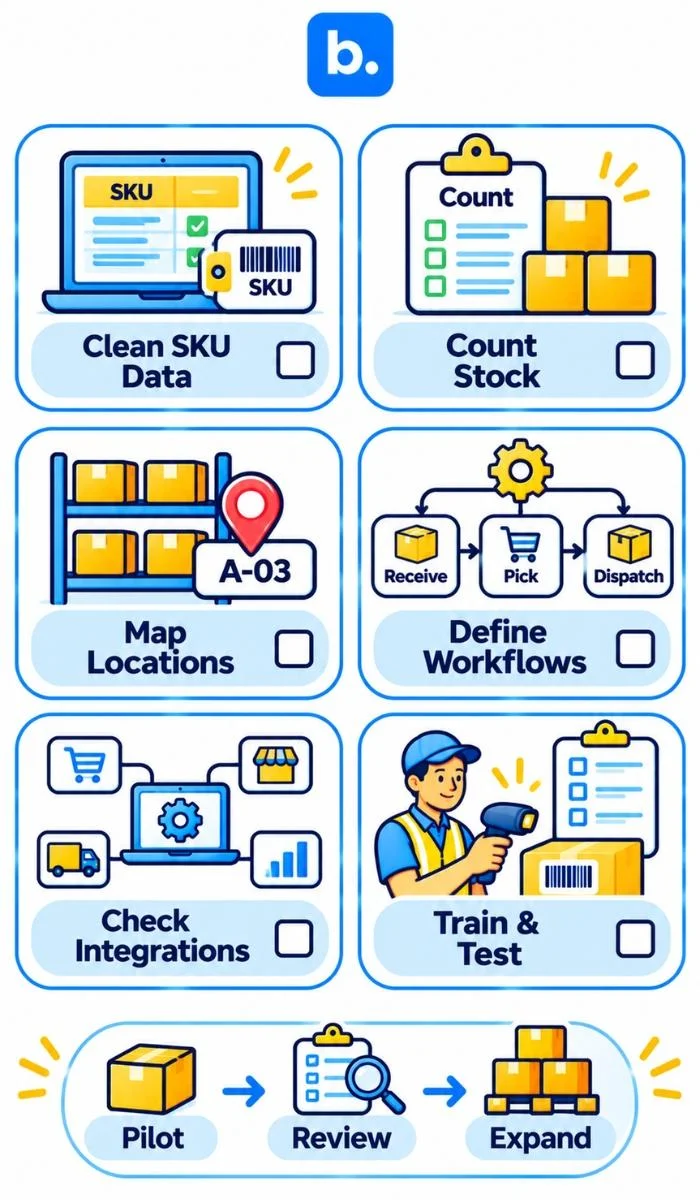
A new system will not correct unclear processes by itself. Prepare the operation before importing records:
- Clean product data. Standardise SKUs, names, variants and units of measure.
- Verify opening stock. Count key inventory and investigate material differences before migration.
- Map storage. Record zones, racks, shelves and locations that staff need to identify.
- Document workflows. Write down how the team receives, stores, picks, packs and handles returns.
- Check connections. List marketplaces, D2C platforms, OMS, shipping and accounting tools. Review current Base integrations where relevant, then confirm each required connection and data flow.
- Plan people and tests. Assign process owners, train warehouse staff and run sample receiving, picking, packing, adjustments and return scenarios before a full rollout.
A phased launch, such as starting with one zone or product range, can expose data, configuration and training issues before expanding. The implementation effort depends on data quality, integrations, warehouse layout and operational complexity, so do not assume a fixed timeline.
How Base WMS supports growing ecommerce warehouses
Our Base WMS supports structured warehouse workflows that can help businesses move beyond spreadsheet-only records. It offers stock visibility by product and location, batch and expiry information, warehouse location configuration, full or partial stocktakes, documented stock corrections and barcode-assisted counting. It also supports receiving with quantity and quality checks, location-guided picking, scanning during item collection, mobile warehouse tasks and configurable return statuses and reasons.
Results still depend on accurate product data, the right setup and teams recording each transaction. Check the features against your needs and talk to us about the workflow you have in mind.
Conclusion
Spreadsheets remain useful while they fit the work. Consider a WMS when manual tracking begins to affect stock accuracy, fulfilment, visibility or growth. Assess the problems and prepare your data before choosing a warehouse management solution.
