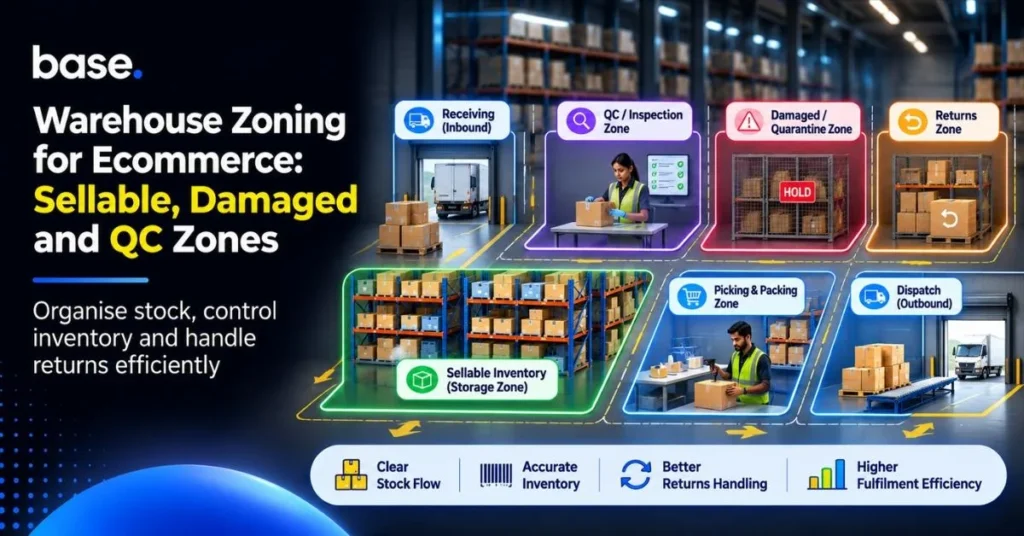
Warehouse zoning for ecommerce means dividing a facility into designated areas for activities and stock conditions, including receiving, inspection, sellable storage, picking, packing, dispatch, returns and damaged-stock holding. This matters because products can be physically inside a warehouse without being ready to sell or fulfil.
A new delivery may still need checking. A returned item may be waiting for inspection. Damaged stock may need to be isolated. Products reserved for orders may be present but not freely available for another sale. Separating these categories helps teams see what can be picked, what needs a decision and where stock belongs.
Effective warehouse zoning connects the physical layout with clear handling procedures and accurate inventory records. A returned parcel should not become available stock simply because it has arrived. It needs to be identified, checked and assigned an appropriate next step.
What is warehouse zoning and why does it matter in ecommerce?
Warehouse zoning assigns areas to activities or stock conditions so products follow a predictable route. A small D2C warehouse may use labelled shelves, cages or bins; a large fulfilment centre may have dedicated areas and traffic flows. Either way, staff should know where stock is and what happens next.
A planned layout supports warehouse inventory management by distinguishing stock awaiting checks, ready for picking or held separately. It makes receiving and returns less likely to mix with sellable inventory, helps pickers find products and uses space according to movement and handling needs. Zoning defines how inventory enters, moves through and leaves the warehouse. For broader context, see our warehouse management system explainer.
Warehouse zones vs inventory statuses: what is the difference?
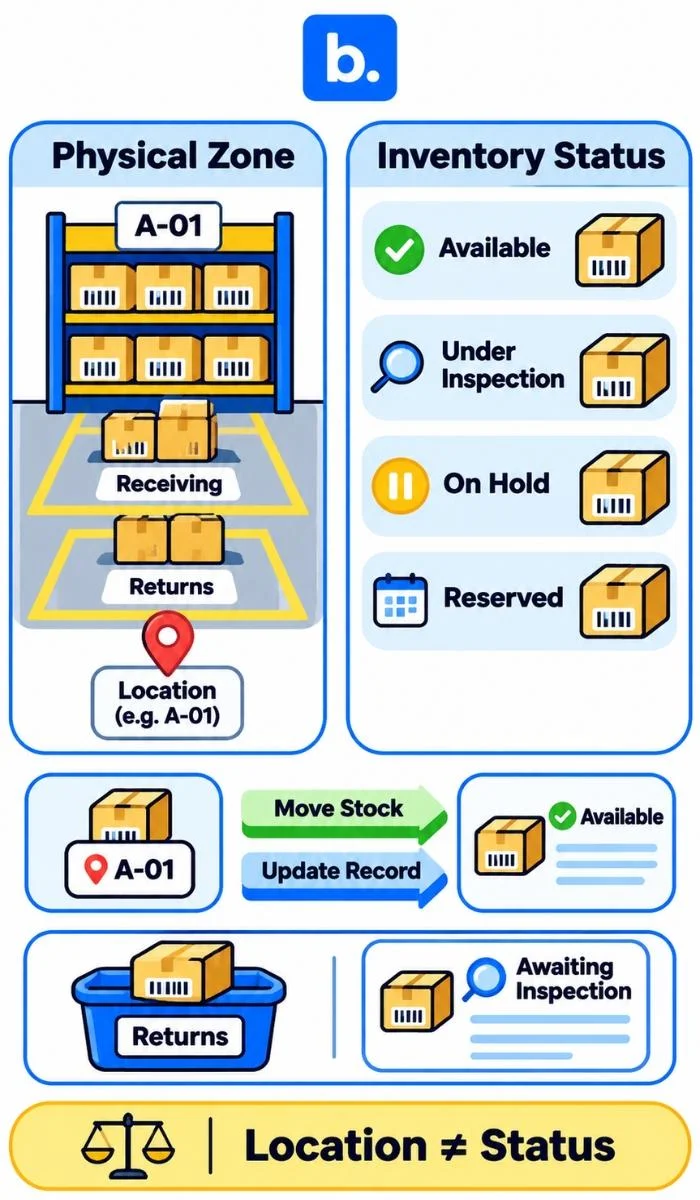
A physical zone is a designated place in the warehouse. An inventory status describes the condition or availability of stock in the system or the team’s documented process. The two should work together, but they are not interchangeable.
| Physical warehouse zone | Inventory status or condition | Operational meaning |
|---|---|---|
| Receiving area | Received, awaiting verification | Stock has arrived; checks may still be pending |
| QC or inspection area | Under inspection | The product is being checked before a decision |
| Sellable storage | Available | Stock has passed the required checks and may be allocated under inventory rules |
| Damaged-goods or quarantine area | Damaged, blocked or on hold | Do not treat stock as normally sellable while it awaits a decision |
| Returns area | Return received, awaiting assessment | The item is physically present, but its condition and disposition are not yet established |
| Order staging or allocated-stock area | Reserved or allocated | Stock is held for an order or operational requirement |
A physical move does not automatically change system status, and a status change does not move a product to another shelf. A returned phone case may sit in a returns bin with an awaiting-inspection status. After inspection, staff move it to sellable stock and update its record, or place it on hold. Statuses and system behaviour depend on the warehouse’s process and configuration, so use a clear location and deliberate record update together.
Essential zones every ecommerce warehouse should consider
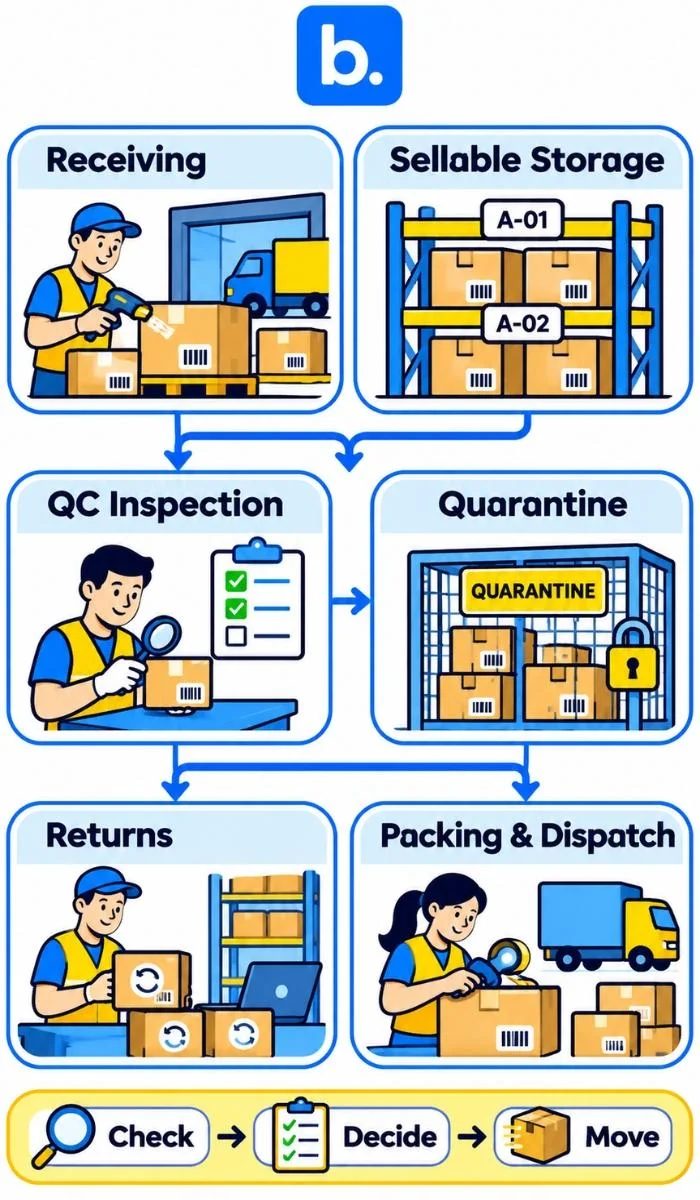
Not every seller needs a separate room for every activity. A small operation can use labelled shelving, a cage, a trolley or clearly marked bins, provided staff can distinguish stock and follow the same process.
Receiving and inbound zone
Supplier deliveries first enter a designated receiving area. Staff compare them with purchase orders or delivery documents, verify quantity, SKU and variant, and check visible condition. Record accepted stock and flag shortages, excess or damaged packaging for follow-up.
If 100 units are expected but five cartons are visibly damaged and two units are missing, record what arrived and route questionable stock for checks. Do not add the expected quantity straight to sellable inventory. Once verified, goods can move to QC or an assigned storage location. Keep inbound stock apart from products already available for orders.
Sellable inventory and picking zone
This area holds products that passed required checks and are available for fulfilment, subject to reservations, channel allocation and other stock rules. Use clear SKU and location identifiers, accurate quantities and separate variants where they could be confused. A fashion seller might store each T-shirt size and colour in an identified location rather than rely on visual distinction. Record primary and overflow locations. Picking may use the same storage or a forward-picking area replenished from reserve stock; in either case, physical stock and location records should agree.
Quality control and inspection zone
The QC area holds products awaiting inspection. This is a decision stage, not a damaged-stock label. Checks should fit the product: sealed skincare, an appliance and a garment need different criteria. For inbound stock, verify SKU, quantity, packaging and visible condition, plus batch, expiry or serial details where relevant. For returns, confirm the order and product, assess signs of use, accessories and packaging against resale criteria. Record the result and route the item. Keep it apart from approved stock until a decision is made: it may pass, need more review or be held elsewhere. QC stock is not automatically damaged.
Damaged and quarantine zone
Use a labelled holding area for damaged, defective, incomplete or otherwise unsuitable goods pending a decision. This might include inbound transit damage, a return missing accessories or stock under supplier investigation. Isolation helps stop accidental picking. Define how to record the hold, who authorises a disposition and where items go if repaired, returned or written off. Damaged outer packaging does not always make a product unsellable; document acceptable resale conditions and any repackaging checks. Physical separation is not enough if the stock record still shows the item as available, so update its status through the system or documented process.
Returns and reverse-logistics zone
Process returned parcels separately from supplier inbound. Link the return to its order where possible, verify product and quantity, record condition and route it for inspection or another defined outcome. Under the seller’s policy, it may return to sellable stock, remain held, be repaired or written off. Arrival is not approval: a request or parcel does not prove the item is correct, complete or in resale condition. Customer returns and return-to-origin (RTO) parcels may follow different routes. An RTO following a failed delivery or COD refusal still needs identification and a condition check before stock is restored. See our guide to ecommerce returns management.
Packing and dispatch zone
Picked items move to packing for order verification, packaging, labelling and shipment documents. Keep packed orders awaiting courier handover separate from inbound and unprocessed stock. If a picked item returns to storage, update its location and availability through a controlled process. The packing area should not become an overflow store. For setup detail, see our barcode pick and pack system guide.
How should inventory move between warehouse zones?
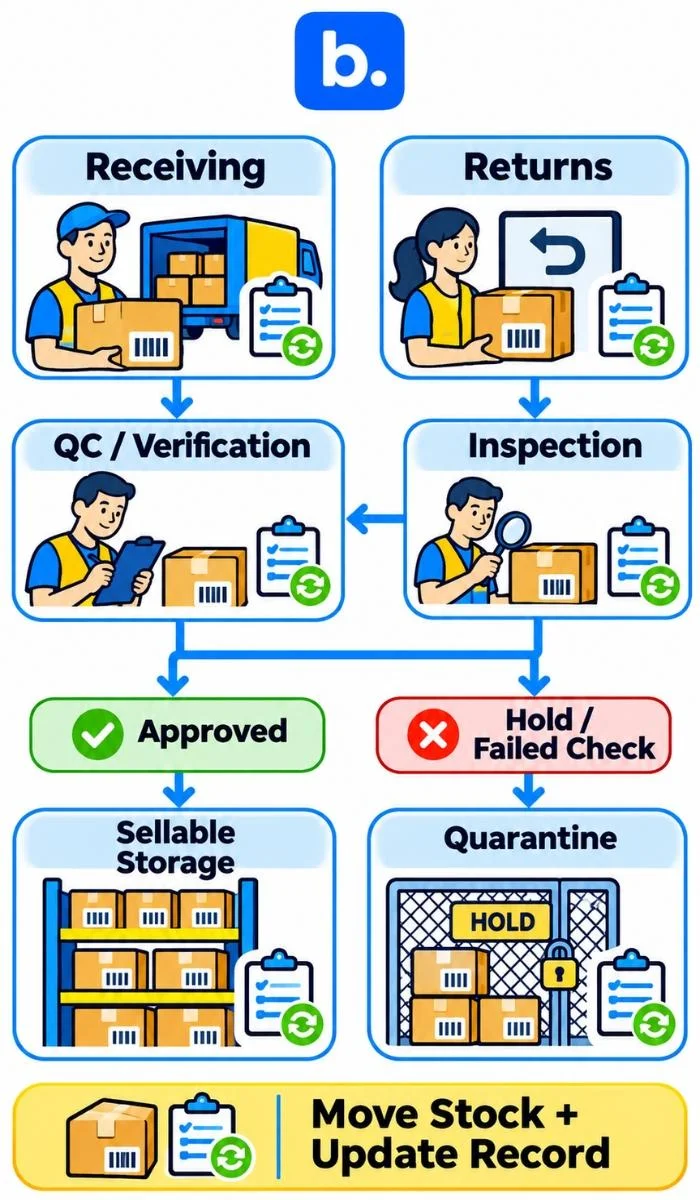
Zoning works best when every movement has a trigger, a responsible person and a record update. The precise sequence depends on the product, seller policy and warehouse configuration.
| Stock movement | What triggers it? | What should happen next? |
|---|---|---|
| Receiving to QC | Verification or inspection is required | Check product identity, quantity and condition; record the result |
| Receiving to sellable storage | Required checks are completed | Record accepted quantity and destination location |
| QC to sellable storage | Product passes inspection | Move it to a suitable sellable location and update its record |
| QC to damaged or quarantine | Product fails a check or needs further review | Isolate it and keep it out of normal sale or picking |
| Returns to QC | A returned product arrives | Identify the item and assess its condition |
| Returns to sellable storage | Product is approved for resale under policy | Update its status and physical location |
| Returns to quarantine | Product cannot yet be released | Hold it separately until an authorised decision |
Hypothetical example: returned shoes. A customer returns a pair because the size was wrong. The parcel is received in the returns area and linked to the order. Staff confirm the product and move it to inspection. They check the soles, upper material, labels and accessories. If it meets the seller’s criteria, they update the record and return it to sellable stock. If it shows wear or damage, it stays outside normal sellable inventory while the next action is decided. The returns area receives the item; the QC area evaluates it. Those zones have different jobs.
How to plan an effective warehouse zoning layout
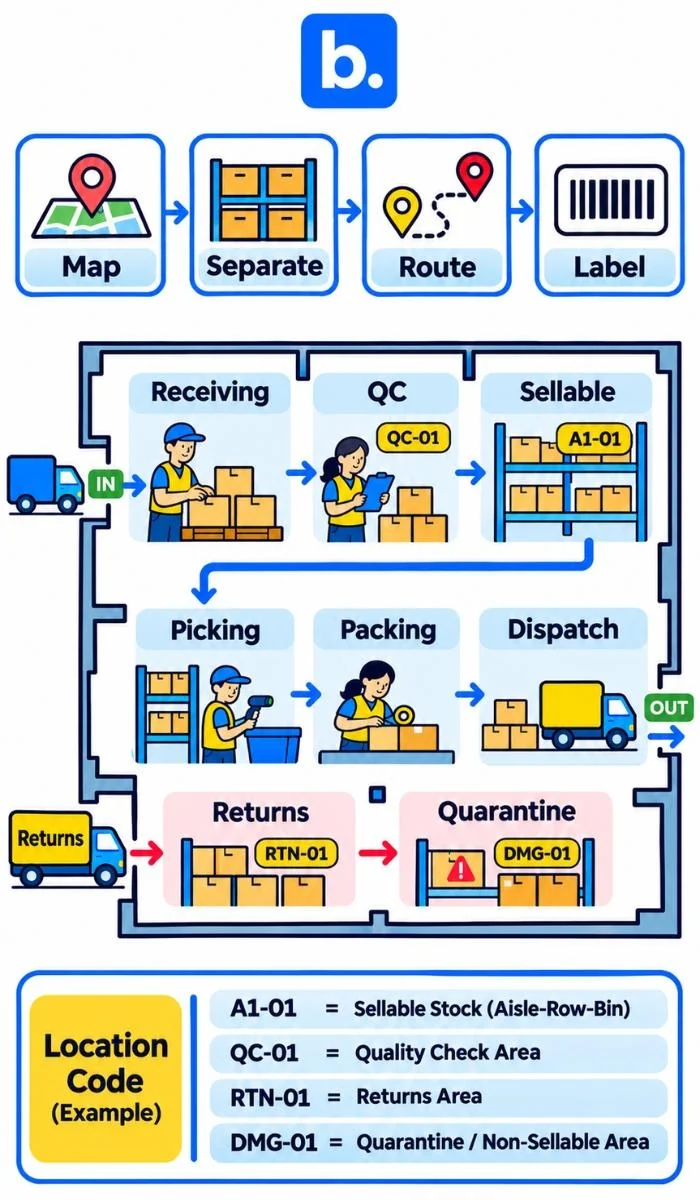
1. Map the existing warehouse
Mark receiving, storage, picking, packing, dispatch and returns areas, plus places where damaged or unchecked goods accumulate. Trace actual product movement before changing the layout to spot cross-traffic, repeated handling and informal holding areas missing from inventory records.
2. Separate stock by condition and purpose
Group stock by operational condition and handling needs, not only product category. Different products can share a building, but unchecked, sellable, returned and damaged items should remain distinguishable, with inspection or holds completed before normal fulfilment.
3. Plan the movement of goods
Where possible, plan a route from receiving through verification and storage to picking, packing and dispatch. Keep returns and quarantine from obstructing outbound work. A compact warehouse needs a different layout from a large fulfilment centre; seasonal peaks may also require temporary space and procedures for extra inbound or returns volume.
4. Assign clear location codes
Use consistent names that staff can understand. Illustrative codes might include A1-01 for aisle 1, rack 1, shelf 1; QC-01 for an inspection location; RTN-01 for returns holding; and DMG-01 for damaged stock. These examples are not an industry standard. Use signs and labels that match the location records, and ensure the team knows the difference between a product location and a status such as blocked or awaiting inspection. Our help guide on warehouse locations explains product-location assignment and display options.
5. Establish rules for moving stock
Document who can release an item to sellable stock, who records damage, when a return must be inspected, what to do with a product found in the wrong location and who updates its record after relocation. Zoning needs operating procedures as well as floor markings. Train new and temporary staff to use the same steps, particularly during sales periods when receiving and returns volumes can rise.
How a warehouse management system supports warehouse zoning
A warehouse management system helps manage inventory and activities such as receiving, storage locations, picking, packing and stocktakes. It can connect a physical location to a digital stock record, but it does not create floor partitions or make inspection decisions for the team.
Depending on configuration, warehouse inventory management software can record locations and quantities, support receiving and putaway, compare physical counts with system stock and guide picking to recorded locations. Returns workflows can tie an item to a status and assign it to a configured warehouse. A physical move and system update must stay in step; the software cannot know an item has moved if the change is not recorded. Whether a business calls its system a WMS, an inventory management system for a warehouse or inventory software for a warehouse, check whether its records support the required locations and holds. Warehouse and inventory management capabilities vary across warehouse systems and WMS systems.
Base WMS supports warehouse locations, receiving, stocktakes, picking, barcode scanning, returns workflows and multiple warehouses. Each warehouse can have separate stock and location records, subject to configuration. Our WMS also supports custom return statuses and reasons. In the returns workflow, an item status can be associated with a warehouse; selecting that status determines where the returned item is assigned, provided the warehouse is available for its inventory. A completed return restores stock after receipt and positive review, while rejected or cancelled returns are not restored through that workflow.
These functions can help sellers keep return outcomes distinct in warehouse records. Our multi-warehouse inventory management guide explains why separate warehouse records matter when fulfilment happens from more than one location. Staff, layout and operating rules complete the process.
Common warehouse zoning mistakes to avoid
- Mixing returns with sellable inventory. A returned item should be assessed before it is treated as available.
- Treating QC stock as damaged stock. Inspection is pending decision; it is not a final disposition.
- Using unclear location labels. Similar shelves and bins invite misplaced stock and extra searching.
- Moving products without updating records. The system can then show stock where staff cannot find it, or mark held goods as available.
- Creating zones without movement procedures. Staff need to know who can move stock and when its status should change.
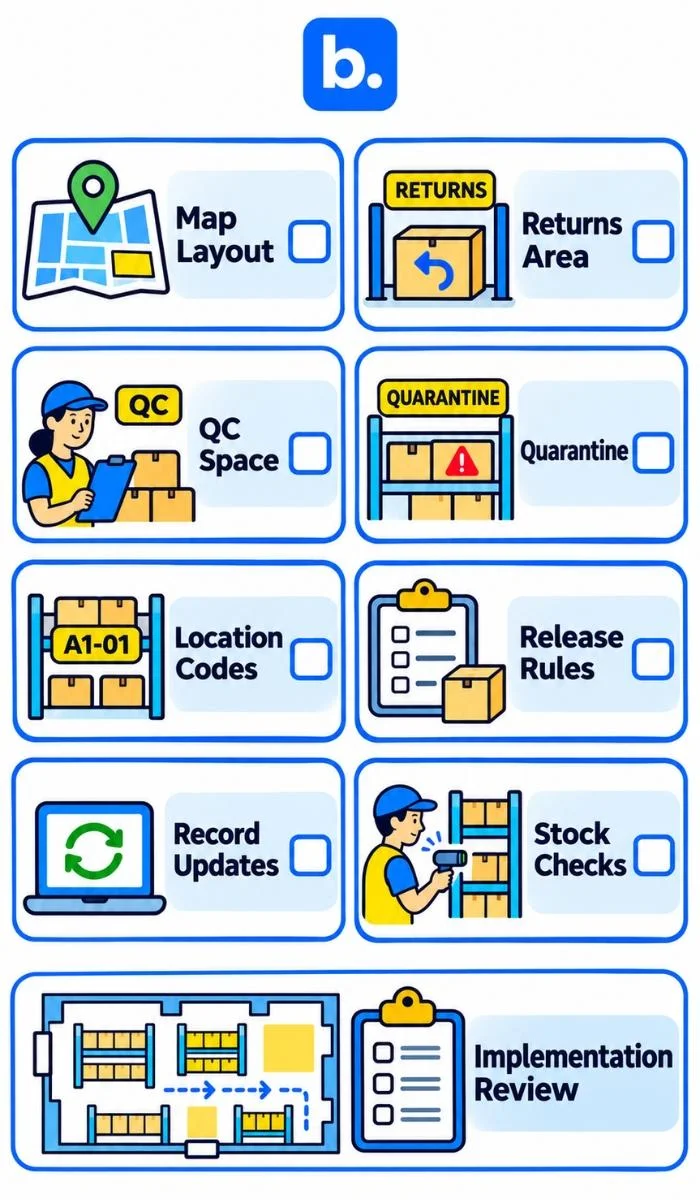
Warehouse zoning implementation checklist
| Check | Complete |
|---|---|
| Map receiving, storage, picking, packing and dispatch areas | ☐ |
| Set aside identifiable space for returns and inspection | ☐ |
| Separate damaged or quarantined stock from sellable inventory | ☐ |
| Create consistent location codes and matching records | ☐ |
| Define inspection and stock-release procedures | ☐ |
| Assign responsibility for stock movements and record updates | ☐ |
| Check system quantities and locations against the physical layout | ☐ |
| Review the layout as order volume and product range change | ☐ |
Conclusion
Warehouse zoning works when physical locations, stock-handling procedures and inventory records agree. Separate sellable, returned, damaged and inspection stock so teams can tell what is ready to pick and what needs a decision. Our WMS can support location management, inventory visibility and warehouse workflows; explore its features to see how it fits your process.
