

To manage inventory during ecommerce sales, run live stock synchronisation across every channel, hold a 10-15% buffer on your top 20 SKUs, reserve stock at order capture rather than at dispatch, and freeze catalogue changes 72 hours before the sale opens. Overselling during a sale event is a synchronisation-latency problem, not a stock problem.
That distinction matters more in India than anywhere else.
Why Big Indian Ecommerce Sale Events Break Inventory Systems: Volume, Channel Fragmentation and COD
Indian sale events are not a demand curve. They are a wall.
Redseer reported that the first 11 days of the 2025 festive season clocked over ₹60,000 crore in GMV, roughly 3.5 times business-as-usual levels, with about 90 million shoppers participating at an average spend of close to ₹7,000 each. Full-season festive GMV was projected to cross ₹1.15 lakh crore, growing 20-25% year on year.
A system that comfortably handles 400 orders a day is asked to handle 1,400 within a six-hour window. Nothing about that is linear.
Three structural factors make it harder for Indian sellers specifically:
- Channel fragmentation. A mid-size Indian brand typically sells across Amazon.in, Flipkart, Myntra, Meesho, AJIO, JioMart, Nykaa, its own Shopify store, and increasingly Blinkit, Zepto and Instamart. Each has a different inventory push mechanism and a different lag tolerance.
- Dual-peak demand. Redseer noted a dual-peak pattern in 2025, with GST slab simplification pushing high-ticket purchases past Diwali into a second wave. One inventory plan no longer covers the season.
- COD exposure. COD still accounts for roughly 45% of Indian D2C orders, down from 55% in 2024 according to one 2026 industry survey. Every COD order locks physical stock against revenue that may never arrive.
The last point is the one most sellers underestimate. India’s average RTO rate sits between 20% and 30%, against a global benchmark closer to 8-12%, and COD-heavy categories like fashion and footwear can touch 40%. Please verify these ranges against your own courier data before publishing them as your own benchmark; they vary sharply by category and pin code.
So when Indian brands ask how to manage inventory during ecommerce sales, they are really asking four separate operational questions at once.
What Are the Four Inventory Failure Modes During an Ecommerce Sale?
|
Failure mode |
What triggers it |
Typical cost |
Where it surfaces |
|---|---|---|---|
|
Overselling |
Sync interval longer than order velocity |
Order cancellation, seller-rating penalty, listing suppression |
Amazon, Flipkart, Meesho |
|
Phantom stockout |
Unreconciled reservations and returns |
Lost sale at peak CPC |
Own store, Myntra |
|
Mispick / wrong item |
Manual picking under volume pressure |
Return, refund, CAC written off |
Warehouse floor |
|
Dead stock |
Over-indexed buy on unvalidated SKUs |
Blocked working capital, markdown |
Post-season P&L |
Overselling is the most visible. Dead stock is the most expensive. Any serious attempt to manage inventory during ecommerce sales has to close all four, because fixing only the visible one moves the loss rather than removing it.
Marketplaces do not treat overselling as an inventory error. They treat it as a seller defect. Cancellations driven by unavailability feed directly into account health metrics, and a suppressed listing during a sale window costs more than the cancelled order ever did.
How to Prepare Inventory Before an Ecommerce Sale: The 30-Day Readiness Window for Indian Sellers
The work that decides whether you manage inventory during ecommerce sales successfully happens before the sale opens, not during it.
T-30 Days: How to Classify SKUs and Forecast Demand for an Indian Festive Sale

Run an ABC classification on the last 90 days of order data, then overlay last year’s sale-period velocity.
- A-class SKUs (roughly top 20% by units) usually drive 70-80% of sale-window volume. Verify this split against your own data rather than assuming the Pareto ratio holds.
- Forecast at the SKU-channel level, not the SKU level. Flipkart’s Big Billion Days mix rarely matches your Shopify mix.
- Build three scenarios: base, 1.5x base, 2.5x base. Procure to base, contract to 1.5x, hold optionality to 2.5x.
T-21 Days: How to Lock Procurement and Inbound Supply Before Peak Season
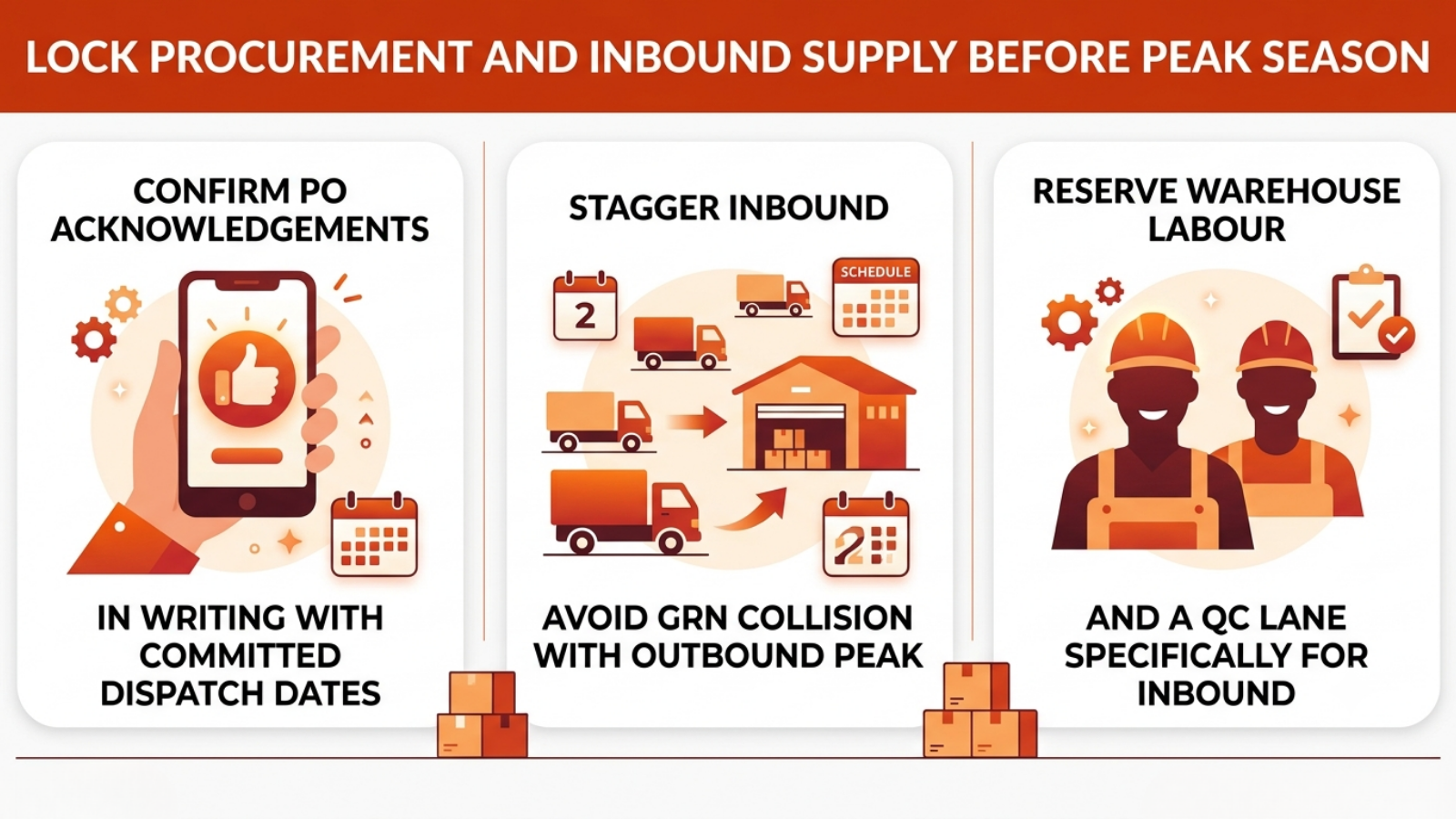
Indian inbound lead times stretch during festive weeks because your suppliers are also everyone else’s suppliers.
- Confirm PO acknowledgements in writing with committed dispatch dates.
- Stagger inbound so GRN work does not collide with outbound peak.
- Reserve additional warehouse labour and a QC lane specifically for inbound during the sale, or receiving will silently stall.
T-14 Days: How to Fix SKU Mapping, Barcodes and Catalogue Data Before a Sale
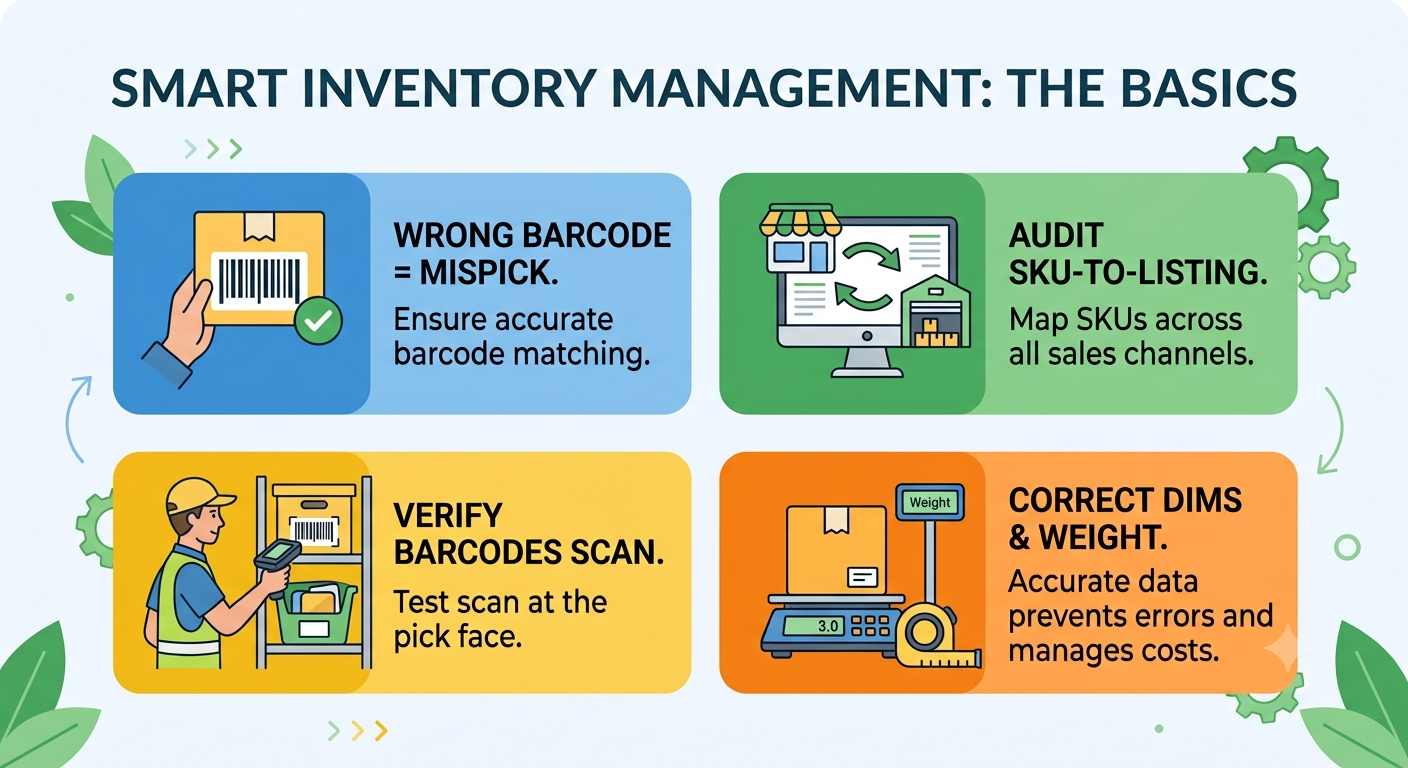
Catalogue hygiene is inventory management. A wrong barcode is a guaranteed mispick.
- Audit SKU-to-listing mapping on every channel. Unmapped or duplicate-mapped SKUs are the single most common source of oversell.
- Verify barcodes scan cleanly at the pick face.
- Correct dimensional and weight data. Wrong dims mean wrong courier rates and, at volume, wrong bin allocation.
T-7 Days: How to Cycle Count A-Class SKUs and Set Channel-Level Buffer Stock
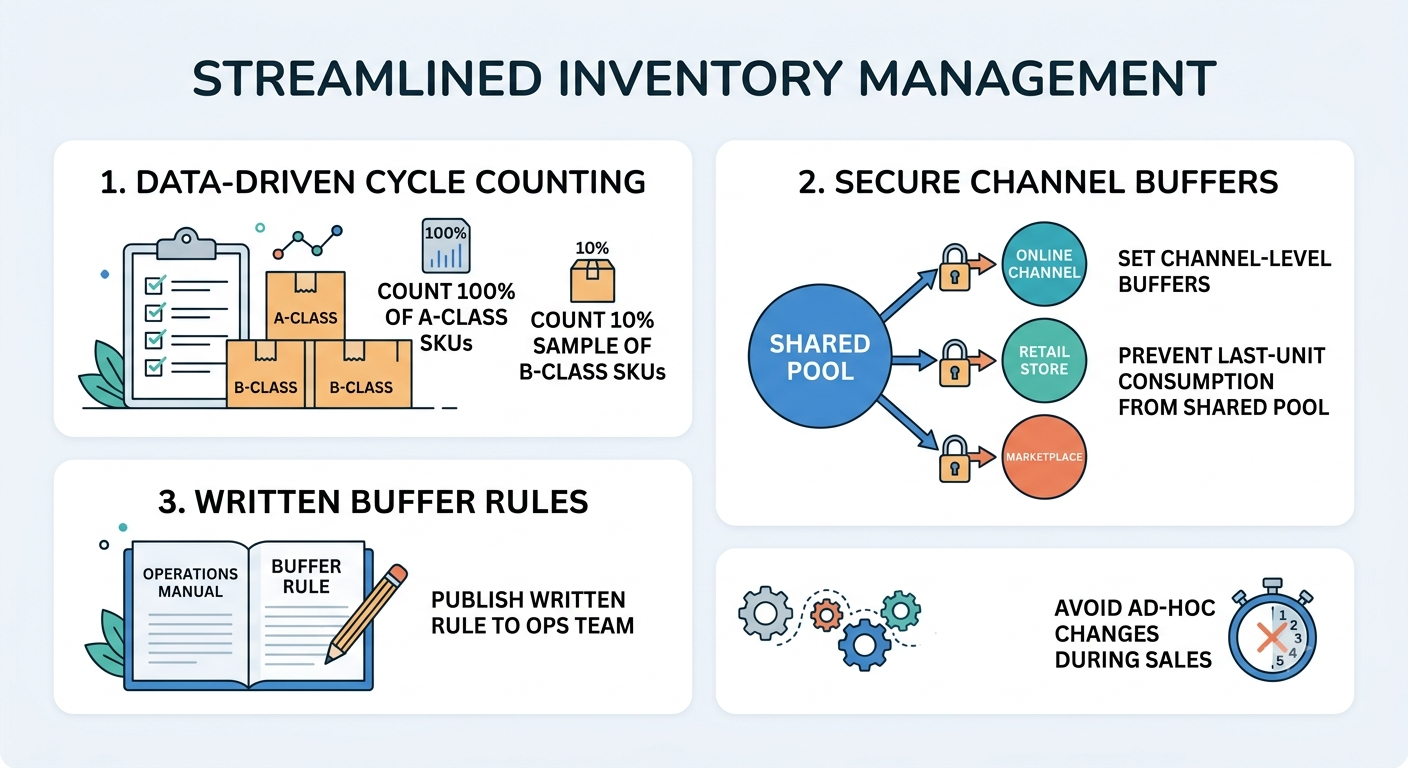
Full stocktakes are not feasible mid-season. Cycle counting is.
- Cycle count 100% of A-class SKUs and a 10% sample of B-class.
- Set channel-level buffers so no single channel can consume the last units of a shared pool.
- Publish the buffer rule to your ops team in writing. Ad-hoc buffer changes during a sale cause more harm than the oversell they prevent.
T-3 Days: Why You Should Freeze Catalogue, Pricing and Integration Changes Before a Sale
Freeze catalogue edits, price-list changes, and integration changes 72 hours out.
Every mid-sale integration change is an untested deployment on your highest-revenue day.
Top 8 Ways to Manage Inventory During Ecommerce Sales With Base.com: A Detailed Walkthrough
Base.com is an ecommerce operating system that combines order management, product and inventory management, marketplace listing management, shipping, and workflow automation in one platform. Its Product Manager module explicitly combines ERP, WMS, and PIM functions, inventory control, pricing, reservations, stock documents, and storage automation.
The eight capabilities below map directly to the failure modes above, and together they cover every layer you need to manage inventory during ecommerce sales at Indian festive volumes. Each is a documented Base.com feature; configuration specifics should be confirmed with your implementation team.
1. Switch Stock Synchronisation to Live Mode to Prevent Overselling on Amazon and Flipkart
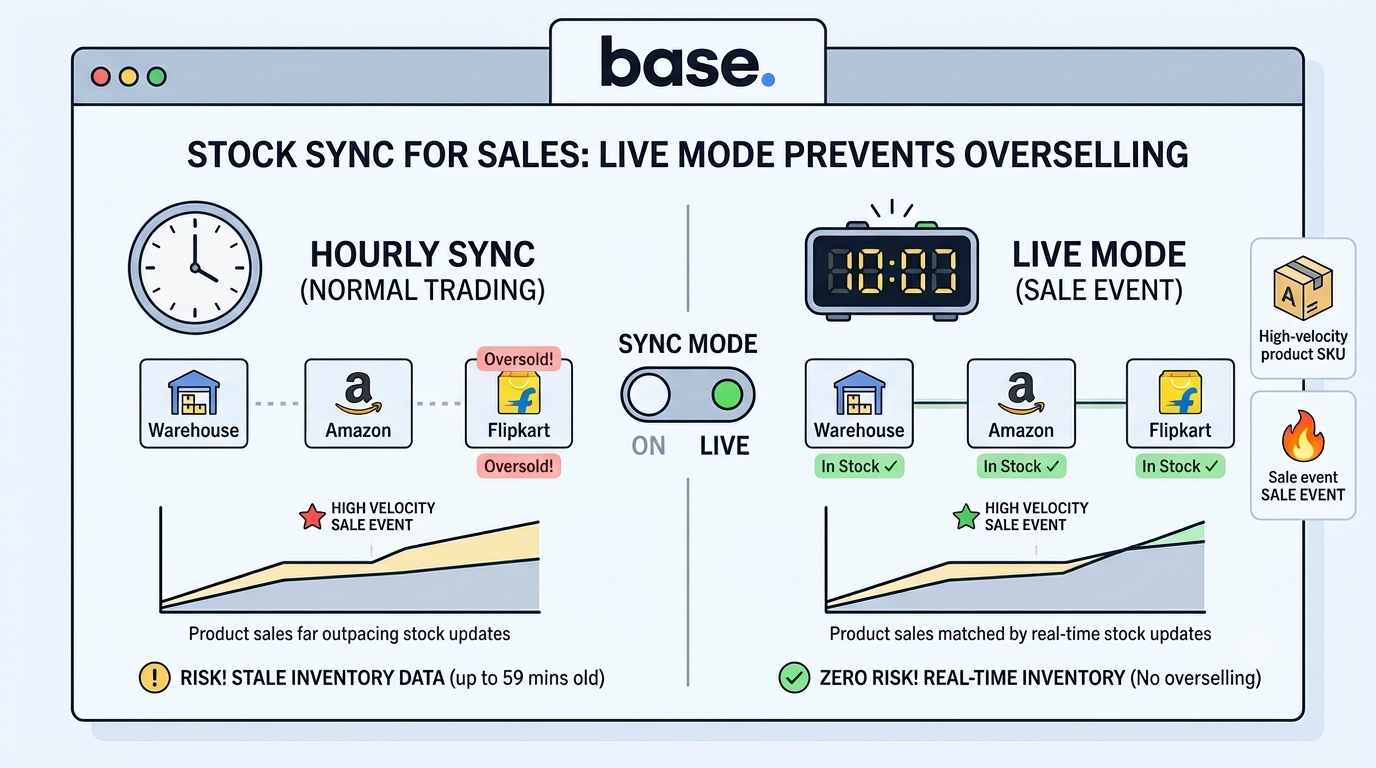
Base.com offers stock synchronisation on a configurable cadence, every eight hours, hourly, or live, and price synchronisation at 24-hour, 12-hour, four-hour, hourly, or real-time intervals.
For business-as-usual trading, hourly is adequate. During a sale event, it is not.
At 3.5x normal velocity, an hourly sync means your Amazon listing can be selling stock that left the warehouse 59 minutes ago. Switch A-class SKUs to live synchronisation for the sale window. This single configuration change eliminates most oversell risk for high-velocity SKUs.
2. Use the Base.com Accelerations Module to Raise Sync Frequency on Peak Sale Days

Base.com ships a dedicated Accelerations module that lets sellers raise synchronisation frequency for periods when higher sales are expected.
This is the feature built precisely for the problem. Rather than permanently running every SKU at maximum sync frequency, you schedule elevated cadence for the sale window and revert afterwards.
Practical configuration for Indian sale events:
- Turn Accelerations on 24 hours before the sale opens, not at open. Traffic builds ahead of the official start.
- Hold elevated cadence through the full sale window plus 48 hours, since post-sale cancellations and returns also move stock.
- Revert deliberately, with a checklist, rather than leaving it running.
3. Auto-Close Listings at Zero Stock and Auto-Relist Them on Replenishment
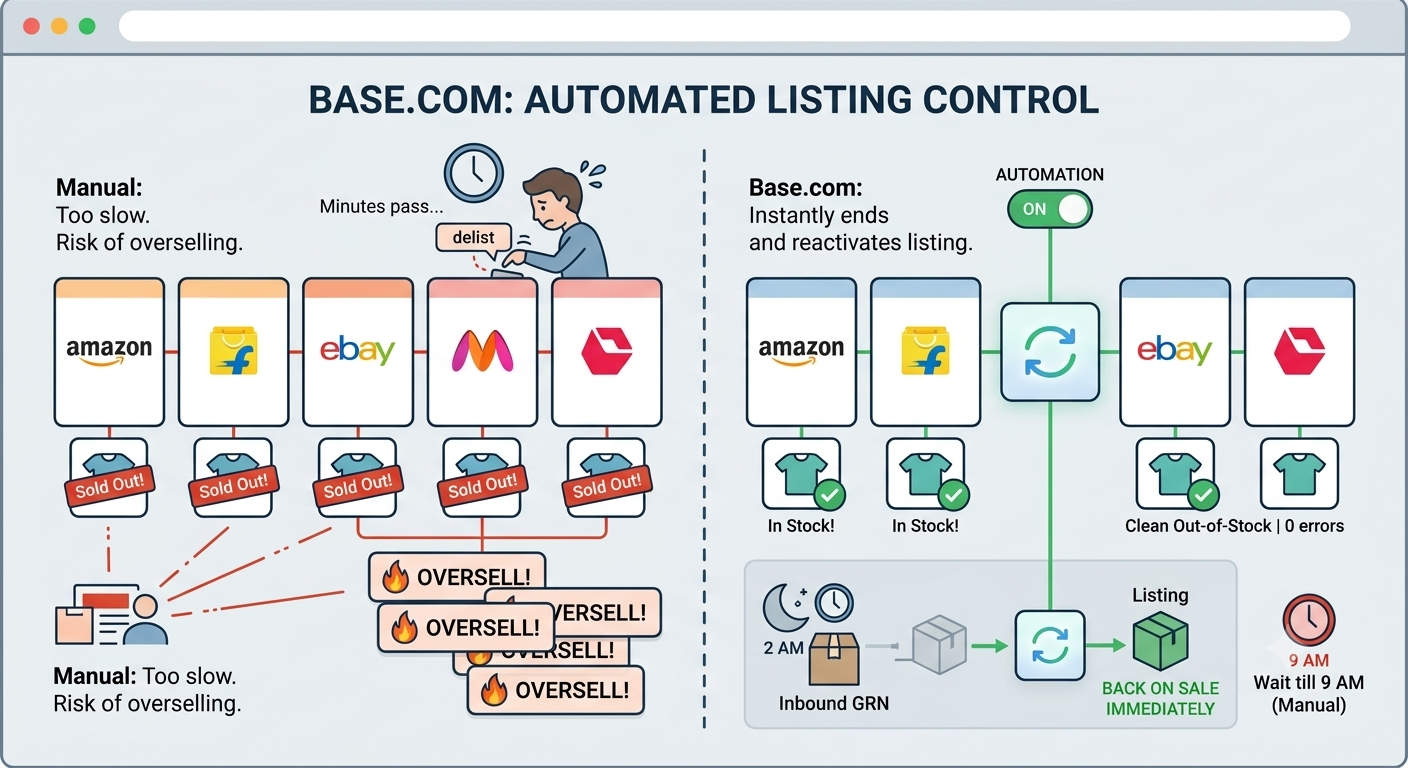
Base.com can automatically end a listing or offer when stock reaches zero, and automatically reactivate it when the product is replenished.
Manual delisting does not work at sale velocity. A human noticing a zero-stock SKU and closing the listing across six marketplaces takes minutes you do not have.
Automatic closure converts a would-be oversell into a clean out-of-stock. Automatic relisting means an inbound GRN at 2 AM puts the SKU back on sale immediately, instead of waiting for someone to reach a desk at 9 AM.
4. Reserve Stock at Order Capture, Not at Dispatch, to Handle COD Order Backlogs

Base.com’s Product Manager supports reserving products before orders are paid.
This is the most important setting for Indian sellers, and the one most commonly left off.
If stock is only decremented at dispatch, every unshipped COD order is invisible to your available-to-promise figure. With COD at roughly 45% of D2C orders and a backlog building during a sale, that gap becomes structural; you keep selling units that are already spoken for.
Reserving at capture means available-to-promise reflects committed stock, not just physical stock. Set a reservation expiry that matches your prepaid payment window so abandoned carts release inventory automatically.
5. Split Bundles, Combos and Festive Hampers Automatically Into Component SKUs
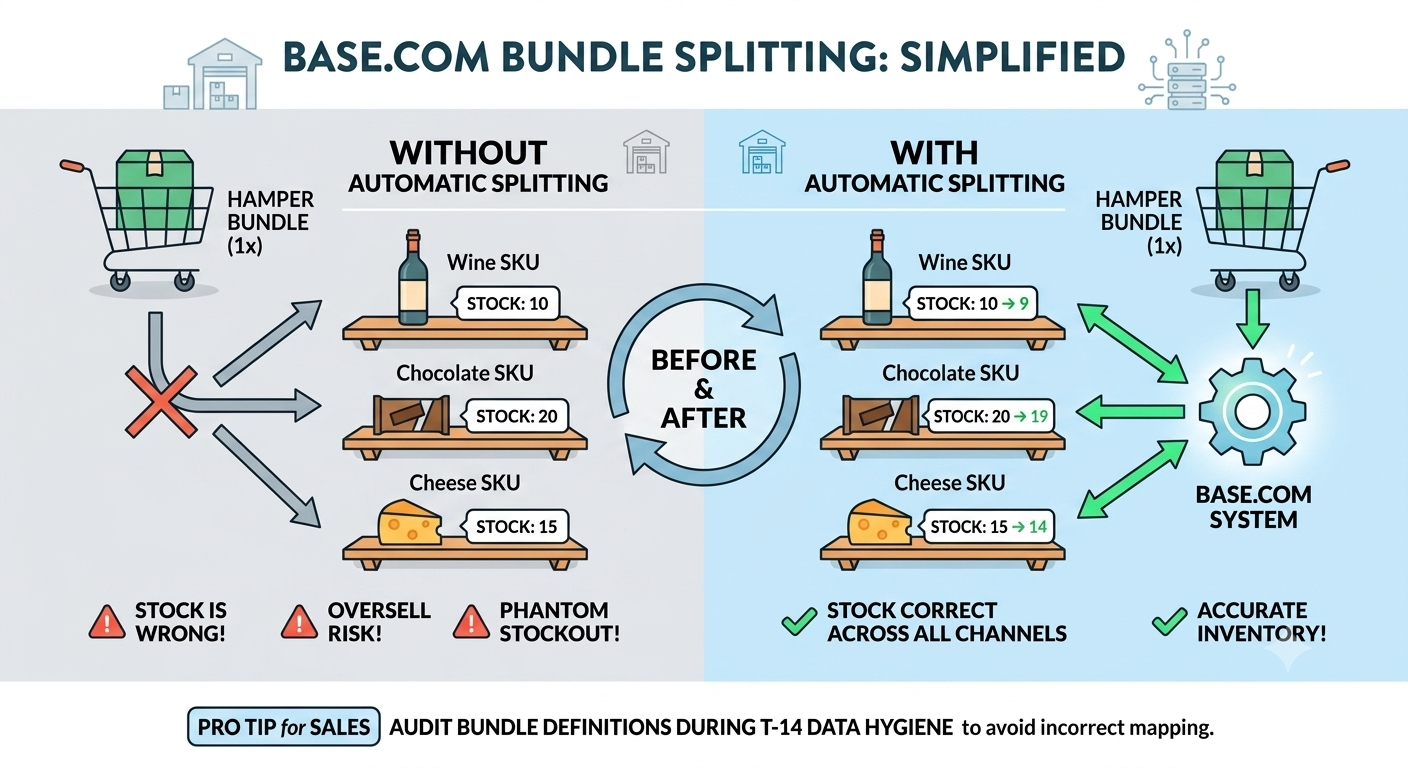
Base.com allows bundles to be created and, with the right settings, automatically split when an order is fetched.
Sale events are combo events. Festive hampers, buy-2-get-1 sets, and category bundles all consume component SKUs that are usually also sold standalone.
Without automatic splitting, component-level stock is wrong from the first bundle order. With it, one bundle sale correctly decrements all constituent SKUs across every channel simultaneously.
Audit your bundle definitions during the T-14 data-hygiene step. A bundle mapped to the wrong component SKU produces oversell on one item and phantom stockout on another.
6. Run Multi-Warehouse Inventory Allocation Across Your Indian Fulfilment Nodes

Base.com supports assigning one or more warehouses to an inventory, with separate stock levels, documents, deliveries and stocktakings per warehouse. It also supports a “special warehouse” created automatically for synchronisation with an external source such as an ERP or a dropshipping wholesaler.
For Indian sellers running a Bhiwandi or Bhiwadi hub plus a southern node, this matters in two ways.
- Regional allocation. Route orders to the warehouse that serves the destination pin code fastest. Faster delivery correlates with lower RTO, and RTO is a working-capital problem before it is a logistics one.
- Marketplace-fulfilled vs self-fulfilled separation. Stock committed to Amazon FBA or Flipkart Smart Fulfilment must not appear in your self-ship available pool. Separate warehouses enforce that cleanly.
You can also export warehouse-level stock to CSV, edit, and re-import with changes applied only to the selected warehouse, useful for bulk buffer adjustments before a sale without touching other locations.
7. Automate Order Routing, Invoicing and Low-Stock Alerts With Automatic Actions
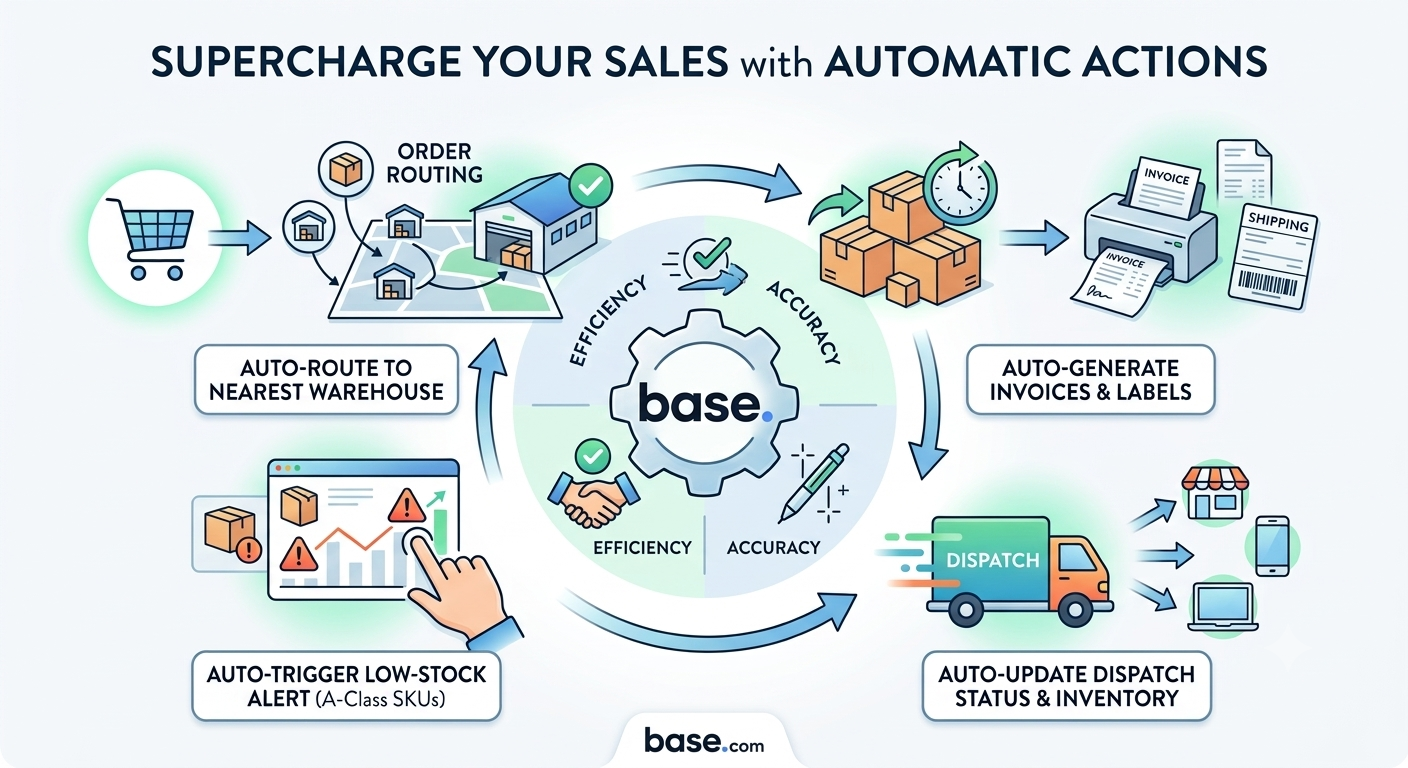
Base.com’s Automatic Actions handle order routing, status updates, invoice generation, label printing, shipment creation, and customer messaging without manual steps.
During a sale, manual steps are where accuracy dies. A packer making a judgement call on the 900th order of the day makes worse decisions than the same packer on the 90th.
Automation rules worth configuring before a sale window:
- Auto-route orders to the nearest warehouse with available stock.
- Auto-generate invoices and labels on payment confirmation for prepaid orders.
- Auto-trigger a low-stock alert at a defined threshold on A-class SKUs.
- Auto-update order status on dispatch so channel-side inventory reflects reality without a human touch.
8. Enforce Warehouse Pick Accuracy With the Base.com Pick and Pack Assistant
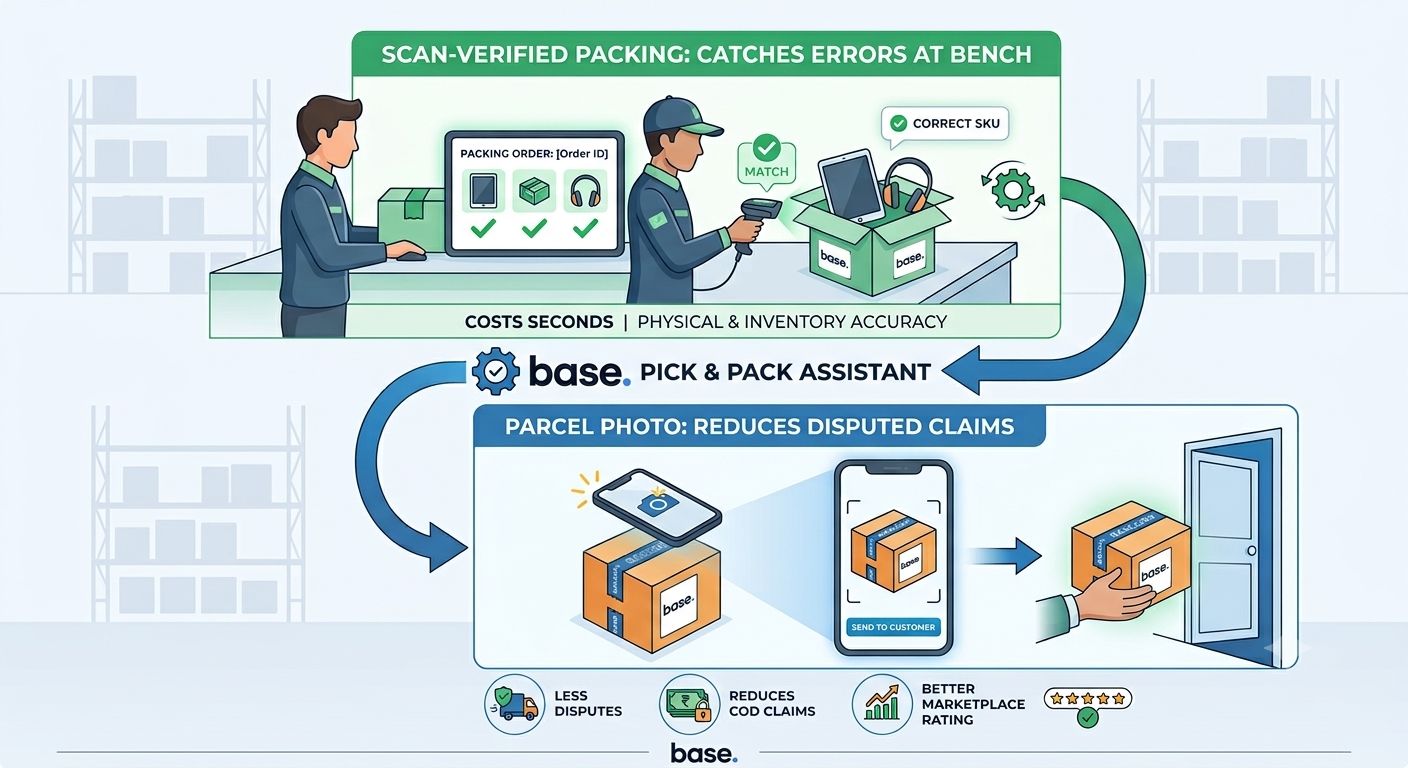
Base.com’s Pick & Pack Assistant supports fast, accurate order processing in the warehouse, including sending a photo of the packed parcel to the customer.
Physical accuracy is inventory accuracy. Every mispick creates a double error: the wrong SKU leaves, and the right SKU shows as consumed.
Scan-verified packing catches the error at the packing bench, where it costs seconds. The alternative is catching it at the customer’s door, where it costs a return, a refund, a reverse-logistics leg, and a marketplace defect on your seller account.
The parcel photo also reduces disputed non-delivery claims, a meaningful line item in COD-heavy Indian operations.
How to Manage Inventory During an Ecommerce Sale in Real Time: The Live Operating Cadence
Teams that manage inventory during ecommerce sales well run to a rhythm. Teams that do not run on adrenaline.
|
Interval |
Check |
Trigger for action |
|---|---|---|
|
Every 30 min |
Oversell exceptions, sync error log |
Any oversell, investigate immediately |
|
Every 2 hours |
A-class stock-on-hand vs burn rate |
SKU projected to zero within 6 hours |
|
Every 4 hours |
Unallocated/unpicked order ageing |
Backlog exceeding one pick cycle |
|
Twice daily |
Inbound GRN status |
Any inbound slipping past committed date |
|
Daily |
Buffer adequacy review |
Adjust only at defined review points |
Assign one named inventory owner per shift with authority to delist a SKU without escalation. During a sale, the cost of a delayed decision exceeds the cost of a wrong one.
Buffer changes ripple across every connected channel. Making them reactively, at peak, is how a small oversell becomes a broad stockout across nine listings.
Review buffers at fixed points. Change them at fixed points. Document every change.
How COD Orders and RTO Rates Affect Inventory Planning for Indian Ecommerce Sales

Prepaid RTO in India runs at low single digits. COD RTO commonly sits at 25-30% and higher in fashion. Treat these as directional ranges to validate against your own courier reports.
That gap has three inventory consequences during a sale, and it is the reason Indian sellers cannot simply copy a Western playbook to manage inventory during ecommerce sales.
One: reserved stock stays reserved longer. A COD order in transit for six days is six days of committed inventory. Build this into available-to-promise, not into your post-sale reconciliation.
Two: RTO inventory returns unsellable. Units come back opened, damaged, or in mixed condition. Assume a realistic write-off rate on returned units and hold a quarantine bin, not a straight put-away to the pick face.
Three: returns arrive after the sale ends. RTO stock from a Diwali sale lands in November, when demand has normalised. Plan the second-peak window, the post-Diwali high-ticket wave Redseer identified, as the natural absorption point for that inventory.
What to Do After the Sale Ends: A 14-Day Inventory Reconciliation and Returns Plan
- Reconcile within 72 hours. Match system stock to physical stock on all A-class SKUs. The longer you wait, the harder the variance is to explain.
- Full stocktake within 14 days. Base.com maintains separate stocktakings per warehouse, which lets you close one location at a time instead of freezing the whole operation.
- Classify returns properly. Sellable, refurbishable, write-off. Returned units silently put away as sellable are the most common cause of phantom availability in the following quarter.
- Quantify dead stock. Every unit of unsold sale inventory is capital that could have funded acquisition. Decide markdown or liquidation within 30 days, before it ages further.
- Write the post-mortem. Oversell count, stockout hours by SKU, pick accuracy, forecast variance. Without these numbers, the next sale repeats the same mistakes.
Which Inventory Metrics Should Indian Sellers Track During an Ecommerce Sale?
|
Metric |
Formula |
Target during sale |
|---|---|---|
|
Oversell rate |
Oversold orders ÷ total orders |
Under 0.5% |
|
Stock sync latency |
Time from dispatch to channel update |
Under 5 minutes |
|
Pick accuracy |
Correct picks ÷ total picks |
Above 99.5% |
|
Sell-through |
Units sold ÷ units allocated |
75-85% |
|
Stockout hours (A-class) |
Hours at zero stock, top 20% SKUs |
Under 2% of sale window |
|
Forecast variance |
(Actual − forecast) ÷ forecast |
Within ±15% |
Targets are directional planning benchmarks, not published industry standards. Calibrate them to your category and your last two sale cycles. Track all six every cycle, because you cannot improve how you manage inventory during ecommerce sales without a baseline to improve against.
Five Inventory Management Mistakes That Cost Indian Ecommerce Sellers the Most During Sales
- Treating sync frequency as a permanent setting. It should be a variable you raise for peak and lower afterwards.
- Decrementing stock at dispatch instead of at capture. This guarantees oversell once a COD backlog builds.
- Forecasting at SKU level instead of SKU-channel level. Marketplace mix and D2C mix diverge sharply during sales.
- Deploying integration changes inside the sale window. Freeze at T-3 and hold the line.
- Putting RTO returns straight back on the pick face. Quarantine, inspect, then restock.
Managing Inventory During Ecommerce Sales Is a Systems Problem, Not a Stock Problem
Sale-period inventory failures are rarely caused by buying too little. They are caused by systems that cannot tell you the truth fast enough.
Indian ecommerce festive GMV crossing ₹1.15 lakh crore in a 30-35 day window means the operational gap between brands that manage inventory during ecommerce sales with automation and brands that manage it with spreadsheets widens every year.
The fix is unglamorous: correct data, live synchronisation, reservations at capture, automated listing control, and scan-verified picking. Base.com consolidates all five into one platform, which removes the integration seams where sale-period inventory usually breaks.
Fix the system before the sale. During the sale, you can only manage what the system already tells you correctly.
Frequently Asked Questions
1. How do I prevent overselling during a big ecommerce sale in India?
Set stock synchronisation to live mode across all connected channels, reserve inventory at order capture rather than at dispatch, and hold a 10-15% buffer on your top 20% of SKUs. Base.com supports live sync, pre-payment reservations, and automatic listing closure at zero stock, which together remove the manual steps where oversell usually originates.
2. How much buffer stock should I hold during a festive sale?
A 10-15% buffer on A-class SKUs is a common starting point for Indian multichannel sellers, adjusted upward for COD-heavy categories where RTO runs 25-30%. Calibrate the exact figure using your own sell-through and RTO data from the previous two sale cycles rather than applying a fixed rule.
3. Should stock be deducted at order placement or at dispatch?
At order placement, using a reservation. Deducting at dispatch makes every unshipped COD order invisible to your available-to-promise figure, which is the primary cause of oversell once a backlog builds during a sale. Set a reservation expiry matching your payment window so abandoned orders release stock automatically.
4. Can one system manage inventory across Amazon, Flipkart, Meesho and Shopify simultaneously?
Yes. Base.com connects to marketplaces, online stores and offline channels from a single panel and synchronises stock and prices across all of them, with automatic listing closure at zero stock and automatic relisting on replenishment. This is the core requirement for multichannel Indian sellers, since channel-by-channel management does not scale past a few hundred orders a day.
5. What is the first thing to fix if I only have one week to manage inventory during ecommerce sales?
Catalogue and mapping accuracy. Audit SKU-to-listing mapping on every channel, verify barcodes scan at the pick face, and cycle count your A-class SKUs. Unmapped or duplicate-mapped SKUs cause more oversell during Indian sale events than genuine stock shortfalls do.