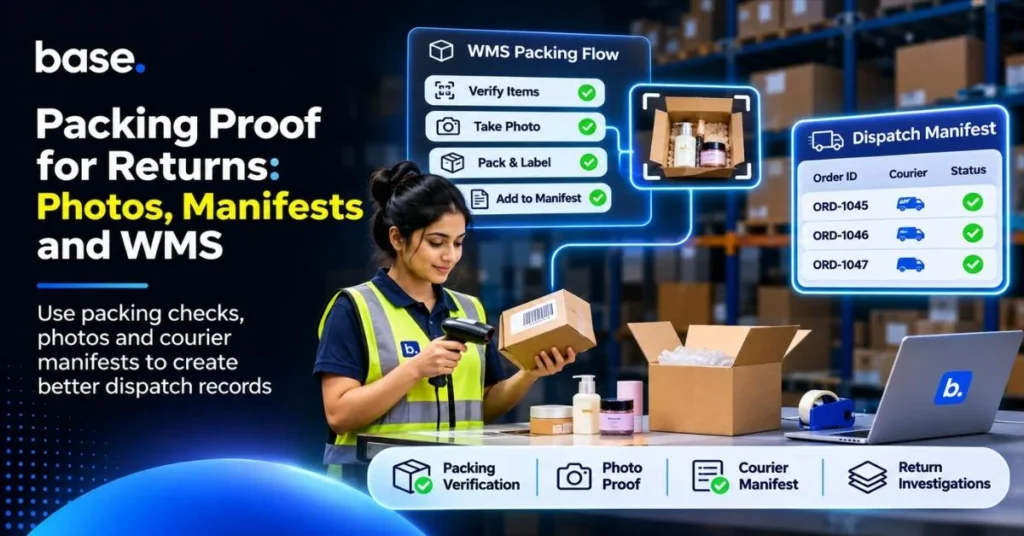
An order has been picked correctly and arrives at the packing bench. The team still needs to confirm the products and quantities, choose protective packaging, attach the right label and prepare the parcel for collection. A missed accessory, wrong variant or label attached to another parcel can turn a sound pick into a customer complaint or a difficult courier query.
Packing and dispatch are control points, not merely the final physical steps of fulfilment: one checks and prepares the contents, while the other organises shipment handover. A considered process also creates useful packing proof for returns. This guide covers packing stations, verification, photographs, manifests and how warehouse management software (WMS) and shipping tools can support them.
What happens during packing and dispatch in an ecommerce warehouse?
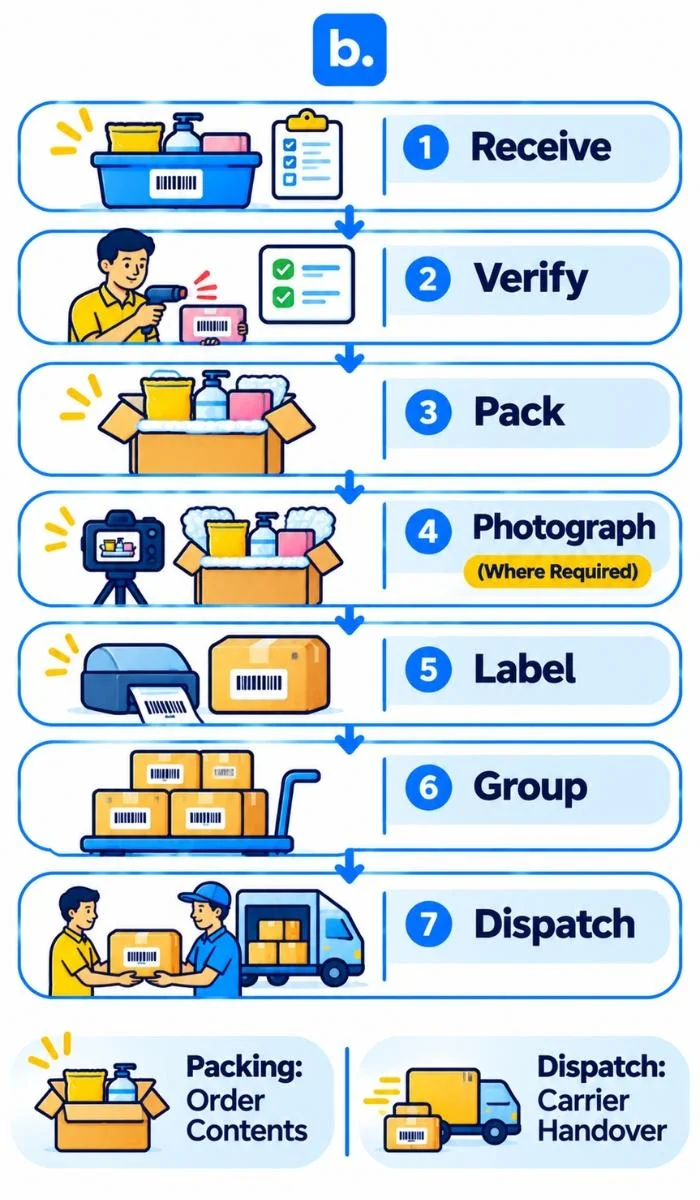
After picking, products move to a defined packing station. The packer verifies items, quantities and variants, checks visible condition, selects packaging and follows special instructions. The parcel is then packed, labelled and documented as required. Completed shipments are grouped for collection, reconciled where the carrier process allows, and their dispatch status recorded.
In short: receive, verify, pack, photograph where required, label, group for handover and update dispatch records.
Packing prepares and verifies the contents of an individual order.
Dispatch prepares completed shipments for transfer to a carrier.
Each needs its own check: a well-packed parcel can still be delayed or misrouted if its label is wrong or it is absent from the expected collection.
Why do packing and dispatch errors matter?
A wrong variant, missing component, inadequate protection or misplaced label can trigger customer-service work, replacements, refunds, return handling and carrier investigation. Without relevant records, reconstructing events is difficult. Not every return is caused by warehouse handling; preference, expectations, sizing and delivery problems also matter.
How to set up an efficient ecommerce packing station
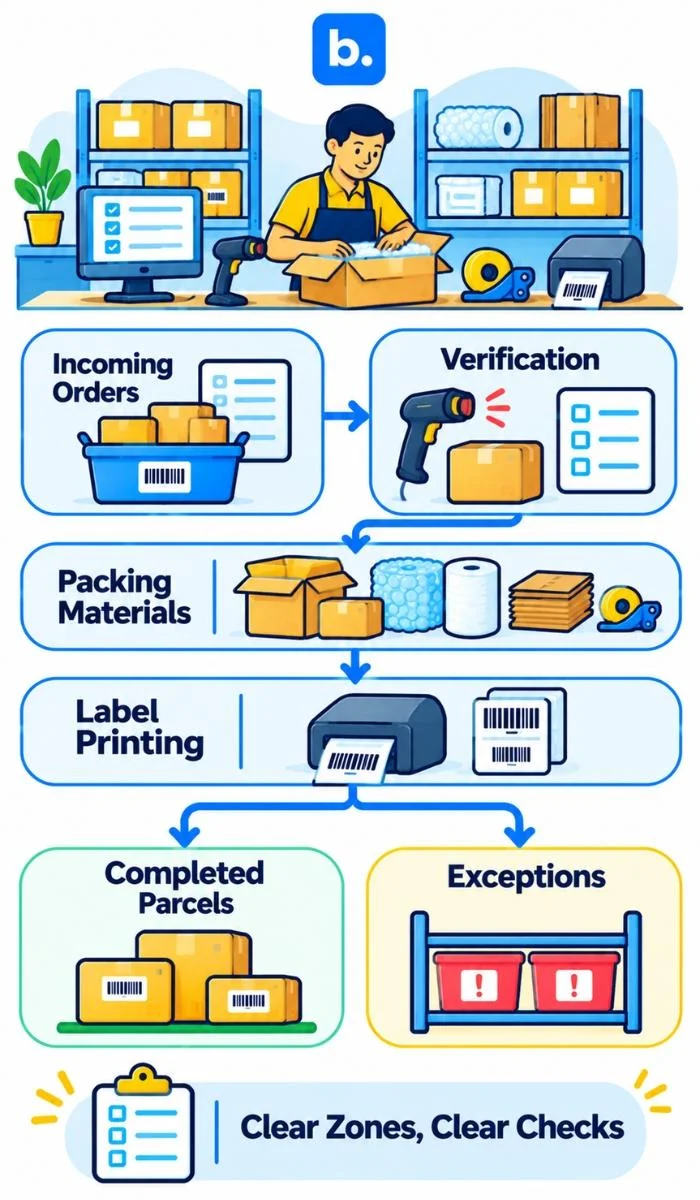
A packing station should make checking and recording straightforward, not simply provide a surface for sealing boxes.
Keep the work area organised
Define separate spaces for incoming orders, work in progress, completed parcels and exceptions. Keep packaging, scanners and printers accessible. Move damaged, incomplete or mismatched orders out of the normal flow until the issue is recorded and resolved; mixing stages invites confusion.
Choose packaging for the product
Keep suitable cartons, mailers, cushioning, tape and labels within reach. Choose packaging according to dimensions, weight, fragility, shape, protection needs, shipping conditions and multi-product orders. Avoid defaulting to the largest box: excess space may need more fill and can affect carrier charges. Follow product instructions and test packaging for expected handling.
Use a consistent packing checklist
| Check | What the packer verifies |
|---|---|
| Product identity | Correct SKU, model, size, colour or variant |
| Quantity | All ordered units are present |
| Accessories | Required components, manuals or included items are present |
| Condition | No visible damage before packing |
| Packaging | Suitable protection and package type are used |
| Special requirements | Fragile or other handling instructions are followed |
| Shipment identity | Label and order reference belong to this parcel |
A shared checklist helps different shifts follow the same sequence. Route missing, damaged or mismatched products through an exception process: identify and record the issue, then notify the responsible team. Software does not resolve exceptions automatically in every setup.
What is packing verification and why does it matter?
Packing verification checks whether the products being prepared match the order. Visual inspection is useful, but memory and appearance alone can be unreliable when products or variants look alike and order volumes rise.
| Manual check | Barcode-supported check |
|---|---|
| Packer compares the product with order details | Product barcode is scanned against order information |
| Depends strongly on visual identification | Adds an electronic product-identification step |
| Similar variants can be difficult to tell apart | Accurate barcode data can help distinguish SKUs |
| Records may need to be entered separately | Scan activity may be recorded, depending on the system |
| A mismatch may be noticed later | A mismatch may be flagged during packing |
Scanning supports a check; it does not guarantee error-free packing. Incorrect product data, unreadable labels, poor training or a process that permits bypassing checks can still lead to mistakes.
A useful record may include the order reference, expected items, completion status, scans, operator or time information where recorded, photographs and exception notes. Retain what serves a clear purpose and make it retrievable by order.
What is a courier manifest and why is it important?
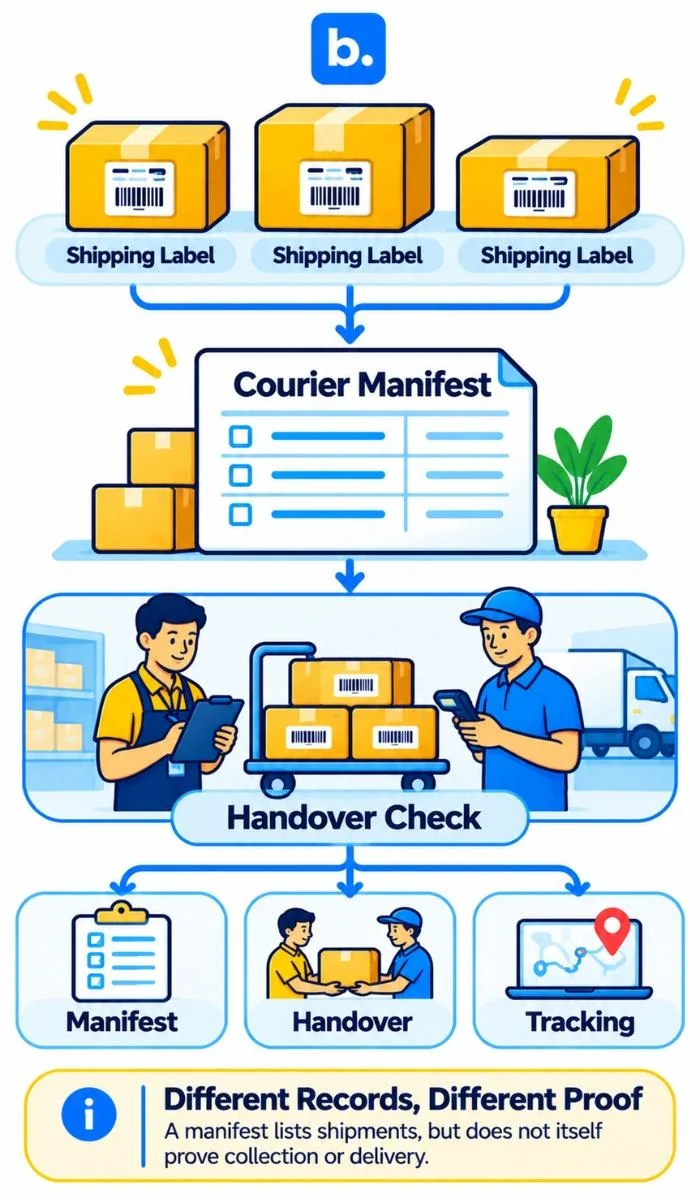
A courier manifest is a document or electronic record that groups shipments for a carrier collection or dispatch process. Depending on the carrier format, it may list airway bill or shipment references, order references, parcel counts, service details and recipient information. Requirements and fields differ, so follow the applicable carrier workflow rather than assume one universal format.
The warehouse identifies completed parcels, groups them for collection, generates the required manifest, checks them against handover information, transfers them and retains applicable confirmation. Reconciliation can reveal a missing parcel or an incorrect or duplicate reference; record discrepancies before the courier leaves where permitted.
| Record | Purpose | Does not prove on its own |
|---|---|---|
| Shipping label | Identifies an individual shipment and provides carrier routing information | That it was collected or delivered |
| Courier manifest | Lists or groups shipments prepared for a dispatch or collection process | That every listed parcel was collected or delivered |
| Packing photograph | Shows visible contents or parcel condition at the time of the image | Hidden contents, later handling, handover or delivery |
| Handover record | Helps document transfer of parcels to a carrier | That the customer received the parcel in good condition |
| Tracking or proof of delivery | Records carrier-reported shipment progress or delivery | The exact contents at the time of packing |
These are separate parts of an evidence trail. A manifest supports dispatch checks, not proof of delivery. Carrier practices differ, and a printed manifest is not required for every shipment.
Packing proof for returns: when can photographs help?
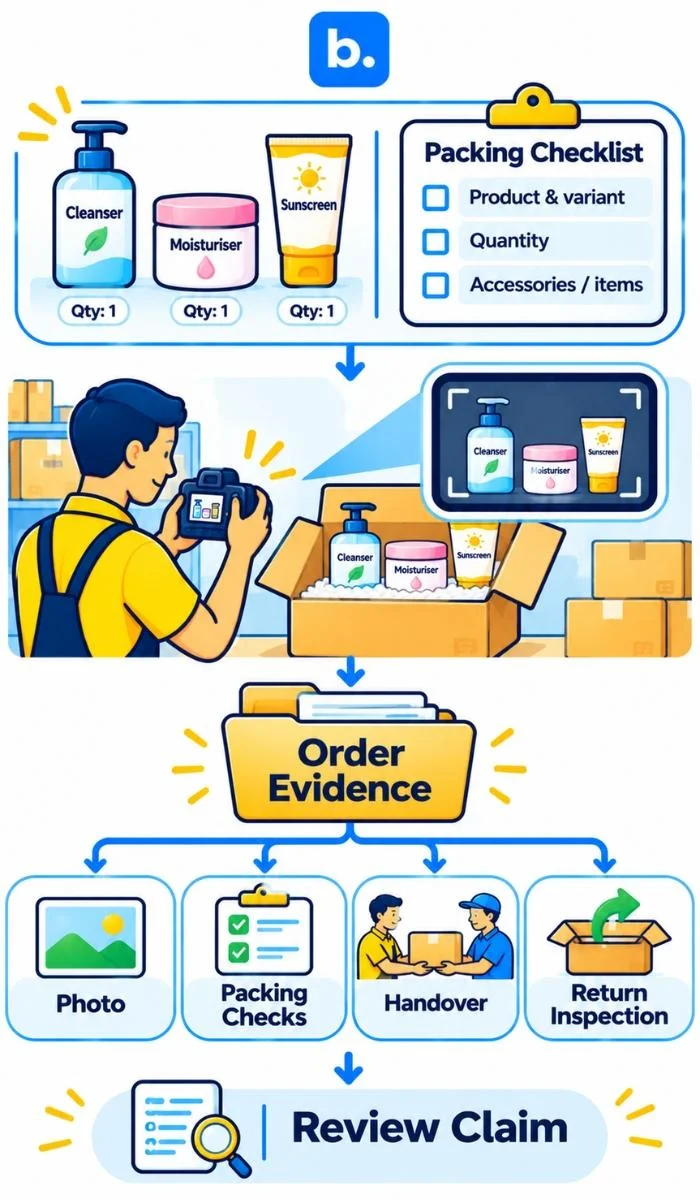
Suppose a skincare seller sends three products and the customer later says one is missing. A photograph taken before sealing may show which items were visible at packing and their condition, providing supporting evidence rather than a complete account of the parcel’s journey. Frame it to show products, variants, quantities and accessories where practical. Keep the process workable; businesses may prioritise high-value, fragile, multi-item or frequently disputed orders based on their own risk.
Verify the products, photograph them before sealing, then close and label the parcel and associate the image with its order where supported. A photograph taken afterwards may show only the exterior.
| Claim or query | How packing evidence may contribute |
|---|---|
| Customer says an item was missing | Image may show which items were visible before sealing; check scans and order details too |
| Customer received a different variant | Visible product details may help identify what was prepared |
| Parcel was allegedly damaged before dispatch | Image may show visible condition at the packing stage |
| Returned order is disputed | Compare packing information with return inspection and original order |
| Carrier asks about parcel handling | Packing evidence can contribute alongside dispatch and handover records |
For the skincare order, review the photograph with the order, scans, packing history, label, manifest or handover information, tracking and return inspection. The photo does not independently prove hidden contents, later handling, collection or delivery, and cannot guarantee a claim outcome. It is stronger when linked to the correct order; do not assume timestamps, metadata or tamper-proof storage unless documented.
How warehouse management software supports packing and dispatch
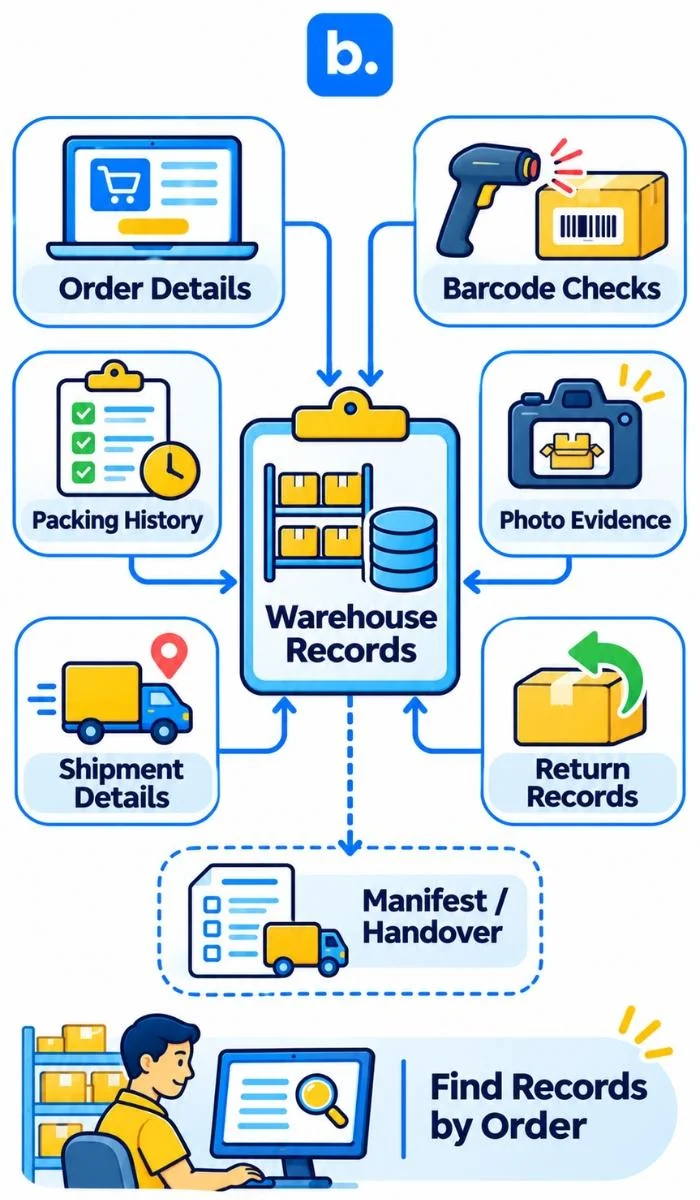
A warehouse management system connects order information with inventory, picking and packing. As staff and stations multiply, paper notes and memory make consistent checks and record retrieval harder. A WMS can structure warehouse work while shipping tools handle carrier tasks; not every WMS includes labels, manifests or tracking.
When evaluating warehouse management software, ask whether it supports:
| Capability | Why it matters |
|---|---|
| Packing verification | Checks items and quantities against the order |
| Barcode scanning | Adds product identification during packing |
| Packing history | Helps review activity and operator details where recorded |
| Photo capture | Creates a visual record of packed items or parcel |
| Labels and shipment creation | Supports preparation of carrier shipments |
| Manifest workflow | Organises shipments for applicable handover processes |
| Shipment status updates | Improves visibility after shipment creation |
| Returns records | Helps connect returned products with the original order |
Records are most useful when related information can be found together: order, picked items, packing checks and images, shipment details, handover records, tracking and return inspection. A WMS, shipping module, order platform and carrier integration may each own different records. See our warehouse management system overview and assess each product’s scope.
How our WMS supports packing verification and dispatch preparation
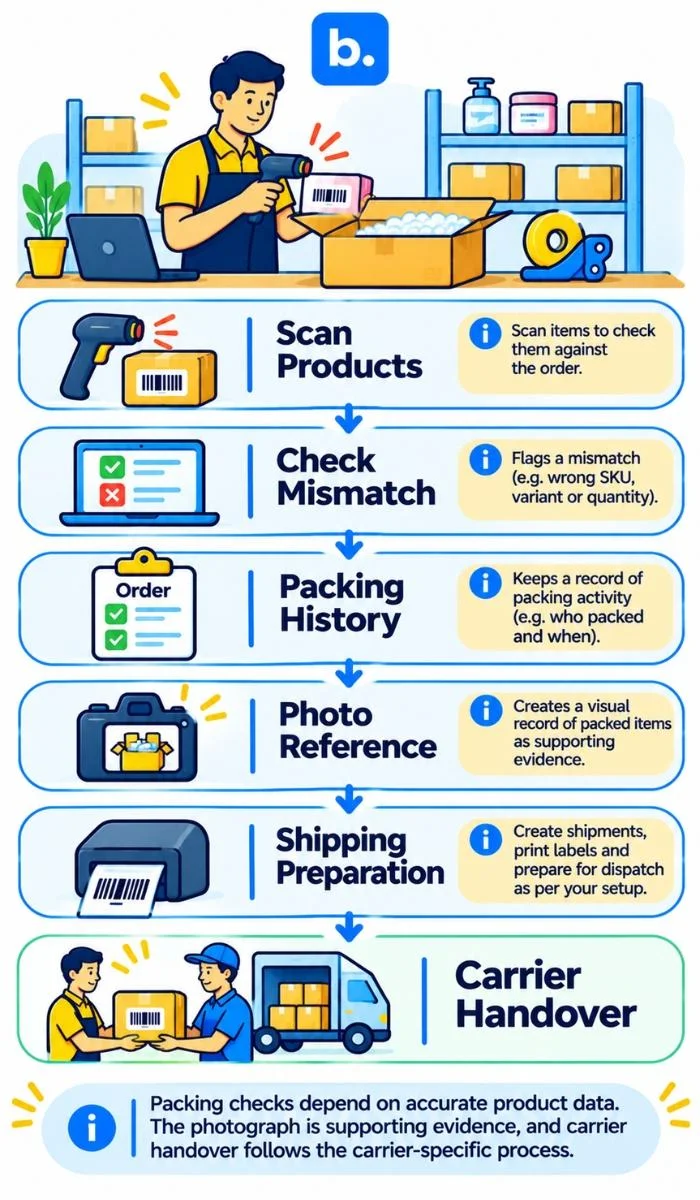
As order volumes grow, checking products manually and keeping separate packing records becomes harder. Our WMS includes the Packing Assistant, which supports product checks during packing. Barcode scanning can help flag a mismatch against the order, particularly for similar SKUs and multi-item orders, but accurate product data and staff procedures remain essential.
Our Packing Assistant documentation describes packing history on the order card, including who packed an order and how long it took, and photographing completed orders for reference in customer or courier disputes. Our WMS page describes photographing packed items before sealing. For packing proof for returns, the linked photograph provides supporting evidence; it does not prove hidden contents, handover or delivery. Configured post-packing actions may include printing invoices and labels, sending customer emails or changing status.
Shipping preparation is related but distinct. Our shipping management capabilities support single or bulk shipment creation, label printing, carrier integrations, tracking-number forwarding and status visibility. Our shipment planning guidance discusses manifests and dispatch preparation. Carrier-specific formats and handover steps still apply; a label identifies a parcel, while a manifest groups relevant shipments for a dispatch process.
Our platform also supports managing ecommerce returns through workflows including custom statuses and reasons, intake and matching returned products to original orders. Teams can review this alongside packing and dispatch records; a photograph does not automatically approve or reject a return.
How to build a reliable packing and dispatch process
- Standardise the station. Define order flow, checking responsibilities, exception handling and transfer to dispatch.
- Introduce product verification. Use consistent identification and barcode scans where suitable; keep SKU and barcode data accurate.
- Set photo rules. Decide which order types merit photographs, who takes them and how they are connected to the order.
- Document dispatch. Establish how labels and applicable manifests are prepared, how physical parcels are reconciled and how handover is recorded.
- Connect return investigations. Ensure relevant staff can retrieve order, packing, dispatch and return information.
- Review operational measures. Track packing accuracy, time per order, error frequency, manifest discrepancies, on-time dispatch, packing-related returns and evidence retrieval time. Establish your own baseline rather than relying on universal benchmarks.
Make packing and dispatch more accountable
A reliable process verifies the order, protects its contents, prepares correct shipment information and retains records that help explain exceptions. Photographs, scans, manifests, handover records and delivery updates answer different questions; none replaces the others. Start with a consistent station and clear checks, then choose practical evidence for your operation. Our WMS and shipping management tools support relevant packing and shipment workflows; explore them against your requirements and carrier processes.
Frequently asked questions
What is packing proof for returns?
Packing proof is supporting information retained during order preparation, such as photographs, packing records and product verification details. It can help investigate missing, incorrect or damaged-item claims, but a photograph alone does not prove every stage or the complete contents of a parcel.
Why should ecommerce businesses photograph parcels before dispatch?
A photograph before sealing can show visible products and parcel condition at the packing stage. It may help investigate a customer or courier query when reviewed with order, packing and dispatch records.
What is the difference between a courier manifest and a shipping label?
A label identifies an individual shipment and provides routing information. A manifest groups shipments prepared for a carrier or collection process. Formats and requirements vary by carrier.
Does a courier manifest prove that a parcel was delivered?
No. A manifest records shipments prepared for dispatch or handover under the relevant process. Delivery confirmation is a separate carrier tracking or proof-of-delivery record.
What should be included in a packing checklist?
Check product identity and variant, quantity, accessories, visible condition, packaging suitability, special handling instructions and that the shipment label belongs to the parcel.
Can a WMS help reduce packing errors?
Barcode-supported checks, packing instructions and structured workflows can help identify mismatches during preparation. Outcomes still depend on accurate product data, suitable processes and staff training.
How long should businesses keep packing photographs and dispatch records?
There is no universal period that fits every business. Set a documented retention policy reflecting applicable legal, tax, marketplace, carrier, contractual and business requirements, along with data protection and storage considerations. Seek appropriate advice for obligations that apply to your business.
Can packing photographs help with wrong-item or missing-item claims?
They may show what was visibly prepared before sealing, but should be reviewed with scans, order information, packing history, shipment records and return inspection. A photograph alone does not guarantee a claim will be accepted or resolved.
