

To plan shipments for ecommerce sales, book carrier capacity four to six weeks out, allocate orders across at least three couriers by pin code performance rather than by rate card alone, automate label and manifest generation, and treat NDR resolution inside four hours as a dispatch function rather than a support function.
Most sale-period delivery failures are booked in weeks before the sale opens, not caused during it.
Why Shipment Planning Breaks During Indian Sale Events
Inventory gets the attention. Shipping absorbs the damage.
Your warehouse can scale with temporary labour. Your courier network cannot scale on demand, because it is serving every other seller in your category in the same week.
Three failure patterns dominate:
- Capacity you did not book. Couriers allocate pickup capacity to accounts with committed volume. Walking up during festive week gets you whatever is left.
- Dispatch backlog rather than dispatch failure. Orders are picked and packed but not manifested, so they age in your warehouse while the SLA clock runs.
- RTO that compounds. India’s average RTO rate sits between 20% and 30%, against a global benchmark closer to 8-12%, and COD accounts for roughly 45% of Indian D2C orders. Treat these as directional and verify against your own courier reports.
Understanding how to plan shipments for ecommerce sales starts from an uncomfortable fact: your dispatch capacity is a contract you negotiate in advance, not a resource you buy when you need it.
The Four Constraints That Actually Bind How to Plan Shipments for Ecommerce Sales
|
Constraint |
What it limits |
When it must be resolved |
|---|---|---|
|
Carrier pickup capacity |
Parcels collected per day |
4-6 weeks before the sale |
|
Pickup cutoff times |
Same-day dispatch volume |
2-3 weeks before, per carrier |
|
Weight and dimension accuracy |
Billing correctness and slab allocation |
2 weeks before, in catalogue data |
|
COD pin code serviceability |
Which orders you can accept at all |
2 weeks before, in checkout rules |
Each of these is fixed before the sale opens. None can be fixed during it, which is why how to plan shipments for ecommerce sales is almost entirely a question of sequencing rather than of effort.
Carrier Capacity Is Allocated, Not Purchased

Couriers plan festive capacity against committed volume from named accounts. A seller who declares expected daily parcel counts and holds to them gets allocation. A seller who arrives with 900 parcels on an unannounced Tuesday gets a partial pickup.
Give each courier a daily volume forecast by node, then hold to it within a reasonable band. Under-delivering against a declared number damages your allocation for the next window as surely as over-delivering does.
Pickup Cutoffs Determine Your Real SLA
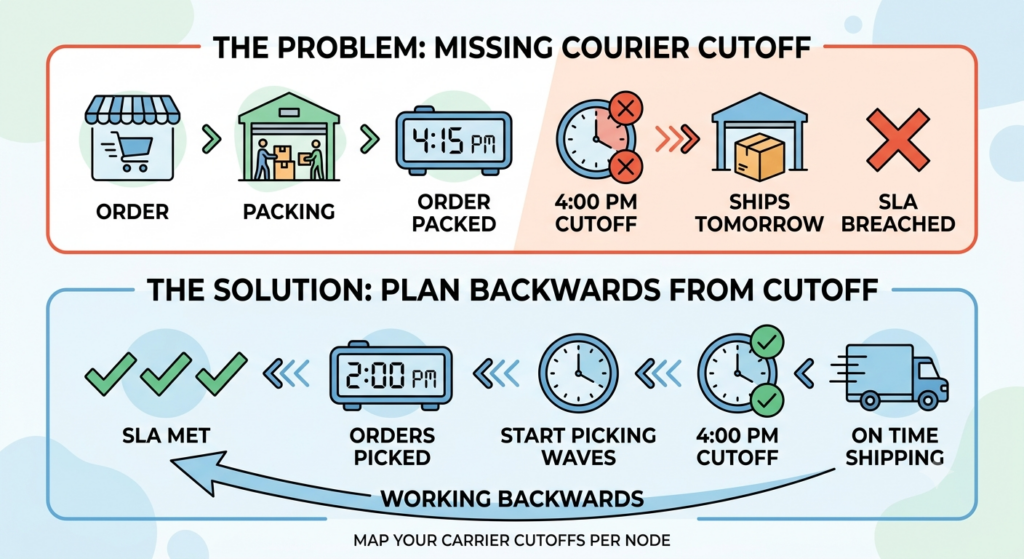
A courier cutoff at 4 PM means an order packed at 4:15 PM ships tomorrow. During a sale window, that single day is the difference between meeting a marketplace SLA and breaching it.
Map every carrier’s cutoff per node in writing, then work your picking waves backwards from the earliest one.
Weight and Dimension Errors Cost More Than Rates
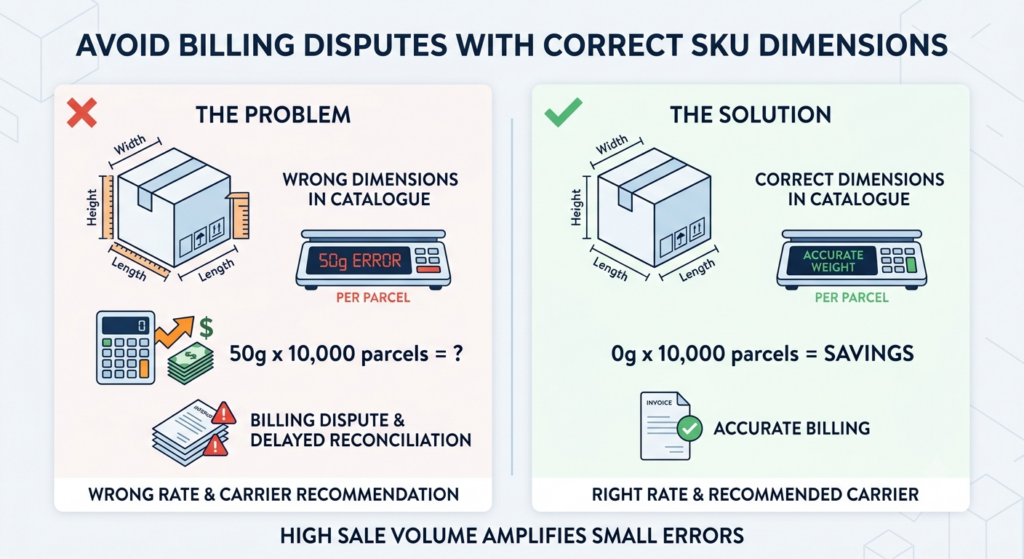
Indian courier billing runs on weight slabs and volumetric calculations. A SKU with wrong dimensional data in your catalogue produces the wrong rate, the wrong carrier recommendation, and a billing dispute you will reconcile weeks later.
At sale volume, a 50 gram error across 10,000 parcels is a real number.
COD Serviceability Should Shape What You Accept

Not every pin code is COD-serviceable by every courier, and some serviceable pin codes carry RTO rates high enough that accepting the order is a loss.
Any serious approach to how to plan shipments for ecommerce sales includes deciding, before the sale, which pin codes you will accept COD from at all.
The Shipment Planning Calendar: When Each Decision Must Be Made
The calendar below is the operational spine of how to plan shipments for ecommerce sales. Every row is a decision with a deadline, and each one becomes irreversible once passed.
|
Timing |
Action |
|---|---|
|
T-45 days |
Share daily volume forecasts with every carrier; request written capacity commitment |
|
T-35 days |
Confirm pickup cutoffs per node; negotiate extended cutoffs for the sale window |
|
T-30 days |
Add or activate a third carrier if you are running two |
|
T-21 days |
Audit weight and dimension data across A-class SKUs |
|
T-14 days |
Test label generation and manifest printing at volume, not one at a time |
|
T-10 days |
Confirm COD serviceability rules and pin code exclusions in checkout |
|
T-7 days |
Dry-run the full dispatch flow: pick, pack, label, manifest, handover |
|
T-3 days |
Freeze carrier rules and integration changes |
|
T-1 day |
Confirm pickup slots and staffing for day one |
The dry run at T-7 is the step most often skipped and the one that surfaces the most problems. Printing 2,000 labels reveals queue, printer, and API rate-limit issues that printing twelve does not.
Run the dry run with real orders where possible, not test records. Test orders skip the marketplace API calls, the tracking push, and the manifest sequence, which is precisely where the failures live. If you cannot use real orders, at minimum reproduce the full sequence end to end rather than testing each component in isolation.
Document what broke. A dry run that surfaces four problems and fixes three is a successful dry run; one that surfaces nothing usually means it was not run at volume.
Multi-Carrier Allocation: The Core Strategic Decision in How to Plan Shipments for Ecommerce Sales
Single-carrier dependency is the most common structural weakness in Indian dispatch operations, and sale periods are exactly when it fails.
Run at least three carriers. Allocate by performance data, not by rate card. This single choice does more for how to plan shipments for ecommerce sales successfully than any other decision on the list.
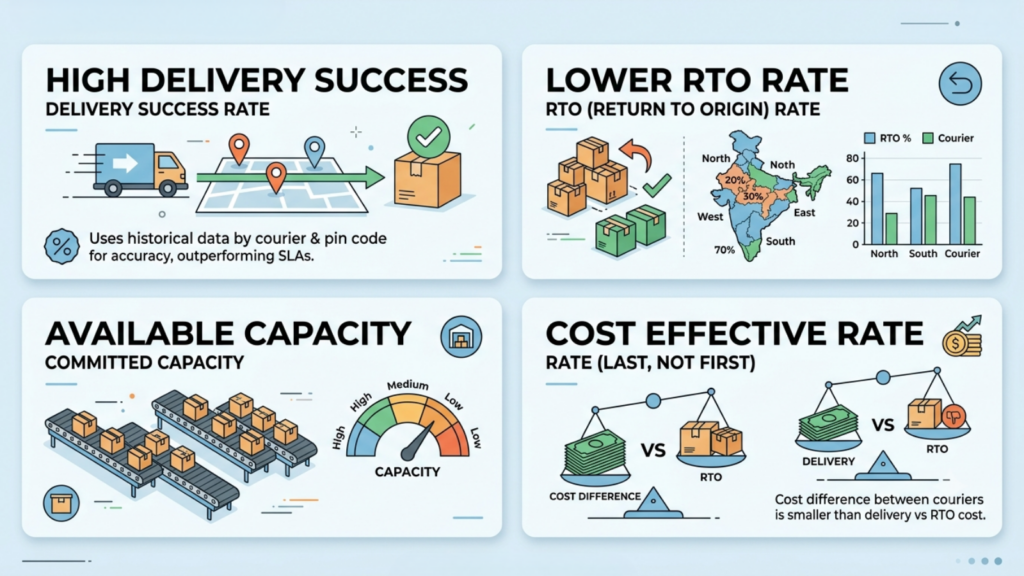
Allocation inputs, in priority order:
- Pin code delivery success rate. Your own historical data by courier by pin code beats any published SLA. This is the highest-value dataset most sellers never build.
- RTO rate by courier by region. Courier performance accounts for a meaningful share of COD returns, and it varies substantially by region.
- Committed capacity available. A cheaper courier with no capacity left is not cheaper.
- Rate. Last, not first. The cost difference between couriers is usually smaller than the cost difference between a delivery and an RTO.
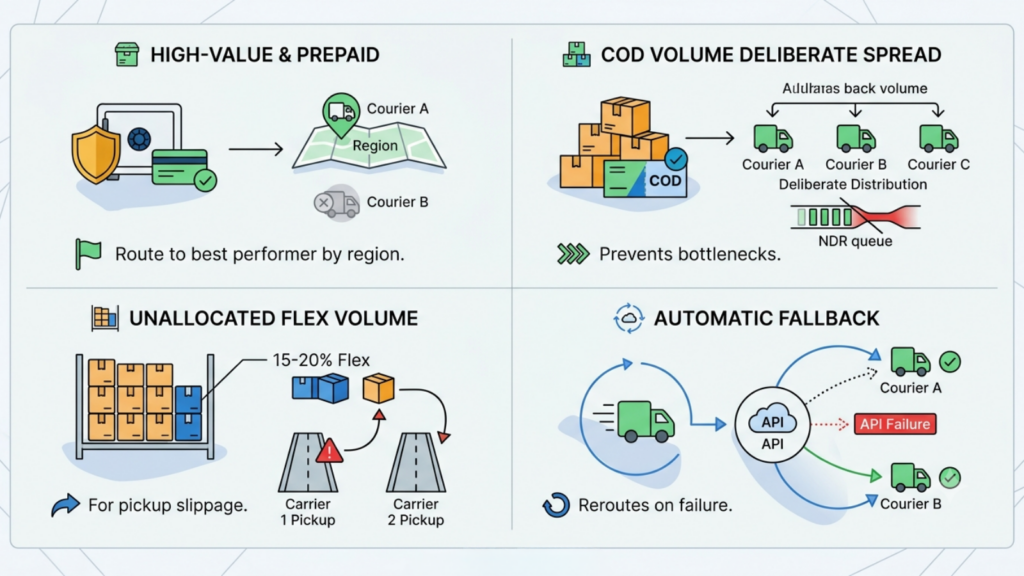
Practical allocation rules for a sale window:
Route high-value and prepaid orders to your best-performing courier per region, not your cheapest.
Spread COD volume across carriers deliberately so no single courier’s NDR queue becomes a bottleneck.
Hold roughly 15-20% of expected volume unallocated as flex, to redirect when one carrier’s pickup slips.
Set an automatic fallback so an API failure at one courier reroutes rather than stalls.
That last point matters more than it sounds. When a courier API goes down mid-sale, orders do not fail loudly. They simply stop generating labels, and the backlog is discovered at handover.
Build the PIN code performance dataset now if you do not have one. It requires nothing more than your own dispatch history joined to delivery outcomes by courier and destination, and it is the input that makes every subsequent allocation decision defensible. Sellers who allocate on published carrier SLAs are using the courier’s marketing claim in place of their own evidence.
Rebuild it quarterly. Courier network performance shifts as carriers open and close hubs, and a dataset from eighteen months ago will route parcels to a hub that has since been deprioritised.
Step by Step: How to Plan Shipments for Ecommerce Sales With Base.com
Base.com is an ecommerce operating system that combines order management, product and inventory management, marketplace listing control, shipping management and workflow automation in one platform. On the shipping side specifically, it consolidates carrier connections, label generation, manifest printing, and customer notifications into the Order Manager, so dispatch runs from one panel rather than from each carrier’s own portal.
The ten steps below map the planning method onto documented Base.com capability. Configuration specifics should be confirmed with your implementation team, and one India-specific caveat appears at the end of this section.
Step 1: Connect Every Carrier and Broker You Will Use

Base.com offers over 140 courier integrations, added through Integrations → Add integration → Couriers, and the library continues to expand.
Where you do not hold a direct agreement with a carrier, Base.com supports connecting a courier broker instead, which lets you dispatch across multiple carriers without signing separate contracts. For a seller adding a third carrier at T-30, that is often the faster route.
Multiple accounts with the same carrier can be connected simultaneously, which matters for sellers running separate accounts per node or per entity.
Step 2: Build Size and Weight Templates Per Carrier
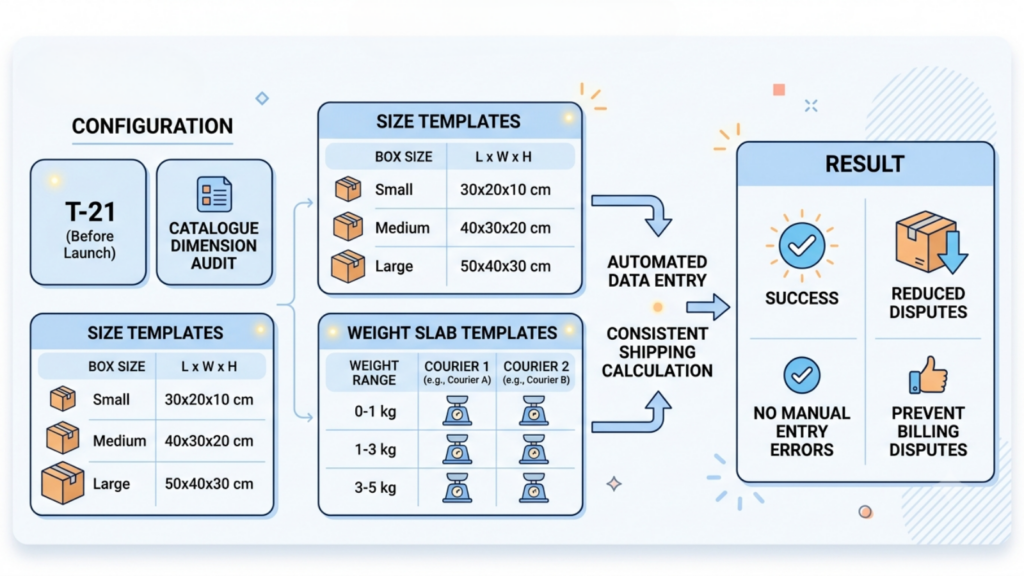
Base.com lets you create your own size and weight templates for each courier integration.
Build these at T-21, alongside the catalogue dimension audit. A template that encodes your standard box sizes removes the single most common source of manual entry error at the packing bench, and it makes the weight slab allocation consistent across thousands of parcels.
This is unglamorous configuration work, and it is where most of the billing disputes are prevented.
Step 3: Set Up Automatic Shipment Creation
Base.com supports creating shipments individually from the order card, in bulk from the order list without opening each order, or automatically with no manual step at all.
The automatic route uses Automatic Actions. You can configure an action that creates a shipment with the appropriate courier connection depending on the shipping method on the order, and actions can specify the carrier, dimensions, parcel count, and weight when the label is generated.
A common configuration is triggering shipment creation immediately on payment confirmation for prepaid orders, so the label exists before the picker reaches the shelf.
Step 4: Encode Your Carrier Allocation Rules as Automatic Actions

Automation is the point at which how to plan shipments for ecommerce sales stops depending on who happens to be on shift.
This is where the allocation strategy from the previous section becomes executable rather than aspirational.
Rather than a packer deciding which courier to use at 11 PM on day three of a sale, the rule decides. Build conditions that route by shipping method, order attributes, and destination, and keep the rule set documented so anyone on shift can explain why a parcel went where it did.
Freeze these rules at T-3 alongside everything else. Mid-sale rule changes are untested deployments on your highest-volume day.
Step 5: Automate Label and Manifest Printing
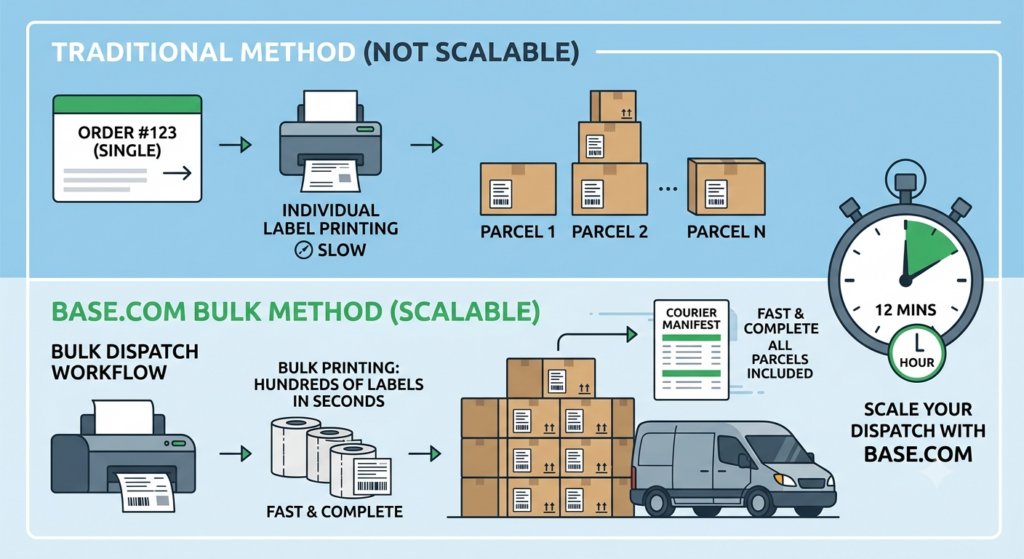
Base.com prints shipping labels individually from the order card and in bulk from the order list, and generates courier manifests.
Bulk label printing is the difference between a dispatch bench that scales and one that does not. Manifest generation matters equally: an unmanifested parcel is not collected, regardless of whether it is labelled and boxed.
Run the T-14 volume test on this specifically. Print several hundred labels and a full manifest in one batch and time it.
Step 6: Turn On Automatic Pickup Ordering Where Available
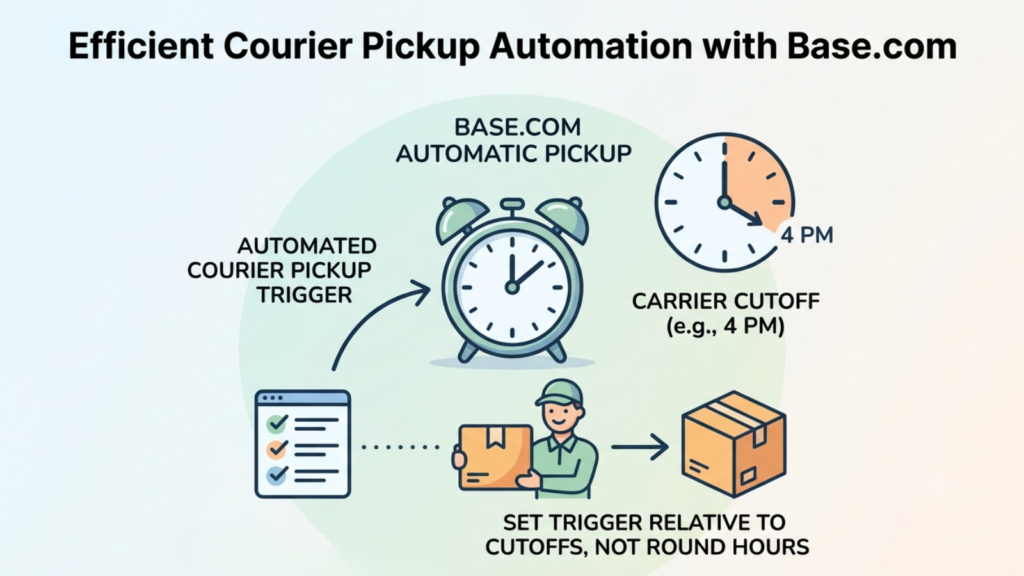
For courier integrations where ordering a courier through the system is supported, marked with an ordering-courier indicator on the integrations list, Base.com offers automatic pickup ordering, triggered daily at a time you configure.
Set that trigger relative to each carrier’s cutoff, not to a convenient round hour. If a carrier cuts off at 4 PM, the automated pickup request needs to fire early enough to be actioned.
Note that not every carrier’s API supports this. Confirm which of your connected carriers do before assuming the automation covers all of them.
Step 7: Use the Pick and Pack Assistant to Protect Accuracy

Base.com’s Pick & Pack Assistant supports fast, accurate order processing in the warehouse, including sending a photo of the packed parcel to the customer.
Two dispatch benefits during a sale. Scan verification catches the wrong-item error at the bench rather than at the customer’s door, where it becomes a return, a refund, and a reverse leg. The parcel photo reduces disputed non-delivery and wrong-item claims, which is a meaningful line item in COD-heavy Indian operations.
Step 8: Automate Customer Notifications and Marketplace Tracking Updates

Base.com sends the customer an email or SMS containing a shipment tracking link, provides a unique order information page where delivery status can be checked, and pushes the tracking number back to the marketplace and to your store automatically.
The marketplace push is the operationally important half. Marketplace SLAs are measured on tracking updates, not on when the parcel physically left. Automating that removes a manual step that fails silently under volume.
Automatic Actions can also notify the customer on shipment status change without anyone monitoring a dashboard.
Step 9: Monitor Shipment Status With a Realistic Expectation of Lag
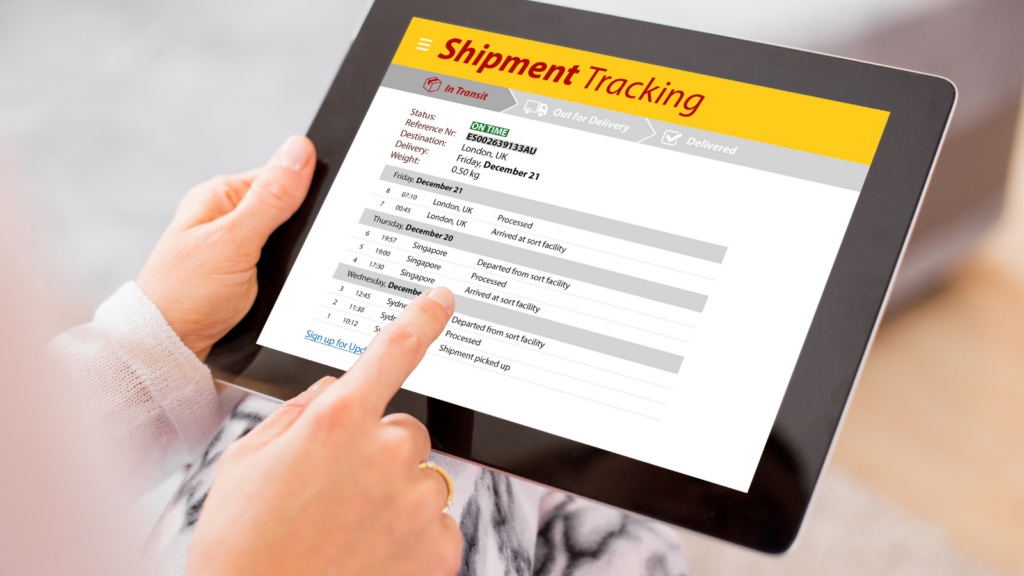
Base.com monitors the status of sent parcels, and the system updates shipment status approximately every four hours.
Plan your NDR workflow around that cadence. A four-hour refresh is entirely adequate for exception management, but it is not real-time, and building a process that assumes minute-level status accuracy will produce false alarms.
The system also has no control over when a carrier marks a shipment delivered in its own network, which is worth setting expectations on internally before someone escalates a lag that is not yours.
Step 10: Build the Exception Queue Before You Need It
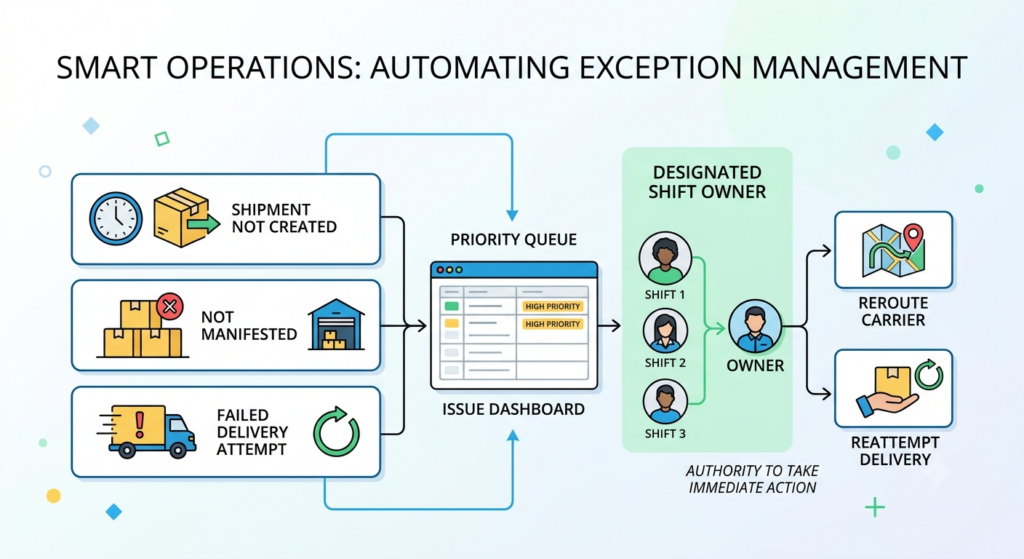
Configure automatic actions that surface the exceptions rather than requiring someone to find them: shipments not created within a defined period after order confirmation, parcels created but not manifested, and status changes indicating a failed delivery attempt.
Assign a named owner per shift to that queue, with authority to reroute a carrier or reattempt a delivery without escalation.
One India-Specific Caveat Worth Raising Before You Buy
Base.com’s published carrier documentation names European and global carriers, DHL, DPD, UPS, FedEx, Royal Mail, and various regional brokers among them. In researching this guide, I did not find published confirmation of native integrations with Indian carriers such as Delhivery, Blue Dart, Ekart, Xpressbees, or Shadowfax.
That may simply reflect what is documented publicly rather than what is supported. If you are an Indian seller evaluating the platform for domestic dispatch, confirm the current Indian carrier list with Base.com directly before committing, rather than assuming the 140+ figure includes your specific couriers.
Stating this plainly is more useful than implying coverage that has not been verified.
NDR Management: The Highest-Return Activity of the Sale Window
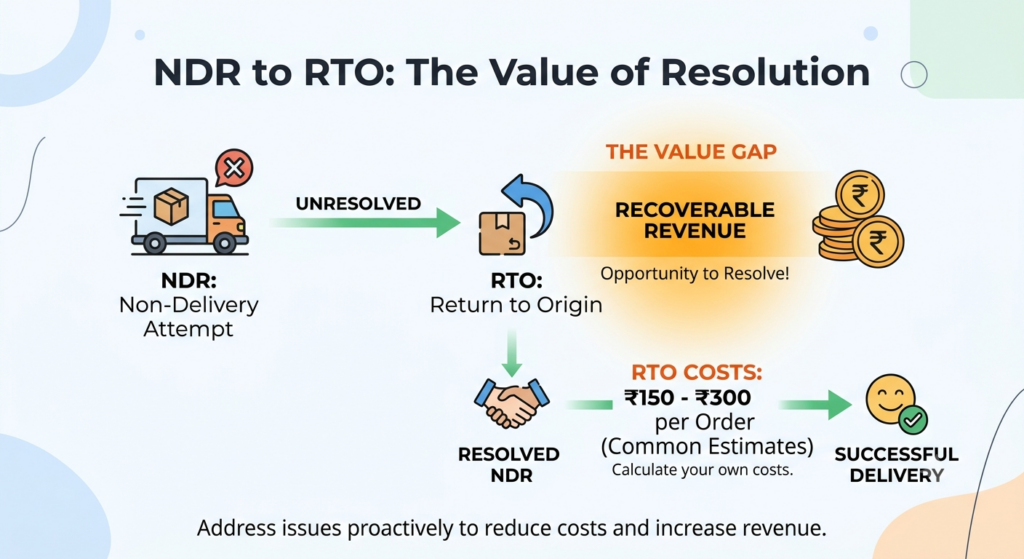
An NDR is a failed delivery attempt. An unresolved NDR becomes an RTO. That gap is where the recoverable money sits.
RTO costs are commonly cited in the range of ₹150-300 per order across Indian logistics publications, with some estimates running higher once packaging, blocked capital, and wasted acquisition spend are included. These figures come from vendor sources rather than a single authoritative study, so calculate your own.
A working NDR cadence during a sale:
- Within 4 hours of the NDR posting: attempt customer contact by phone and WhatsApp.
- Within 12 hours: confirm the reattempt with the courier, or update the address.
- Within 24 hours: if unresolved, decide whether to reattempt or accept the RTO.
- Never leave an NDR to auto-expire. Courier default timelines are not built around your margin.
Track NDR reason codes separately rather than as one queue. A customer-unavailable NDR is recoverable with a reattempt at a different time slot. An incorrect-address NDR needs the address corrected before any reattempt has a chance. A customer-refused NDR on a COD order is usually not recoverable at all, and reattempting it spends money on a delivery that will fail twice.
Sorting the queue by recoverability rather than by age is a small change that materially improves resolution rates during a high-volume window.
NDR work is the part of how to plan shipments for ecommerce sales with the highest return per hour invested, and it is consistently under-resourced. Staff this specifically for the sale window. NDR volume scales with dispatch volume, and a queue that is manageable at 200 orders a day becomes unworkable at 900 without dedicated people.
Treating NDR resolution as a dispatch function rather than a customer-support afterthought is one of the clearest separations between sellers who handle sale windows well and those who do not.
Metrics to Track During the Dispatch Window
|
Metric |
Formula |
Target during sale |
|---|---|---|
|
Same-day dispatch rate |
Orders manifested same day ÷ orders confirmed |
Above 90% |
|
Label generation failure rate |
Failed label calls ÷ total attempts |
Under 1% |
|
Pickup fulfilment rate |
Parcels collected ÷ parcels manifested |
Above 98% |
|
NDR resolution within 24h |
NDRs resolved ÷ NDRs raised |
Above 70% |
|
Order-to-manifest ageing |
Median hours, confirmation to manifest |
Under 8 hours |
|
Carrier concentration |
Largest carrier share of volume |
Under 50% |
Targets are directional planning benchmarks constructed for this article, not published industry standards. Calibrate against your own last two cycles.
Review these weekly in normal trading and daily during the window, because they are the leading indicators of how to plan shipments for ecommerce sales working or failing. The carrier concentration metric is the one to watch across cycles rather than within one. If a single courier is carrying more than half your volume during a sale, you have a dependency rather than a partnership.
Seven Mistakes That Undermine How to Plan Shipments for Ecommerce Sales
- Booking capacity late. Carrier allocation is decided weeks before the sale, and late requests get residual capacity.
- Allocating by rate card. The gap between a delivery and an RTO dwarfs the gap between two couriers’ rates.
- Running a single carrier. One API outage or one pickup failure and dispatch stops entirely.
- Testing label generation at unit volume. Queue, printer, and rate-limit problems only appear in bulk.
- Leaving weight and dimension data unaudited. Wrong dims produce wrong rates, wrong carrier recommendations, and billing disputes at scale.
- Treating NDR as support work. Every unresolved NDR converts to an RTO on the courier’s timeline, not yours.
- Changing carrier rules mid-sale. An untested rule change on your highest-volume day is an avoidable risk.
Getting How to Plan Shipments for Ecommerce Sales Right Is Mostly Pre-Work
Almost nothing in this guide can be done during a sale. Carrier capacity is allocated weeks earlier. Cutoffs are negotiated in advance. Dimension data is audited before the catalogue freezes. Automation rules are built and tested at T-14 and frozen at T-3.
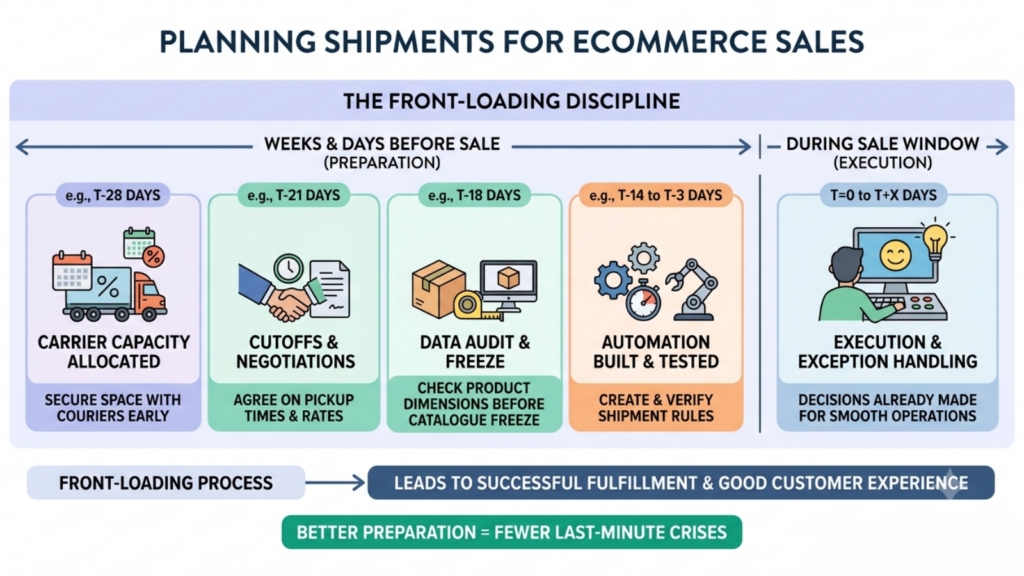
What remains during the window is execution and exception handling, and both go better when the decisions were made while there was time to make them carefully. That front-loading is the whole discipline of how to plan shipments for ecommerce sales.
With Indian festive GMV projected to cross ₹1.15 lakh crore in a 30-35 day window and courier networks running at capacity across the entire market simultaneously, dispatch is the constraint that most often turns a good inventory plan into a bad customer experience. Base.com consolidates carrier connections, label and manifest generation, pickup ordering, and customer notifications into one Order Manager, which is what makes the automation layer of how to plan shipments for ecommerce sales practical rather than theoretical.
Book early. Automate the repetitive. Staff the exceptions. Freeze before you open.
Frequently Asked Questions
How far in advance should I book courier capacity for a festive sale?
How many couriers should I run during an ecommerce sale?
Should I choose couriers by price during a sale?
What is the biggest avoidable cause of late dispatch during a sale?
How do I plan shipments for ecommerce sales if my order volume triples overnight?