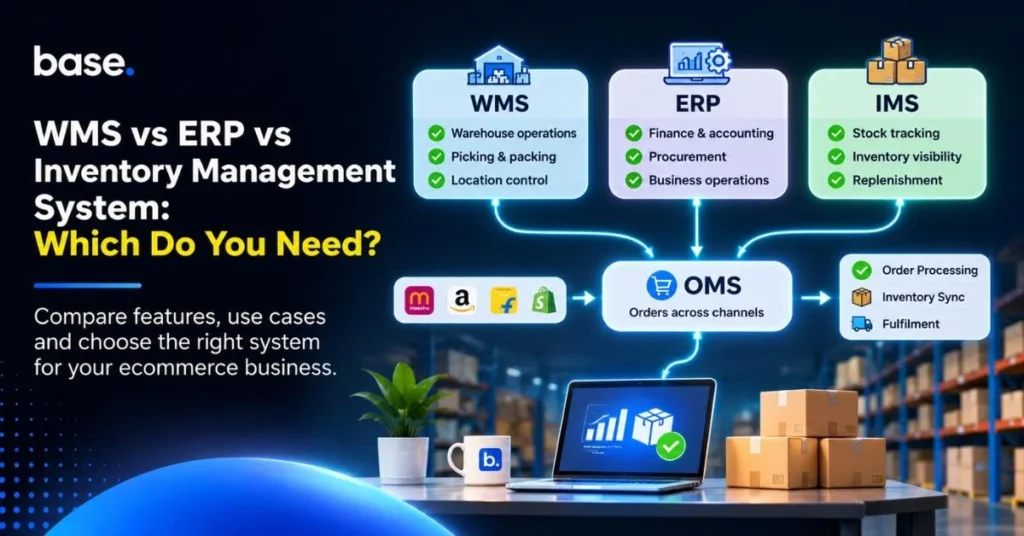
WMS vs ERP vs inventory management comes down to the problem each system manages. A warehouse management system (WMS) coordinates physical warehouse work such as receiving, storage, picking and packing. An enterprise resource planning (ERP) system connects broader business functions, often including finance, purchasing, sales and operations. An inventory management system (IMS) tracks stock quantities, movements, availability and replenishment. An order management system (OMS) coordinates orders across sales channels and fulfilment steps. These systems overlap, but they are not interchangeable. An ecommerce business may need one, several or an integrated combination, depending on its channels, warehouses and operating bottlenecks.
What is a Warehouse Management System (WMS)?
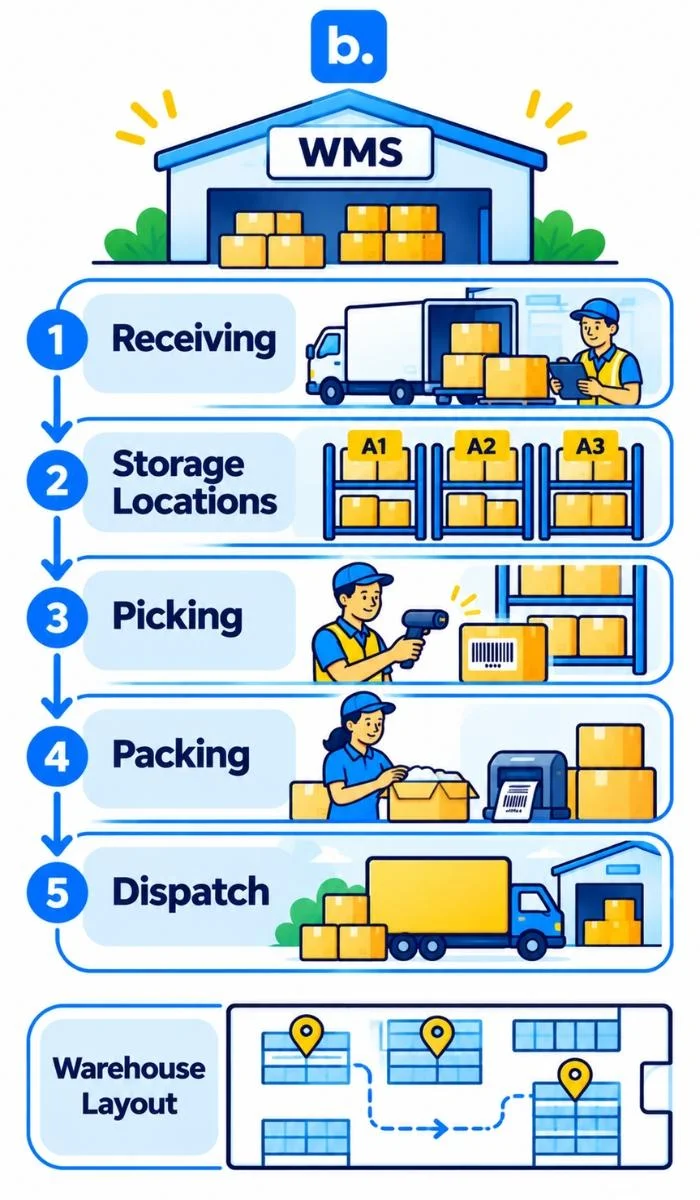
A WMS manages and coordinates work inside a warehouse, from receiving stock to preparing orders for dispatch. It gives warehouse teams a structured way to record where products are stored and how they move through operational tasks. Oracle’s warehouse location documentation, for example, describes location types for receiving, storage, packing and shipping, illustrating the level of operational detail a WMS can support.
Typical WMS capabilities include recording receipts, assigning or tracking storage locations, supporting picking lists and routes, managing packing steps, stocktakes and inventory checks, and recording warehouse movements. Product scope varies: some systems guide picking and packing in detail, while others focus on location and inventory records. A WMS is concerned with execution on the warehouse floor, not necessarily the company’s full financial or sales processes.
When does an ecommerce business need a WMS?
A WMS becomes useful when the warehouse operation itself is difficult to coordinate. Signals include staff searching for products, stock records that do not match physical locations, picking and packing delays, multiple storage areas, and stocktakes or replenishment that are hard to manage. A small seller with one storage area and manageable orders may not need a specialised WMS yet. The key is whether location-level visibility and structured warehouse workflows solve a real operating problem.
What is an Enterprise Resource Planning (ERP) system?
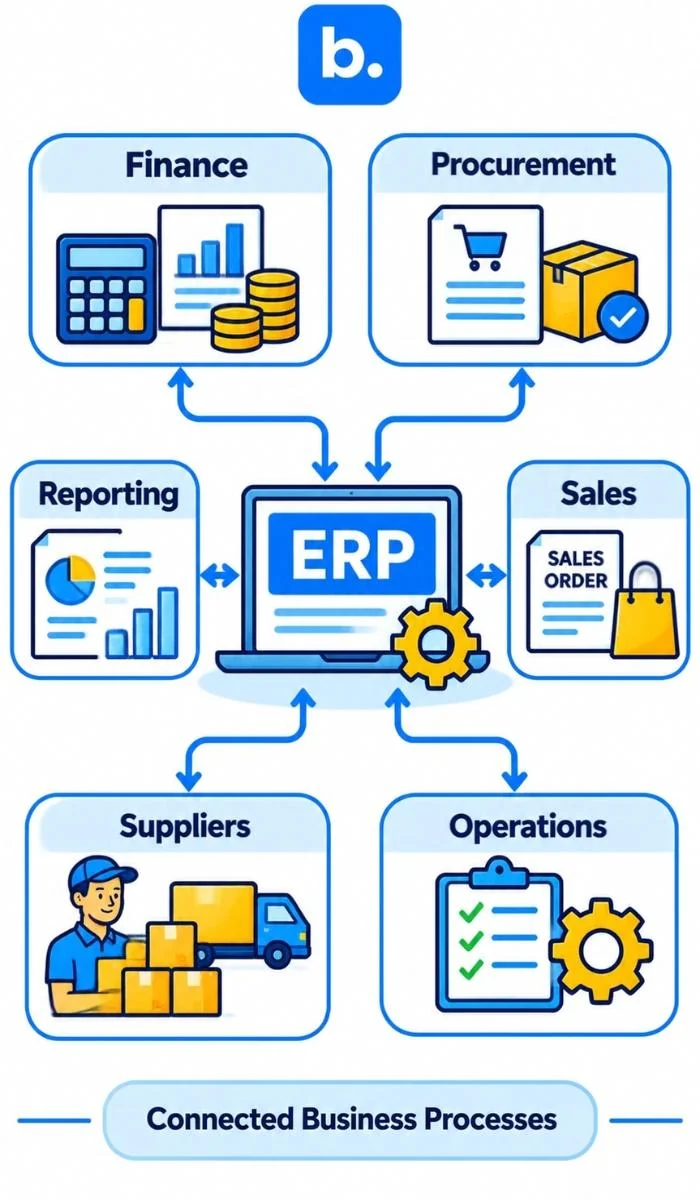
An ERP connects information and processes across a business, often including finance, procurement, sales, operations, supply chain and reporting. Rather than having each department maintain disconnected records, an ERP can provide shared data and linked workflows. Microsoft’s ERP overview describes ERP as software that integrates core processes across business functions.
For an ecommerce company, an ERP may connect purchasing and supplier records with finance, sales and inventory information. A procurement transaction might feed a financial record; sales and stock information may contribute to business reporting. But ERP capabilities differ by product and implementation. Some platforms include inventory and warehouse modules, while others integrate with separate IMS, WMS or OMS products. The ERP label alone does not prove that the system supports detailed pick paths, bin-level execution or multichannel order orchestration.
When does an ecommerce business need an ERP?
ERP is worth considering when the challenge extends beyond stock or fulfilment: finance, purchasing, sales and operations rely on disconnected tools; staff repeatedly enter the same information; or leadership needs a more consolidated view of business activity. It may also matter when multiple departments, entities or locations need coordinated processes. If the main issue is only finding products in a warehouse, an ERP may be broader than the immediate need.
What is an Inventory Management System (IMS)?
An IMS tracks what stock a business has, how quantities change, where inventory is recorded and when replenishment may be needed. Common functions include SKU records, stock receipts and adjustments, transfers, availability, low-stock monitoring and inventory reports. Some products also support reorder points or inventory valuation, but these are not universal features.
An inventory tool can help replace scattered spreadsheets with a clearer stock record, including balances across channels or locations where supported. It may not direct warehouse staff to a bin, create an efficient pick route or manage packing. The distinction is important: stock visibility answers what the records say is available; a WMS guides the physical tasks that receive, store and fulfil that stock.
When does an ecommerce business need an IMS?
An IMS may be the right starting point when the business needs dependable quantities across SKUs, locations or sales channels, or when overselling, stock mismatches and manual updates are becoming common. It can also help purchasing teams review low-stock items. Confirm whether the system tracks stock by location and how it handles transfers; do not assume that every IMS includes barcode scanning, pick lists or warehouse execution.
WMS vs ERP vs inventory management system: what are the differences?
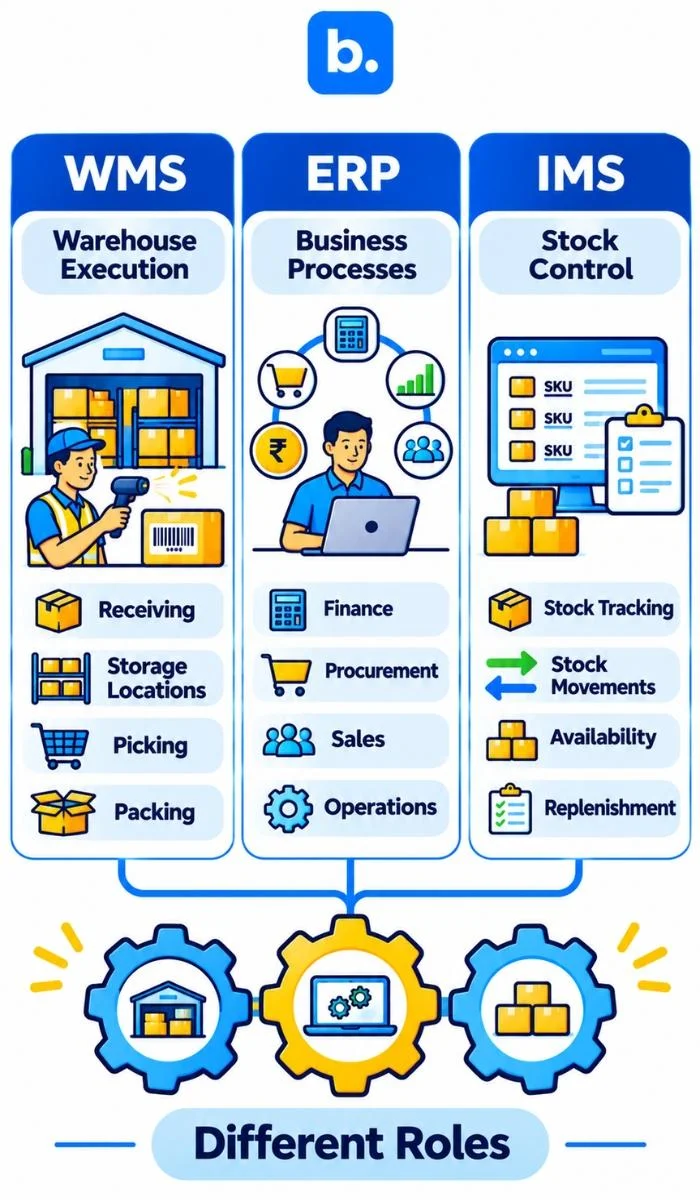
The primary difference is the level of work each system manages: warehouse execution, business-wide processes or stock control. The table summarises typical roles, although product boundaries vary.
| Comparison area | WMS | ERP | Inventory Management System |
|---|---|---|---|
| Primary purpose | Manages warehouse operations | Connects wider business functions | Tracks and manages stock |
| Main focus | Physical warehouse execution | Business-wide processes and records | Quantities, movements and availability |
| Receiving | Warehouse receiving workflow | May record procurement and receipt data | Records stock entering inventory |
| Storage locations | Often detailed warehouse locations | Depends on modules and setup | May provide basic location tracking |
| Picking and packing | Supports warehouse tasks | May offer basic fulfilment functions | Usually limited unless included |
| Inventory visibility | Tracks stock through warehouse work | Can provide business-wide stock view | Core focus |
| Finance and procurement | Not the primary role | Often central functions | Usually limited |
| Best suited for | Complex warehouse execution | Coordinating departments and records | Improving stock control |
These are typical roles, not fixed product boundaries. Some platforms combine WMS, ERP and inventory management functions. A product may also have optional modules. Evaluate documented functions and workflows rather than relying on category names.
Is an inventory management system the same as a WMS?
No. An IMS focuses on stock records, quantities and availability; a WMS manages the warehouse activities that move and process inventory. A WMS often includes inventory functions, but a basic IMS does not automatically provide detailed warehouse execution.
Is a WMS part of an ERP?
Sometimes. An ERP may include warehouse functions or connect to a separate WMS. Basic stock or warehouse features are not necessarily equivalent to a specialised WMS with detailed locations, picking workflows and stocktake processes.
Where does an Order Management System (OMS) fit into ecommerce?
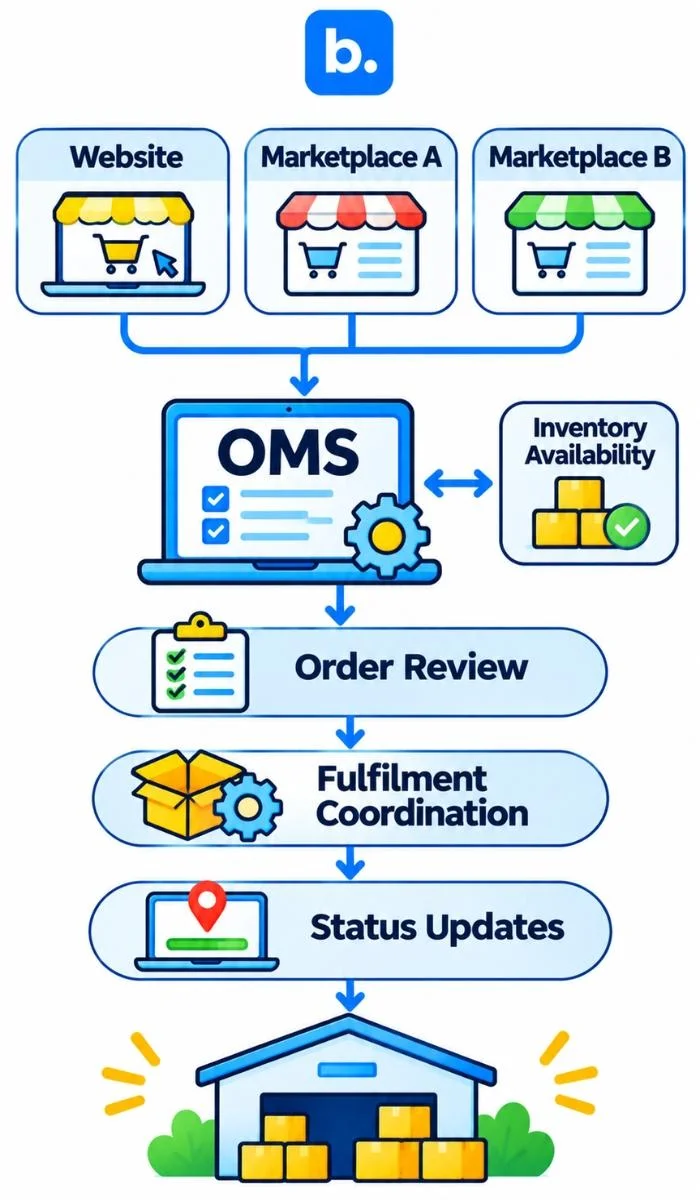
An OMS manages the order lifecycle across one or more sales channels. It can collect orders, consolidate them, track status and support allocation or fulfilment coordination, depending on the platform. OMS software sits between the sales channel and fulfilment work; a WMS handles physical warehouse execution, while an ERP connects wider business processes.
What does an OMS do?
An OMS may gather orders from a brand’s website and marketplaces, provide a consolidated order view, manage status changes and cancellations, and coordinate where orders should be fulfilled. Some platforms also support returns or inventory availability; the precise scope varies. Marketplace order management becomes more useful when teams need one process for orders from several channels rather than checking each seller account separately.
Order processing software can refer to a narrower tool that captures, validates, routes or updates orders. An OMS usually offers a broader view of the order lifecycle, but the terms are not used identically by every vendor. Check which stages the product actually manages.
OMS vs WMS: what is the difference?
| Area | OMS | WMS |
|---|---|---|
| Main responsibility | Coordinates the order lifecycle | Manages warehouse execution |
| Order capture | Often central to its role | Usually receives work for fulfilment |
| Sales channels | May consolidate multiple channels | Not its main purpose |
| Allocation | May coordinate where an order is fulfilled | Executes warehouse tasks for the allocated order |
| Picking and packing | Tracks or coordinates fulfilment status | Guides physical picking and packing |
| Inventory | May use availability for order decisions | Records warehouse stock and movements |
The systems complement one another: an OMS can coordinate what needs fulfilment, while the WMS guides the warehouse work. For example, Shopify’s location guidance describes tracking inventory at locations and configuring order fulfilment by location. That is one platform’s workflow, not a universal OMS architecture.
Which system does an ecommerce brand actually need?
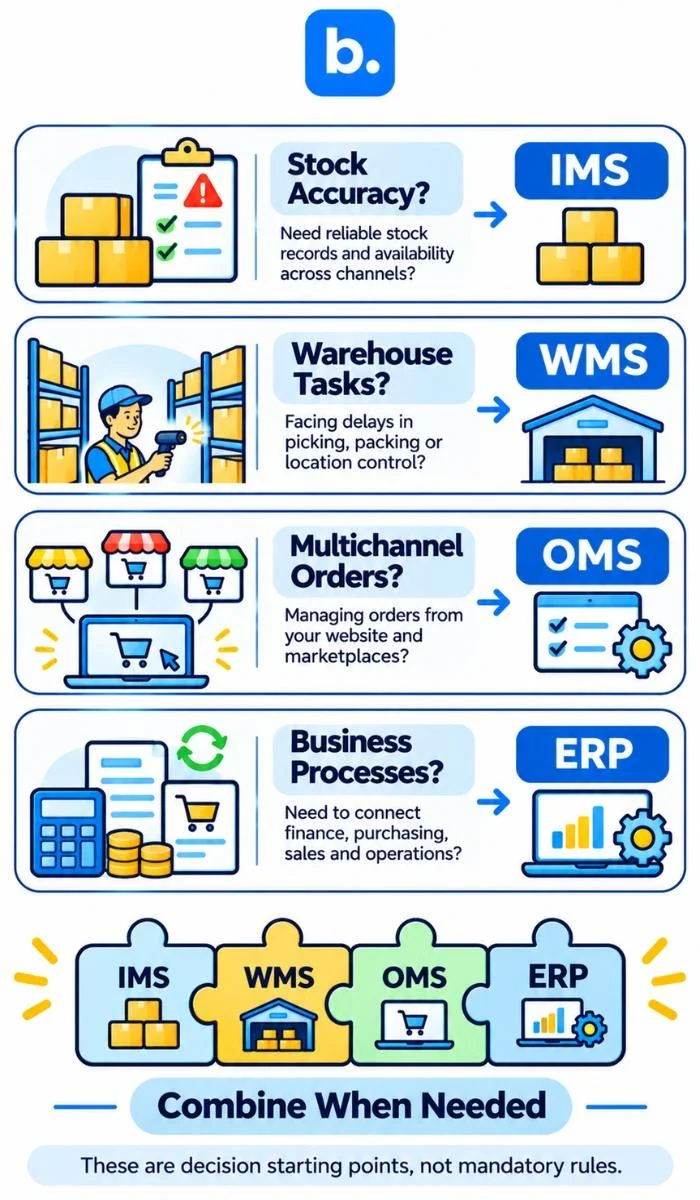
Choose based on the bottleneck, not the software label. This decision table is a starting point, not a rule that every business must follow.
| Ecommerce situation | Consider first | Why |
|---|---|---|
| Small seller, limited SKUs and manageable orders | Basic IMS | Better stock records may be the immediate need |
| Growing seller with stock mismatches | IMS | Centralised tracking can reduce spreadsheet reliance |
| Busy warehouse with complex picking | WMS | Location control and structured execution matter |
| Website plus several marketplaces | OMS | Centralised order processing may help coordinate channels |
| Disconnected finance, purchasing and operations | ERP | Business-wide processes need to connect |
| Complex warehouse and multichannel operation | Integrated combination | Specialist functions may need to exchange data |
Scenario 1: A small ecommerce seller
A seller with one storage area, a limited catalogue and a manageable number of orders may need only an IMS or existing platform inventory tools. Adding a full ERP or specialised WMS could create unnecessary setup and maintenance if simple processes work reliably.
Scenario 2: A growing multichannel brand
A brand selling through its own site and marketplaces may need an OMS to consolidate and coordinate orders. It also needs stock availability to remain aligned across channels. The order system and inventory tool must exchange the right updates; an OMS label alone does not guarantee synchronisation.
Scenario 3: An ecommerce business with its own warehouse
A dedicated warehouse team, multiple storage locations, high order activity or complicated picking can make a WMS more relevant. If stock visibility is already reliable but staff spend time locating products or coordinating tasks, the operational gap is likely in warehouse execution rather than the ERP.
Scenario 4: An established business with several departments
A business coordinating finance, procurement, sales and operations may benefit from ERP. It can still retain specialist OMS or WMS products if channel order processing or warehouse execution needs more detail than the ERP provides. ERP does not automatically replace every specialist system.
Can WMS, ERP, inventory management and OMS work together?
Yes. The systems can exchange information through integrations or shared platform functions, but the arrangement depends on architecture and product capability. A common ecommerce workflow might be:
- An order is placed through a website or marketplace.
- The OMS captures and processes it, if one is used.
- Stock availability is checked against the relevant inventory records.
- The order is sent to the warehouse for fulfilment.
- The WMS guides picking, packing and dispatch preparation.
- Inventory and fulfilment updates are returned to connected systems.
- The ERP records relevant financial, purchasing or business transactions.
This is illustrative, not a required sequence. Some businesses use one platform for several steps, direct integrations without a separate OMS, or different system boundaries. Before connecting systems, identify which one owns product data, stock balances, orders and fulfilment status. Integration can reduce repeated entry, but it does not remove the need to resolve sync failures, duplicate records or unclear process ownership.
How to choose the right software for your ecommerce business
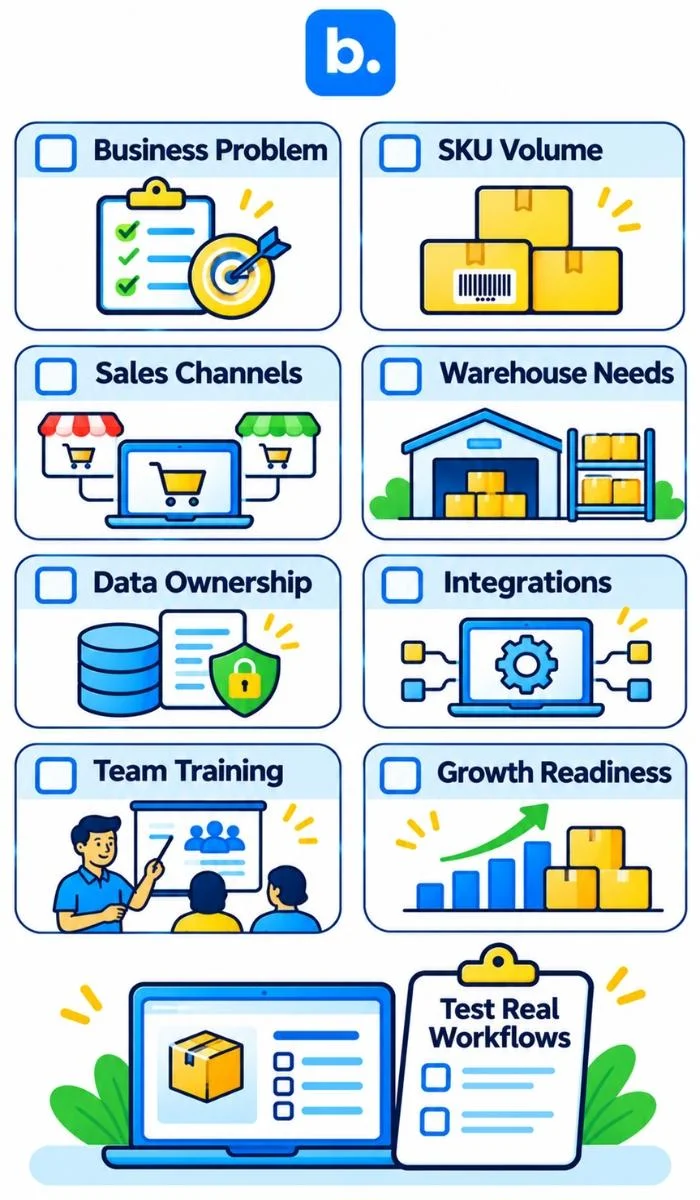
Start by defining the task you need to improve. Ask:
- Is the problem stock visibility, warehouse execution, order processing or business-wide coordination?
- How many SKUs, orders, channels and warehouse locations are involved?
- Do staff need detailed bin locations, pick lists or stocktake workflows?
- Which order, inventory and financial records must move between systems?
- Which system will own each data type, and who resolves exceptions?
- What configuration, migration, training and ongoing maintenance are required?
- Can the software support expected growth without adding unnecessary complexity?
Ask vendors to demonstrate your real workflow, not only a standard feature list. Test a representative order from capture through dispatch, check stock changes across locations and inspect what happens when an item is unavailable or an update fails. Compare the process and implementation effort, not just the product category or number of features.
How our WMS fits into an ecommerce technology stack
Our WMS supports warehouse-level operations including receiving, storage locations, inventory visibility, picking lists and guided routes, packing workflows, barcode-assisted stocktakes and warehouse activity through the WMS app. These functions address how stock is handled inside a warehouse. See the documented scope on our warehouse management system page; our guide to what a warehouse management system does explains the broader role.
Our WMS is not a complete ERP. To understand how ERP and inventory management software differ, and where each fits into an ecommerce technology stack, read our ERP vs inventory management software guide. It is also important to verify the required integrations and system boundaries for your own operation. For Indian warehouse context, see our warehouse management system in India.
Conclusion
WMS vs ERP vs inventory management is not a contest with one universal winner. IMS tracks stock, WMS guides warehouse work, OMS coordinates orders, and ERP connects wider business processes. Start with the bottleneck, check where functions overlap, and choose systems that exchange the data your operation needs. A specialist WMS, OMS or ERP is useful only when it fits the work the business actually has to do.
