

Everything that follows on how to plan inventory for Amazon and Flipkart sales rests on that separation. Treating them as one channel is the single most expensive planning error Indian sellers make.
Why Amazon and Flipkart Need Two Separate Inventory Plans
Great Indian Festival and Big Billion Days usually run in overlapping windows. That overlap is the trap.
If you plan one number and split it later, you will discover the split was wrong on day two, when neither platform lets you move stock.
Three things make the two platforms genuinely different planning problems:
- Fulfilment commitment is irreversible. Stock inside an Amazon fulfilment centre cannot serve a Flipkart order. Stock inside a Flipkart Fulfilment centre cannot serve an Amazon order. Both are locked from the moment they are received.
- The platforms score you on different metrics. Amazon runs an Inventory Performance Index. Flipkart weights sales velocity and listing health in its search ranking. Optimising for one does not optimise for the other.
- Inbound windows differ. Appointment scheduling, packaging requirements, and labelling standards are platform-specific, and both tighten as the festive window approaches.
Understanding how to plan inventory for Amazon and Flipkart sales starts with accepting that you are building two forecasts and one shared supply pool, not one forecast and two destinations.
The Structural Differences That Change How to Plan Inventory for Amazon and Flipkart Sales
|
Dimension |
Amazon India |
Flipkart |
|---|---|---|
|
Platform-fulfilled model |
FBA (Fulfilment by Amazon) |
Flipkart Fulfilment |
|
Hybrid model |
Seller Flex (Amazon manages inventory at your warehouse) |
Smart Fulfilment / Smart Assured |
|
Self-fulfilled model |
Easy Ship, Self Ship |
Seller-fulfilled |
|
Inventory health metric |
Inventory Performance Index (IPI), 0-1,000 scale |
Seller rating and listing health signals |
|
Native restock tool |
Restock Inventory tool with days-of-supply and seasonal demand forecasts |
Seller Hub inventory and sales reporting |
|
Returns mechanic |
Return requests, restock on receipt |
Replacement orders alongside returns |
|
Aged-stock exposure |
Long-term storage fees on aged FBA inventory |
Storage charges per platform policy |
Verify current fee schedules, storage-fee thresholds, and policy details directly in Seller Central and Seller Hub before acting. Both platforms revise these regularly, and the numbers move.
Amazon’s Inventory Performance Index Rewards Balance, Not Volume
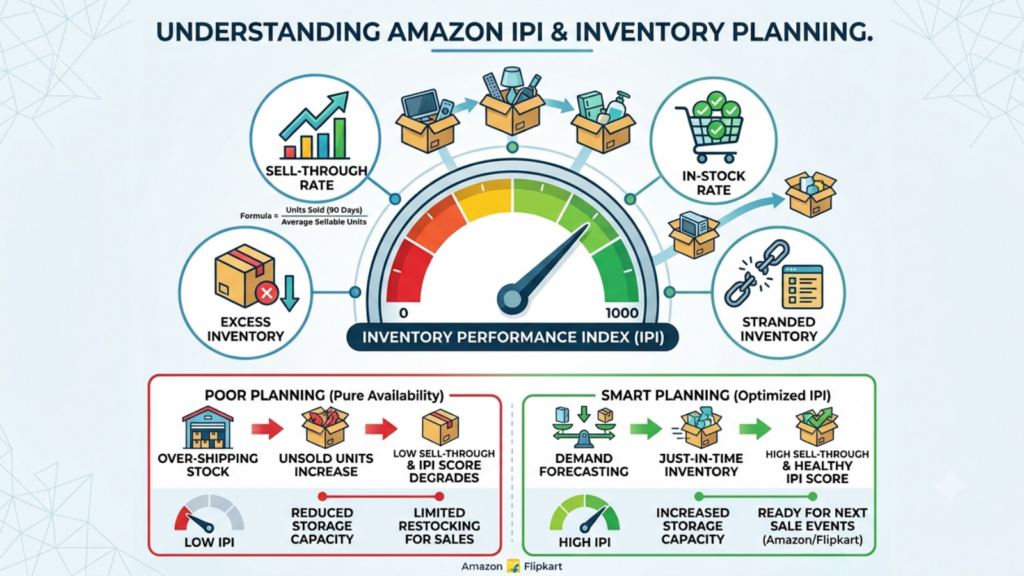
Amazon defines the Inventory Performance Index as a measure of inventory performance over time, scored from 0 to 1,000, calculated on your balance of sold and on-hand inventory, excess and aged inventory, long-term storage fees, how quickly you fix listing issues, and your ability to keep popular products in stock.
Amazon defines sell-through rate as units sold and delivered over the past 90 days divided by the average number of sellable units in fulfilment centres.
The planning consequence is direct: over-shipping to FBA before a sale damages your score if the stock does not clear. A high IPI is not a vanity metric; it affects your storage capacity allocation, which affects your ability to ship in stock for the next sale. Any view of how to plan inventory for Amazon and Flipkart sales that optimises purely for availability will quietly degrade this score.
Amazon’s Restock Inventory Tool Gives You a Free Baseline

Amazon’s Restock Inventory tool calculates days of supply and recommends reorder quantities based on your sales velocity, and its seasonal demand forecast shows projected weekly demand from past seasonal patterns.
It is free, it is already in your account, and most Indian sellers ignore it.
Use it as your starting baseline, then adjust upward for the discount depth you are running. Amazon’s forecast reflects historical patterns, not the promotion you have not run yet.
Flipkart Rewards Velocity, Which Punishes Stockouts Harder
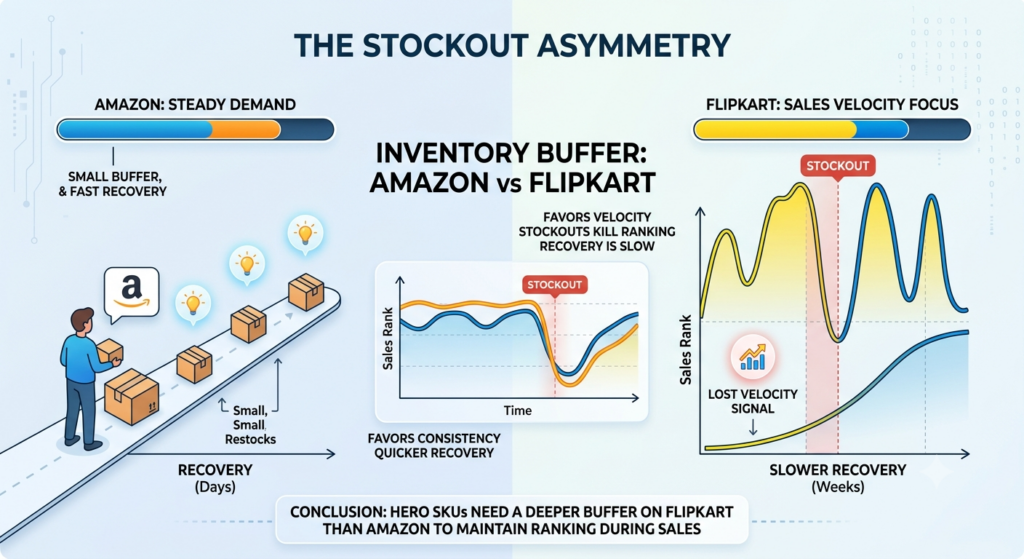
Flipkart’s search behaviour favours sales velocity, listing completeness, and competitive pricing. A stockout does not just cost the units you would have sold; it interrupts the velocity signal that keeps the listing ranking during the sale.
The recovery is not instant when you restock. That asymmetry means Flipkart deserves a slightly deeper buffer on hero SKUs than Amazon does, even at equal forecast volume.
Replacement Orders Change Your Return Maths
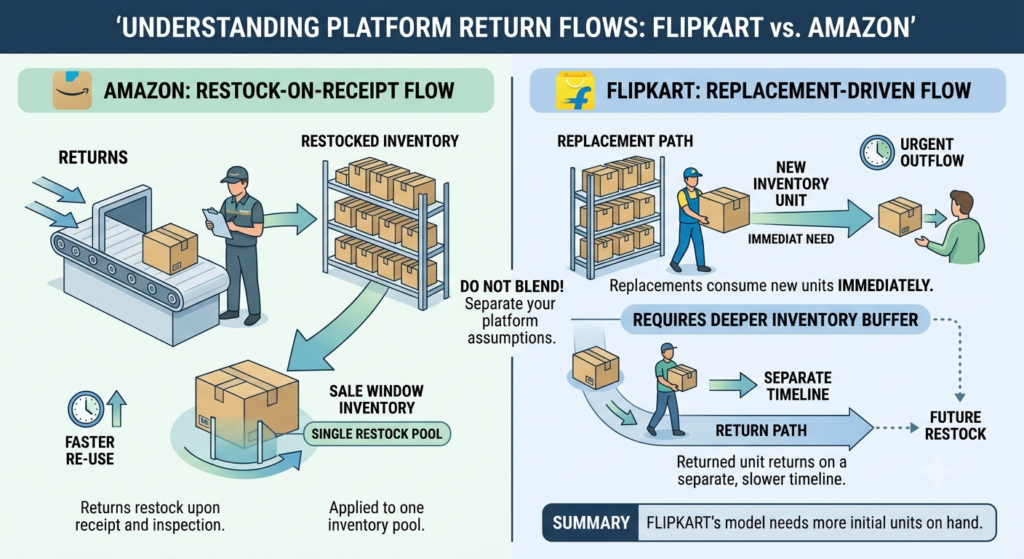
Flipkart operates a replacement order flow alongside standard returns. A replacement consumes a fresh unit of inventory immediately while the returned unit comes back on a separate timeline.
Amazon’s return flow restocks on receipt after inspection.
Model these separately. A single blended “returns” assumption applied across both platforms will understate the units you need on hand during the sale window.
How to Plan Inventory for Amazon and Flipkart Sales: An Eight-Step Method
Before a major Amazon or Flipkart sale, inventory planning needs to go beyond looking at past sales. Sellers need to account for expected demand, current stock, lead times, warehouse capacity, marketplace requirements, and the additional volume a sale can generate. This eight-step method helps sellers plan inventory early, allocate stock across channels, and reduce the risk of both stockouts and excess inventory during high-demand sales.
Step 1: Build Two Separate Baselines
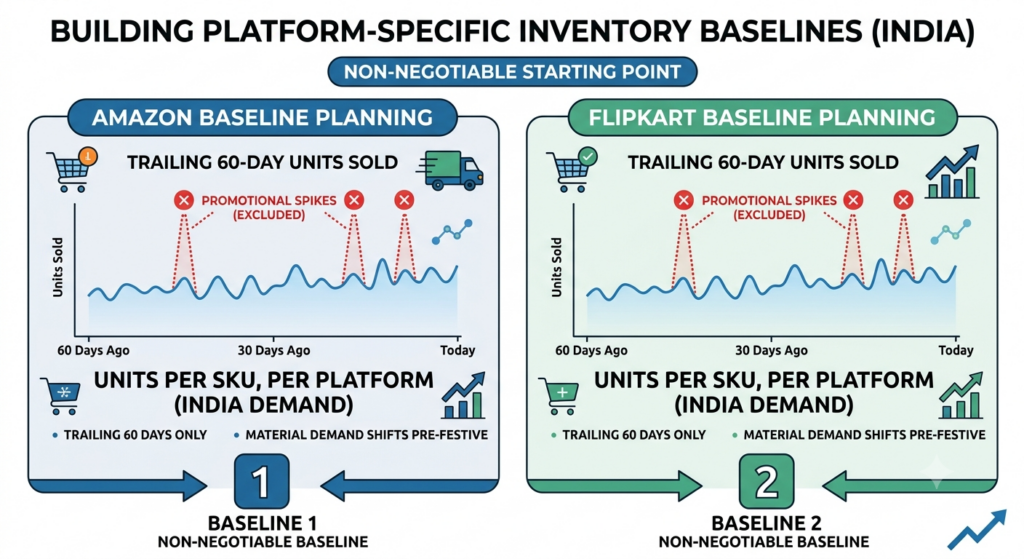
Take trailing 60-day units sold, per SKU, per platform, excluding promotional spikes.
Sixty days rather than ninety, because Indian demand shifts materially in the pre-festive build-up and a longer window drags in a quieter period.
Do not average the two platforms. Your Amazon mix and Flipkart mix will diverge, sometimes sharply, and the average describes neither. Two baselines are the non-negotiable starting point for how to plan inventory for Amazon and Flipkart sales.
Step 2: Apply Platform-Specific Uplift Multipliers
Uplift is a function of your promotion depth and your placement, not of the platform alone.
|
SKU role |
Typical uplift vs baseline |
|---|---|
|
Lightning deal / deal-of-the-day SKU |
6-10x |
|
Featured A-class SKU, moderate discount |
3-5x |
|
Full-price catalogue SKU riding on traffic |
1.5-2x |
|
Long-tail C-class SKU |
1-1.5x |
These are planning heuristics drawn from common operating practice, not published benchmarks. Replace them with your own measured multipliers after one cycle.
If you have secured a specific placement, a deal slot, a banner, a category feature, plan that SKU at the top of the range. If you have not, plan at the bottom.
Step 3: Plan the Commercial Window, Not the Official Dates
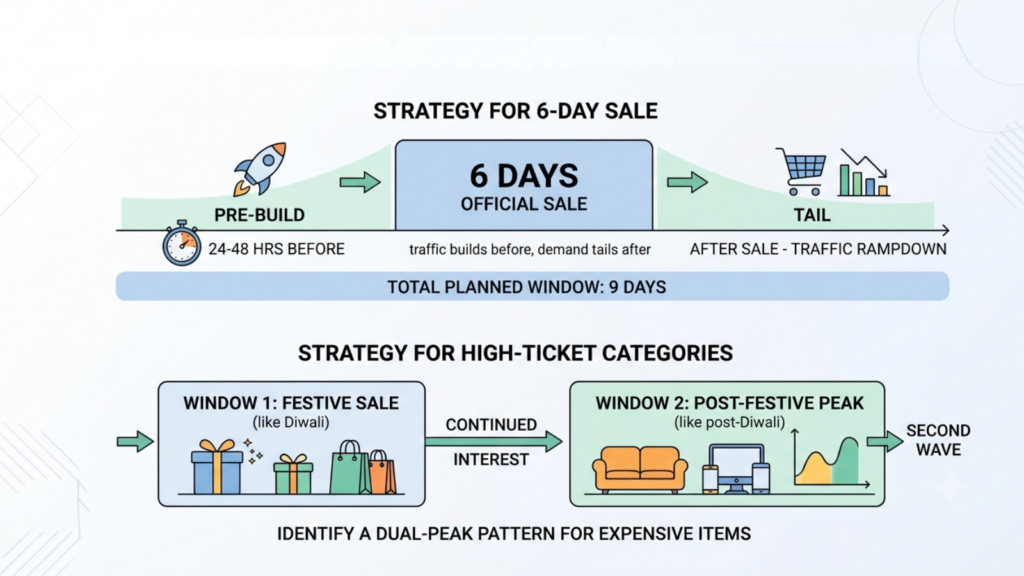
Both platforms see traffic build 24-48 hours before the announced start, and demand does not return to baseline the moment the sale closes.
Redseer also identified a dual-peak pattern in 2025, with GST slab simplification pushing high-ticket purchases past Diwali into a second wave.
For a six-day sale, plan nine days: one day pre-build, six days sale, two days tail. For high-ticket categories, plan a second window entirely.
Step 4: Decide the FBA and Flipkart Fulfilment Commitment First
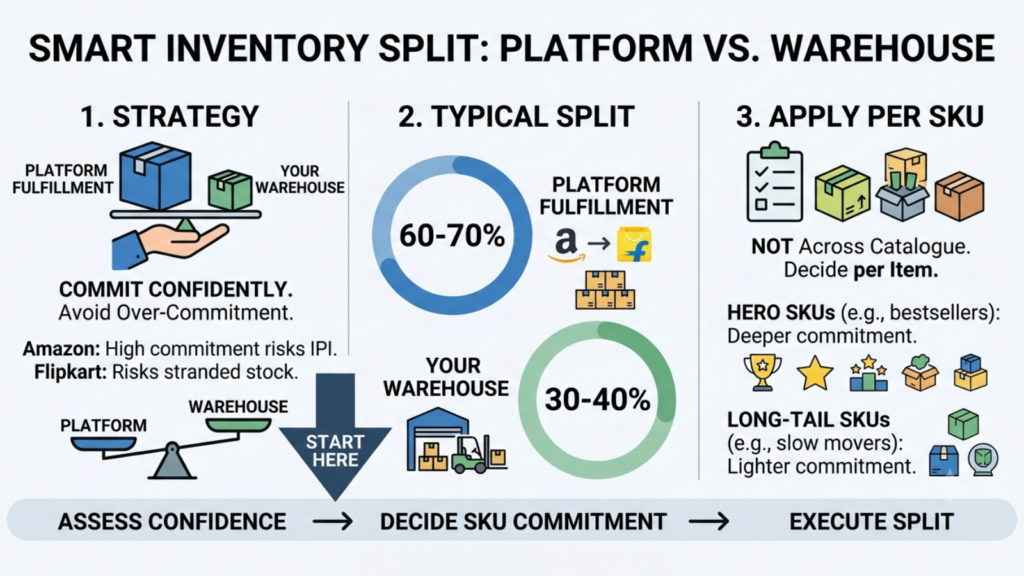
This is the irreversible decision, so it comes before everything else in how to plan inventory for Amazon and Flipkart sales.
Commit to platform fulfilment only the volume you are confident will clear. Over-commitment on Amazon damages IPI. Over-commitment on Flipkart strands stock you cannot redeploy.
A common approach is committing 60-70% of forecast to platform fulfilment and holding 30-40% as flexible stock in your own warehouse.
Confirm that split per SKU, not across the catalogue. Hero SKUs justify deeper platform commitment. Long-tail SKUs rarely do.
Step 5: Hold the Buffer Where You Control It
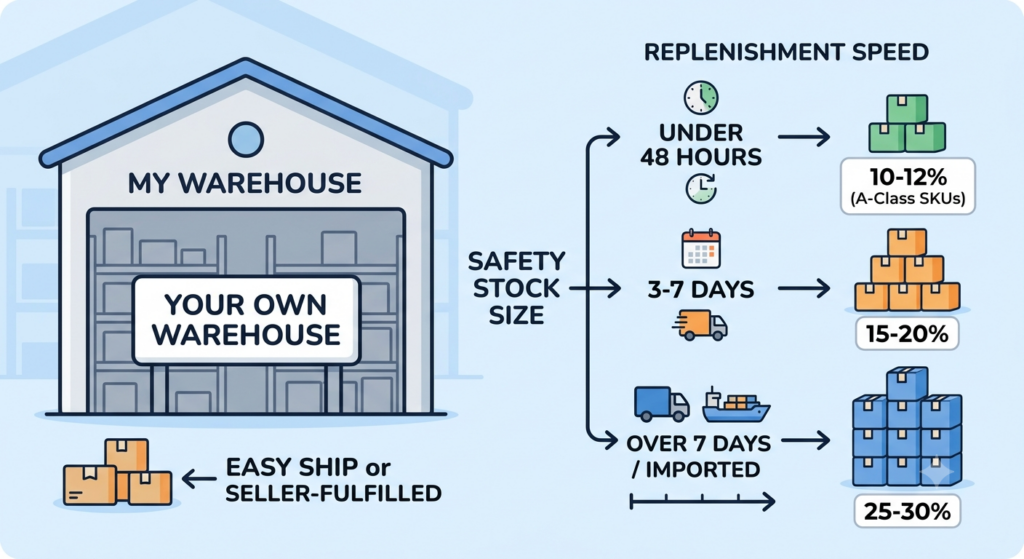
Your safety stock belongs in your own warehouse, served through Easy Ship or seller-fulfilled channels, because that is the only pool you can point at either platform mid-sale.
Buffer sizing should follow replenishment speed:
Under 48-hour replenishment to your own node: 10-12% on A-class SKUs.
Three to seven days: 15-20%.
Over seven days or imported: 25-30%.
A buffer smaller than one replenishment cycle of demand is decorative.
Step 6: Net Off RTO and Returns in Transit

COD still accounts for roughly 45% of Indian D2C orders, down from 55% in 2024 according to one 2026 industry survey, and India’s average RTO rate sits between 20% and 30% against a global benchmark closer to 8-12%. Treat both as directional and verify against your own courier data.
Units in RTO transit are inventory you own but cannot sell for six to ten days. Model them as a separate late-window supply pool with a realistic sellable-condition rate, not as stock available on day two.
Step 7: Build the Inbound Calendar Backwards from the Cutoff
Working out how to plan inventory for Amazon and Flipkart sales successfully depends more on the inbound calendar than on the forecast. A perfect forecast that misses the appointment window is worthless.
|
Timing |
Action |
|---|---|
|
T-45 days |
Confirm supplier POs with committed dispatch dates |
|
T-35 days |
Book fulfilment centre inbound appointments for both platforms |
|
T-28 days |
Dispatch first FBA and Flipkart Fulfilment consignments |
|
T-21 days |
Confirm receipt and check-in; investigate any discrepancy immediately |
|
T-14 days |
Audit SKU-to-listing mapping, barcodes, and packaging compliance on both platforms |
|
T-10 days |
Dispatch top-up consignment if check-in confirmed clean |
|
T-7 days |
Cycle count own-warehouse buffer; confirm channel-level allocation |
|
T-3 days |
Freeze catalogue, pricing and integration changes |
Build slack into check-in. Fulfilment centres run at capacity during festive inbound, and a consignment that arrives on time can still check in late.
Step 8: Freeze Changes Three Days Out
Every mid-sale integration change is an untested deployment on your highest-revenue day.
Freeze catalogue edits, price-list updates, and connector changes at T-3 and hold the line regardless of who asks.
How to Split Stock Between Amazon, Flipkart and Your Own Warehouse When You Plan Inventory for Amazon and Flipkart Sales
|
Pool |
Reversible? |
What it should hold |
|---|---|---|
|
Amazon FBA |
No |
High-confidence Amazon forecast only |
|
Flipkart Fulfilment |
No |
High-confidence Flipkart forecast only |
|
Seller Flex / Smart Fulfilment |
Partially |
Platform-committed stock at your node |
|
Own warehouse (Easy Ship / seller-fulfilled) |
Yes |
All safety buffer, all long-tail SKUs |
The rule underneath: commit deep only where you cannot recall stock, and hold every unit of flexibility in the node you control.
This is why platform-committed stock must be physically and systemically separated in your inventory system. If your available-to-promise figure includes units already sitting in an Amazon fulfilment centre, every subsequent calculation is built on a number that is not true.
The 10 Best Planning Tools to Plan Inventory for Amazon and Flipkart Sales
No single tool answers how to plan inventory for Amazon and Flipkart sales end to end, so most sellers run a native tool alongside a planning platform.
1. Base.com, Unified OMS, WMS and Inventory Control
Base.com is an ecommerce operating system combining order management, product and inventory management, marketplace listing control, shipping, and workflow automation in one platform. Its Product Manager module explicitly combines ERP, WMS and PIM functions.
For Amazon and Flipkart planning specifically, four capabilities matter.
- Multi-warehouse separation. Base.com supports assigning one or more warehouses to an inventory, each with separate stock levels, documents, deliveries and stocktakings. That is what keeps FBA-committed stock out of your self-ship available pool.
- Reservations at order capture. Stock can be reserved before orders are paid, so an unshipped COD backlog does not silently consume your planned buffer.
- Configurable sync plus the Accelerations module. Stock synchronisation runs every eight hours, hourly, or live, and a dedicated Accelerations module raises sync frequency for periods when higher sales are expected.
- Automatic listing closure and relisting. Listings end automatically at zero stock and reactivate on replenishment, which makes running the long tail to zero safe.
Best for: Multi-channel Indian sellers who want order management, warehouse execution and channel sync in one system rather than stitched across two vendors.
2. Amazon Restock Inventory Tool and FBA Dashboard, Free and Underused
Amazon’s native tooling includes FBA inventory levels, restock recommendations, stranded inventory alerts, and the Inventory Performance Index dashboard in Seller Central.
The Restock Inventory tool calculates days of supply and recommends reorder quantities from your sales velocity, and the seasonal demand forecast projects weekly demand from past patterns.
Best for: Every Amazon seller, as a baseline. It costs nothing, and it is the only tool that sees Amazon’s own demand signal. Its limitation is scope; it knows nothing about your Flipkart demand or your own warehouse.
3. Flipkart Seller Hub, The Platform-Side Source of Truth

Seller Hub provides sales and inventory reporting and is the authoritative record for your Flipkart listing and stock position.
Its known gap is analytical depth. Seller Hub reports sales but does not surface keyword rank data, which means listing performance diagnosis needs a third-party layer.
Best for: Authoritative Flipkart stock and order data. Pair it with a planning system rather than relying on it as one.
4. Unicommerce, Enterprise-Scale Multichannel Depth

Unicommerce is an established Indian multichannel inventory and warehouse platform with a broad integration library covering Amazon, Flipkart, Myntra, Shopify and WooCommerce among others, and it serves a wide range from small brands to high-volume enterprises.
Best for: High-volume marketplace sellers who need proven transaction-processing scale and the broadest Indian integration coverage.
5. EasyEcom, Marketplace Reconciliation Strength
EasyEcom offers order management, real-time stock visibility and warehouse execution, with particular strength in payment and SKU-level reconciliation across channels.
Independent assessments place it below the enterprise platforms in overall feature depth, positioning it as an accessible entry point for SMB marketplace sellers.
Best for: Growing marketplace-first sellers who want reconciliation accuracy alongside inventory sync.
6. Increff, Fashion and Lifestyle Merchandising Depth
Increff focuses on fashion, apparel and lifestyle, with item-level serialisation for very high inventory accuracy and merchandising analytics for regional demand planning, plus pre-built integrations for Myntra, AJIO and Nykaa Fashion.
Its commonly cited limitation is that the WMS is stronger than the OMS, so many brands run a separate order management layer alongside it.
Best for: Fashion and lifestyle brands at larger GMV with complex size-curve, markdown and merchandising requirements.
7. Vinculum (Vin eRetail), Omnichannel and Offline-to-Online

Vinculum combines WMS, OMS and POS capability, connecting physical stores, marketplaces and warehouses under a single inventory view, with configurable threshold-based replenishment across channels.
Best for: Retailers bridging physical stores and marketplaces, or franchise networks with large catalogues.
8. Browntape, Simple Multichannel Aggregation
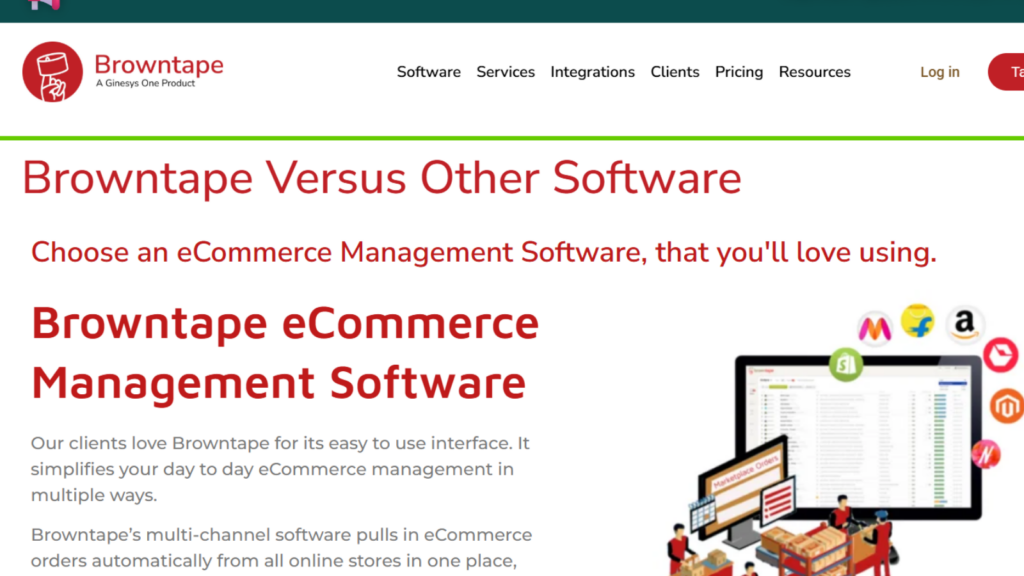
Browntape pulls orders from Amazon, Flipkart, Myntra, and your own website into one dashboard, and is generally described as user-friendly and cost-effective for early-stage sellers.
It does not carry deep WMS capability, which is a reasonable trade at low volume.
Best for: Sellers expanding to their second or third marketplace who need consolidation before they need warehouse execution.
9. Zoho Inventory, Lightweight Entry Point

Zoho Inventory is consistently positioned as a suitable option for sellers with lower order volumes and limited operational complexity, particularly those already inside the Zoho ecosystem.
Best for: Early-stage sellers under meaningful GMV who need stock tracking rather than fulfilment orchestration.
10. Anchanto, Cross-Border and Regional Reach

Anchanto provides ecommerce enablement with regional marketplace integration depth, with a footprint concentrated in Southeast Asia and MENA alongside India.
Assessments note its merchandising and planning capability is thinner than fashion-specialist platforms.
Best for: Indian sellers whose plan includes cross-border expansion into Southeast Asia or the Middle East.
Tool Comparison at a Glance
|
Tool |
Category |
Amazon + Flipkart sync |
Warehouse execution |
Best fit |
|---|---|---|---|---|
|
Base.com |
Unified OMS + WMS |
Yes |
Yes |
Multi-channel sellers wanting one system |
|
Amazon Restock Tool |
Native, free |
Amazon only |
No |
Baseline forecasting on Amazon |
|
Flipkart Seller Hub |
Native, free |
Flipkart only |
No |
Authoritative Flipkart data |
|
Unicommerce |
Enterprise multichannel |
Yes |
Yes |
High-volume marketplace sellers |
|
EasyEcom |
Multichannel + reconciliation |
Yes |
Yes |
SMB marketplace sellers |
|
Increff |
Fashion WMS |
Via integrations |
Yes |
Fashion and lifestyle at scale |
|
Vinculum |
Omnichannel |
Yes |
Yes |
Store plus marketplace retailers |
|
Browntape |
Aggregator |
Yes |
Limited |
Early multichannel sellers |
|
Zoho Inventory |
Lightweight inventory |
Limited |
Limited |
Low-volume sellers |
|
Anchanto |
Regional enablement |
Yes |
Yes |
Cross-border expansion |
Capability summaries are drawn from vendor documentation and third-party industry write-ups. Run a demo against your own SKU count, channel mix, and order volume before committing, comparison tables are a shortlist mechanism, not a decision.
How to Choose Between Them
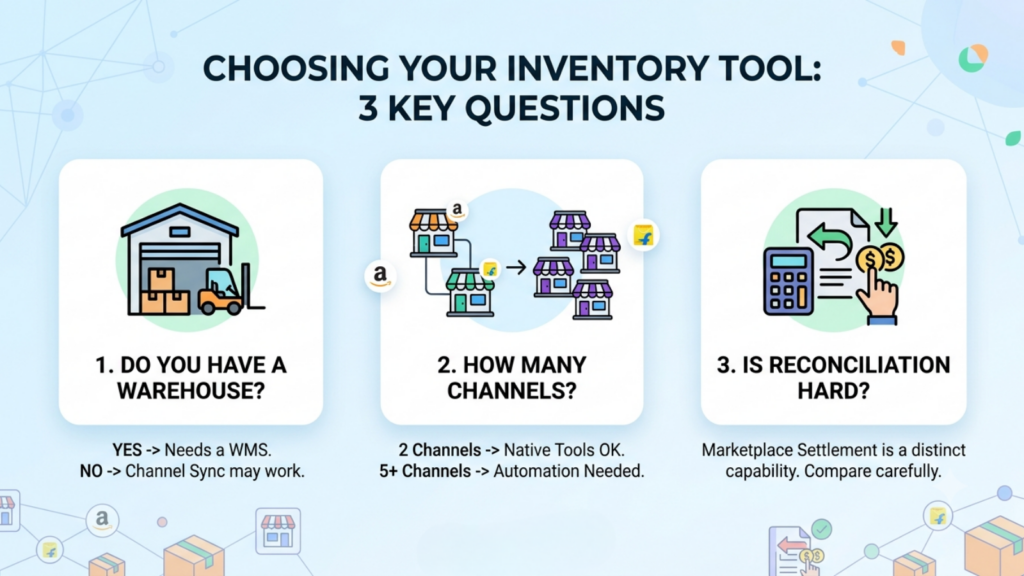
Three questions settle most decisions about which tool to use when working out how to plan inventory for Amazon and Flipkart sales.
- Do you run your own warehouse? If yes, you need genuine WMS execution, not just channel sync. If you are fully platform-fulfilled, a lighter tool may suffice.
- How many channels beyond Amazon and Flipkart? Two channels can be managed with native tools and discipline. Five or more cannot.
- Is reconciliation a pain point? Marketplace settlement reconciliation is a distinct capability, and platforms differ substantially in how well they handle it.
During the Sale: What to Watch on Each Platform
Planning ends when the sale opens. Monitoring starts, and it is the half of how to plan inventory for Amazon and Flipkart sales that most guides leave out.
|
Interval |
Amazon |
Flipkart |
|---|---|---|
|
Every 30 min |
Oversell exceptions, sync errors |
Oversell exceptions, sync errors |
|
Every 2 hours |
FBA fulfillable stock vs burn rate |
Fulfilment centre stock vs burn rate |
|
Every 4 hours |
Easy Ship order ageing |
Seller-fulfilled order ageing |
|
Twice daily |
Stranded inventory alerts |
Listing health and availability |
|
Daily |
Days-of-supply on A-class SKUs |
Velocity trend on hero SKUs |
Assign one named owner per platform per shift, with authority to close a listing without escalation. During a sale, a delayed decision costs more than a wrong one.
Do not change buffer logic mid-sale. Buffer changes ripple across every connected channel, and making them reactively at peak turns a small oversell into a broad stockout.
After the Sale: Reconcile Before You Reorder to Improve How to Plan Inventory for Amazon and Flipkart Sales Next Cycle
- Reconcile within 72 hours. Match system stock to physical and platform-reported stock on all A-class SKUs, on both marketplaces separately.
- Review IPI movement. If your Inventory Performance Index dropped, you over-shipped to FBA. Correct the commitment ratio next cycle, not the forecast.
- Classify returns properly. Sellable, refurbishable, write-off. Units restocked without inspection are the most common cause of phantom availability next quarter.
- Handle aged FBA stock deliberately. Removal, liquidation, or discount; decide inside 30 days, before long-term storage exposure builds.
- Measure and record. Sell-through by platform, stockout hours on A-class, oversell rate, forecast variance. Without these, next cycle repeats this cycle’s errors.
Sell-through of 75-85% on A-class SKUs is a reasonable planning target. It is a directional benchmark, not a published standard, and should be calibrated to your category’s carryover value.
Knowing How to Plan Inventory for Amazon and Flipkart Sales Is a Separation Problem
Everything in this guide reduces to one discipline: keep the pools separate and keep the numbers true.
Two forecasts, because the platforms sell different mixes. Two committed pools, because neither can serve the other. One flexible buffer in the node you control, because that is your only mid-sale option. And an available-to-promise figure that excludes everything already committed, because a plan built on an inflated number fails on day two regardless of how good the forecast was.
With Indian festive GMV projected to cross ₹1.15 lakh crore in a 30-35 day window and both marketplaces peaking simultaneously, the sellers who handle this well are not the ones with better forecasts. They are the ones whose systems tell them the truth fast enough to act.
Base.com separates warehouse pools, reserves stock at capture, and syncs both marketplaces from one source of truth, which is what turns how to plan inventory for Amazon and Flipkart sales from an annual spreadsheet exercise into a repeatable operating process.
Plan twice. Commit once. Keep the buffer where you can reach it.