
To integrate ecommerce orders with SAP, first route every marketplace and website order into one order management system. That system posts each order to SAP as a sales order with the correct SKU, GST, and customer codes. It then sends dispatch, invoice, return, and stock updates back automatically. Base.com runs this operations layer for Indian D2C brands.
India’s ecommerce market has reached $226 billion, and D2C brands are growing at a 40% CAGR. Most of that growth comes through Amazon, Flipkart, Myntra, Meesho, quick commerce apps, and brand websites. Finance, however, still closes the books in SAP.
The gap between those two worlds costs you time, margin, and compliance. Orders get re-keyed, stock drifts out of sync, and returns reach the ledger days late.
This guide explains how to integrate ecommerce orders with SAP step by step. It is written for Indian brands that run SAP Business One or SAP S/4HANA and sell across several channels.
What Ecommerce to SAP Integration Means for a D2C Brand
Ecommerce to SAP integration is a continuous, two-way flow of data, not a one-time upload. Orders move into SAP, and stock, prices, and statuses move back out to your channels.
Three systems take part in that flow, and each one has a defined job:
- Sales channels capture demand. Each marketplace and your Shopify or WooCommerce store creates orders in its own format, with its own IDs and tax fields.
- The OMS runs execution. It pulls in orders from every channel, handles picking, packing, courier allocation, and returns, and prepares documents that SAP can accept.
- SAP records the business. It holds your item master, pricing, tax configuration, and financial ledger. It is the system your CFO and auditors trust.
At this scale, automation is not optional. A brand shipping 1,500 orders a day posts roughly 45,000 sales orders a month, plus a delivery, an invoice, and sometimes a credit note for each one. Once you know how to integrate ecommerce orders with SAP, that volume moves without a single manual entry.
Why Manual Order Posting Into SAP Breaks at Indian Scale
Most D2C brands start with CSV downloads and Excel uploads into SAP. That process holds up at 100 orders a day and falls apart somewhere past 1,000.
Brands that put off planning how to integrate ecommerce orders with SAP run into the same six problems.
1. Every Channel Exports a Different Order Format
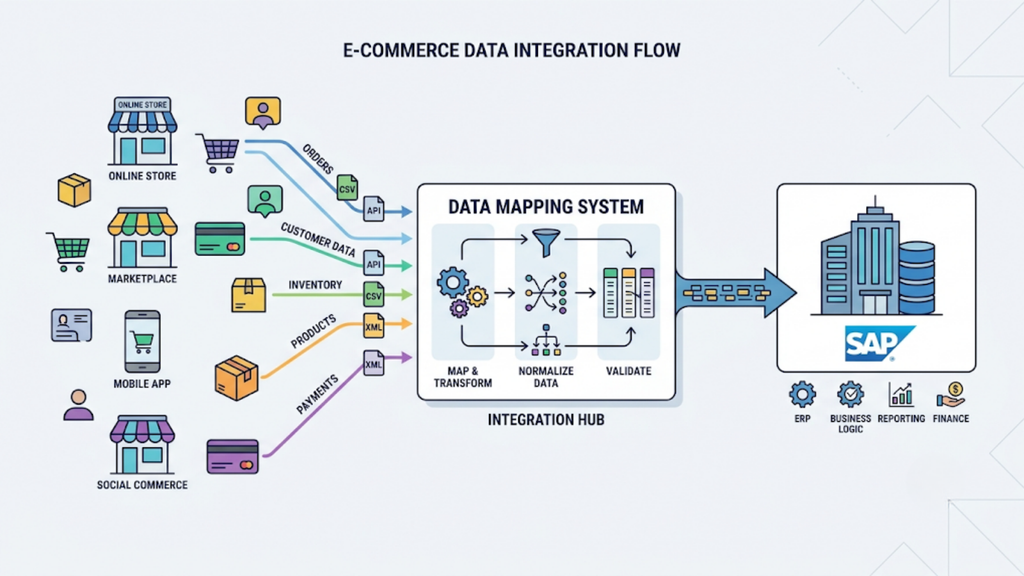
Amazon, Flipkart, Myntra, and Shopify each use different field names, tax breakups, and order IDs. Your team has to re-map every file before SAP can accept it.
That re-mapping happens every day, for every channel and often for every seller account. One shifted column can put the wrong tax amount on hundreds of invoices.
2. Channel SKUs Rarely Match SAP Item Codes
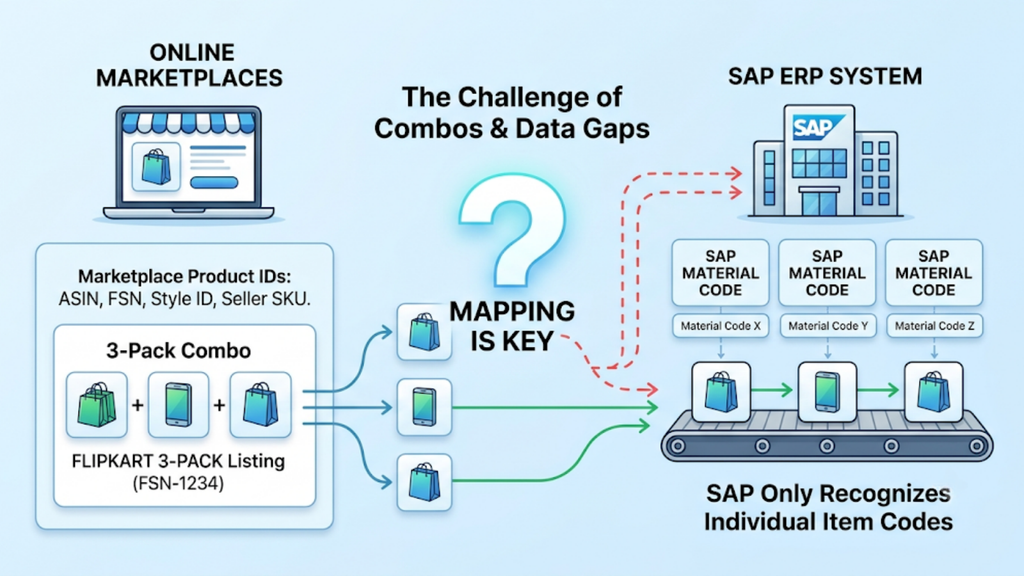
Marketplaces identify products by ASINs, FSNs, style IDs, and seller SKUs. SAP recognises only its own item or material codes.
Combos widen the gap. A three-pack listed on Flipkart does not exist in SAP until someone maps it to its component items.
3. COD Returns Create Reversal Work Nobody Owns
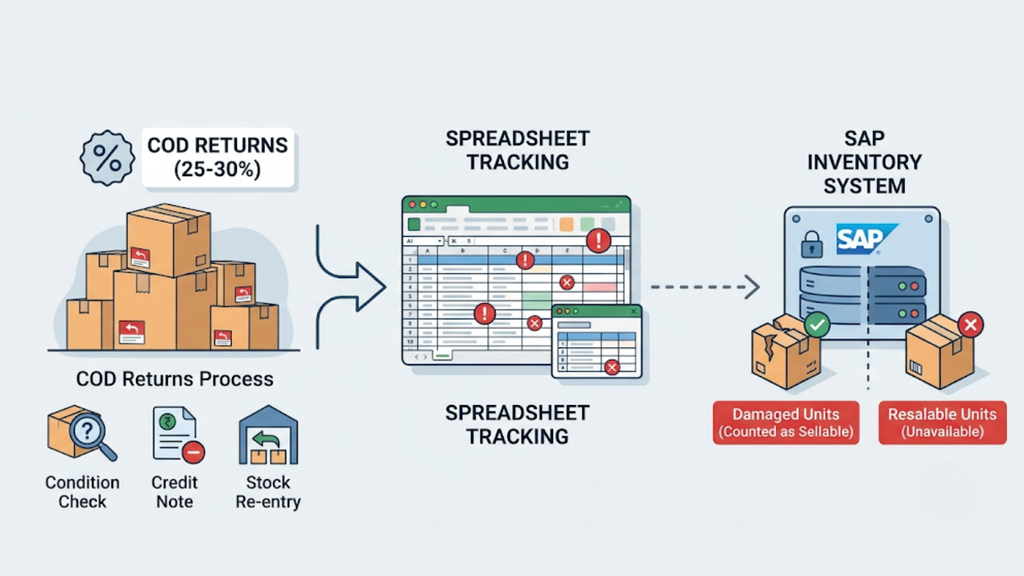
COD return rates in India run at 25-30%. Every return needs a credit note, a stock re-entry, and a condition check.
When returns are tracked in a spreadsheet, SAP stock stays wrong for days. Resalable units remain unavailable, and damaged units still count as sellable.
4. SAP Stock Lags Behind Marketplace Demand
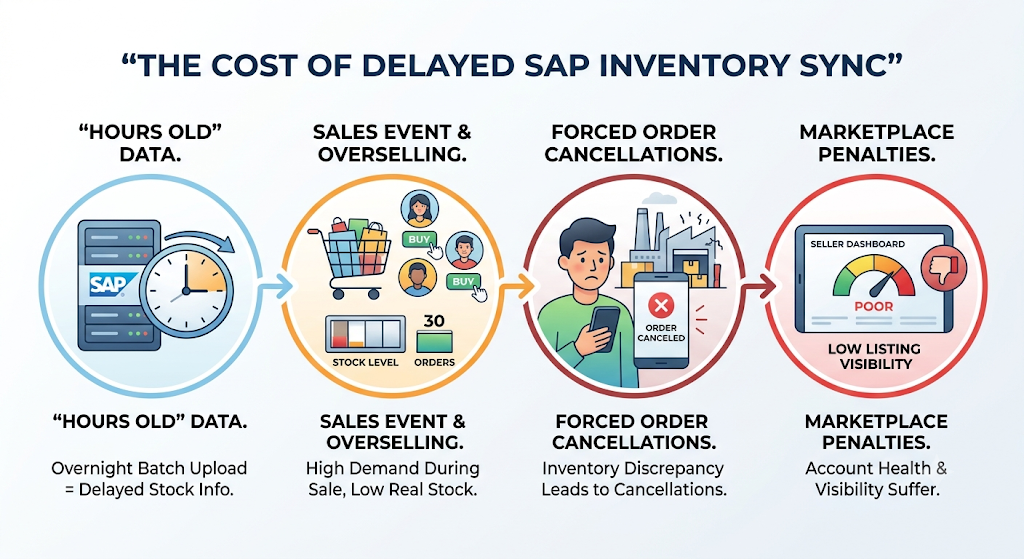
With an overnight batch upload, SAP stock is always hours old. During a sale event, that delay leads straight to overselling.
Overselling forces you to cancel orders. Marketplaces track seller-side cancellations, and repeated breaches pull down your account health and listing visibility.
5. Marketplace Payouts Never Match SAP Invoices
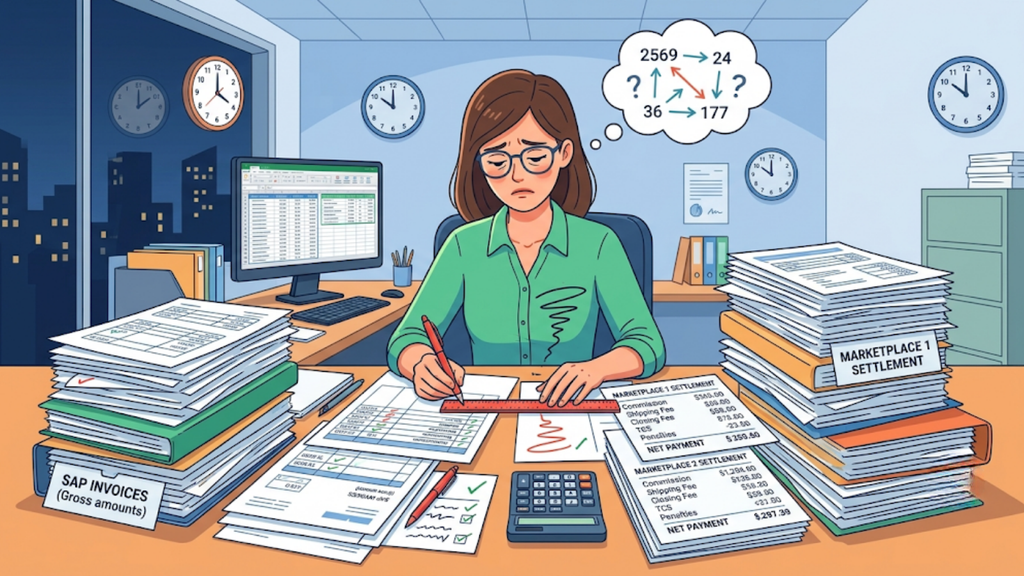
Marketplaces pay out net amounts after deducting commission, shipping fees, closing fees, TCS, and penalties. None of those deductions appear on your SAP invoice.
Finance then has to match settlement files against invoices line by line. With four marketplaces and several seller accounts, that reconciliation becomes a full-time job.
6. Compliance Deadlines: Do Not Wait for Batch Uploads
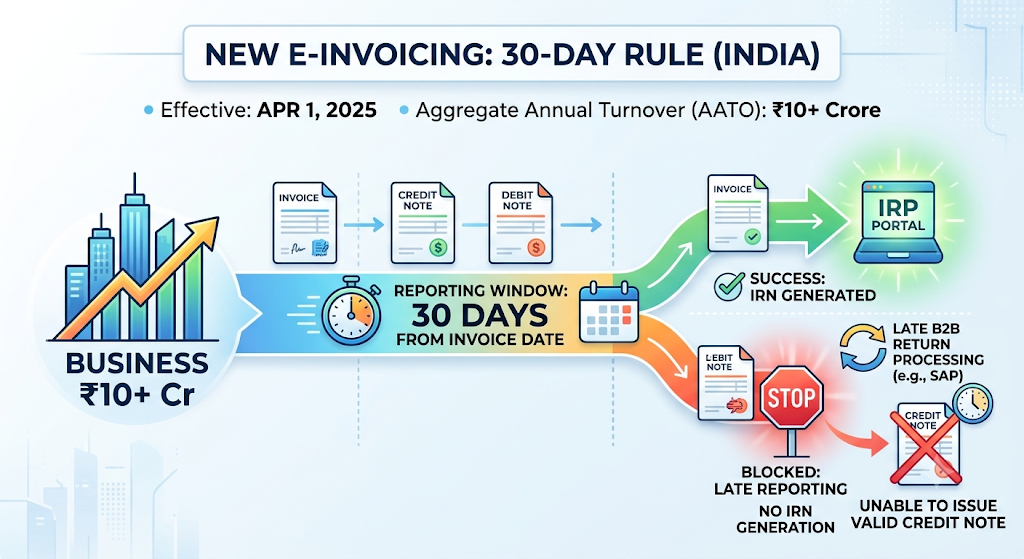
Since April 1, 2025, businesses with an AATO of ₹10 crore or more must report e-invoices to the IRP within 30 days of the invoice date. If you report late, the portal blocks IRN generation for that document.
The rule also covers credit notes and debit notes. If a B2B return is processed late in SAP, you may be unable to issue a valid credit note at all.
What Data Must Flow Between Your Sales Channels and SAP
The first practical step in working out how to integrate ecommerce orders with SAP is a data map. Every object needs a direction, a trigger, and a matching SAP document.
Use the table below as your blueprint, and share it with your SAP partner in the first workshop.
| Data Object | Direction | SAP Business One | SAP S/4HANA | Trigger |
| Customer order | Channel → SAP | Sales Order | Sales order | Order confirmed on channel |
| Dispatch | OMS → SAP | Delivery | Outbound delivery | Shipping label generated |
| Invoice | OMS → SAP | A/R Invoice | Billing document | Order dispatched |
| Return or RTO | OMS → SAP | A/R Credit Memo | Returns order and credit memo | Return received and graded |
| Marketplace payout | Settlement file → SAP | Incoming Payment | Incoming payment and clearing | Settlement report received |
| Channel customer | OMS → SAP | Business Partner (one per channel) | Customer master (one per channel) | Channel onboarded |
| Product master | SAP → OMS | Item Master Data | Material master | New SKU created |
| Stock levels | Owner system → other system | Warehouse stock | Plant and storage location stock | Every stock movement |
| Prices | SAP → OMS | Price lists | Pricing conditions | Price change approved |
One principle keeps this map clean. SAP owns master data and money, and the OMS owns orders and warehouse execution. Stock also needs a single owner; otherwise each system keeps overwriting the other.
Customers need special care. If you create a business partner for every D2C buyer, SAP becomes bloated within months. Instead, post B2C orders against one customer record per channel and store buyer details on the document itself.
How to Integrate Ecommerce Orders with SAP in 8 Steps
A successful rollout follows a fixed sequence. If you skip a step, you will spend the first quarter after go-live correcting mismatched documents.
Follow these eight steps in order.
1. Assign a System of Record to Every Data Object
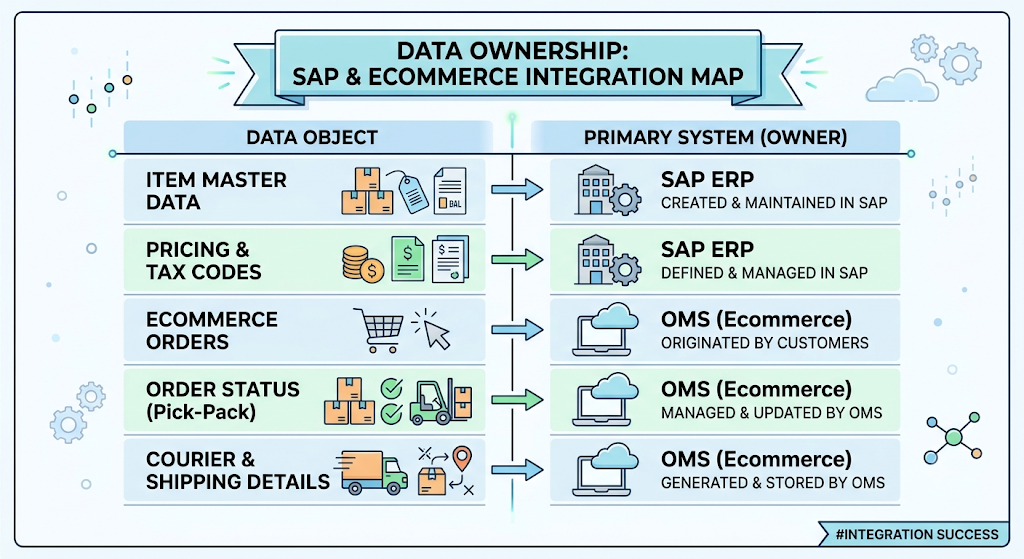
Every plan for how to integrate ecommerce orders with SAP starts with ownership. Decide which system creates, edits, and owns each object on your data map.
Item masters, prices and tax codes usually stay in SAP. Orders, pick-pack status, and courier details stay in the OMS. Write these decisions down, because they will settle most disputes between IT, finance and operations later.
2. Clean and Map Your SKU Master First
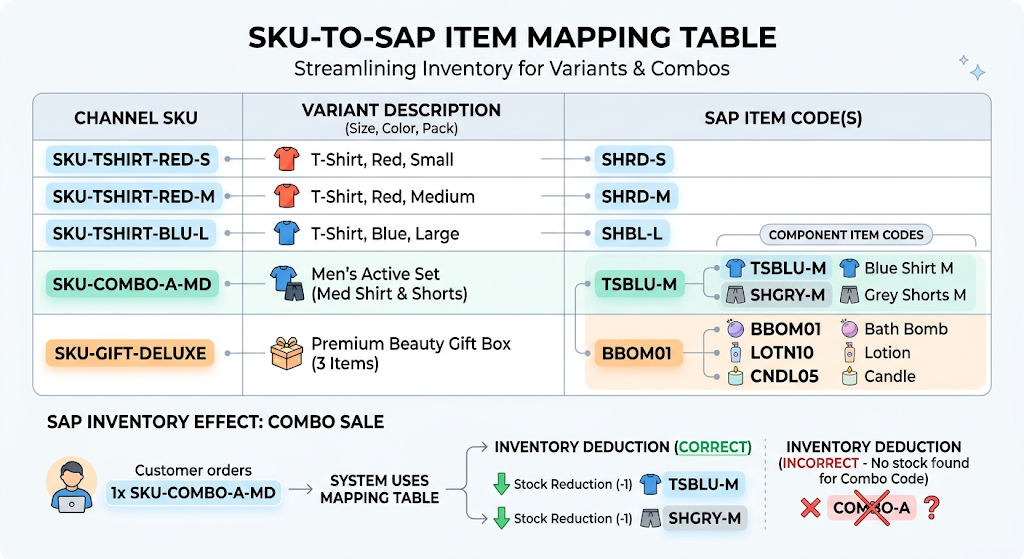
Build one mapping table that links every channel SKU to its SAP item code. Give each size, colour and pack variant its own row.
Map combos and gift packs to their components. When a combo sells, SAP should reduce stock for each component item, not for a code it has never seen.
3. Choose Your Customer Posting Model
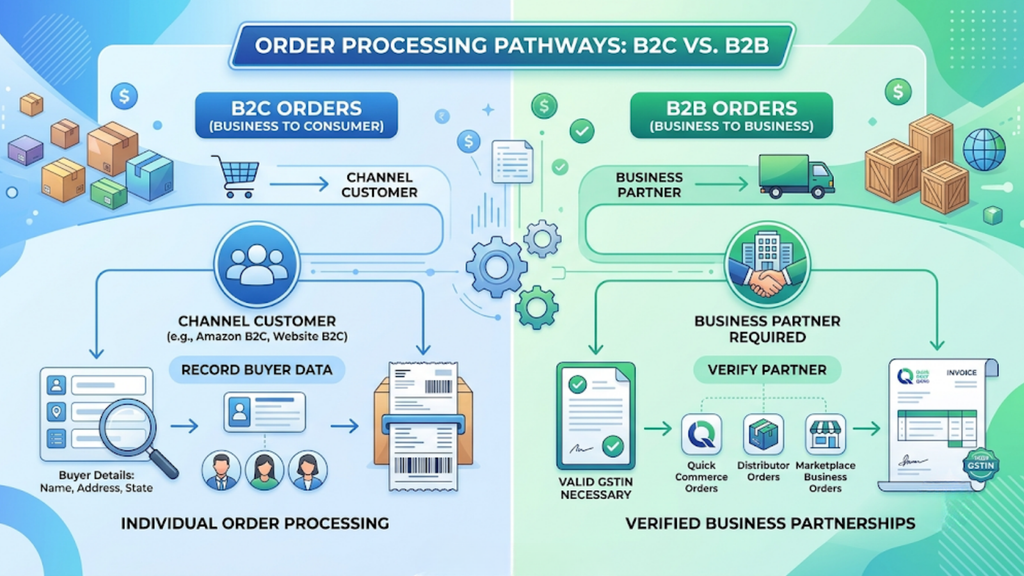
Post B2C orders against a channel-level customer, such as “Amazon B2C” or “Website B2C”. Record the buyer’s name, address, and state on the order document.
B2B orders need a different path. Quick commerce purchase orders, distributor orders, and marketplace business orders each require a proper business partner with a valid GSTIN.
4. Centralise Every Channel’s Orders in One OMS
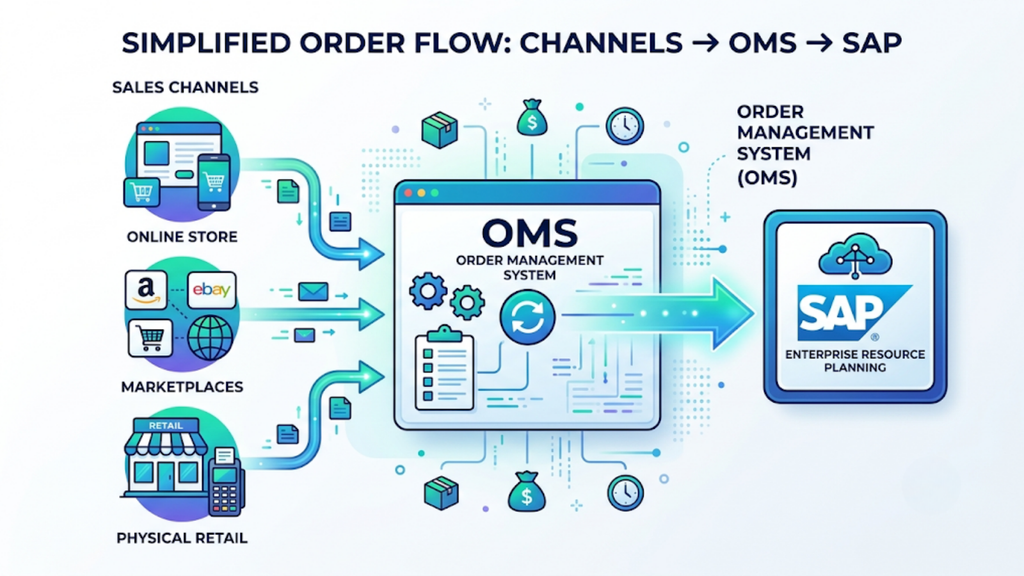
Connect all your marketplaces, your website, and your offline channels to a single OMS before you touch SAP. SAP should receive orders from one source, not from six separate connectors.
Most guides on how to integrate ecommerce orders with SAP skip this step, yet it removes most format errors. SAP receives the same fields in the same structure, whether the order came from Myntra, Meesho, or Shopify.
5. Set Posting Rules and Sync Frequency
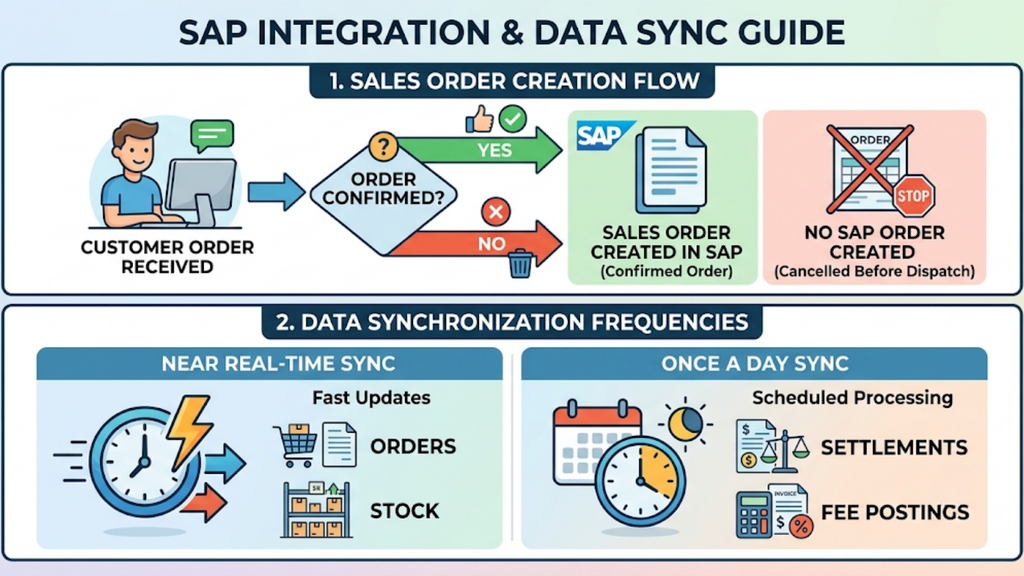
Decide which order status creates a sales order in SAP. Most brands post on order confirmation and leave out orders cancelled before dispatch.
Then set the sync frequency for each object. Orders and stock need near real-time sync, while settlements and fee postings can run once a day.
6. Map Taxes, HSN Codes and Place of Supply
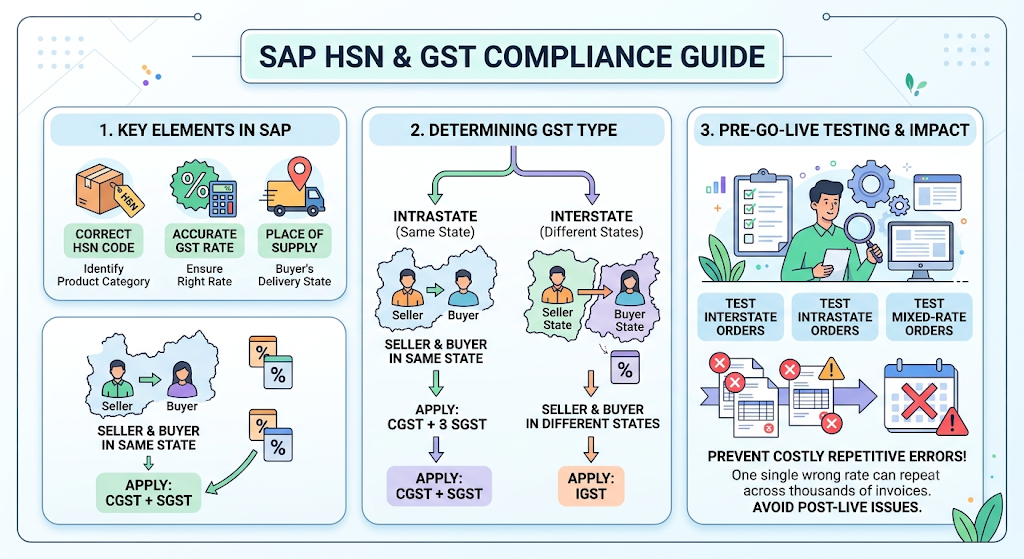
Every SAP document needs the correct HSN code, GST rate, and place of supply. The buyer’s delivery state decides whether the order carries CGST and SGST or IGST.
Test interstate, intrastate, and mixed-rate orders before go-live. A single wrong rate will repeat itself across thousands of invoices.
7. Close the Return and Settlement Loops
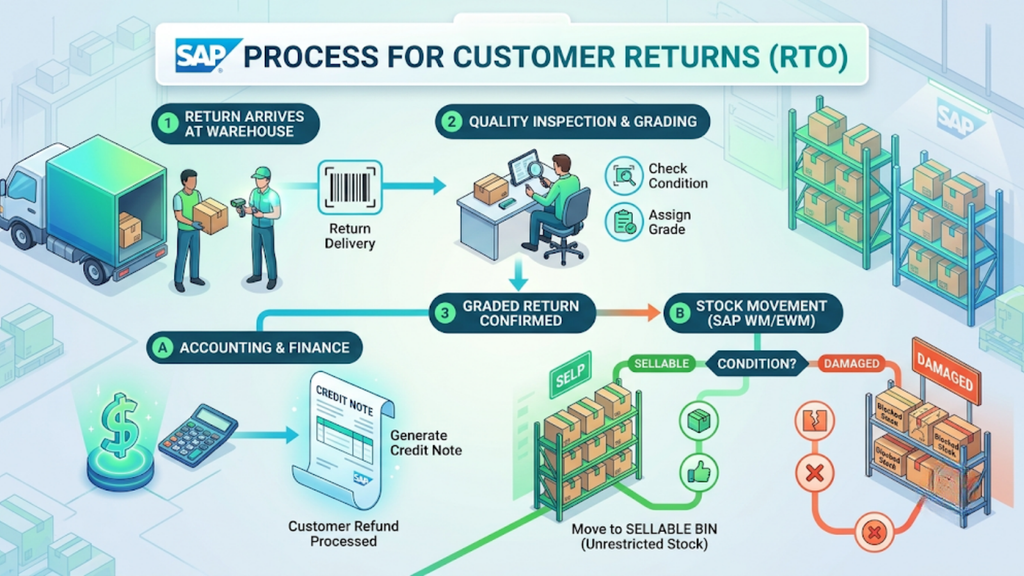
Define exactly what happens in SAP when an RTO or customer return reaches your warehouse. A graded return should create a credit note and move the stock to either a sellable bin or a damaged location.
Bring marketplace settlement files into the same flow. Match each payout to its invoices, then post fees and TCS as separate lines.
8. Test With Sale-Day Volumes Before Go-Live
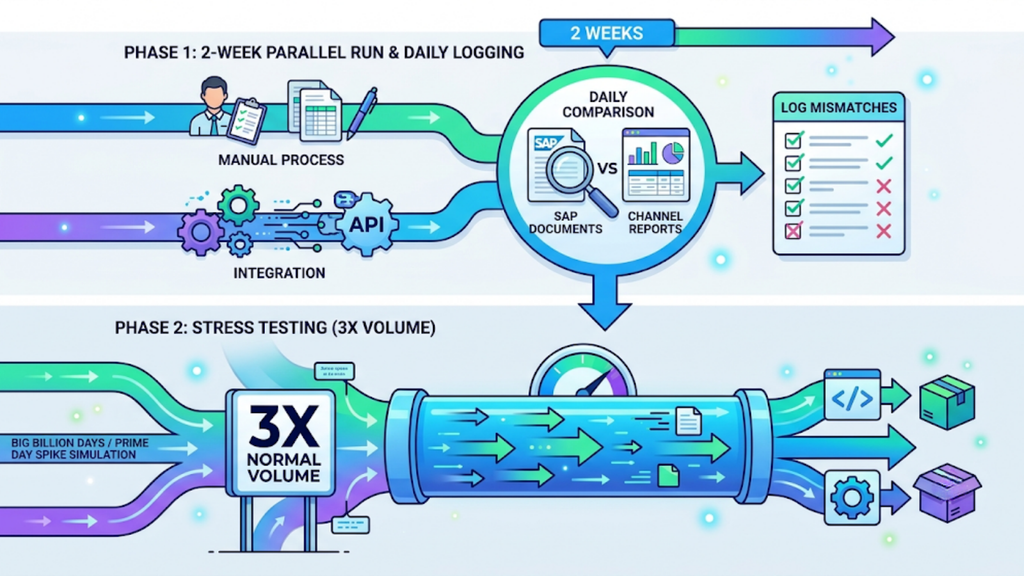
Run the integration alongside your manual process for at least two weeks. Compare SAP documents against channel reports every day and log each mismatch.
Then stress test it. Push three times your normal daily volume through the flow to simulate a Big Billion Days or Prime Day spike.
Which Integration Method Fits Your SAP Setup?
Indian brands usually choose between four approaches. The right one depends on how many channels you sell on, your order volume, and your in-house IT capacity.
The comparison below shows where each method works well and where it struggles.
| Method | How It Works | Best For | Trade-off |
| 1. Base.com + SAP integrator | Base.com brings all channel orders together and connects to SAP through API- or XML-based integrators | Multi-channel D2C brands on SAP B1 or S/4HANA | Needs a clean SKU map before go-live |
| 2. Direct channel-to-SAP connectors | Each marketplace or store connects to SAP separately | Brands selling on one or two channels | Every new channel needs a new connector |
| 3. Middleware or iPaaS | A generic integration platform moves data between systems | Large IT teams with integration developers | Warehouse and marketplace logic must be built from scratch |
| 4. CSV uploads | Teams export channel reports and import them into SAP | Brands under 100 orders a day | Breaks at scale, with no real-time stock |
For most D2C brands, warehouse logic decides the method. Picking, packing, courier allocation and returns grading have to run somewhere, and SAP was not built for marketplace-speed fulfilment.
That is why deciding how to integrate ecommerce orders with SAP usually starts with choosing the right OMS, not the right connector.
How to Handle GST, E-Invoicing and Settlements in SAP
In India, understanding how to integrate ecommerce orders with SAP means designing for GST from day one. Every document your integration posts must hold up in your GST returns and audits.
These six rules keep SAP ready for audit.
1. Separate B2C and B2B Orders at the Point of Posting
E-invoicing applies to B2B supplies once your AATO has crossed ₹5 crore in any year since 2017-18. Regular B2C invoices do not need an IRN.
Tag each order as B2C or B2B before it reaches SAP. That one flag decides whether the document goes to the IRP at all.
2. Generate IRNs Inside the 30-Day Window
If your AATO is ₹10 crore or more, the IRP rejects invoices, credit notes, and debit notes reported after 30 days. Automated posting keeps every B2B document well within that limit.
Set up an alert for documents stuck in draft. A B2B order waiting on a missing GSTIN should come to someone’s attention within hours, not at month-end.
3. Attach E-Way Bills to High-Value Consignments
Consignments valued above ₹50,000 generally need an e-way bill before they move, and some states set their own limits for intrastate movement. This matters most for stock transfers to marketplace fulfilment centres and for bulk B2B dispatches.
Link the e-way bill number to the delivery document in SAP. That way, auditors and transporters can trace every consignment back to its invoice.
4. Account for the 0.5% TCS on Marketplace Sales
Marketplaces collect TCS at 0.5% of net taxable supplies under Section 52 and report it in GSTR-8. That amount then shows up as a credit in your electronic cash ledger.
Post TCS as a receivable in SAP, not as a reduction in sales. Otherwise, the revenue and GST liability in SAP will never match your returns.
5. Book Marketplace Fees as Separate Expense Lines
Commission, shipping, and closing fees arrive as deductions from your payout. Each fee carries GST that you can claim as input tax credit.
If you post the net payout as revenue, you hide those fees and lose the input credit. Post gross sales first, then book each fee as its own expense line.
6. Link Every Credit Note to Its Original Invoice
A return should never create a standalone credit note. Link it to the original invoice so the GST reversal matches the correct tax period and rate.
This link also supports analysis. You can see return rates by SKU, channel, and pin code directly in SAP.
How Base.com Connects Your Ecommerce Operations to SAP
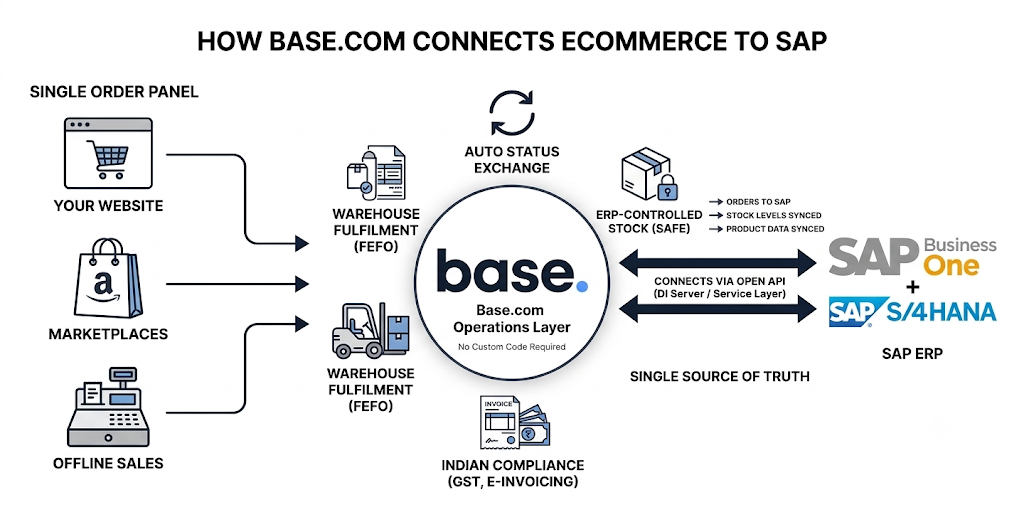
For brands working out how to integrate ecommerce orders with SAP without writing custom code, Base.com acts as the operations layer in the middle. It runs orders, inventory, and fulfilment, and it keeps SAP in sync.
Here is what that connection covers.
- Every channel in one order panel. Marketplace, website, and offline orders arrive in Base.com in one format, so SAP receives documents from a single, consistent source.
- SAP connection through API or XML. Base.com connects to SAP Business One and SAP S/4HANA through integrators built on its open API. The Business One integration uses SAP-certified tools that connect through DI Server and Service Layer.
- Four sync modules. Orders move from Base.com to SAP, and stock levels stay synchronised. Product data can be imported from your SAP warehouse or exported to it.
- ERP-controlled stock. You can create a Base.com warehouse that only the SAP integration can edit, so your team cannot overwrite SAP-owned stock by mistake. Each Base.com inventory connects to one ERP, which keeps a single source of truth.
- Automatic status exchange. Order statuses pass between SAP and Base.com without manual updates, so finance and operations see the same order state.
- Compliance built for India. GST invoices, e-invoicing, e-way bills, and payment reconciliation run inside Base.com before documents reach SAP.
- Warehouse execution that SAP does not cover. Base.com handles bin-wise picking, FEFO batch and expiry control, pin-code-based courier allocation, and graded returns.
- Custom add-ons for Indian workflows. Base.com’s India team builds add-ons for specific needs, such as syncing ERP batch details onto invoices or scheduling customised reports.
This gives each system a clear role. SAP stays your system of record for finance and master data, and Base.com handles the marketplace-speed work that SAP was never built for.
Mistakes That Stall SAP Integration Projects
Even brands that understand how to integrate ecommerce orders with SAP can get stuck during execution. Most stalled projects fail for the same five reasons.
Avoid these, and your go-live will stay on schedule.
- Treating integration as an IT-only project. Finance defines the posting rules, and operations defines the order statuses. Without both teams involved, the mapping reflects neither.
- Onboarding channels with different logic. If Amazon orders post on confirmation and Myntra orders post on dispatch, your SAP reports compare numbers that don’t match. Apply one set of rules across every channel.
- Running without an error queue. Some postings will fail because of a missing GSTIN or an unmapped SKU. Send every failure to a visible queue with a named owner, or it will go unnoticed until month-end.
- Pushing returns to phase two. Returns affect stock, GST, and cash at the same time. Deferring them leaves SAP inaccurate from the first week after go-live.
- Freezing the setup after launch. New channels, new SKUs, and GST changes, such as the 40% rate added to the tax master, all require mapping updates. Review the integration every quarter.
Bring Your Sales Channels and SAP Into One Flow
SAP should remain your system of record while your channels keep selling at marketplace speed. The integration between them decides whether growth brings in more revenue or just more reconciliation work.
Now that you know how to integrate ecommerce orders with SAP, start with your data map and your SKU master. Base.com then connects every marketplace, your website, and your warehouse to SAP, so orders, stock, invoices, and returns stay aligned without manual entry.
Talk to the Base.com India team to plan an SAP integration built around your channels, your GST setup, and your warehouse.