E-commerce return processing is rarely glamorous, but on Amazon, it is high-stakes. Between strict refund timelines, carrier label rules, and inventory reconciliation, a clumsy reverse logistics workflow directly threatens your bottom line and your Account Health rating.
To protect your seller metrics and keep warehouse inventory accurate, you need a firm grasp on Amazon’s latest return policies and a system that processes inbound packages without manual friction.
Here is a complete breakdown of Amazon return policies for FBM, FBA and Seller Flex merchants, along with a guide to setting up automated, error-free return handling in Base.
Amazon Return Rules, Timelines, and Seller Guidelines
Amazon enforces specific operational boundaries depending on product category, marketplace location, and fulfillment model. Return windows depend heavily on where you sell; currently, Amazon US has a standard baseline of 30 days from the delivery date, while Amazon EU, based on product category, either aligns with the EU statutory 14 day “right of withdrawal”, where buyers must declare their returns within 14 days of receipt, or offers an extended policy with a 30 days timeframe.
There are also category exceptions and holidays extensions: some products can’t be returned at all, especially once opened or having had their seal broken, or on the other hand Amazon usually allows a longer return window for items purchased during peak season.
It’s strongly recommended to check Amazon return policy on all markets you sell, and keep track of seasonal- and category-related changes through Amazon official channels.
Do customer returns directly lower an Amazon Account Health Rating (AHR)?
Handling Amazon returns quickly is essential, but return volume itself does not directly lower an Account Health Rating (AHR). Returns affect account standing indirectly based on the outcome: unresolved disputes that escalate into A-to-z Guarantee claims or negative feedback increase the Order Defect Rate (ODR), while high rates of defect-related returns elevate Negative Customer Experience (NCX) metrics. Between strict refund deadlines, carrier label rules, and inventory reconciliation, a clumsy reverse logistics workflow directly threatens operating margins.
Prepaid Labels and Refund at First Scan (RFS)
For Merchant-Fulfilled (FBM) orders, return requests usually generate prepaid shipping labels automatically. Depending on the return reason code selected by the buyer, postage costs are billed either to the customer or deducted from the seller’s account.
Under Refund at First Scan (RFS), Amazon issues an automated buyer refund the moment the carrier scans the returning parcel into its network. For FBM returns not covered by RFS, sellers have 4 calendar days after receiving the package to inspect it and issue a refund. Missing that window triggers an automatic refund to the buyer and generally forfeits the seller’s eligibility for SAFE-T reimbursement.
FBM merchants must provide a valid return address. For domestic sales, this must generally be a local address in the destination marketplace country, while international sellers shipping cross-border must either provide a local domestic return address, offer a returnless refund, or supply a prepaid international return shipping label. Depending on the target marketplace, automated returnless refund thresholds may apply, such as automatic refunds on low-value orders (typically $25 in the US, or £20/€25 in EU marketplaces, and under), if an international seller fails to provide a local address or prepaid shipping label.
Returns for Heavy and Bulky Items
Standard drop-off return labels do not apply to large goods. Items weighing 31.5 kg (about 70 lbs) or more, or whose longest side exceeds 175 cm when packed, fall under Amazon’s Heavy and Bulky policy. For these shipments, sellers are required to arrange scheduled home pickups or specialized freight collection rather than issuing a standard drop-off label.
FBM vs. FBA: What Happens to Returned Stock?
How return data impacts sellers warehouse depends entirely on who fulfilled the original order:
| Fulfillment Channel | Who Handles Receiving? | Inventory Impact & Processing |
|---|---|---|
| Amazon FBA | Amazon Customer Service & Fulfilment Centres | Amazon inspects the returned unit. Sellable items re-enter FBA stock. Unsellable or damaged units are marked Unfulfillable, requiring removal or disposal orders. |
| Amazon FBM | Merchant Warehouse Operations | Parcels arrive directly at Sellers return address, which inspects condition, determines resale viability, and handles physical restocking. |
| Seller Flex | Sellers Facility via Amazon Systems | Parcels arrive at the merchant facility; stock is inspected and reconciled by the merchant either manually in Seller Central or via connected inventory software. |
When FBA items return, unfulfillable stock sits in Amazon’s fulfillment network until Sellers take action. FBM returns, by contrast, land directly on merchants’ designated return address, making physical inspection and quick restock decisions their responsibility.
Protecting Margins with SAFE-T Claims
Automated refunds shift financial risk onto merchants when returned goods arrive damaged, swapped, or incomplete. In these cases, sellers can request reimbursement through Seller Central using a SAFE-T (Seller Assurance For E-commerce Transactions) claim.
SAFE-T claims cover seller-fulfilled orders where Amazon issued the refund on the merchant’s behalf, provided the order wasn’t already resolved through an A-to-z Guarantee claim. Winning a claim comes down to evidence: photos of the item’s condition and packaging, along with shipping and tracking documentation. Claims also need to be filed within 30 days after the refund hits the seller’s account, so timing matters as much as documentation.
Filing promptly helps recover costs from return fraud and transit damage without disrupting automated buyer workflows.
Configuring Amazon Returns in Base
Considering all of the above, managing Amazon returns across multiple marketplaces and fulfillment channels quickly becomes a chaotic operational bottleneck, especially when juggling across multiple fulfillment programs, warehouses, and bridging between Seller Central and companies’ WMS and OMS systems.
This is where a centralized management platform like Base transforms reverse logistics. Instead of logging into separate Amazon accounts and external systems, Base unifies inbound return data into a single operational workflow. It automates inventory reconciliation, routes physical packages straight to warehouse receiving queues, and keeps stock levels accurate across all your sales channels without manual data entry.
To handle different fulfillment models cleanly, Base lets you configure how each Amazon return stream enters your workspace (Integrations -> Amazon -> Returns):
- FBM Returns: Enable return card creation to push merchant-fulfilled returns directly into your active warehouse queue for receiving, inspection, and restock.
- FBA Returns: Log FBA return events are logged on the order page in the Additional Information section, without cluttering your physical warehouse task list.
- Seller Flex: Import Seller Flex return records as regular return cards to keep physical warehouse intake aligned with channel updates.
When connected, Base continuously checks Amazon for return updates in the background, including an automated 14-day historical lookback on each run.
Processing FBM Shipments in the Warehouse
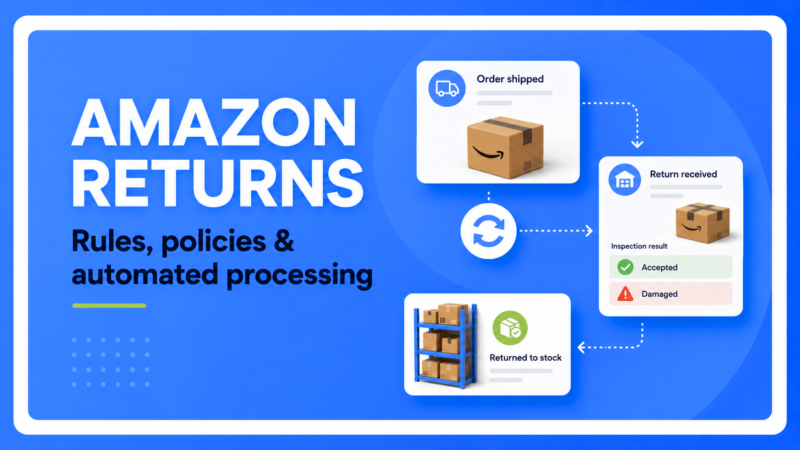
When an FBM return parcel arrives at your warehouse, your receiving team uses Base’s Return Assistant (Orders -> Returns -> Return list) to execute the intake:
-
- Item Condition Assessment: Mark each returned unit with an item status. The built-in defaults are None, Accepted or Damaged, but more statuses can be configured.
- Warehouse Assignment: Base users can select the designated storage location based on the item’s condition.
Workflow Execution:
-
- Complete (Stock Receipt): Finalizes intake, adds the item back into active inventory, and generates an automated Goods Received document.
- Accept: Acknowledges physical delivery while holding the return for detailed quality inspection.
- Cancel: Rejects invalid return claims with no stock changes.
- Send Goods Back: Processes the return so the goods can be sent back to the customer/supplier.
Note on Monetary Refunds:
Base tracks return payment states (refunded, unrefunded, dates, and historical logs) to keep your back office synced. The actual cash refund disbursement is executed inside Amazon Seller Central in compliance with Amazon API security protocols.
Customising Your Reverse Logistics Engine
Base provides modular controls to adapt these return steps to your warehouse setup:
- Automated Actions: Trigger automatic customer notification emails or internal alerts when a return status changes.
- Custom Status Queues: Build tailored status pipelines such as Awaiting Inspection, Pending Supplier Claim, or Restocked.
- API and Webhook Connectivity: Connect hardware barcode scanners or custom ERP platforms using Base’s open integration architecture.
Streamline Your Amazon Logistics Today
Eliminate manual stock errors and protect your seller metrics. Centralise your Amazon listings, inventory, and return workflows inside Base. Explore the Base Knowledge Base for step-by-step setup documentation, or launch the Return Assistant in your Base panel to get started.
FAQ
Q1: What is Amazon’s standard return window?
Most eligible Amazon purchases can generally be returned within 30 days. However, return periods vary by marketplace, product category and season, so sellers should always check the rules for each market in which they operate.
Q2: Do customer returns affect an Amazon seller’s Account Health Rating?
Returns do not usually reduce Account Health directly. However, unresolved returns can lead to negative feedback, A-to-z Guarantee claims and higher defect-related return rates, which may affect seller performance metrics.
Q3: What is Amazon Refund at First Scan?
Refund at First Scan allows Amazon to refund the customer when the carrier first scans an eligible return parcel, before the seller receives and inspects the returned item.
Q4: What is the difference between FBA and FBM returns?
Amazon receives and assesses FBA returns at its fulfilment centres, while FBM returns are sent to the seller, who is responsible for inspection, refund processing and returning eligible products to stock.
Q5: How can Base help automate Amazon returns?
Base centralises Amazon return information, creates return records for warehouse teams, tracks inspection and payment statuses, supports automated actions and helps keep inventory accurate across connected sales channels.