
Flipkart shows a product as out of stock while your warehouse holds units for five main reasons: the Seller Hub inventory count is zero or stale, your stock sync has failed, the buyer’s pincode is unserviceable, the listing is inactive or blocked, or your SKU mapping points to the wrong stock.
The Flipkart showing out of stock but stock available problem is rarely a Flipkart bug. It is almost always a data gap between your warehouse, your listing, and your logistics setup.
That gap costs more than one lost order. India’s ecommerce market is valued at around $226 billion, and every hour your listing sits dark hands your buyer to a competing seller on the same product page.
This guide breaks down every cause, shows you exactly where to check in Seller Hub, and explains how to stop the issue from recurring across Flipkart, Amazon, Myntra, Meesho, and your D2C website.
What Does Flipkart Showing Out of Stock but Stock Available Mean?
It means your buyer-facing page and your physical inventory disagree. Your warehouse holds sellable units, but Flipkart either reads the quantity as zero or cannot deliver those units to the buyer.
Buyers see this problem in three different ways. Each message points to a different root cause, so read it carefully before you change anything.
- “Out of Stock” or “Sold Out”: Flipkart reads your available quantity as zero. This is an inventory or sync issue.
- “Currently out of stock for this pincode”: Stock exists, but no serviceable route connects your pickup location to that buyer.
- “Currently Unavailable”: The listing is inactive, blocked, or suppressed. Your stock count does not matter until the listing is fixed.
Treat these as three separate problems, each with its own owner in your team. Sellers who respond to every Flipkart showing out of stock but stock available alert by re-uploading inventory waste hours on the wrong fix.
What False Stockouts Cost Indian Sellers
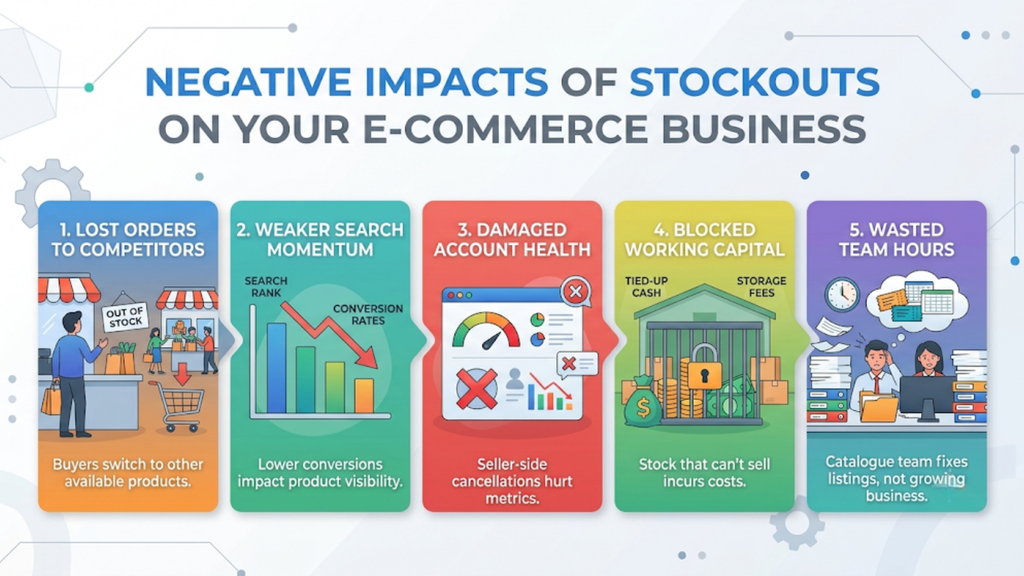
A listing that shows zero while stock sits on your shelf is not a neutral pause. It quietly damages revenue, account health, and cash flow at the same time.
Here is what each hour of the Flipkart showing out of stock but stock available problem actually costs you:
- Lost orders to competing sellers: Buyers do not wait for your listing to return. They buy the next available offer or a similar product on the same page.
- Weaker search momentum: Flipkart rewards listings that sell consistently. A SKU that stops converting, even for a few days, loses ground to rivals that kept selling.
- Cancellations and account health damage: Oversell-then-zero cycles force seller-side cancellations, and those cancellations pull your seller performance metrics down.
- Blocked working capital: Stock that cannot sell still costs storage, and it ties up cash you need for replenishment before the next sale event.
- Wasted team hours: Your catalogue team spends the day raising tickets and re-uploading inventory instead of growing the account.
The pattern is consistent across categories. The longer the gap between physical and listed stock, the more expensive every one of these costs becomes.
Why Is Flipkart Showing Out of Stock When You Have Stock?
Most false stockouts trace back to eight causes. Some sit inside Seller Hub, some inside your OMS or ERP, and some inside your warehouse.
Knowing which layer failed is what turns the Flipkart showing out of stock but stock available issue from a recurring headache into a one-time fix.
1. Stale or Zero Inventory in Seller Hub
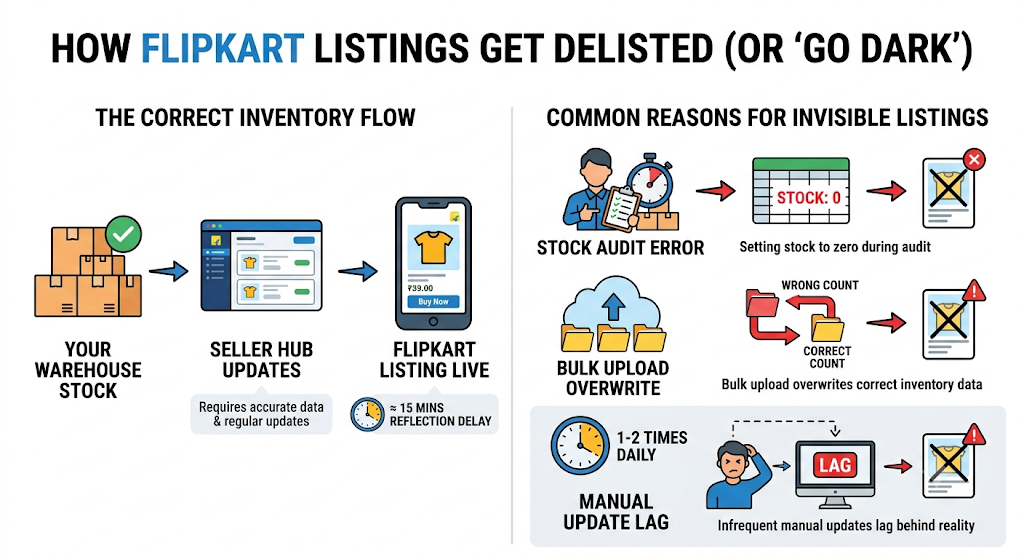
Flipkart only sells what Seller Hub says you have. If a team member set a SKU to zero during a stock audit, or a bulk upload overwrote the correct count, the listing goes dark instantly.
Manual updates also lag behind reality. A stock update on Flipkart typically takes around 15 minutes to reflect, and many teams push manual updates only once or twice a day.
2. Failed or Broken Stock Sync
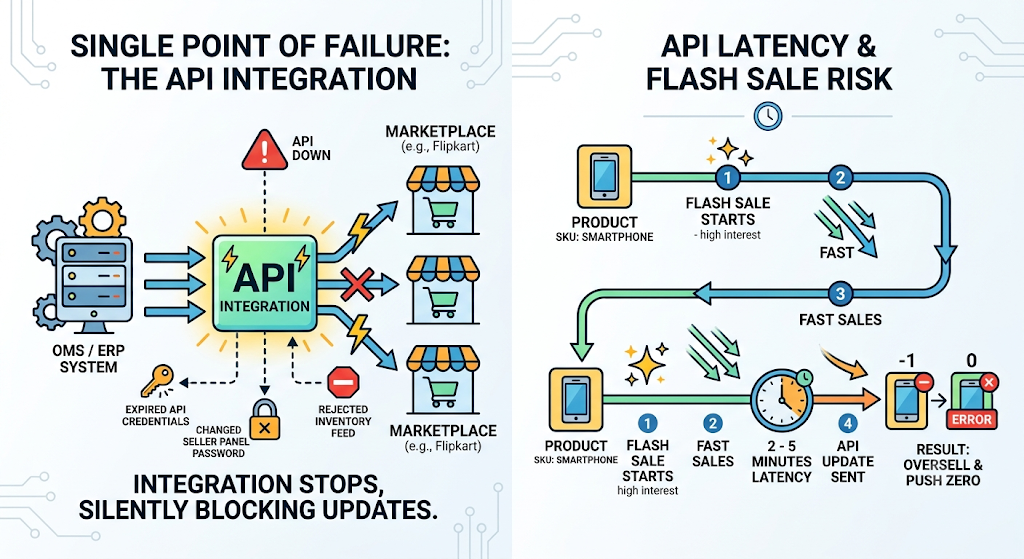
If you manage stock through an OMS or ERP, the integration becomes your single point of failure. Expired API credentials, a changed seller panel password, or a rejected inventory feed can silently stop updates.
Even healthy integrations carry latency. Flipkart inventory updates through the API can take 2 to 5 minutes to reflect. During a flash sale, that window is long enough to oversell a SKU and then push a zero to correct it.
3. Pincode Serviceability Gaps
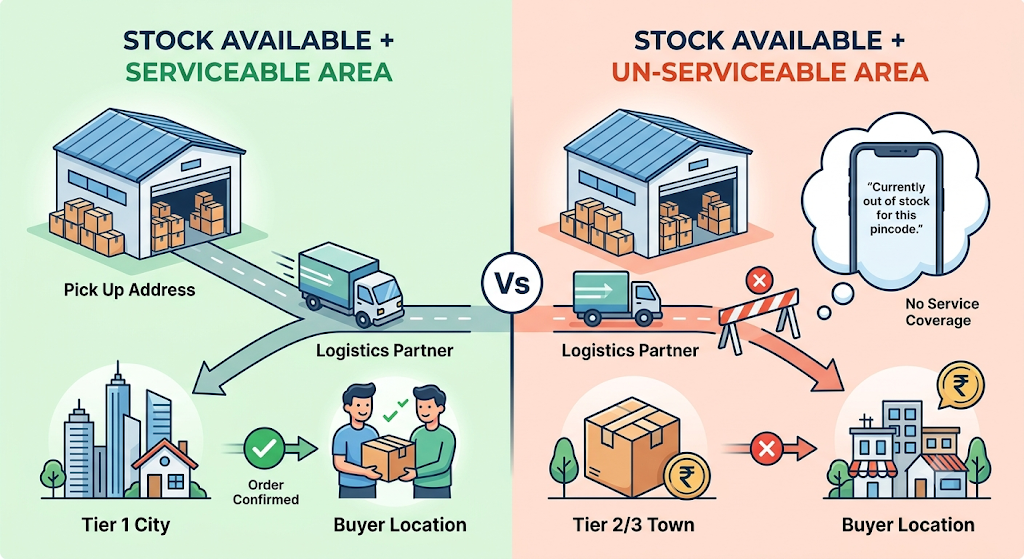
Stock can be available and still unsellable to a specific buyer. If your logistics partner does not service a pincode from your pickup address, Flipkart displays “Currently out of stock for this pincode.”
This hits hardest in Tier 2 and Tier 3 towns, bulky categories, and COD-heavy regions where courier coverage is thinner. It also spikes during sale events, when Flipkart temporarily blocks new orders to backlogged pincodes.
4. Inactive, Blocked, or Suppressed Listings
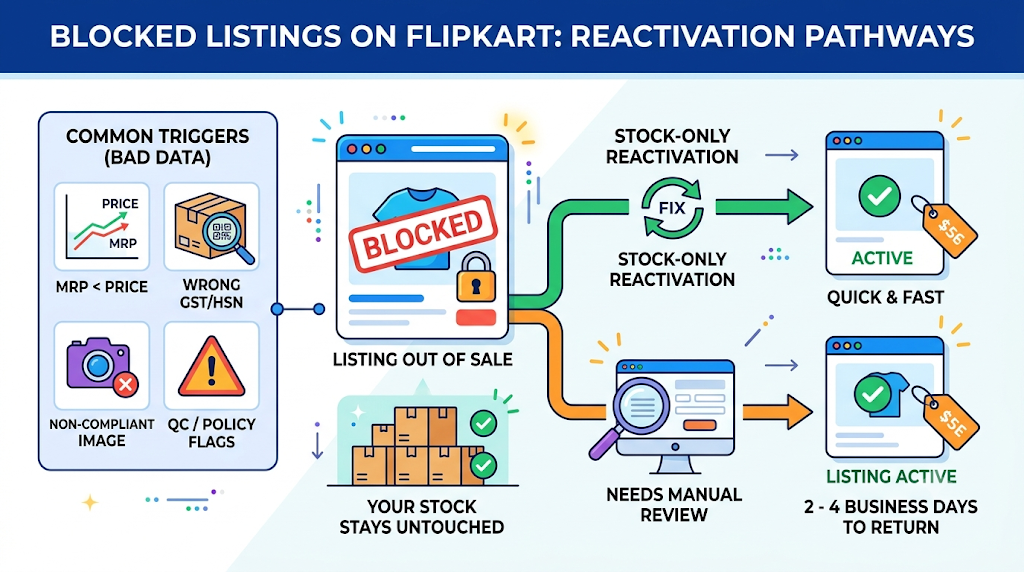
A listing with bad data drops out of sale while your stock stays untouched. Common triggers include an MRP lower than the selling price, an incorrect GST rate or HSN code, non-compliant images, and QC or policy flags.
Stock-only reactivations are quick. However, a blocked listing that needs manual review by Flipkart can take 2 to 4 business days to return.
5. SKU and Variant Mapping Errors
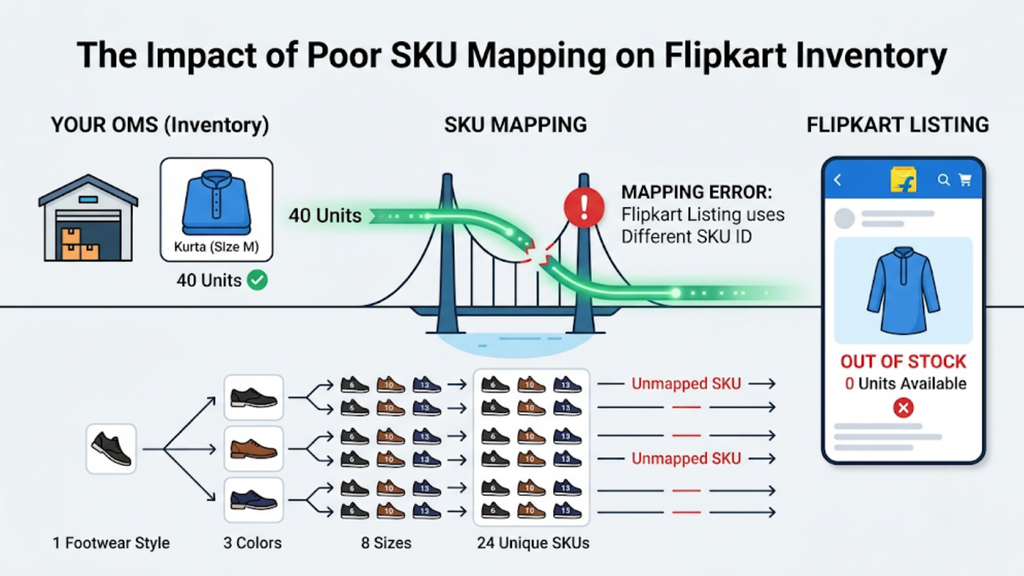
Your OMS may hold 40 units of a kurta in size M, but if the Flipkart listing is mapped to a different seller SKU ID, Flipkart reads zero. This is the most common cause in fashion and footwear.
The maths compounds quickly. One footwear style in 8 sizes and 3 colours creates 24 SKUs, and each one needs a correct, one-to-one mapping to its Flipkart listing.
6. Reserved and Blocked Stock
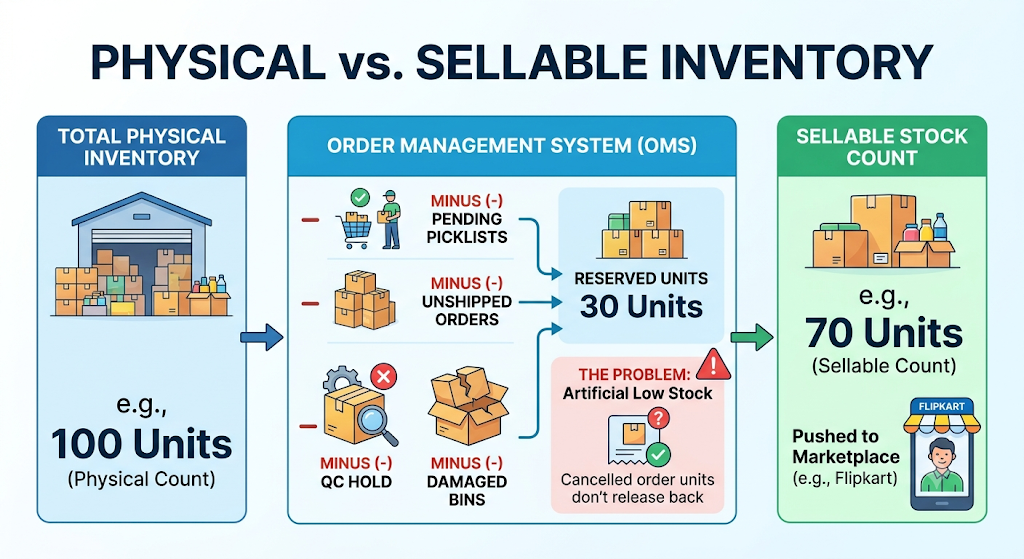
Your physical count is not your sellable count. Units in pending picklists, unshipped orders, QC hold, or damaged bins get deducted before your OMS pushes stock to Flipkart.
If those reservations never release, your available-to-sell number stays artificially low. A cancelled order that does not free its units is a classic example.
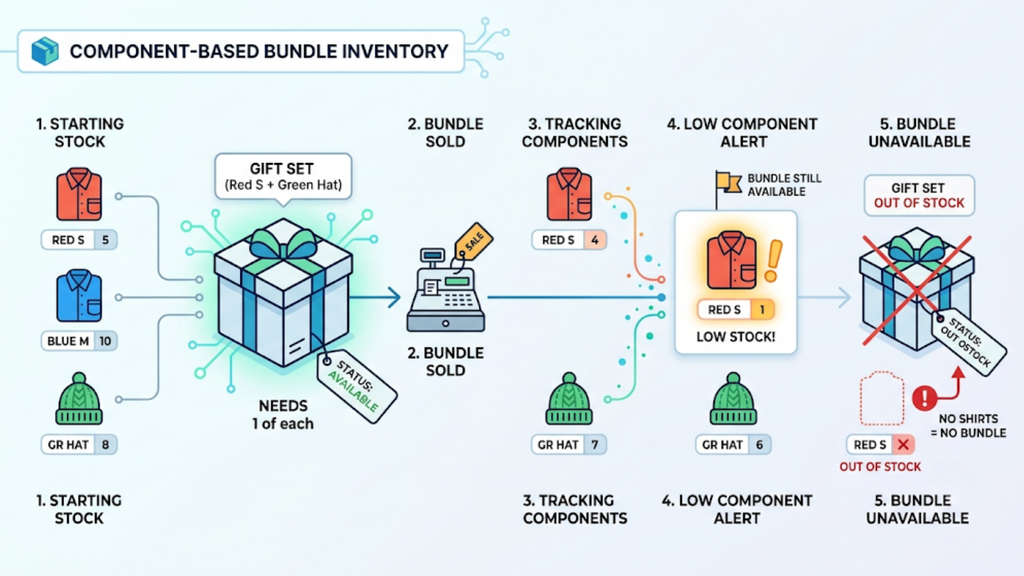
7. Bundle and Combo Component Shortages
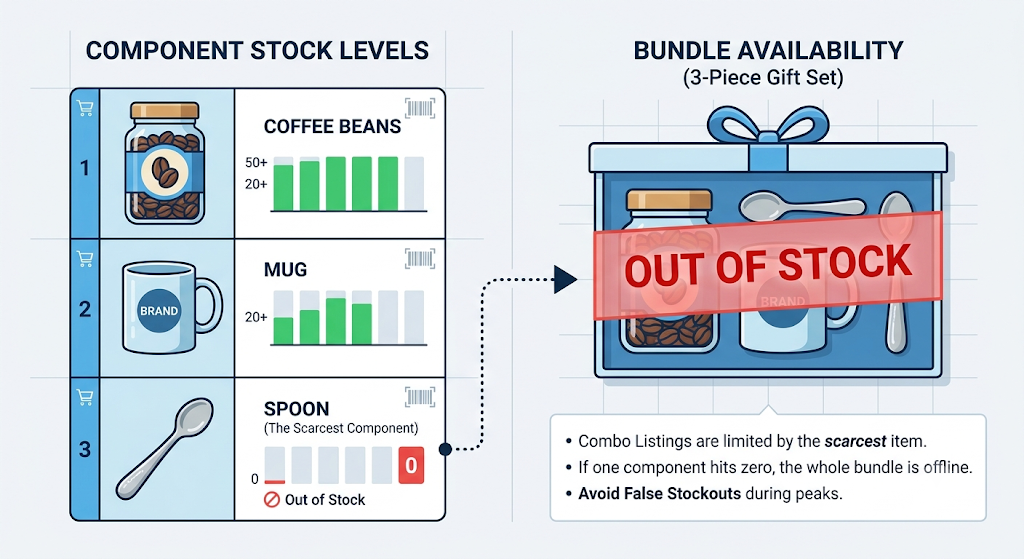
A combo listing is only as available as its scarcest component. If one item inside a 3-piece gift set hits zero, the entire bundle shows out of stock, even when the other two components are fully stocked.
Sellers who track bundles as standalone SKUs miss this completely. Handicraft, gifting, and FMCG combo sellers feel it most during festive peaks. The bundle count and the component count drift apart until buyers start seeing false stockouts.
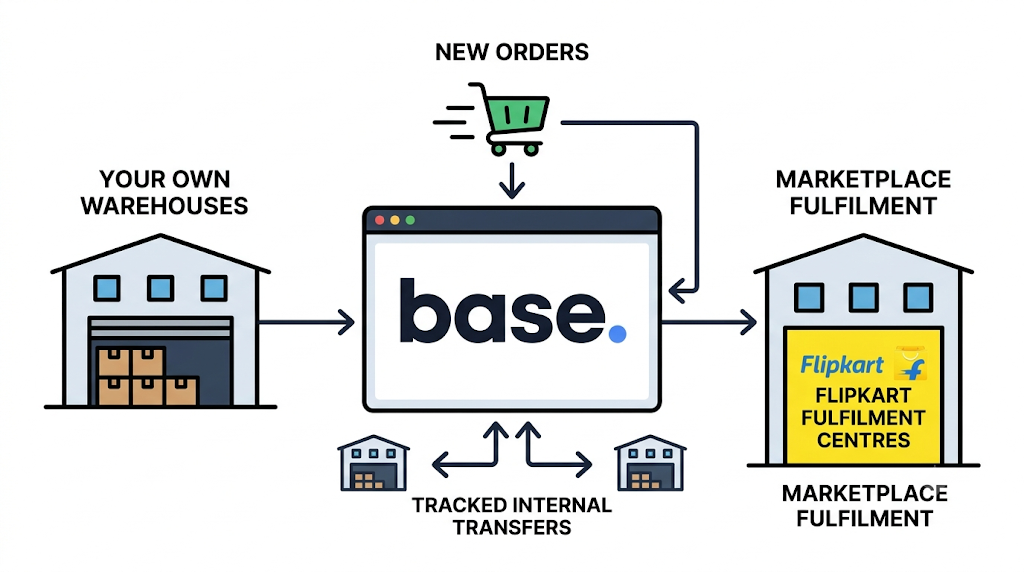
8. Warehouse and Fulfilment Location Mismatch
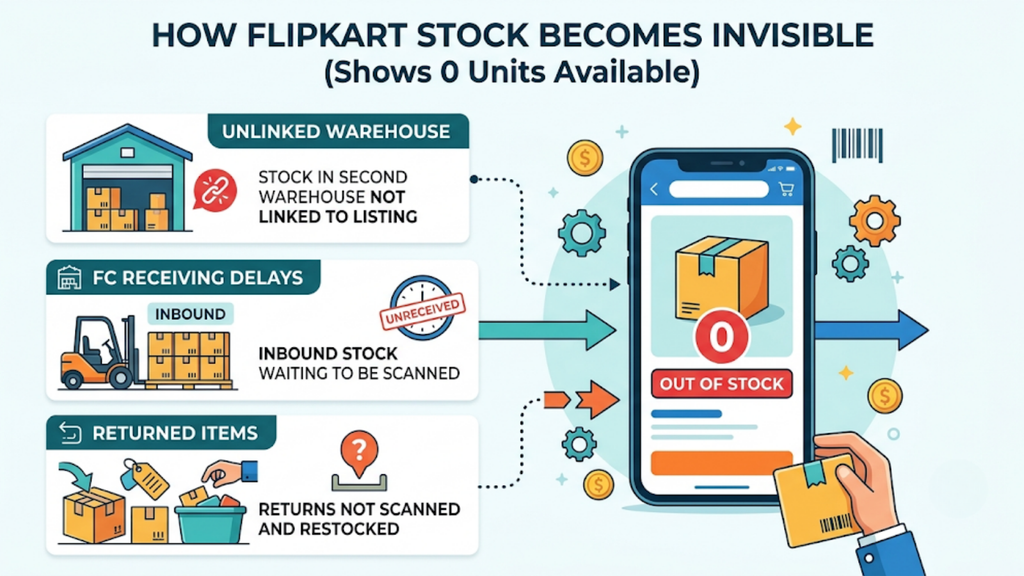
Flipkart sells stock against a specific pickup location or fulfilment centre. If your units sit in a second warehouse that is not linked to that listing, or inbound stock at a Flipkart fulfilment centre is still awaiting receiving, the listing shows zero.
Returns create the same gap. Units that come back but are never scanned and restocked stay invisible to every sales channel.
Multi-warehouse sellers see this cause more than anyone else. A seller shipping from Bengaluru and Delhi can hold enough total stock and still trigger the Flipkart showing out-of-stock but stock available error if the listed location is empty.
How to Diagnose Flipkart Out of Stock Errors in Seller Hub
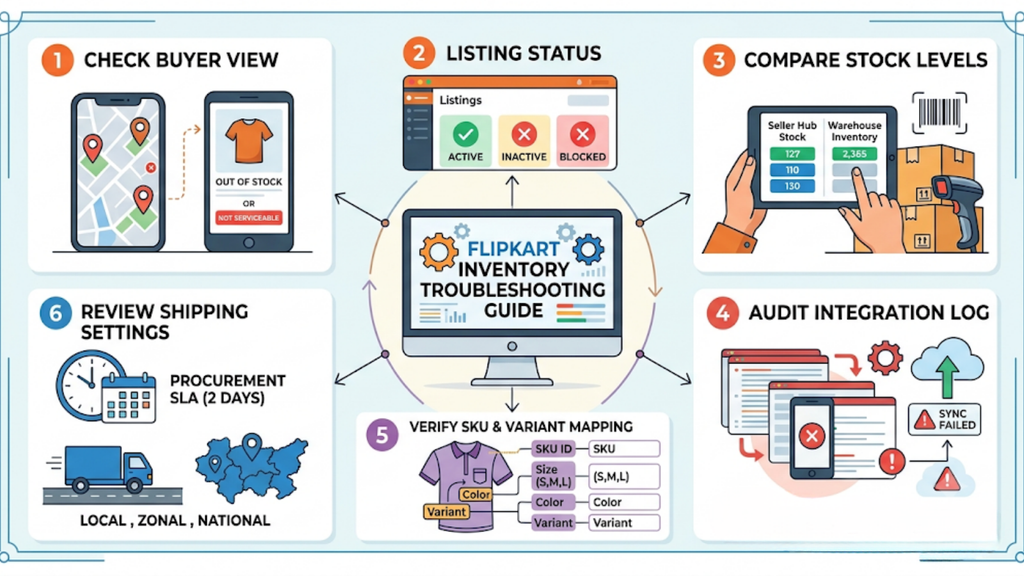
Diagnose before you fix. Run these checks in order, because each step rules out one group of causes.
1. Check the Buyer-Facing Message
Open the product page on the Flipkart app and test it with three different pincodes. If it shows out of stock everywhere, the issue sits in inventory or the listing. If only some pincodes fail, the issue is serviceability, and you can skip straight to your shipping settings.
2. Confirm the Listing Status
Go to the Listings section in Seller Hub and filter by status. Anything marked Inactive, Blocked, or Error needs a listing fix first, not a stock update.
3. Compare Seller Hub Stock with Your Warehouse
Pull the SKU-level quantity from Seller Hub and match it against your WMS or physical count. A mismatch here confirms a sync or manual-entry problem. If the numbers match and the listing is active, move on to mapping and location checks.
4. Audit the Integration Log
Check your OMS for failed inventory pushes, expired credentials, or rejected feeds. One failed sync can freeze stock across hundreds of SKUs at once. Reconnect the channel, then push a full inventory refresh rather than a partial one.
5. Verify SKU and Variant Mapping
Match the seller SKU ID on the Flipkart listing against the SKU in your OMS. Check every size, colour, and pack variant, not just the parent product. A single wrong mapping on a best-selling size can cost more than an entire slow-moving style.
6. Review Shipping and Procurement Settings
Check your procurement type, procurement SLA, and local, zonal, and national shipping settings. Flipkart’s standard procurement SLA is 2 days, and repeated breaches can reduce your listing visibility.
Most sellers resolve the Flipkart showing out-of-stock but stock available issue by the third check. The remaining cases usually sit in mapping or location data.
Cause-by-Cause Fix Table for Flipkart Out of Stock Errors
Use this table as a quick reference for your catalogue and operations teams. Match the symptom to the cause, then apply the fix in the right system.
| Cause | What the Buyer Sees | Where to Check | Fix |
| Stale or zero inventory | Out of Stock | Seller Hub inventory | Update stock and stop manual overwrites |
| Broken sync | Out of Stock | OMS integration log | Reconnect credentials and re-push stock |
| Pincode gap | Out of stock for this pincode | Shipping and courier settings | Expand courier coverage for that pickup location |
| Inactive or blocked listing | Currently Unavailable | Seller Hub listing status | Correct MRP, GST, HSN, images, or QC flags |
| SKU mapping error | Out of Stock | OMS SKU map vs Seller Hub | Remap seller SKU ID at variant level |
| Reserved stock not released | Out of Stock | OMS reservations and picklists | Release cancelled and expired reservations |
| Bundle component shortage | Out of Stock on combo only | Component inventory | Restock component or track bundles at component level |
| Location mismatch | Out of Stock | Warehouse and fulfilment centre stock | Link the right location and complete inbound receiving |
Keep this table beside your catalogue team. It turns every Flipkart showing out of stock but stock available tickets into a structured check instead of guesswork.
How to Keep Stock Accurate Across Flipkart and Other Channels
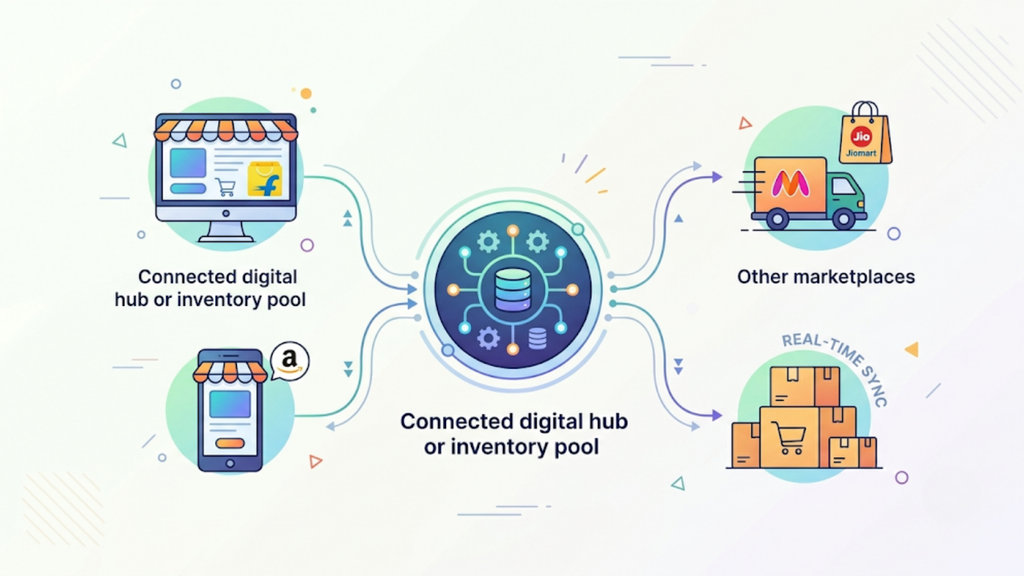
Fixing one listing is easy. Keeping every listing accurate across five channels is where Indian sellers actually lose money.
D2C in India is growing at around 40% CAGR, so most brands now sell on their own website alongside several marketplaces. Each new channel multiplies the chances of Flipkart showing out of stock but stock available problem returning.
1. Use One Inventory Pool for Every Channel
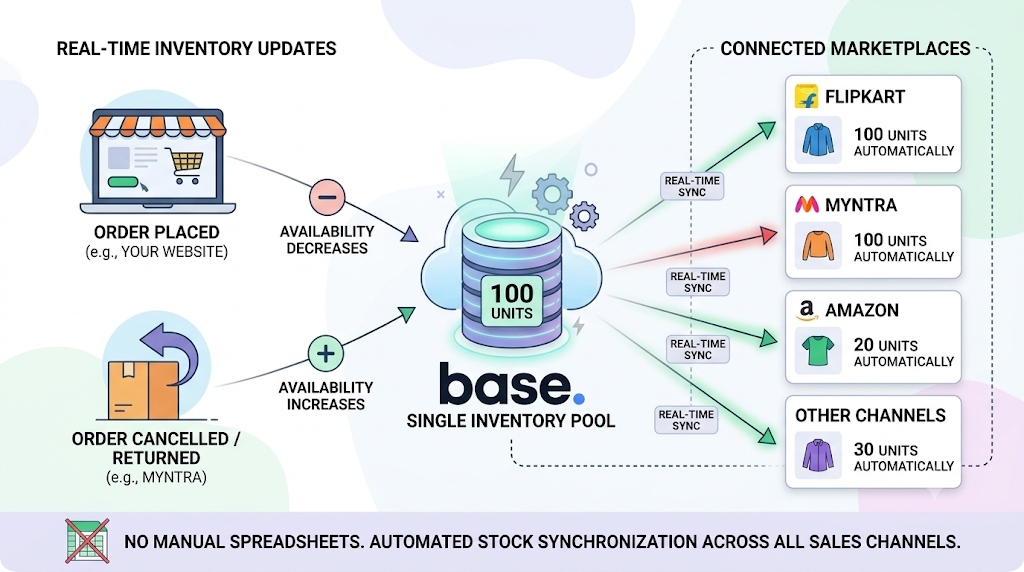
Maintain a single available-to-sell number and let every channel read from it. Separate stock sheets per marketplace guarantee drift within days, because each sheet updates on a different schedule and a different person owns it.
2. Set Smart Safety Buffers, Not Blanket Ones
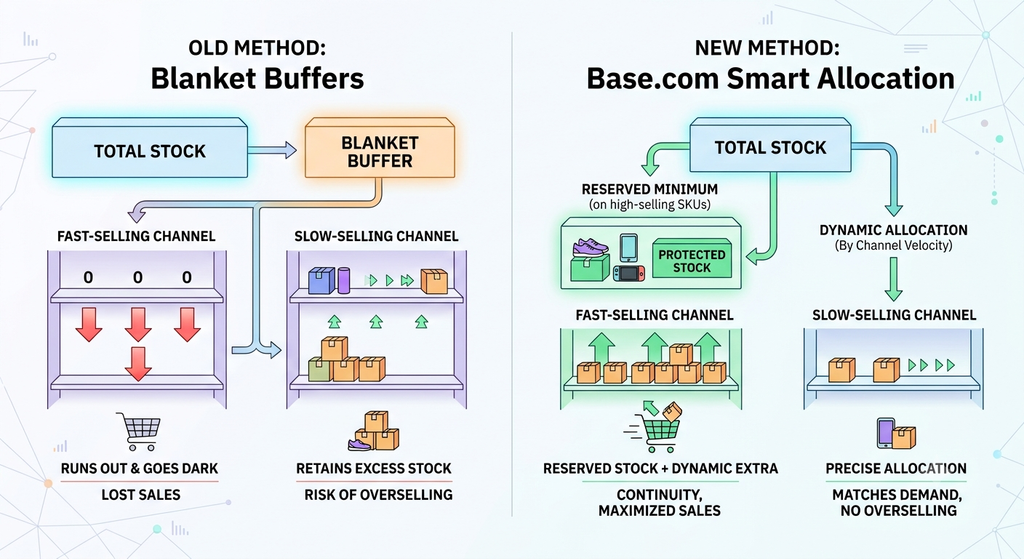
Fixed buffers create artificial stockouts on your best-performing channel. A common approach holds back 10 to 15% of stock per channel on high-velocity SKUs and releases the rest based on sales velocity.
3. Release Reserved Stock Automatically
Cancelled orders, failed pickups, and expired picklists should free their units within minutes. Otherwise, sellable stock sits reserved against orders that will never ship.
4. Map Every Variant One-to-One
Build a master SKU map and lock it, so no one creates a new seller SKU ID without updating the map. Every size, colour, and pack variant needs one internal SKU linked to one listing per channel.
5. Track Bundles at Component Level
Deduct component stock whenever a bundle sells. Equally, reduce bundle availability whenever a component sells on its own.
6. Restock Returns Through Scanning
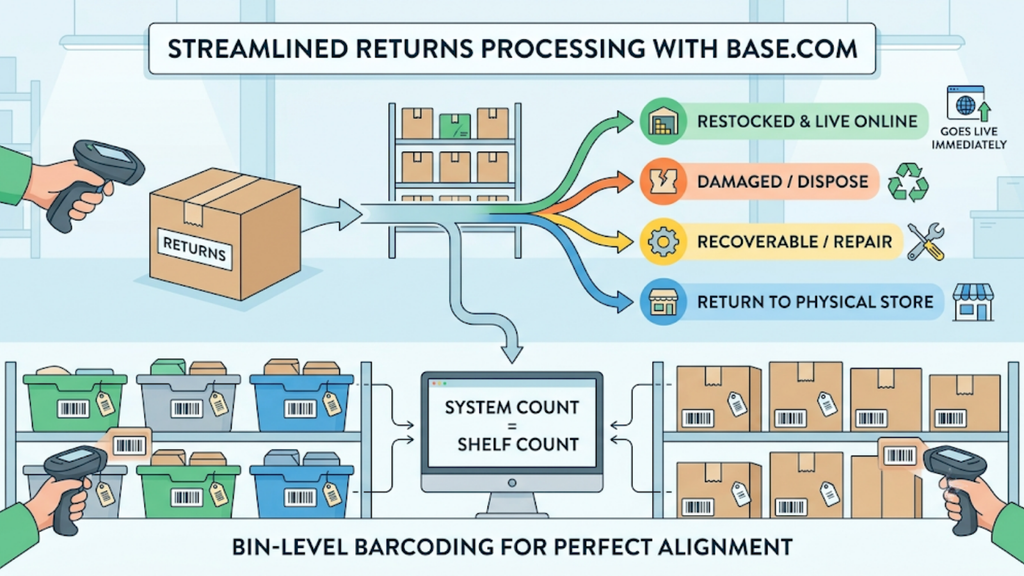
Scan every RTO and customer return into a defined status such as sellable, damaged, or recoverable. With COD returns running at 25 to 30% in India, unscanned returns are one of the largest hidden sources of phantom stockouts.
How to Prevent False Stockouts During Flipkart Sale Events
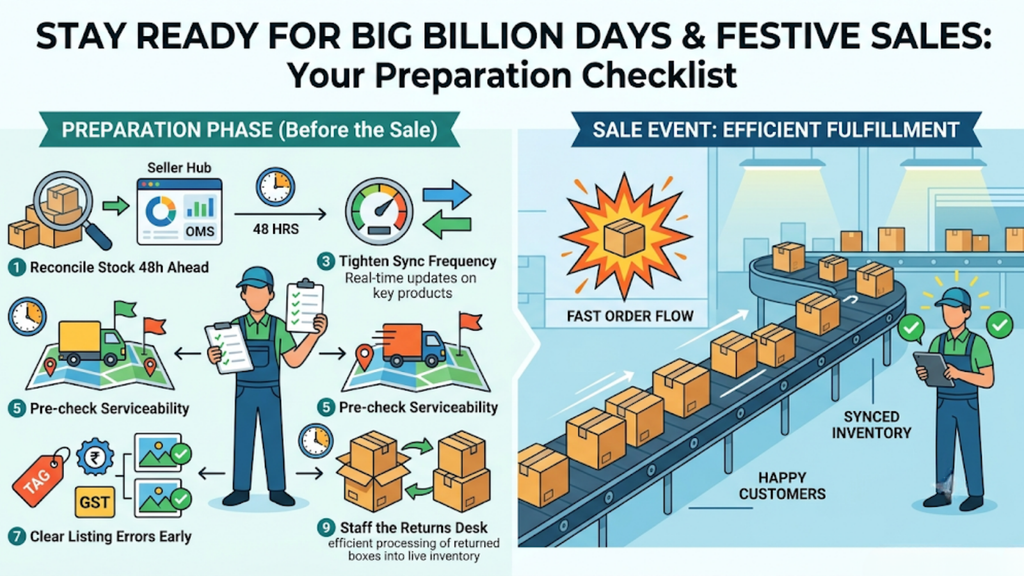
Big Billion Days and festive sales magnify every weakness in your stock setup. Order volume can jump several times over within hours, and sync lag that is harmless on a normal day becomes expensive.
Preparation matters more than reaction during these windows. Run this routine before every major sale event:
- Reconcile stock 48 hours ahead: Match Seller Hub, OMS, and physical counts for your top-selling SKUs.
- Tighten sync frequency: Confirm near real-time inventory updates are live on high-velocity SKUs.
- Pre-check serviceability: Confirm courier coverage for your top pincodes, especially for bulky and fragile products.
- Clear listing errors a week early: Fix pricing, GST, and image flags early, since blocked listings can take days to review.
- Staff the returns desk: Restock RTOs daily so returned units re-enter live inventory quickly.
A pre-sale routine removes most of the Flipkart showing out of stock but stock available tickets that otherwise flood your team on day one.
How Base.com Fixes Flipkart Showing Out of Stock but Stock Available
Base.com is built for Indian sellers running Flipkart alongside Amazon, Myntra, Meesho, JioMart, and their own websites. It removes the data gaps behind false stockouts instead of patching them listing by listing.
Base.com supports sellers across 15 industry categories in India, and homeware sellers on the platform typically manage 500 to 8,000+ SKUs across multiple marketplace accounts. These are the capabilities that keep that stock visible.
1. Real-Time Stock Sync Across Every Channel
Base.com maintains one inventory pool and updates every connected marketplace as orders, cancellations, and returns happen. A unit sold on your website reduces availability on Flipkart automatically, and a cancelled Myntra order releases that unit back to every channel without anyone touching a spreadsheet.
2. Dynamic Safety Stock Rules
Instead of blanket buffers, Base.com lets you reserve a minimum quantity on high-selling SKUs and allocate the remaining stock by channel velocity. Your best channel stops going dark to protect a slower one, and you stop overselling on the channel that updates slowest.
3. Variant-Level and Bundle-Aware Inventory
Base.com tracks each size and colour combination separately and treats bundles as first-class inventory. Selling a gift set deducts every component, so a low component shows up before the bundle fails.
4. Multi-Warehouse and Fulfilment Centre Visibility
Base.com shows stock warehouse by warehouse and unifies your own warehouse with marketplace fulfilment stock, including Flipkart’s fulfilment centres. Orders route to the location that actually holds the stock, and stock transfers between warehouses stay tracked inside the same system.
5. Pincode-Based Courier Allocation
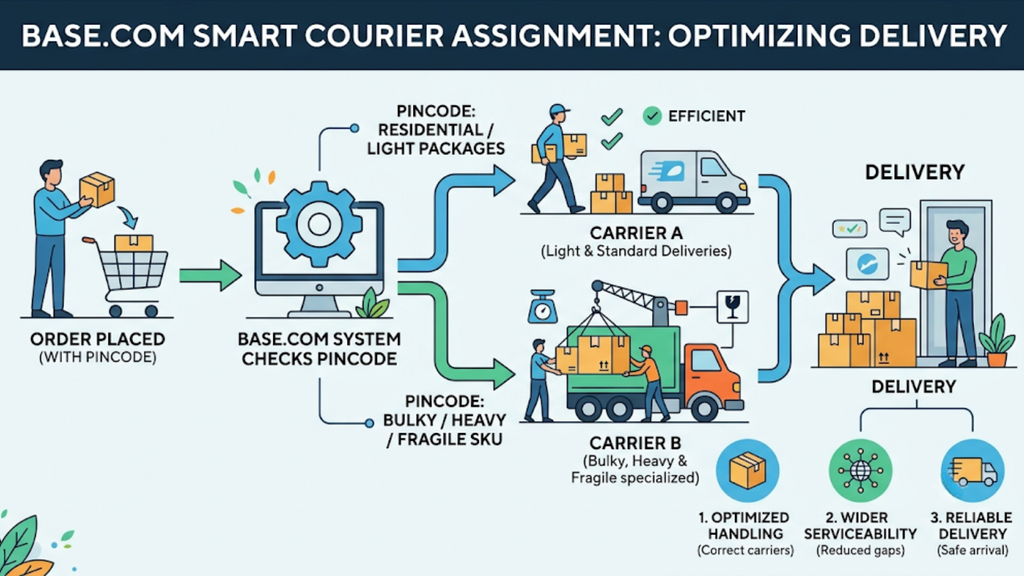
Base.com assigns courier partners by delivery pincode, so each order goes through a carrier that services that address. This narrows serviceability gaps, especially for bulky and fragile SKUs, and it keeps heavier cartons away from carriers that cannot handle them in that area.
6. Structured Returns and Barcoded Warehouse Operations
Base.com scans returns into custom statuses such as damaged, recoverable, or return to store, and restocked units go live immediately. Bin-level barcoding keeps your system count aligned with your shelves.
7. Reporting That Catches Drift Early
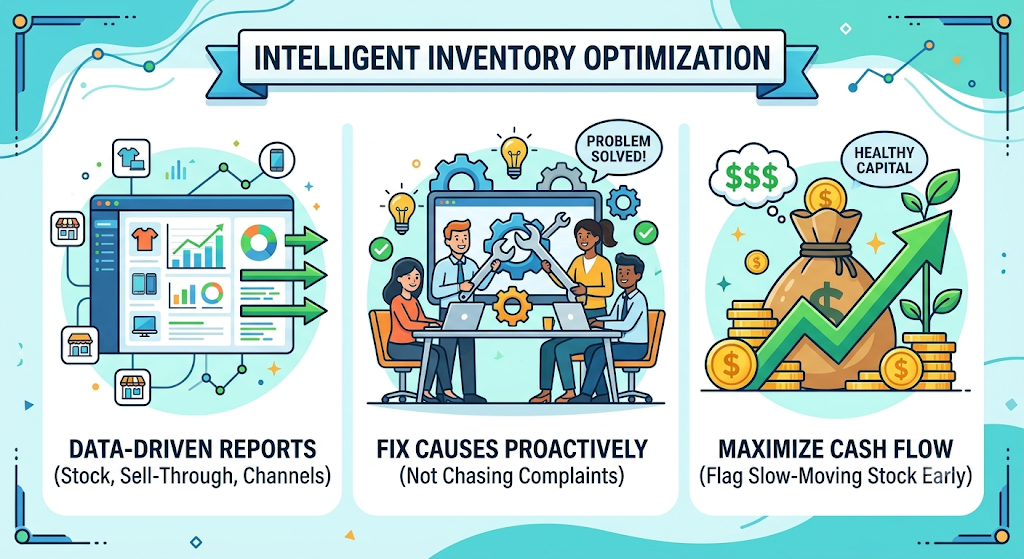
Stock, sell-through, and channel-level reports show which SKUs are drifting before buyers see a stockout. Your team fixes the cause instead of chasing complaints, and slow-moving stock gets flagged before it blocks cash.
Stop Losing Flipkart Sales to Phantom Stockouts
The Flipkart showing out of stock but stock available issue is a systems problem, not a marketplace glitch. Every false stockout traces back to inventory, sync, serviceability, listing, mapping, or location data that someone can fix.
Manual checks work at 50 SKUs. At 5,000 SKUs across five channels, they break, usually during the exact sale week when every order counts most. Base.com gives Indian sellers one operating layer for inventory, orders, warehouse, couriers, and returns, so stock that exists is stock that sells.
Book a Base.com demo to see how real-time stock sync keeps your Flipkart listings live.