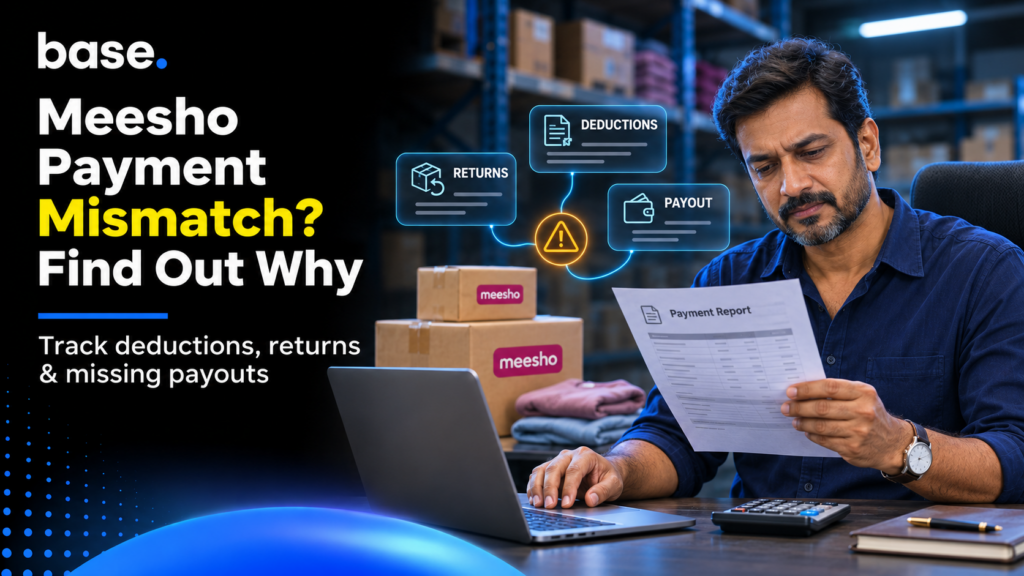
A Meesho payment settlement mismatch occurs when the amount you expect to receive differs from what’s shown in your payment statement or bank account. This is due to things like logistics charges, returns, RTOs, taxes, service charges, refunds and payments.
Meesho states that payouts can include things like payouts for orders delivered, logistics charges, taxes, advertising, influencer marketing, return protection, loan EMIs, program recoveries, and other service charges. These are combined in the payment system to calculate the payout.
This is where Meesho payment reconciliation comes in. Rather than just looking at your final payout, you’ll want to look at your order, delivery status, deductions, returns and settle amount.
Understanding how Meesho payout and a Meesho payment settlement mismatch
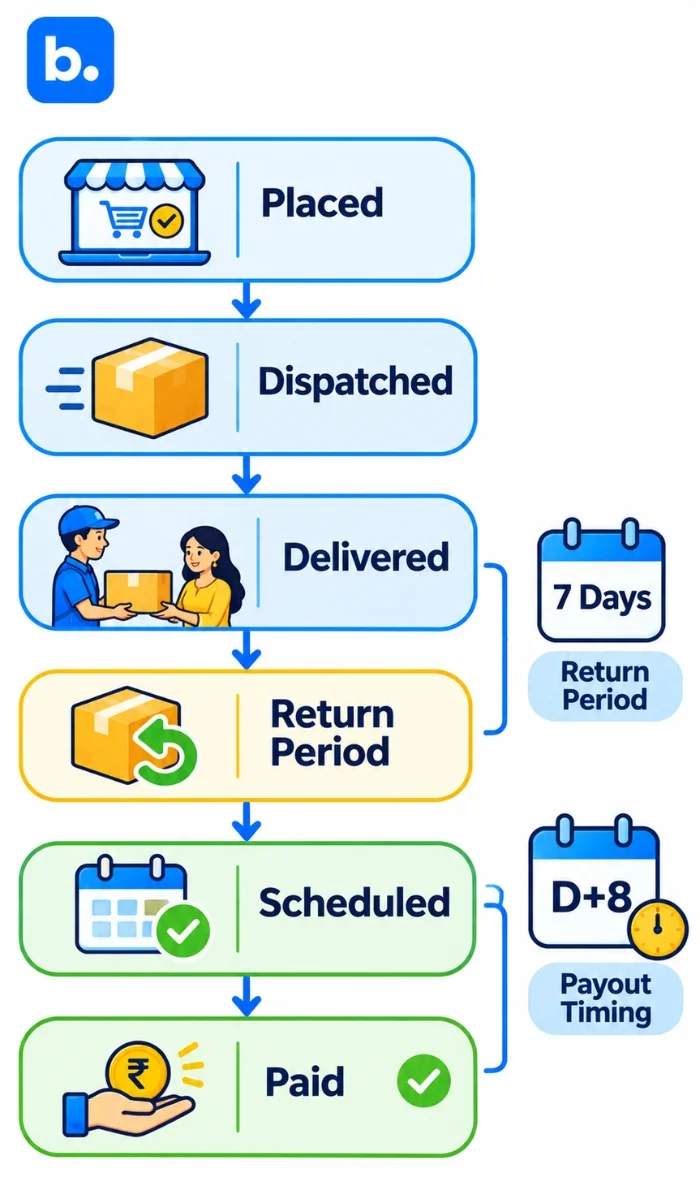
If you’re experiencing a Meesho payment discrepancy, then start by understanding how the payout works. Meesho doesn’t just take the price you sold your order at and place it into your bank account. They look at the status of your order and calculate based on this.
An order can go through the following statuses:
- Order Placed
- Dispatched
- Delivered
- Return Period
- Scheduled to be paid
- Paid
If you dispatched an order today, it won’t be added to your payout straight away. The current Meesho payment system will split your payment into unscheduled and scheduled amounts.
When does Meesho pay sellers?
Meesho payouts are based on delivery and return periods. The current payment system states that you will be paid D+8. This means 8 days after delivery. However, you will also need to wait 7 days for the return period to pass.
If your order was delivered on a Monday, don’t compare the order value to your bank payout on that day. The order may still be in its return period.
What can reduce your final payout?
Your final payout can be different from your gross order value due to things like:
- Logistics charges
- Taxes
- Advertising
- Influencer Marketing
- Returns
- Program recoveries
- Loan EMI
- Other service charges
- Refunds/Adjustments
- Compensations/Credits
Why Meesho payment reconciliations occur
Usually, there are some reasons why you’re seeing a payment discrepancy. The payment hasn’t been scheduled or has been reduced.
1. Not scheduled
If you have delivered an order, it may still be in its return period. If your order is dispatched, then it shouldn’t be considered as revenue.
Check:
- Delivery date
- Return period status
- Scheduled payment date
- Payment status
- If the order was cancelled or returned.
2. Deduction
You may see a deduction reducing your final payout.
Not all deductions are unexplained. Look into why there was a deduction by looking into the transaction level.
Meesho payment tab will now show deductions, compensations, scheduled payments, unscheduled payments, and other elements.
3. Returns/RTO
Returns can cause some complications. You may have initially had a financial entry, but this may have been adjusted.
RTOs are slightly different from customer returns. This means that your parcel hasn’t reached the customer and has been returned to you. Whereas customer returns are when the customer has received the product and then returned it. Both can affect your final payout but you shouldn’t mix them up.
4. Adjustment posted
Not all transactions will be reconciled at the same time. You may find that your payment is different to what you expected, as there has been a recovery, compensation, or adjustment posted against your seller account. This is why having transaction details is more helpful.
| Cause | What to check |
|---|---|
| Payment not scheduled | Delivery date, return period and payment status |
| Customer return or RTO | Original order and return/shipment status |
| Shipping or return charge | Related shipment and transaction entry |
| Tax or other adjustment | Payment description, reference and tax records |
What is inside a Meesho payment report?
Review the transaction-level report rather than relying only on the final payout. Exact field names should be confirmed in the latest file downloaded from the Meesho supplier panel.
| Field | What to check |
|---|---|
| Payment reference and date | Identify and date the payout |
| Order or sub-order ID | Match the entry to the original order |
| Sale amount | Compare with the order value |
| Returns and reversals | Match with the return record |
| Shipping and RTO charges | Check the related shipment |
| Other fees and adjustments | Identify the reason for each entry |
| TCS and TDS | Compare with tax records |
| Net payout | Match with the bank credit |
Use the orders report to check the sale, the returns report to trace returned shipments and the bank statement to confirm the amount received. One of the biggest issues sellers have with payment reconciliation is returns.
You need to understand the three figures:
- Gross order value
- Amount you’re actually being paid
- Amount you’re being paid into your bank.
Once you’ve mapped all your returns and RTOs to the original order, it will be easier to understand why there is a discrepancy.
The problem can be quite large. Unicommerce’s India Ecommerce Index stated that 10.4% of orders were returned in FY2023. COD orders had a high return rate of 20.9%, whereas Prepaid orders had a much lower return rate of 5.8%.
More recent data from Shipway in FY25 showed that nearly 26% of COD shipments were returned to origin. Prepaid shipments had an RTO rate of less than 2%.
This can be an issue for marketplace sellers as RTOs can cause logistics costs without a completed sale.
Typically, RTOs in the wider e-commerce ecosystem fall between 15-25% of total orders. Customer returns can be higher in certain categories such as fashion and apparel, explained Kapil Makhija, MD and CEO of Unicommerce in 2026.
RTO vs Customer Return
An RTO is when the customer doesn’t receive their order.
This can be due to:
- Customer refusing delivery
- Customer not available
- Incorrect/Incomplete address
- Failed delivery
- Delivery exceptions
Customer returns are when the order has been successfully delivered.
This can cause issues with your reconciliation if you’re categorising all your returned shipments as customer returns. This can cause incorrect return rates and costs within your reports.
Meesho deductions and return charges explained
| Deduction | What it relates to | What to check |
|---|---|---|
| Customer return reversal | Sale adjusted after a delivered order is returned | Original order and return status |
| Courier return (RTO) | Shipment returned before delivery | Shipment status and logistics entry |
| Shipping charge | Logistics cost | Related shipment |
| Other fee or penalty | Service charge, recovery or adjustment | Transaction description and reference |
| TCS or TDS | Tax collected or deducted at source | Tax statement and accounting records |
Track customer returns and RTOs separately, and carry unresolved deductions forward until they are explained.
How to reconcile Meesho payments
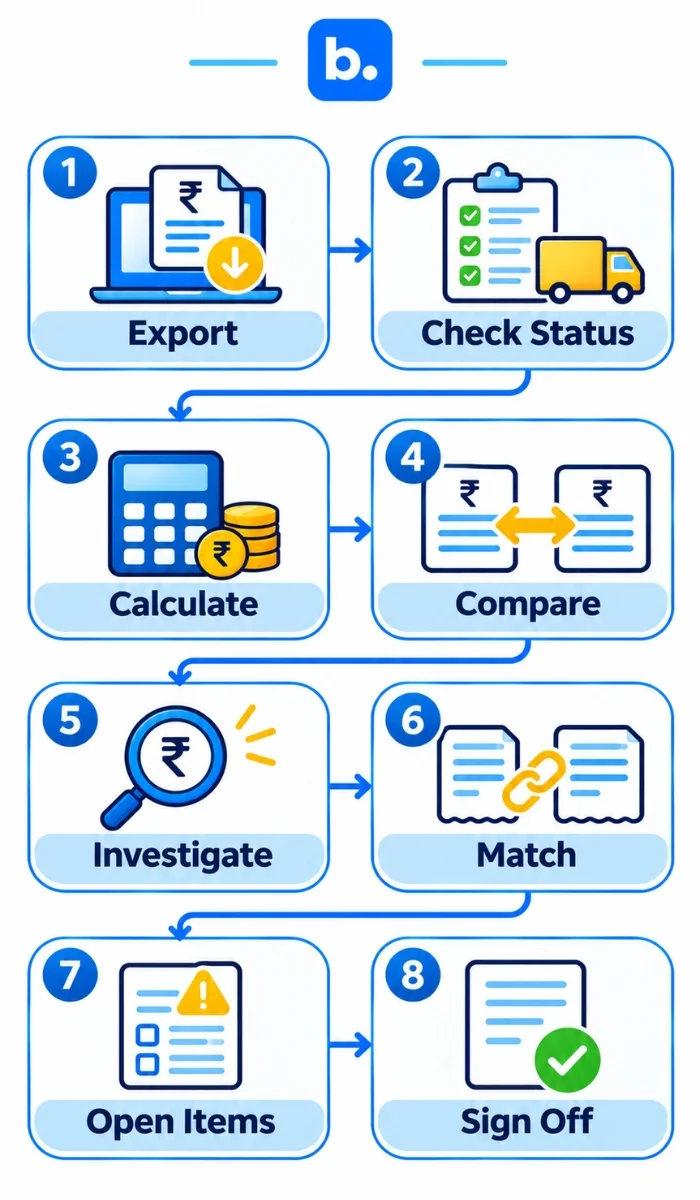
Don’t start with your bank statement; start with your order data.
Step 1: Export your order and payment data
Export the relevant reports from Meesho. Make sure you have your order and payment data. If you’re a larger business, they provide downloadable reports at the transaction level to help you reconcile your payouts, deductions, recoveries, compensations, and other elements.
Step 2: Map your order status
Create a simple column with the following:
| Order Status | What to look for |
|---|---|
| Delivered | Delivery date and payment eligibility |
| In Transit | Not paid |
| Returned | Return date and adjustment |
| RTO | RTO status and charges |
| Cancelled | Cancellation and refund |
| Paid | Reference and amount in bank |
This will instantly show any orders that shouldn’t be in your expected payout.
Step 3: Calculate expected payout
A simple payment reconciliation example could look like:
| Particulars | Amount |
|---|---|
| Delivered order value | ₹50,000 |
| Minus deductions | ₹4,000 |
| Minus returns/RTO | ₹2,500 |
| Plus compensation | ₹500 |
| Expected payout | ₹44,000 |
The numbers are just an example. Your actual deductions from Meesho will depend on your orders, services and charges.
The key thing is to start with your transactions and apply the relevant adjustments.
Step 4: Compare with actual payout
Compare your calculated amount to:
- Meesho payment report
- Meesho payment tab
- Amount in bank
- Reference or transaction ID.
If all four match, then your payout has been reconciled. If they don’t match, then look to isolate the difference.
Step 5: Investigate discrepancy
Create a sheet with the following columns:
- Order ID
- Order Value
- Status
- Returns/RTO
- Deduction
- Expected payout
- Actual payout
- Difference
- Reason.
This will turn a generic issue of “I’m not getting paid enough” into a specific exception.
Step 6: Match order-level transactions
Compare each payment entry with your sales records, including returns and adjustments from earlier cycles.
Step 7: Record unmatched transactions.
Keep the order ID, payment reference, amount, date and reason in an open-items list.
Step 8: Post entries and sign off.
Record the checked transactions in your ledger and retain the payment report and bank statement. A clearing account can hold the payout until it is matched with the bank credit.
Payment reconciliation example: a Meesho payout, line by line
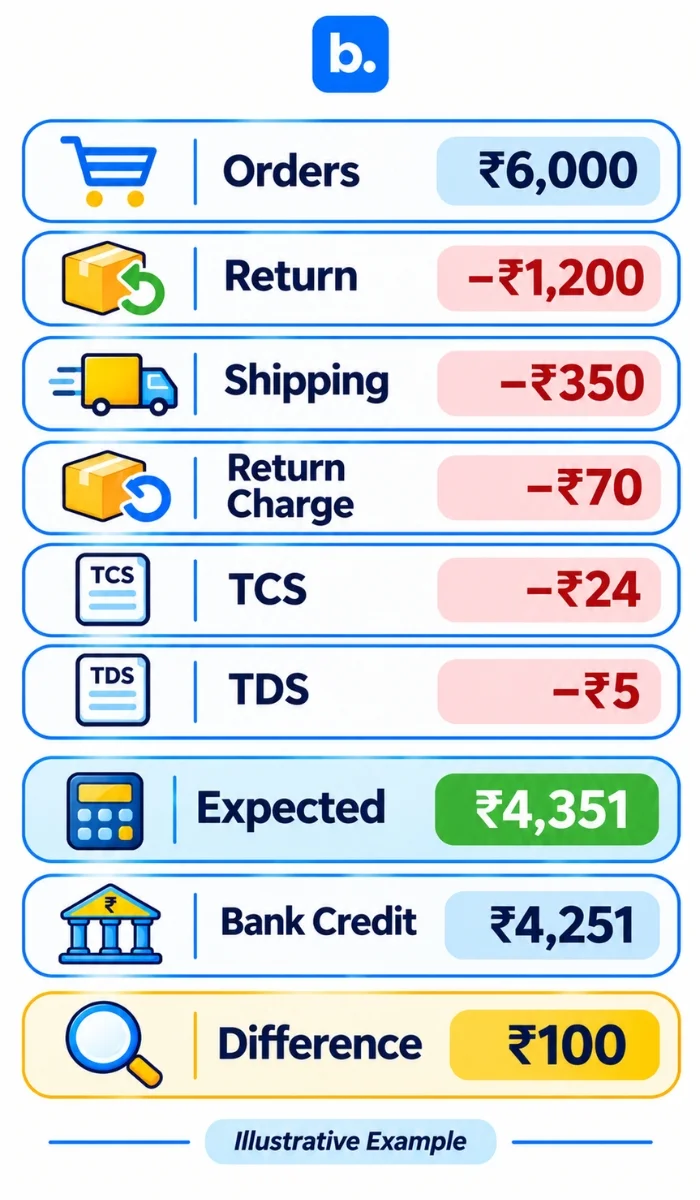
A seller has five orders worth ₹1,000, ₹1,500, ₹1,300, ₹1,200 and ₹1,000, totalling ₹6,000. The ₹1,200 order is returned. For this simplified example, shipping is ₹70 on each of the five outbound orders, with a further ₹70 return charge. TCS and TDS are illustrative.
| Line | Amount | Note |
|---|---|---|
| Total order value | ₹6,000 | Five orders |
| Return reversal | -₹1,200 | One returned order |
| Shipping charges | -₹350 | ₹70 × 5 |
| Return charge | -₹70 | Returned order |
| TCS | -₹24 | Example amount |
| TDS | -₹5 | Example amount |
| Expected net payout | ₹4,351 | After listed adjustments |
The books should record sales, a credit note for the return, shipping and return charges as expenses, TCS and TDS as receivables where applicable, and the expected payout against a clearing account. Match the clearing account with the bank credit.
If the bank shows ₹4,251, the ₹100 difference needs investigation. Check the payment report and adjustment history for an advertising charge, penalty or another entry; do not assume the reason. These figures are illustrative, not Meesho’s current rates.
How an order management system can help
An order management system (OMS) collects orders from different channels, keeps a record for each sale and passes order and return information to fulfilment and accounting workflows. It can supply organised order data, but it does not replace the Meesho payment file or accounting system.
An OMS can connect order IDs and SKUs to sales records, capture returns and RTOs at the operational source, and make available order-level costs easier to review.
How to investigate a payment mismatch and raise a dispute
| Symptom | Likely cause | What to do |
|---|---|---|
| Payout lower than expected | Deductions or returns | Review transaction lines |
| Payout higher than expected | Compensation or adjustment | Check adjustment history |
| Order missing | Payment not scheduled | Check order and payment status |
| Return deducted twice | Duplicate adjustment | Match both entries to the order |
| Unrecognised charge | Fee or recovery | Check reference and description |
| Payout delayed | Timing or eligibility | Check scheduled date |
For a support request, keep the order or sub-order ID, payout reference, expected and actual amounts, delivery or return evidence, screenshots and a clear explanation. Confirm the current ticket process and time limits in Meesho’s supplier documentation.
Post Meesho payouts to your ledger (Tally and Zoho Books)
Record sales by applicable tax rate, returns through credit notes, shipping and return charges as expenses, TCS and TDS as receivables where applicable, and the payout against the Meesho party or clearing account. Order-wise posting gives more detail; summary posting is quicker but needs supporting transaction records for audit and verification.
As your order volume increases, it can become difficult to reconcile manually.
You may have:
- Orders in Meesho
- Inventory in your order management system
- Payment data in your marketplace reports
- Cash in your bank.
These aren’t always set up the same and may not update at the same time. This is where payment reconciliation software can help.
An ecommerce reconciliation software platform can help you reconcile marketplace orders, returns, fees and payouts. You won’t have to open multiple spreadsheets. Transactions will be matched and exceptions will be highlighted.
Manual vs Automated
| Manual | Automated |
|---|---|
| Multiple reports to download | Pull/import data into one system |
| Match manually | Match using rules |
| Search for discrepancies | Exceptions highlighted |
| Check deductions manually | Map deductions to transactions |
| Time consuming at high volumes | Better scalability |
Marketplace payment reconciliation across Meesho, Amazon and Flipkart
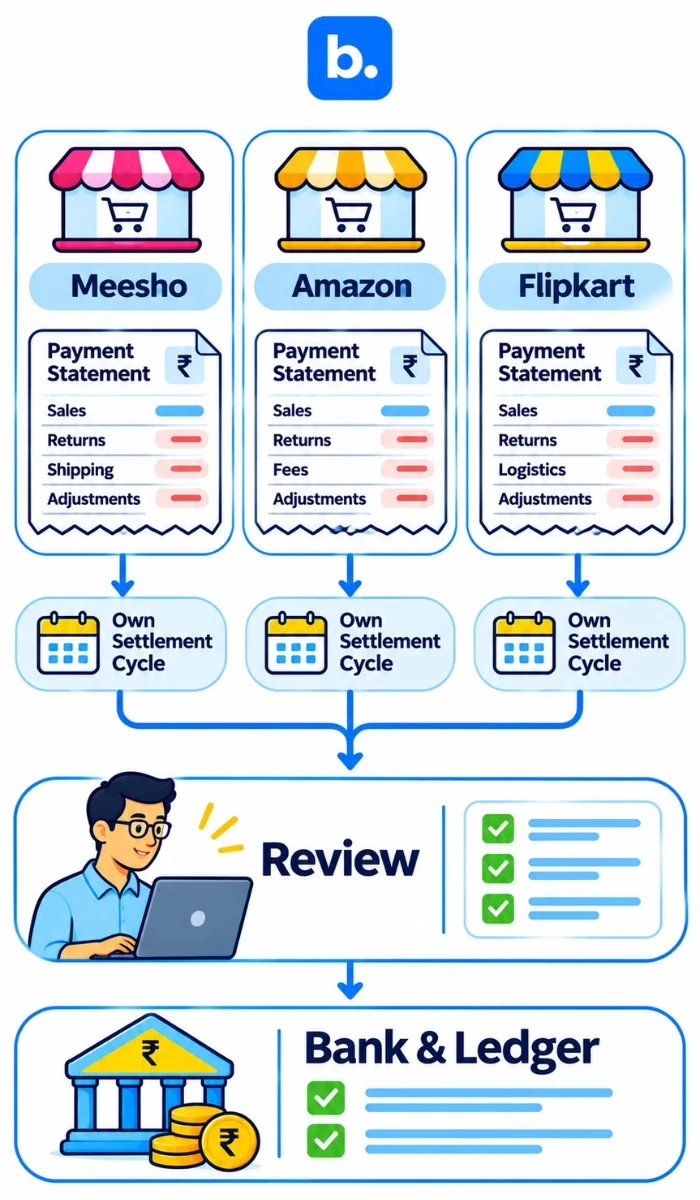
The report formats differ, but sellers still need to match orders, payment reports and bank credits.
| Channel | Payout source | Main difference to watch |
|---|---|---|
| Meesho | Payment report | Returns, RTOs and adjustments |
| Amazon | Settlement report | Marketplace fees and refunds |
| Flipkart | Payment report | Commission, logistics and returns |
| Own store and gateway | Gateway report | Fees, refunds and chargebacks |
| Courier COD | Remittance report | COD collection and remittance |
What automated payment reconciliation does
A payment reconciliation system can group payment lines by order, separate charges and taxes, match bank credits and list exceptions. A person still needs to review unusual entries and approve the final reconciliation.
| Question | Spreadsheet | Software |
|---|---|---|
| Setup | Usually quick | May need configuration |
| Higher volumes | More manual work | Can apply matching rules |
| Errors | Depends on checks and formulas | Still needs human review |
| Multiple channels | Often separate files | May combine supported channels |
| Audit trail | Depends on file handling | May retain transaction history |
| Cost | Lower direct cost | Subscription or setup cost |
Common mistakes when checking Meesho payouts
Sales vs Bank
Your sales aren’t your payout. Sales show what you sold where your payout shows what you’ve been paid after the relevant adjustments.
Dispatched vs Paid
Just because your order has been dispatched doesn’t mean it has reached the customer or passed the return period. Wait for the correct payment status.
RTOs
An RTO can affect the outcome of your order financially. Even if you expected to make a sale on that order. Make sure you track RTOs separately.
Total payout
Just looking at the total payout won’t tell you why there is an issue. Always look to break down your payout to order and deduction level.
All discrepancies are due to an error on the platform
Sometimes there will be a timing issue. Before raising a dispute check the delivery date, return period, payment status and adjustment history of your order.
| Mistake | Why it hurts | Fix |
|---|---|---|
| Matching only to the bank | Does not explain order-level differences | Match entries to orders |
| Ignoring charge and tax lines | Makes payout totals incomplete | Review each category |
| Missing earlier returns | Adjustments may belong to an earlier cycle | Link returns to original orders |
| Wrong period cut-off | Orders and payments may fall in different cycles | Check dates and status |
| Treating adjustments as sales | Misstates records | Identify the entry before posting |
| Mixing payouts | Makes differences harder to isolate | Reconcile each cycle separately |
| No owner for open items | Differences can be forgotten | Assign an owner and review date |
How to choose ecommerce reconciliation software
Check whether the software imports the current Meesho payment file, handles charges and TCS/TDS, links returns to original orders, supports multiple-line matching, provides an exception queue, supports clearing accounts, connects with Tally or Zoho Books, and maintains an audit trail with user roles.
Ask vendors how they handle RTOs, duplicate deductions, unmatched entries and bank matching. A payment reconciliation system should fit your current records and accounting workflow.
| Route | Best for | Limit |
|---|---|---|
| Spreadsheet | Lower transaction volumes | Manual matching |
| Accounting add-on | Basic accounting workflows | May lack marketplace matching |
| Reconciliation software | Payment matching across sources | Needs compatible data |
| OMS software feeding accounts | Organising order data | Does not replace payment files or accounting |
How Base OMS helps with Meesho payment reconciliation
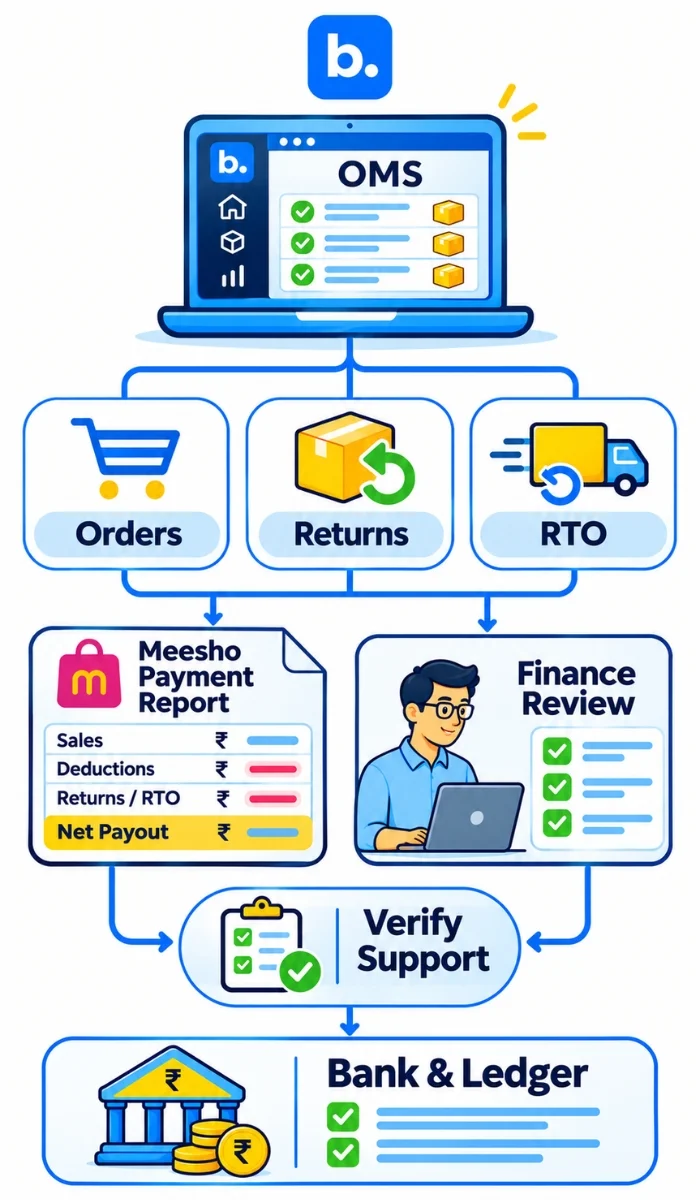
Orders: Base OMS supports order management across sales channels. Organised order and return information can help sellers trace transactions to their original orders.
Payouts: Order-level information can support the review of transactions behind marketplace payouts. Whether Base OMS reads Meesho payment files, matches payouts or separates charges must be confirmed by the product team.
Exceptions: Sellers should verify unmatched payment entries against the marketplace report and accounting records. Confirm supported modules and accounting hand-offs with the product team before describing specific capabilities. Add real screenshots or customer results only if approved.
Conclusion
A Meesho payment settlement mismatch can be easier to identify when you track your orders, deductions, returns and payouts together. As your business grows, an order management system can also help keep your marketplace and payment data organised.