


To create product bundles for ecommerce sales, pair a high-demand anchor SKU with complementary items, price the bundle to raise contribution per order rather than to maximise discount, and configure your system to split bundles into component SKUs automatically so component stock stays accurate.
The pricing is the easy part. The component stock is where bundles quietly break operations.
Why How to Create Product Bundles for Ecommerce Sales Beats Discounting on the Same Margin
A discount reduces what you earn on a sale you were already making. A bundle changes what the sale is.
The distinction shows up in contribution per order. Percentage margins hide the effect of basket size: 25% on ₹600 is ₹150, while 25% on ₹1,400 is ₹350. Your fixed cost per order- pick, pack, label, courier handover, support- does not scale down with basket size.
Redseer reported average spend near ₹7,000 per shopper during the 2025 Indian festive season, with over ₹60,000 crore in GMV across the first 11 days at roughly 3.5 times business-as-usual levels. That spend arrives in some number of orders, and you influence how many.
Benchmark data on order values puts a healthy AOV at roughly $45-150 for consumables and $180-436 for jewellery, with DTC Shopify store medians around $85-95. These are US figures at dollar values, useful for shape rather than as Indian targets.
The margin context makes bundling more urgent than it was. Median DTC contribution margin reportedly fell from 35% in 2021 to 22% in 2025 as paid acquisition became more expensive. When contribution per unit compresses, contribution per order becomes the lever that still moves.
That is the strategic case for learning how to create product bundles for ecommerce sales properly rather than assembling combos the week before a festive event.
Five Bundle Types and What Each Is For
The first decision in how to create product bundles for ecommerce sales is which job the bundle is doing.
| Bundle type | Structure | Primary objective | Best category fit |
| Anchor plus accessory | Hero SKU + complementary low-cost items | Raise AOV without discounting the hero | Electronics, appliances |
| Replenishment multipack | Same SKU in quantity | Extend purchase cycle, block competitor repeat | FMCG, beauty, supplements |
| Routine or kit | Complementary SKUs solving one job | Cross-sell, raise trial of secondary SKUs | Beauty, wellness, home |
| Gifting set | Curated mix with presentation packaging | Capture occasion demand at premium | Festive, baby, gourmet |
| Clearance pairing | Slow SKU attached to a fast one | Move ageing stock without visible markdown | Any category with dead stock |
The clearance pairing deserves care. Attaching a slow SKU to a hero can move stock, but if the pairing feels arbitrary, the bundle depresses conversion on your best product. Test it before scaling it.
The anchor-plus-accessory bundle is usually the highest-return starting point, because accessories typically carry higher percentage margins than the anchor. A bundle can therefore raise the rupee contribution while improving blended margin percentage, which a straight discount can never do.
Start with one bundle type rather than launching all five. Each type carries different operational requirements; multipacks need expiry alignment, gifting sets need presentation packaging and assembly labour, clearance pairings need constant reconfiguration as stock ages. Running one well for a cycle teaches you more about how to create product bundles for ecommerce sales in your specific operation than running five badly.
Choose based on which lever your business most needs. If AOV is your constraint, start with anchor-plus-accessory. If repeat rate is the problem, start with replenishment multipacks. If you are sitting on ageing stock, clearance pairings pay back fastest.
Bundle Economics: The Trap Most Sellers Fall Into When Learning How to Create Product Bundles for Ecommerce Sales
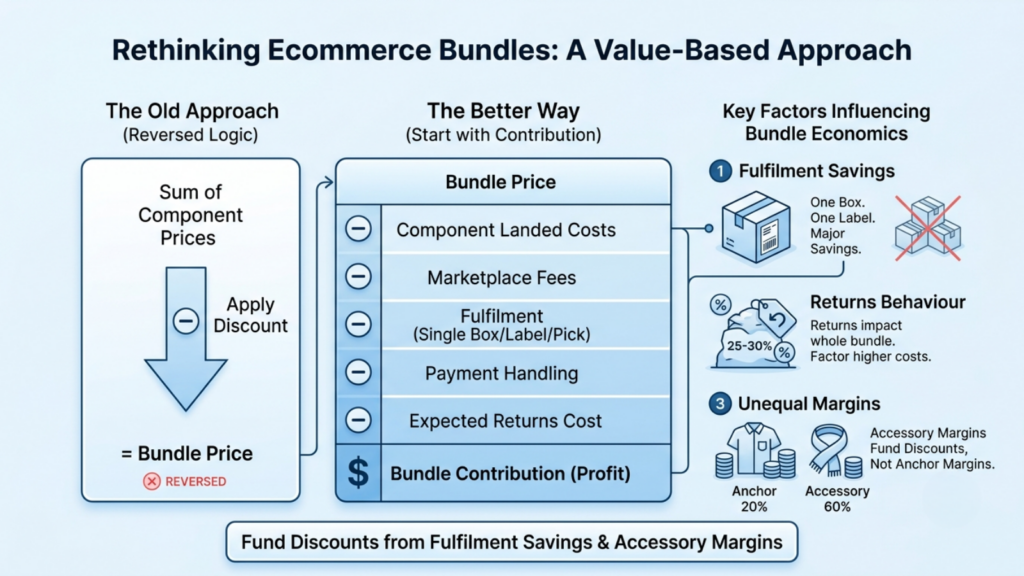
The common approach is to sum component MRPs, apply a discount, and call it a bundle. That reverses the logic.
Start from contribution instead.
Bundle contribution = bundle price − sum of component landed costs − marketplace fees − fulfilment − payment handling − expected returns cost
Three things make bundle economics different from single-SKU economics.
- Fulfilment cost does not multiply. One bundle order is one pick sequence, one box, one label, one courier handover. Three separate orders for the same items cost three times as much to fulfil. This saving is where the bundle discount should come from.
- Returns behave differently. A bundle return usually returns everything, including components that were fine. In fashion, where Indian return rates commonly sit at 25-30%, a bundle return costsf more than a single-item return, and the recovery is slower.
- Component margins are unequal. A bundle blending a 20%-margin anchor with 60%-margin accessories has a blended margin the discount must respect. Discounting uniformly across components gives away the wrong margin.
A working rule: fund the bundle discount from the fulfilment saving and the accessory margin, not from the anchor. Anyone deciding how to create product bundles for ecommerce sales should be able to point at which cost line pays for the discount.
The Break-Even Check
Before committing, run the same test on how to create product bundles for ecommerce sales that you would run on any discount.
The same arithmetic that governs discounts applies here.
Required volume multiple = original contribution margin % ÷ (original contribution margin % − effective discount %)
If the bundle’s effective discount against buying separately is 15%, and your blended contribution margin is 40%, you need 1.6x the volume to break even on contribution. Bundles usually clear this comfortably because of the fulfilment saving, but check rather than assume.
Step by Step: How to Create Product Bundles for Ecommerce Sales With Base.com
Base.com’s three core modules are the Product Manager (also called Inventory), the Order Manager, and the Marketplace Manager. Bundles live in the first, behave in the second, and sell through the third. All fifteen steps below cross at least two of them.
Step 1: Confirm Your Components Exist as Proper Catalogue Products
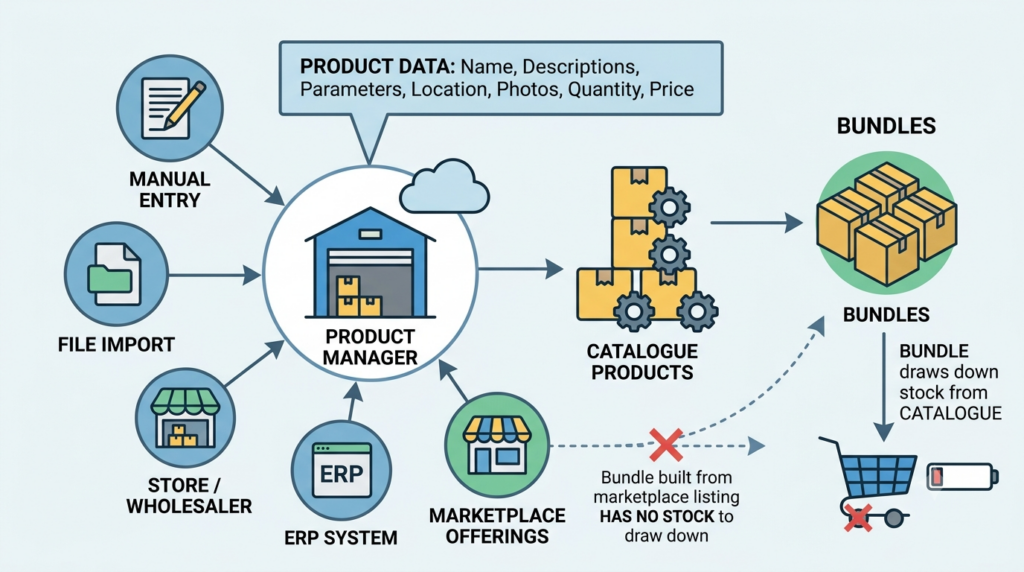
Base.com’s Product Manager serves as an internal, system-wide virtual warehouse storing product name, descriptions, parameters, physical warehouse location, photos, quantity, and price. Products can be added manually, imported from a file, from a store or wholesaler, from an ERP system, or created from imported marketplace offerings.
Every bundle component must exist as a catalogue product first. A bundle built on a component that only exists as a marketplace listing has no stock to draw down.
Step 2: Assign a SKU to Every Product, Variant and Bundle
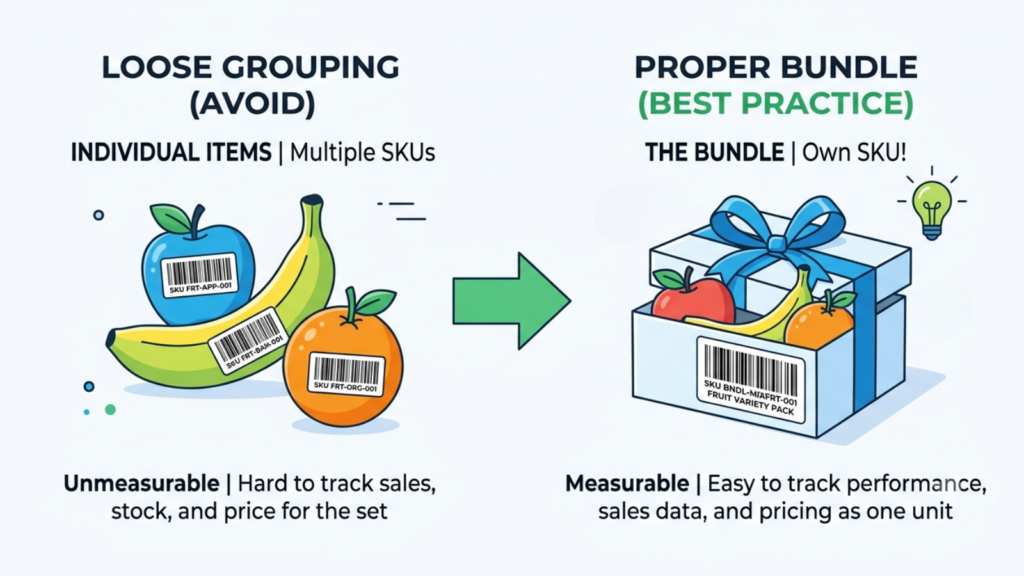
Base.com’s inventory control practice includes allocating a SKU number to each product, variant or bundle and labelling accordingly.
Give the bundle its own SKU. It is a sellable unit with its own price, its own listing and its own performance data, and treating it as a loose grouping makes it unmeasurable.
Step 3: Set Up the Inventory Correctly Before Building Bundles

Inventories are configured under Products → Settings → Inventories, and each is assigned languages, price groups, and warehouses. One product can only be assigned to one inventory, and inventories are independent of each other.
This matters for bundles specifically: all components of a bundle need to sit in the same inventory as the bundle. Components scattered across independent inventories cannot resolve into one bundle stock figure.
Step 4: Decide Your Reservation and Negative Stock Settings
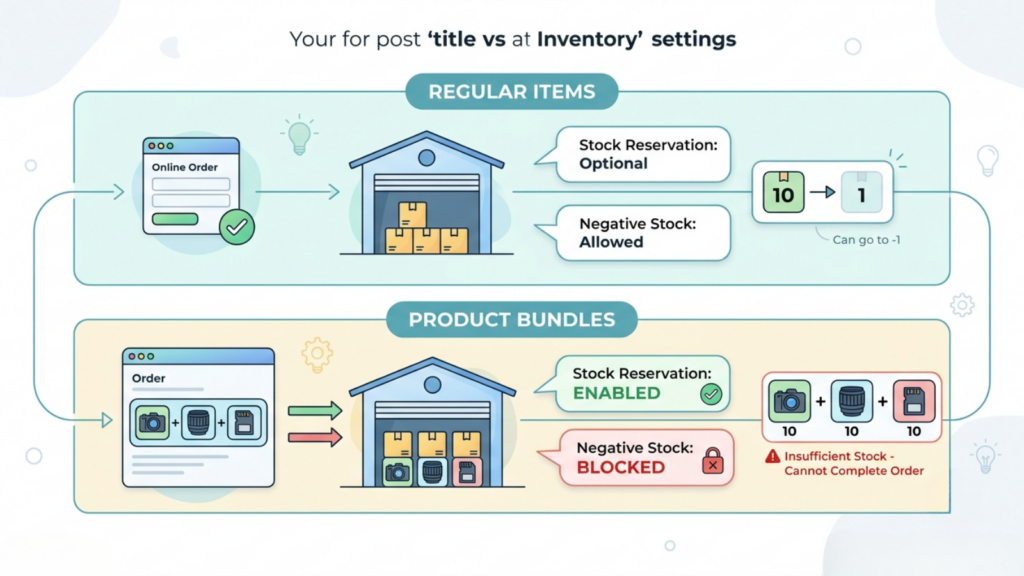
In the inventory settings, you choose whether to enable stock reservation, which pulls products from stock immediately after an order is fetched into Base, before the order is confirmed. You also choose whether to allow negative stock; blocking it means order fulfilment is not possible if it would reduce stock below zero, including reservations.
For bundles, enable reservations and block negative stock. Bundles multiply the ways stock can go wrong, and blocking negative stock forces the error to surface at order capture rather than at picking.
Step 5: Consider Enabling Strict Inventory Control

Base.com offers storage documents with strict inventory control, which blocks manual stock changes so that changes occur only through orders and warehouse documents.
For a catalogue with bundles, this is worth the discipline. Manual stock adjustments are how component quantities drift out of alignment with bundle availability, and the drift is invisible until a bundle sells with a component that is not physically there.
Step 6: Build the Bundle in the Product Manager
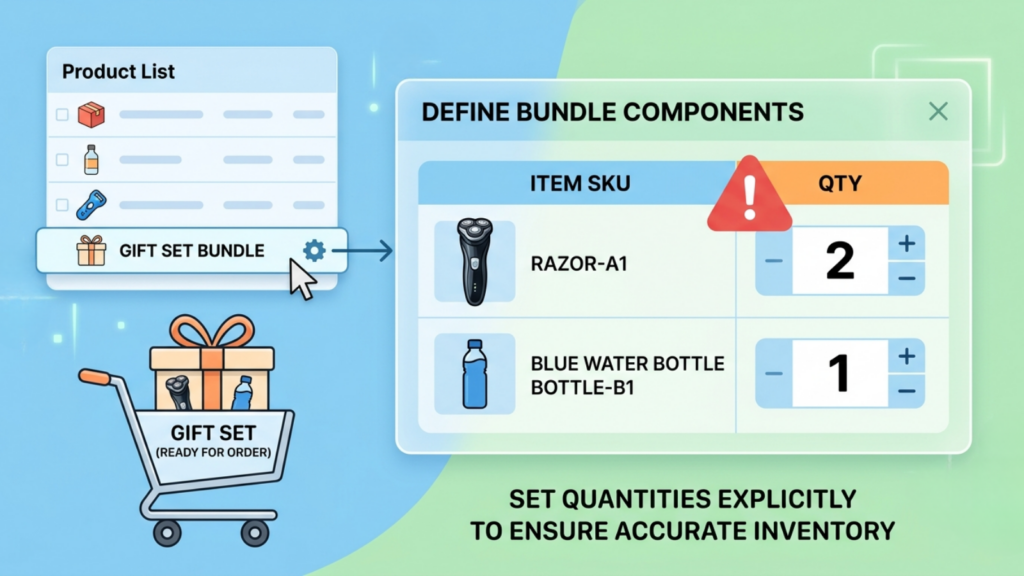
Bundles are created and managed from the Product List, alongside regular products.
Define the bundle, add its components, and set component quantities explicitly. A gift set containing two units of one SKU and one of another must state those quantities, or the stock draw-down will be wrong from the first order.
Step 7: Verify Relationships on the Product Card
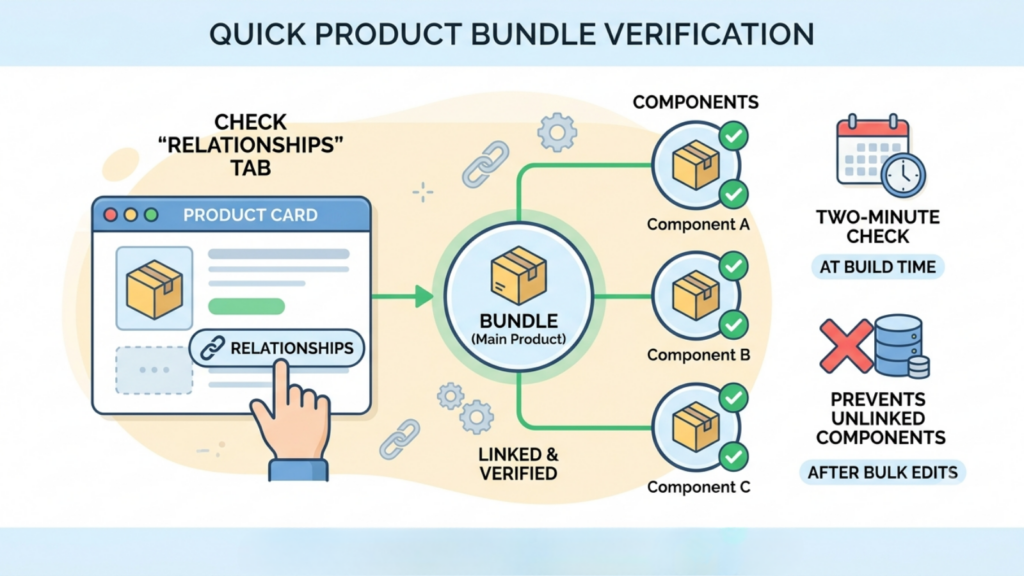
Base.com provides a Relationships tab on the product card (Product List → Products → Edit) where you can check all product connections, add new ones, and remove manually created relations.
Open each component and confirm it shows the expected bundle relationship. This two-minute check at build time prevents the most common bundle error, which is a component silently unlinked after a bulk catalogue edit.
Step 8: Set the Bundle Split Behaviour Deliberately
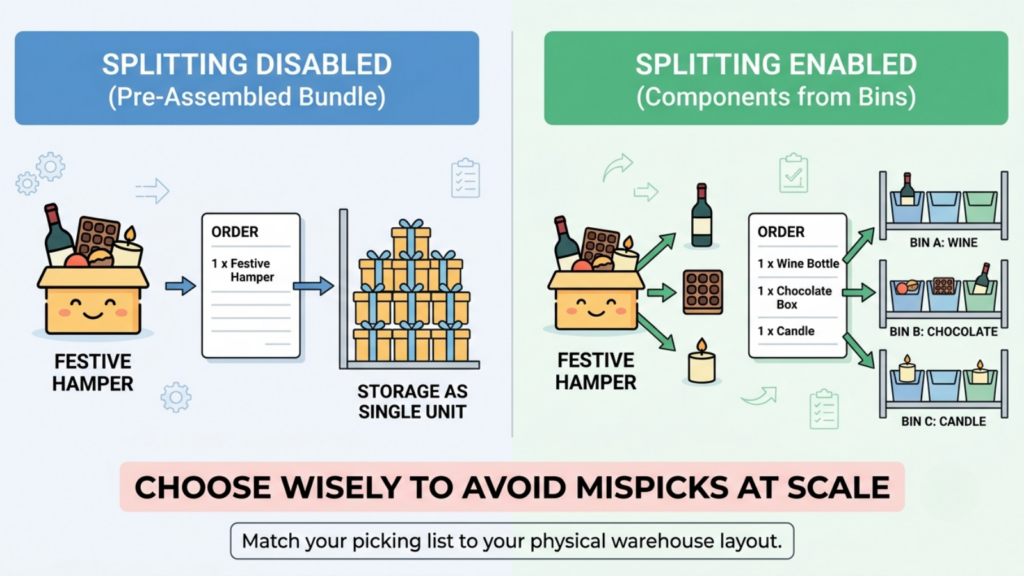
This is the most consequential configuration decision in the entire process.
In Base.com’s order settings (Order → Settings → Order processing), you decide whether bundles are split.
- Splitting disabled: one item showing the bundle appears in the order, but the corresponding bundle components go out of stock.
- Splitting enabled: all components of the bundle appear in the order instead of the purchased offer.
The setting also applies to manually entered orders.
Which to choose: enable splitting when your warehouse picks individual components from their own bin locations, which is the normal case for kits and routine bundles. Disable splitting when the bundle is pre-assembled and stored as a single physical unit, such as a pre-packed festive hamper.
Getting this backwards produces a picking list that does not match physical reality, which under sale volume becomes mispicks at scale.
Step 9: Cost the Bundle Using Purchase Price Data
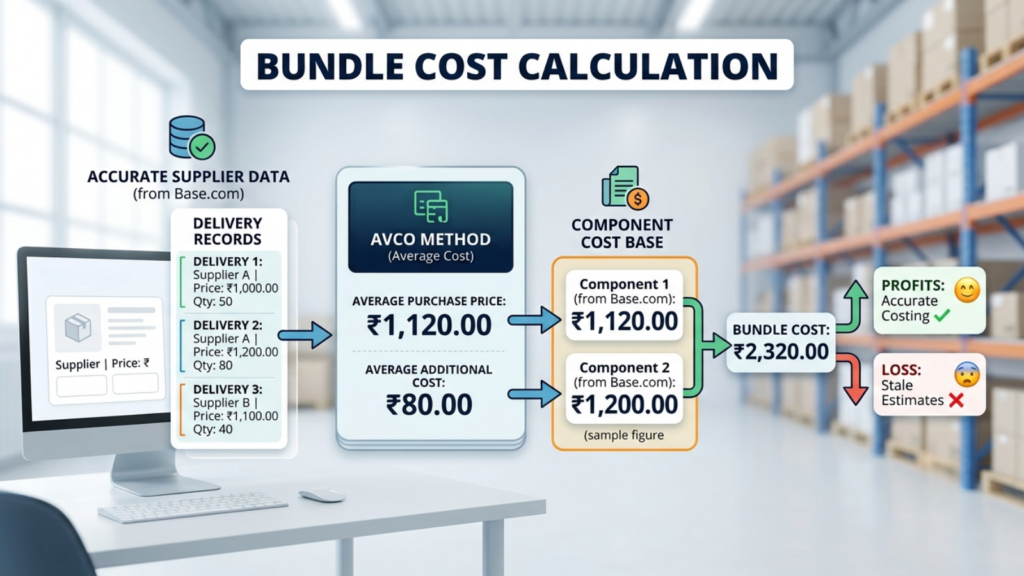
On the product card, under Sales and Warehouse, Base.com shows which supplier the product came from and at what price it was purchased. With purchase price accounting using the standard AVCO method, you see the average purchase price and average additional cost calculated from the prices entered in deliveries.
Use these figures, not your assumptions, to build the bundle’s component cost base. Bundle pricing built on stale cost estimates is the fastest route to a combo that loses money on every sale.
Step 10: Price the Bundle Through a Dedicated Price Group
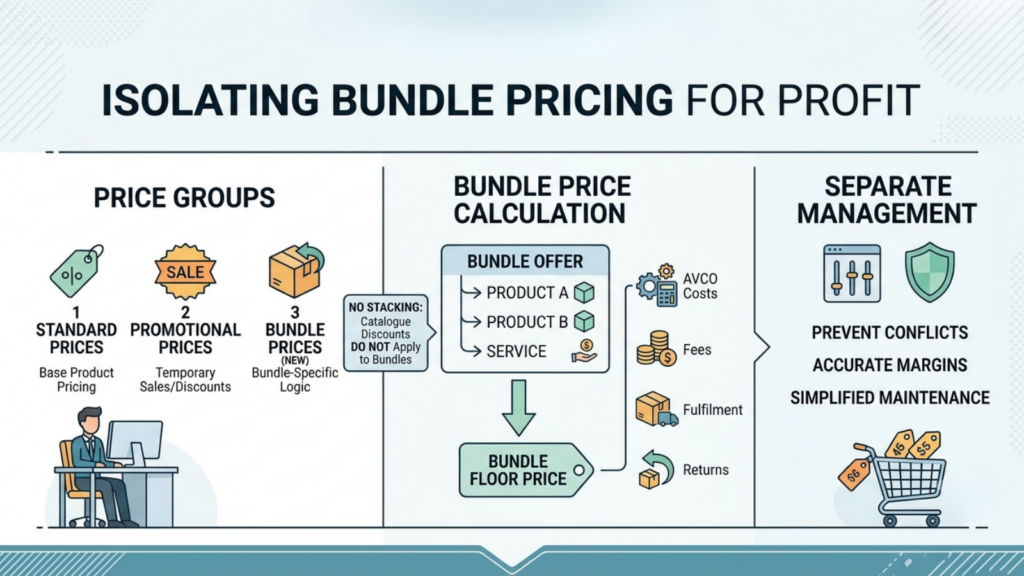
Each inventory is assigned to price groups, which function as separate price lists.
Create a bundle price group separate from your standard and promotional groups. This keeps bundle pricing logic isolated, so a catalogue-wide discount does not stack onto a bundle price that already contains a discount.
Also create the bundle’s floor price, calculated from AVCO component costs plus fees, fulfilment, and expected returns.
Step 11: List the Bundle as a Marketplace Offer
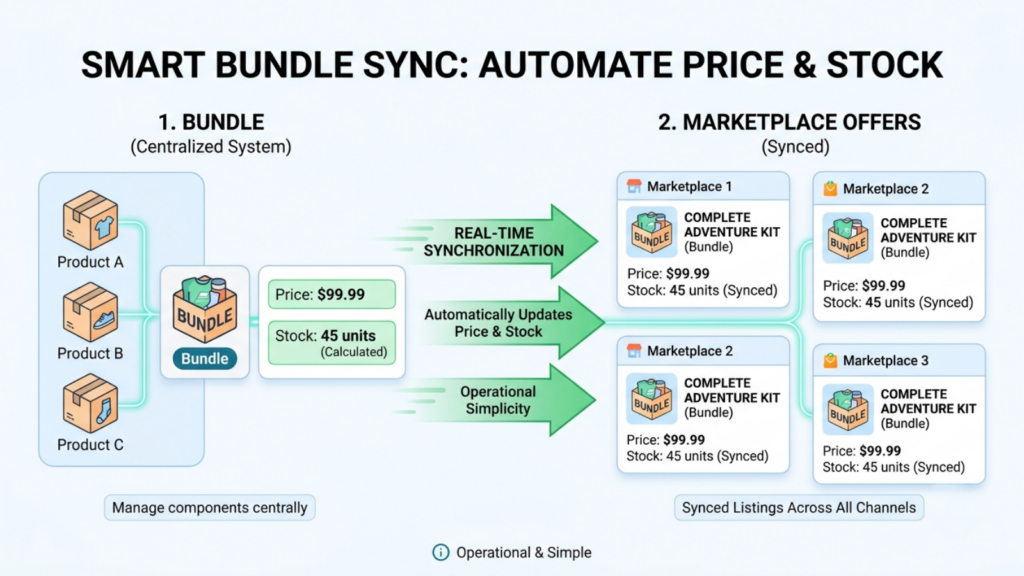
A bundle can be associated with a marketplace offer exactly like a normal product, and the offer synchronises with the bundle’s own price and stock.
This is the capability that makes bundles genuinely operational rather than a manual workaround. The listing shows bundle availability, calculated from component stock, and updates as components move.
Bulk listing tools let you create offers across marketplaces without building each listing individually.
Step 12: Configure Stock and Price Synchronisation for the Sale Window
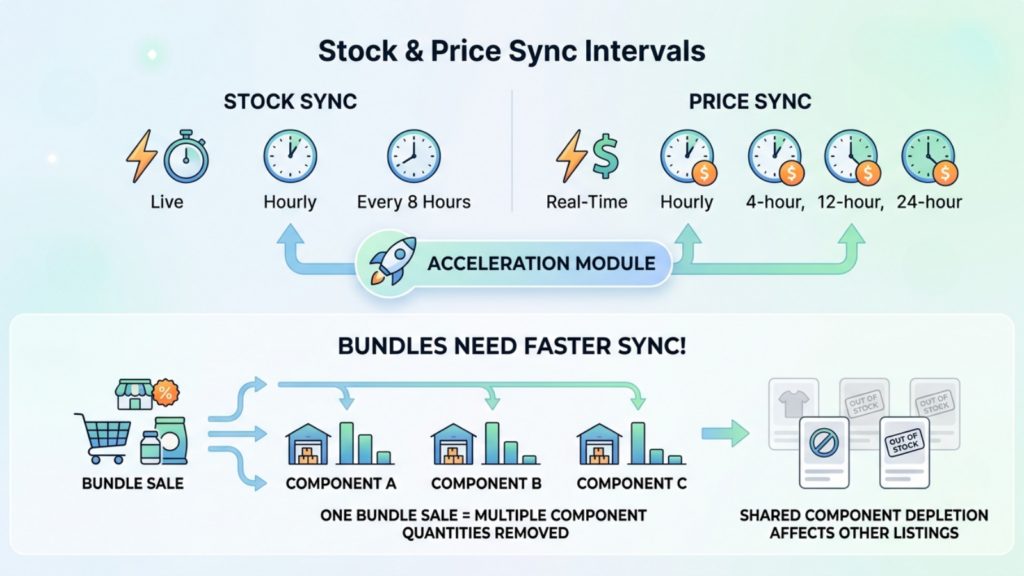
Base.com’s stock synchronisation runs every eight hours, hourly, or live, and price synchronisation at 24-hour, 12-hour, four-hour, hourly, or real-time intervals, with a dedicated Accelerations module that raises frequency for periods when higher sales are expected.
Bundles need faster sync than single SKUs, because one bundle sale moves multiple component quantities at once. A bundle selling well can deplete a shared component faster than any single listing would, which then affects every other listing using that component.
Step 13: Set the Moment of Order Fulfilment

Base.com’s order settings define the moment of fulfilment for orders where products are linked to the Inventory.
Set this consistently with your reservation choice. Reserving at fetch and fulfilling at dispatch gives you an accurate available-to-promise figure through the whole order lifecycle, which matters more for bundles than for single items because the error propagates across every component.
Step 14: Automate the Operational Response in Order Manager
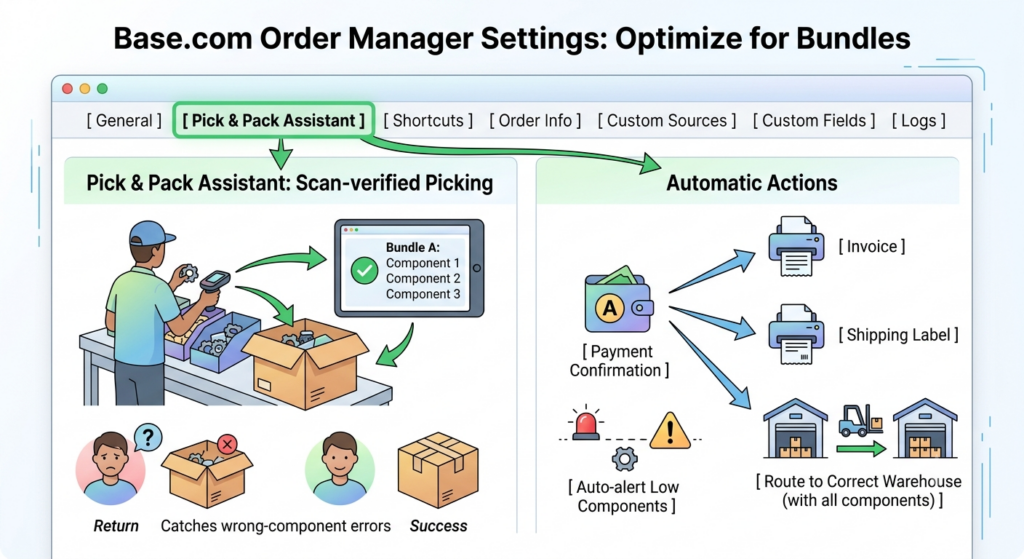
Base.com’s Order Manager settings include tabs for general settings, Picking/packing configuration for the Pick & Pack Assistant, keyboard shortcuts, order information pages, custom order sources for orders placed in person, by phone or by email, additional custom order fields, and order logs.
Two configurations matter most for bundles.
Pick & Pack Assistant. Scan-verified picking catches the wrong-component error at the bench. Bundles have more components to get wrong than single items, and a bundle shipped with a missing component generates a full return rather than a partial one.
Automatic Actions. Auto-generate invoices and labels on payment confirmation, auto-route orders to the warehouse holding all components, and auto-alert when any bundle component falls below threshold.
Step 15: Monitor Component Stock, Not Bundle Stock
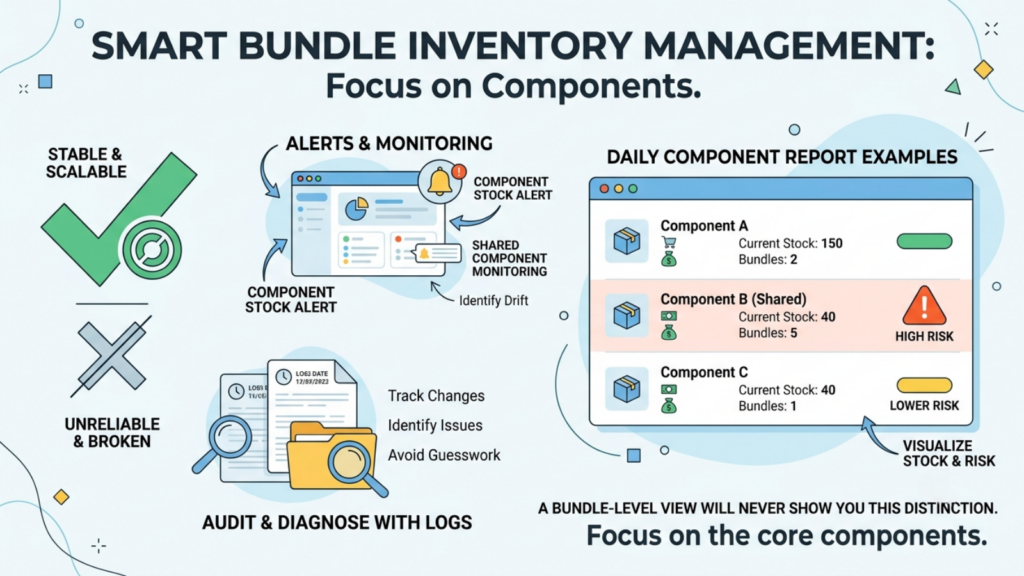
This is the step that separates working bundle operations from broken ones.
Bundle availability is derived from component availability, so the leading indicator is always the component. Set alerts on components, particularly any component shared across multiple bundles or also sold standalone.
Order logs let you audit what changed and when, which is how you diagnose a component that drifted rather than guessing at it.
Build one report you check daily during a sale: every component sitting in an active bundle, its current stock, and the number of bundles depending on it. A component supporting three bundles at forty units of stock is a different risk from one supporting a single bundle at the same level, and a bundle-level view will never show you that distinction.
A Note on Indian Marketplace Coverage
Base.com’s bundle, inventory, order management and synchronisation machinery described above is marketplace-agnostic. Its documented competitor-monitoring and repricing coverage, however, names Amazon, Allegro, eMAG and Ceneo, and Indian marketplace integration coverage is not enumerated in public documentation.
Confirm the current Indian channel list with Base.com directly before building a bundle strategy that depends on specific marketplace integrations.
The Component Drift Problem: The Main Operational Risk in How to Create Product Bundles for Ecommerce Sales
Component drift is when your component stock records diverge from physical reality because of bundle activity. It is the defining operational risk of bundling, and it has three causes.
- Split setting mismatched to physical storage. Splitting enabled on a pre-assembled hamper, or disabled on a bundle picked from separate bins, guarantees drift from the first order.
- Shared components across multiple bundles. A single SKU appearing in four bundles and also sold standalone is drawn down by five different demand streams. Without live sync, the last unit is visible to all five.
- Manual stock adjustments. Someone corrects a count on a component without accounting for open bundle orders. This is precisely what strict inventory control prevents.
Detecting drift early is the single most valuable habit in how to create product bundles for ecommerce sales at scale. Cycle count shared components more frequently than anything else in your catalogue. If a component appears in more than two bundles, it belongs in your weekly count, not your quarterly one.
Category Guidance: How to Create Product Bundles for Ecommerce Sales by Vertical
| Category | Bundle type that works | Main caution |
| Beauty and personal care | Routine kits, shade sets | Batch and expiry must be tracked per component; enforce FEFO |
| Consumer electronics | Anchor plus accessory | Accessory margin funds the discount; never discount the anchor |
| FMCG and food | Replenishment multipacks | Shortest component expiry governs the whole bundle |
| Fashion and apparel | Coordinated sets | Returns come back whole; a 25-30% return rate hits harder on bundles |
| Home and kitchen | Room or task kits | Cubic volume; a bundle may need a larger box tier |
| Baby and toys | Gifting sets | Festive gifting demand concentrates in the final 72 hours |
| Supplements | Multi-month packs | Ring-fence from subscription stock |
The FMCG row carries a rule worth stating explicitly: a multipack inherits the expiry of its earliest-dating component. Building a six-month bundle around a component with four months remaining creates a write-off, not a promotion.
Metrics to Track for Bundle Performance
Measurement is what tells you whether how to create product bundles for ecommerce sales was executed well or merely executed.
| Metric | What it tells you |
| AOV, bundle orders vs single-item orders | Whether the bundle is doing its primary job |
| Contribution per order, bundled vs unbundled | The actual financial answer |
| Bundle attach rate | Share of anchor-SKU buyers choosing the bundle |
| Component stock accuracy | Whether drift is occurring |
| Bundle return rate vs single-item return rate | Whether bundles return disproportionately |
| Cannibalisation rate | Whether bundles replaced full-price single sales |
Cannibalisation is the metric most often skipped and most worth tracking. If bundle sales grew while single-SKU sales of the same anchor fell by a similar volume, you discounted existing demand rather than creating new demand.
The honest test of how to create product bundles for ecommerce sales is whether total contribution rose, not whether bundles sold.
Doing How to Create Product Bundles for Ecommerce Sales Well Is an Operations Problem
The commercial idea behind a bundle takes an afternoon. The operational setup that keeps it from corrupting your stock records is the actual work.
Components as proper catalogue products, in the same inventory, with their own SKUs. Reservations on, negative stock blocked, strict inventory control considered. The split setting matched to physical storage. Costing from real AVCO purchase prices. A dedicated price group with its own floor. Faster synchronisation because one bundle sale moves several components. Alerts on components rather than on bundles.
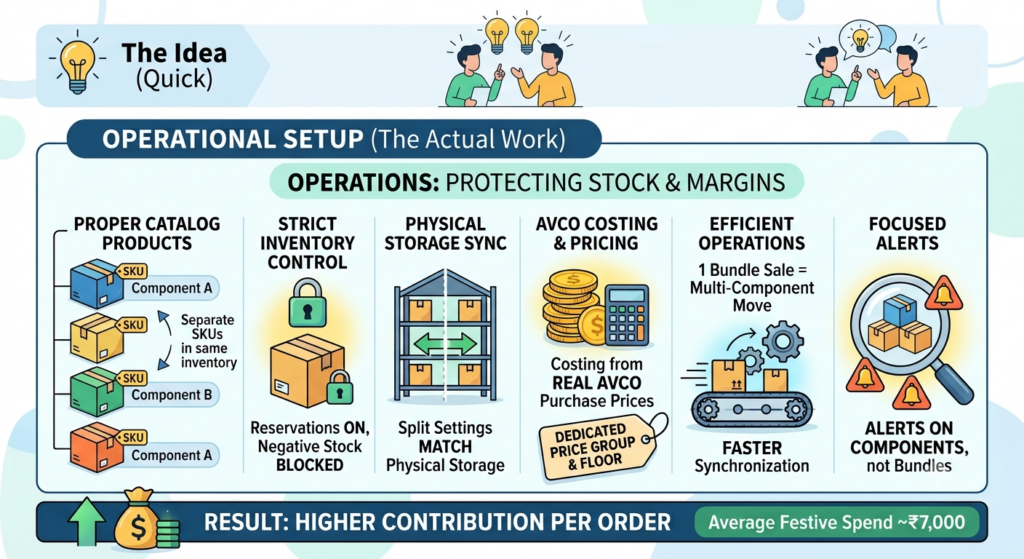
With Indian festive average spend near ₹7,000 per shopper and contribution margins compressing across the industry, contribution per order is one of the few levers still fully within your control. Bundles move it, provided the operational layer holds.
Build components first. Match the split to the shelf. Fund the discount from fulfilment. Watch the components, not the bundle.
Frequently Asked Questions
How should I price a product bundle?
Should bundles be split into components in the order?
How is bundle stock calculated?
Do bundles increase returns?
What is the biggest risk in how to create product bundles for ecommerce sales?



[…] Bin-location sequenced pick lists, barcode scan enforcement at packing, kit and bundle component-level picking, pincode-level COD/RTO flagging before label generation, native SAP […]
[…] deducts each component when a bundle ships, keeping festive gift sets and individual SKUs aligned. Handicraft, home decor, and gifting sellers […]
[…] time, and its demand lands inside a three-week window. Once you accept that framing, how to manage combo and bundle inventory in ecommerce becomes a planning problem rather than a listing […]