
Learning how to manage pre-order stock separately comes down to four moves. Create a dedicated pre-order inventory pool, cap it against confirmed production, keep it out of live marketplace stock, and fulfil it on its own timeline. When promised units never mix with sellable stock, you avoid overselling, cancellations, and account health penalties.
Most D2C launches in India do not fail on demand. They fail because the operations layer cannot tell a promised unit from a physical one.
India’s e-commerce market is valued at around $226 billion, and D2C is growing at roughly 40% CAGR. More brands are launching more products, faster. That pace makes pre-orders a powerful launch tool and a serious operational risk at the same time.
This guide shows how to manage pre-order stock separately, from setting the right quantity cap to converting stock inward. It also covers COD, invoicing, launch metrics, and how Base.com runs the entire flow from one system.
What Is Pre-Order Inventory Management?
Pre-order inventory management is the process of selling products before they reach your warehouse while tracking those commitments apart from ready stock. It connects demand, production, and dispatch into one controlled flow.
For Indian D2C brands, the process usually involves three distinct stock states:
- Promised stock: Units customers have booked and paid for, but which do not yet physically exist in your warehouse.
- Incoming stock: Units your manufacturer or job worker is producing against a confirmed purchase order.
- Sellable stock: Units that have been inwarded, quality-checked, and are ready to pick, pack, and ship.
The problem starts when a system treats all three as one number. A brand selling 500 units of a new kurta set cannot afford to show 500 units live on Myntra when only 120 are on the shelf.
Knowing how to manage pre-order stock separately is what keeps these three states distinct. Every rupee collected on a pre-order should map to a unit production has already committed to.
Why Do Indian D2C Launches Break Without Separate Pre-Order Stock?
Pre-orders expose every weak link in your operations at once. Here is where launches typically go wrong for Indian sellers.
1. Marketplace Sync Pushes Phantom Stock Live
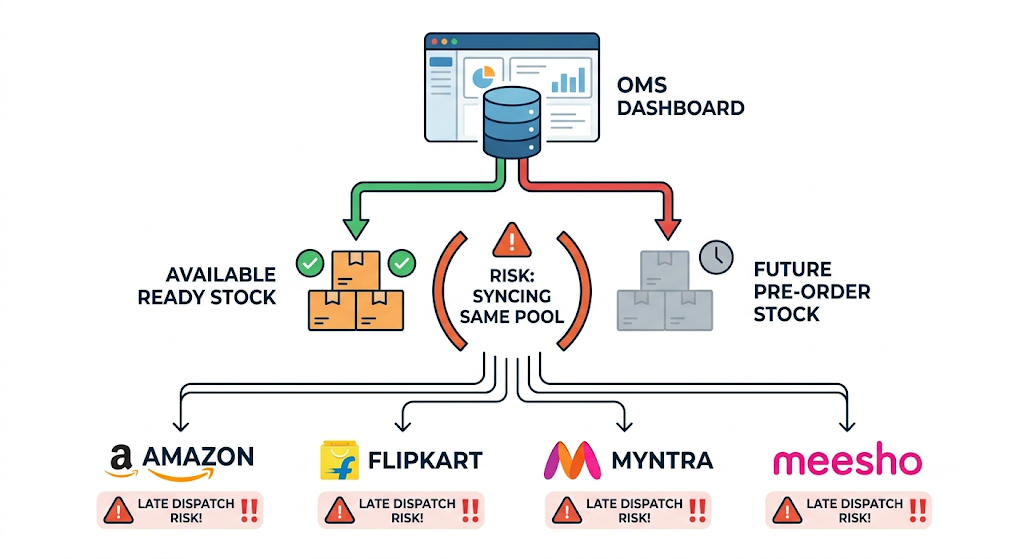
Most OMS setups sync one inventory number to every connected channel. If pre-order quantities sit in the same pool as ready stock, that number flows straight to Amazon, Flipkart, Myntra, and Meesho.
Marketplace buyers expect dispatch within the listed SLA. Every order you cannot ship on time turns into a cancellation or late dispatch, and both directly damage your seller metrics.
2. COD Turns Pre-Orders Into a Returns Liability
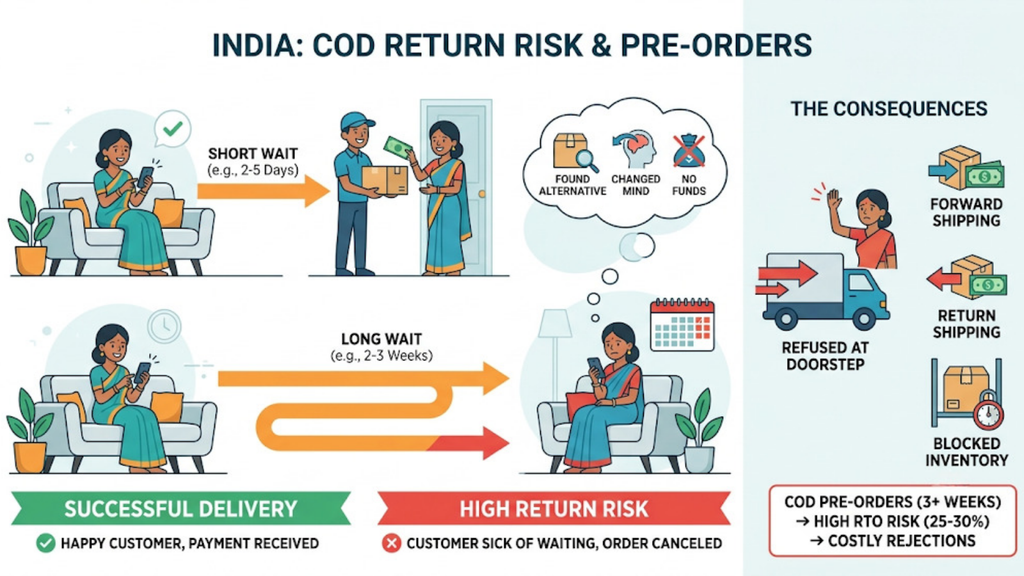
COD return rates in India run at roughly 25-30%. That risk climbs when a customer books a product and waits three weeks for it to arrive.
The longer the wait, the more likely the buyer has already found an alternative or changed their mind. A COD pre-order that gets refused at the doorstep costs you forward shipping, return shipping, and blocked stock.
3. Production Delays Reach Customers Before They Reach You
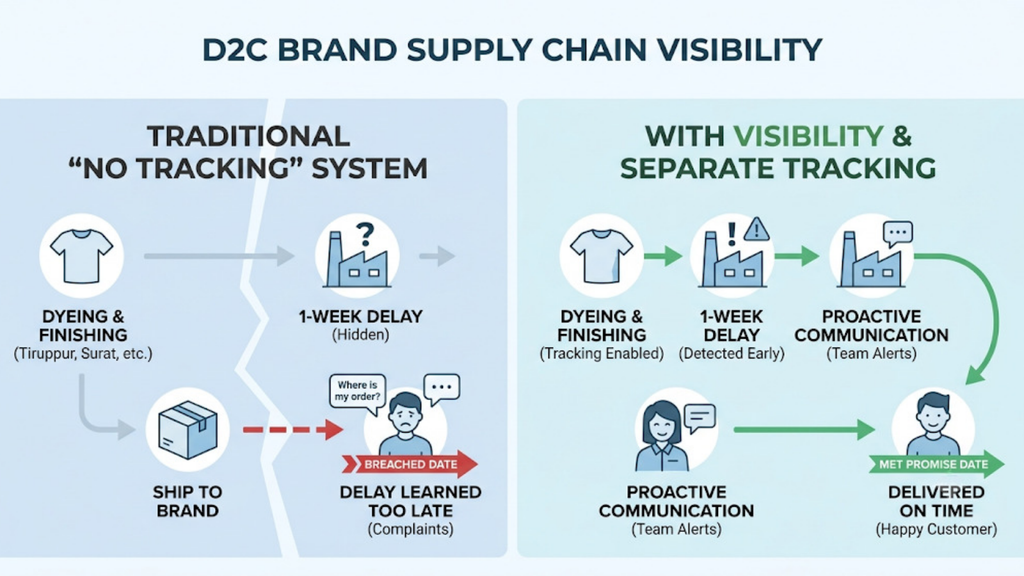
Many D2C brands depend on job workers and contract manufacturers across clusters like Tiruppur, Surat, Jaipur, and Moradabad. A one-week delay at the dyeing or finishing stage is common.
Without separate tracking, your team learns about the delay only when orders start breaching their promised date. By then, customer complaints are already coming in.
4. Cash Flow Looks Healthier Than It Is
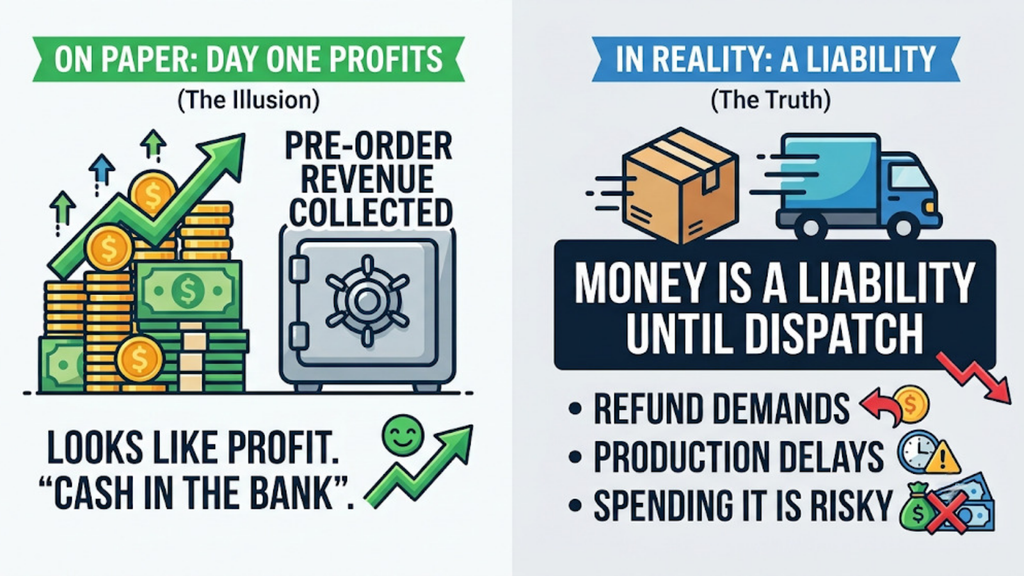
Pre-order collections sit in your bank account before a single unit ships. On paper, the launch looks profitable from day one.
In reality, that money is a liability until dispatch. Brands that spend pre-order advances on marketing or the next production run often struggle when refunds or delays hit together.
5. Mixed Carts Stall Ready-to-Ship Orders
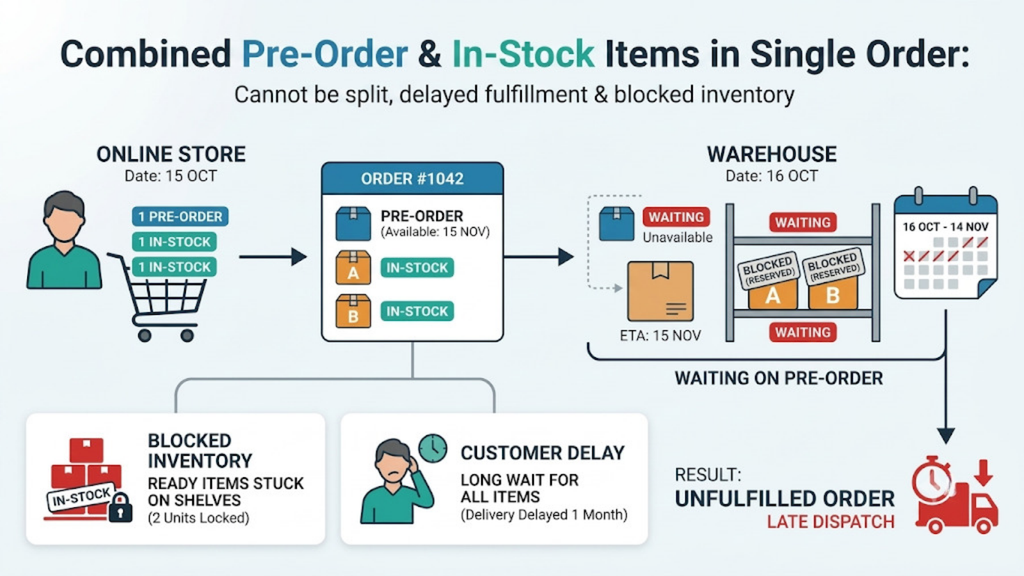
A customer adds one pre-order item and two in-stock items to the same cart. If your system cannot split that order, the in-stock items sit in the warehouse until the pre-order unit arrives.
Your ready stock stays blocked, the customer waits longer than needed, and your dispatch numbers look worse than they are.
6. Festive Launches Multiply Every Error
Many Indian brands launch around Diwali, Raksha Bandhan, or big marketplace sale events. Order volumes during these windows can spike several times over normal levels.
A manual pre-order process that barely survives a regular week collapses under festive load. Small tracking errors turn into hundreds of wrong or delayed shipments.
How to Manage Pre-Order Stock Separately: An 8-Step Framework
The steps below follow the actual life of a pre-order, from booking to dispatch. Follow them in sequence so no unit gets promised twice or shipped late.
This framework is built for Indian D2C brands selling across their own website and multiple marketplaces. It answers how to manage pre-order stock separately without slowing down your regular operations.
1. Create a Dedicated Pre-Order SKU or Inventory Pool
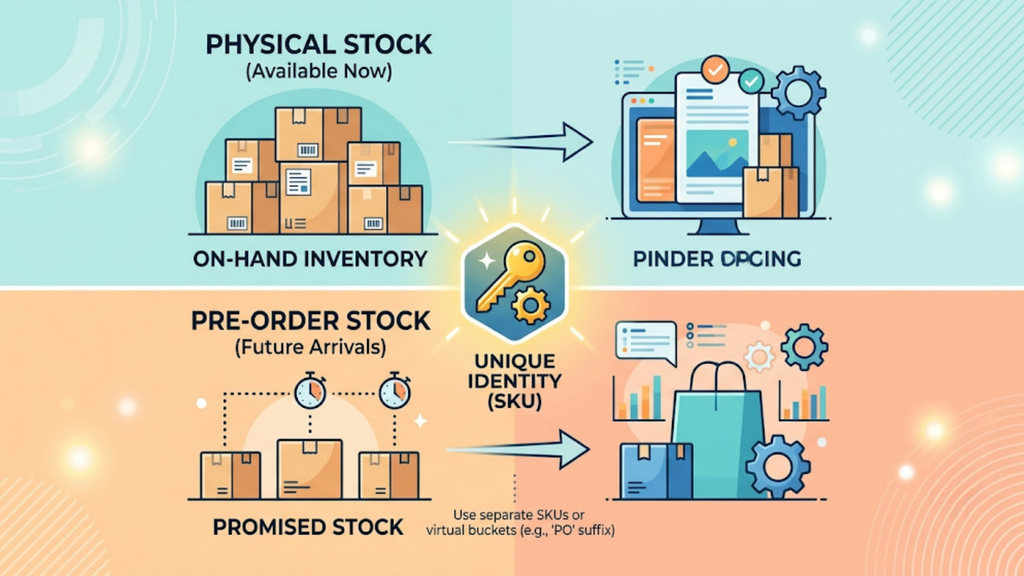
Start by giving pre-order units their own identity in your system. Many brands use a SKU suffix such as “PO” or a separate virtual inventory bucket for launching products.
This single step prevents your team and your software from confusing promised stock with physical stock. Every report, label, and allocation rule can then treat pre-orders differently.
2. Cap Pre-Order Quantity Against Confirmed Production
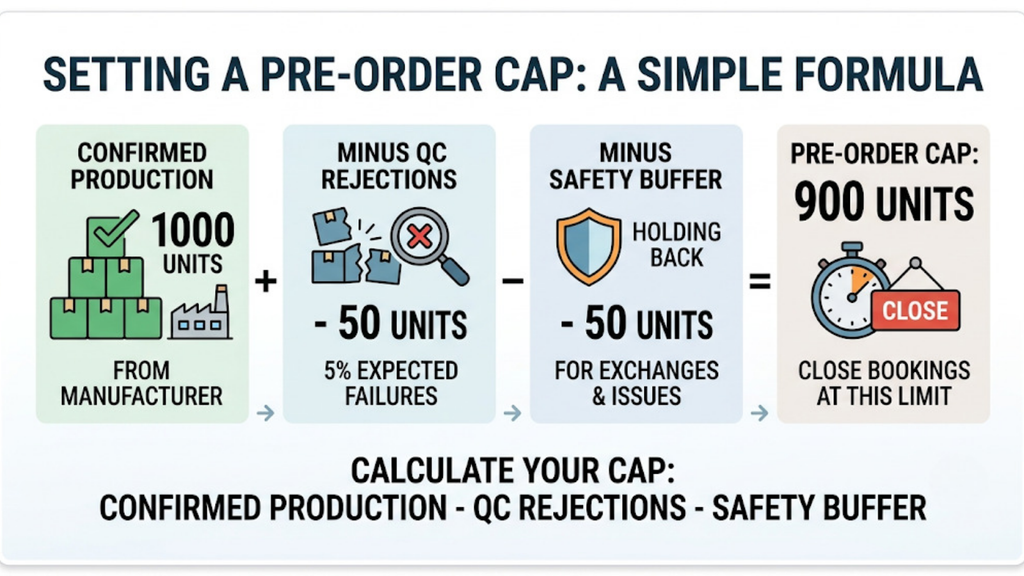
Never open pre-orders without a hard quantity limit. Your cap should come from what production has confirmed, not from what marketing expects to sell.
A simple formula works well:
Pre-order cap = Confirmed production quantity − Expected QC rejection − Safety buffer
If your manufacturer confirms 1,000 units, you expect 5% QC rejection and keep a 5% buffer, your pre-order cap is 900 units. Close bookings the moment you hit that number.
3. Block Pre-Order Stock From Marketplace Sync
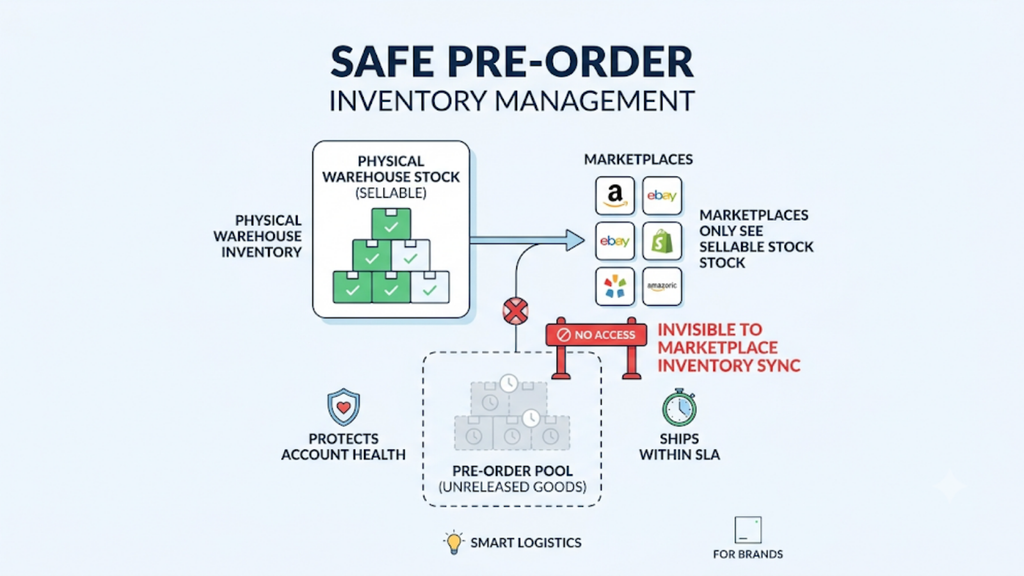
This is the step most brands miss. Your pre-order pool must stay invisible to marketplace inventory sync until stock is physically inward.
Understanding how to manage pre-order stock separately at the channel level protects your account health. Marketplaces should only ever see sellable stock that can ship within their SLA.
4. Set Channel Rules for Where Pre-Orders Are Accepted
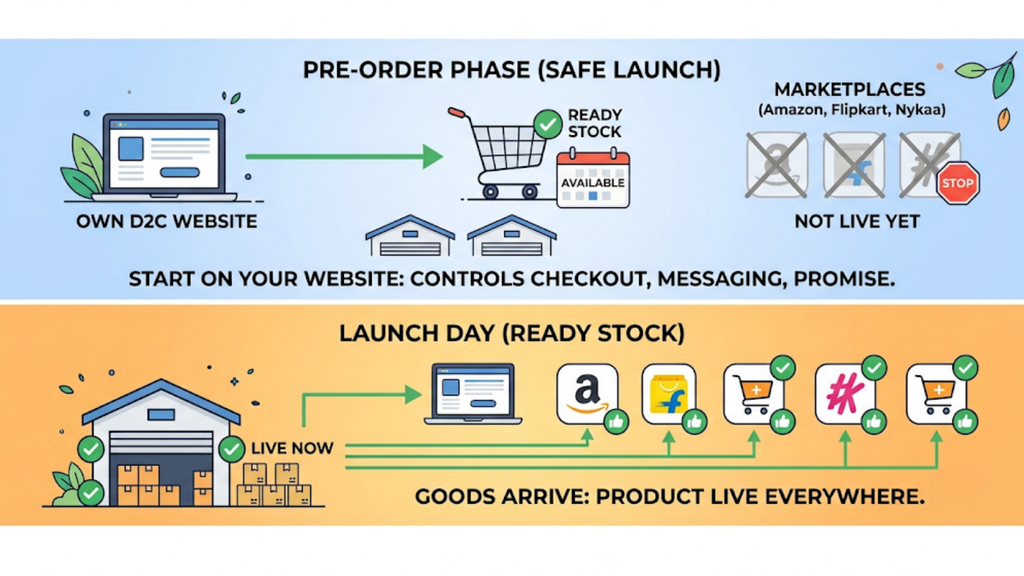
Decide exactly which channels will take pre-orders. For most Indian D2C brands, the own website is the safest starting point because you control the checkout, messaging, and dispatch promise.
Keep marketplaces on ready stock only. Once goods arrive and you convert pre-order stock into sellable stock, you can push the product live everywhere.
5. Define and Display a Realistic Dispatch Window
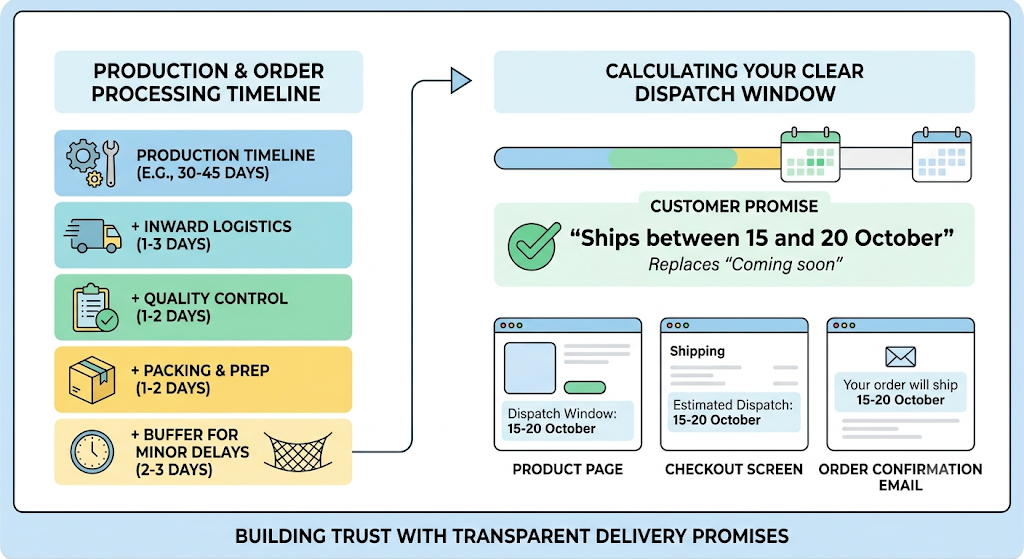
Show a clear dispatch window on the product page, the checkout screen, and the order confirmation. “Ships between 15 and 20 October” works far better than “Coming soon.”
Build this window from your production timeline plus inward, QC, and packing time. Add a small buffer so a minor delay does not break your promise.
6. Split Mixed Carts at Order Creation
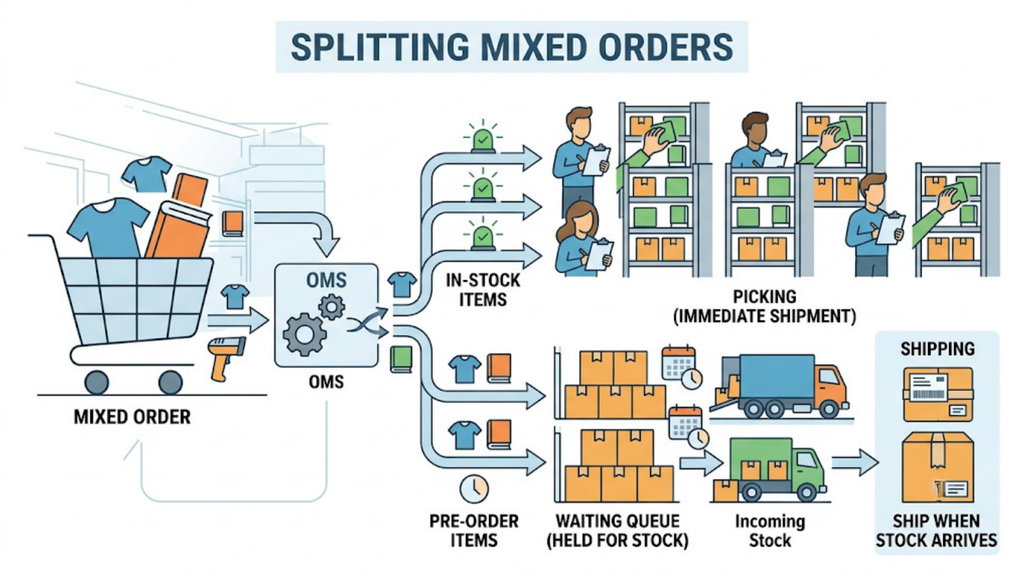
Configure your OMS to split orders that contain both pre-order and in-stock items. The in-stock portion should move to picking immediately.
The pre-order portion waits in its own queue until stock arrives. Customers get part of their order sooner, and your ready stock never sits blocked.
7. Link Pre-Orders to Purchase Orders and Inward Schedules
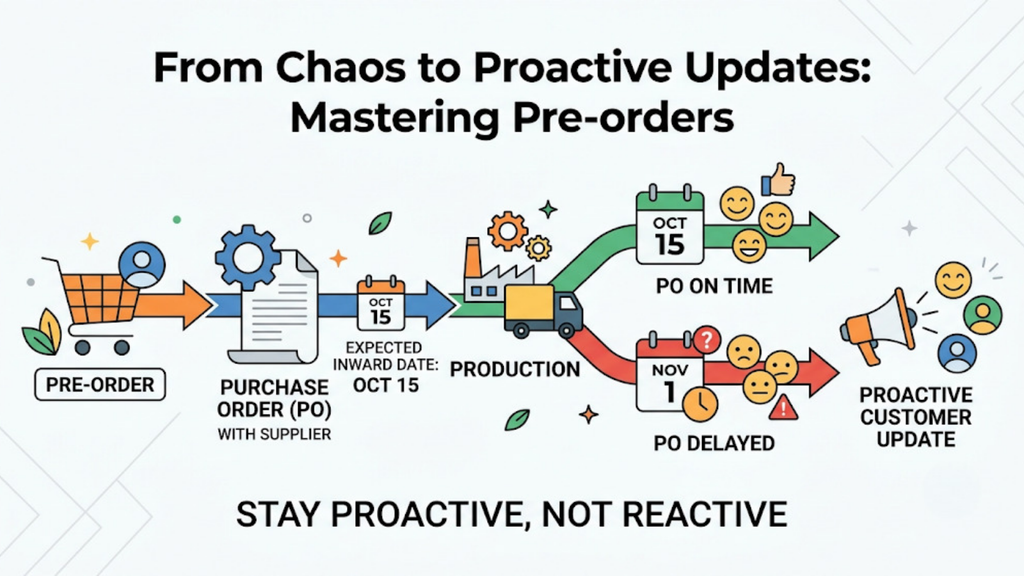
Every pre-order should trace back to a specific purchase order with a supplier and expected inward date. This gives your operations team early warning when production slips.
If the PO date moves, you know exactly which customers are affected. Your team can then send proactive updates instead of reacting to complaints.
8. Convert Pre-Order Stock in Booking Sequence at Inward
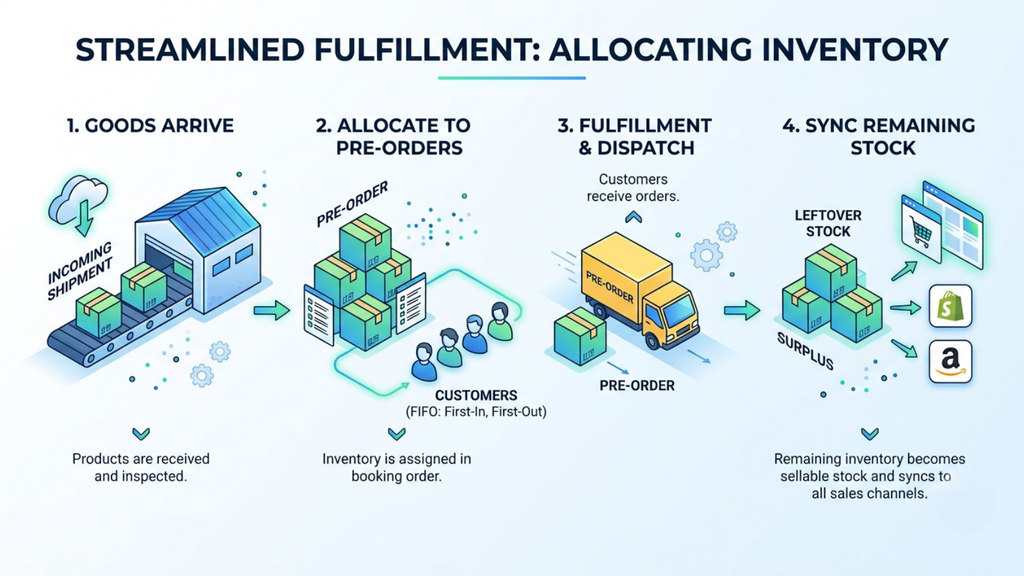
When goods arrive, allocate them to pre-orders in the order customers booked. The first customer to book should be the first to receive a dispatch.
Only after all pre-orders are allocated should leftover units move into sellable stock. That surplus then syncs to marketplaces and your website as regular inventory.
Pre-Order vs Backorder vs Regular Stock: What Is the Difference?
These three stock types are often confused, which leads to wrong system settings. The table below shows how each one behaves across your operations.
Use it as a reference when you configure your OMS and brief your team on how to manage pre-order stock separately from everything else.
| Factor | Pre-Order Stock | Backorder | Regular Stock |
| Stock status | Not yet produced or received | Normally stocked, temporarily out | Physically available in warehouse |
| Typical use | New launches, limited editions, crowdfunded drops | Restocking best-sellers | Everyday sales |
| Customer expectation | Knows the product ships later | Often expects near-immediate dispatch | Expects dispatch within SLA |
| Marketplace sync | Should stay blocked | Usually paused | Synced live across channels |
| Recommended payment | Prepaid or token amount | Prepaid or COD | Prepaid or COD |
| Dispatch trigger | Inward and allocation of new production | Arrival of replenishment stock | Order confirmation |
| Main risk | Production delay, cancellations | Stockout disappointment | Overselling if sync lags |
How Should You Handle Payments, COD and Invoicing on Pre-Orders?
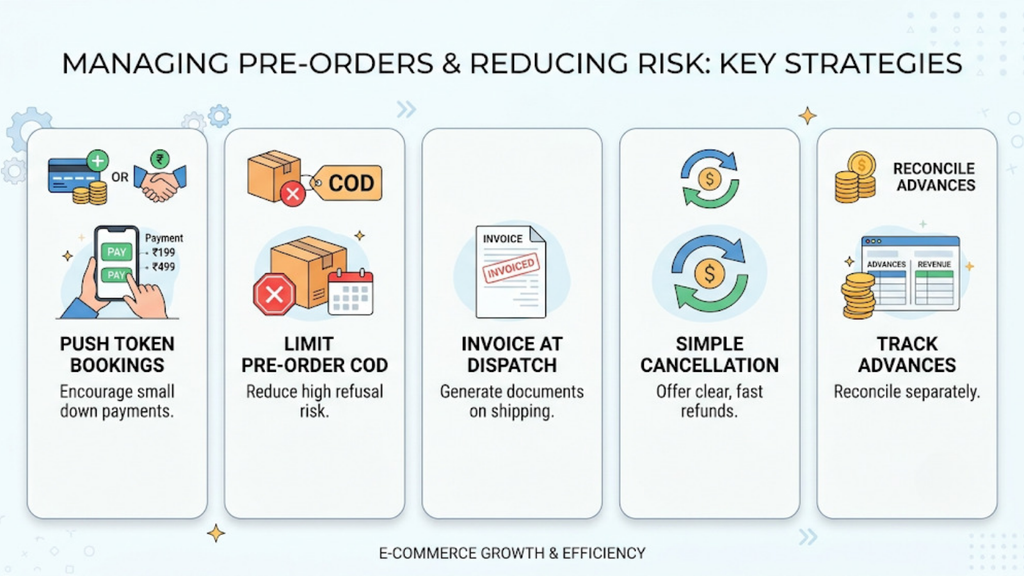
Payments are where Indian pre-orders differ most from global playbooks. COD habits, GST rules, and refund expectations all shape how you should structure bookings.
Getting this right is part of how to manage pre-order stock separately in financial terms, not just physical ones. Follow these five rules:
- Push prepaid or token-amount bookings: Offer full prepaid payment or a token amount such as ₹199 or ₹499 at booking. A token amount filters out casual buyers and cuts refusal risk sharply.
- Restrict full COD on pre-orders: Full COD on a product that ships weeks later carries the highest refusal risk. If you must offer it, limit it to repeat customers or lower-value SKUs.
- Raise the tax invoice at dispatch: Generate the tax invoice and, where applicable, the e-way bill when goods actually move. Record advances cleanly so your CA can map them against final invoices.
- Publish a clear cancellation and refund policy: State how customers can cancel before dispatch and how quickly refunds reach them. Fast, predictable refunds protect your brand when delays happen.
- Reconcile advances separately: Track pre-order collections in their own ledger view until dispatch. This stops your finance team from treating advances as earned revenue.
How Base.com Helps You Manage Pre-Order Stock Separately
Spreadsheets can handle a pilot launch of 50 units. They cannot handle a multi-channel launch with thousands of bookings, mixed carts, and a festive deadline.
Base.com gives Indian D2C brands one system to manage pre-order stock separately while regular operations keep running at full speed. Here is how each part of the workflow comes together.
1. A Dedicated Pre-Order Management Add-On
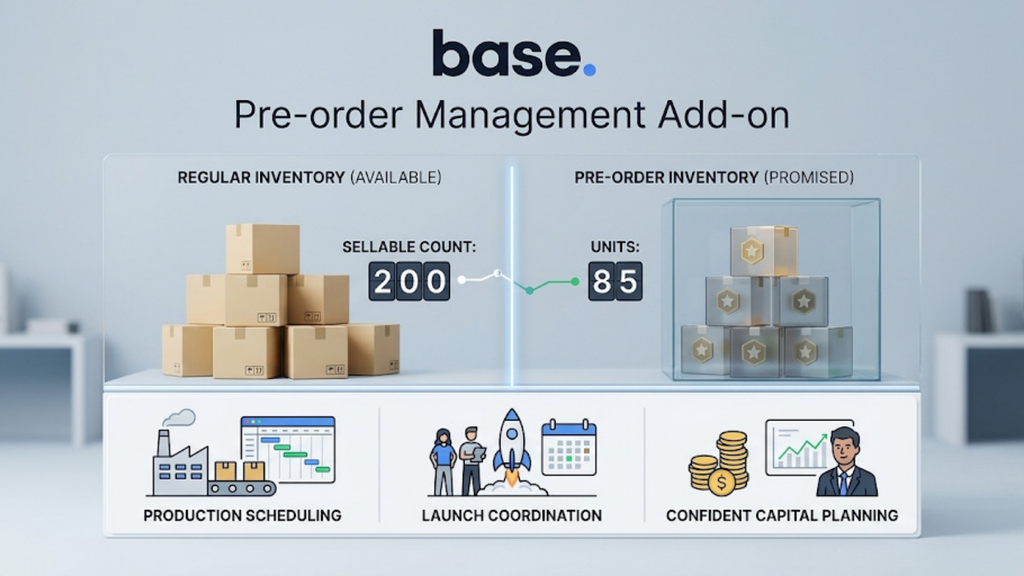
Base.com offers a pre-order management add-on that separates pre-order inventory from regular stock. Promised units live in their own pool and never inflate your sellable count.
The add-on also supports the business side of launches. It helps with production scheduling, launch coordination, and using pre-order demand to plan capital more confidently.
2. Separate Fulfilment Timelines for Pre-Order and Ready Stock
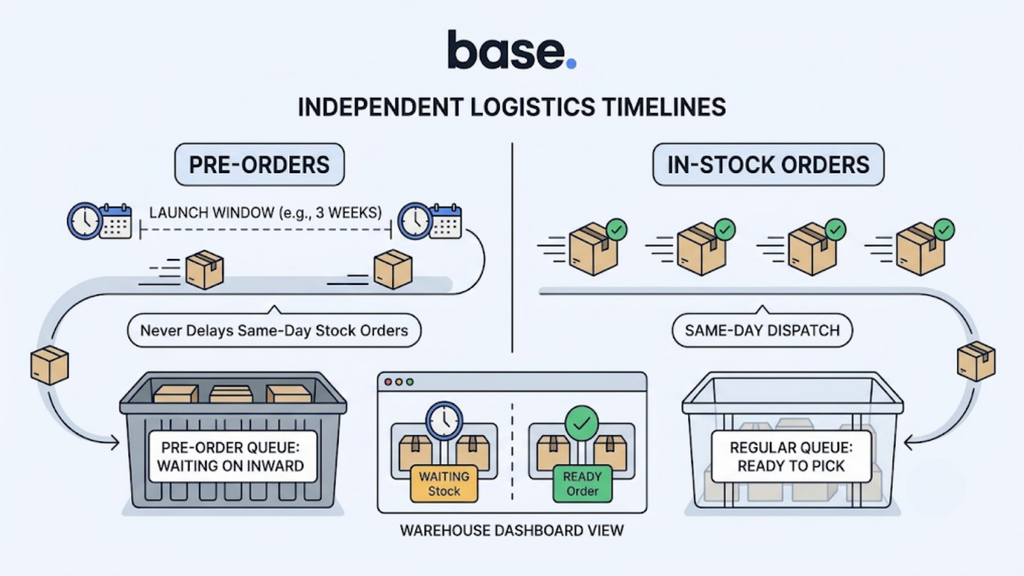
Pre-orders and regular orders move on different clocks. Base.com manages these timelines independently, so a three-week launch window never delays same-day dispatch for in-stock orders.
Custom workflows let you route pre-orders to their own queue. Your warehouse team sees exactly which orders are ready to pick and which are waiting on inward.
3. Marketplace Stock Sync That Only Shows Sellable Units
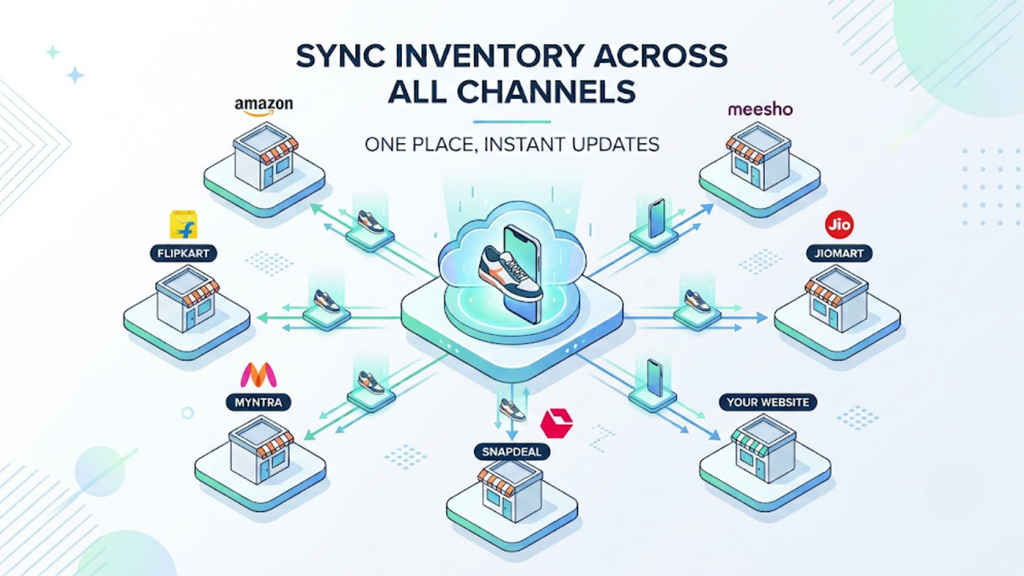
Base.com syncs inventory across Amazon, Flipkart, Myntra, Meesho, JioMart, and your website from one place. Because pre-order stock sits separately, marketplaces only receive units you can actually ship.
The same product listed across several channels updates everywhere at once. That removes the manual, listing-by-listing updates that usually cause overselling during launches.
4. Purchase Orders, Raw Material and Production in One System
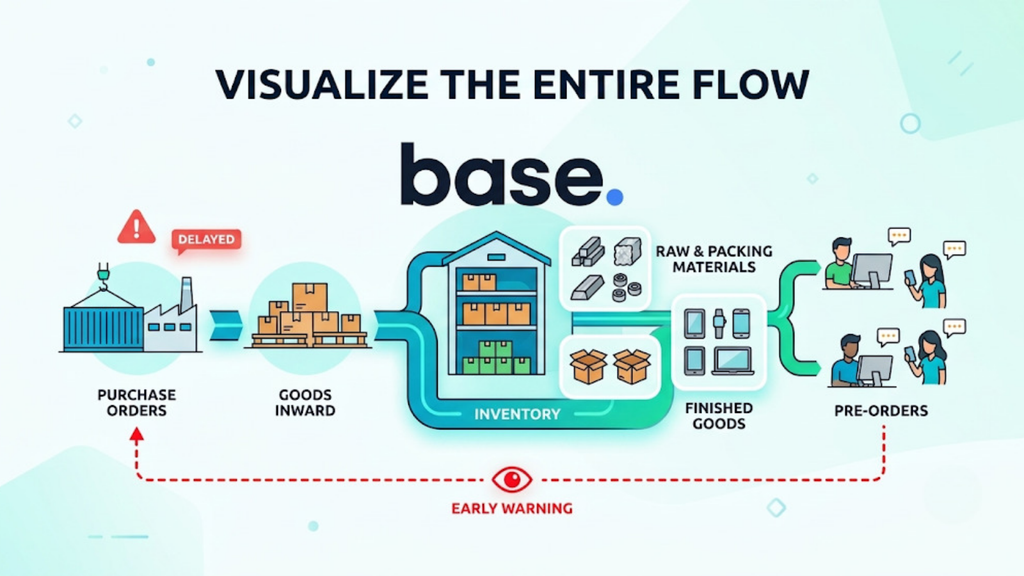
Base.com connects purchase orders, goods inward, and inventory in a single flow. For brands that manufacture in-house, it can also track raw material and packing material alongside finished goods.
This link gives you early warning on delays. When a PO slips, you see which pre-orders it affects before customers start asking.
5. Location-Based Inventory Planning
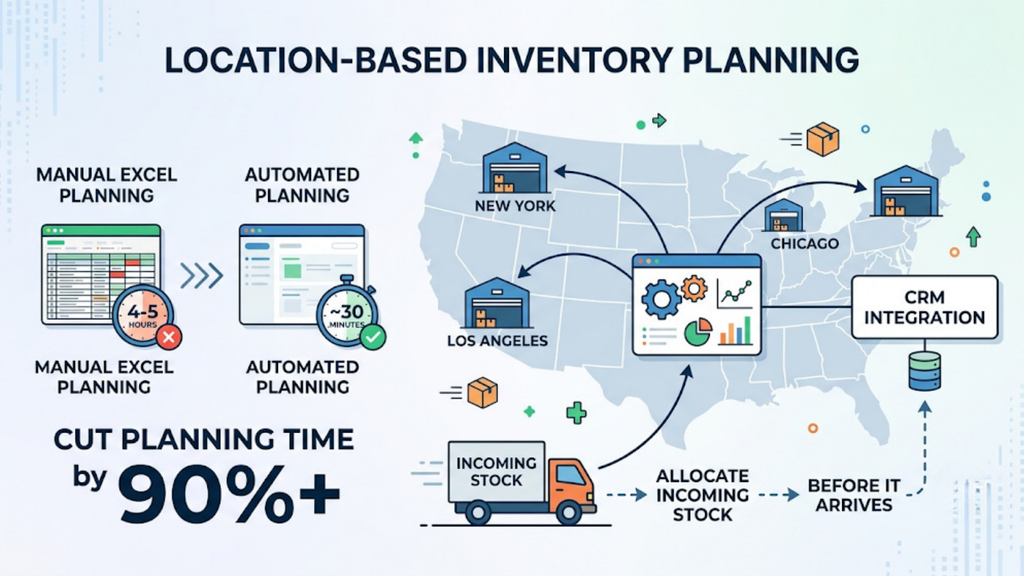
Many D2C brands hold stock across more than one warehouse or city. Base.com’s location-based inventory planning add-on manages stock by geography and can integrate with your CRM.
One fashion seller using this add-on cut 4-5 hours of manual Excel planning down to about 30 minutes. For launches, it means you can allocate incoming stock to the right location before it arrives.
6. SKU-Wise Labels and Bin-Based Picking on Launch Day
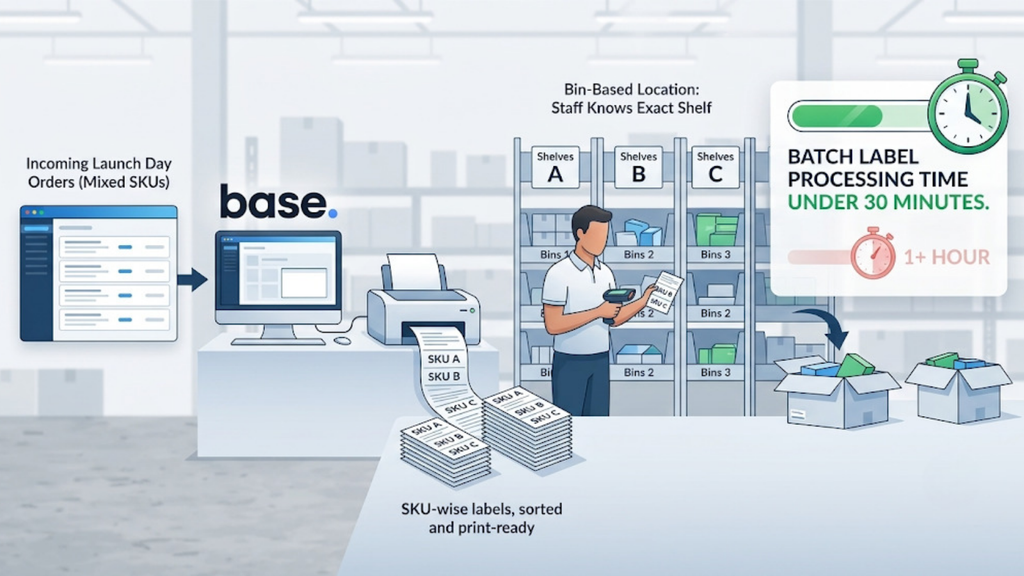
Launch day brings a sudden wave of dispatches for the same few SKUs. Base.com generates SKU-wise labels, so styles come out already sorted and print-ready.
A bin-based location system shows staff the exact shelf for every product. Sellers using automated SKU-wise labels have cut batch label processing from over an hour to under 30 minutes.
7. Launch Reporting You Can Customise
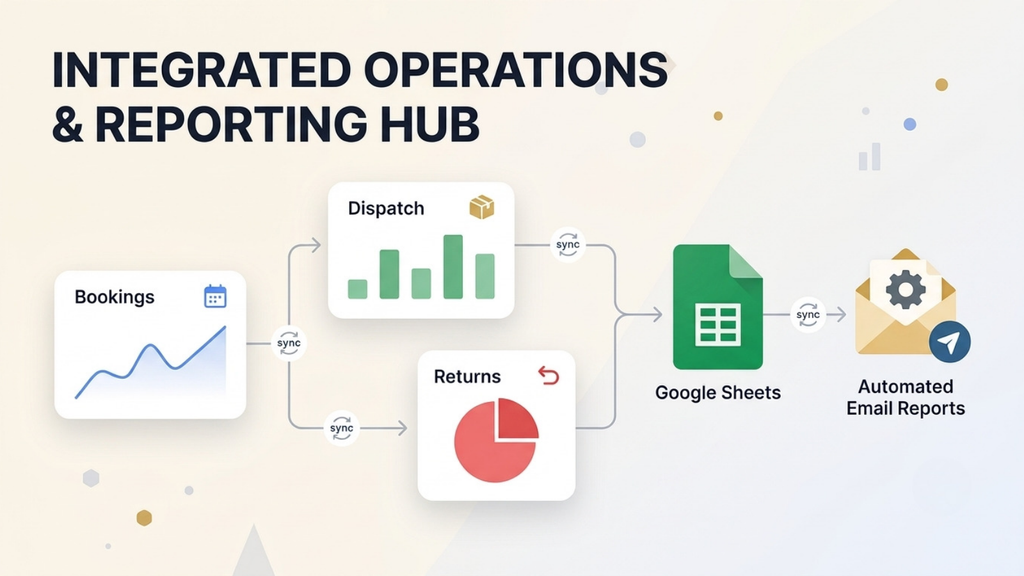
Base.com lets you build custom reports around what matters for a launch, such as bookings, conversion to dispatch, cancellations and returns. Scheduled automated reports reach your team without anyone pulling data manually.
Brands that work heavily in spreadsheets can also use Base.com’s Google Sheets integration add-on. It lets teams create orders and check payment status directly from Google Sheets.
Common Pre-Order Mistakes Indian D2C Brands Should Avoid
Even well-planned launches go wrong because of a few repeat errors. Most of them trace back to not knowing how to manage pre-order stock separately from day one.
- Opening bookings without a production cap: Marketing-driven targets lead to overselling. Always cap bookings against confirmed production.
- Letting pre-orders sync to marketplaces: Phantom stock on marketplaces turns into cancellations and SLA breaches that hurt account health.
- Offering unrestricted COD: Long waits plus COD produce high refusal rates. Use prepaid or token bookings wherever possible.
- Promising vague dispatch dates: “Coming soon” creates anxiety and support tickets. A specific window builds trust.
- Holding mixed carts until everything arrives: Blocking in-stock items frustrates customers and ties up sellable inventory.
- Staying silent during delays: Customers forgive delays they hear about early. They rarely forgive delays they discover on their own.
Which Metrics Should You Track During a Pre-Order Launch?
You cannot fix what you do not measure. These metrics show whether your launch is healthy before problems reach customers.
Track them daily during the booking window and weekly after inward:
- Cap utilisation: Bookings as a percentage of your pre-order cap. This tells you when to close bookings or negotiate extra production.
- Pre-order cancellation rate: Cancellations before dispatch as a share of total bookings. A rising rate signals that your dispatch window is too long.
- On-time dispatch rate: Pre-orders shipped within the promised window. This is your core customer promise metric.
- Allocation accuracy: Inwarded units correctly matched to bookings. Errors here mean wrong customers getting stock first.
- Pre-order RTO rate: Returns-to-origin on shipped pre-orders, split by prepaid and COD. It shows whether your payment rules are working.
- Surplus conversion rate: Leftover units moved into sellable stock after all pre-orders are fulfilled. It shows how accurate your production cap was.
Final Word: Launch With Control, Not Guesswork
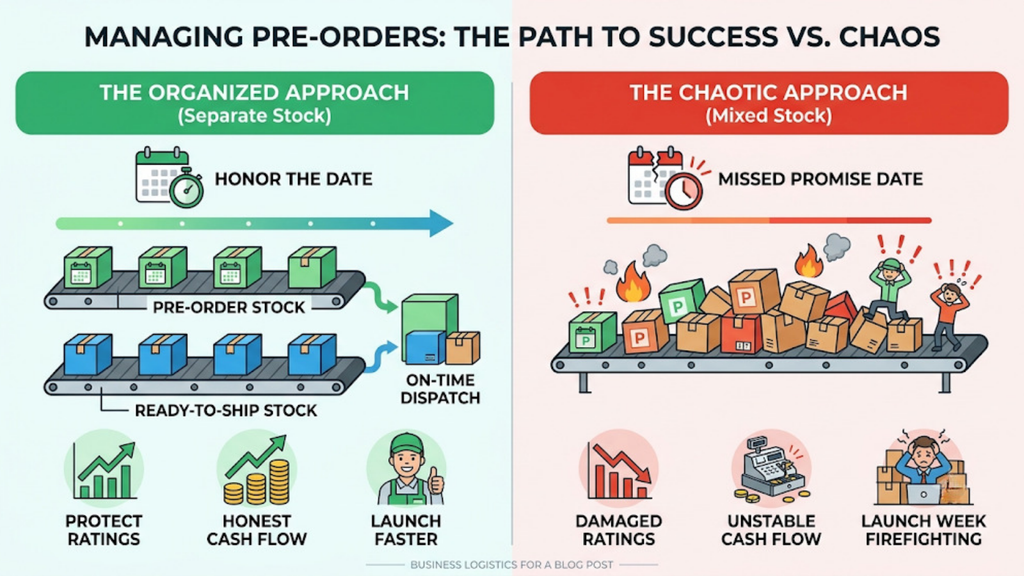
A pre-order is a promise with a date attached. Every part of your operation, from production to payment to dispatch, has to honour that date.
Brands that understand how to manage pre-order stock separately launch faster, protect their marketplace ratings, and keep cash flow honest. Brands that mix pre-order and ready stock spend launch week firefighting.
Base.com gives Indian D2C brands one system to separate pre-order inventory, sync only sellable stock, link bookings to production, and dispatch launch orders at scale. Book a demo with Base.com to plan your next launch with full inventory control.