
To learn how to print Flipkart and Meesho labels in bulk, connect both seller accounts to one order management system, sync and segregate your orders, group them SKU-wise, and generate print-ready 4×6 labels and invoices in a single run. This removes the download, crop, and sort cycle from every dispatch.
Most Indian sellers still print labels portal by portal. That works at 30 orders a day. At 300, it becomes the reason parcels miss the courier pickup.
The stakes are rising. India’s ecommerce market is on track to reach $226 billion by 2030, and Flipkart and Meesho carry a large share of that order volume. Sellers who fix label printing now fix the first bottleneck in their dispatch chain.
This guide explains how to print Flipkart and Meesho labels in bulk, which batching rules save the most time, and how Base.com turns label printing into one step inside a connected order workflow.
Why Does Manual Label Printing Break Down for Flipkart and Meesho Sellers?
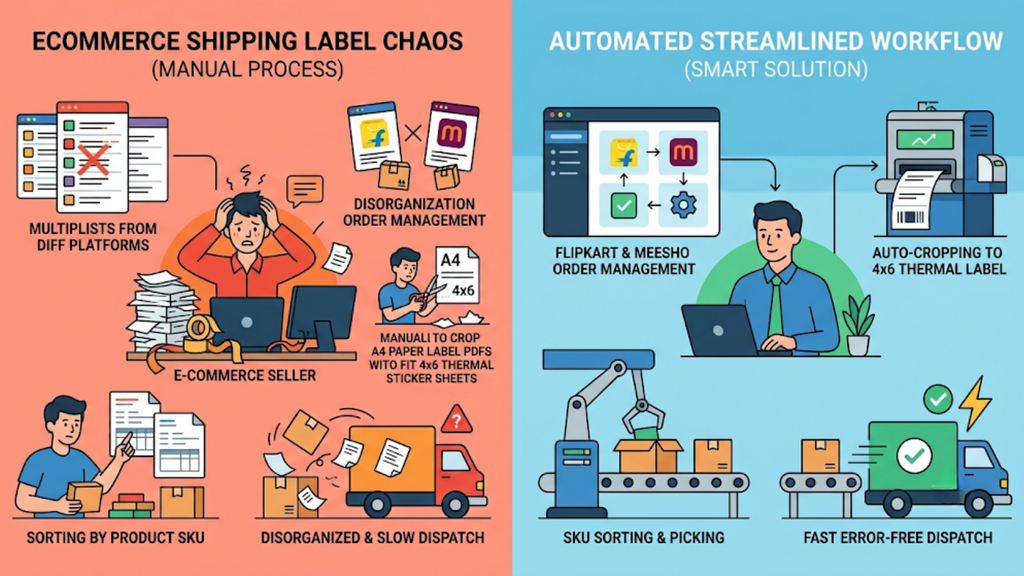
Before you work out how to print Flipkart and Meesho labels in bulk, it helps to see where the manual process loses time. Label printing looks like a five-minute task until your order count crosses a few hundred a day, and then every manual step multiplies.
1. Two Portals, Two Separate Downloads
Flipkart labels come from Seller Hub. Meesho labels come from the Supplier Panel. Each portal needs its own login, filters, and download, so your team repeats the same job twice before a single parcel is packed.
The filters differ too. A team member trained on Seller Hub often slows down on the Supplier Panel, and that gap shows up most on sale days.
2. A4 PDFs That Need Cropping
Both portals typically export labels on A4 pages, often with the tax invoice on the same sheet. Thermal printers need a 4×6 inch label, so someone has to crop, resize, and re-export every file before the first print.
A crop that cuts off part of a barcode fails at the courier hub. The parcel then returns to your warehouse or sits unscanned.
3. Labels That Print in Random Order
Portal PDFs follow order sequence, not product sequence. Your packers then sort a mixed stack of labels by hand to match each one with the right SKU on the shelf.
For apparel and footwear sellers, one style can split into a dozen size and colour combinations. Random-order labels turn that variety into mix-ups at the packing table.
4. One Print Run for Every Seller Account
Many Indian sellers run multiple Flipkart and Meesho accounts to separate brands or GST registrations. Each account adds another login, another download, and another chance to miss an order.
A seller running four Flipkart and three Meesho accounts downloads seven label files every dispatch cycle. Missing one file means a full batch of orders never reaches the packing table.
5. Dispatch Deadlines That Slip
Both marketplaces track dispatch timelines closely. A batch that misses the courier pickup can lead to SLA breaches, a weaker account health score, and lower listing visibility.
The damage compounds. Orders that were in stock but missed by a team member hurt account metrics as much as genuine stockouts do.
6. Wrong Labels on the Wrong Parcels
A mismatched label ships the wrong product to the wrong buyer. With COD return rates in India already at 25-30%, every avoidable return adds reverse shipping cost and locks up working capital.
Portal Printing vs Crop Tools vs Base.com: How Do the Methods Compare?
Indian sellers generally use one of three methods to print marketplace labels. The table below compares them on the steps that decide how fast a batch leaves your warehouse.
| Criteria | Base.com | Free Label Crop Tools | Manual Portal Printing |
| Order source | Orders from all connected accounts in one login | PDFs downloaded from each portal and uploaded manually | Each portal and account handled separately |
| Label format | Print-ready 4×6 labels generated directly | A4 PDFs cropped to 4×6 | A4 PDFs cropped by hand or printed as is |
| Sorting | SKU-wise, courier-wise, payment-mode, and weight-wise grouping | SKU or courier sorting within the uploaded file | Manual sorting after printing |
| Invoices | Labels and invoices generated together in one click | Invoice separated or skipped during cropping | Printed separately from each portal |
| Inventory link | Stock updated across every channel as orders are processed | No inventory link | No inventory link |
| Multi-account support | All Flipkart and Meesho accounts under a single login | One batch of files at a time, often capped per upload | One login per account |
| Returns | Returns scanned and restocked in the same system | Not covered | Tracked in portals or spreadsheets |
| Suited for | Sellers processing hundreds of orders a day across channels | Low-volume sellers moving to thermal printing | Sellers with a handful of daily orders |
Crop tools solve the formatting problem. They do not solve sorting, stock sync, or multi-account handling, which is where most dispatch time actually goes.
If you are deciding how to print Flipkart and Meesho labels in bulk at scale, the real choice is between fixing a file and fixing the workflow. A crop tool still leaves your team downloading, uploading, and sorting every day.
How to Print Flipkart and Meesho Labels in Bulk: A Step-by-Step Workflow
The workflow below shows how to print Flipkart and Meesho labels in bulk using Base.com. Each step removes one manual task from your daily dispatch cycle.
1. Connect Every Flipkart and Meesho Account to One Login
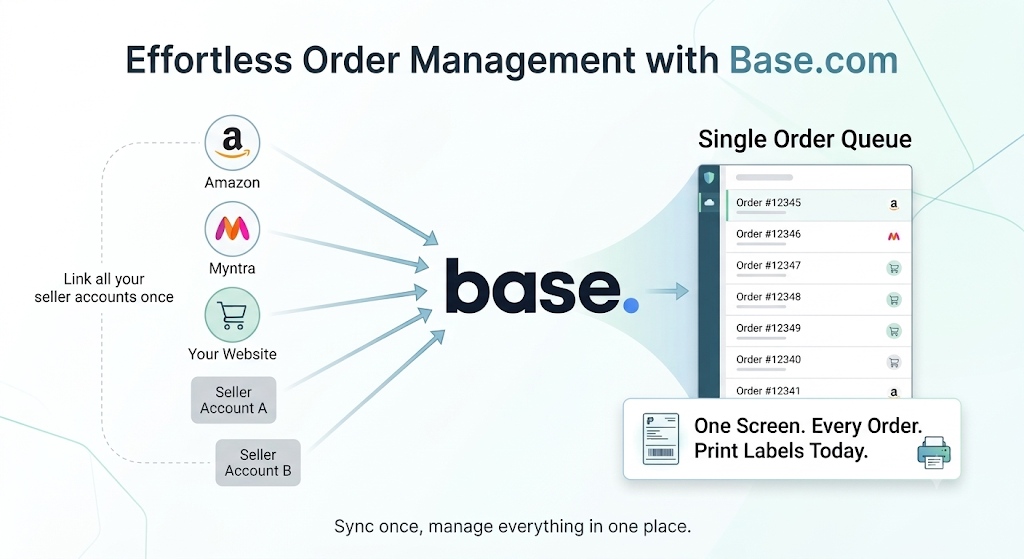
Link all your seller accounts to Base.com once. Orders from every account flow into a single queue, along with Amazon, Myntra, and your own website if you sell there.
Your team stops switching between Seller Hub and the Supplier Panel. One screen shows every order that needs a label today.
2. Sync Orders and Confirm Stock Automatically
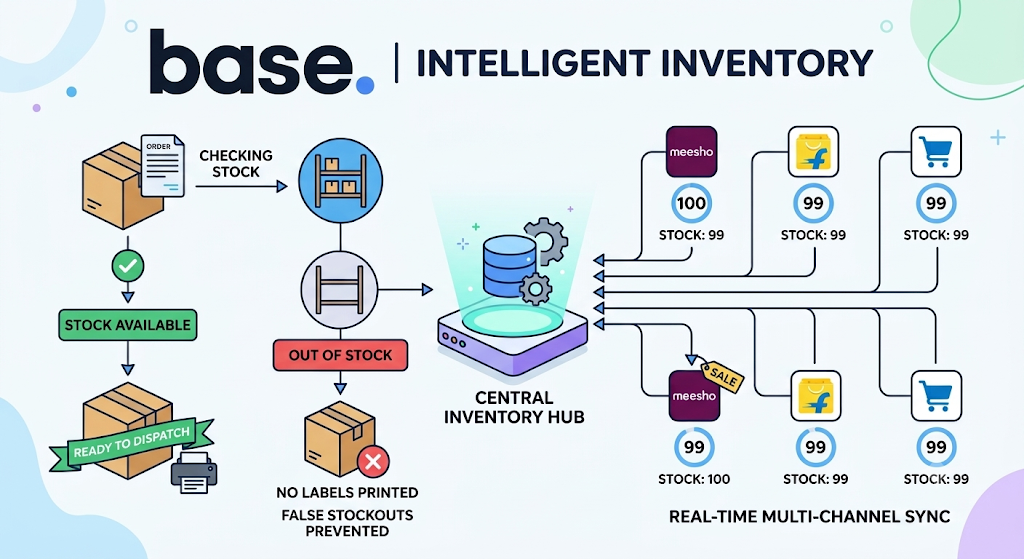
Base.com checks inventory as orders arrive. Orders with available stock are marked ready to dispatch automatically, so your team never prints a label for a product that is not on the shelf.
This also cuts false stockouts. Because stock updates centrally, a product sold on Meesho reduces the available count on Flipkart at the same time.
3. Segregate Orders by Courier, Payment Mode, and Weight
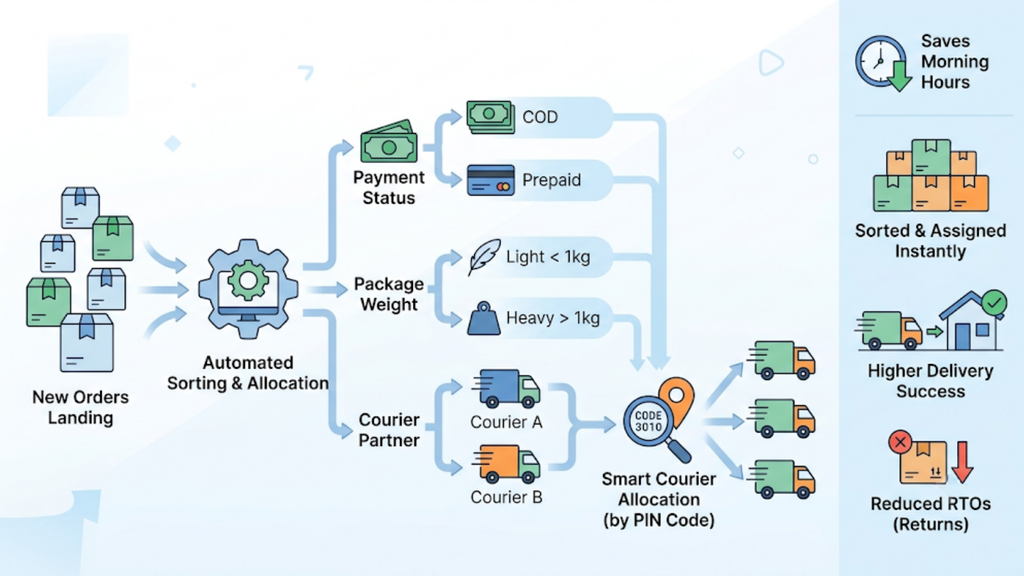
Base.com sorts incoming orders by COD or prepaid status, package weight, and courier partner the moment they land. Your team no longer spends the first hour of every morning sorting orders by hand.
Courier allocation can also follow the delivery PIN code. Each parcel goes to a partner that actually services that address, which lowers failed deliveries and RTOs.
4. Group Orders SKU-Wise Before Printing
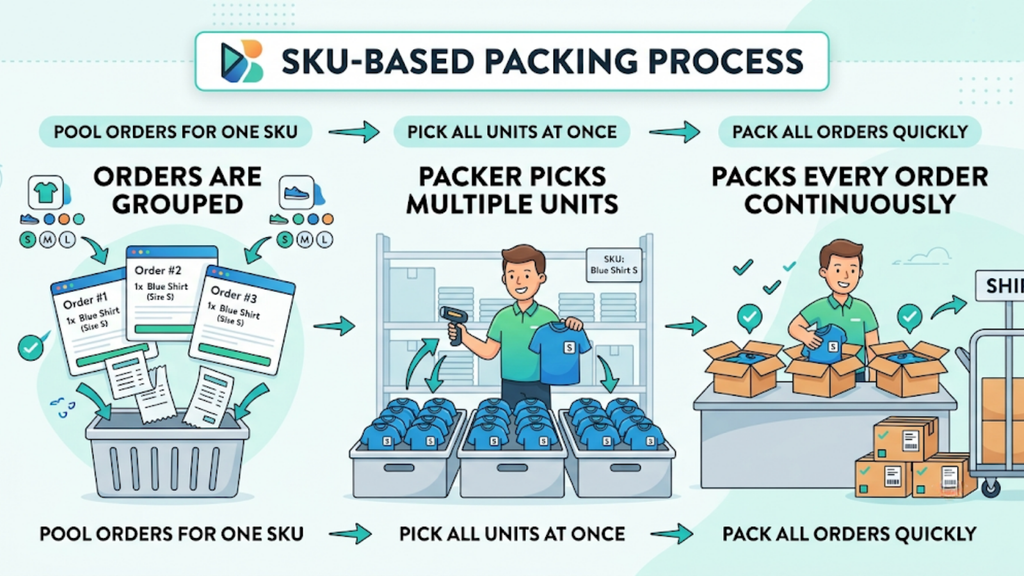
Base.com pulls all orders for one SKU together before moving to the next. Packers pick one product, pack every order for it, and move on.
This single change removes the manual separation of orders before packaging. For a catalog with sizes and colour variants, it also prevents mix-ups at dispatch.
5. Generate Labels and Invoices in One Click
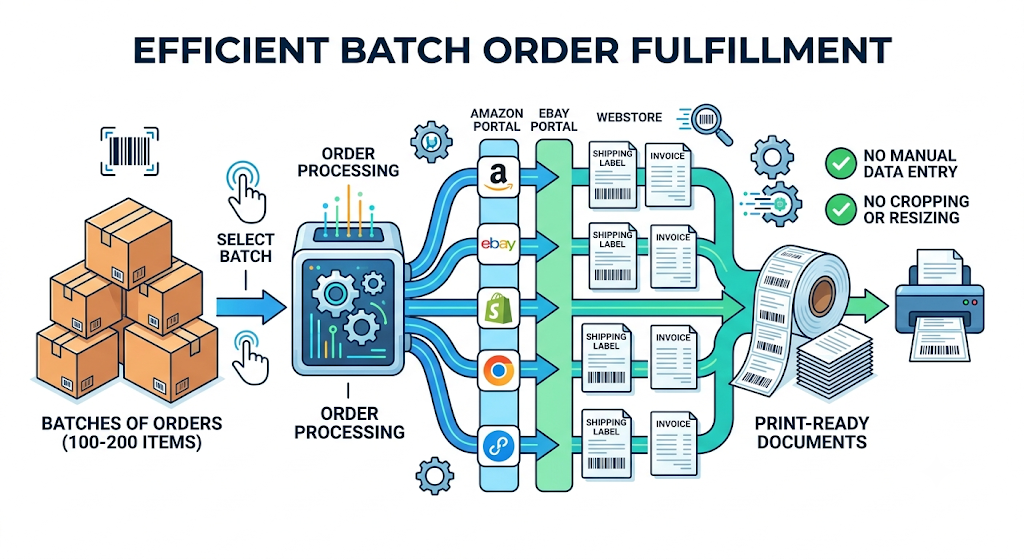
Select the batch and generate labels and invoices together across portals. Base.com processes orders in batches of 100 to 200 at a time.
Labels come out print-ready. There is no cropping, no resizing, and no manual entry of dimensions, buyer details, or tracking numbers.
6. Print on a 4×6 Thermal Printer
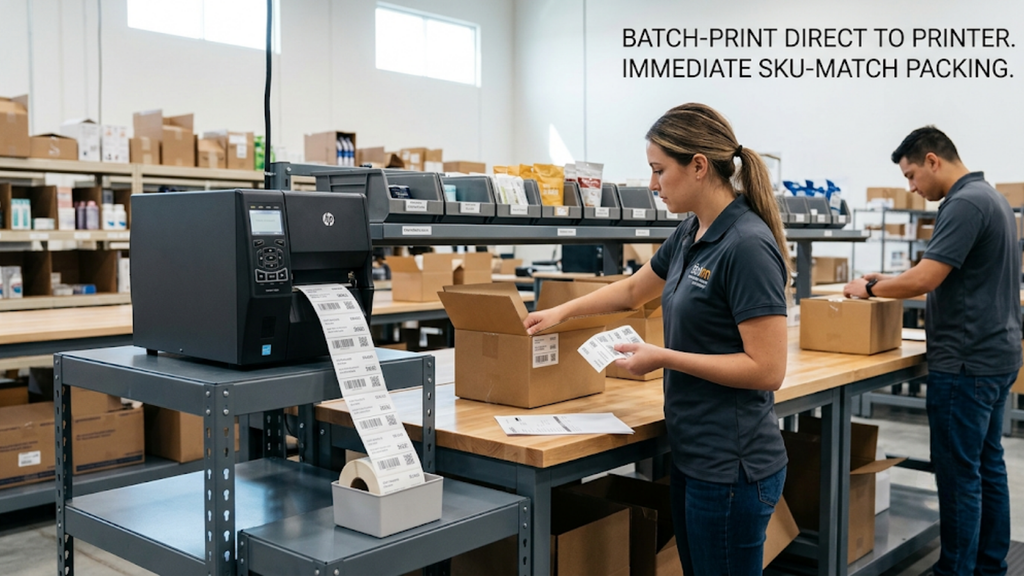
Send the batch straight to your thermal printer. Labels print SKU-wise, so each product is already separated and matched to its pick list.
Your packing team starts work the moment the first label comes out. Nobody waits for a sorted stack.
7. Scan, Pack, and Hand Over to the Courier
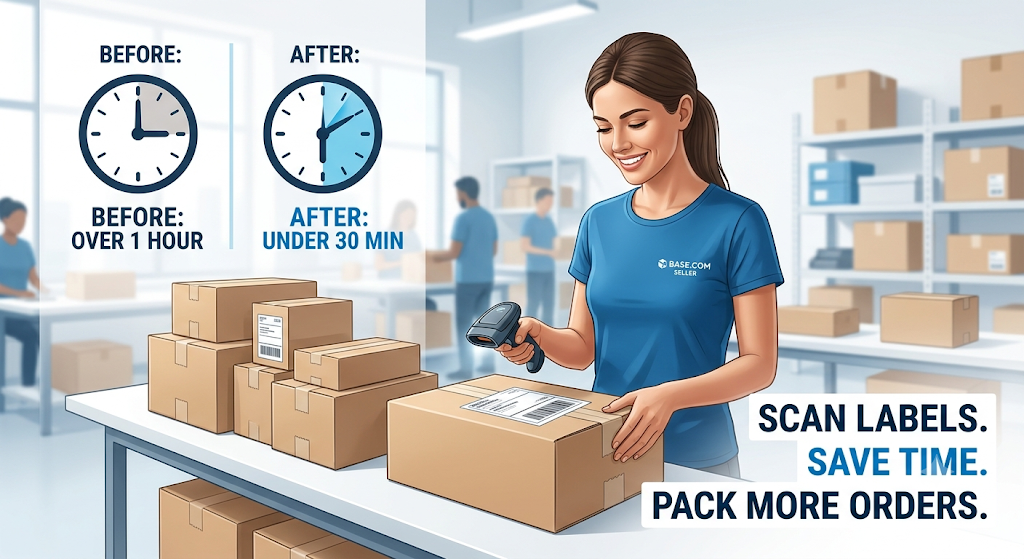
Scan each label at the packing station to match the parcel with its order. Once the batch is packed, generate the manifest and hand it to the courier within the pickup window.
Sellers on Base.com have cut label processing that took over an hour per batch to under 30 minutes. The time saved goes straight into packing more orders.
That is how to print Flipkart and Meesho labels in bulk without adding headcount. The same seven steps hold whether you ship 200 orders on a normal Tuesday or 2,000 during a sale.
How to Set Up Your Warehouse Printing Station
Software speeds up label generation, but your printing station decides whether that speed reaches the packing table. Any plan for how to print Flipkart and Meesho labels in bulk needs these six elements in place.
- Choose a 4×6 thermal printer. Courier barcodes scan reliably at 203 DPI, which most entry-level thermal printers support.
- Use direct thermal label rolls. Industry estimates put thermal labels near ₹0.45 each, against about ₹2.20 for laser printing on A4 sticker sheets.
- Print at 100% scale with zero margins. Scale-to-fit shrinks barcodes and causes scan failures at courier hubs.
- Keep a scanner at every packing table. Scanning each label before sealing the parcel catches mismatches inside your warehouse, not at the buyer’s door.
- Assign fixed bin locations to every SKU. Base.com maps products to bin codes such as H2-37, so pick lists tell staff exactly which shelf to walk to.
- Keep a backup printer ready for sale days. One jammed printer can hold up hundreds of orders during Big Billion Days or Meesho’s festive sales.
Which Batching Rules Save the Most Time in Bulk Printing?
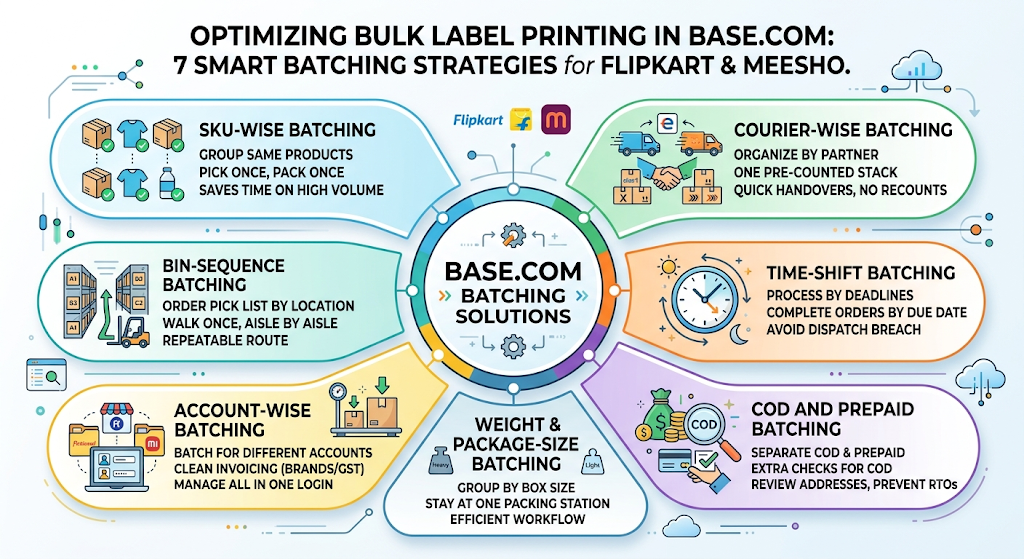
Batching decides how fast labels turn into packed parcels. Most guides on how to print Flipkart and Meesho labels in bulk skip it, yet it saves the most time once rules are set in Base.com.
1. SKU-Wise Batching
Group every order for the same SKU into one print run. Packers pick the product once and pack in a single sequence, which is the largest time saver for high-volume listings.
2. Courier-Wise Batching
Group labels by courier partner, such as Ekart, Delhivery, Xpressbees, or Valmo. Each pickup then gets one clean, pre-counted stack, and handovers take minutes instead of a recount.
3. Time-Shift Batching
Run batches against courier cut-off times rather than printing everything at once. Base.com’s time-shift order processing completes orders by their due date, so late-afternoon orders do not push morning dispatches into breach.
4. COD and Prepaid Batching
Separate COD orders from prepaid ones before printing. Your team can then apply extra checks to high-value COD orders, where a failed delivery costs the most.
COD parcels that come back as RTOs carry forward and reverse shipping costs with no revenue. Separating them at the label stage gives your team one clear point to review address quality before dispatch.
5. Weight and Package-Size Batching
Group orders that use the same carton size or weight band. Packers stay at one packaging station and avoid switching box sizes mid-batch.
For home, kitchen, and appliance sellers, weight-based batching also keeps heavy cartons with couriers that can service them, which reduces damage in transit.
6. Account-Wise Batching
Print separate batches for each seller account when your business splits brands or GST registrations. Invoices stay clean for accounting, while the orders still sit inside one Base.com login.
7. Bin-Sequence Batching
Order the pick list by bin location so staff walk the warehouse once, aisle by aisle. For catalogs running into thousands of SKUs, this turns picking from guesswork into a repeatable route.
How Base.com Handles Bulk Labels Beyond Printing
Knowing how to print Flipkart and Meesho labels in bulk solves one part of dispatch. Base.com connects that step to everything that happens before and after it.
- Multi-channel order management in one login: Flipkart, Meesho, Amazon, Myntra, Ajio, JioMart, and website orders run from a single dashboard.
- SKU-wise label generation: Labels print already separated by style or product, removing manual sorting and tearing.
- Bulk barcode printing: Product barcodes print in bulk for multiple SKUs at once, not one at a time.
- Real-time inventory sync: Stock updates across every listing, even when the same product appears on several marketplaces.
- Structured returns: RTOs and customer returns are scanned and restocked with custom statuses such as damaged, recoverable, or return to store.
- Reporting and analytics: Dispatch performance, product velocity, and sell-through sit in one view, not across nine seller panels.
- Payout visibility: Marketplace payouts across multiple seller accounts appear in one place.
- Hands-on onboarding: The Base.com team maps your warehouse layout, picking patterns, and SKU structure before setup, then trains your team until the workflow runs smoothly.
This matters because labels are only as accurate as the orders and stock behind them. When orders, inventory, and returns share one system, every printed label reflects what is actually on your shelf.
How to Prepare Bulk Label Printing for Sale Events
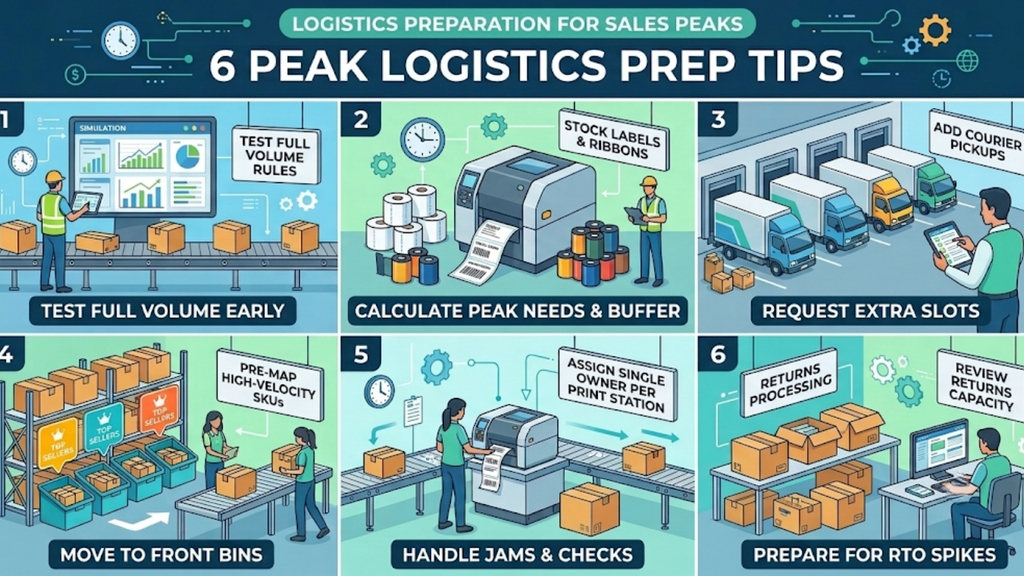
Sale events like Big Billion Days can multiply daily order volume several times over. The preparation below keeps label printing from becoming the first thing that breaks.
- Load-test your batching rules a week early. Run a full-day batch in Base.com at expected sale volume and check that courier-wise and SKU-wise groups still match your pickup schedule.
- Stock labels and ribbons for peak volume. Calculate label rolls against your highest expected daily order count, then add a buffer for reprints and damaged rolls.
- Add courier pickups in advance. Request extra pickup slots from each courier partner so time-shifted batches have a handover waiting for them.
- Pre-map high-velocity SKUs to front bins. Move your top sellers to bins nearest the packing stations, so SKU-wise batches pack faster.
- Assign a single owner per print station. One trained person per printer handles jams, reprints, and label checks, so packers keep packing.
- Review returns capacity. Sale spikes bring return spikes a week or two later, so set up return statuses in Base.com before the first RTO arrives.
Common Bulk Printing Mistakes and How to Fix Them

Even sellers who already know how to print Flipkart and Meesho labels in bulk lose time to a few repeat errors. Each one below has a direct fix.
- Printing before stock is confirmed: Labels get generated for items that are not on the shelf. Fix it by printing only orders that Base.com has marked ready to dispatch.
- Using scale-to-fit: Barcodes shrink and fail at courier scanners. Fix it by locking print settings at 100% scale and 4×6 size.
- Mixing A4 and thermal output: Printers jam or waste stock when formats change mid-run. Fix it by generating labels in a single 4×6 format from the start.
- Printing all accounts in one unsorted batch: Packers lose time separating labels by account and courier. Fix it by setting courier-wise and account-wise batching rules.
- Skipping the scan at packing: Wrong labels reach the wrong parcels. Fix it by making a label scan mandatory before sealing.
- Printing after the pickup cut-off: Parcels sit overnight and breach dispatch SLAs. Fix it by running time-shift batches ahead of each pickup.
How to Calculate the Time You Save With Bulk Printing
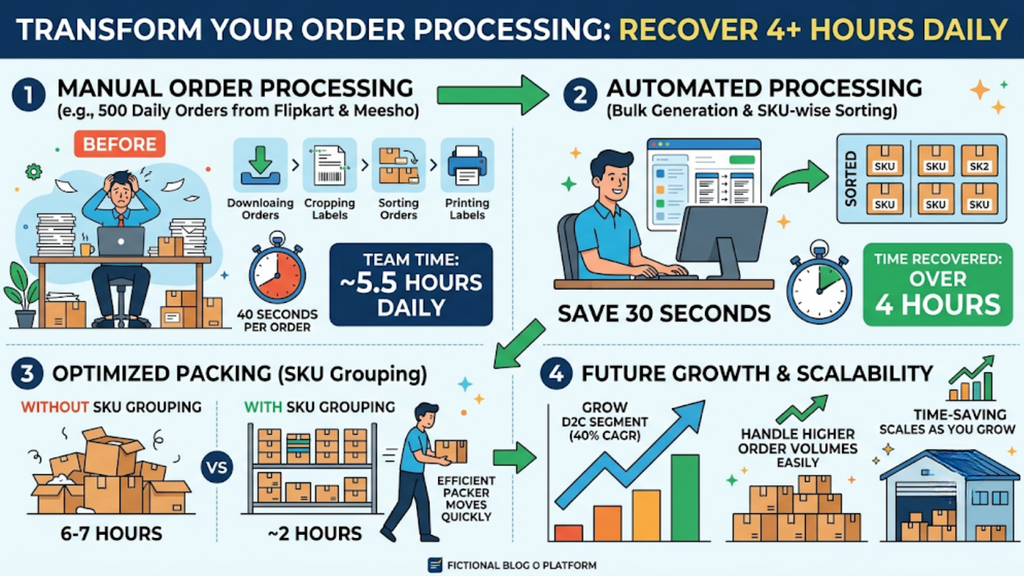
Label printing time is easy to underestimate because it hides inside other tasks. This calculation shows what learning how to print Flipkart and Meesho labels in bulk is worth to your warehouse every day.
- Count your daily orders. Take a seller shipping 500 Flipkart and Meesho orders a day.
- Time the manual steps per order. Downloading, cropping, sorting, and printing can add up to around 40 seconds per order, or about 5.5 hours of team time daily.
- Estimate the time removed. If bulk generation and SKU-wise sorting remove 30 of those 40 seconds, you recover over 4 hours every day.
- Add packing gains. Sellers using SKU-wise grouping on Base.com have brought packing that took 6-7 hours in peak weeks down to about 2 hours.
- Project it forward. With India’s D2C segment growing at around 40% CAGR, order volume keeps climbing, and so does the cost of every manual second.
Start Printing Flipkart and Meesho Labels in Bulk With Base.com
Understanding how to print Flipkart and Meesho labels in bulk is the first step. Building it into a connected workflow, from order sync to courier handover, is what keeps dispatch on time as your volume grows.
Base.com gives Indian sellers one login for every marketplace, print-ready SKU-wise labels, and batching rules that match how your warehouse actually runs. Book a demo with Base.com to see how to print Flipkart and Meesho labels in bulk in a live workflow, with your own Flipkart and Meesho orders moving from queue to courier in a single flow.
Frequently Asked Questions
How do I print Flipkart and Meesho labels in bulk without cropping PDFs?
Can I print labels from multiple Flipkart and Meesho accounts together?
What label size should I use for Flipkart and Meesho thermal printing?
Does bulk label printing reduce returns?
What is the difference between a label crop tool and an order management system?