

Pin-code-based courier allocation is a rule engine that reads each order’s delivery pin code. It then assigns the courier partner with the right serviceability, cost, and delivery record for that address. For Indian sellers shipping across 19,000+ pin codes, it replaces manual selection, lowers RTO, and speeds up dispatch without adding headcount.
India’s ecommerce market has reached $226 billion, and D2C is growing at a 40% CAGR. That growth does not arrive evenly. It comes from thousands of pin codes with very different delivery conditions, and each one needs the right courier.
This guide explains how to automatically assign a courier based on pin code, which rules Indian sellers should configure, and how Base.com runs the entire allocation inside one order management system.
What Is Pin-Code Based Courier Allocation?
Pin-code based courier allocation uses the six-digit PIN as the main input for choosing a courier. The system checks which partners service that PIN. It then applies your rules on payment mode, weight, order value, and past performance to select one.
India Post’s directory lists approximately 19,097 active PIN codes across 36 states and union territories. No single courier delivers to all of them at consistent quality. Courier selection is therefore a decision you make on every order, not once a quarter.
The PIN structure itself makes rule-building practical. The first digit identifies the postal region and the first two identify the postal circle. The third marks the sorting district, and the last three point to the delivery post office. As a result, you can write rules at region level, state level, or exact PIN level.
Sellers who learn how to automatically assign a courier based on PIN code stop treating shipping as a booking task. Instead, they treat it as a routing decision that directly shapes RTO, cost per delivered order, and marketplace account health.
Why Manual Courier Selection Fails Indian Sellers at Scale
Manual allocation holds up at 30 to 50 orders a day. Beyond that, the mix of pin codes, payment modes, and weight slabs overwhelms even an experienced operations team.
Most sellers researching how to automatically assign a courier based on pin code have already hit one or more of these six gaps.
1. Courier Coverage Drops Beyond Metros
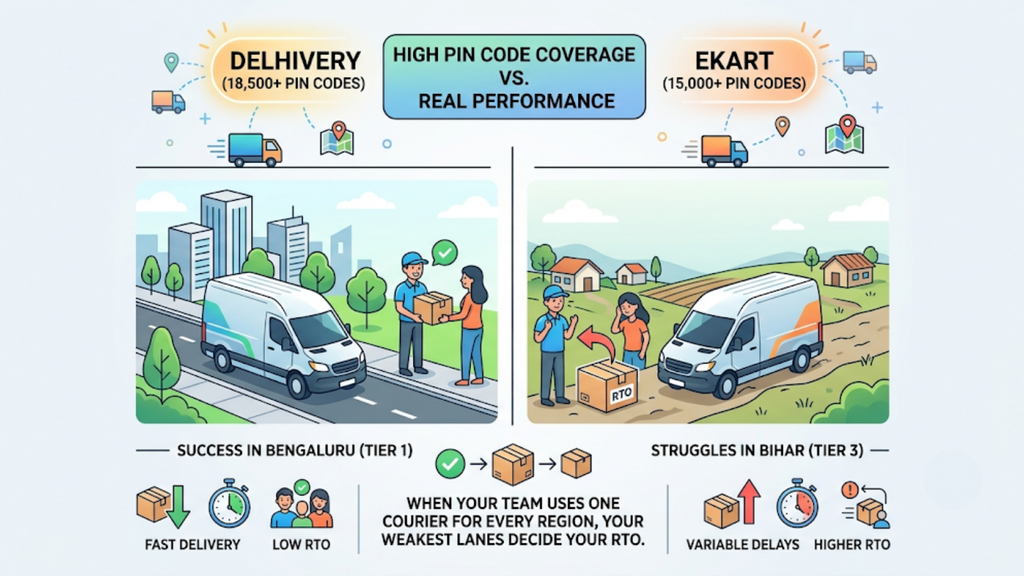
Coverage numbers look similar on paper. Delhivery services 18,500+ pin codes and Ekart covers 15,000+. Yet performance in a Tier 3 pin code in Bihar rarely matches performance in Bengaluru.
This matters because Tier 2 and Tier 3 cities now account for over 60% of new ecommerce orders. When your team uses one default courier for every region, your weakest lanes decide your RTO.
2. COD Orders Carry Higher Return Risk

COD returns in India run at 25-30%, well above prepaid. Across categories, the average D2C RTO sits at 18-25%.
A COD order handed to a courier with a weak record in that PIN code has a high chance of coming back. Consequently, COD needs its own allocation logic instead of sharing prepaid rules.
3. Every RTO Costs You Twice

Each failed delivery costs roughly ₹60-₹120 in return shipping, depending on weight and zone. On top of that, you lose forward freight, packaging, and the days your inventory spends in transit instead of on a shelf.
The second cost is the customer. A buyer whose parcel never arrived rarely orders again. Repeated failed deliveries also weaken your seller metrics on Amazon and Flipkart.
4. Weight Slabs Change the Cheapest Option
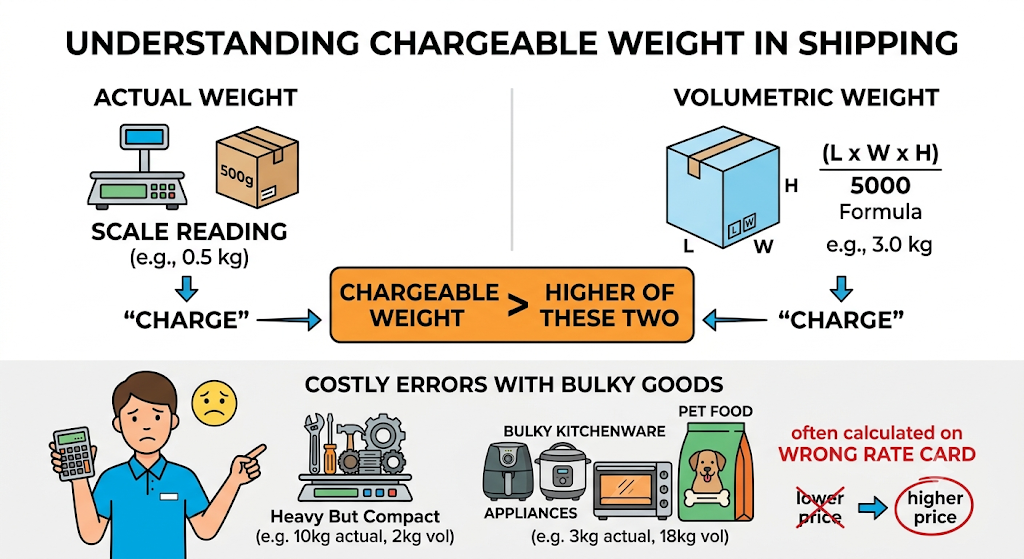
Couriers bill on chargeable weight, which is the higher of actual weight and volumetric weight. For surface shipments, volumetric weight is commonly calculated as length × width × height ÷ 5,000, in centimetres.
A courier that is cheapest at 500 grams can become expensive at 3 kilograms. Manual teams rarely recalculate this per order. As a result, bulky kitchenware, appliances, and pet food bags often ship on the wrong rate card.
5. Multiple Warehouses Multiply the Decisions

Shipping from both Delhi and Bengaluru doubles the number of origin-destination pairs. Each warehouse also has its own courier pickup schedules, contracts, and cut-off times.
Without automation, someone has to remember which courier works best from which warehouse to which region. That knowledge usually sits in one person’s head, not in a system.
6. Portal Switching Slows Every Dispatch

Manual allocation means logging into several courier panels, copying AWB numbers, and tracking NDRs separately. Every switch adds minutes per order and another chance for error.
Only about 28% of Indian D2C brands processing more than 500 orders a day run a proper multi-channel OMS. The rest still manage courier decisions through spreadsheets, partial integrations, or memory.
How to Automatically Assign Courier Based on PIN Code in 7 Steps
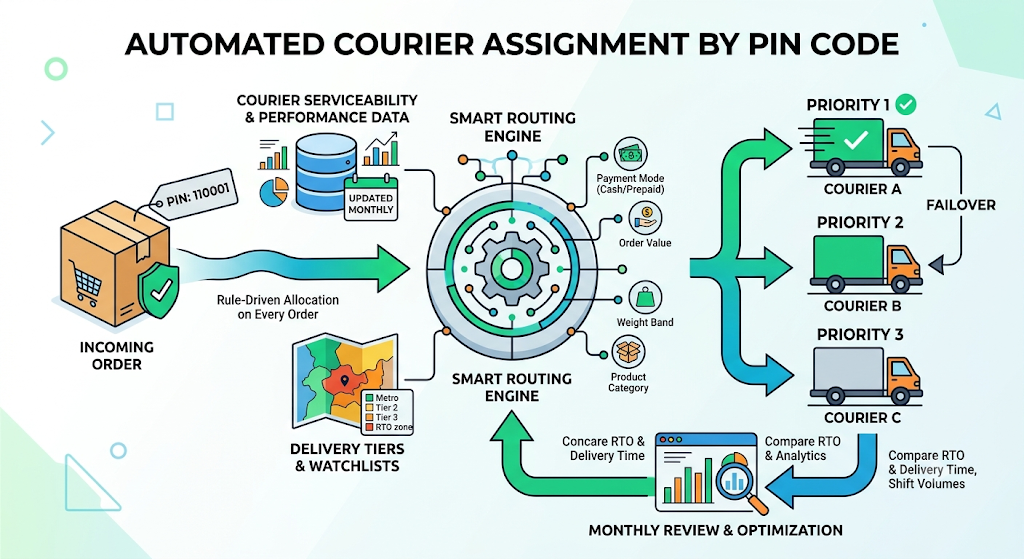
Automation works only when rules reflect real delivery data. These seven steps take you from manual booking to rule-driven allocation that runs on every order.
1. Map Serviceability for Every Courier Partner
Start by importing each courier’s serviceability list. Capture four flags per pin code: forward delivery, COD availability, reverse pickup, and pickup from your warehouse.
Refresh this data every month. Couriers add and drop pin codes regularly. Stale lists are a common reason automated rules send orders to couriers that cannot deliver them.
2. Segment Pin Codes into Delivery Tiers
Next, group pin codes into tiers: metro, Tier 2, Tier 3, and remote or North-East. Add a separate watchlist for pin codes with chronically high RTO.
India has over 8,200 cities and towns and roughly 6 lakh villages. Tiering turns that scale into a handful of segments your rules can act on.
3. Pull Courier Performance by Pin Code Cluster
Then collect at least 90 days of delivery data for each courier in each tier. Track delivery success rate, average turnaround time, and RTO percentage.
This data layer separates useful rules from guesswork. Brands with intelligent routing and active NDR management typically bring RTO down to 10-15%, compared with the 18-25% average.
4. Define Priority Couriers and Conditions
Now assign a primary, secondary, and tertiary courier for each tier. Layer conditions on top: payment mode, order value, weight band, and product category.
For example, one rule can send metro prepaid orders to an express partner. Another can route Tier 3 COD orders to the courier with the strongest last-mile record in that cluster.
5. Configure Automatic Failover
Rules break when a courier rejects a pickup or stops servicing a PIN code mid-month. Failover solves this by moving the order to the next courier in priority, with no one stepping in.
Set failover at the rule level, not globally. That way, a heavy parcel falls back to another courier that handles heavy parcels, not simply the next name on a list.
6. Link Allocation to Pick, Pack, and Labels
Allocation must happen before the label prints. Weight captured at the packing station should feed the pricing calculation, so the final courier choice reflects the actual parcel.
Once allocation and packing connect, labels generate in bulk and group by courier. Handovers to each pickup agent then become faster and cleaner.
7. Review Rules Every Month
Finally, compare RTO and delivery time for each rule, and shift volume away from couriers that slip. Leading Indian brands operate below 15% RTO on prepaid orders and 22% on COD.
Once your team knows how to automatically assign a courier based on PIN code, allocation stops being a daily firefight. It becomes a monthly review cycle driven by data.
Which Allocation Rules Should Indian Sellers Configure?
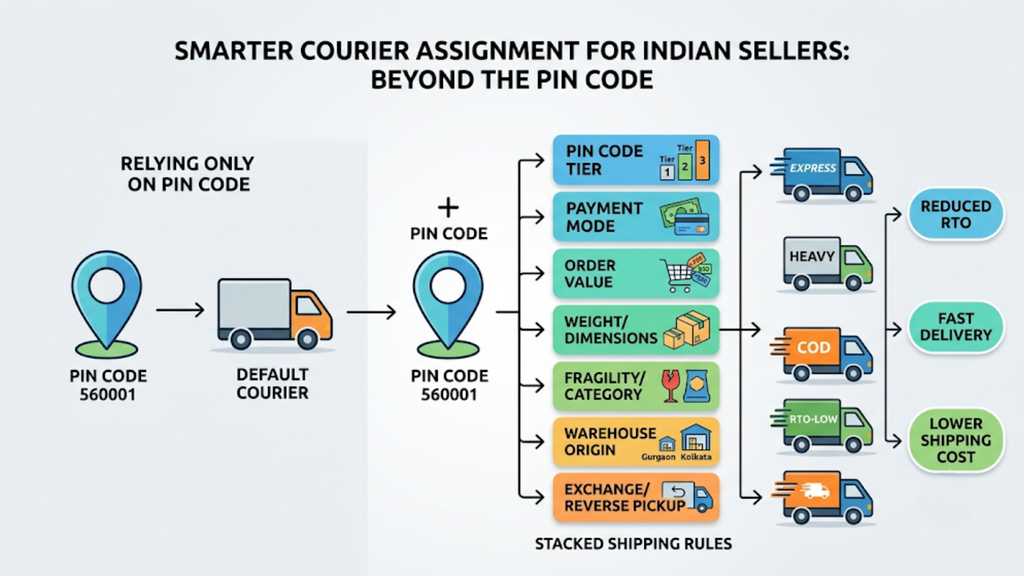
Rules decide outcomes. Indian sellers get stronger results by stacking several conditions on top of the pin code rather than relying on the pin code alone.
The seven rule types below cover most Indian ecommerce scenarios. Understanding how to automatically assign a courier based on pin code comes down to combining them in the right order.
1. Pin Code Tier Rules
Tier rules form the base layer. Assign couriers by metro, Tier 2, Tier 3, and remote clusters. Then override for specific pin codes where you have strong performance data.
2. Payment Mode Rules
Separate COD and prepaid logic. Route COD orders to couriers with proven delivery and cash collection in that tier. Restrict COD entirely in pin codes that repeatedly return parcels.
3. Order Value Rules
High-value orders justify premium couriers with lower RTO. Express networks such as Blue Dart report RTO rates of around 6-9%. Above a set threshold, such as ₹2,000, the higher freight cost pays for itself.
4. Weight and Dimension Rules
Create weight bands, for example, up to 500 grams, 500 grams to 2 kilograms, and above 2 kilograms. Assign each band to the courier with the right rate card and handling capability for that size.
5. Product Category and Fragility Rules
Glass skincare bottles, handcrafted decor, and small-part toys need careful handling. Route fragile categories to couriers with a better handling record in the destination area, even at a slightly higher rate.
6. Warehouse Origin Rules
Map couriers to each warehouse separately. A courier that performs well from a Gurgaon warehouse may have weak pickup reliability from a Kolkata one.
7. Exchange and Reverse Pickup Rules
Footwear and apparel sellers handle frequent size exchanges. Assign couriers with fast reverse pickup in the customer’s pin code, so exchange turnaround stays short, and the customer stays with you.
Manual vs Aggregator vs OMS-Native Allocation: How the Approaches Compare
Indian sellers typically use one of three approaches. Each has strengths, and the right choice depends on order volume, channel count, and warehouse complexity.
The table below compares them on the factors that matter most to operations teams.
| Factor | Base.com OMS-Native Allocation | Shipping Aggregator Rules | Manual Selection |
| Decision inputs | Pin code, payment mode, order value, weight, category, warehouse, stock location | Pin code, cost, speed, courier preference | Team judgment |
| Time per order | Instant, at order sync | Instant, once the order reaches the aggregator | 1-3 minutes |
| Failover | Automatic, rule-level P1 → P2 → P3 | Available on many platforms | Manual reassignment |
| Link to inventory and warehouse | Routes to the warehouse with stock, then the courier | Works on orders already assigned to a warehouse | None |
| Weight at packing | Captured at pick & pack and used for pricing | Based on declared weight | Entered manually |
| Multi-channel orders | Marketplace and website orders in one flow | Depends on integrations | Separate portals |
| NDR and COD reconciliation | One operations view | Consolidated across the aggregator’s couriers | Per courier portal |
| Scales with volume | Yes, rules apply uniformly | Yes, for shipping decisions | No |
Aggregators do their job well. They offer multi-courier access, rate comparison, and pin code serviceability in one place. The difference with OMS-native allocation is scope: the courier decision connects to inventory, warehouse routing, and packing, which is where many allocation errors begin.
That is why sellers asking how to automatically assign a courier based on pin code increasingly want the answer inside their order management system, not in a separate tool.
How Base.com Automates Pin-Code Based Courier Allocation
Base.com builds courier allocation into the same platform that runs your orders, inventory, and warehouse. Every order from Amazon, Flipkart, Myntra, Meesho, or your website passes through one rule engine before a label prints.
For sellers evaluating how to automatically assign a courier based on PIN code at scale, here is how Base.com handles each part of the workflow.
- No-code rule builder: Operations teams configure multi-condition rules by pin code tier, order value, payment mode, and category without writing code or raising a development ticket.
- Priority routing with automatic failover: Base.com selects the courier partner (P1, P2, P3) for each destination pin code and moves to the next courier automatically if the first cannot service the order.
- Weight-based pricing per package: The system calculates weight-based pricing for each parcel and can integrate with aggregators such as Shiprocket for weight-based pricing parameters.
- Warehouse-specific courier mapping: Each warehouse gets its own courier partners and rules, so pickup reliability and contracts match the origin location.
- Location-based order routing: Multi-warehouse sellers get orders routed first to the warehouse that holds stock, then to the courier that fits that warehouse-destination pair.
- Category-aware handling: Fragile, bulky, and high-value products follow their own rules, including routing breakable items to carriers with a better handling record in that area.
- Weight-wise pick & pack: Weight captured at packing feeds allocation, so appliance cartons and pet food bags ship on the correct rate card.
- COD eligibility controls: Pin code-level, order-value-level, and customer-history-level rules automatically decline or nudge risky COD orders before they ship.
- NDR and remittance in one view: Base.com pulls NDR status from every courier into one screen and consolidates COD remittance data into a single report.
Together, these capabilities keep allocation, packing, labelling, and reconciliation on one set of data. Your team works from one screen instead of four portals.
Base.com also supports custom add-ons when routing logic goes beyond standard rules. For instance, sellers can add warehouse-specific courier integrations or pin code routing with per-package pricing built around their own courier contracts.
How to Measure Whether Your Courier Allocation Is Working
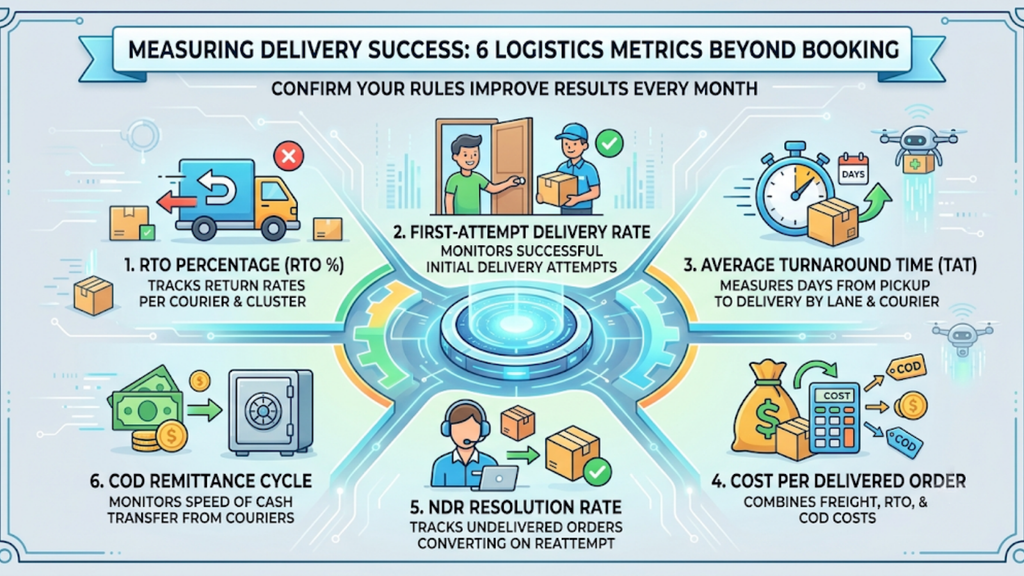
Automation is only as good as its results. Track these six metrics every month to confirm your rules improve delivery, not just booking speed.
- RTO percentage by courier and tier: Shows which courier underperforms in which cluster.
- First-attempt delivery rate: Shows whether the assigned courier reaches the customer the first time.
- Average turnaround time: Measures pickup-to-delivery days by lane and courier.
- Cost per delivered order: Combines forward freight, RTO cost, and COD charges into one true cost.
- NDR resolution rate: Tracks how many undelivered orders convert on reattempt.
- COD remittance cycle: Monitors how quickly each courier transfers collected cash.
The financial case is direct. A 5 percentage point reduction in RTO on 1,000 daily COD orders saves approximately ₹75,000-₹1,20,000 per month in reverse logistics alone. Brands that control RTO also outperform peers on contribution margin by roughly 8-15%.
Tracking these numbers shows your team how to automatically assign a courier based on PIN code more accurately each quarter, instead of setting rules once and leaving them untouched.
Common Mistakes Sellers Make With Pin-Code Allocation

Even automated systems produce poor results when the rules underneath are weak. Avoid these five mistakes during setup.
- Optimising for the cheapest courier only: A low rate means little if the parcel returns. Weigh cost against delivery success in each tier.
- Running on outdated serviceability data: Couriers change coverage often, so refresh serviceability lists monthly.
- Ignoring volumetric weight: Declared weight rarely matches billed weight for bulky items, which inflates freight and triggers disputes.
- Applying one rule set to every warehouse: Pickup performance differs by origin, so your rules should too.
- Skipping failover logic: Without failover, one courier outage stalls hundreds of orders at the dispatch desk.
Fixing these five issues is the fastest way to apply how to automatically assign a courier based on PIN code in a way that lowers RTO, rather than automating existing mistakes.
Start Automating Courier Allocation With Base.com
Pin-code-based courier allocation is now core infrastructure for Indian sellers shipping across marketplaces and tiers. The right rules reduce RTO, cut freight leakage, and free your team from manual booking.
Base.com gives you one platform to set those rules, route orders to the right warehouse, assign the right courier, and reconcile NDR and COD in one view. If your team is still working out how to automatically assign a courier based on PIN code, book a demo with Base.com and see the rule engine run on your own order data.